

Description
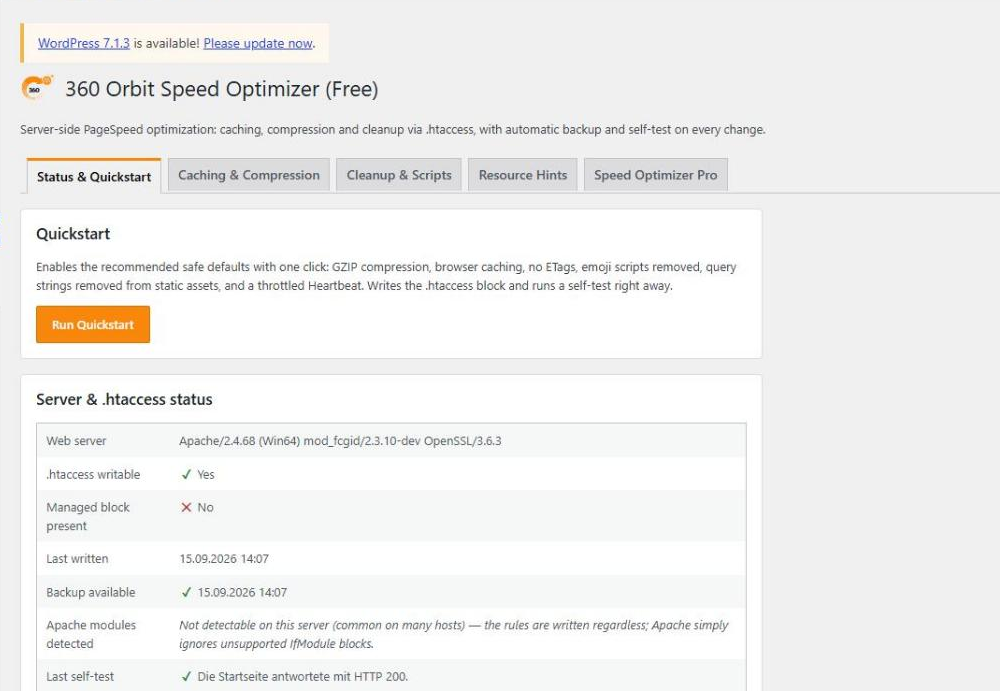
Speed Optimizer adjusts the server settings that Google PageSpeed/Lighthouse regularly flags:
- GZIP/Deflate compression
- Brotli compression (where the web server supports it)
- Browser caching (Expires + Cache-Control) per file type
- Removed ETags
- Removed emoji scripts and query strings on static files
- Throttled Heartbeat API
- Manually maintained preconnect/DNS prefetch hints
- “defer” attribute for scripts via a list of handles
Performance Doctor
The new Performance Doctor tab answers “why is my site slow?” without technical knowledge:
- One click measures a page of your own site: server time, time until the first byte, memory, database queries, the time each plugin, theme and WordPress itself needs, and calls to other servers.
- It explains what it found in plain words with the measured numbers, what you can do, how much effort it is and how risky.
- “The most important steps” on top, a traffic light for each area, and “Done” / “Later” for every recommendation.
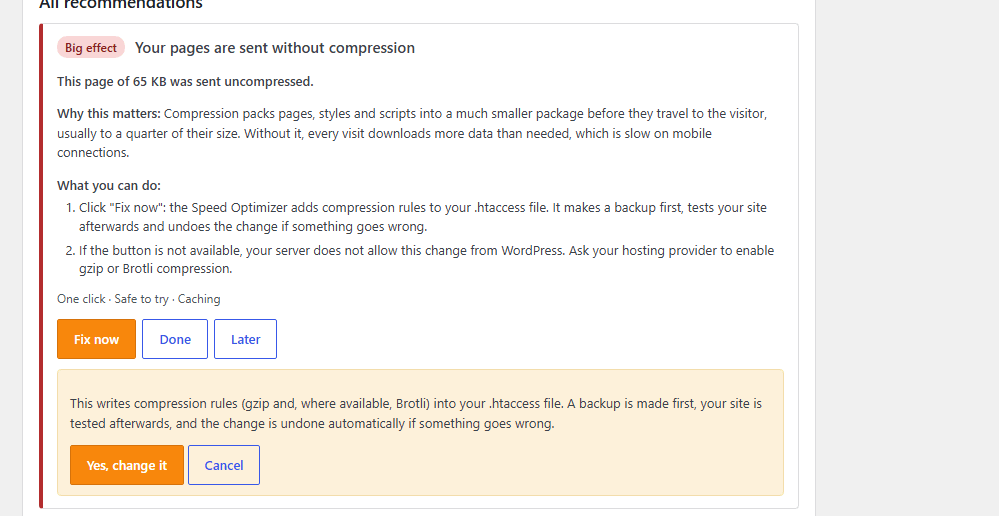
- For compression, browser caching, Heartbeat, emoji scripts and version numbers in file addresses, “Fix now” changes the matching setting through the safe .htaccess mode (backup, self-test, automatic rollback).
- Measure the admin area by hand: switch measuring on for your browser, click through the slow pages, then evaluate.
The Performance Doctor only measures when you ask it to and changes nothing by itself. Database queries are stored without their values.
Every change to .htaccess is backed up automatically beforehand and checked with a self-test afterwards. If the test fails, the plugin automatically rolls back to the last working state. The backup can also be restored manually at any time.
Free version vs. Pro
The free version fully covers compression, caching, the safe .htaccess mode, all cleanup features and the Performance Doctor with 15 recommendations.
Speed Optimizer Pro adds:
- Preload manager for critical resources (images, fonts).
- Automatic delivery of existing WebP/AVIF files to supporting browsers (no conversion; for that, see Media Cleaner Pro).
- Advanced cache rule editor for custom file patterns, e.g. long-term caching of hashed build assets.
- PageSpeed check right in the admin area via the Google PageSpeed Insights API, including a history of recent checks.
- Automatic update notifications right in the WordPress admin area.
- Performance Doctor Pro: all 24 recommendations, a series over several pages with the median, history with before/after comparison, scheduled checks with an e-mail report, reports as a file or printable page, and an optional loader that measures from the first plugin on.
Installation
- Upload the plugin ZIP under Plugins → Add New → Upload Plugin.
- Activate the plugin.
- In the Speed Optimizer menu, click “Run Quickstart” or configure the settings individually.
FAQ
Can a wrong setting take my website down?
That is exactly what the safe .htaccess mode protects against: before every change, the previous block is backed up automatically, and afterwards the homepage is requested once. If it responds with a server error, the change is rolled back automatically, without any action on your part.
How does the Performance Doctor measure my site?
It requests one page of your own website, like a visitor would, and measures that single request. The request carries a one-time key that is valid for five minutes. The result is saved by your server, not sent back in the answer. Nothing leaves your server.
Does the Performance Doctor run all the time? Can it slow my site down?
No. It only measures when you click “Start check” or switch on measuring for your browser (which ends by itself after 60 minutes). When it is not measuring, it does not hook into your pages and costs no database queries. While measuring, the request takes a little longer than normal, so the numbers are slightly above everyday operation. Visitors are never measured.
Does the Performance Doctor change anything on its own?
No. It only gives advice. A setting changes only when you click “Fix now” and confirm. Changes to .htaccess go through the safe mode: backup first, self-test afterwards, automatic rollback if your site stops answering.
What does the Performance Doctor not measure?
It measures the server side: how long your server needs to build a page. It does not measure what happens in the visitor’s browser (layout shifts, image sizes, rendering); for that, use a browser tool. Plugins that load before the Performance Doctor itself are not included in the measurement. Visitors on other devices, other pages and other times of day may see different numbers.
The check fails with a message. What now?
A password protection, a firewall, maintenance mode or a host that does not allow a site to call itself can stop the automatic check. The message says which one. You can then measure by hand: switch on “Measure this browser” in the Performance Doctor tab, click through the slow pages as an administrator and click “Evaluate”.
What happens when I deactivate the plugin?
The .htaccess block written by the plugin is removed automatically on deactivation, and the website then runs as it did before the installation.
Which languages is the admin area available in?
The admin area follows the language set in WordPress. Translations are provided through translate.wordpress.org and you are welcome to contribute one for your language.
Screenshots



Changelog
1.9.4
- New: a “Speed” box on the 360 WP Orbit overview, optionally also on the WordPress dashboard.
1.9.3
- Changed: the 360 WP Orbit overview shows the important boxes of the active plugins at the top, optionally also on the WordPress dashboard; all boxes and tables now use one width.
1.9.2
- Fixed: version 1.9.1 of the free plugin stopped with a fatal error as soon as it read its settings. Please update.
- The Pro version gains a setup assistant.
1.9.1
- Maintenance: code cleanup for the checks of the WordPress.org plugin directory. No change in behaviour.
1.9.0
- New: Files tab. Scans your pages and lists the scripts and stylesheets they load, with source and size; leave single files out of minifying or merging.
- Changed: the Caching and Frontend tabs are split into groups with a submenu; Save & apply always stores all groups.
- Changed: buttons, the License tab and Export/Import now look the same in all plugins of the suite (primary actions in the plugin colour, cards side by side).
1.8.0
- New: Backend tab. Hide widgets of the admin Dashboard one by one, so they are not loaded.
- New: HTTP detection (HTTP/1.1, HTTP/2, HTTP/3, CDN in front). Merging stylesheets is offered only where it helps (HTTP/1.1) and is blocked with a reason otherwise.
- New: merge stylesheets that follow each other into one smaller file, in the same order.
- New: the texts of the plugin appear in German by default, also on sites in another language; under 360 WP Orbit > Overview the language can be switched to the language of the website. The WordPress.org package follows the language of the website and now ships the German translation itself, so no language pack is needed.
1.7.0
- New (Pro): serve libraries from your own website. Stylesheets and scripts that your theme or plugins load from cdnjs, jsDelivr, unpkg, Google Hosted Libraries or code.jquery.com (for example jQuery, Bootstrap, Font Awesome) are copied to wp-content/uploads/wp360-so-ext/, together with the fonts and images in the stylesheet. Visitors then contact no other server for them. Only files with a fixed version are copied, never tracking or advertising scripts. A separate switch, off by default, with a list of the copied files (library, version, size, source) where each file can be switched on or off on its own, and a button to delete them.
1.6.0
- New: make stylesheets and scripts smaller (Frontend tab). Comments and unneeded spaces are removed from the files of your theme and plugins; the smaller copy is served from wp-content/cache/wp360-so-min/. Files are not merged, nothing is renamed or reordered, and a file that cannot be read safely keeps its original. Both switches are off by default, with a list of exceptions.
1.5.0
- New: new Frontend tab. Images and iframes load when they come into view (the first images are never delayed, a large first image is marked as important), missing width and height are filled in from your uploads, display=swap is added to Google Fonts. All switches are off until you turn them on.
- New (Pro): tracking and advertising scripts (Google Analytics and Tag Manager, Meta and TikTok pixels, Hotjar, Clarity, chat widgets) start only on the first scroll, click or key press. Consent tools, modules and data-no-delay are left alone.
- New (Pro): YouTube and Vimeo show a play button until clicked (nothing is requested before), embeds and inline background images load when they come into view.
- New (Pro): serve Google Fonts from your own website (copied to wp-content/uploads/wp360-so-fonts/), so visitors no longer contact Google.
- New: remove unneeded entries from the page header, load block styles only where used, do not load wp-embed, Dashicons and jQuery Migrate for visitors.
- Fixed: the page cache and object cache self-tests work behind a server cache; a leftover cache drop-in of a removed plugin no longer blocks activation.
1.4.0
- New (Pro): edge cache for a proxy or CDN in front of your site. Releases pages with Cache-Control s-maxage and stale-while-revalidate, only where the page cache would also store them, and withdraws the release when the finished response does not fit (cookie, other status, no-cache).
- New (Pro): clears the proxy on changes, even without the page cache: Varnish and other proxies via PURGE, Nginx with ngx_cache_purge, Cloudflare and Bunny CDN. A “Test now” button checks the release, the proxy and the credentials.
- New (Pro): object cache storage can be Redis, Memcached, SQLite or Files (PHP files that PHP reads from OPcache memory; works on every server) besides APCu. Storages that are not available on the server are disabled in the list.
- New (Pro): Redis can keep everything, including transients. WP-CLI and cron jobs use the same Redis, counters are atomic.
- New (Pro): wp 360-orbit-speed-optimizer flush-all clears the page cache, the proxy or CDN and the object cache, for example after a deployment; without WP-CLI use do_action( ‘wp360_so_flush_all’ ).
- New (Pro): separate page cache for mobile devices (detected like wp_is_mobile()), with its own rules, drop-in handling and preload.
- New (Pro): the page cache can keep its pages in Redis instead of files; advanced-cache.php delivers them before WordPress loads, also on servers without .htaccess. A Redis that is down never blocks the site.
- New: speculative loading. The browser loads the next page ahead while the visitor hovers over or taps a link (prefetch or prerender), with exclusions. Uses the WordPress 6.8 filters where available.
- Changed: the switches for GZIP, Brotli and browser caching are disabled when the server demonstrably lacks the Apache module.
- Fix (Pro): the object cache self-test failed in the mode “everything” with HTTP 403; clearing the object cache left the copies of the current request.
1.3.0
- New (Pro): object cache for options. Keeps the options of WordPress and your plugins in the shared APCu memory of the server between page views instead of reading them from the database on every request. Transients stay in the database, so WP-CLI and cron jobs see the same data as the website; a change made with WP-CLI reaches the website at once.
- New (Pro): switching it on sets up wp-content/object-cache.php and tests with several parallel requests that all PHP processes share the APCu memory; otherwise it is removed again. It never replaces another object cache, and switching it off, deactivating the plugin or a lapsed license removes it. “Clear object cache” on the Caching tab; wp cache flush works too.
- Changed (Pro): Performance Doctor counts this object cache as a persistent object cache.
1.2.1
- Fixed (Pro): a post, page or custom post type entry that was unpublished, trashed or given a new slug no longer stays in the page cache under its old address.
- Changed (Pro): a change to any content now also clears the archives of its terms including their parent terms, terms that were added or removed, the previous and next entry, parent pages and the date archives. Changed fields (e.g. ACF, prices) and WooCommerce stock clear the entry too.
- Changed (Pro): editing a term’s description or fields only clears that term, its parent terms, its entries and the archives instead of the whole cache; a new name, slug or parent still clears everything. Archives of custom post types are preloaded.
1.2.0
- New (Pro): page cache. Stores each finished page once and serves it to visitors who are not logged in, straight from .htaccess without PHP (with advanced-cache.php as fallback, e.g. for addresses with campaign parameters or on nginx). Logged-in users, carts, previews, searches and addresses with parameters always get a fresh page. Switching it on sets up advanced-cache.php, WP_CACHE in wp-config.php and the .htaccess rules, tests that a page really comes from the cache and undoes everything otherwise; switching it off or deactivating the plugin restores both files exactly.
- New (Pro): the page cache clears single pages, the homepage and archives when content changes and everything after theme, menu or plugin changes; pages expire after 10 hours (adjustable), and preloading rebuilds them in the background. “Clear page cache” in the admin bar and wp 360-orbit-speed-optimizer flush-cache.
- New (Pro): the page cache pauses while Maintenance Mode or Staging Guard lock visitors out, including the automatic lock during plugin updates.
- New (Pro): Performance Doctor offers “Fix now” for the missing page cache.
1.1.7
- Fixed: Performance Doctor no longer reports “Visitors download your files again on every visit” right after “Fix now”. With version strings removed, the plugin deliberately lets browsers check style sheets and scripts for changes (no-cache) instead of keeping them for a year; the check now accepts this.
- Changed: content boxes are 960 px wide as in the other 360 Orbit plugins and the License tab.
- Fixed (Pro): on phones the Performance Doctor tables scroll sideways inside themselves.
1.1.6
- Changed: the settings tabs Caching, Cleanup and Hints use the same layout as the WordPress settings pages: one row per setting with a short label, the explanation below and the heartbeat interval in its own row.
- Changed: shorter tab names, so all tabs fit in one row.
- Changed: the License tab uses the same layout; disconnecting has its own danger zone.
1.1.5
- Changed: the 360 WP Orbit overview now picks up new suite plugins automatically, as every plugin registers itself. No more list to keep in sync.
1.1.4
- Fixed: the German translation now also covers the plugin name, description and the remaining texts that were still shown in English. No functional changes.
1.1.3
- New: the plugin list now shows a “Settings” link for this plugin, as it already does for the other plugins of the suite.
1.1.2
- The brand name “360 WP Orbit” is no longer offered for translation, as it is the same in every language.
1.1.1
- Changed: the Performance Doctor no longer raises the PHP time limit.