
Description
A copy of a live website contains real customers, real orders and real service credentials. One cron run can send reminder emails to customers, renew subscriptions or call a payment service, silently and without warning. Staging Guard stops that on the copy.
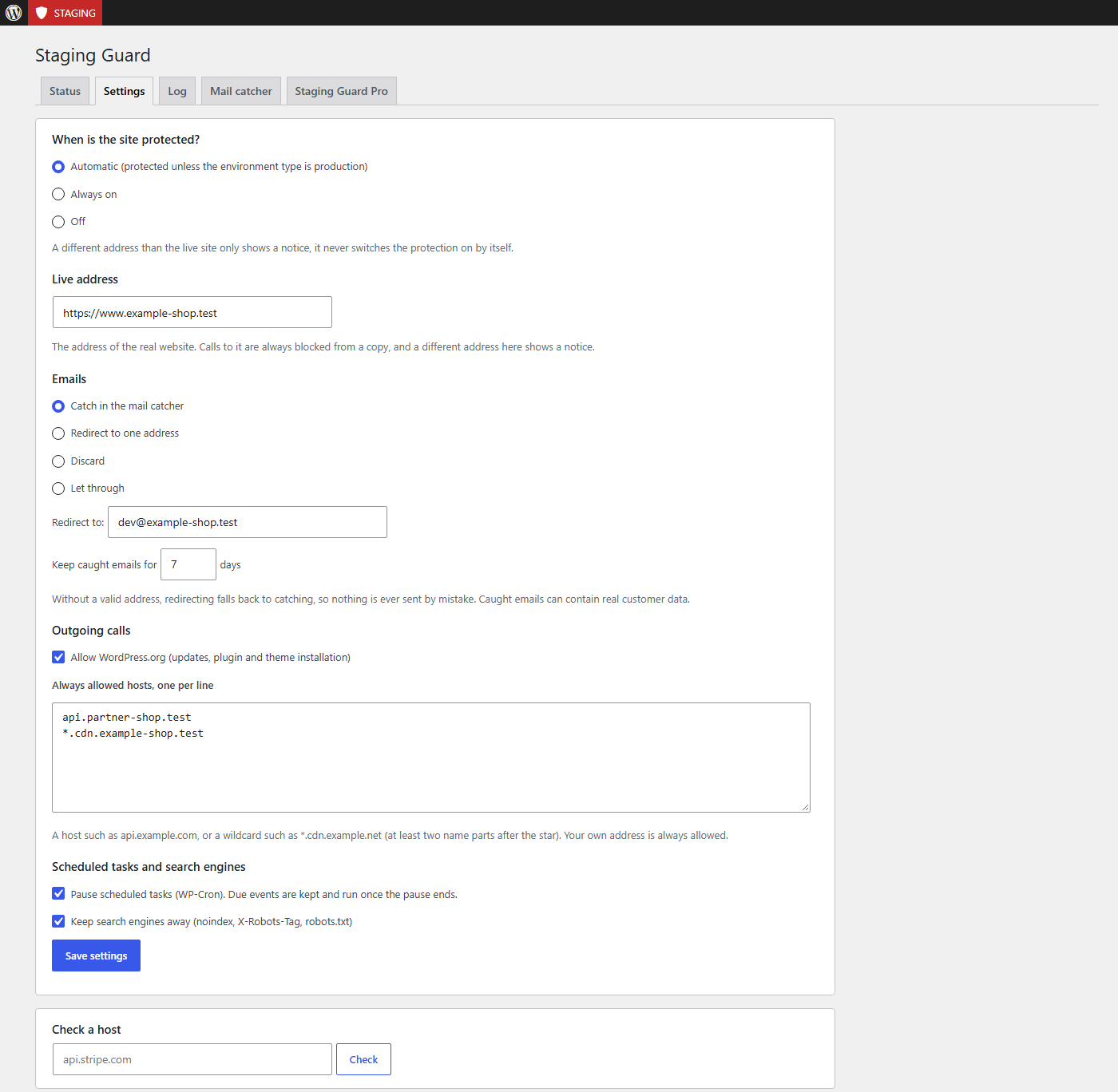
- Outgoing calls are blocked. Every call that goes through the WordPress HTTP API is refused immediately, except your own address, hosts on your allow list and, by default, WordPress.org (so updates and plugin installation keep working). The log shows which hosts were called and lets you allow one with a click.
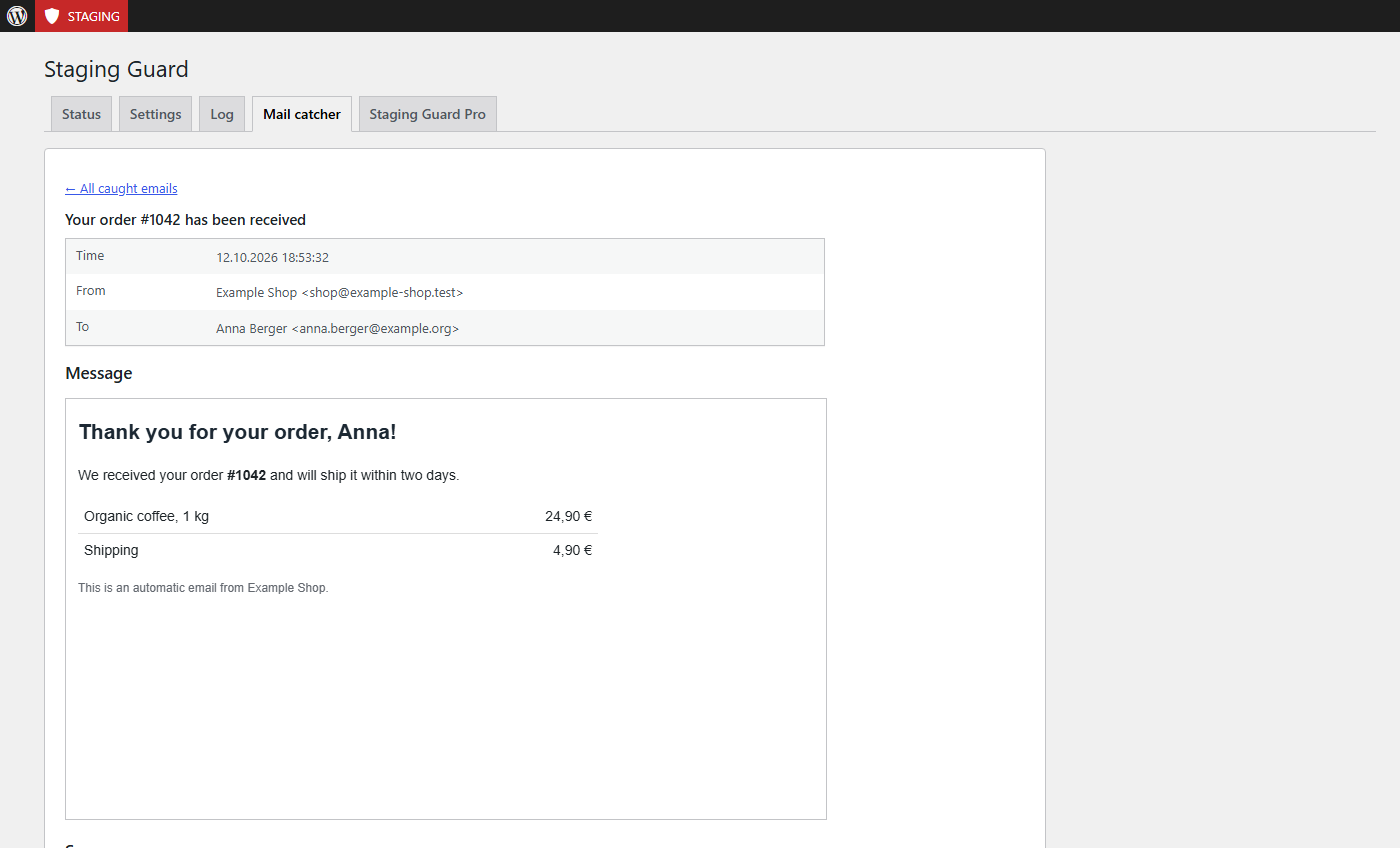
- Emails are caught, not sent. By default nothing leaves the site: each email lands in the Mail catcher tab with its recipients, headers and a safe preview. Alternatively redirect everything to one address, discard it, or let it through.
- Scheduled tasks are paused. Due WP-Cron events are kept and run once you switch the protection off.
- Search engines stay away.
noindex, anX-Robots-Tagheader and arobots.txtthat disallows everything. Your Discourage search engines setting is never changed. - Visitors can be locked out (optional). Switch it on and everybody except administrators sees a short notice (HTTP 403, noindex) instead of the copy. Let in single IP addresses or ranges (IPv4 and IPv6), or share a secret access link that sets a 7-day cookie, for example for a client who reviews the copy. The page cache is kept out, REST requests and feeds are locked as well. It is off by default.
- You always know where you are. A red marker in the admin bar shows on every page that the protection is on, and the Status tab says why.
- A different address only shows a notice. If a copy still has the live settings but runs under another address, the plugin tells you and offers to switch the protection on. It never switches it on by itself, so a domain move of your live site can never silently block its emails.
- Emergency switch.
define( 'WP360_SG_DISABLE', true );inwp-config.phpswitches everything off at once. - WP-CLI:
wp 360-staging status|on|off|auto|hosts|allow <host>|mails.
What this protects, and what it does not
Staging Guard is a safeguard against accidents, not an isolation.
- It stops what goes through the WordPress HTTP API and
wp_mail(). Code that calls curl,file_get_contents()or its own library directly (many payment and cloud SDKs) is not caught. - Plugins that talk to a mail service or SMTP directly, or replace
wp_mail(), bypass the email protection. - The visitor lock covers pages, feeds, sitemaps and the REST API. The login page, the dashboard, scheduled tasks and AJAX requests stay reachable, so nobody gets locked out. Behind a proxy or CDN the IP list sees the proxy, use the access link there.
- For real isolation, block outgoing traffic in the firewall or remove the service credentials from the copy.
Privacy
Caught emails can contain real customer data. They are stored in your database only, are visible only to administrators (on a multisite network only to super admins), are limited in number and age (50 emails, 7 days by default), never include attachments (only their names) and are removed when you delete the plugin. The log stores host names and counters only, never paths, parameters or content. The plugin itself makes no requests to other servers.
Free vs. Pro
The free version covers everything above.
Staging Guard Pro adds:
- Service presets for common payment, newsletter, CRM, shipping, backup and AI services, each set to allow or block.
- Single scheduled tasks can keep running while the rest stays paused.
- Rules per path and method for allowed hosts (for example only
GETon/v1/read). - Longer log and mail catcher (up to 500 entries), search, CSV export of the log,
.emlexport of an email and send as a test to one address. - Export and import of the settings for agencies that set up several websites the same way.
- Automatic update notifications directly in the WordPress admin area.
Installation
- Install the plugin under Plugins → Add New (search for “360 Orbit Staging Guard”), or upload the ZIP under Plugins → Add New → Upload Plugin.
- Activate the plugin on the staging or development copy. The live address is remembered when you activate it.
- Open Staging Guard in the 360 WP Orbit menu and check the status.
- Tip: set
WP_ENVIRONMENT_TYPEtostagingin thewp-config.phpof the copy (define( 'WP_ENVIRONMENT_TYPE', 'staging' );). WordPress assumesproductionwhen nothing is set.
FAQ
When is the protection on?
In Automatic mode (the default) the protection is on as long as the environment type is not production. You can also set it to Always on or Off. If the environment type says production but the address differs from the live address, a notice offers to switch the protection on.
The notice says “This site runs under a different address”. What now?
Either click Switch protection on now if this is a copy, or This is the live site if the live site moved to a new address. The second remembers the new address as the live address.
I switched the protection on by mistake on my live site.
Click This is the live site on the Status tab, set the mode to Off, or add define( 'WP360_SG_DISABLE', true ); to wp-config.php.
Where do I see the emails that were caught?
On the Mail catcher tab of the Staging Guard page. HTML emails are shown in a sandboxed preview that loads nothing from the internet and runs no scripts.
Why is WordPress.org allowed?
So that updates and installing plugins keep working on the copy. Blocked calls to WordPress.org also cause warnings when WP_DEBUG is on. You can switch it off in the settings.
An outgoing call still gets through.
Only calls that use the WordPress HTTP API are caught, and redirects are checked as well. Libraries that open connections themselves are not caught. Block them in the firewall, or remove the credentials of that service from the copy.
Does it work on multisite?
The plugin works per site. Activate it on each site where you want to use it. Caught emails can contain password reset links, so on a multisite network only super admins can see them.
What happens when I deactivate or delete the plugin?
Deactivating switches everything off and keeps your settings and caught emails until you delete them on the Mail catcher tab. Deleting the plugin removes its settings, its log and all caught emails.
Liability?
This plugin is provided without any warranty (“as is”). The developer assumes no liability for damage or loss arising from its use. It reduces the risk of accidents on a copy, it does not isolate it.
Screenshots

Changelog
1.2.13
- New: a “Staging protection” box on the 360 WP Orbit overview, optionally also on the WordPress dashboard.
1.2.12
- Changed: the 360 WP Orbit overview shows the important boxes of the active plugins at the top, optionally also on the WordPress dashboard; all boxes and tables now use one width.
1.2.11
- Changed: calls to api.pwnedpasswords.com are always allowed, so the leaked password check of 360 Orbit Login Guard also works on a protected copy. Only the first five characters of a password hash are sent.
- Pro: service presets for large plugins (WPML, WooCommerce.com, Yoast SEO, Rank Math, Elementor, WP Rocket, Gravity Forms, ACF PRO, Jetpack, Complianz, WPForms, UpdraftPlus); the “Plugin license servers” preset now contains the real WP Rocket license host.
1.2.10
- Maintenance release for the free version; the Pro version gains a setup assistant.
1.2.9
- Changed: calls to download.db-ip.com and www.spamhaus.org are always allowed, so the country and block-list data of 360 Orbit Security Digest can also be loaded on a protected copy. The calls only download public data.
1.2.8
- Changed: calls to www.wpvulnerability.net are always allowed, so the vulnerability check of 360 Orbit Security Digest also works on a protected copy. The call only reads public data.
1.2.7
- Fixed: on narrow screens the service templates are stacked instead of squeezed into a four-column table.
1.2.6
- Changed: the settings are split into groups with a submenu; saving always stores all groups.
- Changed: buttons, the License tab and Export/Import now look the same in all plugins of the suite (primary actions in the plugin colour, cards side by side).
1.2.5
- New: the texts of the plugin appear in German by default, also on sites in another language; under 360 WP Orbit > Overview the language can be switched to the language of the website. The WordPress.org package follows the language of the website and now ships the German translation itself, so no language pack is needed.
1.2.4
- Changed: tab order as in the other 360 Orbit plugins: Settings, then Export/Import (was “Import / Export”), then License (or the Pro tab) at the end.
- Fixed: on phones the tables scroll sideways inside themselves instead of widening the whole page.
1.2.3
- Changed: the settings page uses the layout of the WordPress settings screens: one row per setting with its title on the left, the redirect address and the days to keep caught emails in their own rows, and the help text below each field.
- Changed: “Check a host” is its own section with a labelled field.
- Changed: without a license, the Scheduled tasks and Import / Export tabs show a lock and the Pro notice box. The License tab uses the same layout; disconnecting has its own danger zone.
1.2.2
- Changed: the 360 WP Orbit overview now picks up new suite plugins automatically, as every plugin registers itself. No more list to keep in sync.
1.2.1
- Fixed: the German translation now also covers the plugin name, description and the remaining texts that were still shown in English. No functional changes.
1.2.0
- New (Pro): service preset for plugin license servers, so license checks of other plugins can be allowed on a copy with one click.
1.1.2
- Fix: the visitor lock no longer blocks /wp-admin and /login on sites where WordPress lives in a subfolder (for example Bedrock), so the redirect to the login works again.
1.1.1
- Admin bar colors are now added through the WordPress style API.