


Description
Recover lost sales with WooCommerce abandoned cart emails — no subscription, no external service.
Most shoppers who add a product to their cart never finish checkout. Abandoned Cart Recovery Suite for WooCommerce captures those carts the moment a shopper enters an email address, then follows up automatically with a timed sequence of cart recovery emails. Each email contains a one-click link that restores the shopper’s exact cart, so coming back and paying takes seconds. When the order is placed, the remaining reminders are cancelled and the recovered revenue appears on your dashboard.
WooCommerce does not recover abandoned carts on its own. This plugin fills that gap with cart tracking, automated email follow-up, restore links, optional single-use discount coupons and recovery analytics — all running on your own WordPress site, with no API key and no monthly fee.
How It Works
- A shopper adds products to their cart and starts checkout.
- The plugin saves the cart as soon as an email address is entered at checkout (guests) or automatically (logged-in customers).
- If no order is placed within your inactivity threshold (default: 15 minutes), the cart is marked as abandoned.
- Up to three recovery emails are sent at the delays you choose. The defaults are 1 hour, 24 hours and 72 hours after abandonment.
- Each email includes a secure one-click link that rebuilds the cart, including products, variations, quantities and the coupon (if one was issued).
- When the order is completed, the cart is marked as recovered, pending reminders for it are cancelled, and the revenue is added to your recovery statistics.
Key Features
- Automatic abandoned cart capture for guest and logged-in shoppers
- Works with both the classic WooCommerce checkout and the Checkout Block
- Three-step abandoned cart email sequence with your own delay and subject line for each step
- One-click cart restore links (products, variations and quantities)
- Optional auto-generated discount coupon: percentage or fixed cart amount, single-use, restricted to the recipient’s email, with a configurable expiry
- Email open and link click tracking
- Unsubscribe link in every recovery email
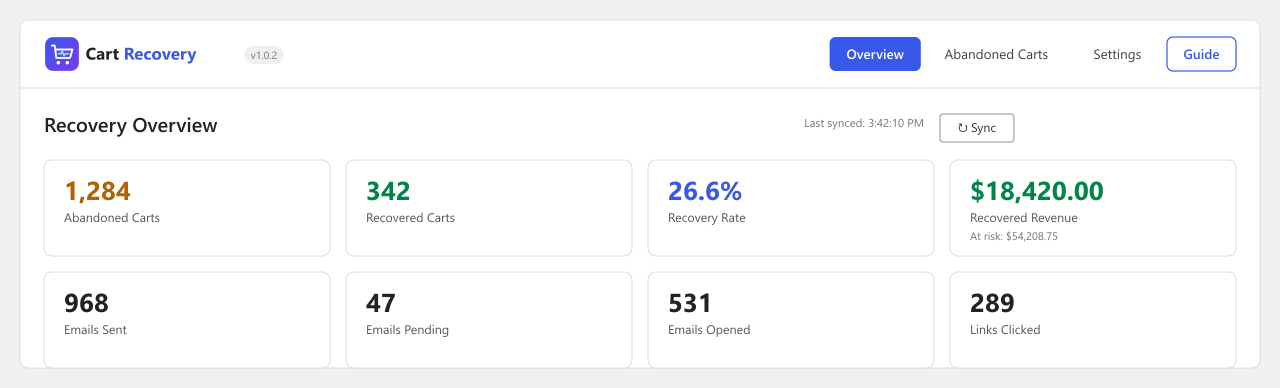
- Recovery dashboard: abandoned and recovered carts, recovery rate, recovered revenue, revenue at risk, and emails sent, pending, opened and clicked
- Tracked carts list with status filter, search by email or name, and delete
- Send-yourself test email to preview the recovery email
- Built-in setup guide with a checklist based on your current settings
- Optional consent checkbox before tracking guests (classic checkout)
- Automatic cleanup of old cart records after a retention period you choose
- Customizable email template, overridable from your theme
- Compatible with WooCommerce High-Performance Order Storage (HPOS)
- Translation-ready, with a .pot file included
Why Choose This Abandoned Cart Plugin?
- No subscription or per-email fees. Emails go out through your own WooCommerce mailer.
- Your data stays with you. Cart and email records are stored in your own WordPress database, and the plugin does not send customer data to any third-party service.
- Built for WooCommerce. It hooks into the cart and checkout process in the background and does not alter your theme or checkout design.
- Lightweight. The small tracking script loads only on cart and checkout pages, and email sending runs in scheduled background tasks.
- Everything described here is included for free — the full email sequence, coupons and the analytics dashboard.
Who Is It For?
Any WooCommerce store that wants to reduce cart abandonment and win back hesitant shoppers without adding a paid third-party service. Typical use cases:
- Small stores that want a simple, set-and-forget cart abandonment email workflow
- Stores selling physical products, digital downloads or services through WooCommerce checkout
- Merchants who want to test a small discount coupon as an incentive to complete checkout
- Store owners who want recovery results (recovered carts and revenue) visible inside wp-admin
Privacy & Data
For each tracked cart, the plugin stores the shopper’s email address, first name (when provided), cart contents and cart total in your own WordPress database. Nothing is sent to a third-party service by the plugin.
- Optional consent checkbox before tracking guest shoppers (shown on the classic checkout)
- Unsubscribe link in every email, stopping future reminders for that address
- Configurable data retention with automatic daily cleanup of old cart records
- You can delete individual cart records from the Tracked Carts screen
You remain responsible for your store’s privacy policy and for obtaining any consent required in your jurisdiction.
Template Customization
The recovery email template can be overridden from your theme. Copy templates/emails/recovery-email.php to yourtheme/woocommerce/emails/recovery-email.php and customize it.
Source Code
Installation
Automatic installation
- Go to Plugins → Add New in your WordPress dashboard.
- Search for Abandoned Cart Recovery Suite for WooCommerce.
- Click Install Now, then Activate. WooCommerce must be installed and active.
- Open the Cart Recovery menu and go to Settings to configure your email sequence.
Manual installation
- Upload the
abandoned-cart-recovery-suite-for-woocommercefolder to the/wp-content/plugins/directory. - Activate the plugin through the Plugins screen.
- Open Cart Recovery → Settings and review the tracking threshold, reminder emails and coupon options.
- Use Send Test Email to preview a recovery email, then check the Guide tab for a setup checklist.
Requirements
- WordPress 6.2 or later
- WooCommerce 7.0 or later
- PHP 7.4 or later
FAQ
How do I recover abandoned carts in WooCommerce?
WooCommerce does not do this out of the box. Install this plugin, activate it, and open Cart Recovery → Settings. Choose how long a cart must be inactive before it counts as abandoned, enable up to three reminder emails with your own delays and subject lines, and optionally attach a discount coupon. From then on the plugin captures carts, sends the emails, and marks carts as recovered when the order is placed.
Does WooCommerce have built-in abandoned cart recovery?
No. WooCommerce does not track or recover abandoned carts by default. This plugin adds cart tracking, automated recovery emails, one-click restore links and analytics to your existing store.
Does it work with guest checkout?
Yes. For guests, the cart is saved as soon as they type an email address into the checkout form (or leave the email field). If they leave without buying, the recovery sequence starts. A guest who never enters an email address cannot be contacted, so that cart cannot be recovered by email.
Are logged-in customers tracked too?
Yes. Their email address is already known, so their cart is tracked automatically whenever it changes.
Does it work with the WooCommerce Checkout Block?
Yes. Emails are captured from both the classic checkout form and the block-based checkout, and recovered orders are detected from either. The optional guest consent checkbox is currently shown on the classic checkout only.
Do I need an external email service or API key?
No. Emails are sent through the WooCommerce mailer using your site’s email configuration. For better deliverability we recommend an SMTP plugin, but it is not required.
Is the plugin GDPR compliant?
The plugin includes tools that help you operate compliantly: an optional consent checkbox before guest tracking, an unsubscribe link in every email, configurable data retention with automatic cleanup, and storage of all data on your own server. Compliance also depends on your store’s privacy policy and local requirements, so please review your own obligations.
How many recovery emails can I send, and when?
Up to three per abandoned cart. Each has its own on/off switch, delay (in minutes after the cart was abandoned) and subject line. The defaults are 60 minutes, 1,440 minutes (24 hours) and 4,320 minutes (72 hours).
Can I offer a discount coupon in the recovery emails?
Yes. Enable the coupon option and choose which email includes it, whether it is a percentage or fixed cart discount, the amount, and how many days it stays valid. Each coupon is single-use and restricted to the recipient’s email address, so a forwarded link cannot be used by someone else.
Can I customize the recovery emails?
You can edit each email’s subject line and delay in the settings, and fully customize the HTML template by overriding recovery-email.php in your theme (see the Template Customization section).
What happens when a customer completes their order?
The cart is marked as recovered, all remaining reminder emails for that cart are cancelled, and the order value is added to your recovered revenue statistics.
Will this slow down my store?
It is designed not to. The tracking script is about 1 KB and loads only on cart and checkout pages, and emails are sent by scheduled background tasks.
Do scheduled emails depend on WP-Cron?
Yes. The plugin uses WP-Cron to flag abandoned carts and send the scheduled emails. On very low-traffic sites, WP-Cron only runs when the site is visited, so you may prefer to trigger it with a real server cron job.
How is this different from paid cart recovery services?
Many cart recovery tools are hosted services with a monthly fee that process your customer data on their servers. This plugin runs on your own WordPress site using WP-Cron and your own mailer, so there is no subscription and no external account.
Will it work with my theme or page builder?
The plugin does not modify your theme or checkout design. It hooks into WooCommerce’s cart and checkout process, so it should work with any properly coded WooCommerce theme or page builder.
Does it work with WooCommerce High-Performance Order Storage (HPOS)?
Yes. The plugin declares compatibility with High-Performance Order Storage (custom order tables).
Is the plugin translation-ready?
Yes. All strings use the plugin text domain and a .pot file is included in the /languages folder.
What customer data is stored?
An email address is required to send a recovery email. The plugin also stores the cart contents, cart total, currency and (if available) the shopper’s first name, so the email can be personalized and the cart restored.
Screenshots


Changelog
1.0.5
- Improvement: Redesigned admin dashboard with one consistent design system across Overview, Abandoned Carts, Settings and Guide.
- Improvement: Settings are grouped into sections, reminder emails are shown as step cards with on/off switches, and a save bar warns about unsaved changes.
1.0.4
- Minor improvements and bug fixes.
1.0.3
- Performance Improved.
1.0.2
- Changed plugin slug to abandoned-cart-recovery-suite-for-woocommerce per WordPress.org directory requirement.
1.0.1
- Fixed plugin name issue.
- Added source code link
1.0.0
- Initial release.
- Automatic cart capture for guests and logged-in customers.
- Support for classic checkout and WooCommerce Checkout Block.
- Three-step configurable recovery email sequence.
- Secure one-click cart restore links.
- Auto-generated single-use, email-restricted discount coupons.
- Email open and click tracking.
- Unsubscribe handling.
- Recovery analytics dashboard.
- Consent mode, data retention cleanup, and clean uninstall.