


Description
Turn every visitor who wants something from you into a lead you own.
A free PDF, a price list, a webinar seat or a discovery call: people take it and leave, and you never learn who they were. AcquisitionSuite is a free lead generation plugin for WordPress that asks for a name and email first, saves each person as a lead in your own dashboard, and sends them on to your email service. You can set it up in minutes, you don’t need to write any code, and there is no site limit and no license key.
There are three ways to capture a lead:
- Gated downloads: offer a PDF, ebook, checklist, template, video or ZIP in exchange for a name and email address.
- Custom forms: build contact, enquiry, booking, registration and waitlist forms with conditional logic. No file needed.
- Lead Funnels: pick a template, answer a few questions, and get a ready-made form, delivery email and shortcode.
Every submission becomes a lead you can search, filter and export, and syncs to Mailchimp, Brevo or MailWizz so you can follow up.
Watch the walkthrough
See how to set up and use a funnel with AcquisitionSuite, step by step:
Why site owners choose AcquisitionSuite
- Free, with no limits on leads, forms or sites. No license key, no activation, no trial.
- You own your leads. They are stored in your own WordPress database and files stay on your own server. Nothing is sent anywhere unless you connect an email service.
- Quick to set up. Start a Lead Funnel from a template and have a working form, delivery email and shortcode in a few minutes.
- Files that can’t be shared around. Files sit in a protected folder, and every download link is single-use and expires.
- Works with the tools you already use. Place a form with a shortcode or the Gutenberg block, in Elementor, Divi, Beaver Builder or any theme, as an embedded form or a popup.
- Built with privacy in mind. It works with the WordPress personal data export and erase tools, adds suggested text to your privacy policy, and lets you set how long to keep data.
Start capturing leads in 5 minutes
- Choose what to offer. Upload a file, paste a link to one (Google Drive, Dropbox, a hosted video course), or skip the file and use a form on its own for enquiries, bookings and registrations.
- Set up the form. Start from a Lead Funnel template, or build your own with the drag-and-drop form builder.
- Place it on your site. Add it to any post or page with a shortcode or the Gutenberg block, as an embedded form or a popup.
- Capture and follow up. Each submission is saved as a lead and synced to Mailchimp, Brevo or MailWizz. For gated files, the visitor also gets a single-use download link that expires.
Use AcquisitionSuite as your
- Lead magnet plugin: turn a PDF, ebook, checklist or video course into a gated offer that captures an email address first.
- Form builder: create multi-field contact, enquiry, registration and appointment forms with 12 field types and conditional logic.
- Content upgrade plugin: gate bonus content inside blog posts to grow your email list.
- Lead funnel builder: start from a template (free resource, email list, waitlist, webinar, call booking, service enquiries) and get a ready-made form, email and shortcode.
- Download manager with email capture: track every download, submission and lead in one place.
- Email list building tool: every lead syncs to your email service on submission.
Who it’s for
- Coaches and consultants who want enquiries, discovery calls and bookings to arrive as organised leads
- Marketing agencies and freelancers who add lead capture to client sites without writing code
- Course creators, bloggers and publishers who grow an email list with lead magnets and content upgrades
- SaaS and B2B marketers who offer guides, reports and webinars in exchange for contact details
- Small businesses that want to know who is asking for their price lists, brochures and quotes
What you get with Lite (free)
Capture leads
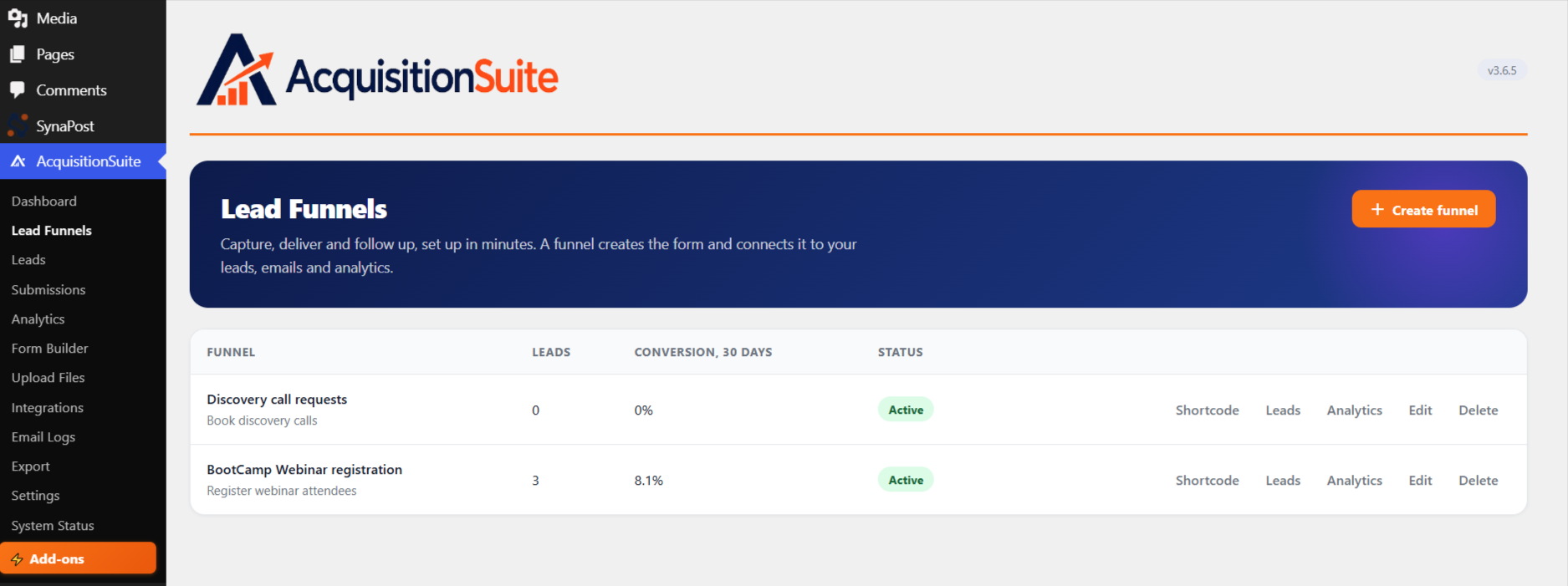
- Lead Funnels: pick a template (free resource, email list, waitlist, webinar registration, call booking, service enquiries), answer a few questions, and get a ready-made form, delivery email and notification, plus a shortcode to place it. Each funnel has its own leads and analytics view. Start one from the Lead Funnels page or from the bar on the dashboard (which you can dismiss). Nothing on your pages is changed.
- Custom Form Builder: build multi-field lead capture forms with conditional logic, drag-and-drop reordering, and 12 field types (text, email, phone, link, number, textarea, dropdown, radio, checkbox, date, country, hidden).
- Standalone forms: use any form on its own, with no file attached, for appointments, registrations, or any other lead capture. Choose an Embedded or Popup Modal display style.
- Lead capture modal: a polished, fully responsive popup form collects visitor details before granting access. Header colour, accent colour, title and subtitle are all configurable.
- Multiple ways to place a form: inline shortcode or a native Gutenberg block.
Deliver files securely
- Secure file upload: files are stored in a protected directory. Direct URL access is blocked.
- URL-gated files: gate an external link (Google Drive, Dropbox, etc.) instead of uploading. Great for large files like video courses.
- Signed, time-limited download links: every download token is single-use and expires after a window you choose.
- Email delivery: choose instant download, email-only delivery, or both. Branded HTML email templates, fully editable from Settings.
Follow up
- Email service integrations: subscribe leads to Mailchimp, Brevo (Sendinblue) or MailWizz on form submission, with double opt-in support.
Understand and manage your leads
- Leads management: a full lead list with search, filter and delete.
- Submissions log: every form submission recorded with its full field values.
- Analytics: download counts, lead source breakdowns and conversion rate.
- CSV and XLSX export: export all leads and submissions whenever you like.
- Email logs: see every email sent or failed.
- Settings: configure email, branding, delivery, file types and data retention.
- Add-ons page: see the separate add-ons that come with AcquisitionSuite Pro (WooCommerce, Easy Digital Downloads, form plugins and more) and which of them match plugins already on your site. Lite only lists them, from a list built into the plugin; installing and using add-ons needs Pro.
Lite and Pro
Lite is the complete lead capture system, and it is free for good. When you are ready to follow leads up and sell, AcquisitionSuite Pro is a separate plugin that works with Lite and adds:
- Marketing automation with a trigger, conditions and actions engine
- Email sequences (drip campaigns with configurable delays)
- Lead scoring with configurable rules and tier labels
- Lead intelligence (geo, device, browser, ISP detection)
- Sales pipeline kanban board
- Tags and audience segments
- Paid downloads with Stripe, Paystack and Flutterwave, including paid URL-gated files
- Paid standalone forms: charge for an appointment or registration using the same checkout flow as paid downloads
- Floating Button and Slide-in Panel display styles for standalone forms and funnels
- Elementor widget and Bricks element for placing standalone forms
- Orders and transaction management
- Email open and click tracking
- Webhooks to external tools
- WhatsApp notifications via Meta Cloud API or Twilio
- Add-ons for WooCommerce, Easy Digital Downloads and popular form plugins
- Priority support
See what Pro adds at acquisitionsuite.ufirstdev.com
Shortcode Usage
Display a gated download:
[acquis_download id="123"]
Customize the button label:
[acquis_download id="123" label="Download the Guide"]
Use a specific form:
[acquis_download id="123" form="3"]
Display a standalone form (appointment, registration, or any lead capture not gating a file):
[acquis_form id="3"]
Override its display style:
[acquis_form id="3" display="embedded"]

display accepts `embedded` or `popup` in Lite (Pro adds `floating`). Leave it out to use whatever is configured on the form itself.<h3>Support</h3>
Questions or ideas? Ask in the support forum, or visit acquisitionsuite.ufirstdev.com.
Third-Party Libraries
This plugin bundles the following third-party libraries:
Chart.js
- Version: 4.5.1
- License: MIT License
- Copyright: (c) 2014-2024 Chart.js Contributors
- Source: https://www.chartjs.org
- License text: https://github.com/chartjs/Chart.js/blob/master/LICENSE.md
- Used for: rendering lead and download analytics charts on the Analytics page.
AcquisitionSuite Custom Drag-and-Drop
- Version: 1.0.0
- License: MIT License
- Copyright: (c) 2024 Fortunatus | UfirstDEV Technologies
- This is original code written for the AcquisitionSuite Form Builder.
It is NOT the SortableJS library. It provides a lightweight drag handle
compatible with the SortableJS API surface (handle, ghostClass, onEnd). - Used for: drag-to-reorder form fields in the Form Builder.
External Services
This plugin connects to the following external services:
Mailchimp
- URL: https://api.mailchimp.com
- When: On lead form submission, only when Mailchimp integration is enabled and configured
- Data sent: Lead name and email address
- Privacy policy: https://mailchimp.com/legal/privacy/
Brevo (Sendinblue)
- URL: https://api.brevo.com
- When: On lead form submission, only when Brevo integration is enabled and configured
- Data sent: Lead name and email address
- Privacy policy: https://www.brevo.com/en/legal/privacypolicy/
MailWizz
- URL: Your self-hosted MailWizz API URL (configured by you in Settings)
- When: On lead form submission, only when MailWizz integration is enabled and configured
- Data sent: Lead name and email address
Installation
- Upload the
acquisitionsuitefolder to/wp-content/plugins/, or search for “AcquisitionSuite” under Plugins > Add New - Activate the plugin through Plugins > Installed Plugins
- Go to AcquisitionSuite > Lead Funnels to start from a template, or AcquisitionSuite > Upload Files to gate your first file
- Copy the shortcode and paste it into any post or page
- Configure branding and email settings under AcquisitionSuite > Settings
FAQ
Is AcquisitionSuite really free?
Yes. The Lite version on WordPress.org is permanently free, with no trial, no activation, no license key and no limit on leads, forms or sites. AcquisitionSuite Pro is an optional paid plugin that adds automation, email sequences and paid downloads.
How do I get my first lead as quickly as possible?
Go to AcquisitionSuite > Lead Funnels, pick a template (free resource, email list, waitlist, webinar registration, call booking or service enquiries) and answer a few questions. You get a ready-made form, a delivery email and a shortcode to paste into any page.
Is there a video that shows how to use it?
Yes. Watch the walkthrough on YouTube: https://www.youtube.com/watch?v=vxmg2DwhHDo
What is the difference between Lite and Pro?
Lite is the complete lead capture system: gated downloads, the form builder, Lead Funnels, email delivery, Mailchimp, Brevo and MailWizz sync, analytics and export. Pro is a separate plugin that works on top of Lite and adds marketing automation, email sequences, lead scoring, a sales pipeline, paid downloads and forms, and add-ons for WooCommerce and other plugins. See acquisitionsuite.ufirstdev.com/pricing/ for details.
How do I send leads to Mailchimp, Brevo or MailWizz?
Connect your account under AcquisitionSuite > Integrations. After that, every person who submits one of your forms is added to your list automatically, with double opt-in if you want it.
Can I use it as a lead magnet plugin to grow my email list?
Yes. Upload a PDF, ebook, checklist or any other lead magnet and gate it behind the lead capture form. Every visitor who wants the file must submit their name and email first, and the lead can sync to Mailchimp, Brevo or MailWizz.
What file types can I gate, and how big can they be?
Out of the box: PDF, ZIP, DOCX, XLSX, PPTX, MP4, MP3, JPG, JPEG and PNG. You can change the allowed types under Settings. The size limit is your host’s PHP upload limit, which the System Status page shows. For larger files, such as video courses, gate an external link (Google Drive, Dropbox or your own hosting) instead.
Can I gate a file that’s hosted elsewhere, like Google Drive or Dropbox?
Yes. When adding a file, choose “External URL” instead of “Upload File” and paste the link. The same lead-capture gate, signed tokens and expiry apply exactly as they do for uploaded files.
Can visitors bypass the gate and download directly?
No. Files are stored in a protected directory that denies all direct URL access. Downloads are only served through temporary signed tokens created after the form is submitted.
How long do download links stay valid?
Thirty minutes by default. You can set it under Settings, from 1 minute up to 7 days. Each link works once.
Is there a free WordPress form builder included?
Yes. The Custom Form Builder is included in Lite, with 12 field types, conditional logic and drag-and-drop reordering. A form can gate a file, or stand alone as a contact, registration or appointment form.
Can I use a form without gating a file?
Yes. Mark any form as standalone in the Form Builder, then place it with the [acquis_form] shortcode or the Gutenberg block, as an embedded form or a popup.
Can I add a popup lead capture form?
Yes. Any form can open as a popup modal from a button, or sit embedded in the page. Pro adds a floating button and a slide-in panel.
Does it work as a content upgrade plugin for blog posts?
Yes. Gate a checklist, template or bonus PDF inside a post with the shortcode or Gutenberg block, and readers swap their email for it.
Does it work with my theme and page builder?
Yes. The shortcode works in any theme and in Elementor, Divi, Beaver Builder or any builder that has a shortcode block. Standalone forms also have a native Gutenberg block, and Pro adds an Elementor widget and a Bricks element.
Can I charge for a download?
Yes, with AcquisitionSuite Pro. It turns any uploaded or externally hosted file into a paid download with Stripe, Paystack or Flutterwave, and buyers get a receipt and a secure link. No commission is taken. In Lite, a visitor gets a file free in exchange for their details.
Where are leads stored, and can I export them?
In a custom table in your own WordPress database, viewable under AcquisitionSuite > Leads with the full submission history for each lead. You can export leads and submissions to CSV or XLSX at any time, so your data is never locked in.
What happens to my leads if I delete the plugin?
Nothing, by default. Your leads, forms and settings stay in your database. They are only removed if you switch on “Data Deletion on Uninstall” in Settings before you delete the plugin.
Is it GDPR friendly?
AcquisitionSuite stores leads on your own server, works with the WordPress personal data export and erase tools, adds suggested text to your privacy policy, and lets you set a data retention period. You can add a consent checkbox to any form. As with any plugin, you are responsible for having a lawful basis and the right wording for the data you collect.
Is it translation ready?
Yes. All text uses WordPress’s translation system and a translation template (.pot file) is included, so you can translate it with any translation plugin or tool.
Where can I get help?
Ask in the support forum and we will answer there.
Screenshots


Changelog
3.6.6
- Changed: The dismissible Dashboard banner now says what Pro does for your leads, its button reads “See what Pro adds”, the review button reads “Leave a review” (it no longer asks for 5 stars or pre-selects them), and the Share on X text describes only what the free plugin does. It still shows only on the Dashboard and AcquisitionSuite screens, after the first week, and is snoozed for 60 days when dismissed.
- Changed: The Add-ons page now leads with what an add-on does for you, lists what Lite and Pro each include today (Lead Funnels, XLSX export, the current add-ons, WhatsApp and SMS), and explains the three steps to set up Pro.
- Changed: the plugin description shown in the Plugins list now says what the free plugin does (gate downloads, build forms and lead funnels, sync leads to Mailchimp, Brevo or MailWizz) and no longer promises automated emails, which are a Pro feature.
- Fix: the Add-ons page lists Fluent Forms and Formidable Forms under their current names and folders.
3.6.5
- New: Lead Funnels. Pick a template (free resource, email list, service enquiries, waitlist, webinar registration or discovery calls), answer a few questions, and get a form, a delivery email, a notification and a shortcode. Each funnel has its own leads and analytics view, and nothing on your pages is changed. Start one from AcquisitionSuite → Lead Funnels or from the bar on the dashboard.
- New: a funnel can set what happens after a submission (a message or a redirect), its own delivery email and a “notify me” email without editing the form, and an existing form can be reused without being changed. A funnel can be edited, repaired if something it uses was deleted, and deleted with a clear list of what goes with it.
- New: editing a funnel keeps the changes made to its form in Form Builder (extra fields, edited labels, placeholders, conditions, the look). The wizard opens on the form as it is now, lists every field on it (including ones added in Form Builder, which you can rename or remove), reloads when you come back to the tab, and a save applies only what was changed in the wizard.
- New: a paid download shows its discount price (set in Pro) next to the regular price, crossed out, with the percent saved.
- New: Lite carries the slide-in panel code for forms and funnels; Pro enables the display style.
- Fix: the recent-files price badge on the dashboard never showed because it read a setting that does not exist; it now shows the price, and the discount.
- Fix: the internal version constant now matches the plugin version.
3.6.4
- New: submissions that an add-on records (for example from WooCommerce orders in AcquisitionSuite Pro) are labelled with the add-on’s name instead of “Default Form”, and can be filtered by it. Default Form now only means a submission from the built-in form.
3.6.3
- Fix: addressed the findings of a WordPress Plugin Check scan (the readme name and tags now match the plugin, a few outputs are escaped, requests are sanitized, wp_safe_redirect is used, translators comments added).
- Fix: the version shown in the admin header and System Status is now always Lite’s own, never Pro’s.
- Fix: Pro’s license and update notices are no longer hidden on AcquisitionSuite’s own screens.
- Fix: the Upgrade to Pro / Rate us banner is limited to the Dashboard and AcquisitionSuite’s own pages, as WordPress.org guidelines ask.
3.6.2
- Fix: multi-step forms are a Pro feature, so the Steps setting is locked to 1 in Lite (also enforced on the server).
- Fix: the Steps setting on the Form Builder’s Settings tab now saves, and creating a form no longer redirects before Steps or Purpose are set.
- Fix: a required checkbox or radio field no longer keeps showing “This field is required” once an option is chosen.
- Security fix: required custom fields are now also enforced on the server, not only in the browser.
- New: a Link field type (URL validation), alongside the existing 11 field types.
- Fix: a standalone form’s success message no longer mentions a download email, and a long popup button label no longer causes horizontal scroll on mobile.
- Fix: the Required and Step badges on a field card update right after an auto-save.
- Fix: several admin pages (page header, lead detail, System Status) are now mobile responsive, and long values wrap inside tables.
3.6.1
- Fix: the Submissions page (grouped and ungrouped views) and CSV/XLSX export always failed with a “table doesn’t exist” database error when running Lite without Pro installed a lead-score column was joined unconditionally even though that table only exists in Pro.
- Fix: other active plugins’ sitewide admin notices (e.g. setup/onboarding banners) no longer render inside AcquisitionSuite’s own admin pages, in both Lite and Pro.
- Fix: AcquisitionSuite admin pages were missing a page heading element restored as a screen-reader-accessible heading, without changing the visual design.
- Fix: the WordPress.org plugin slug is
acquisitionsuite(no hyphen), notacquisition-suite. Corrected in the Installation instructions, the support-forum link, and the Dashboard banner’s review link, and in the AcquisitionSuite Theme’s Lite “Download Free” button, all of which pointed at a URL that doesn’t resolve. - New: a small, dismissible admin banner (Upgrade to Pro, a link to leave a WordPress.org review, a “Subscribe on YouTube” button, and a “Share on X” button), shown on every wp-admin page, including every Pro admin page.
3.6.0
- New: URL-gated files gate an external link (Google Drive, Dropbox, etc.) instead of uploading, ideal for large files like video courses. Free in Lite.
- New: Standalone forms any form can now be used on its own, with no file attached, for appointments, registrations, or general lead capture.
- New: Display styles for standalone forms Embedded or Popup Modal (Pro adds Floating Button).
- New:
[acquis_form]shortcode and a native Gutenberg block for placing standalone forms. - New: a form’s Purpose (File Access or Standalone Form) is chosen when it’s created; the Form Builder’s Settings tab now shows only the Shortcode section or only the Standalone Usage section never both at once.
- New: custom Button Label for standalone forms, instead of always using the form’s name.
- New: “View Submissions” button and a lead-count badge on every form in the Form Builder list.
- Fix: standalone form submissions no longer receive the file-delivery “Your download is ready!” email since there’s no file, that email never made sense there. They still reach any connected ESP, and can be targeted by an email sequence (Pro) attached to the form.
- Fix: gated-file downloads could be permanently broken on Windows hosts where
ABSPATHcontains backslashes wp_normalize_path() is now applied before the path is stored. - Fix: a stray undefined-function reference in the admin JS was silently preventing several admin features (CSV export, submissions filtering, copy-to-clipboard, form-builder drag reordering, dashboard KPI animation) from initializing on most admin pages.
- Fix: the Automation rule builder’s file picker was always empty due to a stale post-type reference.
- Fix: resent lead-notification emails linked to a dead download URL.
- Fix: a WordPress 6.7+ “translation loaded too early” notice during Pro activation.
3.5.0
- Complete architectural separation of Lite and Pro into two standalone plugins
- Lite plugin now has zero licensing code, zero phone-home, zero feature locking
- Added WordPress.org-compliant Upgrade to Pro marketing page (no activation UI)
- Custom form builder: drag-and-drop reordering, 10 field types, auto-save
- ESP integrations: Mailchimp, Brevo (Sendinblue), MailWizz with double opt-in support
- Analytics: lead and download charts, conversion rate, UTM attribution
- Data export: CSV and XLSX for leads and form submissions
- Email logs: full sent/failed log with bulk clear by status and date
- Signed, time-limited download tokens with configurable expiry
- Branded HTML email template editor with live preview
- Geo Lookup settings moved to AcquisitionSuite Pro — configuration now in Pro’s Integrations page
- File upload protected directory with .htaccess deny-all guard
- System status page: PHP, WordPress, DB tables, cron, and gateway health checks
- Security: all inputs sanitized, all outputs escaped, all forms nonce-verified
- WordPress Coding Standards compliance across all PHP, JS, and CSS files
3.0.0
- Lead capture modal with custom form builder
- Visual form builder with drag-and-drop field reordering
- Submissions log with full field value history
- Analytics dashboard with lead source and download breakdowns
2.0.0
- Signed download tokens with configurable expiry window
- Branded HTML email delivery with template editor
- ESP integrations: Mailchimp and Brevo
- CSV export for leads
1.0.0
- Initial release: secure file upload to protected directory
- Lead capture modal gating file downloads
- Basic lead management and email notification