


Description
You need add your custom CSS class to Elementor image widget? Me too!
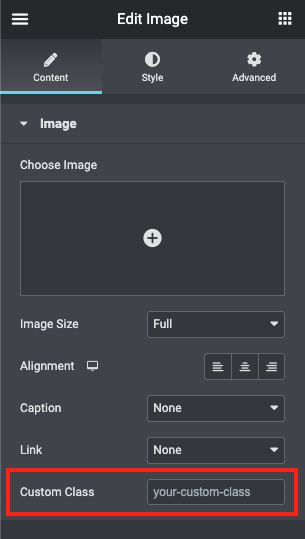
So i created this simple plugin to help. Just install and use the new input in Image widget to add your custom class.
More plugins?
Check my other plugins: WordPress Plugins
WordPress Tips?
Check my blog: WordPress Tips
Plugins Suggestions?
Please, send to me: plugins@eduardovillao.me
Installation
-
Install plugin in your WordPress.
-
Open Elementor editor and use the new input in Image Widget to set custom Class.
Screenshots
Changelog
1.3.2
- Changed: compatibility with WordPress 6.7.
- Changed: code improvements.
1.3.1
- Changed: compatibility with WordPress 6.5.
- Changed: code improvements.
1.3
- Fix: do not working on the latest versions of Elementor.
- Changed: Compatibility with WordPress 6.3.
1.2.4
- Changed: Compatibility with WordPress 6.2.
1.2.3
- Changed: Compatibility with WordPress 6.1.
1.2.2
- Changed: Compatibility with WordPress 6.0.
1.2.1
- Fix php notice “Undefined index: cei_image_custom_class” in some cases.
- Support to plugins translation.
- Improve plugins header requirements.
- Compatibility with WP 5.8.3.
1.2
- Add support to “Featured Image” Widget (Elementor PRO).
- Compatibility with WP 5.8.
1.1
- Add support to “Image Box” Widget.
1.0
- Initial release.