


Description
Custom WooCommerce Checkout Fields Editor helps you customize the WooCommerce checkout experience without code. Manage billing, shipping, and additional checkout fields from a simple admin interface.
The plugin supports Classic checkout and WooCommerce Block checkout (WooCommerce 8.8+), with drag-and-drop ordering, field validation, backup/import, and locale override settings.
Free features
- Add, edit, remove, enable, disable, duplicate, and reorder checkout fields
- Classic checkout sections: Billing, Shipping, Additional
- Block checkout sections: Contact, Address, Additional Information
- 17 field types on classic and block checkout
- Field label, placeholder, required, validation, and width controls
- Custom CSS classes per field
- Display fields in order emails and order detail pages
- Locale override settings for address fields
- Backup and import for classic, block, and settings data
- HPOS and cart/checkout blocks compatibility
- Multilingual ready: WPML, Polylang, and Loco Translate support
Field types (free)
- Text
- Number
- Hidden
- Password
- Phone
- Textarea
- Select
- Multi Select
- Checkbox
- Checkbox Group
- Radio
- Heading
- Paragraph
- Date
- Time Picker
- URL
Multilingual compatibility
Checkout field labels, placeholders, and option text can be translated with:
- WPML — field strings are registered automatically (String Translation) when fields are saved or on page load
- Polylang — field strings are registered with Polylang String Translations
- Loco Translate / Gettext — translate static plugin UI strings from the
wcfetext domain (/languages)
Dynamic field text entered in the admin is translated via WPML or Polylang after you translate the registered strings. Classic and Block checkout, order details, and order emails use the translated labels.
Block checkout
Block checkout editing requires WooCommerce 8.8 or later and a store checkout page that uses the Checkout block.
Supported block sections:
- Contact Information
- Address
- Additional Information
Order notes remain managed by the native WooCommerce checkout block.
Premium features
- My Account field editor
- Conditional field display
- Conditional custom checkout sections
- Price fields and checkout fees
- File upload fields
- Advanced address display formatting
Notes
- Classic checkout uses the WooCommerce checkout shortcode.
- Only use one checkout field editor plugin at a time to avoid conflicts.
- Need help? Contact ThemeLocation
Installation
- Upload the plugin folder to
/wp-content/plugins/or install from the WordPress Plugins screen. - Activate the plugin.
- Go to WooCommerce → Checkout Form Editor.
- Choose Classic Checkout or Block Checkout and edit your fields.
- Save changes and test your checkout page.
FAQ
Does this work with WooCommerce Block checkout?
Yes. Block checkout support requires WooCommerce 8.8 or later and the Checkout block on your checkout page.
Can I back up my field settings?
Yes. Use the Backup & Import tab to export or restore classic fields, block fields, and locale override settings.
Can I translate checkout fields?
Yes. Field labels, placeholders, and options support WPML and Polylang. You can also translate plugin strings with Loco Translate.
Can I add custom CSS classes to fields?
Yes. Each field has a Custom CSS classes option in the add/edit field popup, in addition to the built-in width presets.
Does this work with HPOS?
Yes. The plugin declares compatibility with WooCommerce High-Performance Order Storage.
Screenshots

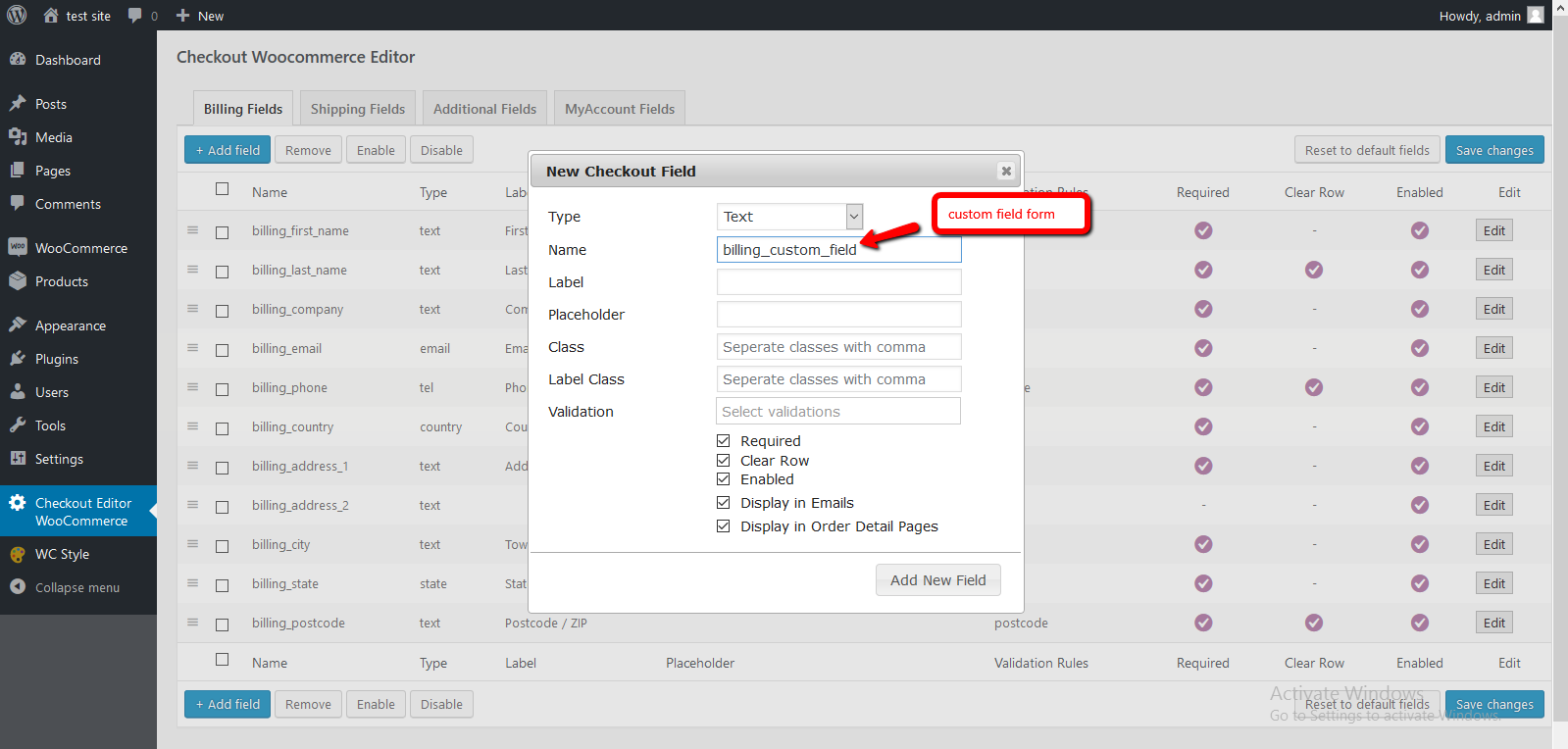

Changelog
1.7.0
- Replaced jQuery UI field editor dialogs with WordPress React (
@wordpress/components) modals - Improved admin field modal layout (scrollable body, sticky footer, responsive height)
- Enforced lowercase field names with no spaces in the React modal
- Add / Edit / Copy update the fields table without reloading; Save changes persists via AJAX with toast notifications
- Reset to default fields uses AJAX plus a confirmation modal (no browser alert) and toast feedback
- Disabled Update Field until changes are made in the edit modal
- Added top-right toast notifications for save, validation, and field actions
1.6.4
- Fixed classic checkout breakage caused by block order-notes / locale filters running on shortcode checkout
- Gated block checkout field filters behind a Checkout block page check so theme customizations are preserved
- Fixed fatal error on checkout after upgrading from 1.3.x when Additional field options had no explicit enabled flags
- Ensured checkout field filters always return arrays (prevents uasort() TypeError in WooCommerce)
- Normalized legacy field storage on upgrade so a manual Additional Fields save is no longer required
1.6.3
- Added WordPress 7.1 compatibility
- Added WooCommerce 11.0 compatibility
- Added required validation for checkbox fields on block checkout (ValidatedCheckboxControl)
- Applied custom CSS classes to fields on block checkout frontend
- Improved multilingual compatibility for WPML, Polylang, and Loco Translate / gettext
- Translated classic checkout option labels and email field labels
- Fixed Update Field and Cancel actions in the admin field editor modal
- Fixed cut-off Update Field / Cancel buttons in the field editor modal footer
- Fixed Update Field save for default/core checkout fields in the admin editor
1.6.2
- Updated Freemius SDK to 2.13.4 to address CVE-2024-13362 (reflected XSS in Freemius <= 2.10.1)
- Security hardening for admin CSRF protections on field save/reset flows
1.6.1
- Added custom CSS class field in the free field editor
- Added multilingual compatibility for WPML, Polylang, and Loco Translate
- Updated WordPress.org readme, tested versions, screenshots list, and feature documentation
- Improved field width and CSS class handling in the admin field popup
1.6.0
- Block checkout Additional Information tab: add, save, and display custom fields on checkout
- Fixed empty Additional Information table preventing the first field from being saved
- Added field duplication (copy) in classic and block checkout field editors
- All classic field types supported on block checkout Contact, Address, and Additional Information sections
- Order notes removed from block admin field list (managed by native WooCommerce checkout block)
- Fixed block section save targeting when adding fields via the admin dialog
- Custom frontend renderer for additional checkout sections on block checkout
- Added Backup & Import and locale override Settings tabs
1.5.0
- Added WooCommerce Block Checkout field editor (Contact, Address, Order, Additional Information)
- Improved admin modal UI to match current WordPress admin design
- Fixed block field add/edit/save, enable/disable, and drag reorder
- Fixed custom block field ordering on checkout
- Declared HPOS and cart/checkout blocks compatibility
- Added release build script for distributable zip packages
1.4.0
- Block checkout foundation and compatibility declarations
1.3.4
- Previous stable release.