


Description
The Raptive Ads WordPress Plugin is the easiest and most popular way to install Raptive’s innovative ad code and get ads running on your site. The plugin adds a JavaScript tag to your site and lets you set up a few preferences within WordPress.
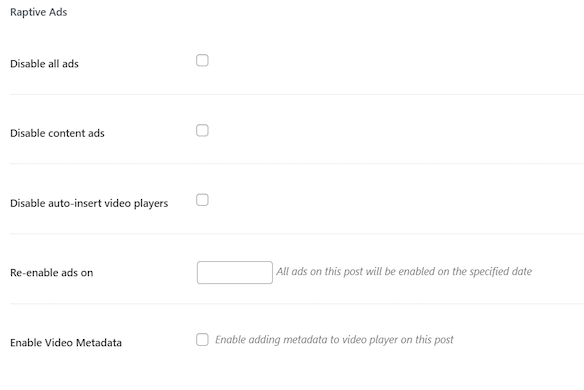
- Disable ads by category, tag, or individual page
- Disable video metadata
- Enable CLS optimization
- Enable Web Stories ads
- Enable Ad Block Recovery
- Override ads.txt
- Create a video sitemap redirect
Raptive is a strategic partner equipping independent creators and enterprise publishers with unmatched ad management, world-class tech, and inspired opportunities to make you more money.
Installation
- Upload the plugin files to the
/wp-content/plugins/adthrive-adsdirectory, or install the plugin through the WordPress plugins screen directly. - Activate the plugin through the ‘Plugins’ screen in WordPress
- Use the Raptive->Ads screen to set your Site ID
FAQ
Where do I report security bugs found in this plugin?
Please report security bugs found in the source code of the Raptive Ads plugin through the Patchstack Vulnerability Disclosure Program. The Patchstack team will assist you with verification, CVE assignment, and notify the developers of this plugin.
Screenshots

Changelog
3.14.0
- Fix Ad Block Recovery setting not showing the selected option
- Remove AI signals toggle
- Ad block recovery improvements
3.13.0
- Improved WordPress v7 compatibility
- Improved ad block recovery
3.12.2
- Support for ad recovery Essentials version
- Support for a new orientation attribute in video shortcodes
- Minor bug fixes and optimizations
3.11.0
- Improvements to ad recovery features
3.10.0
- Improved ad block recovery
3.9.0
- Improved PHP 7.4+ compatibility
- Remove the unused features
- Security patch
3.8.0
- Move Raptive’s Comscore script into the plugin. This update allows the script to load quicker, providing more accurate tracking and measurement of Raptive traffic.
3.7.7
- Use IdentityAPI for privacy compliant localStorage access
- Fix issue with adt_ei url params being cached in pagination links
3.7.6
- Ensure browser storage use with user consent
3.7.5
- Tested up to 6.8