


Description
A WordPress plugin designed to help Turkish websites address the requirements of the KVKK (Law No. 6698 on Protection of Personal Data) and the Cookie Guidelines published by the Personal Data Protection Authority (KVKK Board).
Developed by a Turkish developer for the Turkish WordPress community.
This plugin is completely free. If you find it useful and would like to support its development, you can do so here: https://kreosus.com/agurel
Features:
- Cookie consent bar designed with KVKK requirements in mind (fixed bottom bar, responsive)
- Accept All / Reject All / Cookie Settings button layout
- Google Consent Mode v2 support (GTM and direct gtag.js)
- Automatic KVKK privacy notice generator based on company info
- TinyMCE editor for manual text editing
- Data category selection (general, physical, special category data)
- Consent statistics dashboard with date range filter
- Per-user disclaimer acceptance log
- Shortcode support: [kvkk_aydinlatma_metni]
- Application method toggles (mail, KEP, email)
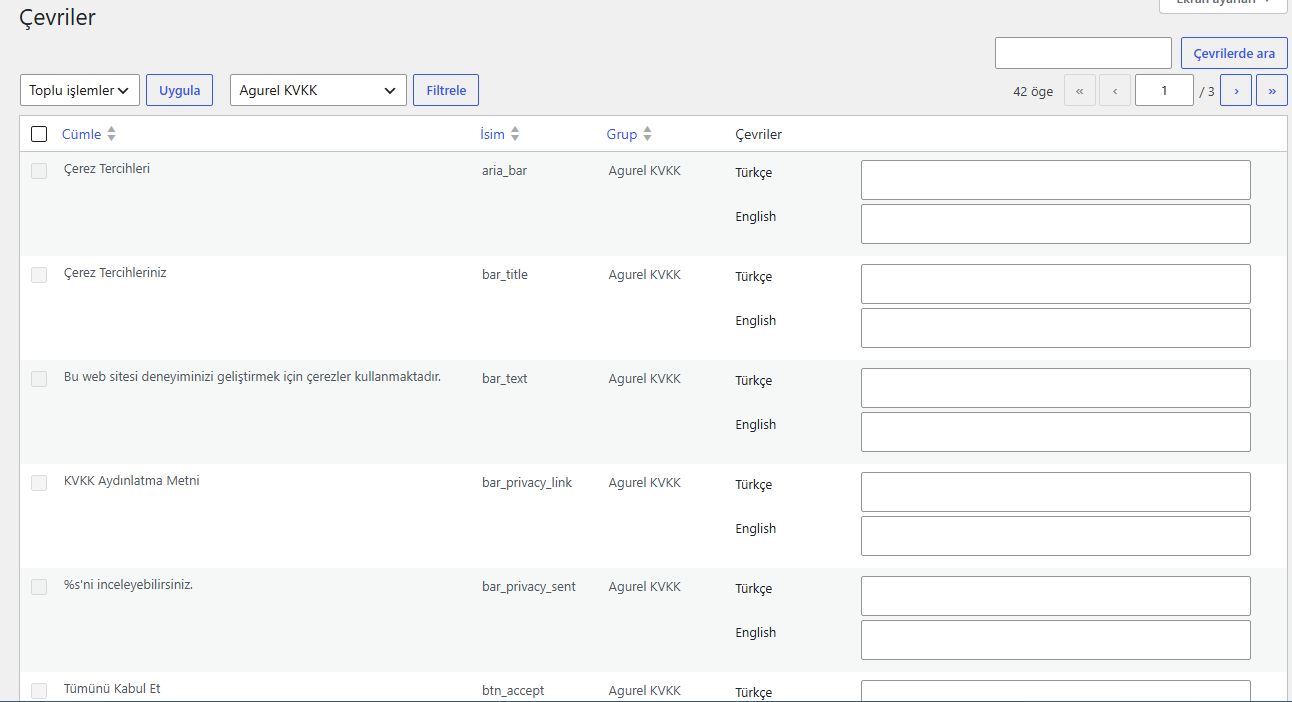
- Polylang and WPML support for cookie bar texts (Turkish is the default and the fallback)
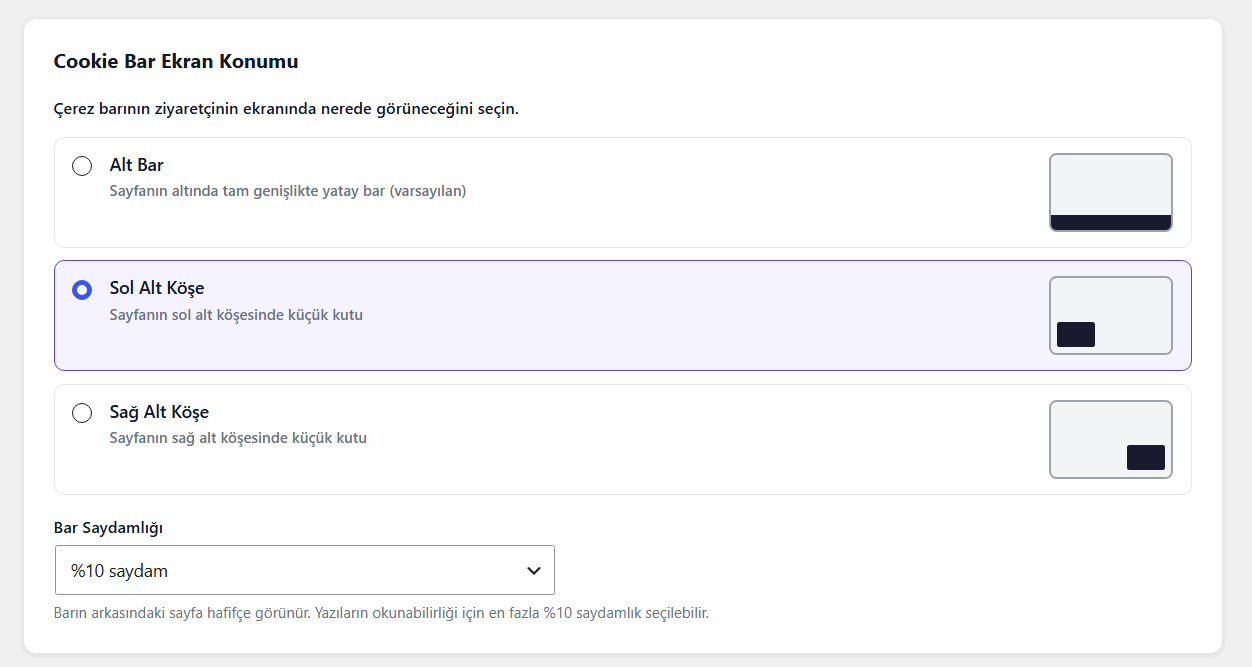
- Bar position options with on-screen previews: full-width bottom bar, bottom-left or bottom-right corner box
- Optional bar transparency (up to 10%, so the text stays readable)
- CSV export of administrator acceptance records and daily consent totals
- “Avukatınıza Danışacağınız Bilgiler”: copy or download your configuration as a plain text list to share with your lawyer
- Script scan: lists known tracking scripts found on your site’s page and warns about other cookie consent tools (report only)
Türkçe Özet
Bu eklenti, Türkiye’deki web sitelerinin 6698 sayılı KVKK ve KVK Kurulu Çerez Kılavuzu kapsamındaki
yükümlülüklere yönelik adımlar atmasına yardımcı olmak amacıyla geliştirilmiştir. KVKK mevzuatı
dikkate alınarak tasarlanmış bir çerez onay barı, Google Consent Mode v2 entegrasyonu
(GTM veya gtag.js), şirket bilgilerinize göre otomatik oluşan bir KVKK aydınlatma metni üretici ve
onay istatistikleri paneli içerir. Eklenti modülerdir: sadece çerez barını, veya çerez barı ile
birlikte GA4 entegrasyonunu kullanabilir; KVKK metni üreticisini hiç kullanmadan kendi
avukatınızın hazırladığı metni de sayfanıza ekleyebilirsiniz.
Çerez barı metinleri Polylang ve WPML ile çevrilebilir (çeviri girilmeyen dilde Türkçe gösterilir). Bar,
ekranın altında tam genişlikte ya da sol veya sağ alt köşede küçük kutu olarak gösterilebilir ve isteğe
bağlı olarak hafif saydam yapılabilir. KVKK aydınlatma metni Türkçe oluşturulur.
KVKK Metni sayfasındaki “Avukatınıza Danışacağınız Bilgiler” bölümü, panelde girdiğiniz bilgileri avukatınızla paylaşabileceğiniz düz metin listesi olarak verir (hukuki metin değildir). “Script Tarama” sayfası sitenizdeki bilinen izleyici scriptlerini listeler ve başka bir çerez onay aracı çalışıyorsa uyarır (yalnızca raporlar, hiçbir şeyi engellemez). Yönetici onay kayıtları ve günlük çerez onayı toplamları CSV olarak dışa aktarılabilir. Kalıcı log dosyasındaki IP adresi hash’lenmiş saklanır ve dosya erişime karşı korumalı bir klasörde tutulur.
Bu metin ve eklenti hukuki danışmanlık niteliği taşımaz; profesyonel bir hukuk danışmanına
başvurmanız önerilir.
Bu eklenti tamamen ücretsizdir. Faydalı bulduysanız ve destek olmak isterseniz:
https://kreosus.com/agurel
External Services
This plugin optionally connects to Google’s services when the GA4 Integration feature is enabled by the site administrator. This feature is disabled by default.
Google Tag Manager
- What it is: A tag management system by Google.
- When it is used: Only when the administrator enables GA4 Integration and selects “Google Tag Manager” mode, entering a GTM Container ID.
- What data is sent: Standard browser and page data as defined by Google Tag Manager and the tags configured within it.
- Terms of Service: https://marketingplatform.google.com/about/analytics/terms/us/
- Privacy Policy: https://policies.google.com/privacy
Google Analytics (gtag.js)
- What it is: Google’s analytics tracking library.
- When it is used: Only when the administrator enables GA4 Integration and selects “Direct gtag.js” mode, entering a GA4 Measurement ID.
- What data is sent: Standard analytics data (page views, browser info, anonymized IP) as defined by Google Analytics.
- Terms of Service: https://marketingplatform.google.com/about/analytics/terms/us/
- Privacy Policy: https://policies.google.com/privacy
No data is sent to any external service when GA4 Integration is disabled (default state).
Installation
- Upload the plugin to the wp-content/plugins/ directory
- Activate the plugin from the Plugins menu in WordPress admin
- Click KVKK in the left menu
- Accept the disclaimer and fill in your company information
FAQ
Is the generated privacy notice legal advice?
No. The generated text is a starting point based on general KVKK requirements. It does not constitute professional legal advice. We strongly recommend that your KVKK privacy notice is reviewed or prepared by a qualified lawyer before publishing. This applies both to the auto-generated text and any custom text you write yourself.
Do I have to use the privacy notice generator?
No. The plugin is modular and the privacy notice generator is entirely optional. You can use:
- Only the cookie consent bar (default), or
- The cookie consent bar together with GA4 / Consent Mode v2, or
- The cookie consent bar with custom script blocking (Meta Pixel, Hotjar, etc.)
— in any case, without ever using the [kvkk_aydinlatma_metni] shortcode. If you already have a privacy notice prepared by a lawyer, simply add that text to your page directly.
How do I link my own KVKK privacy notice page in the cookie bar?
Go to Cookie Settings (Çerez Ayarları) in the plugin panel and enter the URL of your KVKK privacy notice page. The cookie bar will link to that page. We strongly recommend that this page contains a privacy notice prepared by a qualified lawyer.
I edited the generated text manually. Will it update automatically when I change company info or data categories?
No. Once you manually edit the privacy notice text, it is treated as your custom text and is no longer regenerated automatically. If you change your company information or data categories afterwards, go to the “KVKK Metni” page and click “Otomatik Oluştur” (Auto-Generate) again to refresh the text, or edit it manually.
Why does the disclaimer screen appear again after I deactivate/reactivate the plugin, or when a different user logs in?
The disclaimer acceptance is recorded per WordPress user. If a different user logs in, they have not yet accepted it, so it will be shown to them. Deactivating the plugin resets the acceptance records (the permanent file log is not affected), so reactivating the plugin will show the disclaimer again for all users.
Are cookies off by default?
Yes. As required by the KVKK Cookie Guidelines, analytics and marketing cookies are disabled by default. Only essential cookies are always active.
Why are all three cookie bar buttons the same color?
This is intentional. The KVK Board’s guidelines prohibit manipulative design patterns (dark patterns) — for example, making the “Accept” button large and green while hiding the “Reject” button. All three buttons (Accept All, Reject All, Cookie Settings) are displayed in the same neutral color and size so that no option is visually prioritized over another.
What happens when a visitor clicks “Tümünü Kabul Et” (Accept All)?
All cookie categories (essential, analytics, marketing) are enabled. If GA4 integration is active, Consent Mode v2 signals (analytics_storage, ad_storage, etc.) are updated to “granted”. Any custom blocked scripts are also loaded at this point.
What happens when a visitor clicks “Tümünü Reddet” (Reject All)?
Only essential cookies remain active; analytics and marketing cookies stay disabled. If GA4 integration is active, Consent Mode v2 signals remain “denied”. Custom scripts are not loaded.
What happens when a visitor closes the bar with the X button without choosing?
The site continues with only essential cookies — analytics and marketing remain off. The choice is saved as a cookie so the bar will not appear again on subsequent visits. This is not recorded as an explicit “Reject” but consent is not granted either.
Can visitors change their cookie preferences later?
Yes. Add the [kvkk_tercih_butonu] shortcode to your footer or any page. It displays a “Çerez Tercihlerimi Yönet” button — clicking it reopens the cookie bar so the visitor can update their preferences at any time.
Which integration mode should I choose?
The plugin offers three scenarios in the GA4/Script settings page:
- Cookie Bar only (default): If you do not use any analytics or advertising tools. Shows the consent bar for legal compliance only.
- GA4 / Consent Mode v2: If you use Google Analytics or Google Ads. GA4 Consent Mode v2 signals are updated according to the visitor’s consent choice.
- Custom Script Blocking: If you use Meta Pixel, Hotjar, LinkedIn Insight, or other third-party tools. Paste the script code and it will only load after the visitor gives consent.
What is the difference between Consent Mode v2 and Custom Script Blocking?
Consent Mode v2 loads the GA4/GTM script immediately but sends a “denied” signal — the script runs but collects no personal data. Custom Script Blocking is stricter: the script is not loaded at all until the user clicks “Accept”. For the highest level of prior consent compliance, use Custom Script Blocking.
How long is consent stored?
Default is 180 days (6 months), configurable from the admin panel.
Does it work with Polylang and WPML?
Yes. The cookie bar texts (title, description, buttons, category names and descriptions) are registered as translatable strings in the group “Agurel KVKK”. In Polylang, go to Languages > Translations (String translations) and filter by that group. In WPML, use WPML > String Translation. If you do not enter a translation for a language, the Turkish text is shown, so the bar never appears empty. If you use a custom KVKK page URL, it can be translated per language too. The privacy notice created by the [kvkk_aydinlatma_metni] shortcode is Turkish only: for other languages, write or paste your own text on that language’s page. If your site uses page caching, clear the cache after adding translations.
Can I change where the cookie bar appears?
Yes. Open Çerez Ayarları and find “Cookie Bar Ekran Konumu”. You can choose a full-width bar at the bottom (default), or a small box in the bottom-left or bottom-right corner. A small preview next to each option shows how it will look. There is also an optional transparency setting (up to 10%) that lets the page show through slightly. It is kept low on purpose so the consent text stays easy to read.
Can I export the consent records?
Yes. On the “Onay Kayıtları” page, the “CSV İndir” button downloads all administrator disclaimer acceptance records (user, email, date and time, version, hashed IP). On the Dashboard, the “CSV İndir (günlük)” button downloads the daily consent totals (accept, reject, custom choice, closed with X) for the selected date range. Only administrators can download them. Individual visitor records are not stored: for visitors, only daily totals are kept.
Where is the permanent log file and does it contain IP addresses?
The permanent log file is kept in wp-content/uploads/kvkk-logs/, in a folder protected with an access-deny rule, and the file name contains a random part that cannot be guessed. The IP address in it is stored as a SHA-256 hash (with your site’s WordPress salt), the same as in the database. Raw IP addresses are not written anywhere. The deny rule works on Apache and LiteSpeed servers. If your site runs on Nginx, add a rule in your server configuration to block direct access to uploads/kvkk-logs/. When you update from an older version, the previous log file is moved into this folder automatically and nothing is deleted.
What does the Script Tarama (script scan) page do?
It fetches one page of your own website (the home page by default, or another page of the same site) from your server and looks for the web addresses of well known analytics and marketing scripts in its HTML. It lists what it finds with a category (analytics or marketing) and warns you if another cookie consent tool seems to be running on the same page. Nothing is sent to any third party, and it does not block or change any script. It cannot see tags loaded inside Google Tag Manager, scripts added by JavaScript after the page loads, scripts that appear only on pages behind a login, or scripts you added in this plugin’s custom script field. So “nothing detected” does not mean there are no trackers on your site. It is not a legal assessment.
Does this plugin support WooCommerce?
Yes, partially. As of version 1.2.0, the following WooCommerce-specific data categories are available in the Data Categories panel and are automatically reflected in the privacy notice:
- Order information (order number, products, amount, date)
- Billing information (name, address, email, phone, tax ID or national ID)
- Shipping information (delivery address, recipient name, phone)
- Payment processing (handled by third-party payment providers such as iyzico, PayTR, Stripe — card data is not stored on your site)
- Date of birth (for loyalty programs or +18 age verification — includes a note about BTK regulations)
Full WooCommerce integration (automatic essential cookie classification, checkout consent checkbox) is planned for a future release.
Screenshots


Changelog
1.2.6
- Added a collapsed “Avukatınıza Danışacağınız Bilgiler” section on the KVKK Metni page: a plain text list of your company info, selected data categories, cookie and integration settings and application methods that you can copy or download as a TXT file and share with your lawyer. It is not a legal text
- Added “Script Tarama” page: scans your own site’s page HTML and lists known analytics and marketing scripts it finds (Google, Meta, TikTok, LinkedIn, Microsoft, Yandex, Hotjar, Clarity, Matomo, Pinterest, Snapchat, X, Reddit, Criteo, Taboola, Adform, RTB House, AdRoll, HubSpot, Insider, Revotas, Segmentify, Dengage, Netmera, Dataroid and others). It also warns if another cookie consent tool is running. It only reports: it does not block or change any script
- Added CSV export: administrator acceptance records (Onay Kayıtları page) and daily consent totals for the selected date range (Dashboard)
- The IP address in the persistent file log is now hashed (SHA-256 + WordPress salt), the same way as in the database. Raw IP addresses are no longer written anywhere
- The file log now lives in a protected folder (uploads/kvkk-logs/) with an access-deny rule and a non-guessable file name. The old public log file is moved there automatically, nothing is deleted. Note: the access-deny rule works on Apache/LiteSpeed; on Nginx servers, block direct access to uploads/kvkk-logs/ in the server configuration
1.2.5
- Cookie bar texts can now be translated with Polylang and WPML (String Translations, group “Agurel KVKK”); Turkish is the default and the fallback. The KVKK notice shortcode stays Turkish
- Renamed the position section to “Cookie Bar Ekran Konumu” and added a small screen preview for each option
- Added an optional bar transparency setting (fully opaque by default, up to 10% transparent)
1.2.4
- Added a gentle, per-user review request notice in the admin (shown to administrators and editors, dismissible, limited reminders; appears right away after an update, 2 days after a fresh install) and a “Yorum Yap” shortcut in the plugin menu
- Added a safe database upgrade on plugin update: widens the disclaimer log ip_address column for sites updated from earlier versions (no data or settings are removed)
1.2.3
- Fixed disclaimer acceptance failure caused by ip_address column being too short for SHA-256 hash (VARCHAR 45 → 64)
1.2.2
- IP address is now hashed (SHA-256 + WordPress salt) before being stored in the disclaimer log — raw IP is no longer shown in the admin panel; it remains in the file log for legal purposes
- Added cookie bar position options: full-width bottom bar (default), bottom-left corner box, bottom-right corner box
- Kreosus support link added to all admin pages footer in Turkish
1.2.1
- Fixed syntax error in admin-data.php (missing function definition for kvkk_row closure)
- Fixed uninstall.php — consent statistics (kvkk_stats) are now preserved on plugin deletion; only the disclaimer log table is removed
1.2.0
- Added WooCommerce data categories: order info, billing, shipping, payment processing, and birth date (with +18/BTK note)
- Added third-party communication channel toggles: WhatsApp, Telegram, Signal, Instagram DM, Facebook Messenger, X DM, Threads, and other platforms — auto-added to privacy notice with KVKK Article 9 cross-border transfer note
- Auto-generated privacy notice now includes dedicated sections for WooCommerce data and communication channels when enabled
- Updated “Tested up to” to WordPress 7.1
1.1.2
- Cookie bar button colors equalized to neutral gray — all three buttons now have the same color and visibility, consistent with KVK Board dark pattern guidelines
- Added three integration scenarios in GA4 settings: Cookie Bar only (default), GA4 / Consent Mode v2, and Custom Script Blocking
- Added Custom Script Blocking — paste Meta Pixel, Hotjar, LinkedIn Insight or any other third-party script; it will only load after user consent
- Added [kvkk_tercih_butonu] shortcode — adds a “Manage Cookie Preferences” button so visitors can update their consent at any time
- Added KVKK privacy page URL field in Cookie Settings — cookie bar links to your own KVKK page instead of the WordPress default privacy page
- X (dismiss) button now saves a cookie (essential only) so the bar does not reappear on subsequent visits
- X button repositioned above the action buttons to avoid overlap with “Cookie Settings” button
- Plugin settings are now preserved on uninstall — only database tables are removed, so company info and preferences do not need to be re-entered on reinstall
- Expanded FAQ with all new features, button color rationale, X button behavior, integration scenario guide, and KVKK URL configuration
1.1.1
- Updated Author display to “Ahmet Gurel” with LinkedIn link, consistent with the developer’s other plugin
1.1.0
- Softened “compliant” wording in the description and Turkish summary to “designed with KVKK requirements in mind” / “mevzuata yönelik” — avoiding an absolute compliance claim, consistent with the disclaimer that this is not legal advice
1.0.9
- Added a note that the plugin is free and a support/donation link (Kreosus) to both the readme and the dashboard footer
1.0.8
- Added Donate link (Kreosus)
- Added Turkish summary section to the readme
- Expanded FAQ: legal disclaimer notice, modular usage without the privacy notice generator, manual text editing behavior, disclaimer re-acceptance after deactivation, and detailed cookie bar button behaviors
1.0.7
- Disclaimer acceptance records are now reset on plugin deactivation, so the disclaimer is shown again on reactivation or reinstall
- Added “accepted_version” column to the disclaimer log table and display it in the admin log table
- Renamed “Aktif Kurulum Kayıtları” to “Aktif Kurulum Onay Kayıtları” and simplified the persistent log description
- Added a note on the KVKK Text page clarifying that users with their own lawyer-prepared privacy notice do not need to use the shortcode
1.0.6
- Reworded the persistent log explanation text on the “Onay Kayıtları” page for clarity
1.0.5
- Updated plugin display name to “Agurel KVKK Compliance and Cookie Bar”
- Updated description to mention it is developed by a Turkish developer
- Renamed admin menu to “Agurel KVKK & Cookie Bar”
- Added plugin version display on the dashboard page
1.0.4
- The persistent file log now includes the plugin version at the time of acceptance
1.0.3
- Added uninstall.php to remove database tables and settings on plugin deletion
- The persistent file log (uploads/kvkk-logs/) is preserved across uninstall/reinstall
- The persistent file log is now displayed (read-only) on the “Onay Kayıtları” admin page
1.0.2
- Limited representative entries to a maximum of 3
- Added a reminder when company info or data categories change but the privacy notice text has been manually edited
- Added KVKK Board (KVK Kurulu) guidance notes for camera, audio recording, and biometric data categories
1.0.1
- Per-user disclaimer log
- Dashboard date range filter
- Application method toggles
- Strengthened privacy notice text
- Phone number validation
1.0.0
- Initial release