

Description
AI Blog Automator helps you set up once and stay in control: schedule AI-assisted, SEO-oriented blog posts, review drafts when you want, and keep publishing volume modest. Perfect for content marketers, bloggers, and site owners who want a steady cadence without mass-publishing thin content.
Key Features (Free Version)
- Groq free tier (rate-limited) – Generate posts with your own free Groq key; no plugin post caps
- AI-assisted drafts – Create full blog posts with AI, with a minimum word count and one rewrite if a draft is too short
- Semi-Automated scheduling – Daily, twice daily, or weekly via WordPress Cron
- Customizable Content – Configure topics and keywords for diverse content
- SEO Optimization – Built-in default prompt template designed for search engine friendly content
- Stay in control – Save as drafts for review, or publish when you choose
- Flexible Categories – Fixed category, pick from existing categories with fallback, or optional auto-create modes
- Manual Generation – Create posts on-demand with a single click
- Error Logging – Track generation issues and troubleshoot easily
- Statistics Dashboard – Monitor total posts generated and scheduling status
- Free Groq AI – Uses Groq (completely free, no credit card required)
Premium Features (Pro Version)
Upgrade to Pro for advanced capabilities:
- Multiple AI Providers – Choose OpenAI, Claude, Groq, or a custom endpoint
- Custom Post Lengths – Set any word count from 300 to 5000 words with interactive slider
- Flexible Scheduling – Post every 2, 3, 6 hours or custom intervals
- Multiple Categories & Tags – Fixed multi-category selection, smart matching up to 3 categories, and auto-generated tags
- 12+ Prompt Templates – How-To guides, listicles, case studies, comparisons, and more
- Custom Prompt Template Editor – Fully customize AI prompts to match your content style and requirements
- SEO Optimization – Auto-generate meta descriptions (Yoast, Rank Math, AIOSEO compatible)
- Bulk Generation – Create multiple posts at once from keyword list
- AI Images – AI featured and inline images (OpenAI, OpenRouter, Gemini), or keep Unsplash
- Improve with AI – Review and apply improvement suggestions on existing posts
Learn more about Pro features →
How It Works
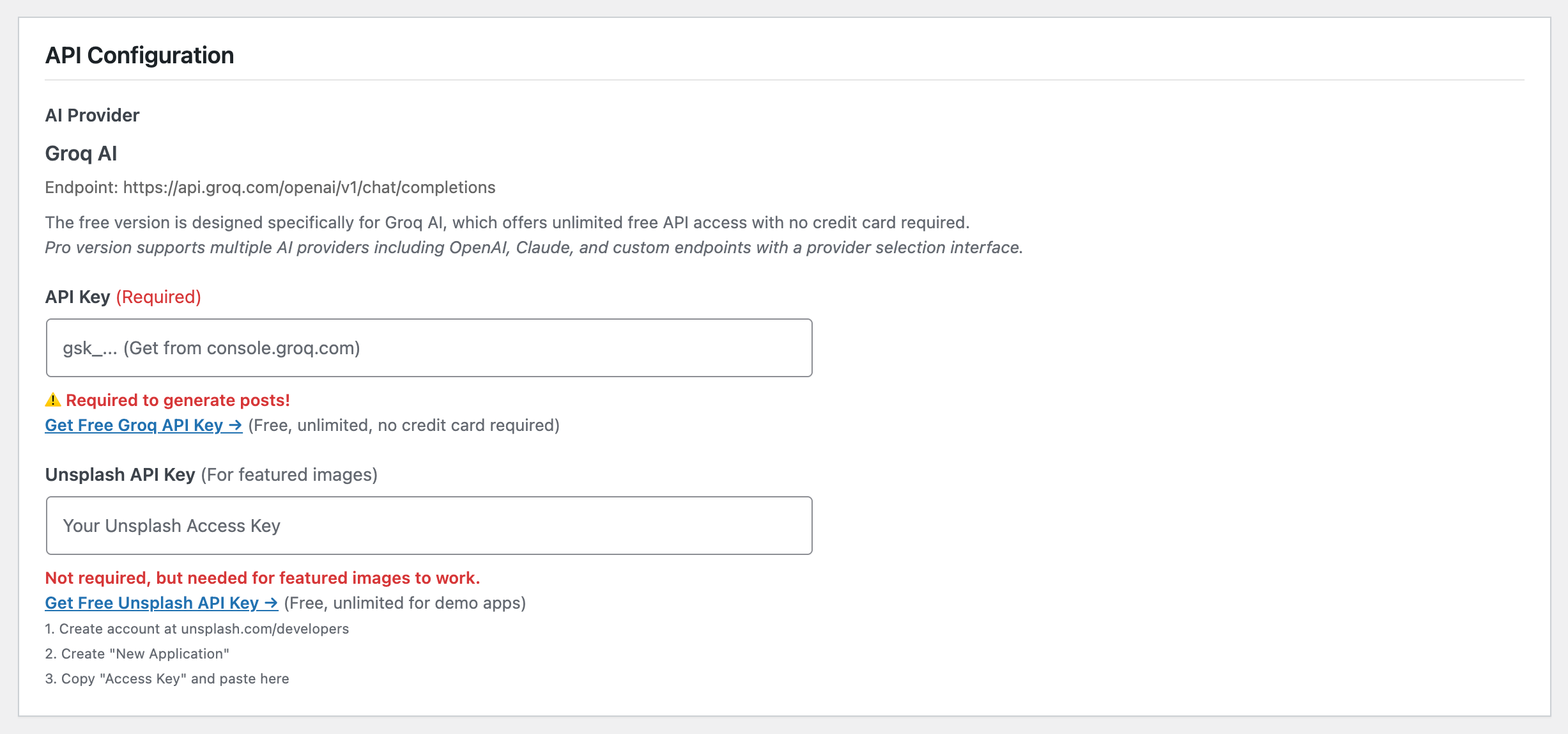
- Get your free Groq API key from console.groq.com
- Enter your API key in the plugin settings
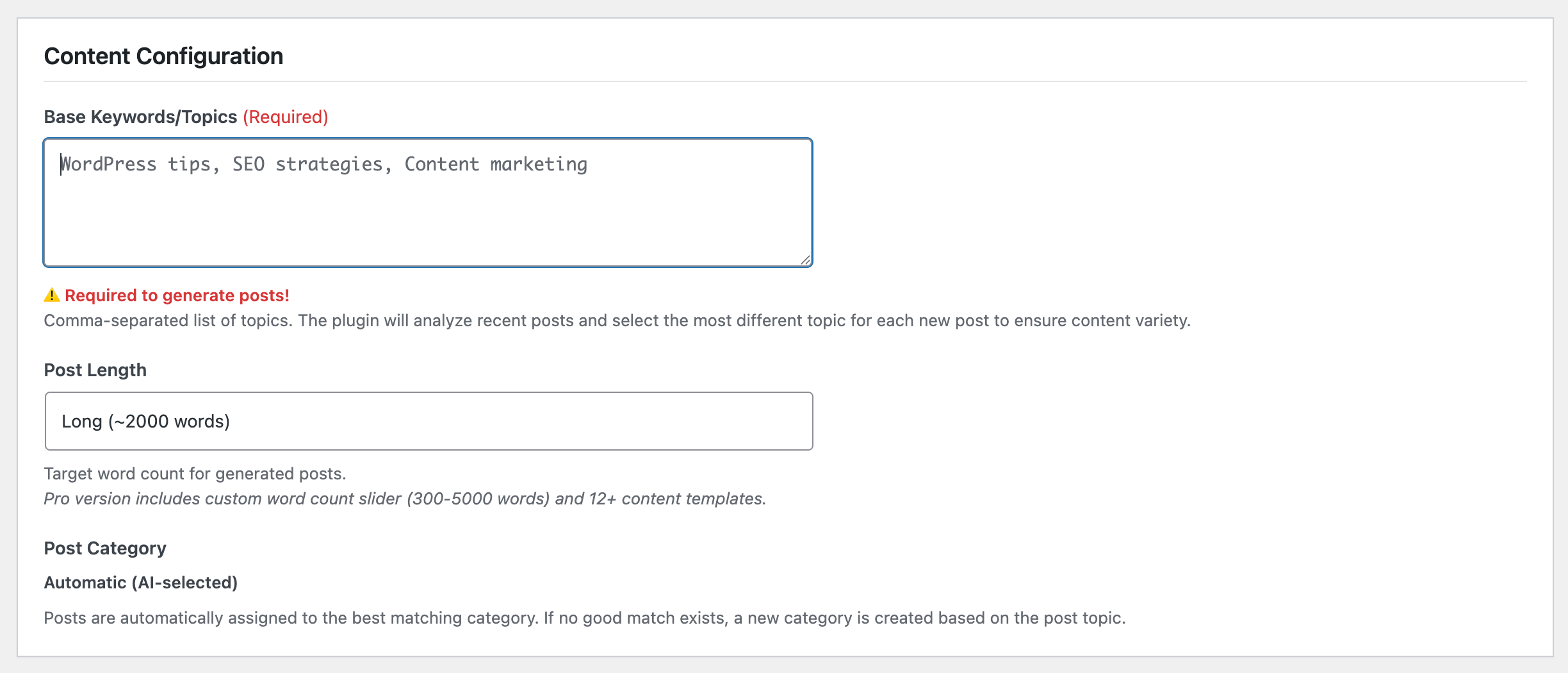
- Add your desired topics and keywords (comma-separated)
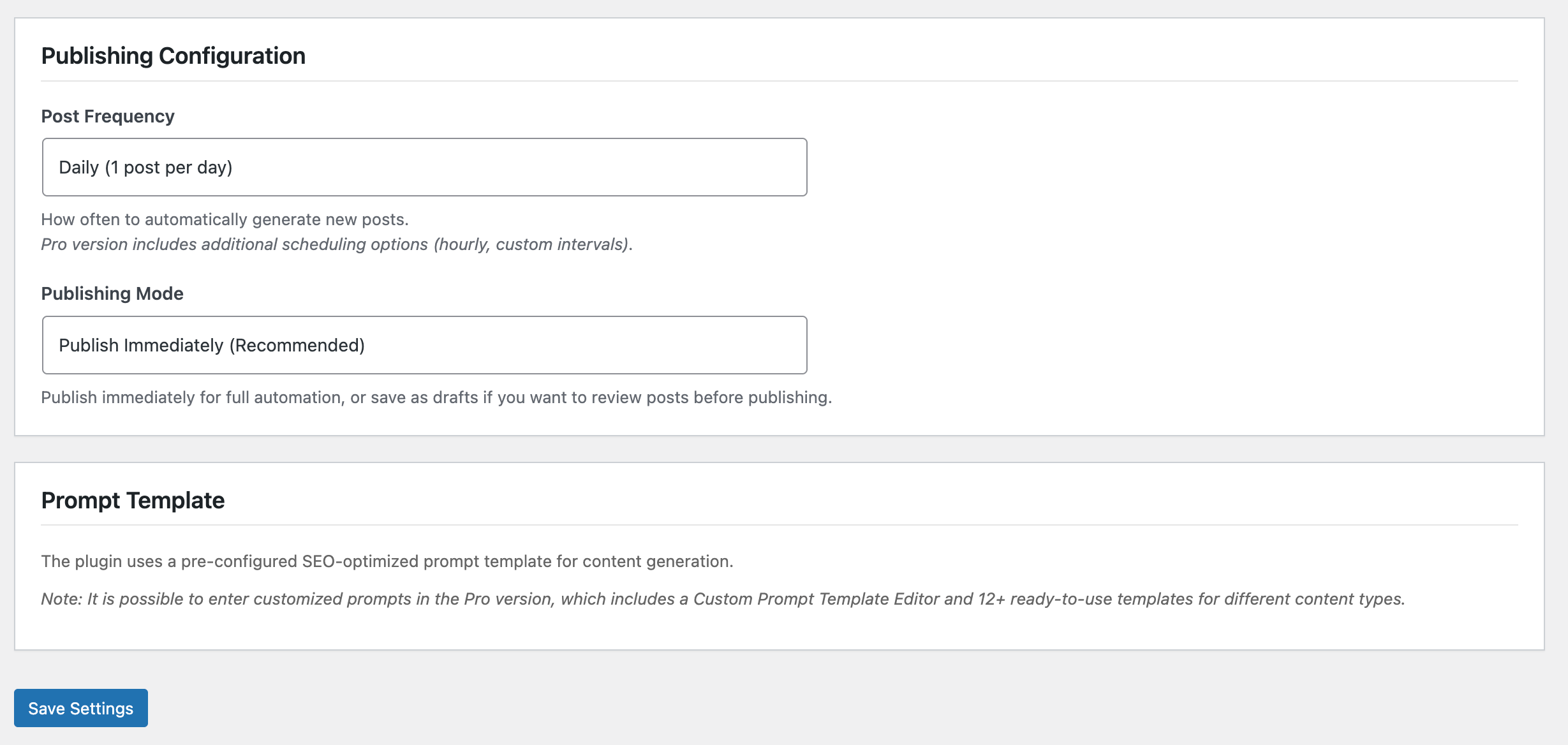
- Configure post frequency and publishing preferences
- Set up once: let WordPress Cron run on your schedule
- Stay in control: review drafts, or publish when you are ready
Perfect For
- Content marketers maintaining multiple blogs
- Niche websites needing consistent content
- Affiliate marketers building authority sites
- Businesses wanting to improve SEO presence
- Bloggers who want a steady cadence without mass-publishing thin posts
External Services Used
IMPORTANT: This plugin uses external services to generate content and images.
1. AI Content Generation
This plugin requires an API key from an AI service provider to generate blog posts.
Why External Service is Required:
AI content generation requires large language models (LLMs) that run on powerful servers with specialized hardware. These models cannot run locally on a WordPress server due to:
– Massive computational requirements (billions of parameters)
– Specialized GPU infrastructure needed for inference
– Continuous model updates and improvements
– Resource-intensive processing that would overwhelm typical hosting environments
The plugin sends your prompts to these external AI services where the actual content generation processing occurs on their servers.
Free Version: Groq free tier (rate-limited); no plugin post caps
Service Used: Groq (https://console.groq.com)
– Completely free, no credit card required
– Fast AI model (OpenAI GPT-OSS 120B via Groq)
– No cost per request
– Get your API key: https://console.groq.com/
Default API Endpoint: https://api.groq.com/openai/v1/chat/completions
Terms of Use & Privacy Policy:
– Groq Privacy Policy: https://groq.com/privacy-policy/
– Groq Terms of Use: https://groq.com/terms-of-use/
Note: The Pro version supports multiple AI providers (OpenAI, Claude, custom endpoints). When using Pro with other AI providers, refer to those providers’ Terms of Use and Privacy Policy pages directly.
Data Transmitted:
– Your prompt text (including keywords)
– Post generation requests
– You control your own API key
– No personal data is collected by this plugin
Pro Version AI Providers:
The Pro version supports multiple AI providers. When using Pro, data is transmitted to the provider selected in settings. The settings screen names that provider, its endpoint, and its privacy and terms pages.
Anthropic (Claude)
– Service: Anthropic (https://anthropic.com)
– API Endpoint: https://api.anthropic.com/v1/messages
– Data transmitted: Your prompt text (including keywords) and API key
– Privacy Policy: https://www.anthropic.com/privacy
– Terms of Use: https://www.anthropic.com/legal/consumer-terms
Azure OpenAI, LocalAI, Custom Endpoints
– Pro users can configure custom OpenAI-compatible API endpoints
– When using custom endpoints, refer to those providers’ Terms of Use and Privacy Policy pages directly
2. Featured Images (Unsplash)
The plugin automatically fetches relevant featured images from Unsplash’s free stock photo API.
Why External Service is Required:
Unsplash provides access to millions of high-quality, royalty-free stock photos that are properly licensed for commercial use. This service cannot be replicated locally because:
– Requires access to a curated library of millions of professional photos
– Ensures proper licensing and attribution compliance
– Provides search functionality across a vast image database
– Maintains photographer attribution and licensing information
The plugin queries Unsplash’s API to retrieve images based on your post keywords, ensuring you get properly licensed images with correct attribution.
Service: Unsplash (https://unsplash.com)
API Endpoint: https://api.unsplash.com/photos/random
Privacy Policy: https://unsplash.com/privacy
Terms of Service: https://unsplash.com/terms
License: All photos are free to use under the Unsplash License
Requirements:
– Free Unsplash API key (get it at https://unsplash.com/developers)
– Create a free developer account
– Register your application (demo/development tier is free)
Data Transmitted:
– Search keyword only (based on your post topic)
– No personal data is sent
Attribution:
– Photos are automatically attributed to photographers
– Attribution is added to image captions (Unsplash requirement)
– All photos are properly licensed for commercial use
Pro Version: Pro users can replace Unsplash with AI-generated featured images (and optional inline images), and also get multi-category selection in fixed mode, smart matching for up to 3 categories, and auto-generated tags.
Requirements
- WordPress 5.8 or higher
- PHP 7.4 or higher
- Free Groq API key (https://console.groq.com)
- Free Unsplash API key (https://unsplash.com/developers)
- Active WordPress Cron (standard on most hosts)
Documentation
Full documentation is available in the plugin’s README.md file, including:
* Detailed installation instructions
* API configuration examples (OpenAI, Azure, LocalAI)
* 9 ready-to-use prompt templates
* Troubleshooting guide
* Security best practices
Privacy Policy
This plugin does not collect, store, or transmit any user data from your WordPress installation, except what is necessary for its core functionality:
What data is transmitted:
– Your configured prompt template (including keywords)
– Basic API request parameters
Where data is sent:
– To your configured AI API endpoint (by default: Groq API)
– No data is sent to the plugin developers
– No tracking or analytics are performed by this plugin
Data storage:
– Plugin settings are stored in your WordPress database
– Generated posts are stored as standard WordPress posts
– No data is transmitted to third parties except your chosen AI provider
Your responsibilities:
– You control what data is sent via prompt templates
– You are responsible for compliance with your AI provider’s terms
– Review generated content before publishing
– Ensure compliance with privacy laws in your jurisdiction
Third-party services:
– Groq Privacy Policy: https://groq.com/privacy-policy/
– Groq Terms of Use: https://groq.com/terms-of-use/
– Unsplash Privacy Policy: https://unsplash.com/privacy
– Unsplash Terms of Service: https://unsplash.com/terms
– Note: Pro version supports additional AI providers (OpenAI, Claude, etc.) – when using Pro with other providers, refer to those providers’ Terms of Use and Privacy Policy pages directly
Support
For support, please visit:
* Plugin documentation (included in download)
* WordPress.org support forums
* GitHub repository (if applicable)
Credits
Developed with WordPress coding standards and best practices. Uses OpenAI API or compatible services for content generation.
Additional Notes
API Costs: Be aware of API usage costs from your AI provider. Monitor your usage dashboard and set billing alerts.
Content Quality: AI-generated content should be reviewed for accuracy, quality, and brand alignment before publishing.
SEO Considerations: While the plugin is optimized for SEO-friendly content, you should still review and optimize posts with your preferred SEO plugin.
Legal Compliance: Ensure your use of AI-generated content complies with relevant laws and regulations in your jurisdiction.
Backup Regularly: As with any automation tool, maintain regular backups of your WordPress site.
Installation
Automatic Installation
- Log in to your WordPress admin panel
- Navigate to Plugins → Add New
- Search for “AI Blog Automator”
- Click “Install Now” and then “Activate”
Manual Installation
- Download the plugin ZIP file
- Log in to your WordPress admin panel
- Navigate to Plugins → Add New → Upload Plugin
- Choose the ZIP file and click “Install Now”
- Click “Activate Plugin”
Configuration
- Go to Settings → AI Blog Automator
- Enter your API key (Groq API key for free version)
- Configure your content preferences:
- Add keywords/topics (comma-separated)
- Choose post length
- Choose category mode (fixed, existing categories only, or auto-create)
- Set publishing preferences:
- Choose frequency (daily recommended)
- Select publish mode (draft or immediate)
- Click “Save Settings”
- Test with “Generate Post Now” button
Note: Custom prompt template editing is available in the Pro version. Free version uses a pre-configured SEO-optimized template.
FAQ
Is this plugin really free?
Yes! The free version is fully functional with Groq’s free tier (rate-limited). You add your own free Groq API key (no credit card required). Premium features are available for users who need Fully-Automated Mode, more AI providers, bulk generation, and advanced tools.
Do I need an API key?
Yes, you’ll need a free API key from Groq (https://console.groq.com/keys) which is completely free and requires no credit card. The Pro version allows you to use OpenAI, Claude, or any custom AI endpoint.
Why is the free version limited to Groq?
Groq has a free tier (rate-limited) and does not require a credit card. Pro users can choose OpenAI, Claude, Groq, or a custom endpoint.
How much does it cost?
The plugin is free. The free version uses Groq, which offers a free API tier and does not require a credit card. Pro can use other providers, and those providers bill you for API usage on their own terms.
How do I upgrade to Pro?
Buy a license at https://bluteem.com/ai-blog-automator/ and install the AI Blog Automator Pro add-on next to this plugin. Then open AI Blog Automator → Pro License and enter the license key. Pro features turn on after the license is active.
Can I review posts before they’re published?
Absolutely! Set the publishing mode to “Save as Draft” and review each post before publishing manually.
What is the pre-publish quality gate?
The plugin scores every generated post and stores the score on the post. A normal miss only lowers the score. Critical misses and the pass mark (default 55) affect the badge color only. The gate never blocks publishing or Automation Mode. The score is shown in the Posts list and on the plugin dashboard.
What happens if the API fails?
The plugin includes comprehensive error handling. Failed generations are logged in the “Recent Errors” section of the settings page, and you’ll receive details about what went wrong.
Can I use my own AI service?
The free version uses Groq AI exclusively. Pro users can use any OpenAI-compatible API including OpenAI, Claude, Azure OpenAI, LocalAI, or custom endpoints. Configure your custom endpoint in Pro settings.
Will this work with other AI providers?
Yes, as long as they support the OpenAI chat completion format. Examples include Azure OpenAI, LocalAI, and various other providers.
Can I customize the writing style?
The free version uses a pre-configured SEO-optimized prompt template. Pro users can fully customize the prompt template using the Prompt Template Editor, and Pro includes 12+ ready-to-use templates for different content types (How-To guides, listicles, case studies, and more).
Does this require WP-Cron?
Yes, the plugin uses WordPress Cron for scheduling. This is enabled by default on most WordPress installations.
How do I stop automatic generation?
Simply deactivate the plugin, or change the frequency settings and save.
Is the generated content unique?
Yes, AI generates unique content each time. However, you should always review content for accuracy and quality before publishing.
Can I choose which category posts are assigned to?
Yes. In Settings → AI Blog Automator, use the Post Category dropdown to pick a mode:
- Fixed category — always use your chosen category
- Pick best existing category, else fallback — only uses categories you already have; picks the best match, or your fallback (default for new installs)
- Pick best existing category, else Uncategorized — only uses categories you already have; picks the best match, or Uncategorized
- Match or create new categories — tries to match first, then creates a new category from the keyword if needed
Can I use this for multiple categories?
The free version supports one category in fixed mode, or smart matching to a single best match. The Pro version adds multi-category selection in fixed mode, up to 3 relevant categories in smart/auto modes, and automatic tag generation.
What if I run out of keywords?
The plugin analyzes your recent posts and selects the keyword that is most different from them, ensuring content variety. With even 5-10 keywords, you can generate diverse content indefinitely as the plugin automatically picks topics you haven’t covered recently.
Does this support custom post types?
Currently, the plugin only supports standard WordPress posts. Custom post type support may be added in future versions.
Is multilingual content supported?
You can generate content in any language supported by your AI provider by writing prompts in that language.
Screenshots
Changelog
1.0.14 – 2026-11-02
- Added: French, Spanish, and Turkish translations for the admin UI (follows the WordPress site or user language).
- Added: Pre-publish quality scoring. The free plugin checks length and truncation; Pro can add more checks through bluteem_aba_quality_check. The score is stored on the post and shown in the admin. It never blocks publishing or Automation Mode. Warnings count as half weight. The default pass mark for the badge is 55. Word counts include Turkish and CJK text.
- Added:
bluteem_aba_featured_imagefilter so Pro can supply AI featured images (with Unsplash fallback) without changing the free Unsplash default. - Added:
bluteem_aba_after_unsplash_settingsaction for Pro Setup fields (AI Images). - Docs: Premium feature list mentions Pro AI Images and Improve with AI.
- Added: Minimum word count per post (at least 300 words, or 60% of the requested length). If a draft is shorter, generation rewrites/expands it once before save. Shared by Semi-Automated Mode, Generate Post Now, Bulk, and Fully-Automated Mode.
- Security: After Markdown conversion and before save, generated HTML is sanitized with an explicit allowlist (no script/iframe/style/object/embed/form, no on* handlers, http(s) only for links/images). Titles, excerpts, and tags use plain-text sanitization. External links get rel=”noopener”.
- Copy: Replaced “set and forget / mass publish” tone with “set up once, stay in control” (short description, How It Works, Free features, Fully-Automated upsell).
- Added: Fully-Automated Mode (Pro) on General Settings, with a plan preview and upgrade link for free installs. Semi-Automated Mode keeps the classic schedule. The interval schedule can stay paused while Fully-Automated Mode is on. Generation accepts prompt and post-data filters so a planned title, time, and category can be saved.
- Changed: Redesigned admin UI. The main screen is General Settings with Fully-Automated Mode, Semi-Automated Mode, Status & Logs, and Pro tabs, plus a separate Setup page. Free vs Pro table, dismissible upsells, and a review prompt after 5 posts.
- Added: Overlapping cron and manual generation runs are skipped. The generation lock lasts 15 minutes and refreshes before each AI request. A lock collision returns aba_locked. Generated content is sanitized with wp_kses_post.
- Changed: AI requests time out after 120 seconds and retry once on HTTP 429 or 5xx, honoring Retry-After. The completion token limit scales with word count. Provider errors name an invalid key, rate limit, or retired model. Optional fallback model retries once when the selected model is retired.
- Changed: The free plugin talks to Groq only. OpenAI, Claude, and custom endpoints stay in Pro through bluteem_aba_ai_response. Pro can format markdown through bluteem_aba_format_post_content (Smart Markdown Renderer); otherwise the free plugin still converts basic markdown to HTML.
- Changed: Saved API keys are shown as bullets plus the last four characters. Blank fields keep the saved key. BLUTEEM_ABA_GROQ_KEY and BLUTEEM_ABA_UNSPLASH_KEY in wp-config.php override stored keys. Error logs are shortened and secrets are stripped. New installs save posts as drafts.
- Changed: Post count, last run, and error log live in their own options and are not loaded on every request. Missing cron events are restored with an admin notice. Status shows Next run and Last run. Groq and Unsplash are described as a free tier with rate limits.
1.0.13 – 2026-08-15
- Updated: Default Groq model switched to openai/gpt-oss-120b after llama-3.3-70b-versatile decommission (Aug 16, 2026).
1.0.12 – 2026-07-05
- Added: Category mode setting — fixed category, smart match with fallback, smart match only, or auto-create.
- Added: Category picker in settings so you can choose a fixed or fallback category instead of auto-creating new ones.
- Changed: New installs default to smart match with fallback instead of auto-creating categories.
- Improved: Existing users keep auto-create behavior until they change the category mode.
1.0.11 – 2026-06-10
- Fixed: Manual “Generate Post Now” now generates immediately on servers where WP-Cron cannot run (blocked loopback requests), instead of queuing a job that never starts.
- Improved: Detects unreliable background processing and runs generation synchronously only when needed, keeping the background path for sites that support it.
- Fixed: Clears stale queued generation jobs so the “already running in the background” message can no longer get stuck.
1.0.10 – 2026-06-10
- Added: Manual “Generate Post Now” runs in the background via WP-Cron, preventing browser and Cloudflare (524) timeouts with slower AI providers.
- Added: WP-Cron health checks – warns when loopback requests are blocked or a queued generation is stuck, so you know a system cron is needed.
- Security: AI connectivity test now verifies its nonce and sanitizes request input at the point of access.
1.0.9 – 2026-06-10
- Fixed: Run AI Connectivity Test button now submits.
- Improved: Connectivity test button shows a Testing… state while the request runs.
1.0.8 – 2026-06-09
- Added: AI connectivity diagnostic on the settings page to test provider reachability before generating posts.
- Improved: AI generation request timeout increased to 300 seconds for slower providers.
- Improved: Settings notes about host PHP execution limits and long-running manual generation.
1.0.7 – 2026-05-21
- Fixed: Manual “Generate Post Now” now increments the total posts generated counter.
- Fixed: Redirect after manual generation returns to the correct plugin settings page.
- Added: Loading state (spinner and disabled button) while a post is being generated manually.
- Added: Logs submenu page for viewing and clearing generation error history.
- Improved: External Services notice moved below the Save Settings button.
- Improved: SEO Optimization section layout when using Pro (How It Works and important notices shown first).
- Tested up to WordPress 7.0.
1.0.6 – 2026-05-10
- Fixed: With AI Blog Automator Pro active, saving settings no longer overwrote the stored AI API endpoint with Groq when the provider form did not submit a separate endpoint field.
1.0.5 – 2026-05-09
- Added: New compatibility hook to the generator.
1.0.4 – 2026-05-04
- Fixed: Generating a post without an Unsplash API key no longer logs a featured-image error; the image step is skipped quietly.
1.0.3 – 2026-05-03
- Changed: Unsplash API key is no longer a required HTML field on the settings form, so you can save settings without it.
- Improved: Clearer wording that the key is optional for saving but still needed for featured images to work.
1.0.2 – 2026-02-17
- Added: SEO Optimization settings section for Pro plugin
- Added: Hook for Pro plugin to display internal linking settings
- Improved: Better integration with Pro plugin advanced features
1.0.1 – 2026-02-17
- Fixed: Added missing action hook for Pro plugin AI provider selector
- Fixed: Pro AI provider selector now displays correctly above API key field
- Fixed: Removed conflicting Pro conditional that prevented Pro UI from rendering
- Fixed: Pro features now fully visible when license is activated
1.0.0 – 2025-11-26
- Initial release
- AI-powered post generation with Groq API (free tier (rate-limited))
- Automatic daily scheduling with WordPress Cron
- Draft and publish modes
- Pre-configured SEO-optimized prompt template (custom editing in Pro)
- Error logging and tracking
- Statistics dashboard
- Manual post generation
- Intelligent category assignment
- Automatic featured images from Unsplash
- Smart keyword selection based on recent posts
- WordPress Cron integration
- Security: Nonce verification, capability checks, input sanitization
- Comprehensive documentation