

Description
All in Box is a marketing platform (email, SMS, push, chat). This plugin connects a WordPress site to an All in Box workspace. It requires an All in Box account; see the external services section below for what is sent and when.
Each feature works on its own. A site can use only the chat bubble, or only push notifications, without ever syncing a single contact.
Contacts sync
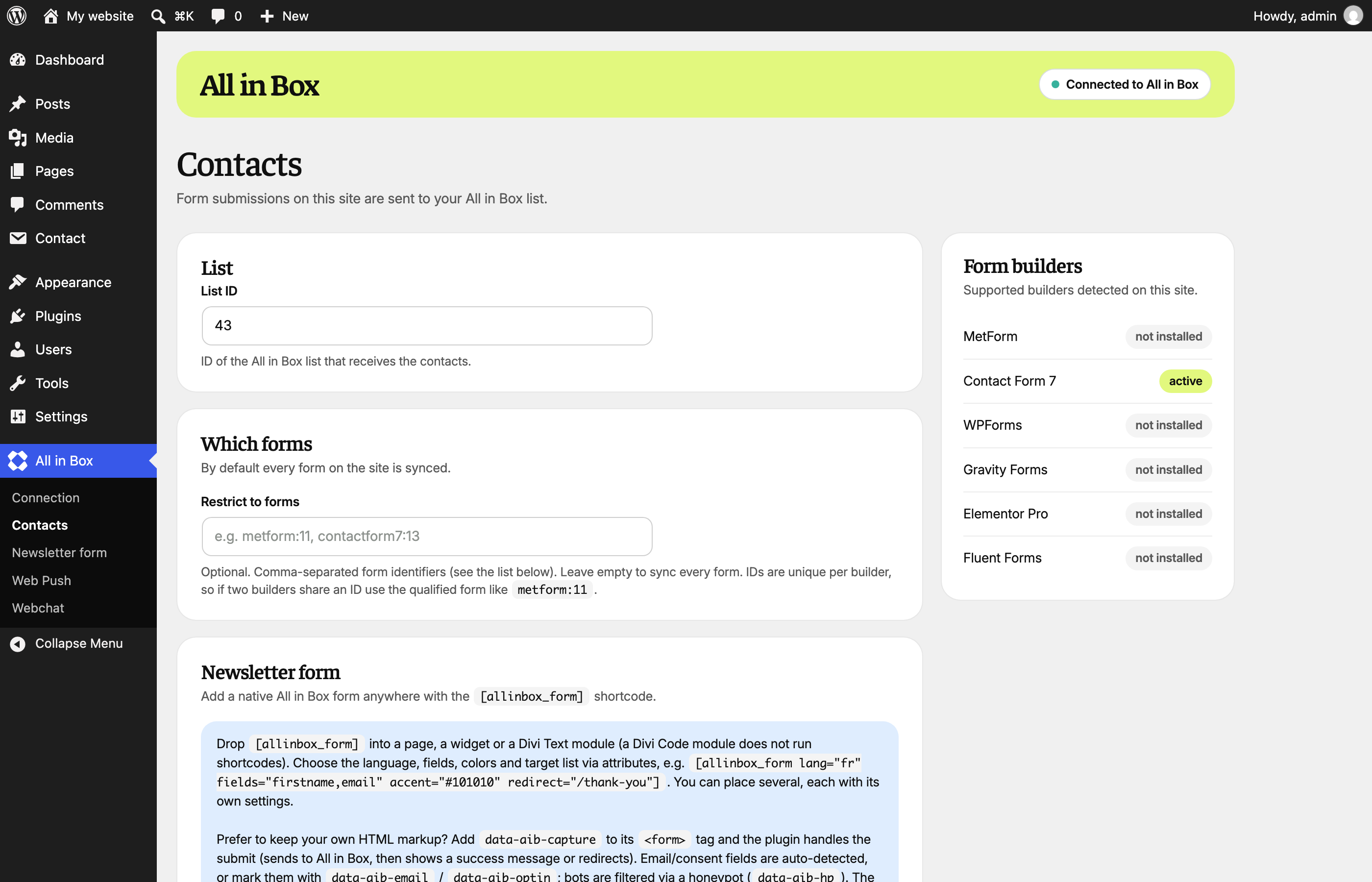
Form submissions are sent to your contact list. Supported form builders: MetForm, Contact Form 7, WPForms, Gravity Forms, Elementor Pro, Fluent Forms. Each one is isolated: an error on our side never breaks the submission of the form itself.
The language of the contact goes with it: the language of the newsletter form, else the language of the page (Polylang and WPML are supported).
Opt-in only. A contact is created, and it is subscribed to the newsletter only when consent is given. Leaving the consent box unticked never unsubscribes an existing subscriber.
Newsletter form generator
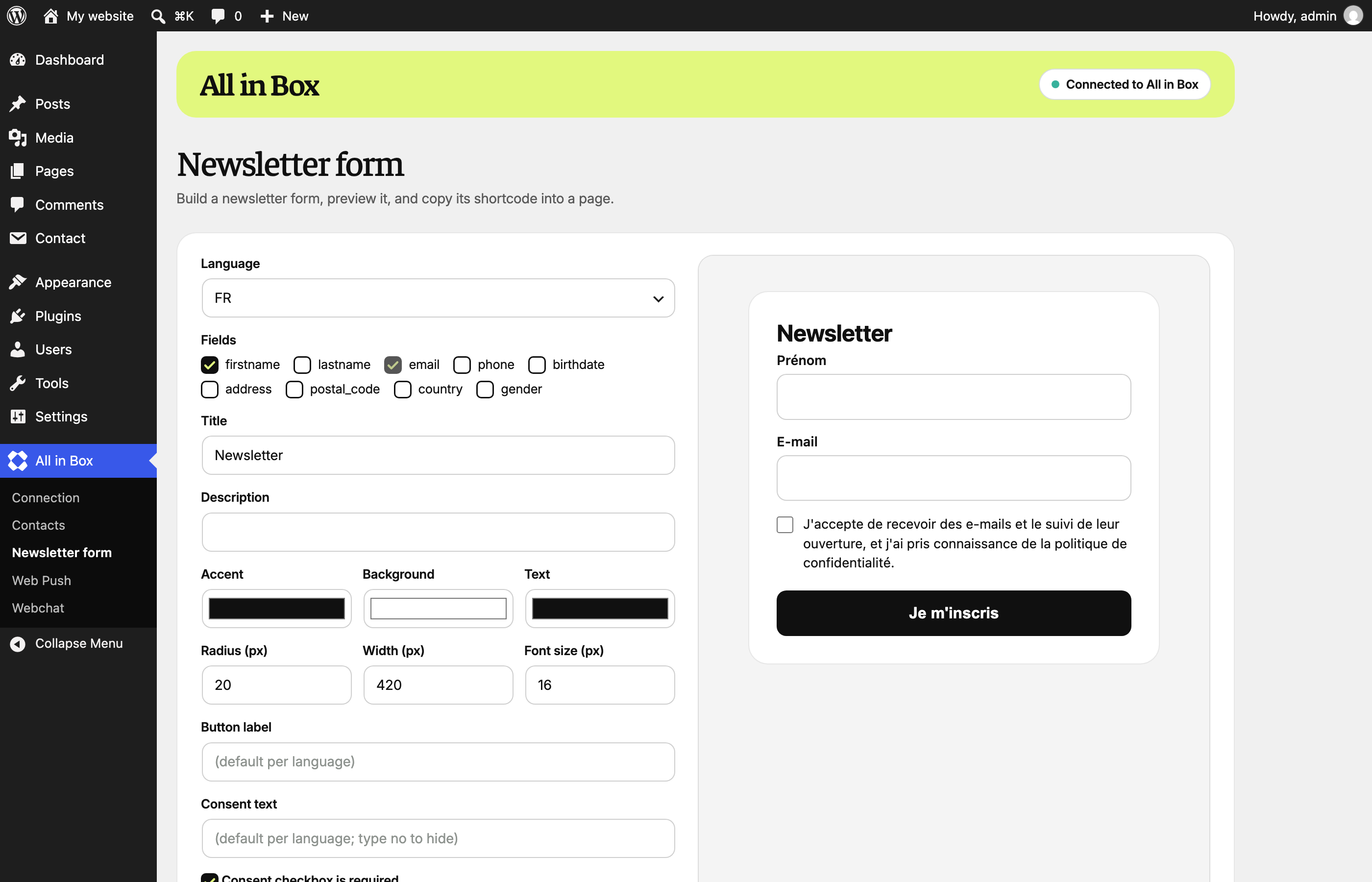
The [allinbox_form] shortcode renders a form handled by the plugin: configurable fields, seven languages, colours, target list, success message or redirect. A visual builder, under All in Box > Newsletter form, previews it live and gives you the shortcode to paste. You can also add data-aib-capture to a form you built by hand and let the plugin handle the submission.
Submissions travel through the site itself, so the API token never reaches the browser.
WooCommerce events
Order placed, payment accepted and add to cart are sent as events attached to the contact, each one toggleable. Orders and payments also enrich the contact with the billing details.
Push notifications
Paste the channel token: the SDK script is added to every page and the service worker is served by the plugin. No theme edit, no FTP, nothing to upload.
On a site that is not at the root of its domain (a subdirectory multisite, or a WordPress in a subfolder) the worker is served on the site’s own path, and notifications cover that site’s pages only. On a network, each sub-site can therefore have its own channel, and the main site is left untouched.
Chat bubble
Paste the chatbot key: the widget script is added to every page. A Check setup button calls your chatbot from the site itself and tells you exactly what is missing if the bubble stays silent (unknown key, chatbot not published, site domain not declared).
External services
This plugin sends data to All in Box (https://app.allinbox.com), the service it connects to. It is operated by All in Box, and an account is required.
What is sent, and when:
- On a form submission, once the connection is configured: the email address, and the first name, last name, phone, postal code, country, address, birth date and gender when the form collects them, plus the consent state, the language of the form or of the page, and the domain of your site. Nothing is sent when no email address is found.
- On a WooCommerce order, payment or add to cart, when the matching event is enabled: the order reference and identifier, total, currency, payment method, product names, item count, and the billing name, phone, address, postal code, country and city. Orders and carts also carry the language of the page; a payment does not, since a payment provider can confirm it from its own server.
- When you save the settings, or use a Check setup button: a request that carries only your API token, or your chatbot key, to verify the connection.
- On every page of your site, when push notifications or the chat bubble are enabled: the visitor’s browser loads a script from app.allinbox.com, which lets All in Box serve the widget and, for the chat, exchange the visitor’s messages with the chatbot.
Terms of use: https://app.allinbox.fr/cgu/
Privacy policy: https://app.allinbox.fr/rgpd/
Installation
- Install and activate the plugin.
- Open All in Box in the admin menu.
- For contacts sync: on Connection, enter the API URL and a workspace token and save, then choose the target list on Contacts. The Contacts, Newsletter form and WooCommerce pages appear once the token is validated.
- For push notifications or the chat bubble: no token needed, fill in the Web Push or Webchat page.
The API token can also be defined in wp-config.php, which keeps it out of the database:
define( 'AIB_LEAD_SYNC_TOKEN', 'aib_skey_xxx' );
FAQ
Do I need an All in Box account?
Yes. The plugin is the bridge to your workspace; on its own it does nothing.
Can I use only the chat bubble, or only push notifications?
Yes. Neither needs the API token, and their pages are always in the menu.
My chat bubble does not appear
Your chatbot only answers the site declared in All in Box. Use Check setup on the Webchat page: it says whether the key is unknown, the chatbot is not published, or your domain is missing from its Your website field.
Does it work on a WordPress multisite?
Yes. Activate it on the sub-site you want; the settings are per sub-site, so each one has its own chatbot key and its own push channel. For push, the service worker is served on the sub-site’s own path and its scope is limited to that sub-site’s pages, so there is nothing to add at the network root and no interference between sub-sites.
Is a contact subscribed to the newsletter without consent?
No. The contact is created, but the newsletter subscription is only sent when consent is given, and an existing subscriber is never unsubscribed by a form submitted without ticking the box.
Where does the token appear?
Nowhere. It stays on the server, and it is never printed back into the plugin’s pages once saved.
How is the public form endpoint protected?
Four layers: a honeypot, a same-origin check (no REST nonce, so forms keep working behind full-page caching), a signed token carried by each rendered form (which also pins the target list, so it cannot be swapped), and ceilings per IP address and per email address. The ceilings are adjustable with the aib_lead_sync_capture_limits filter.
Screenshots



Changelog
1.10.0
- New: All in Box has its own menu, with one page per feature: Connection, Contacts, Newsletter form, Web Push, Webchat and WooCommerce. The former address under Settings leads to the new menu.
- New: the plugin’s pages and the newsletter form follow the All in Box brand. A form that sets its own colours or radius keeps them.
- New: the language of the contact is sent to All in Box: the language of the newsletter form, else the language of the page. Polylang and WPML are supported.
- The brand fonts (Faustina and Inter, SIL Open Font License) are bundled with the plugin and loaded on its pages only.
1.9.2
- The push notification and chat bubble scripts are now loaded through the WordPress script queue.
- Tested with WordPress 7.1.
1.9.1
- Fixed: newsletter forms failed on pages served from a full-page cache older than a day.
- Fixed: the form builder tab of the settings page stayed empty.
1.9.0
- Push notifications and the chat bubble no longer require the contacts API token: their tabs are always available.
- New: chat bubble install, with a setup check that names what is missing.
- Security: each rendered form now carries a signed token, which also pins its target list; ceilings added per IP address (20 per 10 minutes) and per email address (3 per hour).
- Security: a redirect after submission must point at your own site; anything else is ignored.
- Security: the API token is no longer printed back into the settings page.
- Fixed: saving a tab while the connection was invalid could wipe the contacts settings.
- Fixed: the shortcode no longer renders a form that cannot work, and the form it renders posts instead of putting the address in the URL if the script fails to load.
- The service worker is served by the plugin only; the file written at the site root by 1.8.0 is removed automatically.
- Push notifications now work on a multisite, or on a WordPress in a subfolder: the worker is served on the site’s own path with a scope limited to its pages.
- Errors are shown in the settings page instead of being written to the PHP log outside of debug.
1.8.0
- Newsletter form generator, shortcode builder, capture of hand-built forms.
1.7.0
- WooCommerce events, connection validated on save.
1.6.0
- Contacts sync (six form builders) and push notifications install.
1.1.0
- Initial release (contest embed).