


Description
No API key. No account. No setup. Unlike most AI tools, which make you sign up for OpenAI or Anthropic and paste in your own paid API key, AltoGraph runs the AI on our hosted service. Free for 10 items every month.
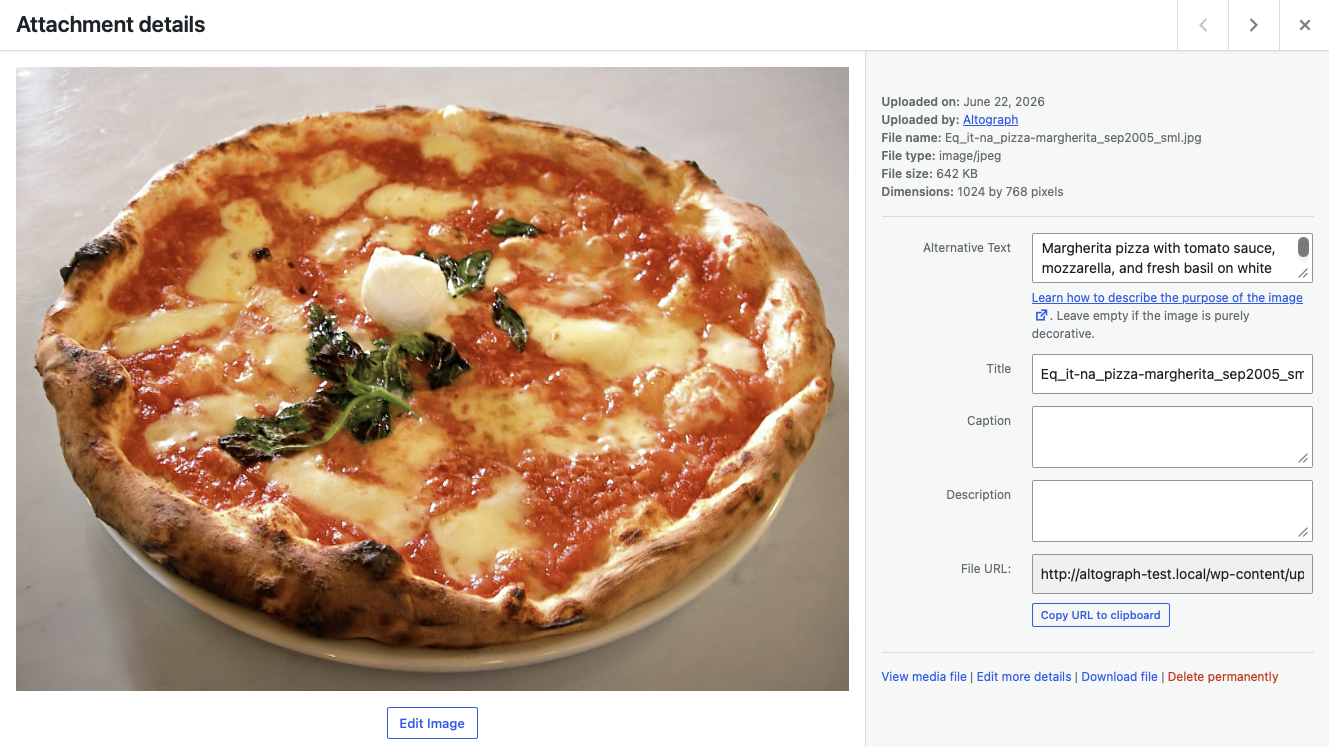
Your Media library gets an Alt text column, so you can see at a glance which images have none, and a Generate button on each one that does not. One click writes alt text from the picture itself. There is a bulk action for a backlog, and a Generate button in the Attachment details panel too.
Watch it work: a short demo on a test site, with an AI-generated voiceover.
Nothing is sent anywhere until you ask for it. If you would rather not click, you can switch on automatic alt text for new uploads, and automatic SEO meta descriptions with JSON-LD structured data when you save a post, in Settings. Both are off until you turn them on. AltoGraph never overwrites alt text you have written yourself.
AltoGraph Pro raises that limit (subject to fair use).
What is included
- Alt text written from the image itself, for one image or many at once (better accessibility and image SEO).
- Concise, on-topic meta descriptions for posts and pages, written when you save a post once you switch that on.
- Article JSON-LD structured data for richer search results, added with each meta description.
- A backfill action for images that have no alt text yet.
- Alt text you have written yourself is never overwritten.
Privacy-friendly by design
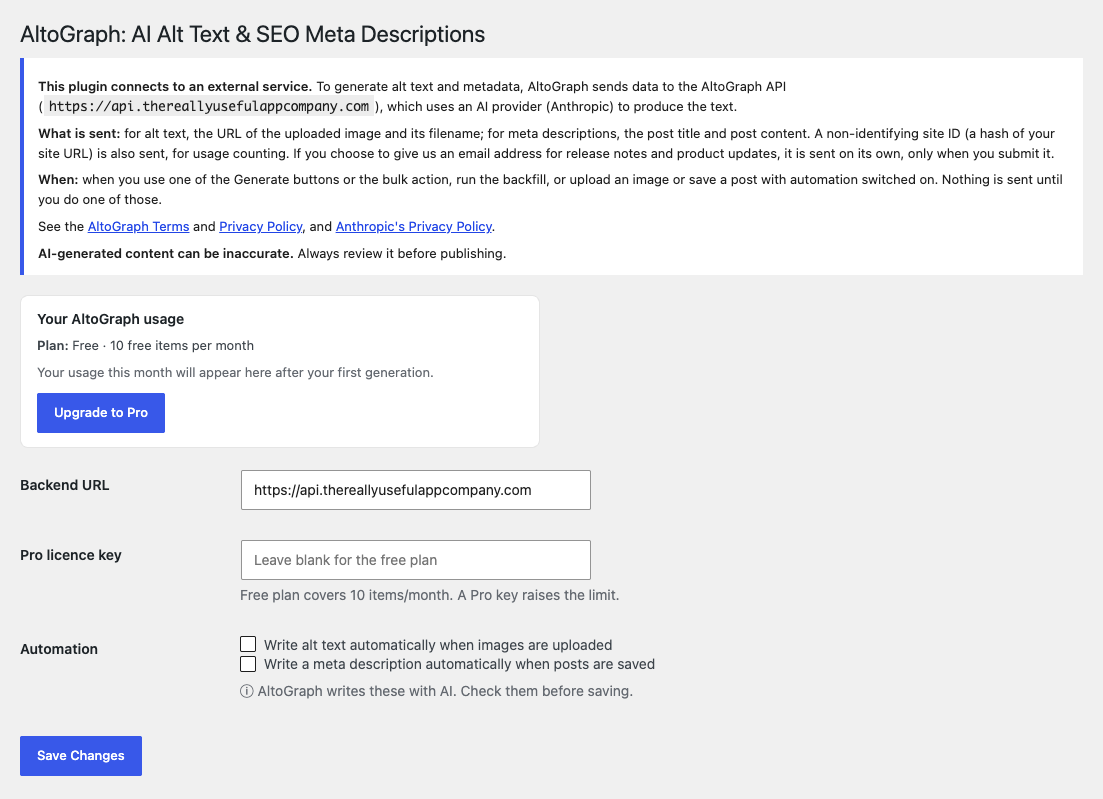
Automation is off until you switch it on, and AltoGraph only ever sends what it needs to do the job (see the External Services section below). A site ID (a hash of your site URL) is used for usage counting; it does not need any personal data about your site’s visitors. You can also choose to give us an email address for release notes and product updates; it is optional, and nothing stops working without it.
External services
This plugin connects to the AltoGraph API to generate alt text and metadata. It is required for the plugin’s core features.
- What is sent and when:
- Alt text: the plugin sends the image URL and filename to the AltoGraph API on each of these actions:
- when you upload an image with automatic alt text switched on
- when you use the Generate button in the Media library Alt text column
- when you use the Alt text bulk action in the Media library, or the backfill on the settings screen
- when you use the Generate button in the Attachment details panel
- Meta descriptions: the plugin sends the post title and post content when you save a post with automatic meta descriptions switched on.
- Usage counting: a site ID (a hash of your site URL) and the plugin version accompany each request. We treat the site ID as personal data, because it can be matched to your site’s address. Our privacy policy explains how we use it. Whether this site’s review prompt was shown, snoozed, dismissed or clicked is also sent, so we can tell whether that prompt is working. It records the site, not the individual user, and says nothing about what you did on WordPress.org afterwards. If you choose to give us an email address, it is sent on its own, only when you submit your email address on the settings screen. It is optional, you are asked once (and again only after we have deleted it), and every feature keeps working if you skip or dismiss it. It is sent only if you tick the sign-up box, together with the wording you agreed to. We use it to send release notes and product updates and to give you a way to reach us. These emails are sent from our Microsoft 365 mailbox. You can unsubscribe from any message, and we delete it 24 months after your last contact with us. Whether this site’s email prompt was shown, dismissed or submitted is also sent, so we can tell whether it is working; it does not include the address itself.
- Where it goes: the AltoGraph API (default
https://api.thereallyusefulappcompany.com), which uses Anthropic as an AI subprocessor to generate the text. - Service terms and privacy:
- AltoGraph Terms: https://thereallyusefulappcompany.com/altograph/terms
- AltoGraph Privacy Policy: https://thereallyusefulappcompany.com/altograph/privacy
- Anthropic Privacy Policy: https://www.anthropic.com/legal/privacy
Nothing is sent until you use one of the Generate buttons or the bulk action, run the backfill, or upload an image or save a post with automation switched on. If you choose to give us an email address, it is sent when you submit it.
Installation
- Install AltoGraph from the Plugins screen, or upload the
altographfolder to/wp-content/plugins/. - Activate the plugin.
- Go to Settings → AltoGraph.
- Review the external-service notice, then enable “Write alt text automatically” and/or “Write a meta description automatically.”
- (Optional) Enter an AltoGraph Pro licence key to raise the monthly limit.
FAQ
Do I need an AI API key?
No. The AI runs on the AltoGraph service, so there’s nothing to set up.
Will it overwrite alt text I’ve already written?
No. AltoGraph only fills in alt text that is missing.
Is anything sent automatically without my knowledge?
No. Automation is off by default. Data is only sent after you enable it, and exactly what’s sent is listed in the External Services section.
What happens when I hit the free limit?
Generation pauses for the rest of the month. Upgrade to Pro to raise the limit, or wait for the next month.
Does alt text named from the filename count towards my limit?
Yes. When our service cannot read an image (for example on a private or password-protected site), it writes alt text from the image’s filename instead and tells you so, because that text will not describe the picture. It still counts as one of your items for the month.
Can I generate alt text for hundreds of images at once?
Yes. Select them in the Media library list view and choose “Generate alt text (AltoGraph)” from Bulk actions. AltoGraph works through them a few at a time with a progress line, so a large selection finishes on any hosting. If you leave the page, the run waits for you to resume it.
Screenshots
Changelog
1.0.35
- Changed: “Generate missing alt text” on the settings screen now finds every image with no alt text, not just the next 20, and works through them in the Media library a few at a time with a progress line, the same way as the bulk action. It used to do its 20 in one request, which could time out on some hosting. You can leave and resume the run, it waits when our service asks it to slow down, and it pauses at your monthly limit.
1.0.34
- Fixed: with AltoGraph Pro, the settings screen now shows how much you have used this month. It used to say your usage would appear after your first generation, however much you had used.
1.0.33
- Fixed: the Media library bulk action now works through a large selection a few images at a time, with a progress line, so it finishes on hosting that stops long requests. It used to do every image in one request, which could time out with no message. If you leave the page, or reach your monthly limit, you can resume the run where it stopped.
- Fixed: when our service asks the plugin to slow down, a bulk run now waits a minute and carries on, instead of reporting the rest of the images as failed.
- Fixed: “Generate missing alt text (next 20)” on the settings screen now says what it did. It used to reload the page with no message.
- Changed: the FAQ now says that alt text named from a filename counts towards the monthly limit.
1.0.32
- Fixed: when our service turns a request away, because too many were sent from your network or because a licence key is already in use on its limit of sites, the message now says why and what to do. It used to say only “Backend error” and a number.
1.0.31
- Fixed: on a password-protected post, the meta description and structured data are no longer added to the page until the password is entered.
- Changed: the settings screen now says the site ID is treated as personal data, as our privacy policy does.
- Changed: the free plan is now 10 items a month (it was 25).
- Changed: wording on the settings screen, in the Media library messages and in the list of our other plugins, so none of it suggests alt text is written without you asking. The settings heading now matches the plugin’s name on WordPress.org.
- Fixed: on a site with more than one Alto plugin, an older Alto plugin could supply this plugin’s shared code, which could silently switch off newer features such as the monthly-limit notice. Each Alto plugin now uses its own copy.
- Fixed: the note on the settings screen about what is sent now lists every action that sends, including the Generate buttons and the bulk action, which it had left out.
- Added: an optional sign-up for release notes and product updates by email, offered once on the settings screen after you have used the plugin a few times. You sign up by ticking a box, every feature works without it, and you can unsubscribe from any message.
1.0.24
- Added: a notice when this site has used its free allowance for the month, on the Dashboard, the settings screen, the Media Library and the editor. It says what is paused, such as alt text for new uploads when automatic alt text is switched on, and the date it resets. Previously automatic alt text and meta descriptions could simply stop, with nothing to say why.
- Added: once 80% of the month’s free allowance is used, the Media Library and editor show how much is left.
- Changed: reaching the monthly limit while generating alt text now shows what happened, when it resets and how to upgrade, instead of a single line of status text.
- Changed: the request for a review is not shown while the site is at its monthly limit.
- Changed: the note under Generate alt text no longer says AltoGraph wrote the text. When an image cannot be read, the alt text comes from the filename, and the note contradicted the warning beside it.
1.0.20
- Fixed: a licence key that our service does not recognise is no longer shown as “Pro”. The plugin now says the key was not recognised and keeps the upgrade link visible, instead of silently putting you on the free allowance with no way to correct it.
- Changed: your licence key is no longer shown in full or left in an editable box. Settings now shows only the last four characters, and replacing the key takes a deliberate click on “Update key”, so it cannot be typed over by accident. Removing a key is its own checkbox.
1.0.18
- Fixed: the address the plugin uses to reach our AI service is now required to be https, both when it is saved and every time it is read. Only an administrator could ever have changed it, and the default has always been secure, but an insecure address entered by hand would have sent your licence key and your content unencrypted. An address that is not https is now refused and the secure default is used instead.
- Fixed: the result message shown after generating alt text in the Media library travelled in the page address, so a link crafted by someone else could put their own wording inside a message labelled AltoGraph. The message is now held for your account only and the address carries nothing but a short reference.
- Fixed: the structured data AltoGraph adds to your page header is now escaped more strictly, so generated text cannot affect the surrounding page whatever it contains. It also no longer passes through a filter that could alter an ampersand inside the data and make it invalid.
- Fixed: the error token in the Media library address is now sanitised where it is read, matching the rest of the family. No visible change.
- Fixed: on the Edit Media screen, Generate alt text did nothing when clicked. The button now works there as it does in the Media library.
- Changed: the notes beside the Generate controls now describe what the button will do, rather than reading as a claim that text already on the page was written by AI.
1.0.13
- Added: a Settings link on the Plugins screen. The welcome notice now uses the same shared component as the rest of the family, so all four behave identically.
1.0.12
- Added: the plugin now reports whether this site’s review prompt was shown, snoozed, dismissed or clicked, so we can tell whether the prompt is working at all. It rides the request the plugin already makes, so no new outbound request is made and no new action triggers a send. It records the site rather than the individual user, and nothing about what happens on WordPress.org afterwards.
- Housekeeping: documented why the alt-text backfill query is written the way it is. No functional change.
1.0.11
- Added: the review prompt now appears in the Media library, where alt text is actually generated, instead of only on the settings screen.
- Added: the plugin now reports its own version with each request, so we can tell which release a problem relates to. No personal data is involved.
- Improved: the External services section now lists every action that sends an image, rather than two of them. Nothing about what is sent has changed.
1.0.10
- New: an “Alt text” column in the Media library shows at a glance which images are
missing alt text, with a “Generate with AltoGraph” button on each one. - New: a “Generate alt text” button in the Attachment details panel, right beside the
Alternative Text field, so it works from the grid view too. - New: a welcome message after activation, pointing at the Media library. Previously the
plugin activated silently and gave no sign it was there. - New: “Generate alt text” also appears as a row action and as a bulk action for several
images at once. - New: the Media library now reports what happened: how many images were given alt text,
how many were skipped because they already had it, and why any failed. Reaching the
monthly limit now says so instead of failing quietly. - Fixed: when the service cannot reach an image (a private or password-protected site,
hotlink protection, a moved file), it names the image from its filename instead. That
is now clearly reported as NOT AI-written, with a prompt to rewrite it. Previously it
was reported as a success and labelled AI-generated, which was misleading: filename
text does not describe the picture and is no use to a screen-reader user. - Unchanged: nothing is sent to the AI until you ask for it. Automation is still off by
default, and existing alt text is never overwritten.
1.0.7
- Compatibility: tested with WordPress 7.1.
- New: a “Your usage” panel on the settings screen showing how much of this month’s
allowance you have used, with a progress bar. - New: an “Upgrade to Pro” link on the settings screen for free-plan users.
- Reaching the monthly limit is now visible on the settings screen; previously the
plugin stopped generating with no indication of why.
1.0.6
- Small wording tidy-ups on the settings screen.
1.0.5
- Renamed to AltoGraph (capital G) to match the rest of the Really Useful App Company family. Same plugin and settings; display name only.
- Refreshed the plugin icon and banner with the new family look.
1.0.4
- Added an optional, dismissible prompt on the settings page inviting an honest review after you’ve generated a few times. No tracking; dismiss any time.
- Added: AltoScribe to the list of our other plugins shown on the settings screen.
1.0.3
- Added: AltoFAQ to the list of our other plugins shown on the settings screen.
1.0.2
- Updated: plugin name and listing details so it’s easier to find and clearer about what it does.
1.0.1
- Added: a reminder to review AI-generated content for accuracy before publishing (settings screen and generate actions).
- Added: links to our other Really Useful App Company plugins on the settings screen (dismissible, no tracking).
1.0.0
- Initial release: automatic alt text, meta descriptions, JSON-LD, and backfill.