


Description
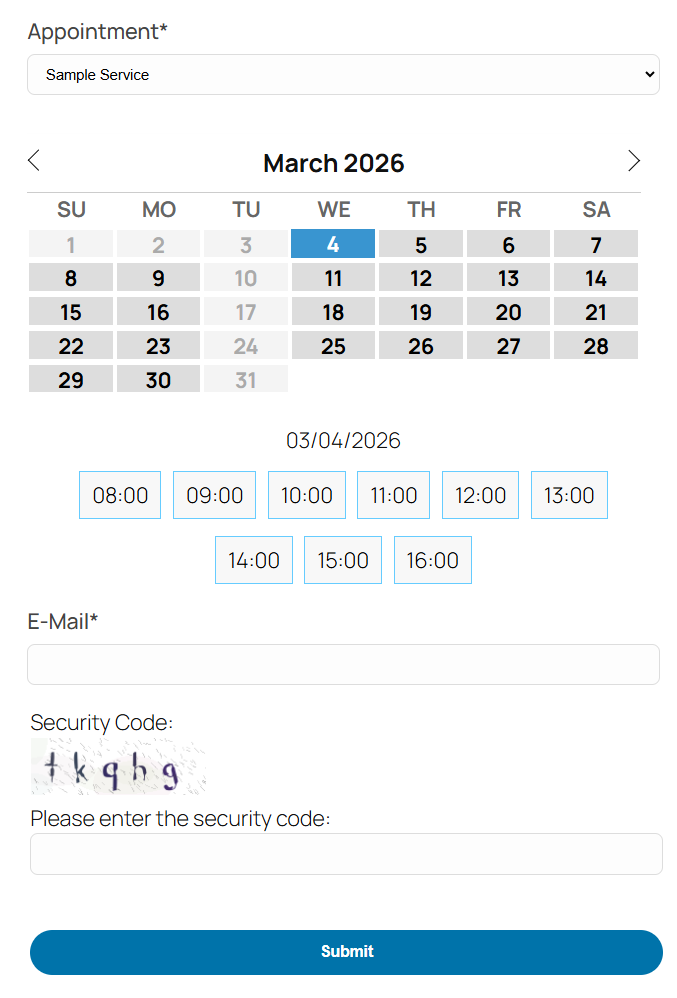
Appointment Hour Booking is a WordPress plugin for creating booking forms for appointments with a start time and a defined duration over a schedule. The start time is visually selected by the end user from a set of start times calculated based on the “open” hours and service duration. The duration/schedule is defined in the “service” selected by the customer. Each calendar can have multiple services with different durations and prices.
This plugin is useful for different cases like booking medical services where services with different durations and prices may be available, personal training sessions, booking rooms for events, reserving language classes or other types of classes, and other types of service/resource bookings where start times are selected and availability is automatically managed using the defined service duration to avoid double-booking (the booked time is blocked once the booking is completed).
Main Features:
- Easy visual configuration of calendar data and schedules
- Working dates, invalid/holiday dates, and special dates can be defined
- Supports restriction of default, maximum, and minimum dates
- Open hours can be defined for each date
- Each calendar can have multiple services defined
- Each service can have its own price and duration
- Start times are calculated automatically based on the open hours and service duration
- Available times are managed automatically to avoid double-booking
- Multiple services can be selected in each booking
- Services can have multiple capacities
- Automatic price calculation
- Customizable email notifications for administrators and users
- Reply to bookings with AI assistance directly from the bookings list (free, no API key required)
- Form validation and built-in anti-spam captcha protection
- Manual and automatic CSV reports (configurable for new/unread submissions or complete active booking lists)
- iCal add-on with iCal export link and iCal file attached to emails
- Calendar available in 53+ languages
- Multiple date formats supported
- Blocks for Elementor and Gutenberg
- Multi-page calendars
- Printable appointments list
Features in commercial versions:
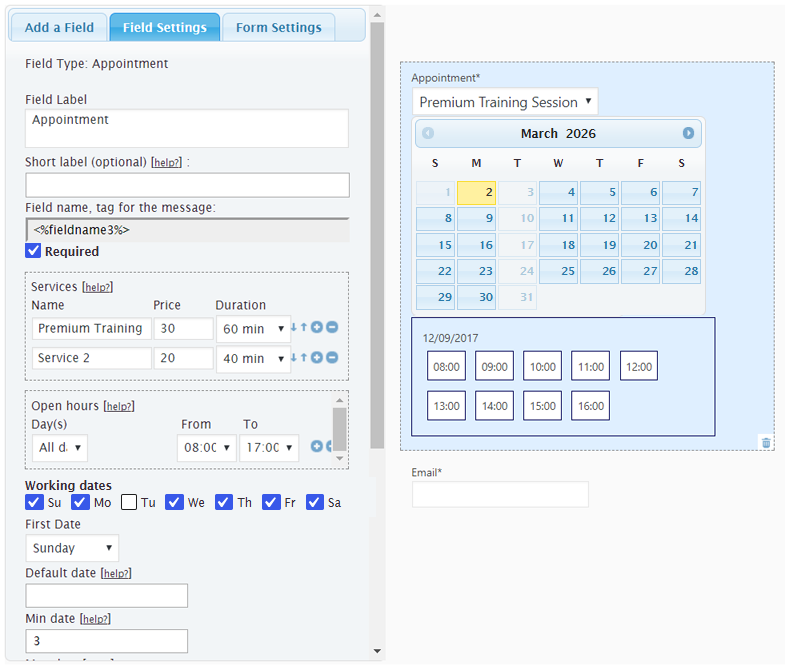
- Visual form builder for creating the booking form fields
- Booking form can be connected to payment processors (e.g., PayPal Standard, PayPal Pro, Stripe, Skrill, Authorize.net, TargetPay/iDEAL, Mollie/iDEAL, SagePay, Redsys)
- Payments are SCA ready (Strong Customer Authentication), compatible with the Payment Services Directive (PSD2 – EU)
- Add-ons for integration with external services: reCAPTCHA, Mailchimp, Salesforce, WooCommerce, and others
- Add-ons with additional features: appointment cancellation add-on, appointment reminders add-on, Clickatell and Twilio SMS add-ons, signature fields, iCal synchronization, Google Calendar API, Zoom Meetings, etc.
Appointment Hour Booking can be used for:
Booking services or resources: Define schedules, open hours, services, prices, and durations, and let the calendar plugin manage the schedule.
Sample cases: Medical services, personal training, resource allocation, booking rooms, classes, etc.
The services can have a maximum capacity (for example: the number of people who can book/attend the service at the same time). The default capacity is 1. If the service capacity has been set to 1, the time slot will be blocked for new bookings after receiving one booking. If the service capacity has been set to a greater number (for example: a service with a capacity of 10), the time slot will be blocked after filling the capacity (for example: after receiving bookings for a total of 10 people). This feature is described in detail at https://apphourbooking.dwbooster.com/blog/2019/01/24/bookings-for-multiple-persons/
AI-Assisted Email Replies
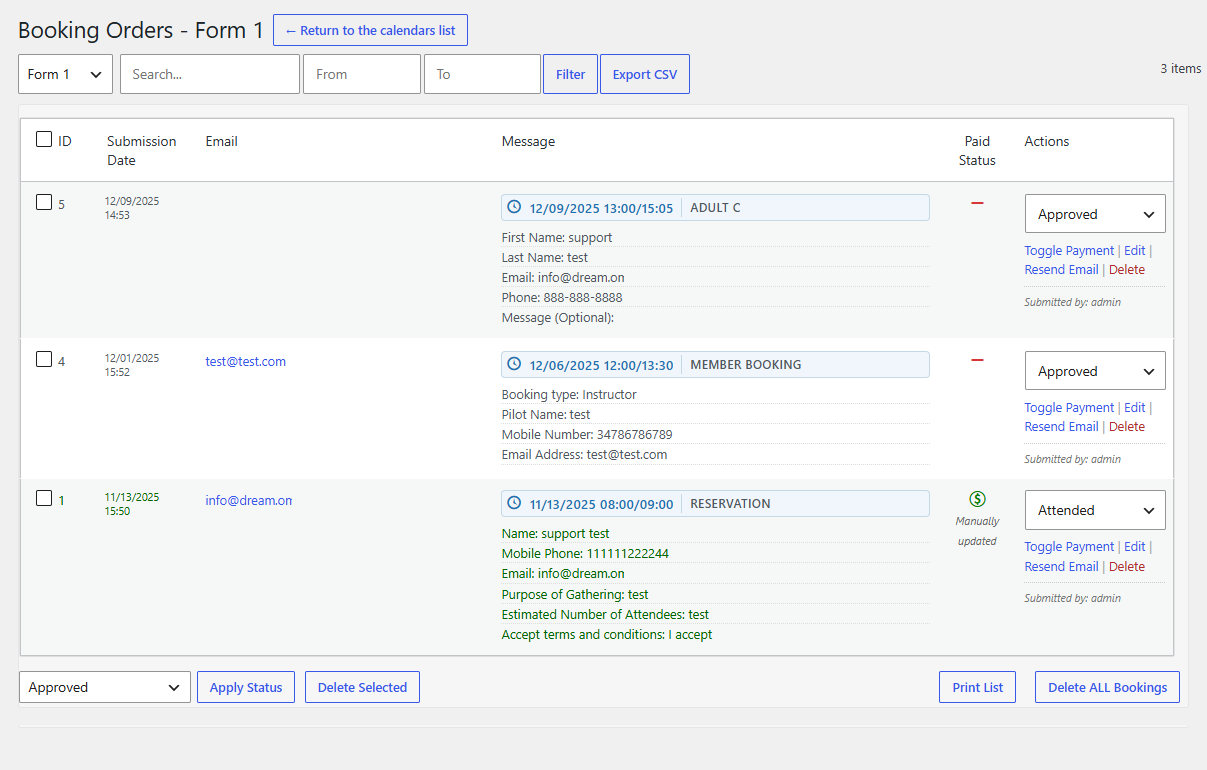
From the “Booking Orders” list, administrators can reply directly to customer bookings using the built-in reply modal. The modal includes a free AI assistant (requiring no API key or external account setup) that drafts replies based on the booking details and optional instructions, and logs sent replies directly in the booking record.
The Troubleshoot Area
Use the troubleshoot area if you are having problems with special or non-Latin characters. In most cases, changing the charset to UTF-8 through the option available in the troubleshoot area will solve the problem.
You can also use this area to change the script load method if the booking calendar isn’t appearing on the public website.
The Notification Emails
The notification emails with the appointment data entered in the booking form can be sent in “Plain Text” format (default) or in “HTML” format. If you select “HTML” format, be sure to use <br /> or <p> tags for line breaks in the text and use proper HTML formatting.
Exporting Appointments to CSV / Excel Files
The appointment data can be exported to a CSV file (Excel compatible) to manage the data in other applications. That option is available from the “Booking Orders” list; appointments can be filtered by date and by text so you can export only the needed appointments to the CSV file. Automatic email reports can also be configured to send either new/unread submissions or the complete active booking list for upcoming events.
Other Versions and Features
The free version published in this WordPress directory is a fully functional version for accepting appointments as indicated in the plugin description. There are also commercial versions with additional features, for example:
- Ability to process forms/appointments linked to payment processors (PayPal, Stripe, Skrill, …)
- Form builder for visual customization of the booking form
- Add-ons with multiple additional features
Payments processed through the plugin are SCA ready (Strong Customer Authentication), compatible with the Payment Services Directive (PSD2 – EU) that came into full effect on 14 September 2019.
Please note that the pro features aren’t advertised as part of the free plugin in the description shown in this WordPress directory. If you are interested in more information about the commercial features, visit the plugin’s page: https://apphourbooking.dwbooster.com/download
Installation
To install Appointment Hour Booking, follow these steps:
- Download and unzip the Appointment Hour Booking calendar plugin.
- Upload the entire
appointment-hour-booking/directory to the/wp-content/plugins/directory. - Activate the Appointment Hour Booking plugin through the Plugins menu in WordPress.
- Configure the settings at the administration menu >> Settings >> Appointment Hour Booking.
- To insert the Appointment Hour Booking calendar form into a page or post, use the block or icon that appears when editing content.
FAQ
Where do I report security bugs found in this plugin?
Please report security bugs found in the source code of the plugin through the Patchstack Vulnerability Disclosure Program. The Patchstack team will assist you with verification, CVE assignment, and notify the developers of this plugin.
Q: What does each field mean in the Appointment Hour Booking calendar settings area?
A: The product’s page contains detailed information about each appointment calendar field and customization:
https://apphourbooking.dwbooster.com
Q: How does the “Reply with AI” feature work in the bookings list?
A: In the “Booking Orders” list, each booking includes a “Reply” action link. Clicking it opens a modal where you can write a direct email reply to the customer or click “Generate with AI” to automatically draft a polite, context-aware response based on the customer’s booking details and your optional instructions. This feature is completely free and requires no API key.
Q: Where can I publish an appointment booking form?
A: You can publish appointment booking forms on pages and posts. The shortcode can also be placed into a theme template. The commercial versions of the plugin also allow publishing it as a widget.
Q: How can I apply CSS styles to the form fields?
A: Please check the complete instructions on the following page: https://apphourbooking.dwbooster.com/faq#q82
Q: How can I align the form using multiple columns?
A: In the form editor, click a field and in its settings locate the field named “Additional CSS Class“. In that field, you can enter the name of a CSS class that will be applied to the field.
There are pre-defined CSS classes to align two, three, or four fields on the same line. The CSS classes are named:
column2
column3
column4
For example, if you want to put two fields on the same line, specify the class name “column2” for both fields.
Q: How do I hide fields on forms?
A: You should use a custom class name. All fields include the attribute “Additional CSS Class”. Simply enter a custom class name in this attribute (for example, myclass), and then define the new class in a CSS file on your website, or add the needed styles into the “Edit Styles” tab in General Settings:
.myclass{ display:none; }
If you are using the latest version of the plugin, you can also enter the class name hide (included in the plugin’s distribution) in the “Additional CSS Class” attribute.
Q: How do I edit or remove the form title / header?
A: In the form builder in the administration area, click the “Form Settings” tab. That area is for editing the form title and header text.
It can also be used to choose different alignments for the field labels.
Q: Can the emails be customized?
A: In addition to editing the email content, you can use the following tags:
%INFO%: Replaced with all the information posted from the form.
%itemnumber%: Request ID.
%formid%: ID of the booking form.
%referrer%: Referrer URL if reported.
%additional%: IP address, server time.
%final_price%: Total cost.
%fieldname1%, %fieldname2%, …: Data entered in each field.
Q: Can I add a reference to the item number (submission number) in the email?
A: Use the tag %itemnumber% in the email content. That tag will be replaced by the submission item number.
Q: How do I insert an image in the notification emails?
A: If you want to send an image in the notification emails, such as a header, insert an IMG tag in the “Email notification to admin” and/or “Email confirmation to user” textareas in the form settings, with an absolute URL in the SRC attribute of the IMG tag:
Q: How do I insert line breaks in the notification emails when the HTML format is selected?
A: If you are using the HTML format in the notification emails, you should insert <br /> tags for line breaks in the email content:
Q: The form doesn’t appear. What is the solution?
A: If the form doesn’t appear on the public website (in some cases only the captcha appears), change the script load method to “Direct”. This resolves the issue in most cases.
This can be changed in the “Troubleshoot Area” located in the General Settings page.
Q: I’m not receiving the emails with the appointment data.
A: First, try using a “from” email address that belongs to your website domain; this is the most common restriction applied by hosting providers.
If that doesn’t work, please check whether your hosting service requires a specific configuration to send emails from PHP/WordPress websites. The plugin uses the settings specified in the WordPress website to deliver emails; if your host has specific requirements like a fixed “from” address or a custom “SMTP” server, those settings must be configured in your WordPress installation.
Q: Non-Latin characters aren’t being displayed in the form. Is there a workaround?
A: Use the “Troubleshoot Area” to change the character encoding.
Q: Can I display a list of the appointments?
A: A list of the appointments scheduled on the calendar can be displayed by using this shortcode on the page where you want to display the list:
[CP_APP_HOUR_BOOKING_LIST]
… it can also be customized with parameters if needed, for example:
[CP_APP_HOUR_BOOKING_LIST from=”today” to=”today +30 days” fields=”DATE,TIME,email” calendar=”1″]
… the “from” and “to” parameters are used to display only the appointments / bookings within the specified period. These can be indicated either as relative days to “today” or as fixed dates.
The styles for the list are located at the end of the file “css/stylepublic.css”:
.cpabc_field_0, .cpabc_field_1, .cpabc_field_2, …
Clear the browser cache if the list isn’t displayed properly (to ensure it loads the updated styles).
You can also add the needed styles into the “Edit Styles” tab in General Settings.
Q: Can I track conversion referrals?
A: Yes, for this purpose you can use the plugin CP Referrer and Conversions Tracking, which includes automatic integration with this plugin.
Q: Are the forms GDPR compliant?
A: In all plugin versions, you can turn off IP tracking to avoid saving that user information. Full GDPR-compliant forms can be built using the commercial versions of the plugin.
Screenshots


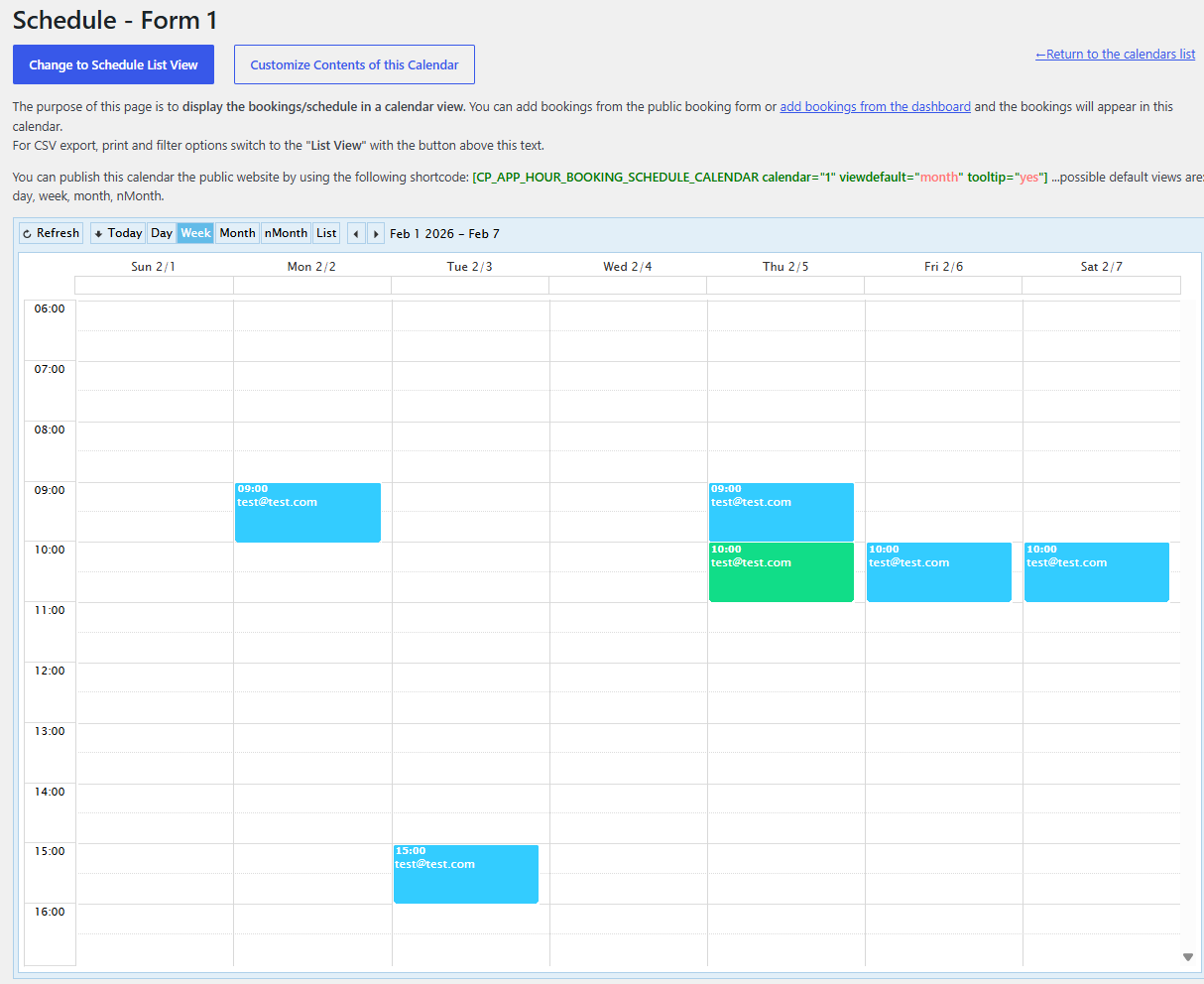
Changelog
1.3.78
- Admin interface update
1.3.79
- Language fixes
1.3.80
- PHP 8 compatibility
1.3.81
- Min-date/max-date fix
1.3.82
- New design theme
1.3.83
- PHP warning fix
1.3.84
- Dashboard add-on update
1.3.85
- Elementor integration update
1.3.86
- Improved load speed
1.3.87
- Add-ons engine update
1.3.88
- iCal Export add-on updates
1.3.89
- Form builder updates
1.3.90
- Max date rule fix
1.3.91
- PHP 8 fix
1.3.92
- iCal update
1.3.93
- CSS fixes
1.3.94
- Add-on improvements
1.3.95
- Better iCal integration
1.3.96
- PHP 8 fixes
1.3.97
- SQL query updates
1.3.98
- PHP 8 fix
1.3.99
- Compatible with WordPress 6.2
1.4.01
- Code improvements
1.4.02
- Query updates
1.4.03
- Fix to reports
1.4.04
- PHP 8 update
1.4.05
- WP 6.2 update
1.4.06
- New add-ons
1.4.07
- iCal add-on update
1.4.08
- iCal improvements
1.4.09
- Add-ons update
1.4.10
- Fix to stats section
1.4.11
- PHP 8 fix
1.4.14
- Misc improvements
1.4.15
- Fixed captcha issue
1.4.16
- Removed old code
1.4.17
- Improved speed
1.4.18
- Fixed cache
1.4.19
- Support for new add-ons
1.4.20
- CSS template update
1.4.21
- Custom list emails link
1.4.23
- Compatible with WP 6.3
1.4.24
- New overbooking verification
1.4.25
- List improvement
1.4.26
- Overbooking features
1.4.27
- New add-on
1.4.28
- PHP update
1.4.29
- PHP 8 update
1.4.30
- New add-on Single Days Selection Interface
1.4.31
- Single Days Selection Interface update
1.4.32
- Database update
1.4.33
- Code improvements
1.4.34
- New help section
1.4.35
- Form title fix
- Square Checkout add-on
1.4.36
- New add calendar
1.4.37
- Fixed CSS conflicts
1.4.38
- Theme CSS improvements
1.4.39
- Compatible with WP 6.4
1.4.40
- Interface fixes
1.4.41
- CSS update
1.4.42
- Language fixes
1.4.43
- Support for new add-ons
1.4.44
- Misc improvements
1.4.45
- New attributes allowed
1.4.46
- Captcha anti-spam update
1.4.47
- Admin layout fix
1.4.48
- Better language support
1.4.49
- Max date calculation fix
1.4.50
- Date format in stats
1.4.51
- Speed optimization
1.4.52
- Better language support
1.4.53
- Max date improved
1.4.54
- Reports update
1.4.55
- Listing updates
- Previous inc: service, sessions, events, reservation, classes, teaching, and training
1.4.56
- Dashboard events speed/cache
1.4.57
- Fixed captcha security issue
1.4.58
- Compatible with WP 6.5
1.4.59
- CSV Export fix
1.4.60
- Script optimizations
1.4.61
- Add-ons update
1.4.62
- iCal update
1.4.63
- Fix calendar view
1.4.64
- Captcha fix
1.4.65
- Fixed DB bug
1.4.66
- Minor PHP update
1.4.67
- Multi-view calendar update
1.4.68
- Add-ons update
1.4.69
- Better Single Days Selection Interface add-on
1.4.70
- Code improvements
1.4.71
- Base class fixes
1.4.72
- Date formatting in Schedule List View
1.4.73
- New Schedule List View options
1.4.74
- Compatible with WP 6.6
1.4.75
- Translation output fix
1.4.76
- Multiple status change in bookings list
1.4.77
- Doc update
1.4.78
- Resend emails options
1.4.79
- New admin options
1.4.80
- Admin language option
1.4.81
- Improved settings
1.4.82
- New block times feature
1.4.83
- New stats
1.4.84
- PHP 8.x update
1.4.85
- Schedule CSV export fix
1.4.86
- Optimized bookings list
1.4.87
- New reports and PDF support
1.4.88
- Options setting
1.4.89
- Translation fixes
1.4.90
- Multiple improvements
1.4.91
- Organizer support for iCal
1.4.92
- Fixes
1.4.93
- Captcha update
1.4.94
- Add-on fixes
1.4.95
- PHP 8 compatibility fix
1.4.96
- Dashboard add-on fix
1.4.97
- Settings processing
1.4.98
- New auto-fill fields add-on
1.4.99
- Captcha update
1.5.01
- Fixed JS conflict
1.5.02
- iCal Export update
1.5.03
- Old WP compatibility
1.5.04
- Block times
1.5.05
- Elementor integration
1.5.06
- Removed library no longer needed
1.5.07
- Users add-on
1.5.08
- Doc update
1.5.09
- Localization
1.5.10
- Old code removed
1.5.11
- Removed JS file
1.5.12
- iCal timezone adjustments
1.5.14
- Dashboard add-on compact view
1.5.15
- Better timezone management
1.5.16
- Compatible with WP 6.8
1.5.17
- Booking add-ons list
1.5.18
- WP 6.8 update
1.5.19
- Fixed cache issue
1.5.20
- Fix to admin add booking
1.5.21
- iCal update
1.5.22
- New theme
1.5.23
- New theme (Elegant)
1.5.24
- WP 6.8 update
1.5.25
- New WP 6.8 update
1.5.26
- New theme (Clean)
1.5.27
- Uppercase add-on
1.5.28
- New theme (Decorative)
1.5.29
- New theme (Professional)
1.5.30
- New theme (Letter)
1.5.31
- Blocking times improvements
1.5.32
- Schedule Calendar View Plus
1.5.33
- New SMS add-on
1.5.34
- +Documentation
1.5.35
- Appointment booking improvements
1.5.36
- Support for capacity override
1.5.37
- Block editor update
1.5.38
- Booking Help
1.5.39
- Script optimization
1.5.40
- Cloudflare Turnstile add-on
1.5.41
- Cloudflare Turnstile and Dashboard add-on updates
1.5.42
- Revolut add-on
1.5.43
- Get Capacity improvement
1.5.44
- Revolut payments
1.5.45
- Better min quantity
1.5.46
- Admin CSS fix
1.5.47
- iCal Export update
1.5.48
- New visual styles editor
1.5.49
- Style customizing change
1.5.50
- Better CSS editor
1.5.51
- Admin interface update
1.5.52
- New theme
1.5.53
- Quantity fix
1.5.54
- New default theme
1.5.55
- Doc update
1.5.56
- Better script loader
1.5.57
- Fixed script conflict with Elementor
1.5.58
- Link updates
1.5.59
- iCal update
1.5.60
- Captcha improvements
1.5.61
- Min / max length settings sanitization
1.5.62
- iCal updates
1.5.63
- New revenue report
1.5.64
- Modern captcha design
1.5.65
- Admin menu fix
1.5.66
- Modern admin list layout
1.5.67
- Better admin list layout
1.5.68
- Admin interface improvement
1.5.69
- New friendly theme
1.5.70
- New cache add-on
- Dashboard widget improvements
- Verifications for editing list shortcodes
1.5.71
- New permissions
1.5.72
- New help area
1.5.73
- Email delivery improvements
1.5.74
- CSS for administration interface modernization
1.5.75
- Swedish language for Schedule Calendar View
1.5.76
- New theme design 2026
1.5.77
- Cache settings update
1.5.78
- Email delivery fixes
1.5.79
- Theme design update
1.5.80
- GD Image Library detection
1.5.81
- Compatible with WordPress 7
1.5.82
- Cache add-on updates
1.5.83
- WP7 updates
1.5.84
- Blocking times improvements
1.5.85
- Messages list fix
1.5.86
- New Logs add-on
1.5.87
- Block editor updates
1.5.88
- General code updates
1.5.89
- Improved price calculation validation
1.5.90
- Improved capacity validation
1.5.91
- iCal queries fix
- Compatible with WordPress 7.1
1.5.92
- Report modification
1.5.93
- Wizard update
1.5.94
- Quantity server-side verification
1.5.95
- Improved double-booking verification
1.5.96
- Cache issue prevented
1.5.97
- iCal content-type fix
1.5.98
- Schedule calendar view encoding fixes
1.5.99
- Help section fix
1.6.01
- New publish wizard
1.6.02
- New add-ons & doc
1.6.03
- Fix to mindate
1.6.04
- New AI-assisted email reply feature in the bookings list (free, no API key required)
- New email report content mode option (new/unread submissions or complete active booking list)
1.6.05
- AI-assistance improvements
1.6.06
- Design modernization
1.6.07
- Improved permission checks, request validation, and input sanitization across form settings and booking management actions.