

Description
Atlant Security protects a WordPress site from the first byte of a request to the clean-up after a break-in: a firewall with rate limits, brute-force and two-factor login protection, a file and database malware scanner, hardening that is verified on your own server, alerts, a visitor log and an audit log, and a post-breach recovery toolkit. Everything runs on your server, with no external dependencies.
Every setting is one search away. Type in the box at the top of the plugin menu, or press “/”, and it finds any setting on any of the plugin’s pages and takes you straight to it.
Layered Defense
- Early-request firewall – the WAF, rate limiter and IP block list inspect every request at
initpriority 0, before the page is built and before other plugins handle it. - Logins and accounts – lockouts, CAPTCHA, a custom login URL, 2FA, session security, password and REST API policies.
- Content and configuration – hardening, security headers, AI crawler control and honeypots.
- Outbound and data – SSRF prevention and malware scanning of files and the database.
- Response and recovery – alerts, logs and the Post-Breach Command Center.
Features
Security Dashboard
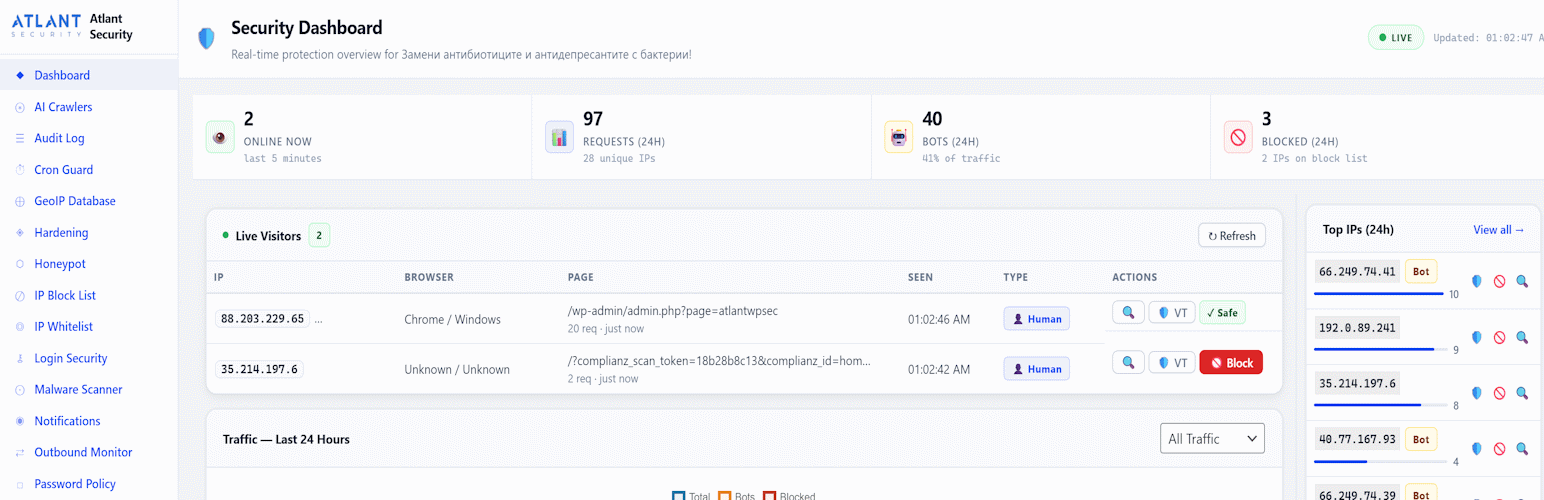
A protection status strip shows at a glance the firewall mode (with a one-click “Switch to Block” while it only logs), login lockouts, two-factor coverage, rate limits, logging, the security headers grade, the last malware scan, whether PHP can run in uploads, and GeoIP, each linking to its page. Below it: visitors online now (refreshed every 15 seconds), requests, bots and blocks in the last 24 hours, a traffic chart, top IPs and top pages.
Web Application Firewall (WAF)
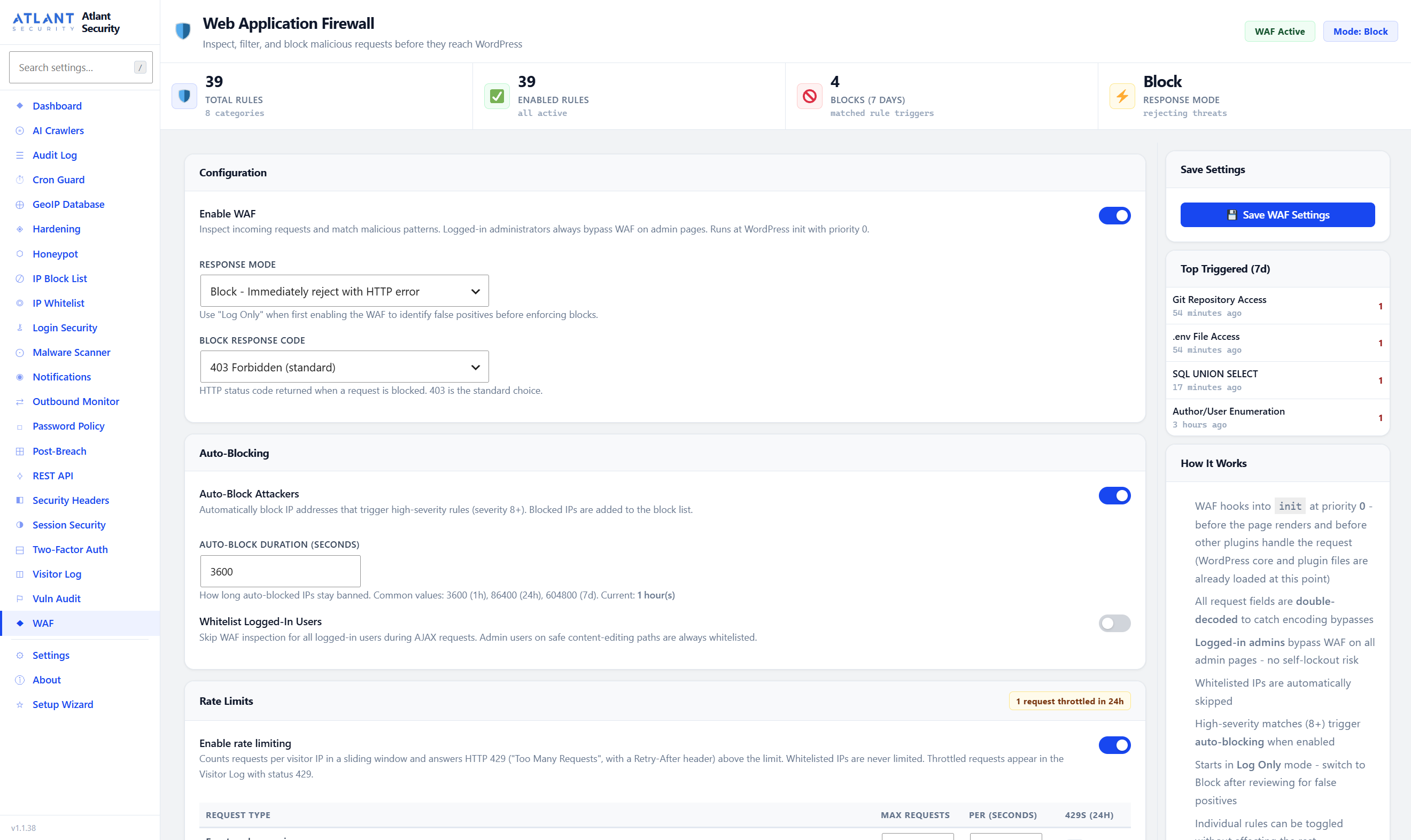
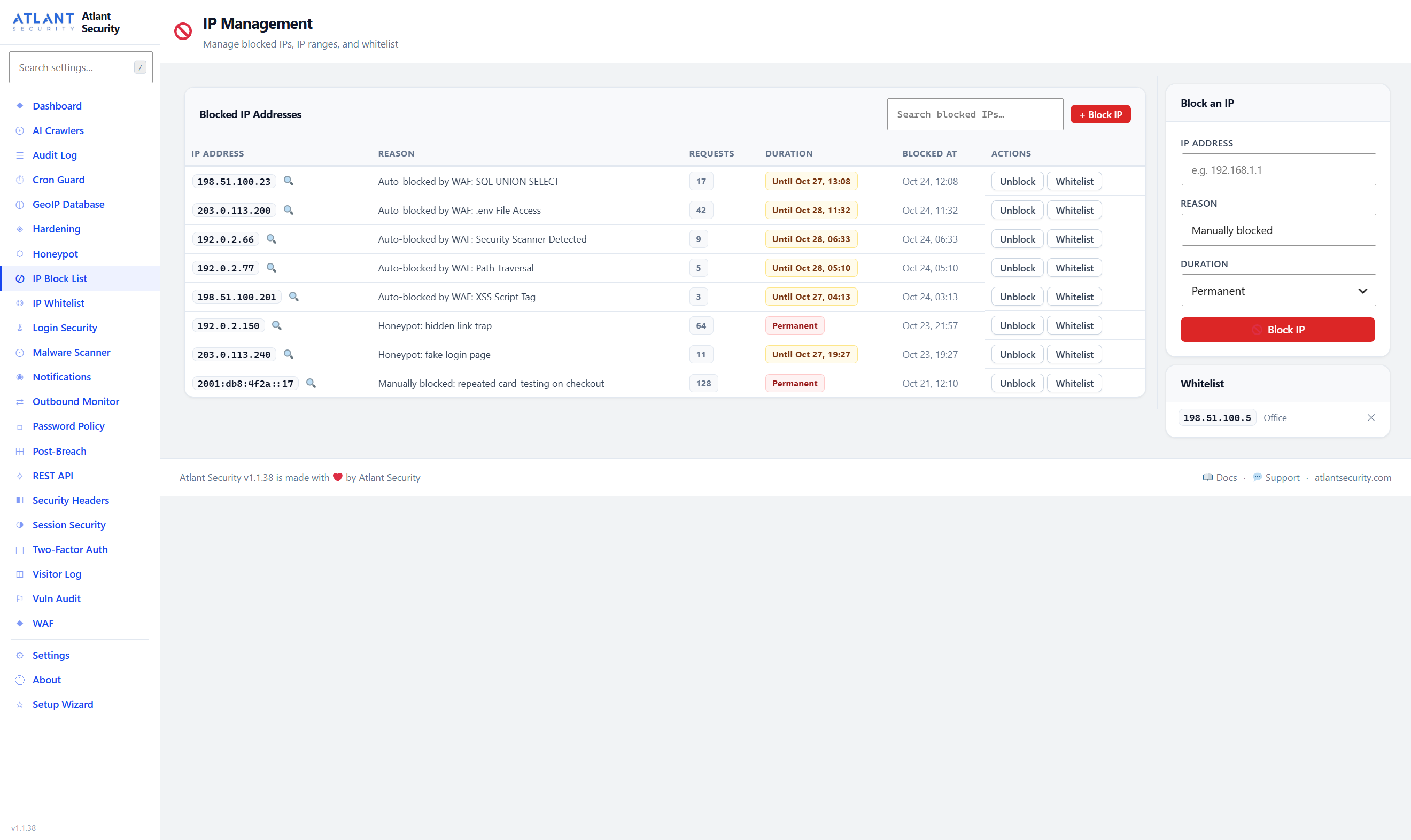
39 rules in 8 categories: SQL injection, XSS, path traversal and file inclusion, remote code execution, PHP object injection, SSRF, WordPress-specific probes (.env, .git, backups, debug logs, readme files) and scanner fingerprints. Request values are decoded twice more after PHP’s own URL decoding, and HTML entities and \u and \x escapes are resolved, before matching, so encoded payloads are caught. Log Only, Block or Tarpit mode; high-severity matches can block the attacking IP for as long as you choose.
Rate Limits
Sliding-window limits per visitor IP for 10 kinds of request: front-end pages, logins, search, feeds, sitemaps, the REST API (signed-in and anonymous), WooCommerce checkout, XML-RPC and WP-Cron. The WAF page shows every limit, lets you change it, and counts the requests throttled in the last 24 hours. Uses APCu when available.
Brute Force Protection
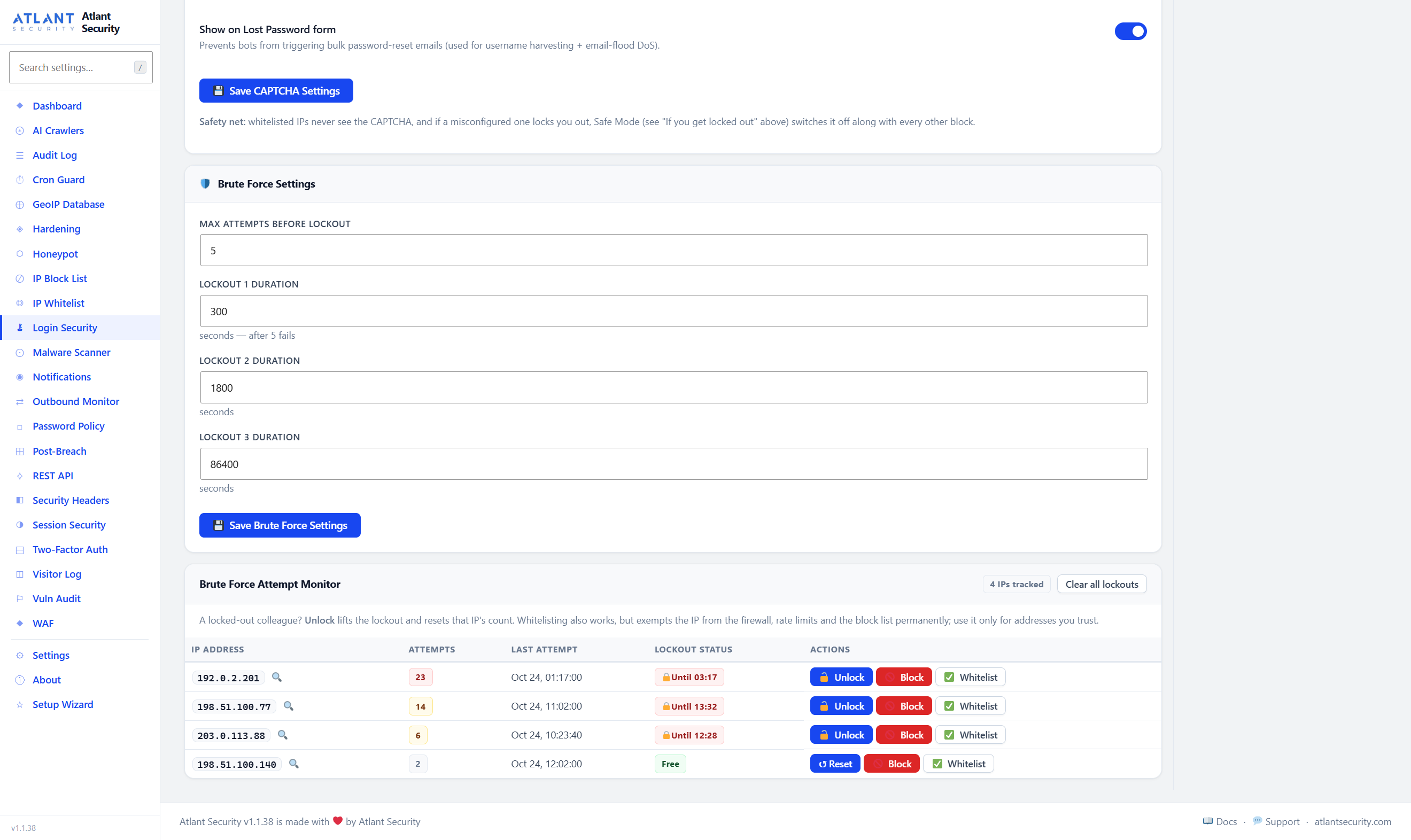
Progressive lockouts (5 minutes, then 30 minutes, then 24 hours) after a number of failures you set, with generic login errors that do not reveal whether a username exists. Unlock one IP, or clear every lockout, in one click; every page that can lock you out explains how to get back in. Author ID scans are blocked, and author archive URLs can be rebuilt from display names so they no longer publish login names.
CAPTCHA and Custom Login URL
Cloudflare Turnstile or Google reCAPTCHA v2 or v3 on the login, registration and lost-password forms, off until you choose a provider. Move wp-login.php to a secret address; the plugin asks you to whitelist your own IP first.
Two-Factor Authentication (2FA)
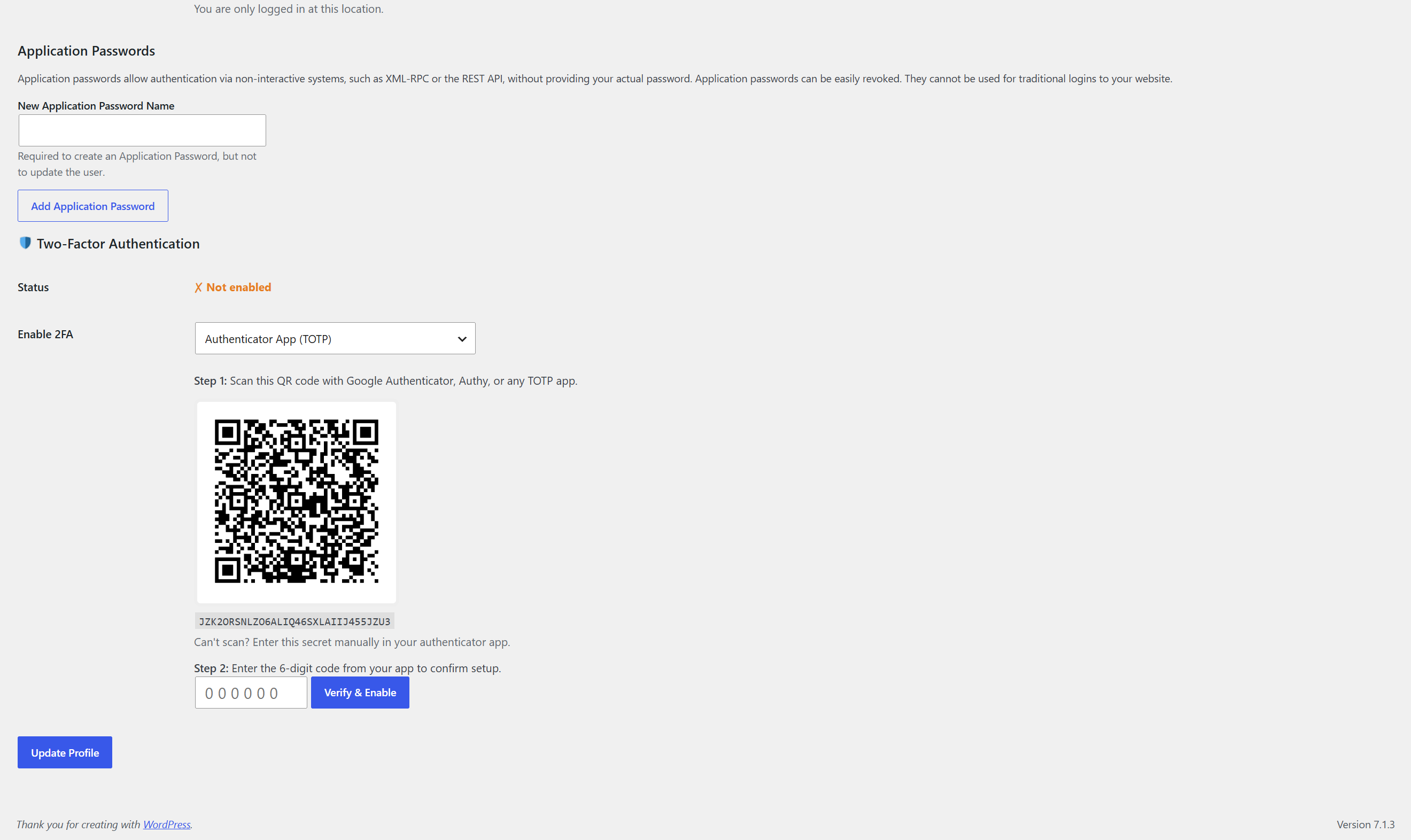
Authenticator apps (Google Authenticator, Microsoft Authenticator, Authy, 1Password and any TOTP app) set up by QR code or key, or codes by email, with 10 recovery codes; require it per role. A password alone never gets in: the session a password-only login creates is revoked on the server before the code is asked for. Anyone who has set up 2FA is asked for a code on every login, each account allows 10 wrong codes in 15 minutes, and API logins for 2FA accounts need an application password.
Malware Scanner
Scans PHP files in WordPress core, plugins, themes, uploads and mu-plugins, checks wp_options and post content for injected scripts, and flags newly created administrator accounts. Core files, and plugins installed from WordPress.org, are verified against WordPress.org’s own checksums, so unmodified code is never reported. 17 signatures cover eval, base64, gzinflate and ROT13 backdoors, web shells (WSO, b374k, China Chopper), crypto miners, card skimmers, malicious redirects, hidden iframes and PHP files in uploads, where empty index.php placeholders, WPML’s template cache and folders you list are recognised. The scan runs in batches in the background, picks up again after a page reload, can be cancelled, and can run daily on a schedule. Quarantine with one-click restore, a false-positive list with Undo, and CSV export of every finding.
Hardening, Verified on Your Server
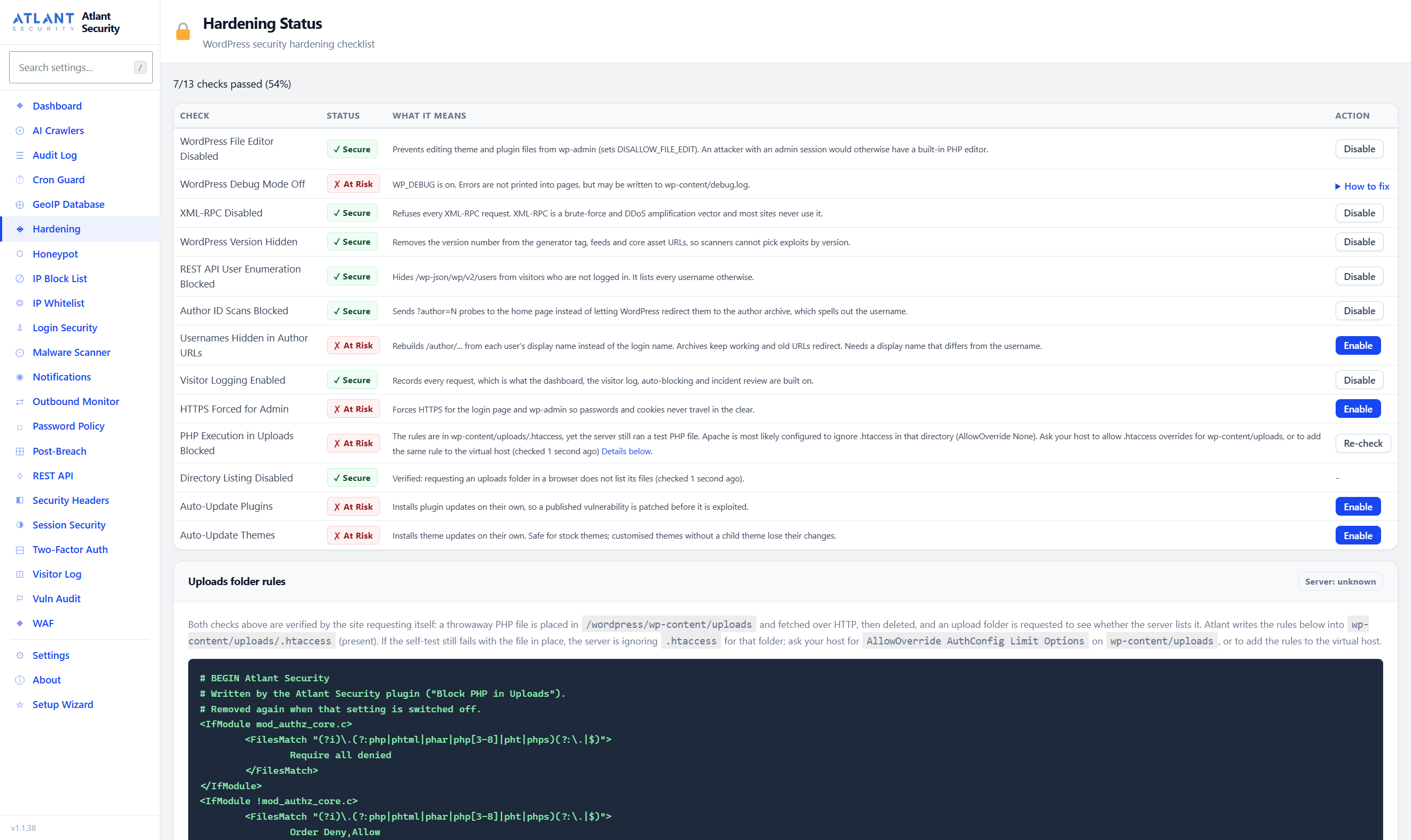
One-click hardening (disable XML-RPC and the file editor, hide the WordPress version, block REST API user listing and author scans, force SSL for wp-admin, automatic updates, block PHP execution in uploads) with Enable and Disable buttons, and “How to fix” instructions for what the plugin cannot change itself. Checks report what is actually true: “Block PHP in Uploads” writes the rule into the uploads .htaccess, then requests a test file to confirm the server obeys it, and gives nginx and IIS sites the snippet to paste. A Vulnerability Audit lists everything still open.
Security Headers
HSTS, X-Frame-Options, X-Content-Type-Options, Referrer-Policy, Permissions-Policy, Content-Security-Policy (report-only or enforced), Cross-Origin-Resource-Policy and Cross-Origin-Opener-Policy, with every CSP directive and Permissions-Policy feature configurable and a preview of the exact header that will be sent, plus a letter grade. Removes X-Powered-By.
Session Security
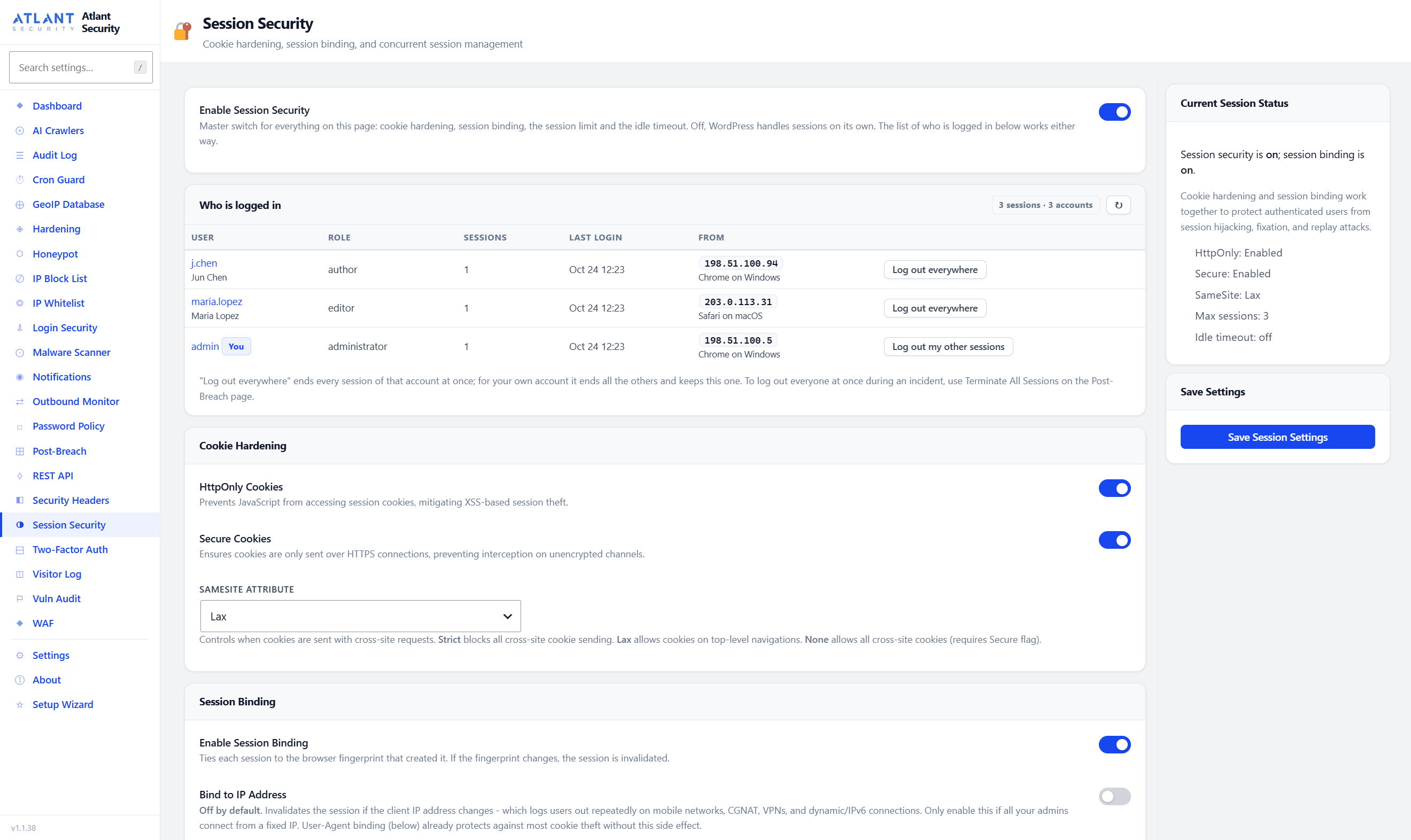
HttpOnly, Secure and SameSite cookies; each session bound to the browser that created it (by User-Agent, and optionally by IP); a limit on concurrent sessions; an optional idle timeout; and a “Who is logged in” list with “Log out everywhere” for each account.
Honeypots and AI Crawlers
Hidden-link traps, a fake login page, and comment and Contact Form 7 fields that only bots fill in. Search engines and the AI crawlers you allow are never banned. Allow or block 20 known AI and LLM crawlers (GPTBot, ClaudeBot, Google-Extended, Bytespider and others) one by one, through robots.txt and with a 403 at the request level.
Outbound Monitor (SSRF Prevention)
Logs every outgoing HTTP request with the plugin or theme that made it, blocks requests to private and internal addresses including cloud metadata endpoints, and can enforce a domain allowlist.
Cron Guard
Takes a snapshot of the scheduled tasks and flags new or unusually frequent ones, a common way for malware to reinstall itself, while recognising every task WordPress core schedules. Detects wp-cron.php floods and helps you move to a real system cron.
Alerts
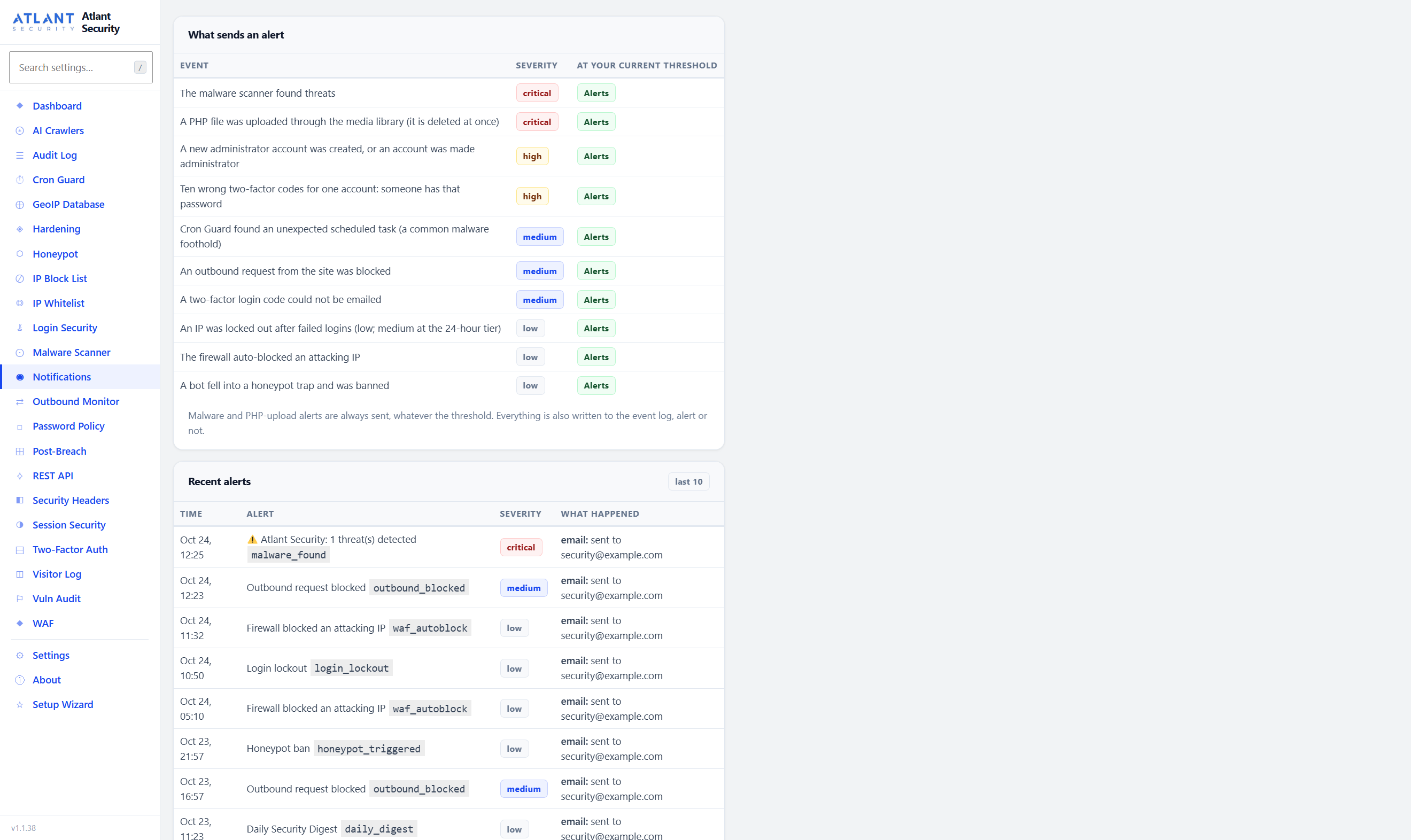
Email, Slack and custom JSON webhooks, off until you enable them, filtered by a minimum severity. Alerts cover malware, PHP files uploaded through the media library, new administrators, two-factor lockouts, unexpected scheduled tasks, blocked outbound requests, failed two-factor emails, login lockouts, firewall auto-blocks and honeypot bans. Each kind is sent at most once per 15 minutes (lockouts, blocks and bans once per 6 hours) with a count of what was held back, so an attack produces a summary, not a flood. “Send test” shows the mail server’s or webhook’s own answer, a Recent alerts table records what was sent where, and an optional daily digest sums up the day.
Visitor Log and Audit Log
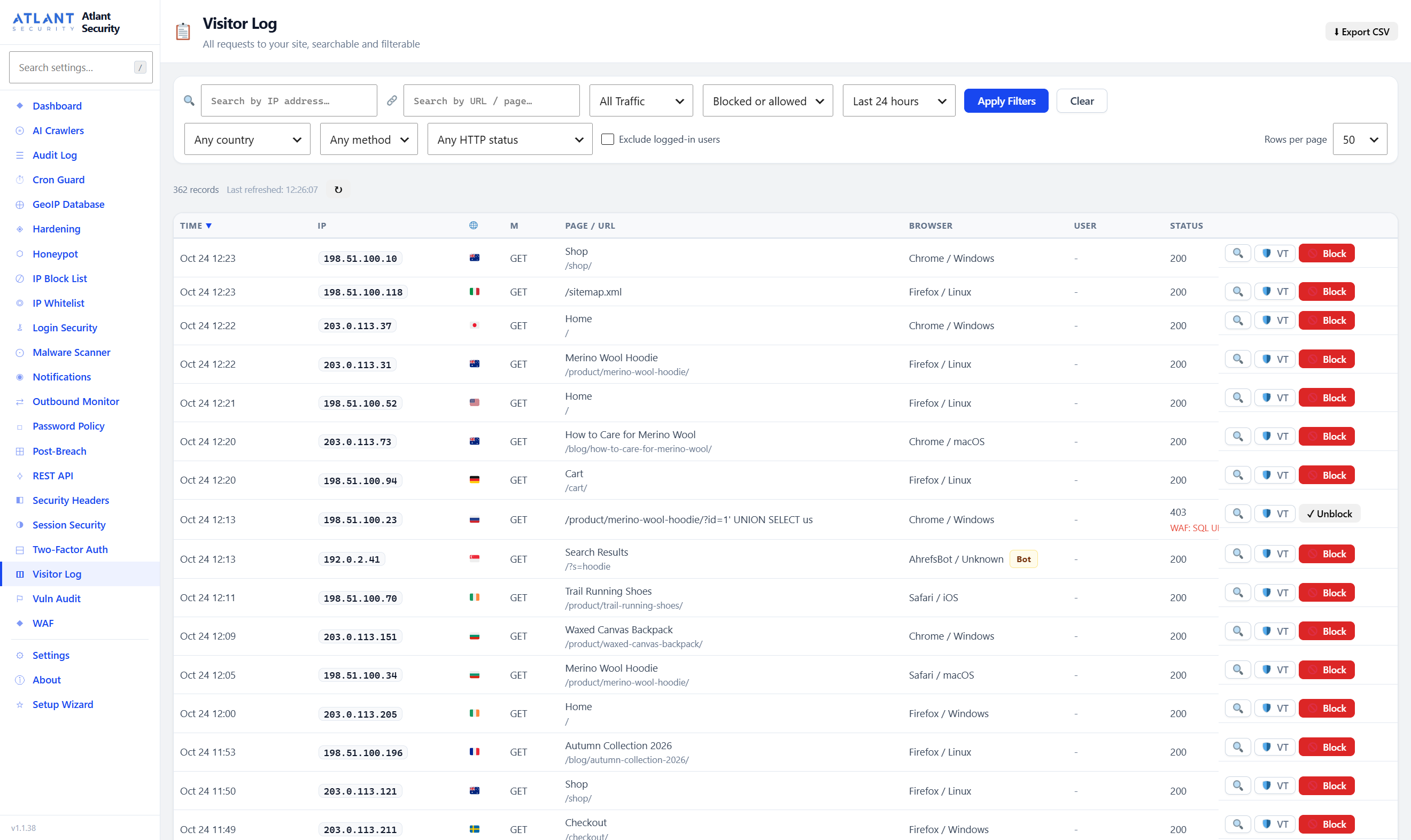
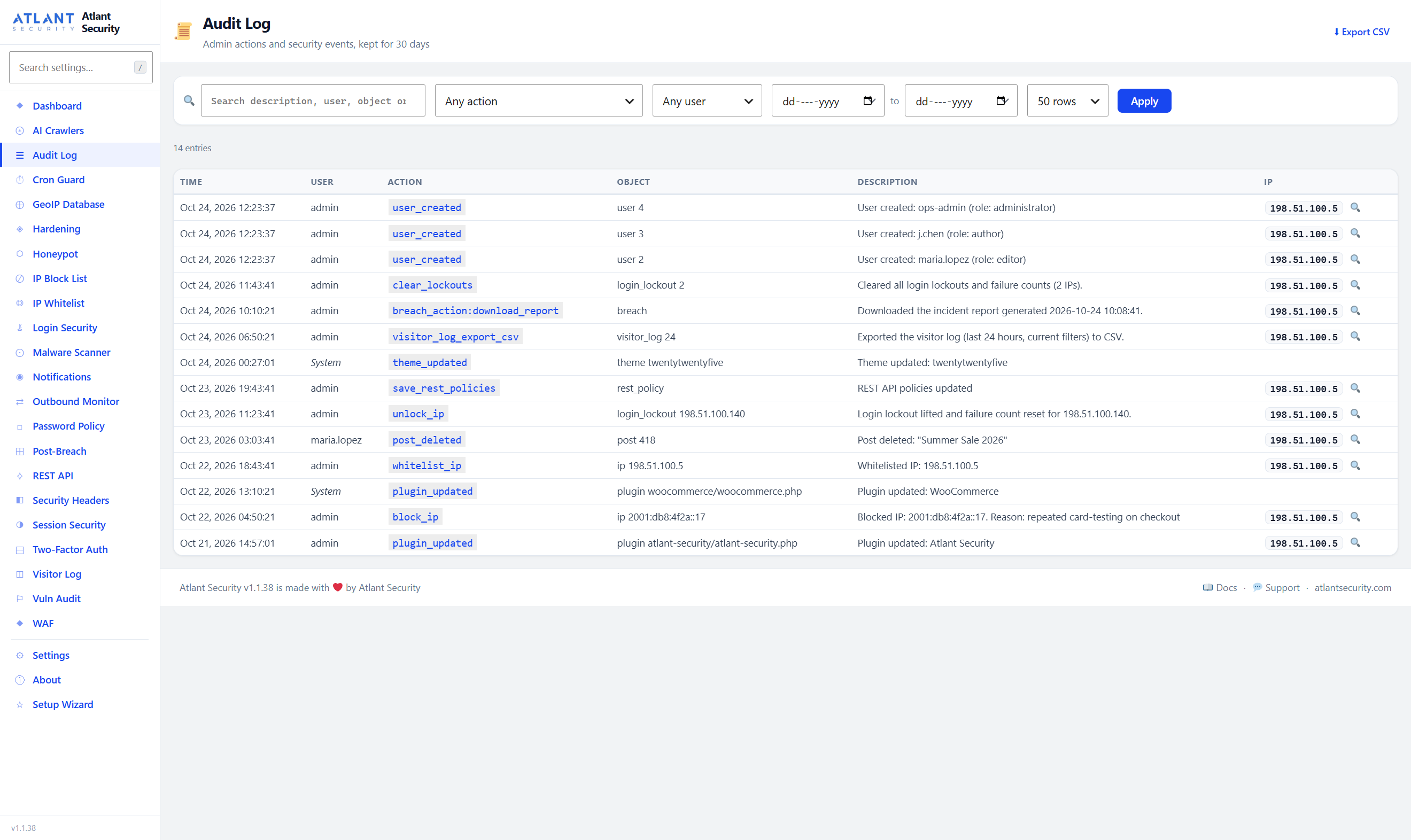
Every request with its IP, country (with the free MaxMind GeoLite2 database), method, page, browser and status, kept for 30 days by default and searchable over the whole period: date ranges, country, method and HTTP status filters, sortable columns, and a CSV export that follows the filters. The audit log records administrator actions (users and roles, plugins and themes, blocks, unlocks and whitelisting, exports) and can be searched, filtered by action, user and date, and exported.
Post-Breach Command Center
The recommended order of response in one place: audit administrator accounts, terminate all sessions, rotate the secret keys and salts, lock the site down, scan the database, reinstall WordPress core and plugins, force a password reset for every user, deactivate plugins, clear caches, and download an incident report. Results stay on screen after the logout these actions cause.
Why Atlant Security?
- Status you can trust – a check passes only when the plugin has verified it on your server, not because a checkbox is ticked.
- One plugin, not five – firewall, logins, scanning, hardening, alerts, logs and recovery share one block list and one whitelist.
- No external dependencies – no CDN, external fonts or telemetry; outside services only for the features you switch on (see External Services).
- Safe Mode – one line in wp-config.php pauses every blocking feature if you lock yourself out.
- Your data, your choice – nothing is deleted on deactivation; deleting the plugin asks whether to keep its data.
- Accessible and multisite-ready – labelled controls, keyboard focus rings and phone layouts; activation and uninstall cover every subsite.
External Services
The plugin contacts these services only for the features listed, and each entry says when. Apart from the WordPress.org checksums the malware scanner uses, each one stays off until you switch its feature on.
Cloudflare IP ranges
Used to check that a request really comes from a Cloudflare edge server before the visitor IP in its CF-Connecting-IP header is trusted.
- Data sent: none; the plugin downloads Cloudflare’s public IP range lists.
- When: weekly (cron
aswp_refresh_cloudflare_ips), only while Cloudflare integration is on. - Endpoints: https://www.cloudflare.com/ips-v4 and https://www.cloudflare.com/ips-v6
- Cloudflare Terms of Use, Cloudflare Privacy Policy
MaxMind GeoLite2 database
Downloads the GeoLite2-Country database, which is stored on your server and used to show visitor countries.
- Data sent: your MaxMind license key, to authenticate the download. No visitor data.
- When: when you download it, then weekly (cron
aswp_update_geoip_db), only while GeoIP is on and a license key is set. - Endpoint: https://download.maxmind.com/app/geoip_download
- MaxMind GeoLite2 EULA, MaxMind Privacy Policy
Google IP ranges
Lets requests from Google’s published IP ranges through the plugin’s protections when they also identify as Googlebot or another Google crawler.
- Data sent: none; the plugin downloads a public JSON list of Google IP ranges.
- When: weekly (cron
aswp_refresh_google_ips), only while Google integration is on. - Endpoint: https://www.gstatic.com/ipranges/goog.json
- Google Terms of Service, Google Privacy Policy
Microsoft Bing IP ranges
Lets requests from Bingbot’s published IP ranges through when they also identify as Bingbot.
- Data sent: none; the plugin downloads a public JSON list of Bingbot IP ranges.
- When: weekly (cron
aswp_refresh_microsoft_ips), only while Microsoft integration is on. - Endpoint: https://www.bing.com/toolbox/bingbot.json
- Microsoft Services Agreement, Microsoft Privacy Statement
WordPress.org checksums
The malware scanner compares WordPress core files and plugin files with the checksums WordPress.org publishes for each release. Matching files are skipped; changed core files are reported.
- Data sent: your WordPress version and the language of its package (core); the folder name and version of each plugin (plugins). WordPress itself sends WordPress.org the same plugin list when it checks for updates. No site or visitor data.
- When: during a malware scan, at most once a day per WordPress version and once a week per plugin version, while “Verify core files with WordPress.org” or “Verify plugin files with WordPress.org” is on (both on by default, under Malware Scanner > Scan Settings).
- Endpoints: https://api.wordpress.org/core/checksums/1.0/ and https://downloads.wordpress.org/plugin-checksums/
- WordPress.org Terms, WordPress.org Privacy Policy
WordPress.org secret keys
Generates new secret keys and salts for the “Rotate Secret Keys” action on the Post-Breach page.
- Data sent: none; the plugin downloads newly generated keys.
- When: only when an administrator clicks Rotate Secret Keys.
- Endpoint: https://api.wordpress.org/secret-key/1.1/salt/
- WordPress.org Terms, WordPress.org Privacy Policy
Slack
Posts alerts to the Slack channel of the incoming webhook you enter.
- Data sent: the alert subject, description and severity, your site URL, and the IP address involved. No cookies or other visitor data.
- When: for each alert at or above your minimum severity, and once a day if the daily digest is on, while Slack alerts are on; and whenever you click “Send test”.
- Endpoint: the Slack incoming webhook URL you enter (https://hooks.slack.com/services/…).
- Slack Terms of Service, Slack Privacy Policy
Custom webhooks
Sends alerts as JSON to the URL you enter, for any monitoring or alerting system.
- Data sent: the alert subject, description and severity, your site URL, a timestamp, and the IP address involved. No cookies or other visitor data.
- When: as for Slack: alerts and the daily digest while webhook alerts are on, and whenever you click “Send test”.
- Endpoint: the URL you enter; its terms and privacy policy are those of the service you choose.
Google reCAPTCHA
Off by default. When you choose reCAPTCHA v2 or v3 as the CAPTCHA provider, it protects the login, registration and lost-password forms you select.
- Data sent by the visitor’s browser: Google’s reCAPTCHA script is loaded from https://www.google.com/recaptcha/api.js, and Google receives the visitor’s IP address and its usual reCAPTCHA signals.
- Data sent by your server: the visitor’s response token, your secret key and the visitor’s IP address, to https://www.google.com/recaptcha/api/siteverify.
- When: only on those forms, only while reCAPTCHA is the chosen provider.
- Google Terms of Service, Google Privacy Policy
Cloudflare Turnstile
Off by default. When you choose Cloudflare Turnstile as the CAPTCHA provider, it protects the login, registration and lost-password forms you select. Cloudflare states that Turnstile does not track users across sites.
- Data sent by the visitor’s browser: the Turnstile script is loaded from https://challenges.cloudflare.com/turnstile/v0/api.js, and Cloudflare receives the visitor’s IP address and its usual Turnstile signals.
- Data sent by your server: the visitor’s response token, your secret key and the visitor’s IP address, to https://challenges.cloudflare.com/turnstile/v0/siteverify.
- When: only on those forms, only while Turnstile is the chosen provider.
- Cloudflare Terms of Service, Cloudflare Privacy Policy
Installation
- In WordPress, go to Plugins > Add New, search for “Atlant Security”, then click Install Now and Activate. Or upload the
atlant-securityfolder to/wp-content/plugins/and activate it on the Plugins screen. - The Setup Wizard opens. It sets up the firewall, login protection, hardening, visitor logging and alerts, and whitelists your own IP so you cannot lock yourself out. Run it again at any time from the plugin menu.
- Open Atlant Security in the admin menu for the dashboard. The search box at the top of the plugin menu finds any setting.
Minimum Requirements
- WordPress 6.0 or higher
- PHP 8.0 or higher
Safe Mode
If you ever get locked out of your site, add this line to wp-config.php:
define( 'ASWP_SAFE_MODE', true );
It pauses every blocking feature (firewall, IP blocks, login lockouts, rate limits, custom login URL, REST API policies and honeypot bans) and mutes alerts, while keeping the admin area available so you can fix the settings. Remove the line afterwards.
FAQ
How do I find a setting?
Type in the search box at the top of the plugin menu, or press “/” on any plugin page. It searches every setting, panel and page as you type; choose a result to jump to it, and the setting is highlighted.
I locked myself out
Add define( 'ASWP_SAFE_MODE', true ); to wp-config.php: it pauses every blocking feature while keeping the admin area available. If another administrator can still log in, they can lift your lockout under Login Security > Brute Force Attempt Monitor (Unlock) or remove your IP from the IP Block List. As a last resort, rename the folder wp-content/plugins/atlant-security over FTP (for example to atlant-security-off), log in, rename it back, and whitelist your IP.
The firewall is blocking my page builder (Elementor, Divi)
Switch the WAF to Log Only, repeat what was blocked, then check Top Triggered on the WAF page, or look for “WAF log only” in the Visitor Log, to see which rule matched. Page builders can trigger false positives with the encoded content in their save requests. Logged-in administrators are not inspected on admin pages.
Users keep getting logged out unexpectedly
This happens when Session Binding is set to bind to the IP address, which is off by default because mobile networks, VPNs and IPv6 change addresses constantly. Go to Session Security and turn off “Bind to IP Address”, keeping User-Agent binding on. “Exempt Administrators” lifts every session restriction for administrators.
Will I get an email for every blocked attack?
No. Each kind of alert is sent at most once per 15 minutes, and login lockouts, firewall auto-blocks and honeypot bans at most once per 6 hours; repeats in between are counted and reported in the next alert or a summary. Choose the minimum severity on the Notifications page, which lists every event that can send an alert.
Email alerts are not arriving
Click Send test next to the address on the Notifications page: it waits for the answer and shows the mail server’s own error, if there is one. WordPress sends mail with PHP’s mail() by default, which many hosts block; an SMTP plugin such as WP Mail SMTP or FluentSMTP routes it through a proper mail provider.
Does two-factor authentication work with the WordPress mobile app, Jetpack or XML-RPC?
Yes, with an application password. Those tools cannot ask for a code, so accounts with 2FA must use an application password (Users > Profile > Application Passwords) for XML-RPC and other API logins. Accounts without 2FA are unaffected.
The Hardening page says PHP still runs in the uploads folder
The plugin writes the blocking rule into wp-content/uploads/.htaccess and then tests it. If PHP still runs, the server ignores .htaccess there: nginx and IIS never read it, and Apache can be set not to. The Hardening page shows the rule for your host to add to the server configuration, and Re-check tests again.
Cron Guard flagged a scheduled task
Cron Guard compares the scheduled tasks with the snapshot taken when it started and flags new or very frequent ones. If you recognise the task (a plugin you just installed, for example), click Approve; if you do not, remove it and run a malware scan. Tasks scheduled by WordPress core and by Atlant Security itself are never flagged.
Will this slow down my site?
No. The firewall runs once per request at init priority 0 against a fixed rule set, the rate limiter uses APCu when available, and the visitor log is one lightweight INSERT per request.
The malware scanner reported a file I trust
WordPress core files and plugins installed from WordPress.org are compared with WordPress.org’s checksums, and unmodified files are never reported. For any other file, check it, then click Mark as False Positive: that finding is not reported again unless the file changes. If a plugin keeps PHP files in the uploads folder on purpose, add that folder under Malware Scanner > Scan Settings: every other check still runs on those files.
The malware scan is running slowly
Lower “Files per Batch” to 20 or 30 on shared hosting. The scanner works in batches to avoid timeouts and keeps running in the background if you leave the page. Files larger than 5 MB are skipped.
How does the honeypot protect legitimate crawlers?
Three ways: trap URLs are listed as Disallow rules in robots.txt, hidden links carry rel=”nofollow”, and 30 known search engine, social media and uptime-monitoring bots are recognised by their user agent and receive a 404 instead of a ban. AI crawlers you have allowed are protected too.
Does this plugin work with multisite?
Yes. Activation, deactivation and uninstall cover every subsite, and each site has its own settings and logs. Session lists are limited to each site’s own users, and network super admins are never listed to site administrators.
What happens to my data when I deactivate the plugin?
Nothing is deleted on deactivation. When you delete the plugin, a dialog asks whether to keep or remove all its data; you can also set this under Settings > Delete data on uninstall.
Screenshots




Changelog
1.1.40 – Fewer False Alarms From the Malware Scanner
Thanks to the two users who sent their scan results.
* Fixed (important): where the site language differs from the language of the installed WordPress package (an English package on a site set to Italian, for example), every scan reported wp-includes/version.php and wp-config-sample.php as modified core files, critical with high confidence. The scanner asked WordPress.org for the checksums of the site language instead of the package’s own, which is how WordPress itself checks. Each file is now compared with its package’s list, and with the English list, before anything is reported.
* New: plugin files identical to the same version on WordPress.org are skipped, so unmodified plugin code, such as the sign-in redirect in UpdraftPlus’s Google Drive connector, is no longer reported. Premium, custom and modified plugins are scanned as before.
* Fixed: “PHP in Uploads Directory” no longer fires for PHP that belongs there: empty index.php placeholders (“Silence is golden”) and the templates WPML compiles into uploads/cache/wpml/twig/. Other folders that hold PHP on purpose can be listed under Scan Settings. Every other check still runs on these files, and PHP uploaded through the media library is still removed.
* New: switches for both WordPress.org checks under Malware Scanner > Scan Settings.
1.1.39 – Outbound Monitor Settings Save Again
- Fixed (important): nothing on the Outbound Monitor page could be saved. Save Allowlist, and the unsaved-changes bar’s “Save now” on that page, always failed with “No allowlist data provided.”, because the page sent the domain list under a different name from the one the server read. The domain list, Mode, “Block Private/Internal IPs” and “Enable Outbound Monitoring” now save; that last switch was never stored even before this. Thanks to the user who reported it.
- Fixed: with Outbound Monitoring or Cron Guard switched off, its page could not load its data or save, so the module could not be switched back on there.
1.1.38 – No False Cron Alarms, Honest Log Only Counts, Tidier Pages
- Fixed (important): Cron Guard flagged Atlant Security’s own scheduled tasks (a background malware scan, the alert summary, the daily digest) and WordPress core tasks created after its snapshot (every scheduled post, cleanup after a plugin upload, updater backups) as “unexpected scheduled tasks”, and where alerts were enabled 1.1.37 emailed an alert about each. Every task core schedules, and the plugin’s own, are now recognised; any other new task is still flagged, and so is a task that borrows one of those names but runs more often than every 5 minutes.
- Fixed: in Log Only mode the firewall still recorded each matching request as blocked with a 403, so the Visitor Log, the dashboard’s Blocked count and chart, the WAF page’s “Blocks (7 days)”, the daily digest and the incident report all counted attacks as blocked that had been let through. They now count only real blocks; Log Only matches are marked “WAF log only” in the Visitor Log and shown separately on the WAF page.
- Fixed: the Outbound Monitor never showed when a request was made, and its Quick Stats stayed at “–“.
- Fixed: the dashboard status strip cut most values off; each item now shows its label above its value.
- Fixed: WordPress’s own footer text was drawn over the plugin’s footer on every plugin page.
- Fixed: the settings search list was clipped to the width of the menu; it now opens at full width over the page.
- Fixed: “Who is logged in” cut off its “Log out everywhere” buttons and showed a truncated user agent; it now names the browser and system (“Safari on macOS”).
- Fixed: notices on many pages spread their bold words, links and code apart, the CAPTCHA “Where to get keys” box was jumbled, and the login URL field broke over three lines.
- Fixed: the Visitor Log and Audit Log filters stretched across the page and wrapped.
- Fixed: the visitor log recorded Android phones as Linux, and Microsoft Edge and Opera as Chrome.
- Fixed: alert emails for login lockouts had “(low; medium at the 24-hour tier)” in the subject; alerts now carry short subjects such as “Login lockout”.
- Fixed: creating a user also wrote a confusing “User role changed” entry to the audit log.
- Fixed: an ellipsis after every “At Risk” badge in the Hardening and Vulnerability Audit tables, a Permissions-Policy preview on the Security Headers page while that header is off, “1 requests throttled”, and “Idle timeout: 0s” (now “off”).
- New screenshots and a rewritten plugin page.
1.1.37 – Find Any Setting, Read Your Logs, Get the Alerts You Asked For
- New: a search box at the top of the plugin menu finds any setting on any of its pages as you type and takes you straight to it; press “/” to jump to it. Suggested on the support forum.
- Fixed: email, Slack and webhook alerts only ever fired for malware scans, although the Notifications page promised lockout and security-event alerts. New administrator accounts, two-factor lockouts, unexpected scheduled tasks, blocked outbound requests, failed two-factor emails, login lockouts, firewall auto-blocks and honeypot bans now raise alerts, filtered by your minimum severity. Each kind is sent at most once per 15 minutes (lockouts, blocks and bans once per 6 hours) with a count of what was held back, so a site under attack gets a summary rather than a flood. Alerts stay off until you enable a channel.
- New: “Send test” beside each notification channel, which waits for the answer and shows it (including the mail server’s own error), and a Recent alerts table listing what was sent where.
- Fixed: the Visitor Log showed at most 7 of the 30 days it keeps. It now reaches the whole retention period, with custom date ranges, country, method and HTTP-status filters, sortable columns, page size and a page-jump box. The CSV export follows every filter.
- New: the Audit Log can be searched, filtered by action, user and date, paged, and exported to CSV. It used to show the newest 200 entries and nothing else.
- Fixed: Terminate All Sessions, Force Password Reset and Rotate Keys log you out too, but the page carried on and every following action failed with “session expired”. It now says so and takes you to the login page, unless rotated keys still have to be pasted into wp-config.php: they stay on screen, and on the page for 30 minutes after you log back in. The incident report and the admin audit results now survive the logout.
- Fixed (important): the database part of the malware scan never checked wp_options or post content. A malformed search pattern made MySQL reject both queries, so they always came back empty. Run a scan after updating.
- Fixed: reloading the Malware Scanner mid-scan offered “Start Full Scan” again, and starting wiped the running scan’s findings. The page now resumes the running scan, a second start is refused, a Cancel button stops it, and false-positive marks have their own list with Undo.
- New: Session Security has its master switch on its own page and a “Who is logged in” list with “Log out everywhere” for each account. The idle-timeout help gave the wrong default.
- Fixed: “Lift Lockdown”, “Cancel Forced Reset”, “Whitelist My IP” and removing a whitelist entry stuck or stayed silent when a request failed.
- New: leaving a page with unsaved changes warns you, and a bar offers to save them.
- Accessibility: every toggle has an accessible name and a visible keyboard focus ring, dialogs close with Escape and return focus, icon-only buttons are labelled, and low-contrast grey text is darker. On phones the page list folds into one menu button and the log tables drop secondary columns.
- Fixed: long explanations in the Hardening checklist and the Vulnerability Audit were cut to a single line.
1.1.36 – Settings That Said “Secure” Without Doing Anything, Plus Lockout Recovery
Every item below applies on its own after updating; nothing needs re-saving.
* Fixed (security): “Block PHP in Uploads” never did anything. The option existed, and the Hardening page and the Vulnerability Audit reported “PHP execution in uploads blocked” because the checkbox was on, but no rule was ever written. It now writes the rule into wp-content/uploads/.htaccess (Apache and LiteSpeed), then verifies it by placing a test file in uploads and requesting it, and reports what actually happened. nginx and IIS get a snippet to paste. The rules are tried in two stages and rolled back if the server answers 500, so a host that forbids .htaccess overrides cannot be left with a broken uploads folder.
* Fixed: the “Directory Listing Disabled” check read its answer back to front. It is now verified by requesting an upload folder and looking for a listing; “Options -Indexes” is added where the server accepts it, and an index file can be added with one click.
* Fixed: saving the Settings page could switch the firewall from Tarpit to Block. The WAF Mode list on that page was missing Tarpit, so the browser pre-selected Block and the save wrote it.
* Fixed: “Export CSV” on the Visitor Log exported the first 50 rows and ignored the URL and logged-in filters. The file is now built on the server from the same filters as the table, every matching row, up to the retention period, with a row count shown before the download.
* Fixed: “Exclude Known Bots” was never read by the logger. It now skips search-engine crawlers (by user agent); blocked IPs stay blocked either way.
* Fixed: the About page claimed an “A+” grade and “All Active” on every site, listed JavaScript challenges and browser fingerprinting that do not exist, and counted 38 malware signatures. Every number and status on it now comes from the code and this site’s settings.
* New: Unlock. Login Security has an Unlock button per locked-out IP and a “Clear all lockouts” button; unblocking an IP also ends its login lockout. Before, the only way out of a 24-hour lockout was to whitelist the address, which exempts it from every protection for good.
* New: whitelisting asks for confirmation everywhere and explains what it bypasses.
* Fixed: the lockout recovery text named a plugin folder that does not exist. Every page that can lock you out now carries the same “If you get locked out” box: Safe Mode first, then the recovery link, then renaming the real folder.
* New: enabling the custom login URL from an IP that is not whitelisted now stops and offers to whitelist it first.
* New: a protection status strip at the top of the dashboard: firewall mode (with one-click “Switch to Block” when it is only logging), lockouts, two-factor, rate limits, logging, headers grade, last scan, uploads protection and GeoIP, each linking to its page. The dashboard also acknowledges a completed setup wizard.
* New: Rate Limits panel on the WAF page. The limiter has run since 1.0 with no switch and no visible numbers; the panel shows each limit, lets you change it, and counts the requests throttled in the last 24 hours.
* New: Content Security Policy directives, a report URI and each Permissions-Policy feature are configurable on the Security Headers page, with a preview of the exact header that will be sent. Before, the page said these were “available in the module code”.
* New: settings that can break a site (Force SSL for Admin, Disable XML-RPC, auto-updates, hidden author URLs) ask for confirmation and explain the consequence, on every page that offers them. The Hardening page gained Disable buttons and “How to fix” instructions for the checks it cannot fix itself.
1.1.35 – Two-Factor Login Could Be Completed With the Password Alone
1.1.34 was held back by the WordPress.org automated security review and never reached any site, so this release also carries the QR code fix listed under 1.1.34 below.
* Fixed (security, reported by the WordPress.org automated security review): a two-factor login could be completed with the password alone. WordPress creates the login session and its cookies before the plugin is told about the login; the plugin then cleared the cookies from the browser but left the session itself valid on the server. Anyone holding the password could keep the cookies from that first response and use them without ever entering a code. The session a password-only login creates is now revoked on the server before the code is asked for, so those cookies no longer work anywhere.
* Fixed (security): users who set up two-factor authentication voluntarily, when their role did not require it, were never asked for a code at all. Anyone with a second factor is now challenged on every login; the “require 2FA” setting only decides who must enrol.
* Fixed (security): XML-RPC accepted a bare password for accounts with two-factor authentication, because that route never asks for a code. Those accounts must now use an application password (Users > Profile) for XML-RPC and other API logins, which Jetpack and the mobile apps support. Accounts without 2FA are unaffected.
* Fixed (security): the correct password alone was enough to reset the brute-force counter for that IP address and to evict the account’s other sessions under the session limit, before the second factor was checked. The challenge now runs ahead of both.
* New: a limit of 10 incorrect codes per account in 15 minutes, counted across every login attempt. The old limit was per attempt, and anyone with the password could start a new attempt at will. Reaching the limit records a “2fa_locked” event, triggers your alerts, and tells the user to change their password, because whoever entered those codes had it.
* Codes are compared in constant time, and codes typed with spaces (as some apps display them) are accepted.
1.1.34 – Two-Factor QR Codes Now Scan
- Fixed (important): the QR code shown when setting up an authenticator app (Google Authenticator, Microsoft Authenticator, Authy and others) could not be scanned. QR codes above a certain size must carry a small “version information” pattern, and the built-in generator never drew it, so the code’s own data was written into that space and no scanner could read the result. A setup link is always long enough to need that size, so this affected every site. Typing the setup key in by hand still worked, which is how 2FA could be enabled at all.
- Fixed: one of the two copies of the QR code’s format information was drawn back to front. Most scanners fall back to the other copy, but it was still invalid.
- Fixed: on sites with a long title, setting up 2FA failed outright with “Request failed”, showing neither a QR code nor the key to type in. The setup link is now kept within what a QR code can hold, and if a code ever cannot be drawn the key is still shown for manual entry.
- Fixed: switching the method dropdown away from “Authenticator App” and back generated a new secret, so a code you had already scanned would never be accepted.
- Fixed: a site title containing “&” or an apostrophe appeared in the authenticator app as “&” or “‘”, and a colon in the title could confuse the app’s account name.
- Verified against an independent QR decoder for every code size the plugin produces, and against the published TOTP test vectors. If 2FA setup failed for you before, simply run it again.
1.1.33 – The Setup Wizard Runs on Activation Again
- Fixed: activating the plugin did nothing visible. The Setup Wizard now opens once, only for the administrator who clicked Activate, never during bulk or network activation or on a configured site. A dismissable prompt on the Plugins list and dashboard covers the cases the redirect skips.
1.1.32 – Author URL Repair: Rebuild, Rollback, and a Fix for Broken Slugs
Thanks to Francesco for the detailed report.
* Fixed (important): “Hide Usernames in Author URLs” could write an empty or meaningless slug for display names in non-Latin scripts. They are now transliterated first; where the server cannot (no PHP intl), the slug is left alone and the Hardening page says why.
* New: every slug change is verified after writing and rolled back if another plugin altered it; “Rebuild” and “Restore original author URLs” buttons; old author URLs redirect to the new ones; enabling the setting warns first.
1.1.31 – Author Enumeration: The Block Now Actually Runs
- Fixed (important): “Block Author Enumeration” did nothing on almost every site, because WordPress core’s canonical redirect ran first. It now runs ahead of core (renamed “Block Author ID Scans”), uses a temporary redirect, and stands down on plain permalinks where ?author=N is the archive itself.
- New: “Hide Usernames in Author URLs” rebuilds author archive URLs from display names. Off by default.
1.1.30 – Hardened Against Fatal Errors From Unexpected Hook Arguments
- Fixed: fatal errors when WordPress or another plugin passed an unexpected argument type to a hook the plugin listens to (multisite network_site_url() with a null scheme, site_url( null )). Every hook callback now validates its input.
1.1.29 – Full Audit Release
A top-to-bottom review of every module; migrations run on their own after updating.
* Fixed (security): stored XSS in the Post-Breach database scan results; the first visitor after an update had their IP removed from the block list.
* Fixed: ASWP_SAFE_MODE now pauses every blocking feature (it skipped the WAF, login lockouts, REST policies and honeypot bans).
* Fixed (2FA): “Disable 2FA” did nothing; admins can reset another user’s 2FA; email-code failures are surfaced; TOTP secrets encrypted at rest.
* Fixed: dead buttons (REST Add/Edit Policy, Outbound Save Allowlist, scan settings, whitelist remove, “+ Block IP”); CAPTCHA save no longer wipes the secret; re-running the wizard keeps custom settings.
* Fixed: false positives (WooCommerce checkout rate limit, code samples in posts, browser updates logging users out, CAPTCHA on non-wp-login forms, outbound monitor killing WP-Cron).
* New: scheduled background scans; quarantine warns before touching core, the active theme or plugins, with one-click Restore. Multisite activation, deactivation and uninstall cover every subsite. Performance work across logging and the dashboard.
1.1.28 – GeoIP “Download Database” Button No Longer Stuck Disabled
- Fixed: the GeoIP “Download Database” button stayed disabled after a license key was entered. It now saves the key and downloads the database in one click.
1.1.27 – Daily Digest Turns Itself Off on Upgrade
- Fixed: the unwanted morning “daily digest” email stops on update, on every subsite. The digest is only scheduled while it is enabled.
1.1.26 – Notifications Are Now Opt-In
- Changed (new installs): every notification channel, including the daily digest and email alerts, is off until you enable it.
- New (multisite): define( ‘ASWP_DISABLE_NOTIFICATIONS’, true ); in wp-config.php, or the aswp_disable_notifications network option, mutes notifications network-wide. Safe Mode mutes them too.
1.1.25 – REST API Policy Fixes + Friendlier Session Defaults
- Fixed: in the REST API Policies editor new rules did not stick, deleting one reset the list, and saving could blank the built-in rules.
- Improved: a plain route path (e.g. /sibs/v1/callback) works in place of a regular expression, to let a payment-gateway webhook through.
- Changed (new installs): the session idle timeout is off and “Exempt Administrators” is on by default.
1.1.24 – Session IP Binding Off By Default
- Changed (new installs): “Bind to IP Address” under Session Security is off by default. Changing IPs on mobile networks, CGNAT, VPNs and IPv6 logged admins out every few minutes; if this affects you, turn it off.
1.1.23 – Fixed: Brute Force Settings Would Not Save
- Fixed: the brute-force settings on Login Security did not save, because two save buttons shared one HTML id. Every save button is now wired by class.
1.1.22 – Hide WP Version No Longer Breaks Asset Caching
- Fixed: “Hide WP Version” stripped the version from every script and style, wp-admin included, which broke cache-busting and left screens such as My Jetpack blank. The version is now masked with a stable token, and wp-admin is left alone.
1.1.21 – Accurate WAF Description
- Fixed (accuracy): the readme, About page and WAF page described a firewall that runs before WordPress loads. It runs at init priority 0. No functional change.
1.1.20 – Emergency Lockdown Now Works With Page Caches
- Fixed: Emergency Site Lockdown did nothing behind a page cache. Turning it on or off now flushes the object cache and the supported page-cache plugins. HTML cached at an external CDN must be purged there.
1.1.19 – Two-Factor Enrollment & Recovery Fixes
- Fixed (lockout): requiring 2FA for a role locked out its users who had not set it up yet. They can now reach their profile to enrol; the REST API and XML-RPC stay closed to them until they do.
- Fixed: a code entered right after setup could be rejected as a replay.
- Fixed: after “Deactivate All Non-Essential Plugins”, a notice links to one-click restore.
1.1.18 – Login & Incident-Response Hardening
- Fixed (security): two-factor authentication could be bypassed during a “Force Password Reset for All Users” window.
- Fixed: “Force Password Reset” could get stuck for good. A “Cancel Forced Reset” button was added, and reactivation clears it.
- Fixed: brute-force lockouts escalated permanently on shared addresses. The counter now resets on a successful login and decays after 24 hours.
- Fixed: passwords containing attack-like characters could be blocked by the firewall. Password fields are no longer inspected.
1.1.17 – Lockdown Off-Switch Fix
- Fixed: the “Lift Lockdown” button could disappear. An always-visible “Lift Lockdown Now” button was added, and activating the plugin lifts a stuck lockdown.
1.1.16 – Custom Login URL Fix
- Fixed (critical): with a Custom Login URL, valid logins bounced back to the login form, because a redirect dropped the submitted form. The custom address now serves wp-login.php in place, and 2FA and other login add-ons work there.
- Fixed: /wp-admin was still reachable on subdirectory installs.
- Fixed: to remove the custom login URL, turn the feature off; that clears the stored address.
1.1.15 – Reinstall WordPress Core Fix
- Fixed: Post-Breach “Reinstall WordPress Core” always reported “already installed”. It now reinstalls the current version, or installs a newer one; wp-content is never touched.
1.1.14 – Login 429 Fix
- Fixed: legitimate users got HTTP 429 “Too Many Requests” on wp-login.php, because the login rate limit counted every visit. It now counts only submitted logins.
1.1.13 – Timezone Fix
- Fixed: admin times were several hours off on non-UTC sites. GeoIP “last updated”, the lockout countdown and the 08:00 digest now use the site timezone too.
1.1.12 – Quarantine Review Ritual
- New: quarantine now opens a review modal – file details, a forensic download button, VirusTotal / Hybrid-Analysis links, and three required acknowledgment checkboxes (also enforced server-side).
- Improved: CSV export includes confidence and matched-signature columns.
1.1.11 – Conservative Quarantine
- New: per-signature fidelity ratings and per-finding confidence; quarantine is gated to HIGH confidence and single ambiguous hits are review-only.
- New: regex matches inside string literals or comments are treated as data, not malware – eliminates self-match false positives.
1.1.10 – Critical: Self-Quarantine Lockout Fix
- Fixed (critical): the scanner could quarantine its own files and take the whole site offline; it now hard-excludes known security plugin directories.
- Fixed (critical): the plugin bootstrap survives a missing module file instead of fataling the site.
1.1.8 – Default-Allow Policy for Vendor Bots
- Fixed: AI crawler defaults flipped to “allow” – legitimate vendor bots (Google, OpenAI, Anthropic, Bing) are never blocked unless the operator opts in.
- Fixed: the Honeypot reverse-DNS check now fails open, so a transient DNS error can’t ban a real Googlebot.
1.1.7 – Critical Audit Hardening
Fixes for 14 critical and 12 high-severity issues found during a full external audit. Recommended upgrade for everyone.
* Fixed (critical): fatal-at-login bug in concurrent-session enforcement; IPv4-mapped-IPv6 IP-block bypass; outbound SSRF DNS-rebinding race; CIDR trusted-proxy parsing; over-broad Cloudflare auto-whitelist; web-accessible quarantine directory and wp-config key backups; a WAF-rule ReDoS; plaintext Custom Login URL recovery token; unvalidated plugin-restore input.
* Fixed (high): 2FA enrollment-session bypass and cross-user nonce reuse; 2FA disable without re-authentication; racy IP blocking; Googlebot user-agent-spoof honeypot exemption; notification webhook SSRF; scan symlink escape; WAF encoded-escape and capability bypasses; and more.
1.1.6 – Scanner Accuracy
- Fixed: false-positive flood on fresh installs (core checksum verification, safe-path allowlist, tightened signatures). New: “Mark as False Positive” with Undo.
1.1.0 to 1.1.5
- New: CAPTCHA (reCAPTCHA v2/v3, Cloudflare Turnstile); CSV export of scan findings; HMAC-signed custom-login grace cookie; enforced 2FA for required roles; always-on SSRF blocking; trusted proxy IPs; About page; denser admin layout.
1.0.0 to 1.0.9
- Initial release and its follow-ups: WAF, brute-force protection, malware scanner, post-breach recovery, IP blocking, visitor and audit logs, hardening, rate limiter, real-time dashboard, setup wizard, inner sidebar navigation, GeoIP, custom login URL, password policy, honeypot, security headers, two-factor authentication, notifications, AI crawlers, REST API policies, session security, outbound monitor and cron guard. Prefix migration to aswp_ with automatic database migration.