
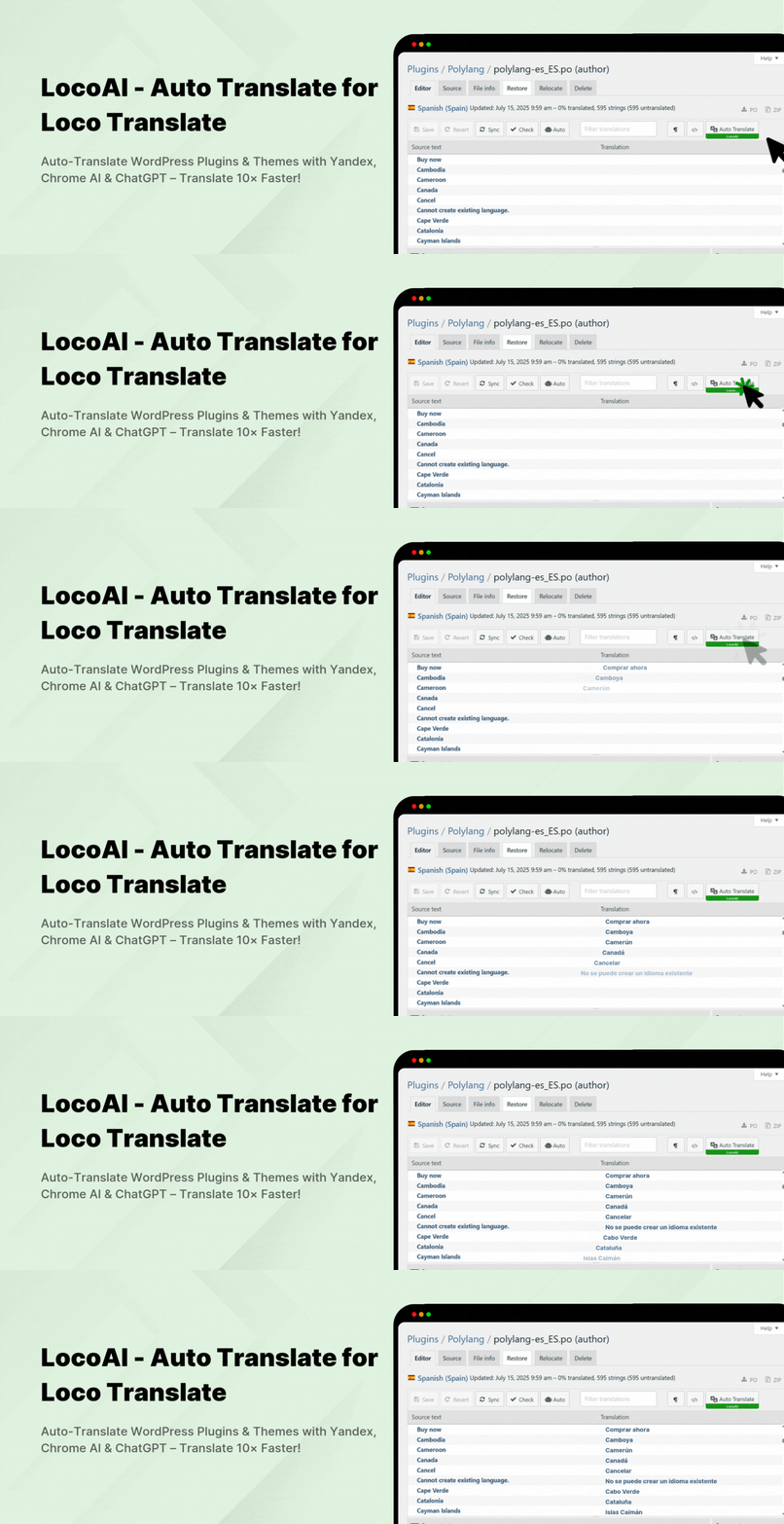

Description
LocoAI – Auto Translate For Loco Translate
LocoAI – Auto Translate For Loco Translate is a WordPress plugin extension that enhances the functionality of the popular Loco Translate plugin by adding automatic translation capabilities using third-party translation services like Yandex Translate and Chrome/Edge built-in AI.
Loco Translate is primarily a manual translation tool for translating WordPress themes and plugins from within the WordPress admin. However, it doesn’t include built-in support for automatic translations. That’s where our Automatic Translate Addon comes in.
How It Works | Upgrade to Pro!
Key Features
-
Automatic Translation: Translate plugin and theme strings using the Yandex Translate widget, Chrome and Edge built-in AI without a paid API.
-
Enhanced Accuracy: This addon supports advanced AI-powered and machine translators for improved accuracy and context understanding.
-
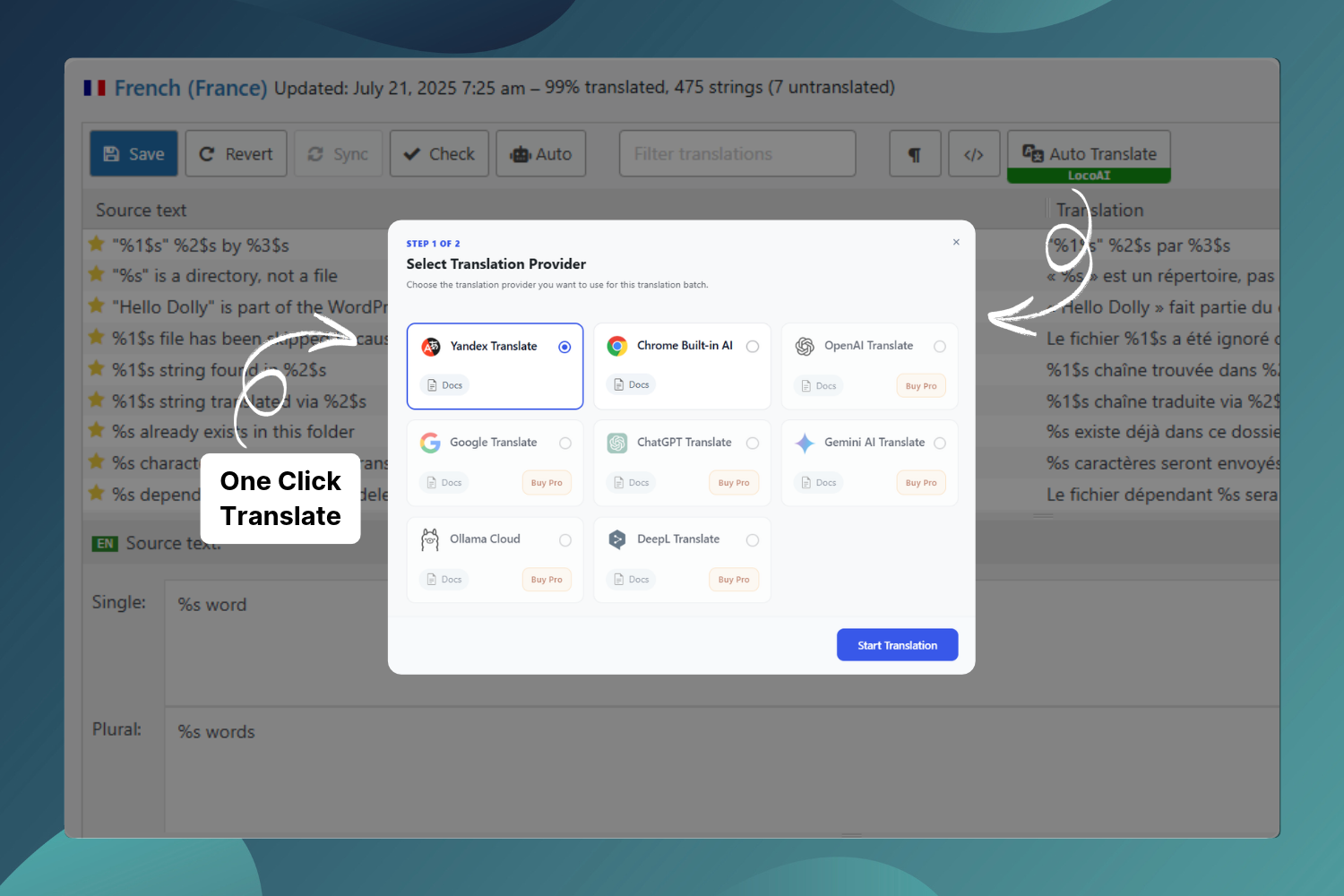
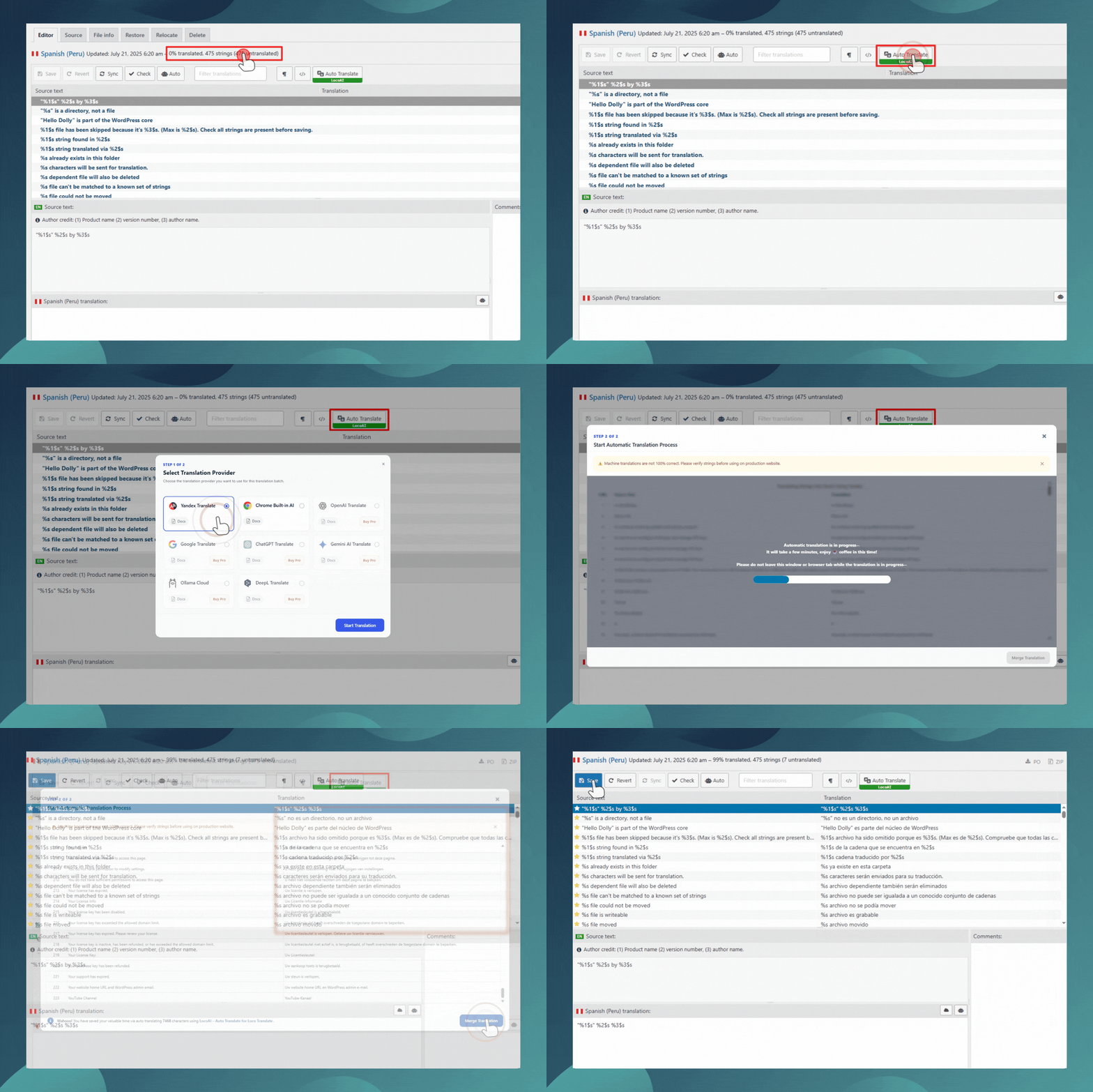
One-Click Automatic Translation: Easily translate all translatable strings in any plugin or theme within a single click without any manual input.
-
Unlimited Free Translations: Automatically translate an unlimited number of plugin and theme strings using the supported translation providers.
-
Edit Translations: Refine and improve machine-translated strings directly within Loco Translate’s built-in editor for better accuracy and readability.
-
Loco Translate Integration: LocoAI works directly inside the Loco Translate editor by adding automatic translation capabilities to the workflow you already know and use.
-
Multiple Languages Support: Translate WordPress plugin and theme strings into a wide range of languages supported by the available translation providers.
“If you spend too much time thinking about a thing, you’ll never get it done. Stop wasting time, complete work smartly & quickly!”
FREE v/s Premium Addon Comparison
Free License
✅ Yandex Translate Widget Support: Available
✅ Chrome Built-in AI Support: Available
✅ Edge built-in AI Support: Available
✅ Unlimited Free Translations: Available (Yandex, Chrome AI, and Edge AI)
✅ API Key Required: Not Required (Yandex, Chrome AI, and Edge AI)
❌ OpenAI Translation Support: Pro Only
❌ Ollama Cloud Translation Support: Pro Only
❌ Google Translate Widget Support: Pro Only
❌ DeepL Doc Translation Support: Pro Only
❌ Premium Support: Pro Only
❌ ChatGPT Translation Support: Pro Only
❌ Gemini Translation Support: Pro Only
Premium License
✅ Yandex Translate Widget Support: Available
✅ Chrome Built-in AI Translation Support: Available
✅ Edge Built-in AI Translation Support: Available
✅ ChatGPT Translation Support: Available
✅ Gemini Translation Support (API Key Required): Available
✅ Google Translate Widget Support: Available
✅ DeepL Doc Translation Support (API Key Required): Available
(Limited free docs translations/day or purchase DeepL Pro)
✅ OpenAI Translation Support (API Key Required): Available
✅ Ollama Cloud Translation Support (API Key Required): Available
✅ Unlimited Free Translations: Available
✅ Translation Context & Tone (Pro): Improve translation accuracy by adding your business context, tone, and target audience. This helps generate translations that match your brand voice and sound more natural and relevant to your users.
✅ Premium Support: Quick Support
(Support time:- 24-48 hours)
Note: API usage charges, quotas, and limits are determined by the selected translation provider.
Important Notice: This addon provides integrations with translation widgets and services (Yandex, Google, DeepL, Gemini, OpenAI, Ollama Cloud, Chrome AI, Edge AI, and ChatGPT); it does not provide a translation service. Yandex and Chrome/Edge built-in AI are available in both Free and Pro. OpenAI, Ollama Cloud, Google, DeepL, Gemini, and ChatGPT integrations require Pro. Please check translated text carefully before making it live. If a provider stops offering its widget or service, the addon may no longer support that provider.
Check out our other advanced Automatic Translate Addons
-
AutoPoly – AI Translation For Polylang duplicates your page or post titles, content, images, galleries, or meta fields, and automatically translates them into the selected language. Whether you’re using Elementor or Gutenberg, this addon makes the translation process easier.
-
AI Translation for TranslatePress is a powerful addon that enhances the functionality of the TranslatePress plugin. This addon uses advanced translation services, like Google Translate, Yandex, and Chrome AI translator, to provide accurate and instant translations for your web pages automatically.
-
Linguator – AI Auto Translate & Create Multilingual Sites is a powerful multilingual plugin that helps you create and manage multilingual content on your WordPress website. Easily translate your posts, pages, menus, and categories into different languages using AI and connect with visitors worldwide.
-
AutoMLP – AI Translation for WPML is WPML automatic translation addon. It allows you to translate your WordPress website using different AI services like OpenAI, Google Gemini, or Chrome AI at low cost.
-
Toolkit for Polylang – Translation Inspector & Duplicate Content is a powerful addon for Polylang that scans and manages your Polylang website for missing translations, outdated content, URLs & routing, site setup, Elementor translation, and more issues from one place.
Use of 3rd Party Services: This plugin connects to the Cool Plugins feedback server only for optional usage data sharing and voluntary feedback submission (for example, during plugin deactivation). Data is transmitted solely after explicit user consent. No hidden tracking is performed, and no frontend visitor or site user data is collected. For more details, please review our Data Usage Policy, TOS, and Privacy Policy.
Special THANKS!
Special thanks to the famous Loco Translate plugin author, Tim Whitlock, for creating an awesome plugin for translations and also thanks to Yandex for providing a translate widget for websites.
Automatic translations use Yandex, Chrome built-in AI, or Edge built-in AI in the free plugin. Pro also supports OpenAI, Ollama Cloud, Google, DeepL, Gemini, and ChatGPT. Please check all translated text carefully before making it live on your production site.
Important Links & Information
- Yandex Translate Terms
- Yandex Privacy Policy
- Google Translate Data Usage Policy
- DeepL Privacy Policy
- DeepL Translate Supports 24 languages:- English, German, French, Spanish, Portuguese, Portuguese (Brazilian), Italian, Dutch, Polish, Russian, Japanese, Chinese (simplified), Italian, bulgarian, Czech, Danish, Greek, hungarian, Slovak, Swedish, Norwegian Bokmål, Korean, Turkish & Ukrainian
Installation
-
Install LocoAI – Auto Translate For Loco Translate from the WordPress.org repository or by uploading a plugin-zip unzipped folder to the /wp-content/plugins directory. You must also install Loco Translate free plugin if you want to use this addon.
-
Activate the plugin through Plugins >> Installed Plugin menu in WordPress
-
Edit a plugin or theme language file in the Loco Translate editor. Click Auto Translate and choose Yandex Translate, Chrome built-in AI, or Edge built-in AI. Browser AI requires a compatible desktop browser, a secure connection, and support for the selected language pair.
-
To use OpenAI, Ollama Cloud, Google Translate, DeepL, ChatGPT, or Gemini integrations, install the Pro plugin and activate a premium license key.
FAQ
Can this plugin automatically translate page content?
No, this plugin only translates plugin and themes strings automatically. To translate page content automatically, you can try the AI Translation for TranslatePress Or AutoPoly – AI Translation For Polylang.
Is there any translation limit?
The addon does not impose a character limit. Free users can use Yandex Translate, Chrome built-in AI, and Edge built-in AI. Pro adds OpenAI, Ollama Cloud, Google Translate, DeepL, ChatGPT, and Gemini integrations, plus priority support. Provider quotas, charges, browser support, and language availability still apply.
What are the benefits of using ChatGPT for translations?
ChatGPT excels in understanding context and generating natural-sounding translations. It’s particularly good at handling complex phrases and maintaining the intended tone and meaning of the original text.
How does Gemini AI improve translation quality?
Gemini AI uses advanced deep learning techniques to provide translations that are highly accurate and contextually appropriate. It ensures that the translated text is fluent and professional.
Do I need any API key to use Gemini AI translations?
Yes, to access Gemini AI translations, you will need to obtain API key.
Do I need any API key to use ChatGPT translations?
The ChatGPT workflow in the Pro plugin does not require an API key. This integration is available only in Pro.
Which edition supports OpenAI and Ollama Cloud?
OpenAI and Ollama Cloud translation integrations are available only in Pro and require a provider API key. The free plugin displays these providers with Pro upgrade links.
Are Chrome and Edge built-in AI available in the free plugin?
Yes. Yandex Translate, Chrome built-in AI, and Edge built-in AI are available in both Free and Pro. Browser AI does not need a provider API key, but requires a compatible desktop browser, a secure connection, and language packs for the selected language pair.
How can this addon make my translations easier?
With one-click machine translations, this addon allows you to quickly and efficiently translate your plugins and themes, saving time and effort on multilingual projects!
What makes the premium version worth it?
Pro adds OpenAI, Ollama Cloud, Google Translate, DeepL, ChatGPT, and Gemini integrations, translation context and tone settings, and priority support. Yandex Translate and Chrome/Edge built-in AI are included in both editions. Provider usage charges and quotas may apply.
Can I edit translations easily?
Absolutely! You can refine any translated strings in Loco Translate’s editor, allowing you to perfect your content’s tone and accuracy.
Is any technical setup required?
Install the addon alongside Loco Translate to use Yandex without an API key. Chrome/Edge built-in AI also works without a provider API key, but requires browser setup, a secure connection, and supported language packs. Pro integrations such as OpenAI, Ollama Cloud, Gemini, and DeepL require their own API keys.
Will my content’s original style and meaning be preserved?
Yes, both ChatGPT and Gemini AI are designed to maintain the original tone and meaning, resulting in natural, coherent translations that match your content perfectly.
Can I rely on these translations for professional use?
Definitely! The advanced AI in the provided translators ensures that your translations are accurate and polished, ideal for professional multilingual sites.
How can I report security bugs?
You can report security bugs through the Patchstack Vulnerability Disclosure Program. The Patchstack team help validate, triage and handle any security vulnerabilities. Report a security vulnerability
Screenshots

Changelog
Version 2.8.0 – 29/10/2026
- Added: Support for Chrome Built-in AI.
- Added: Support for Edge Built-in AI.
- Improved: Overall plugin performance and compatibility.
- Tested Upto: WordPress 7.1.4.
Version 2.7.7 – 07/10/2026
- Added: Test Connection button for AI Translation Providers.
Version 2.7.6 – 01/09/2026
- Updated: Pot file for plugin translation.
- Tested: Upto WordPress 7.1.
Version 2.7.5 – 15/07/2026
- Improved: Code Improvements & Optimization.
Version 2.7.4 – 23/06/2026
- Tweak: Removed unused files.
Version 2.7.3 – 23/06/2026
- Improved: Dashboard UI Improvements.
- Improved: Translation Popups UI Improvements.
- Improved: Overall code improvements.
Version 2.7.2 – 29/04/2026
- Minor: Textual Changes.
Version 2.7.1 – 25/04/2026
- Fixed: Yandex translator infinite loop.
Version 2.7.0 – 22/04/2026
- Improved: Removed unnecessary and redundant code.
- Improved: Optimized code quality and overall performance.
- Fixed: Resolved issues identified by the Plugin Check plugin.
- Fixed: Resolved minor bugs and improved plugin stability.
Version 2.6.3 – 16/04/2026
- Fixed: Issue with yandex translator.
Version 2.6.2 – 19/02/2026
- Improved: Standardized text domain across plugin.
Version 2.6.1 – 2/2/2026
- Improved: Code Improvements.
Version 2.6 – 19/1/2026
- Fixed: Fixed issues reported by “Plugin Check” plugin.
- Improved: Enhanced recommendations for other useful plugins.
- Removed: Extra Code.
Version 2.5.5 – 14/11/2025
- Fixed: Syntex Error.
Version 2.5.4 – 31/10/2025
- Minor: Textual changes.
Version 2.5.3 – 31/10/2025
- Improved: Review Notice.
- Added: Added other plugin recommendations to create multilingual site.
Version 2.5.2 – 28/08/2025
- Improved: Update UTM links.
Version 2.5.1 – 19/08/2025
- Fixed: Addressed security vulnerabilities.
- Improved: Enhanced overall code quality.
Version 2.5 – 21/07/2025
- Added: Redesigned and enhanced the Translator Popup for better usability and appearance.
- Improved: Updated the plugin name for improved clarity and branding.
- Fixed: Addressed minor bugs and issues.
- Tested: Compatible with WordPress 6.8.2.
Version 2.4.11 – 20/06/2025
- New: Added a Preview button.
- Improved: Minor code improvements for better performance.
Version 2.4.10 – 02/06/2025
- New: Introduced a user opt-in option within the plugin.
- Improved: Added support for additional languages in Yandex Translators.
Version 2.4.9 – 16/04/2025
- Updated: Redesigned the review notice logo for improved branding.
- Updated: Refreshed the Open AI video link.
- Fixed: Resolved a compatibility conflict with the CMC plugin.
- Tested: Verified compatibility up to WordPress 6.8.
Version 2.4.8 – 31/03/2025
- New: Launched a new Dashboard.
- Fixed: General bug fixes.
Version 2.4.7 – 27/02/2025
- New: Implemented a Review Notice.
- Fixed: Corrected a popup display issue.
- Fixed: General bug fixes.
- Improved: Enhanced the translator popup.
Version 2.4.6 – 27/01/2025
- Fixed: Addressed a string merging issue with Loco Translate 2.7.
- Fixed: Resolved load textdomain issues.
Version 2.4.5 – 09/10/2024
- Improved: Updated UTM content in URLs.
- Improved: Refreshed Pro features images and optimized their CSS.
- Fixed: Patched security vulnerabilities.
Version 2.4.4 – 21/08/2024
- Tweaks: Made textual adjustments on the dashboard page and in the readme file.
Version 2.4.3 – 22/07/2024
- New: Added a Gemini translation button inside the popup.
- Tested: Verified compatibility up to WordPress 6.6.
Version 2.4.2 – 01/05/2024
- New: Added support for Portuguese (Brazil).
- New: Introduced CSS for RTL (Right-to-Left) support.
Version 2.4.1 – 07/02/2024
- Fixed: Minor bug fixes.
Version 2.4 – 28/11/2023
- Improved: Rewrote the overall JavaScript code.
- Improved: Optimized plugin styles.
- New: Added an AI translation button inside the popup.
- Tweaks: Minor textual changes.
- Improved: Overall code improvements.
Version 2.3.3 – 18/05/2023
- Tweaks: Minor textual changes.
Version 2.3.2 – 24/03/2023
- Tweaks: Minor textual changes.
- Improved: Tested compatibility up to WordPress version 6.2.
- Fixed: Minor bug fixes.
Version 2.3.1 – 02/05/2022
- Fixed: Resolved an issue where scripts were not loading in other languages.
Version 2.3 – 29/04/2022
- Improved: Overall code improvements.
- Removed: No longer requires activation of the free version with PRO.
- Fixed: Corrected a bug with large string translation merging.
Version 2.2.3 – 05/10/2021
- Fixed: Addressed a license notice issue.
Version 2.2.2 – 27/04/2021
- Fixed: Minor ID bug fixes.
Version 2.2 – 17/04/2021
- Updated: Integrated the new Yandex translation API.
- Fixed: Resolved issues preventing translation with Yandex.
- Improved: Tested compatibility up to WordPress 5.7.
Version 2.1.3 – 11/12/2020
- Fixed: Resolved compatibility issues with WordPress 5.6.
- Fixed: Addressed an issue preventing string saving with WordPress 5.6.
Version 2.1.2 – 21/11/2020
- Fixed: Resolved compatibility issues with Loco Translate 2.4.6.
Version 2.1.1 – 27/10/2020
- Fixed: Resolved compatibility issues with Loco Translate 2.4.4.
Version 2.1 – 14/10/2020
- New: Integrated new auto-translation features.
- New: Added support for the latest version of Loco Translate.
- Fixed: Resolved compatibility issues with Loco Translate.
- Improved: Removed extra code for better efficiency.
- Improved: Enhanced
custom.js.
Version 2.0.1 – 07/08/2020
- Notice: Addon is currently compatible only with Loco Translate official plugin version 2.4.0. A new compatible update will be available soon.
Version 2.0 – 31/07/2020
- Improved: Addon is now exclusively compatible with Loco Translate version 2.4.0.
- New: Introduced the Yandex Page Translate Widget (unlimited translations without API).
- Removed: API settings panel (plugin can now be used without an API key).
- Removed: IBM Watson translator support.
- Removed: Older Loco Translate version notices.
- Removed: Test API settings.
- Removed: All APIs.
- Improved: Code improvements for enhanced performance.
- Updated: Major JavaScript changes.
Version 1.9.1 – 09/07/2020
- Fixed: Minor notice change.
Version 1.9 – 23/06/2020
- Fixed: Resolved a “404 not found” bug with IBM translate.
- Fixed: Addressed an issue preventing the disabling of review notices.
- Updated: Refreshed the settings panel and translate popup content.
- Removed: HTML string translation support.
- New: Added some checks for strings.
- Improved: Enhanced the IBM translation process.
- Improved: Minor JavaScript improvements.
Version 1.8 – 12/06/2020
- New: Added IBM Watson Translator API support.
- Notice: Included a notice regarding Yandex Translate API v1 deprecation.
- Fixed: Bug fixes.
- Improved: Endpoint updates.
- Improved: Code improvements.
Version 1.7.5 – 27/05/2020
- Fixed: Notice bug fixed.
- Updated: Minor settings updates.
Version 1.7.3 – 15/05/2020
- Updates: Minor textual changes.
Version 1.7.1 – 28/04/2020
- Fixed: Resolved an issue where index per request was not working.
- Updated: Updated to a new logo and all assets.
Version 1.7 – 13/02/2020
- New: Added Chinese language support.
- New: Supported singular and plural string translation.
- New: Added admin notices.
- New: Added support for major languages.
- New: Added Punjabi, Kannada, Irish, and Malayalam language support in Microsoft Translator.
- Fixed: Corrected %s and s% space issues after special characters.
- Fixed: Resolved wrong index updates with multiple strings.
- Improved: Enhanced string translation.
- Improved: Overall code improvements.
- Improved: Optimized settings panel.
- Updated: Textual changes.
Version 1.6 – 27/01/2020
- New: Integrated Microsoft Translation API support.
- New: Added plain text translation support for %s, %d placeholders.
- New: Integrated an API testing button in the settings panel.
- New: Added error handling messages.
- New: Integrated a sweet alert popup.
- New: Supported %s, %d placeholder strings in Google Translate.
- New: Added Microsoft translation settings.
- Improved: Enhanced review notice and corrected spelling errors.
Version 1.5 – 14/01/2020
- New: Integrated Google Translation API support.
- New: Integrated a reset translation strings button.
- New: Integrated available character limit display in the translation popup.
- New: Added Google API settings in the settings panel.
- New: Added Norwegian language support.
- Improved: Enhanced the translation popup.
- Improved: Code improvements.
- Improved: Improved the deactivation popup.
- Improved: Textual changes.
- Fixed: Minor bugs.
Version 1.4.1 – 08/01/2020
- Fixed: Minor JavaScript bug fixes.
Version 1.4 – 31/12/2019
- New: Integrated HTML string translation feature.
- New: Supported Norwegian and other missing languages.
- New: Integrated translation settings popup.
- Improved: Optimized code.
- Improved: Updated preloader.
- Fixed: Resolved an unsaved string highlighting issue.
- Fixed: Minor JavaScript issues.
- Fixed: Corrected a wrong character calculation bug.
Version 1.3.2 – 13/12/2019
- New: Integrated URL and link filters in strings.
- New: Added string filters.
- Improved: JavaScript code.
- Improved: Feedback form.
- Fixed: Minor issues.
Version 1.3 – 03/12/2019
- New: Integrated translated character statistics tables.
- New: Extended character limit with premium license key.
- New: Integrated namespace.
- New: Added “Not interested” button in the review popup.
- New: Integrated a premium license key manager.
- New: Added security checks in every request.
- New: Integrated nonce in AJAX requests.
- Improved: Improved translation issues.
- Improved: Overall code improvements.
- Improved: Added new screenshots.
- Fixed: Minor translation issues.
- Fixed: Minor JavaScript errors.
- Fixed: Compatibility issues with WordPress 5.3.
Version 1.2.1 – 13/09/2019
- Fixed: Instant review popup notification bug fixed.
Version 1.2 – 02/09/2019
- Fixed: Resolved mismatch translation strings in Turkish.
- Fixed: Minor JavaScript issues.
- Improved: Minor textual changes.
- New: Added feedback on plugin deactivation.
Version 1.1 – 31/08/2019
- New: Integrated an automatic translation progress bar popup.
- New: Added batch translation of all untranslated words in a single click.
- Fixed: Resolved issues with HTML translation.
- Fixed: Minor JavaScript issues.
Version 1.0.2 – 08/07/2019
- Fixed: Translation issues with the Chinese language.
Version 1.0 – 08/06/2019
- New: Initial plugin release.