


Description
AV Solutions Courier Shipping for WooCommerce connects a WooCommerce store to Econt, Speedy, BOX NOW and Pigeon Express.
The plugin provides:
- Fixed or live contract checkout prices for delivery to an office, locker or address.
- Local office and locker lists, filtered automatically by the customer’s delivery city, with optional manual search.
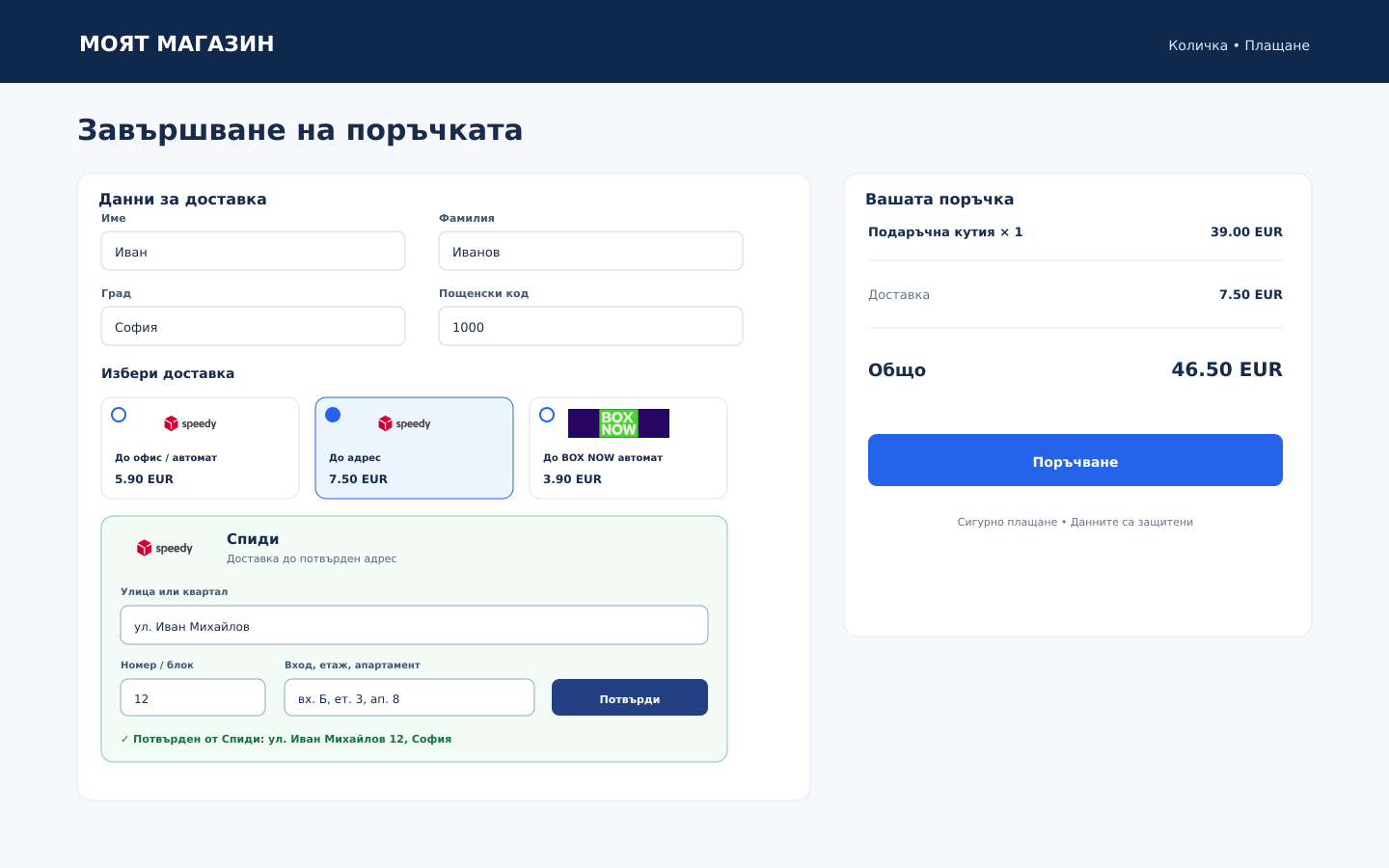
- Courier address search with street or quarter selection and validation before an address-delivery order can be placed.
- WooCommerce Checkout Block fields for delivery locations.
- Contract price checks from the order screen without changing the order total.
- Shipment creation, PDF labels, automatic tracking history and cancellation.
- Courier, waybill and current delivery status fields in WooCommerce orders, customer order pages and outgoing order emails.
- Optional automatic completion of an order after the courier confirms delivery; returned and problematic shipments are flagged without automatic refunds or cancellation.
- Protection against accidentally creating a second shipment after an uncertain API response.
- Optional cash on delivery according to the merchant’s courier contract.
- Automatic customer PDF documents for every accepted order. The Article 52o wording and statutory Appendix 18a QR payload are used only for confirmed remote card payments; other payment methods receive a clearly identified sales document with a verification QR code.
- Documents for postal money transfer sales when supported by the merchant’s Econt or Speedy contract.
- An immutable document snapshot, a separate sequential document number and an event log. Newly issued sales documents include the courier, destination, waybill and delivery status available at issuance.
- Monthly audit XML exports validated against the included GPL-licensed schema.
- WooCommerce HPOS, classic checkout and Checkout Block compatibility.
- Merchant-defined shipping prices or live contract prices from the courier API, with percentage adjustment, minimum, maximum and fallback controls.
- Courier logos in the administration and responsive delivery-method cards in classic checkout and Checkout Blocks.
- Invoices, pro forma invoices and credit notes with sequential numbering and PDF output.
- Invoice-request and company fields in classic checkout and Checkout Blocks.
- Monthly Microinvest Delta TXT export and a ZIP archive of generated accounting documents.
- Bulk shipping-label and invoice generation from the WooCommerce orders list, without an artificial plugin limit.
- Optional customer delivery-history checks through Connectix and NepoStop.
- Optional VAT-number validation through VIES.
- Optional monthly audit XML email to the configured accountant.
The administration interface is in Bulgarian because the plugin is intended for Bulgarian stores. Shipping is limited to Bulgaria. Store owners must obtain their own courier API credentials and contracts.
Each courier can use a fixed merchant-defined checkout price or a live contract price from its API. Percentage adjustment, minimum, maximum and fixed-price fallback controls are available. The price-check button on an order remains a separate manual check and does not change an existing order total.
The plugin does not connect to a fiscal printer or submit files automatically to the Bulgarian National Revenue Agency. It can generate invoices, pro forma invoices and credit notes, but it does not guarantee legal or tax compliance. The merchant and their accountant must verify the configured company data, numbering, document layout, payment methods, VAT groups, postal money transfer contract and current reporting requirements before production use.
The bundled audit XSD is an independently authored validation subset for the XML generated by the plugin. It follows the publicly described Appendix 38 field structure, but it is not an official National Revenue Agency schema and its acceptance in the current reporting period has not been independently confirmed. Compare every export with the current official schema before submission.
External services
This plugin connects only to courier services explicitly enabled and configured by a store administrator. Enabling a courier and entering credentials authorizes the related API communication. No analytics or advertising services are used.
To synchronize delivery locations, search or validate a delivery address, obtain prices, create or cancel shipments, print labels and track shipments, the plugin may send the following data to the selected courier: sender account credentials and contact details; recipient name, telephone, email and delivery city, postcode, selected street or quarter, street or block number, address details or selected office; order reference and shipment number; package weight and dimensions; shipment content description; order currency and value; cash-on-delivery amount and options. Each courier processes this data under the merchant’s contract and its own terms and privacy policy. When automatic tracking is enabled, active shipment numbers are checked periodically through the selected courier API.
Econt
API requests are sent to demo.econt.com in the Econt test environment and ee.econt.com in production.
- API documentation: https://www.econt.com/developers/soap-json-api.html
- Privacy policy: https://static-content.econt.com/cms/pages/documents/privacy_policy/Politika_za_lichnite_danni_en.pdf
- General terms and customer information: https://www.econt.com/en/client-center
Speedy
API requests are sent to api.speedy.bg. Speedy uses the same API host with different test or production credentials.
The plugin also requests the contract-client list to load the client ID, name, object, contact, email and sender address available for the authenticated account. The sender telephone remains editable because it is not guaranteed in this response.
- API documentation: https://api.speedy.bg/api/docs/
- Privacy policy: https://www.speedy.bg/en/gdpr
- General terms: https://www.speedy.bg/en/terms-and-conditions
BOX NOW
API requests are sent to the HTTPS BOX NOW hostname configured by the administrator. The plugin accepts only boxnow.bg and its subdomains.
- API documentation: https://www.boxnow.bg/diy/eshops/api
- Privacy policy: https://boxnow.bg/en/personal-data-processing-notice
- Website terms and customer information: https://boxnow.bg/en/
Pigeon Express
API requests are sent to the HTTPS Pigeon Express hostname configured by the administrator. The plugin accepts only pigeonexpress.com and its subdomains.
- API documentation: https://api-docs.pigeonexpress.com/
- Privacy policy: https://pigeonexpress.com/privacy
- Service terms: https://pigeonexpress.com/terms
Connectix
When explicitly enabled, the plugin sends the customer’s telephone number and the configured API token to Connectix to request delivery-risk information. The result is stored with the WooCommerce order.
- API: https://api.connectix.bg/
- Terms: https://connectix.bg/bg/terms
- Privacy policy: https://connectix.bg/bg/privacy
NepoStop
When explicitly enabled, the plugin sends the customer’s telephone number and the configured API key to NepoStop to request delivery statistics. The result is stored with the WooCommerce order.
- API: https://nepostop.com/api/
- Website: https://nepostop.com/
VIES
When explicitly enabled and a VAT number is entered for an invoice, the country code and VAT number are sent to the European Commission VIES SOAP service. Results are cached for one day.
- Service: https://ec.europa.eu/taxation_customs/vies/
Privacy
The plugin stores courier credentials in the WordPress options table in encrypted form, using keys derived from the site’s WordPress salts. Credentials can alternatively be supplied as constants. Changing the WordPress salts requires the credentials to be entered again.
Order delivery details, courier shipment identifiers, tracking statuses and history, document snapshots, refund information and an action log are stored in the WordPress database. Generated customer document links are signed and expire after seven days. Anyone who obtains a valid link can open the document during that period, so links should not be published.
The plugin does not collect telemetry and does not send data to the plugin author. Data is sent to a courier only after that courier is enabled and configured, as described under External services. Store owners are responsible for adding the selected couriers and applicable retention information to their own privacy notice and for handling data-subject requests under applicable law.
Installation
- Upload the plugin ZIP through Plugins > Add New > Upload Plugin, then activate it.
- Open WooCommerce > AV Solutions Доставки > Couriers and settings.
- Enter the sender and API credentials for each courier. All couriers are disabled by default.
- Select the correct test or live environment. BOX NOW and Pigeon API URLs and credentials are not changed automatically when the environment selector changes.
- Save the settings and synchronize locations for each enabled courier.
- Open WooCommerce > Settings > Shipping > Shipping zones, select the Bulgaria zone and add the AV Solutions Доставки method.
- Configure checkout prices, free-shipping thresholds and shipping tax treatment.
- Place test orders for every enabled courier and verify location selection, price checks, shipment creation, labels, tracking and cancellation before using live credentials.
- In the plugin settings, review automatic tracking and whether a courier-confirmed delivery may complete the WooCommerce order.
MySQL or MariaDB with InnoDB and working GET_LOCK() / RELEASE_LOCK() functions is required. SQLite is not supported in production. The server also needs DOM/XML, mbstring and OpenSSL or Sodium PHP extensions, outbound HTTPS access and a working WordPress mail transport if documents are sent by email.
FAQ
Does it calculate live courier prices during checkout?
Yes, when the courier supports price calculation and the store selects the API price mode. Each courier can instead use fixed office and address prices. The administrator can also configure an API-price adjustment, minimum, maximum and either a fixed-price fallback or hiding the unavailable method.
Does it submit the monthly XML to the National Revenue Agency?
No. The plugin validates and downloads an XML file. The merchant must review and submit it separately using the current official procedure.
Is this a fiscal printer?
No. It does not control fiscal hardware. Version 1.1.0 can generate commercial invoices, pro forma invoices and credit notes, but these documents must be reviewed against the merchant’s accounting policy before production use.
What happens if the courier connection fails while creating a shipment?
The request is marked as uncertain and automatic retry is blocked. Check the courier portal using the order reference. Only after confirming that no shipment exists should a manager reset the request and try again.
Can I use postal money transfer reporting for every courier?
No. In this version it is limited to Econt and Speedy, and only when the merchant confirms the relevant contract. Econt also requires the correct postal money transfer template. BOX NOW and Pigeon cash-on-delivery orders require separate fiscal handling outside this plugin.
Does uninstalling remove the accounting records?
No. Shipment, tracking history, document, audit and refund records are intentionally retained. The scheduled synchronization events are removed.
Are existing issued documents changed when tracking is updated?
No. Issued documents are immutable. A newly issued document stores the courier and waybill status that was available at the time of issue. Later tracking changes remain visible in the WooCommerce order and its delivery history without rewriting an accounting document.
Screenshots


Changelog
1.1.11
- Add a separate Speedy cash-on-delivery mode for contracts where Speedy issues the fiscal receipt. This sends
CASHinstead ofPOSTAL_MONEY_TRANSFERand keeps the existing external-fiscal and postal-money-transfer modes available. - Clarify that the postal-money-transfer contract checkbox applies only to the PPP mode and map Speedy courier-receipt cash on delivery to the existing audit payment code for fiscal cash on delivery.
1.1.10
- Add a QR code to every newly rendered customer document. Confirmed card payments keep the Appendix 18a payload; other sales use a clearly identified document-verification payload.
- Add a separate report for accepted orders that have no document, because a missing order is not the same as a skipped sequential number.
- Add an “Issue now” action to the WooCommerce order list and the documents report, with the exact document-generation error shown in the list.
- Run the missing-document reconciliation from the administration as well as the hourly WordPress cron so delayed cron cannot leave old accepted orders unnoticed.
1.1.9
- Issue non-card sales documents as soon as checkout creates the order, and reconcile recent accepted orders hourly so temporary configuration or mail errors do not leave an order without a document.
- Keep Article 52o documents limited to confirmed remote card payments and show pending card orders as waiting for payment instead of silently missing a document.
- Replace the customer PDF with a compact one-page layout containing merchant, customer, courier destination, payment, item, tax and total sections.
- Audit the shared sales-document sequence, show gaps in the administration and allow a verified skipped number to be recorded as annulled without renumbering issued documents or reusing the number.
- Prevent a single order from receiving both a generic sales document and a separate Article 52o document.
1.1.8
- Issue and email a PDF document automatically for every accepted WooCommerce order while keeping Article 52o wording and QR codes limited to confirmed remote card payments.
- Add a document download column to both HPOS and classic WooCommerce order lists.
- Compact the customer sales-document layout so ordinary orders fit on one A4 page.
1.1.7
- Recognize Speedy’s “Приемане от подател” event as an in-transit shipment and move the WooCommerce order to “Изпратена”.
1.1.6
- Add the WooCommerce order status “Изпратена” after the courier confirms that a shipment is in transit or ready for collection.
- Move delivered orders from “Изпратена” to “Приключена” when automatic completion is enabled.
- Check active shipments every 15 minutes throughout the day and replace the previous four-hour schedule automatically.
1.1.5
- Select monthly audit orders by the confirmed delivery month, including courier-confirmed deliveries that remain in processing status.
- Include every delivered order with its actual Appendix 38 payment code instead of limiting the report to virtual-POS sales.
- Export pre-discount article values while preserving the order discount and final total fields.
- Recover shipping VAT only when it is present in the WooCommerce order totals, and use the Appendix 38 header order produced by Bulgarisation.
- Upgrade existing audit snapshots safely without changing already issued customer PDFs.
1.1.4
- Fixed label printing from the WooCommerce order screen so the selected size opens the courier PDF instead of submitting the order form to edit.php.
1.1.3
- Added per-print label size selection and a per-courier default for Speedy A4/A6 and Pigeon A4/100×150/100×90 mm labels.
1.1.2
- Show the selected courier destination in the WooCommerce order list before and after a shipment is created, with a fallback to the stored office or structured courier address.
1.1.1
- Fixed Speedy label printing when the API negotiates PDF success and JSON error responses, and print every parcel in a multi-parcel shipment.
1.1.0
- Added fixed or live API courier pricing with adjustments, limits and fallback rules.
- Added invoices, pro forma invoices, credit notes, PDF output and company checkout fields.
- Added Microinvest export, document ZIP archives and optional accountant email delivery.
- Added bulk label and invoice generation.
- Added optional Connectix, NepoStop and VIES integrations.
- Added official courier logos to the administration and checkout.
- Added Speedy contract-client synchronization and sender profile selection.
- Added automatic office and locker filtering by the checkout delivery city.
- Fixed switching between courier delivery methods so stale Speedy locations cannot appear after selecting BOX NOW.
- Added responsive courier-logo cards for choosing office, locker or address delivery.
- Added carrier-nomenclature address search for Econt, Speedy and Pigeon, with Econt/Speedy API validation and checkout blocking until a courier address is confirmed.
- Stores the structured courier address with the order and uses it when calculating a live price and creating the shipment.
- Added BOX NOW postcode and location-note data to synchronized lockers for more reliable city filtering.
- Added automatic shipping-label creation as an optional per-courier setting.
- Added automatic courier tracking, normalized delivery statuses and an immutable shipment-event history.
- Added courier, waybill and delivery-status fields to WooCommerce order screens, customer order pages and order emails.
- Added optional order completion after API-confirmed delivery, while returned and problematic shipments remain flagged for manual review.
- Added the courier, destination, waybill and status-at-issue to newly generated N-18 sales documents without changing previously issued documents.
- Fixed courier selection so the complete logo card is rendered and clickable in classic checkout and Checkout Blocks.
- Fixed courier address fields and suggestions overflowing outside the delivery panel, including themes that force content-box sizing.
- Added Bulgarian month names to generated sales documents and monthly report emails.
- Completed orders missing an audit snapshot are now safely archived during monthly XML generation using their WooCommerce completion date.
- Added reliable automatic monthly XML delivery and manual selected-month delivery to the configured accountant email.
- Limited audit exports to completed calendar months and replaced the browser month field with a Bulgarian month selector.
- Added 10-digit sales-document numbers for every exported order and logged repair of audit records created by the earlier invalid schema.
- Added PAYM 6 for cash-on-delivery sales recorded with a fiscal receipt and tightened the local XSD validation.
- Accountant emails now preserve the .xml attachment name and use the WordPress administrator email with the configured company or site name.
- Added a read-only migration from current and legacy Bulgarisation/woo-bg/bfw metadata that preserves original document numbers and PDFs, checks conflicts before import and continues the shared numbering sequence.
- Added a submitted-through cutoff so audit months already filed through Bulgarisation cannot be generated or emailed again.
1.0.0
- Initial public release.
- Added Econt, Speedy, BOX NOW and Pigeon Express courier adapters.
- Added WooCommerce classic checkout and Checkout Block location fields.
- Added sales document PDFs, local QR generation and monthly audit XML export.