
Description
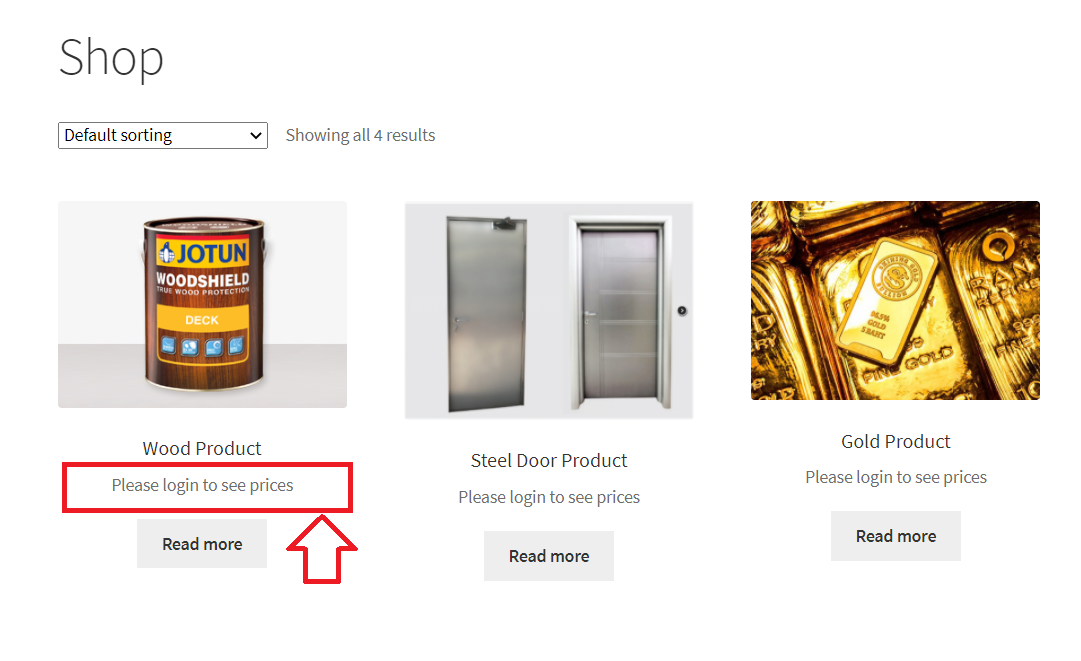
Hide prices for logged-out users, or hide your whole store until customers log in. Perfect for private, B2B and wholesale stores.
Features
- Hide prices for guest users
- Show a message such as “Log in to view prices” instead of the price
- Hide the add to cart button and prevent checkout
- Customize the message, including links
- Force users to log in to view the store
Who is it for?
- Wholesale and B2B stores that only show prices to registered customers
- Members-only stores where pricing is a benefit of having an account
- Private stores, such as company, staff or club shops that shouldn’t be public
B2BKing Pro: The Complete WooCommerce B2B & Wholesale Solution
This plugin is the free private store module of B2BKing, the highest rated WooCommerce B2B and wholesale plugin: 4.95/5 stars from 216+ reviews, powering 15,000+ stores.
B2BKing Pro includes everything in this plugin, plus 130+ features for running a wholesale, B2B or hybrid B2B + B2C store.
New to B2B selling? Read our complete guide to WooCommerce B2B stores.
Advanced Private Store & Product Visibility
How to hide prices in WooCommerce
- Hide prices for specific products only
- Replace prices with quote requests for logged-out users
- Hide the shop and products completely
- Hide specific products or categories from certain user groups or individual users
Wholesale Prices & Customer Groups
Complete guide to WooCommerce wholesale prices
- Organize customers into groups with their own prices, discounts and rules
- Show both retail and wholesale prices to business users
- Configure amount or percentage discounts for each group
- Import and export wholesale prices in bulk via CSV
Tiered Pricing
Learn more about tiered pricing & price tables
- Set different prices based on the quantity ordered
- A tiered pricing table is generated automatically and adapts to any theme
- The current price is highlighted as customers change the quantity
Customer-Specific Pricing
Learn more about customer-specific pricing
- Set negotiated prices for individual customers, no extra groups or rules needed
- Set a regular price, sale price and quantity tiers for each customer and product
- Each customer only sees their own prices once logged in
B2B Registration & Approval
- Separate B2B and B2C registration forms, with manual or automatic approval
- 9 types of custom fields, such as company name, VAT number or file upload
- Automatically validate EU VAT numbers via VIES
Quote Requests & Offers
Learn more about quote requests
- Customers can request quotes for specific products and quantities
- Negotiate through built-in conversations and messaging
- Reply with purchasable offers, also sent as branded PDFs
Minimum & Maximum Order Rules
Complete guide to minimum order amounts & quantities
- Set minimum and maximum order quantities or values
- Apply them to the whole order, specific categories or specific products
- Set different rules per group, e.g. B2C minimum $50, B2B minimum $1,000
- Enforce package quantities, e.g. products sold in boxes of 6
B2B Payments & Tax
How to enable Net 30 payment terms in WooCommerce
- Invoice and purchase order payment methods for B2B customers
- Enable or disable payment and shipping methods for each group
- Tax exemptions by group or country, optionally based on a validated VAT number
- Show prices excluding tax to B2B users and including tax to B2C users
Bulk Ordering & Company Accounts
- Wholesale bulk order form with product search by name or SKU
- Quick orders via CSV upload and reusable purchase lists
- Subaccounts for employees, with permissions and order approval
B2B Only, or B2B + B2C Together
How to sell both B2B and B2C with WooCommerce
- Dedicated modes for B2B-only stores and hybrid B2B + B2C stores
- Business prices and features are shown to B2B users only
- Can be added to an existing store without affecting current customers
👉 Get B2BKing – The Ultimate WooCommerce B2B & Wholesale Plugin
Want wholesale prices for free? Try B2BKing Core, our free wholesale plugin on WordPress.org.
Installation
- Go to Plugins > Add New, search for “Private Store B2BKing”, then click Install Now and Activate. Or upload the plugin zip under Plugins > Add New > Upload Plugin.
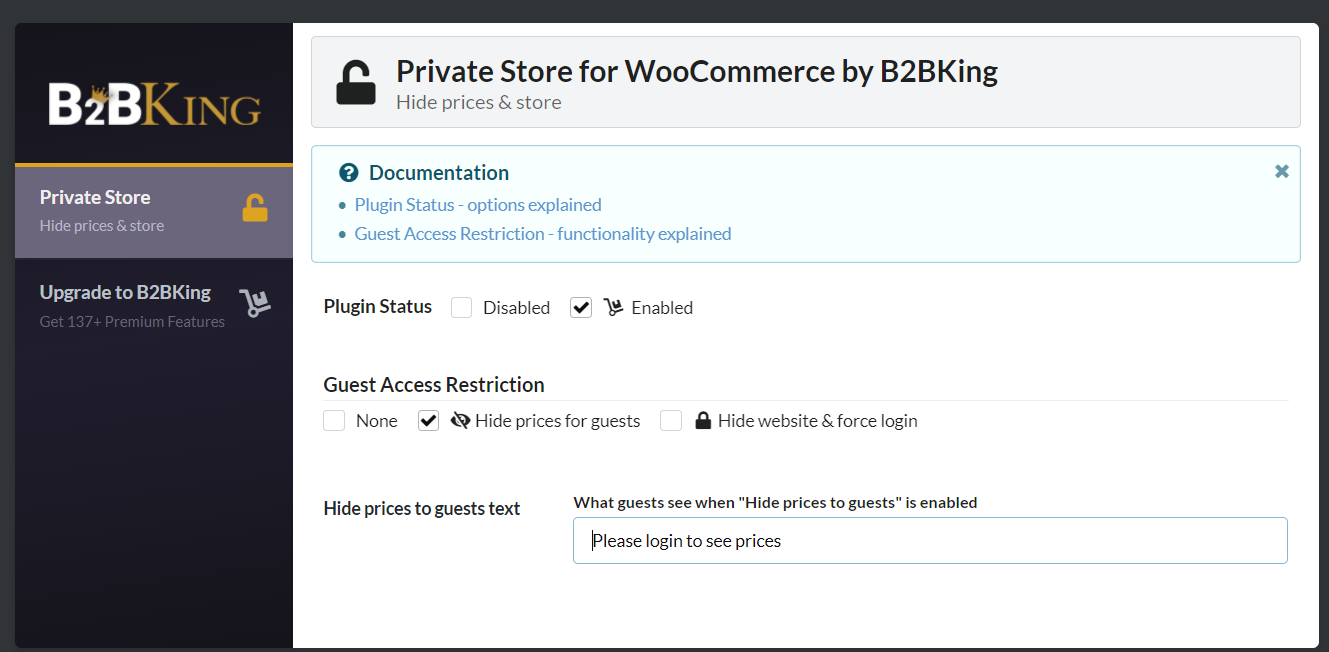
- Go to B2BKing > Private Store in your WordPress admin.
- Set the plugin status to Enabled.
- Under Guest Access Restriction, choose “Hide prices for guests” or “Hide website & force login”.
- Optionally, change the message guests see instead of prices.
FAQ
How do I hide prices until login in WooCommerce?
Activate the plugin, go to B2BKing > Private Store, enable it and choose “Hide prices for guests”. Logged-out visitors will see your message instead of prices.
Can I show a “Log in to view prices” link?
Yes. You can write your own message and include a link, for example to your My Account page, where customers can log in or register.
Does it hide the add to cart button too?
Yes. When prices are hidden, guests can’t add products to the cart or check out.
How do I make my WooCommerce store private or members only?
Choose “Hide website & force login”. Logged-out visitors are sent to the login page before they can see the store.
Will logged-in customers still see prices?
Yes. Prices are only hidden from logged-out visitors.
Can I hide prices only for some products, categories or user roles?
Not in this free plugin, which hides prices for all guests. B2BKing Pro lets you hide prices for specific products, and control prices and visibility for each customer group.
Can I replace prices with a “Request a quote” button?
That’s available in B2BKing Pro, which lets guests request quotes instead of seeing prices.
Does it work with B2BKing Pro?
B2BKing Pro already includes all of these features, so you don’t need both. If B2BKing Pro is active, this plugin won’t activate, which avoids conflicts.
Is WooCommerce required?
Yes. This plugin requires WooCommerce.
Screenshots
Changelog
1.2.2
- Security: prices are now also hidden from guests in the WooCommerce Store API, product variation data, structured data (JSON-LD) and block theme page data
- Security: “Hide website completely” now also blocks guest access through the REST API and WooCommerce AJAX requests
- Security: settings are now sanitized and validated when saved
- Fix: Shop Managers can now save the plugin settings
- Fix: conflict with B2BKing Core, which shared the plugin status and settings tab options
- Fix: the plugin now pauses itself with a notice when B2BKing Pro is active, regardless of plugin load order
- Fix: direct file access is now blocked
1.2.1
- Tested with WooCommerce 11.3
- Improved readme and documentation
1.0.0
- Initial release