


Description
BaraTables builds interactive tables and charts from manual rows, CSV uploads, snapshots, WordPress content or an external database.
Import a JSON, XML, HTML, CSV, TXT, XLSX, ODS or ZIP export from another plugin.
Features:
- Search, sorting, pagination and dropdown, multi-select, checkbox or radio filters, with category and tag filtering
- Export to CSV, Excel or PDF, copy or print
- Reorder columns, control visibility, keep headers visible, freeze leading columns on scroll
- Strict numeric sorting, conditional colors and filtered sum, average, min or max footers
- Fetch a bounded snapshot from a public CSV, JSON or Google Sheet; pages never contact it
- Page large external MySQL/MariaDB tables on demand
- Collapse wide tables into stacked rows on small screens
- Match your theme automatically, or set one design for every table and chart
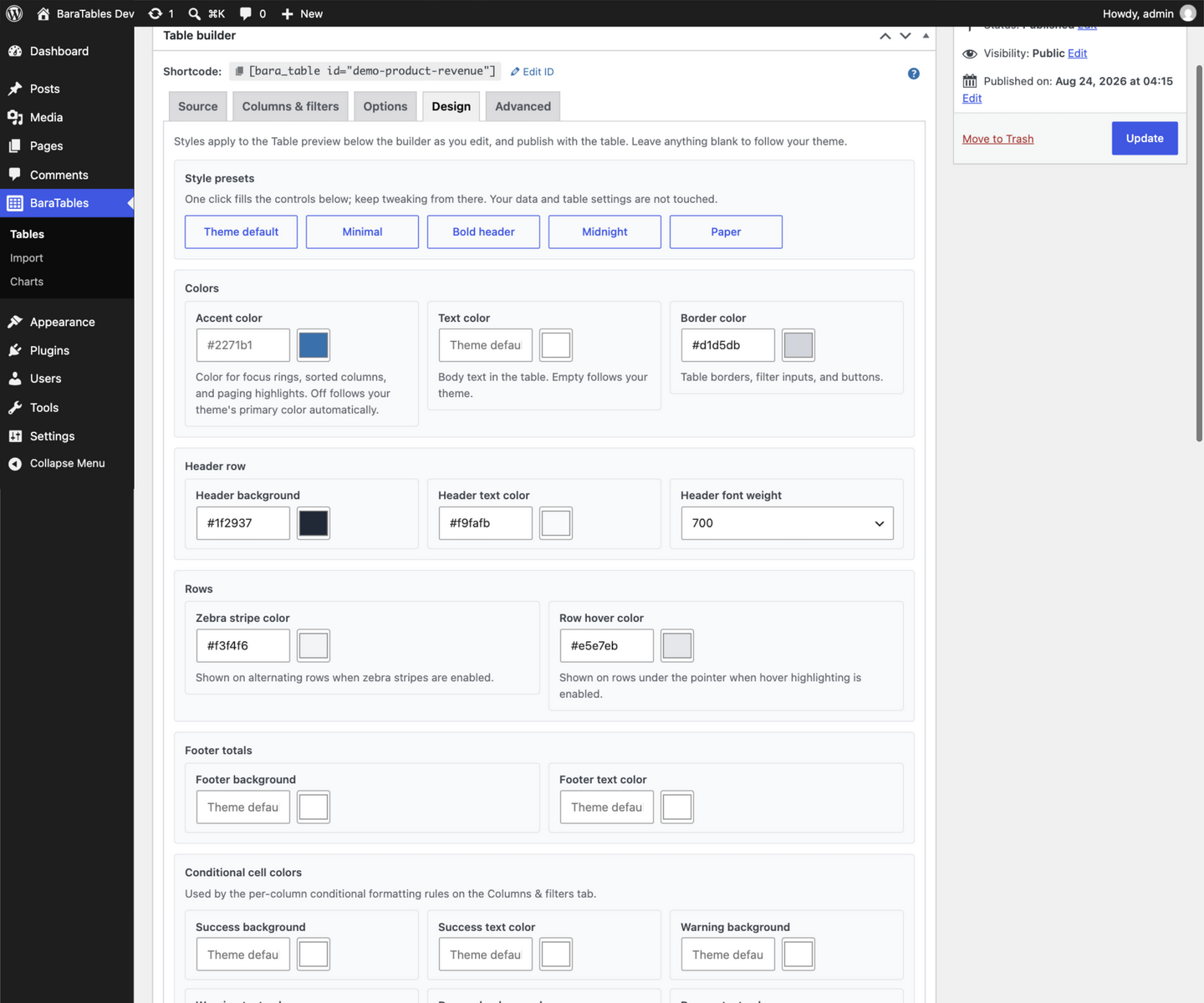
- Style tables and charts without code in the Design tab, with a live preview
- Restrict rows by role or user metadata
- Remember table state between visits; control scrolling, column sizing and row limits
- Create bar, horizontal bar, line, area, radar, pie, donut, treemap, scatter, bubble, heatmap, funnel and Gantt charts
Third-Party Libraries
Bundled libraries, under GPL-compatible licenses; full notices ship in assets/vendor/THIRD-PARTY-LICENSES.txt.
- DataTables v3.1.5 – MIT License – https://github.com/DataTables/DataTablesSrc/tree/3.1.5
- DataTables Buttons v4.1.3 – MIT License – https://github.com/DataTables/Buttons/tree/4.1.3 (bundles FileSaver.js – MIT License – https://github.com/eligrey/FileSaver.js/tree/1.3.3)
- DataTables ColReorder v3.1.2 – MIT License – https://github.com/DataTables/ColReorder/tree/3.1.2
- DataTables Responsive v4.1.1 – MIT License – https://github.com/DataTables/Responsive/tree/4.1.1
- DataTables FixedHeader v5.1.2 – MIT License – https://github.com/DataTables/FixedHeader/tree/5.1.2
- DataTables FixedColumns v6.1.2 – MIT License – https://github.com/DataTables/FixedColumns/tree/6.1.2
- Tom Select v2.6.2 – Apache License 2.0 – https://github.com/orchidjs/tom-select/tree/v2.6.2
- JSZip v3.10.2 – MIT License – https://github.com/Stuk/jszip/tree/v3.10.2 (bundles pako – MIT License – https://github.com/nodeca/pako)
- pdfmake v0.3.13 – MIT License – https://github.com/bpampuch/pdfmake/tree/0.3.13 (bundles the Roboto fonts – Apache License 2.0)
- ECharts v6.1.0 – Apache License 2.0 – https://github.com/apache/echarts/tree/6.1.0
- Chart-type gallery thumbnails from the Apache ECharts examples, Apache License 2.0 – https://github.com/apache/echarts-examples
- BaraTables’ custom ECharts bundle – https://github.com/trinadin/baratables/blob/main/tools/echarts-entry.js
Installation
- Upload the
baratablesfolder to/wp-content/plugins/. - Activate the plugin through the Plugins menu in WordPress.
- Create a table under Tables, then embed it with
[bara_table id="your-table-slug"].
FAQ
What data sources are supported?
CSV files, manual data, WordPress content, external MySQL/MariaDB databases, and snapshots from public CSV, JSON or Google Sheets URLs.
Remote snapshots are manual and administrator-only: save the public HTTPS URL and format, click Fetch snapshot, and published tables use the stored snapshot without contacting the source. CSV endpoints must return text/csv or application/csv; text/plain is rejected, though JSON endpoints may use it. Authentication, private Sheets, scheduled refresh and schema changes are unsupported; re-create the table when remote columns change.
Which plugin exports can I import?
Use a TablePress single-table JSON export; Ninja Tables classic and drag-and-drop JSON also work (export an externally connected Ninja table as CSV). WP Table Builder, Visualizer, Supsystic, League Table, wpDataTables, TableKit and Tablesome exports import too, as do HTML tables; a ZIP imports the first supported table.
Imports rebuild table data and compatible display settings, not styling, formulas, macros, shortcodes, charts or connections. XLSX and ODS formulas use cached results and are never executed; save legacy XLS or encrypted workbooks in a current format first. Uploads are capped at 5 MB; a ZIP holds 50 entries of 5 MB each and 20 MB in total, and an XLSX or ODS archive may hold 200.
How many rows can a table load?
Tables load 1,000 rows by default; the Options tab sets a limit from 1 to 10,000 on every source.
External MySQL/MariaDB tables can page large tables on demand instead: at most 100 rows per request, paged, sorted and searched by the database within a 100,000-result limit. It requires selected columns, pagination and a non-null single-column primary or unique key, and no access rules, value transforms, column filters, formatted dates, Number columns, footer totals, or the export, copy and print buttons; a table using any of them keeps standard loading, and the editor names the reason. Database search follows the source collation. Encrypt the connection with TLS for any host outside your own machine; TLS needs the path of the CA certificate that signed it, as PHP’s MySQL driver cannot use the system trust store.
Can I link to a filtered view of a table?
Yes. Filtering or searching updates the page address, so you can share the view, or build it with btbl_filter[column-slug], btbl_search and btbl_search_cols.
How do I add a chart?
Create a table first, then go to Charts and create a chart linked to it, embedded with [bara_chart id="your-chart-slug"].
Can I customize the table appearance?
Yes. The Design tab (charts get one too) styles tables without code: presets, colors, typography, spacing and a per-chart series palette, each live in the preview as you type. It also takes per-table Additional CSS, scoped to that table, except @import and @font-face, which load for the whole page. Styles print as CSS custom properties, so what you leave blank falls through to the site default, then to your theme.
Can I set one design for the whole site?
Yes. BaraTables > Design sets the design every table and chart starts from. A table or chart that sets its own value keeps it, value by value; one that switches the site design off follows your theme. The screen previews the result as you type, and Copy CSS hands the whole design back as CSS.
How do numeric rules and footer calculations work?
Choose Number in a column’s settings: plain decimals such as -12.5 join numeric sorting, conditional styles and footers, while currency symbols, percentages, grouped numbers, words, blanks and out-of-range values stay visible but excluded. Footers calculate every loaded row matching the current search and filters, not only the current page; rows beyond the row limit and exports are excluded.
Can I style BaraTables with custom CSS?
Minimal frontend styles keep your theme in control; adjust colors, spacing and typography with your theme, the Site Editor, or custom CSS. The Design tab writes its choices as --btbl-* custom properties on .btbl-table-wrapper — a stable API for themes: set a token on any ancestor to re-skin every table under it, or copy the block with Copy CSS and manage it in your theme via the “Theme CSS” output mode. --btbl-accent, --btbl-border, --btbl-muted and --btbl-surface are declared by the wrapper itself, so they follow your theme’s primary color and the plugin’s own default rather than an ancestor’s value. Tokens cover the header, stripe, hover, border, footer and conditional colors, and the chart container’s shape.
A chart’s text, grid and series colors are drawn on its canvas, so they are not CSS: they live in the chart’s own settings, where the same Design tab controls them. The chart container’s shape is CSS, and rides the token layer with the tables.
Where can I see examples?
See https://ktisisweb.com/baratables/ for screenshots and styling guidance.
Screenshots




Changelog
2.1.1
Fixes:
- On right-to-left sites, filter spacing and the search dropdown scrollbar sit on the correct side, and the admin’s actions column, help toggle and arrow keys follow the text direction.
- Export-button pages are much lighter: the Excel and PDF libraries load on first click.
- A table’s search box, filters and buttons now use the same corner radius.
- A table’s custom CSS is applied in full: rules after a media query or keyframes block are kept, and a rule naming the table wrapper reaches it.
- The chart type gallery no longer lets the page scroll behind it.
- A table save that fails part-way restores the previous data instead of leaving the table half-written.
- Saving a table or chart that changed while you had it open is refused, instead of overwriting the newer version.
- Chart colors are now readable against the page; the default palette and the presets were recolored.
- On a multisite network, the hide-help-text preference is now per site.
Accessibility:
- The column visibility menu and the Table options menu work with the keyboard alone: every entry can be reached, and the menu can be closed.
- A chart-only page now offers its data to screen readers.
- The search column picker closes on Escape, and a table without a caption still has a name.
- The chart editor’s table and chart-type selects carry a name again, so a screen reader announces what they are.
Security:
- The plugin’s upgrade of saved table data now waits for an administrator.
- A failed external database connection no longer prints the server’s file path.
Developer:
- Sixteen published PHP methods and constants are deprecated and will be removed in 2.2.0; each names its replacement.
2.1.0
New:
- Set one design for the whole site. BaraTables > Design holds the colors and typography every table and chart starts from. A table or chart with its own value keeps it; one that switches the site design off follows your theme.
- The chart Design tab now offers the same presets and Copy CSS as the table Design tab.
Fixes:
- A colour or size the plugin cannot use no longer erases your value: it is kept and the field named.
- The chart Design tab’s controls reach every chart type: the palette colors heatmap cells and Gantt task groups, and the text and grid colors reach radar, treemap and tooltips.
- A chart font size is now in pixels. A size of 2em used to render as 2px.
- Charts with no palette now use ECharts’ current colors, led by the accent, instead of a stale copy of an older release.
- The Grid color control is no longer offered on charts that have no grid.
- The series palette is reordered from the keyboard, and each color’s remove button names it.
- The “Theme CSS” output mode hands over completely: the plugin no longer prints the chart container’s background, padding and radius.
- The “Theme default” preset is now “Clear overrides”: a blank value inherits the site default first.
- A table or chart whose name contains “&” or “>” saves again, and Additional CSS keeps the characters you typed.
- A ZIP holding a readme next to your table imports the table, not the readme.
- An uploaded file named DATA.CSV is accepted.
- An imported column of numbers sorts as numbers, so 10 no longer comes before 9.
- On a right-to-left site the data grid’s row buttons stay in place.
- The rows-per-page control now shows the page length you set, not an empty list.
- A hidden column no longer keeps a filter that narrows by a column the visitor cannot see.
- An empty table now says it has no rows, not that filters match nothing.
- A table that recovers from a failed request stops showing the failure.
- A table that ran out of requests says so, not that its data source failed.
2.0.1
New:
- External database sources can encrypt their connection with TLS. Give the source the path of the CA certificate that signed it: PHP’s MySQL driver cannot use the system trust store.
Fixes:
- Tables with a hidden column load again instead of showing an error and losing paging, sorting, and search.
- Additional CSS keeps a “<” that cannot break out of the style element, so a content string with markup in it is no longer altered.
- Styles for one table no longer reach a sibling table whose ID starts with the same characters.
- A merged cell value used in a regex replacement is no longer destroyed when it contains “$1”.
- The Design tab shows the color a save will keep, and no longer marks a short “#fff” as invalid.
- The Copy CSS message is translated like the rest of the interface.
Security:
- A remote snapshot URL that resolves to a link-local, carrier-grade NAT, or benchmarking address is refused instead of being fetched.
2.0.0
New:
- A Design tab for tables and charts: presets, colors, typography, spacing and a per-chart series palette, with a live preview as you type.
- The table preview now renders the real table visitors see, so what you style is what you publish.
- Copy CSS hands the styles to your theme, and the “Theme CSS” output mode lets that copy take over.
- Per-table Additional CSS, auto-scoped to the table, plus a documented
--btbl-*token API for themes. - Accent color and the style toggles moved into the Design tab.
1.4.0
New:
- Import XLSX and ODS workbooks, including stored formula results without executing them.
- Fetch a stored table snapshot from a public CSV, JSON-record or Google Sheets URL.
- Keep headers visible and freeze leading columns while a wide table scrolls.
- Add strict numeric sorting, conditional color rules and filtered footer calculations.
- Page, sort and search large external MySQL/MariaDB tables on demand with bounded queries.
- Table summaries and the per-page selector say “rows” instead of “entries”.
- Charts follow the table’s accent color.
Fixes:
- Filter labels containing an ampersand render correctly.
- Table and chart block pickers list every item instead of the first 20.
Security:
- Exported and copied table content neutralizes spreadsheet formulas, so cells from imported or remotely sourced tables no longer execute when the file is opened.
1.3.2
- The table preview now says when it needs refreshing, stays unavailable until refreshed, and recognizes undone changes.
- Option settings stay visible while switched off, with clearer grouping and more consistent spacing.
1.3.1
Fixes:
- Dragging a column no longer leaves a group search on the wrong columns.
- Merge tags like {{meta:Price_USD}} now resolve mixed-case keys.
- A chart-only page no longer flashes unstyled content.
- Switching data sources no longer keeps old columns selected.
- A meta column missing from recent posts is no longer dropped on save.
- A remembered search is now visible and clearable.
- Custom Query date filters now apply as written.
- Ninja Tables custom filter values now import as dropdown options.
- The chart preview shows draft charts instead of Chart not found.
Developer:
- Removed the PHP adapters deprecated in 1.2.5; use the column-record API instead.
1.3.0
New:
- New block editor blocks: add any table or chart from the block picker instead of a shortcode.
- Wide tables can collapse into stacked, expandable rows on small screens.
- Export any table to PDF with a new Export PDF button.
- Tables match your theme automatically: colors follow its palette, with an optional accent color per table.
Improvements:
- Table pages no longer load jQuery, and dropdown filters use a lighter picker, so they load faster.
- The table engine is now DataTables 3; pages with export buttons load fewer files.
- Auto-built dropdown and checkbox filters cap at 250 options, so a near-unique column cannot stall the page.
- The editor’s Options tab is reorganized, and every field shows its default until you change it.
- Tables and charts work better with screen readers: column headers, an announced caption, labelled charts, and a readable no-JavaScript fallback.
- Publishing a table for the first time shows its shortcode and block.
Fixes:
- Day-first dates such as 25/12/2026 now format correctly with “Format as date”.
- Chart values written with a decimal comma (1.234,56) plot at the correct magnitude.
- Tab-delimited files import as separate columns instead of one long column.
- An invalid external database edit no longer silently keeps the previous connection; clearing every field removes it.
- Search limited to chosen columns follows columns you move by dragging.
- The settings gear no longer appears on a switched-off control whose inner option is still checked.
- Layout builder drop zones sit where their labels say.
1.2.5
New:
- Imports WP Table Builder XML, Ninja Tables drag-and-drop JSON, Visualizer CSV, Supsystic JSON or CSV, and League Table XML exports.
- Reads table exports from HTML and ZIP files.
Improvements:
- Chart-only pages load faster and large-table searches stay more responsive.
- The chart editor searches table choices as you type, so it stays fast with many tables.
Fixes:
- Empty or incomplete Ninja Tables exports no longer become a table of WordPress posts.
- Quoted commas and multiline headings no longer break semicolon-delimited imports.
- Hidden columns, footer values, intentional blank rows, and nested cell values are preserved.
- A failed import no longer leaves an incomplete published table behind.
- The plugin activates normally on PHP 7.4 through PHP 8.1.
- A failed table or chart save keeps its data, ID and linked charts.
- Duplicating a table or chart more than once gives every copy its own ID.
- Missing CSV files and external database failures show a clear error instead of an empty table.
- If a table or chart script fails to load, the loading screen clears to show the table or an error.
- Renaming a Table ID no longer removes backslashes from linked chart names.
- Manual column headings from early versions follow the site language after a direct upgrade.
Security:
- Validates the contents of table import uploads before processing them.
1.2.4
- Adds radar, heatmap, and treemap charts.
1.2.3
Improvements:
- Fixed scroll height is now a Table controls option, with its height and collapse settings inside. Existing heights carry over.
- Table wording follows your site’s language: the search label, the “Show … entries” selector, the filters heading and the result summary. Your own wording is kept.
- Tables load without a flash of unstyled content.
- Keyboard and screen reader support: labelled filter controls and option groups, Enter or Space for the settings gear, focus outlines on taxonomy chips, and arrow keys to arrange the layout.
- Pages with a table and its chart, or the same table twice, load faster on large tables.
- The “Clear filters” and “Edit Table” buttons are styled consistently on any theme.
Security:
- Password-protected post content is withheld from visitors who have not entered the password.
- Post passwords cannot be displayed as a column, including through an imported file.
Fixes:
- Hiding a column’s heading keeps the custom heading you typed.
- Sticky posts are excluded, so a table stays within its row limit.
- Column filters follow their column when a visitor reorders columns.
- Date columns sort by date, even with empty cells.
- The Column visibility button reveals columns hidden in the table setup.
- Custom meta keys with capital letters or dots (such as Price_USD) match your data.
- Media tables list your attachments.
1.2.2
New:
- Row-level access control on Custom WP Query tables.
Fixes:
- Filtering by category or tag.
- Advanced Custom Fields Post Object, Relationship, Taxonomy and Repeater columns load correctly, showing their title, name or contents.
- Manual data grids hold up to 25,000 cells; the editor warns when your server’s form-field limit is too low.
- Two tables on the same page keep their own filters in the shareable link.
- An import that fails to save can be retried without uploading the file again.
- Importing a large table keeps more of its rows and columns.
- Ninja Tables exports apply their saved search, sorting, and pagination settings.
- Editing an external database connection keeps your column and filter setup.
- Saved table state keeps sorting, search, page and page length between visits.
- A restored search respects the columns you set as searchable.
- “Value overrides” apply to CSV and external database tables.
- “Format as date” is available on CSV, external database, manual and custom field columns.
- Date columns show the time of day, and timestamps use your site’s timezone.
- Blank lines in a CSV file are skipped.
- Custom WP Query tables load up to the row limit you set.
- On CSV and external database tables, row-level access control shows every row a visitor may see, past the row limit.
- Shareable filter links work for a value of 0.
- Unnamed columns from a headerless CSV follow the site language.
- The editor preview uses the same export button labels as the published table.
- Creating a table from an import opens its editor.
Improvements:
- A table loads only the export, column-reorder and dropdown-filter libraries it uses, cutting about 265KB per page.
- Large tables sort, page, and filter faster.
- The term picker lists the first 200 terms of a taxonomy, plus any already selected.
- The “Strict matching” filter option is removed; filters match whole values exactly.
- A column order set by dragging applies to the current visit only.
Security:
- A column heading taken from a CSV file’s header row could run script in the table editor. Column headings are now escaped everywhere they appear.
- Table and chart posts are no longer listed by the REST API. Anonymous requests could retrieve their ids, titles, and slugs.
- An external database table with no columns selected no longer publishes the column holding its access tokens.
- Row-level access control was accepted but not applied on manual-data tables. The setting has been removed there.
- Changing a table’s data source could leave row-level access control switched on but unenforced, publishing rows it was set to hide. It now applies only to the source it was set up for, and a table whose saved settings cannot be enforced shows no rows until you re-save it.
- New tables default to hiding restricted rows from logged-out visitors. Existing tables keep their saved setting.
1.2.1
- Export a table to Excel with a new table button option.
- Five new chart types: horizontal bar, donut, scatter, bubble and funnel, each previewed in the gallery.
- Remember table state: a table can keep its sorting, search, page, and page length.
- New table controls for horizontal scrolling, vertical scroll height and column auto-sizing.
- Configurable row loading limit per table (default 1,000 rows, up to 10,000).
1.1.1
Fixes:
- “Format as date” shows the formatted date (e.g. “Mar 18, 2026”) on manual data columns.
- Plain numbers such as a year or a count are not read as dates.
- A [bara_table] or [bara_chart] shortcode without an id shows a “not found” message on WordPress 6.2 to 6.4.
- Importing a file with only a header row, or no rows, creates an empty table.
- Front-end table controls (export buttons, column-visibility menu, “Search in”) and the CSV picker follow the site language.
Security:
- Hardened the table editor’s “Column heading” field against script injection (XSS).
1.1.0
New:
- Import a table from another plugin or a spreadsheet: upload a JSON, XML or CSV export and BaraTables creates a matching table.
- Editable Table ID and Chart ID: rename a table’s or chart’s shortcode ID after creation. Linked charts update automatically, and a notice reminds you to update shortcodes.
- Reorder manual-data rows in the editor with up and down controls.
- Manual-table column headers are translation-ready and follow the site language.
Improvements:
- Wide manual-data tables scroll horizontally, keeping the row number and controls in view.
- Paste tabular data straight from a spreadsheet into the manual-data grid.
- Smoother admin: one-click copy for shortcodes and IDs, a Show/Hide help text preference, and fewer reloads while configuring a source.
Fixes:
- Numeric columns sort numerically (e.g. 3.15, 3.2, 3.9).
- Far-future dates display correctly.
Security:
- Hardened admin request handling and input validation.
1.0.1
- Improved date formatting controls for WordPress date columns, including support for the site’s default date format.
- Security: hardened frontend table and chart configuration output.
1.0.0
- Initial release.