


Description
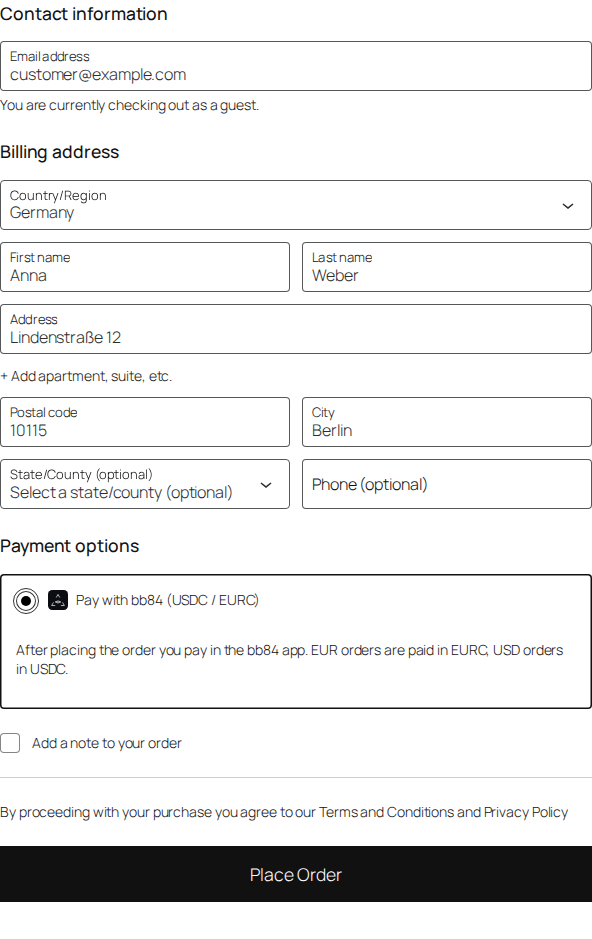
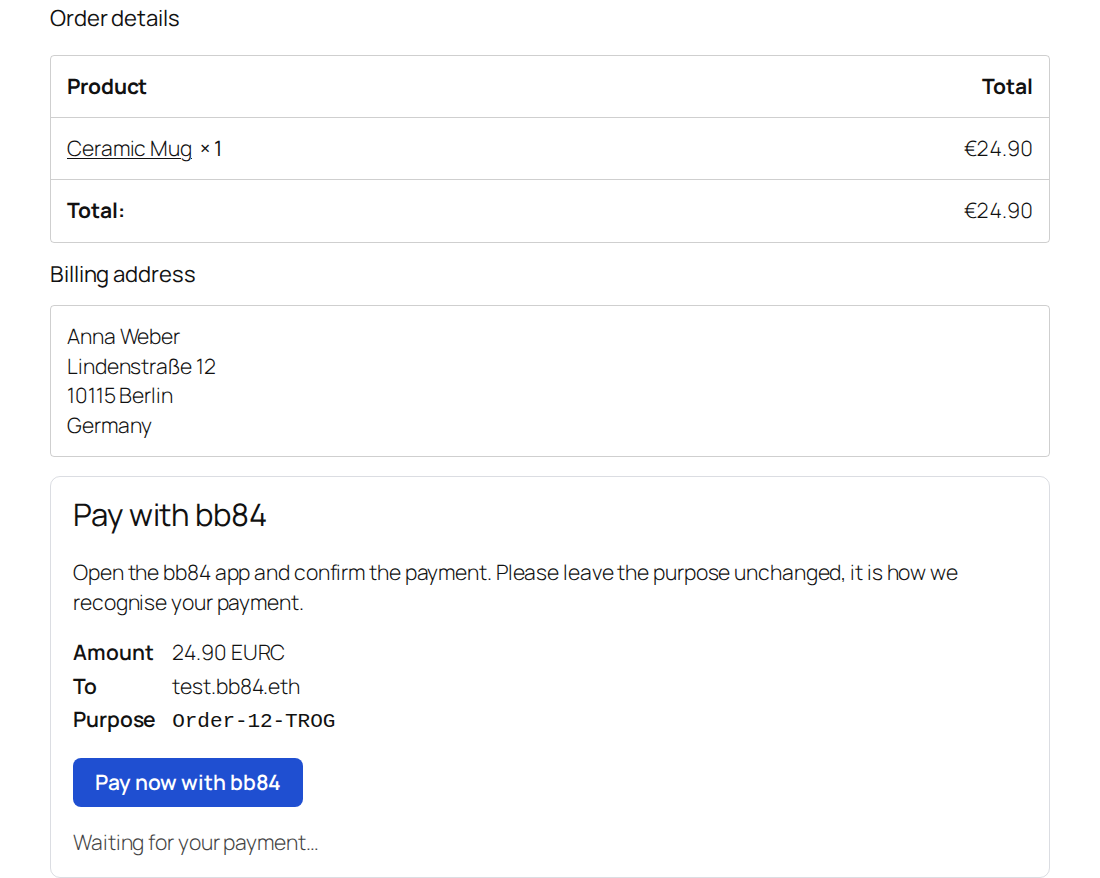
Customers choose “Pay with bb84” at checkout, open the bb84 app from the thank-you page (or the order email)
and confirm the payment. The money goes straight to your bb84 name; the plugin never holds funds or keys.
- EUR orders are paid in EURC, USD orders in USDC (1:1). Other store currencies hide the method.
- Every order gets a unique purpose (e.g.
Order-1042-K7QX). It travels on-chain with the payment, so the
plugin can match it to the order and mark the order paid with the transaction hash. - Every payment is a merchant payment: the bb84 app sends it as “Goods & Services”, with buyer protection
for the customer and the bb84 platform fee deducted from the amount you receive. - Works with the classic and the block checkout, and with HPOS.
- No API key, no account with us: the plugin only reads the public pages of your name on
<name>.bb84.com. - Optional “Pay with BB84” badge (off by default): enable it for the site footer in the settings or place it with
the[bb84_badge]shortcode ([bb84_badge style="light"]for the light variant). The images ship with the plugin.
External services
This plugin connects to bb84.com, the public web service of the bb84 network operated by Hadamard Corporation
(the provider of this plugin). It is required for the plugin to work: payments are made in the bb84 app and can only be
seen on the bb84 network, so the plugin asks bb84.com whether an order has been paid. Every shop uses the pages of its own
bb84 name, https://<name>.bb84.com.
What is sent, and when:
https://<name>.bb84.com/– once, when you save your bb84 name in the settings, to check that the name is registered.
Sent: your bb84 name (as part of the address).https://<name>.bb84.com/api/paid– for every open bb84 order, by WP-Cron every two minutes and every few seconds
while the customer waits on the thank-you page, until the order is paid or cancelled. Sent: your bb84 name, the order
amount, the currency (EURC or USDC) and the order’s payment purpose (e.g.Order-1042-K7QX). No customer name, email,
address or IP address is sent; the request comes from your server.https://<name>.bb84.com/<amount>/<currency>/<purpose>?gs=1– the hosted payment page. It is only opened by the
customer’s browser when the customer clicks “Pay now with bb84” on the thank-you page or in the order email. Like any
web page it receives the customer’s IP address and browser details.
The payment purpose is written on-chain together with the payment and is publicly visible, like every bb84 transaction.
- Terms of service: https://bb84.com/terms
- Privacy policy: https://bb84.com/privacy
Installation
- Upload the ZIP under Plugins → Add New → Upload Plugin and activate it.
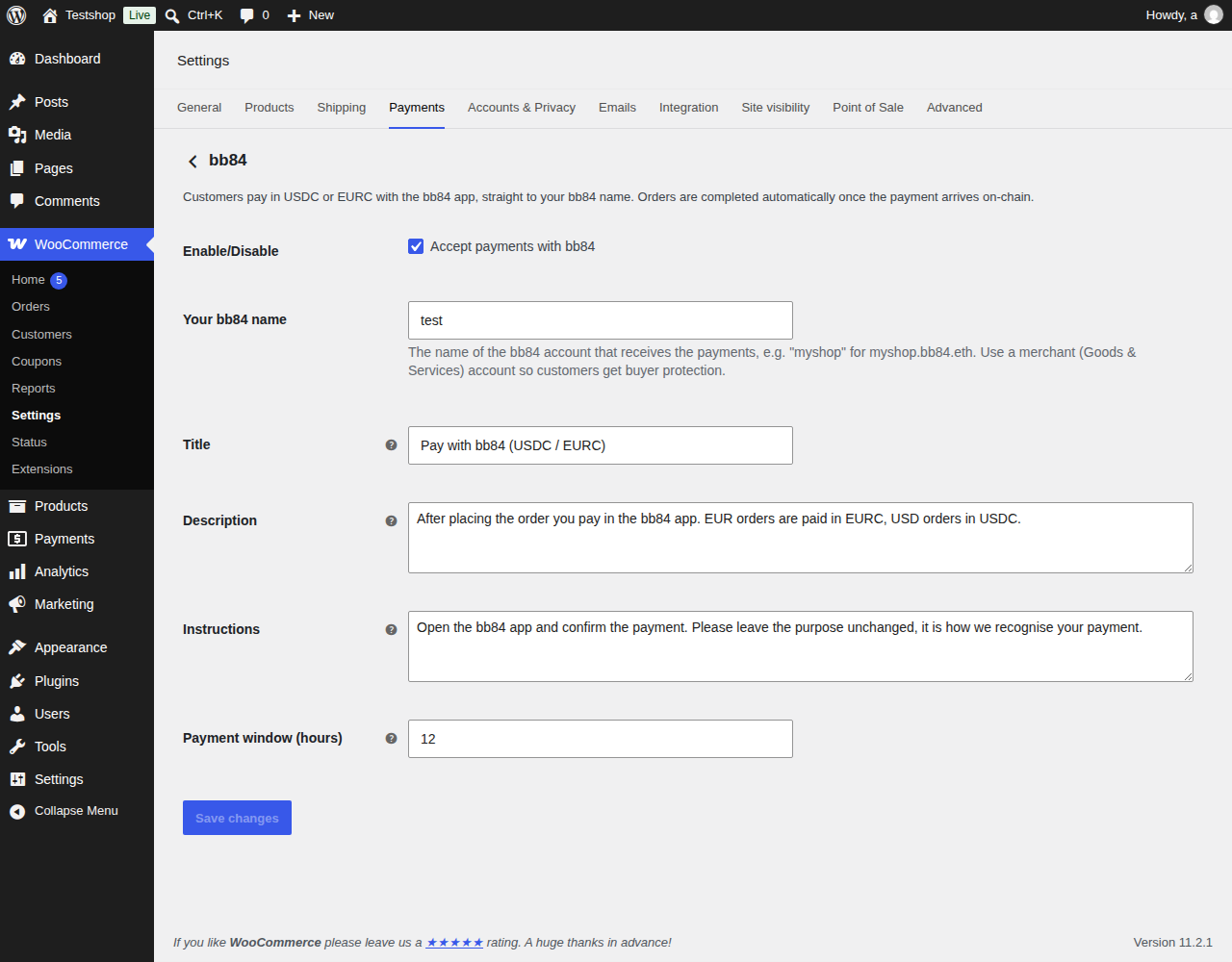
- WooCommerce → Settings → Payments → bb84: enter your bb84 name (e.g.
myshop.bb84.eth) and enable it.
Use a merchant (Goods & Services) account so customers get buyer protection. - Set the store currency to EUR or USD.
FAQ
How is a payment confirmed?
WP-Cron checks open bb84 orders every two minutes, and the thank-you page checks every few seconds while the
customer waits. A payment only completes an order when its on-chain purpose matches. A payment of the right
amount without any purpose is added as an order note for you to check by hand.
What about the Goods & Services fee?
G&S payments lose the protocol fee (currently 0.5 %) on the way; an order counts as paid once the customer has sent the full order total (you receive it minus the fee).
What happens to unpaid orders?
They stay “on hold” (stock reserved) for the payment window (default 12 hours, at most 23) and are then cancelled.
A payment that still arrives within 24 hours of the order reopens it and marks it paid.
My shop has little traffic.
WP-Cron only runs on page views. Add a real cron job that calls wp-cron.php every few minutes, or run
wp cron event run bb84_payments_check.
Refunds?
bb84 is non-custodial, so refunds are sent from your bb84 app. Mark the order refunded in WooCommerce by hand.
Screenshots
Changelog
1.0.7
- Thank-you page, order email and the order screen show the shop’s public bb84 profile name next to its name (“My Shop · myshop.bb84.eth”), so customers see who they pay. A shop name may also be entered as myshop.bb84.com.
1.0.6
- An order whose bb84 payment was confirmed stays paid: if it is put back on hold (by hand or by an anti-fraud plugin), the background check no longer settles it a second time or cancels it as unpaid, and the thank-you page, My Account and the order email show “Payment received” instead of a pay link.
- The download ZIP from bb84.com now installs into the same folder as the wordpress.org version (
bb84-payments-for-woocommerce) and takes its updates from wordpress.org. If you installed an earlier ZIP (folderbb84-payments), deactivate and delete it once, then install this version; your settings are kept.
1.0.5
- If an on-hold order’s total is changed after checkout, a payment of the old amount no longer marks the whole order as paid. A payment that falls short of the new total is noted as a partial payment for the merchant; the customer is asked to pay the new total on the order-pay page (new payment purpose).
1.0.4
- An order now stores the resolved wallet address with its .bb84.eth name: if the name is later moved to someone else, payments to the new owner no longer mark the order as paid.
- The background check now covers every open bb84 order (round robin within a time budget), not only the newest 100.
- Guest checkout: at most 3 unpaid bb84 orders per billing email and per IP (filter
bb84_payments_max_open_guest_orders, 0 = no limit).
1.0.3
- Optional “Pay with BB84” badge for the site footer (off by default) and
[bb84_badge]shortcode.
1.0.2
- Text domain is now bb84-payments-for-woocommerce (translations come from translate.wordpress.org).
- Readme: external services described in more detail.
1.0.1
- Payments are marked as shop payments: the bb84 app always sends them as “Goods & Services” (buyer protection).
1.0.0
- First release.