

Description
BetterShield is a WordPress security plugin that checks your site, explains what it found in plain language, and fixes what it can in one click once you say yes. Change your mind months later and you can still undo it.
It is made by WPDeveloper, whose WordPress products are used on more than 6 million sites. BetterShield has no firewall and no malware scanner, and it works alongside a plugin that does.
What you get
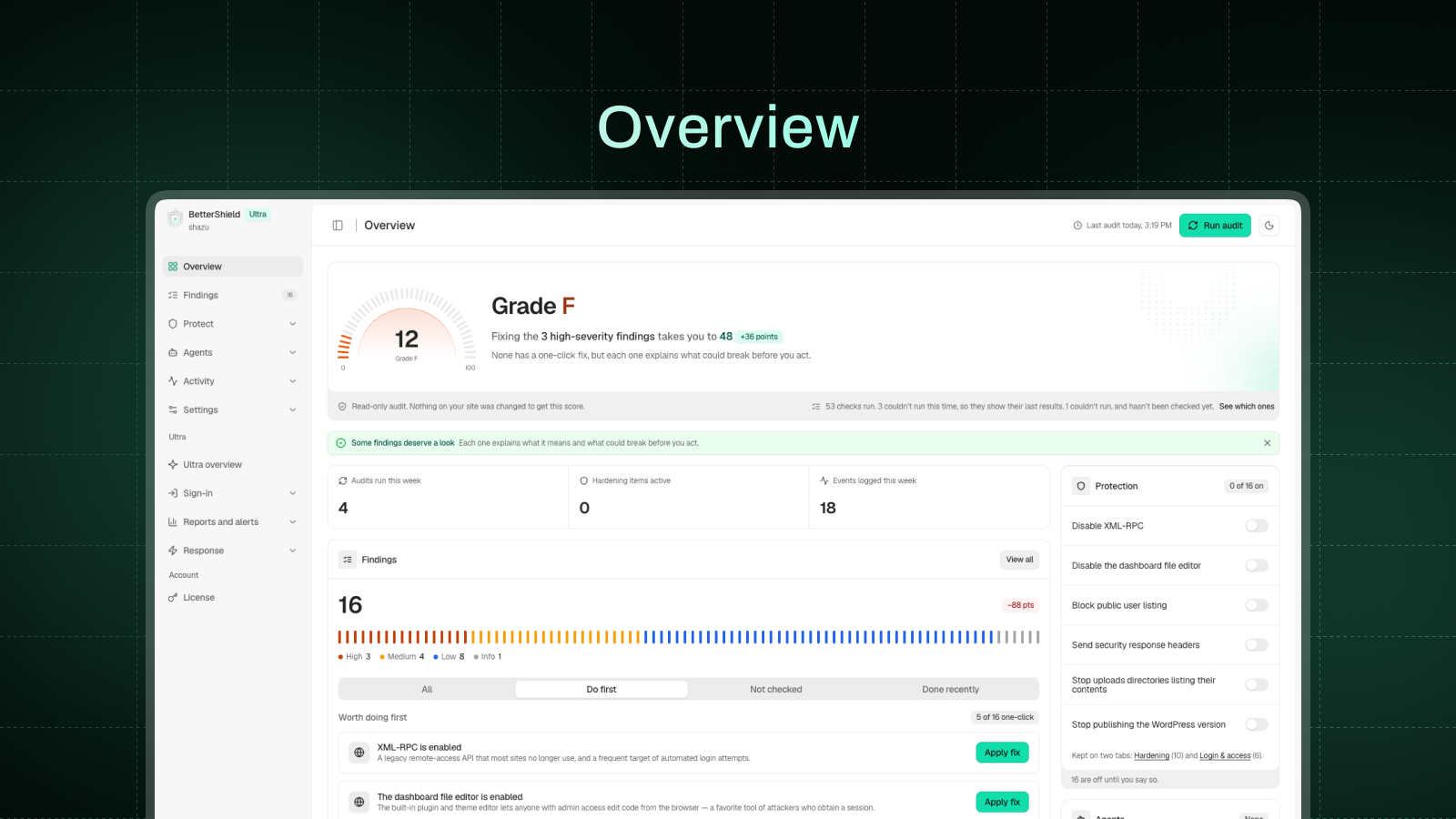
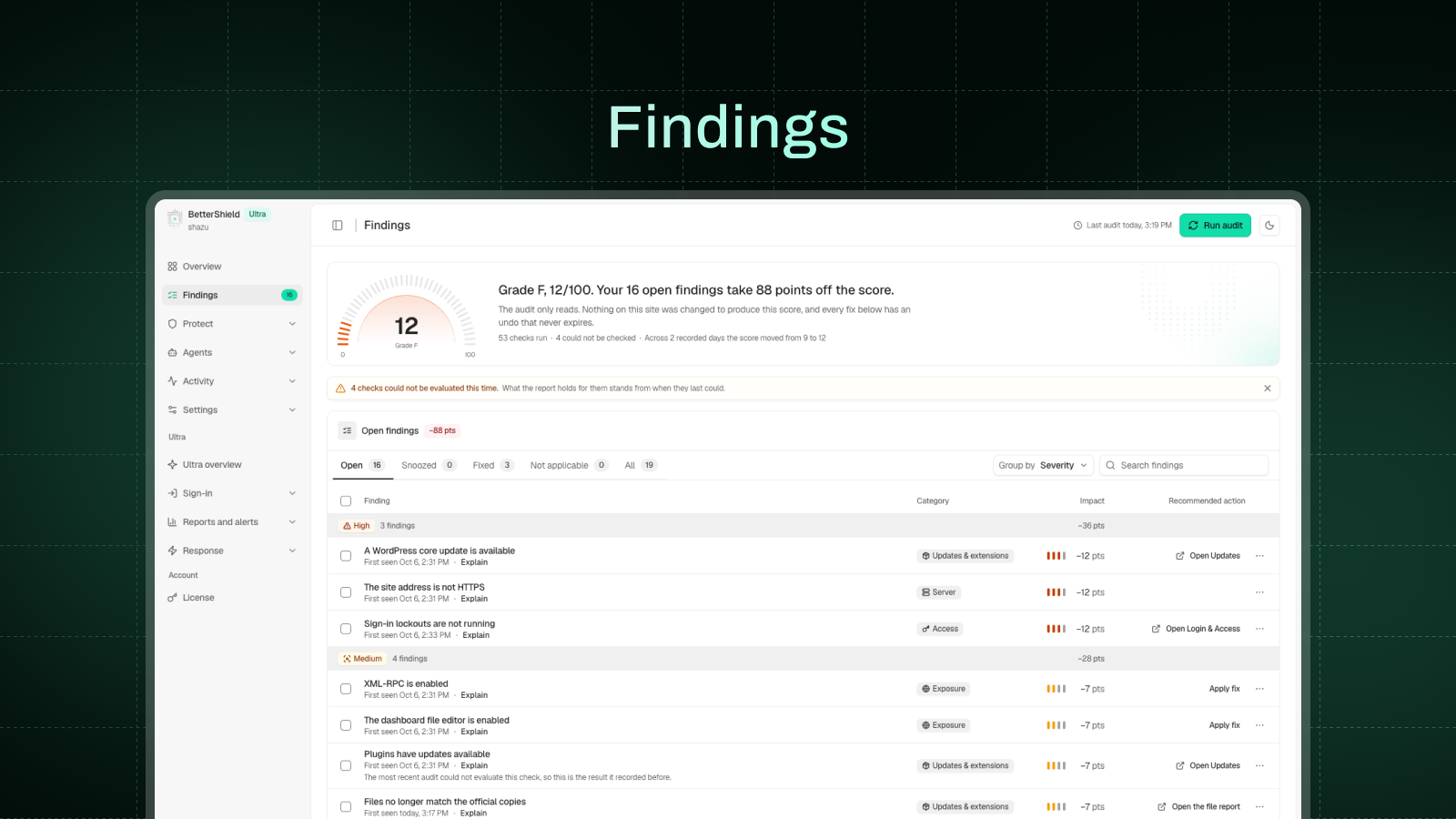
- A security audit and fixes you can undo. A 75-check audit scores your site, and thirty one-click fixes close the gaps. All but one wait for your go-ahead.
- Two-factor authentication and passkeys. Any authenticator app plus ten backup codes, or a passkey unlocked with a fingerprint, face or device PIN. Require either by role.
- Login protection. Limit login attempts, a hidden bot check on the sign-in, registration and comment forms, and an allowlist that is never locked out.
- An activity log and a file check. Who did what and when, with a CSV export, and core and plugin files compared with WordPress.org’s copies.
- Ask your AI assistant what needs fixing. Claude, ChatGPT, Cursor and others can read your site’s security through the built-in MCP server, once you switch it on.
- Outside connections. Out of the box, the only outside services contacted are WordPress.org’s own and, when checking our Pro plugins or Ultra, WPDeveloper’s checksum servers (checksums.wpdeveloper.com and bettershield.ai). Usage sharing, vulnerability checks, the leaked-password check, your AI provider and BetterShield Hub stay off until you turn them on.
- Skipped checks. A file it never compared, or a check that couldn’t run, is never reported as clean.
- Performance. The Overview shows the queries and milliseconds BetterShield added to real page views.
- What’s free. The full audit, all 30 fixes with undo, 2FA, passkeys, the activity log, the file integrity check and alerts.
Quick Setup
A short Quick Setup Wizard opens once after activation. It offers 5 hardening fixes that cannot lock anyone out, gives you a way back in (an emailed single-use recovery link plus printable recovery codes), and lets you choose which plugin handles which job if you run another security plugin.
Every step can be skipped, and run again from Settings > General.
WordPress Security Audit: 75 checks, explained in plain language
Seventy-five read-only checks cover access, exposure, updates, extensions, server settings and configuration, including:
- Idle “Admin” accounts nobody has used in over six months
- User enumeration, XML-RPC, the file editor and the WordPress version on every page
- Missing security headers, an outdated PHP version and weak security keys
- Plugins closed on WordPress.org, or with no update for years
- Installer or database tools left in the web root after a migration
- A domain without SPF, DMARC or CAA records
- Core and plugin files that no longer match the official copies
- Plugins, themes and core with published vulnerabilities, once you turn on vulnerability checks
Each finding explains what it is, why it matters and what acting on it could break. You can snooze a finding for 7 or 30 days.
One-click hardening: 30 fixes, each with a permanent undo
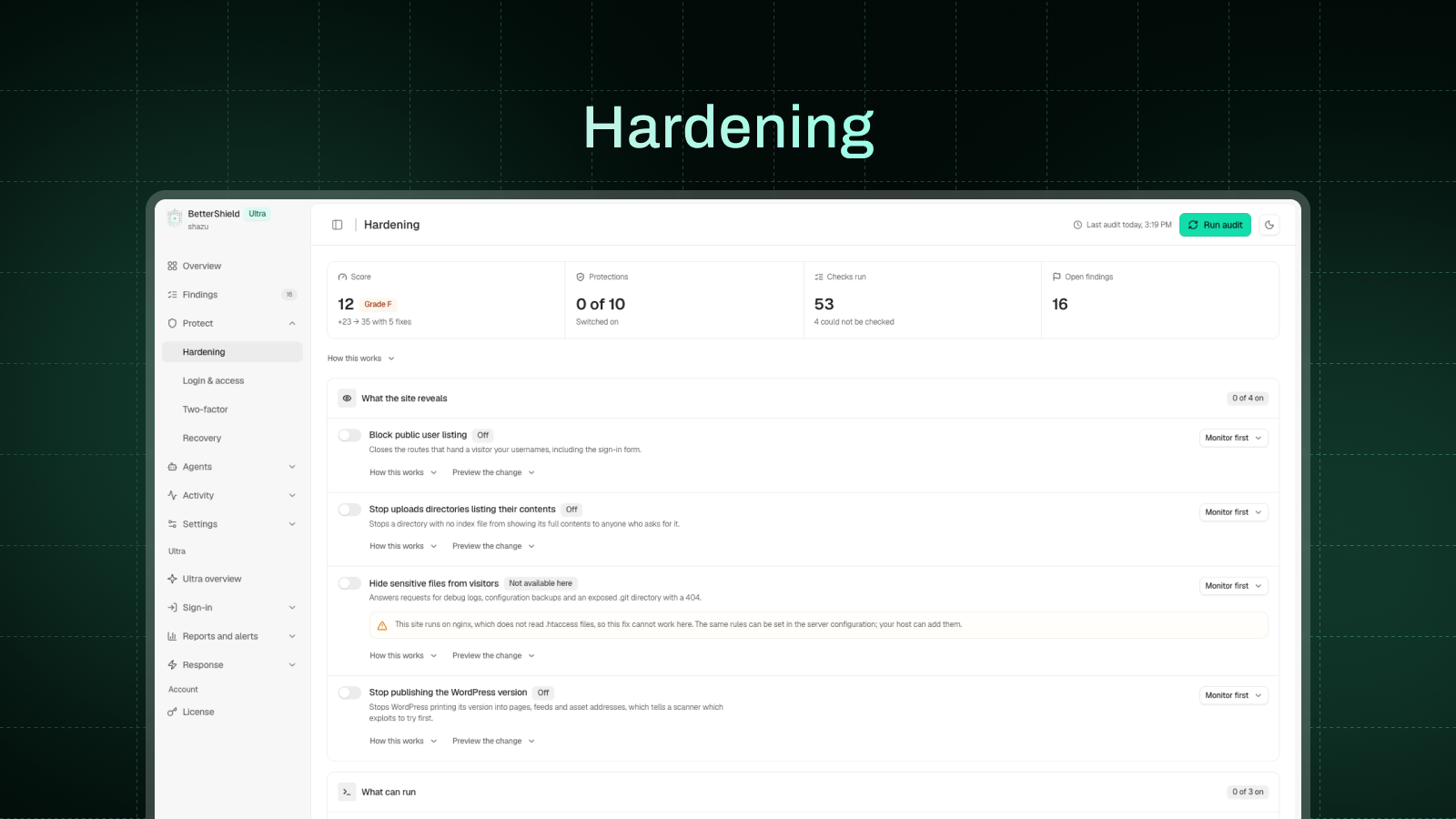
Each fix shows what it will change and stays off until you apply it, except the cloud-metadata block. A fix that cannot work on your site, such as .htaccess rules off Apache or HSTS without HTTPS, stays off and says why.
The thirty one-click fixes:
- Sign-in: custom sign-in address, app password block, leaked password check, short reset links and email change confirmation for admins and editors, sign-in page cache protection, sign everyone out on demand.
- What your site reveals: usernames, the WordPress version, error messages, folder listings, the dashboard.
- Files and uploads: file editor lock, uploads code block, private file protection, admin-only script, file, SVG and code uploads, and admin-only plugin actions.
- Roles and settings: dashboard lock for customers and subscribers, subscriber role for new sign-ups, admin-only key settings.
- HTTPS and headers: HTTPS site address with a 5-minute way back, HTTPS redirect, strict HTTPS (HSTS), content security policy in test mode, cross-site data protection, browser security headers.
- Requests and updates: XML-RPC off or just pingbacks, refusing requests to cloud-metadata addresses, BetterShield’s own auto-updates.
Two-factor authentication (2FA) and passkeys
Login security for yourself, the roles you choose or your WooCommerce customers:
- Two-factor with any authenticator app and ten single-use backup codes, never enforced until the app is proven to work.
- Require two-factor by role, with a 14-day grace period by default.
- Passkeys: sign in with a fingerprint, face or device PIN. A passkey is a WebAuthn credential, and only the public half of the key is stored on your site.
- Passkey-only, passwordless sign-in by role, once a working recovery option is in place.
Login security and brute force protection
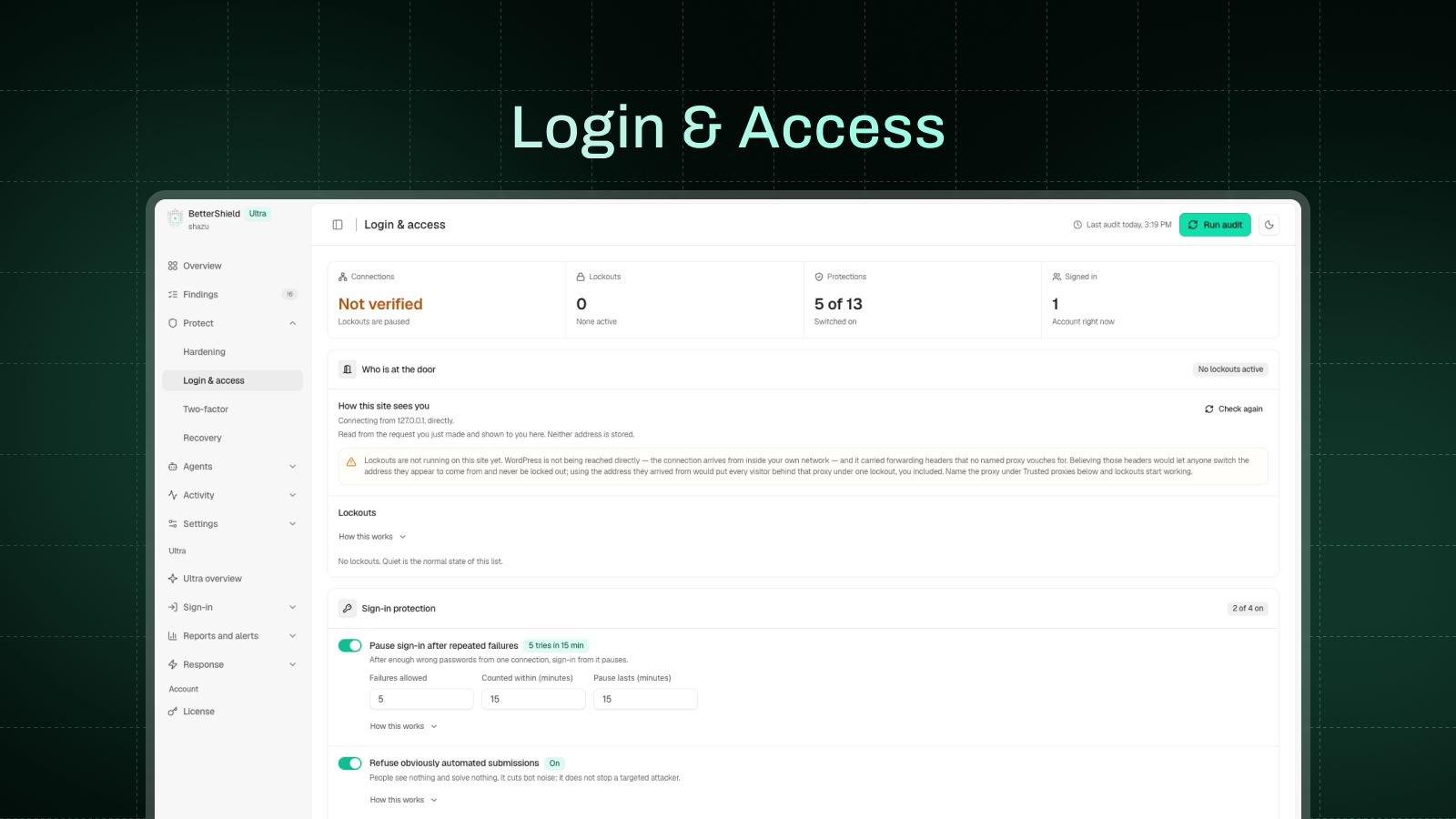
- Limit login attempts: by default, 5 failed sign-ins in 15 minutes lock that connection out for 15 minutes, doubling with each repeat within a day.
- A hidden bot check on the login, registration, WooCommerce account and comment forms.
- Limits on public forms: comment bursts wait in moderation, and repeated password resets or sign-ups are paused.
- Strong password rules, an optional leaked-password check, an IP and username blocklist, and an allowlist that is never locked out.
Lockout recovery
If you get locked out, you can get back in without FTP or a call to your host. A single-use recovery link, emailed when you activate BetterShield, pauses its sign-in protections for one hour. Printed recovery codes are a second way in.
Security activity log
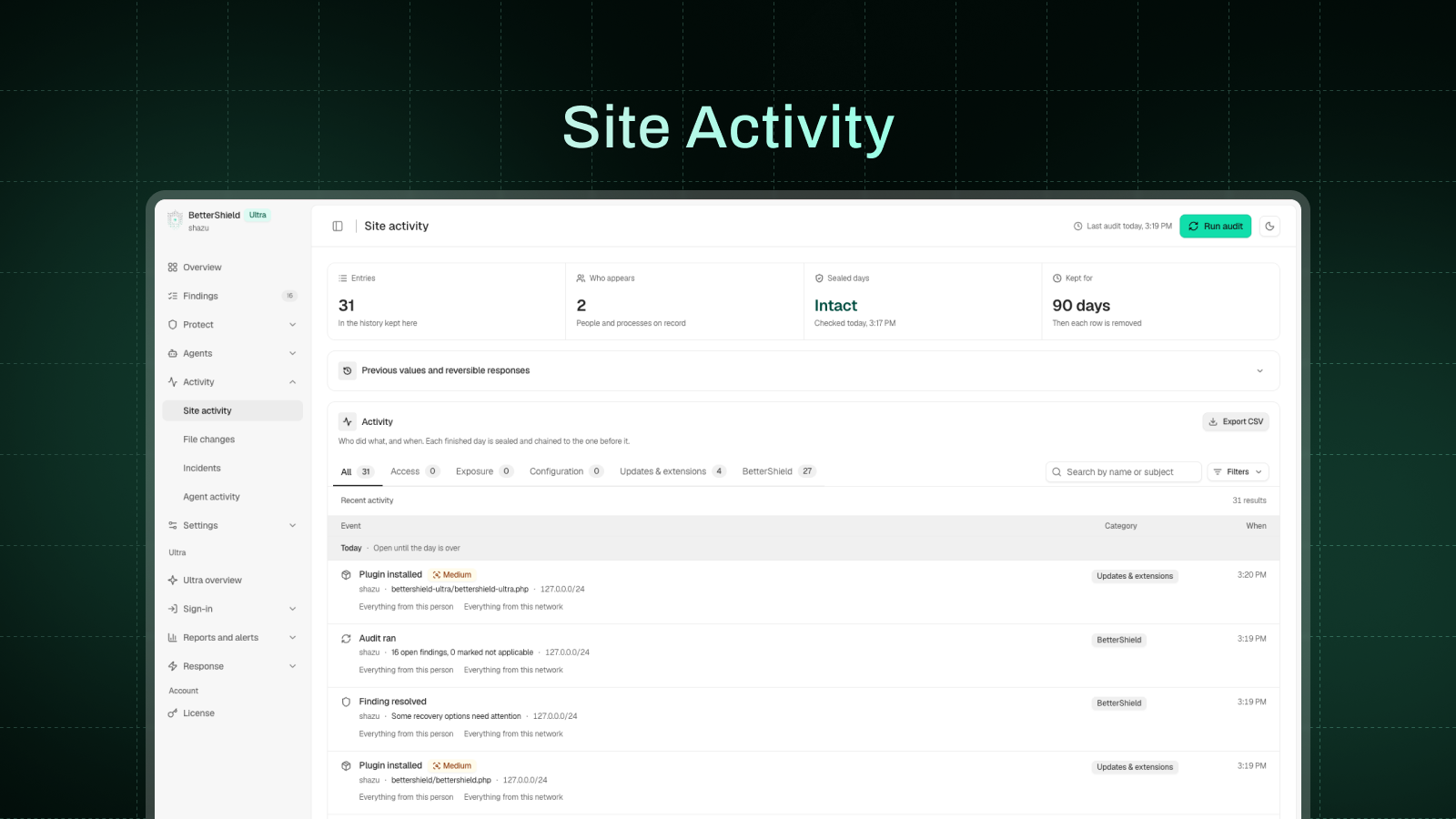
Sign-ins, account and role changes, password resets, and plugin, theme and core changes, with who and when. Filter, search and export to CSV, with 30 days of history. Each finished day is sealed, so an edit or deletion opens a high-severity finding.
Incident response
Related access and file changes are joined into one incident, flagging signs of account takeover. You review the response plan before anything changes, and BetterShield checks again afterward.
Security alerts
Get a weekly summary, even on quiet weeks, a security report on demand, and an email when something high or critical happens. Off until you turn them on, in Quick Setup or Settings. Alerts never carry an upgrade prompt.
File integrity check against WordPress.org
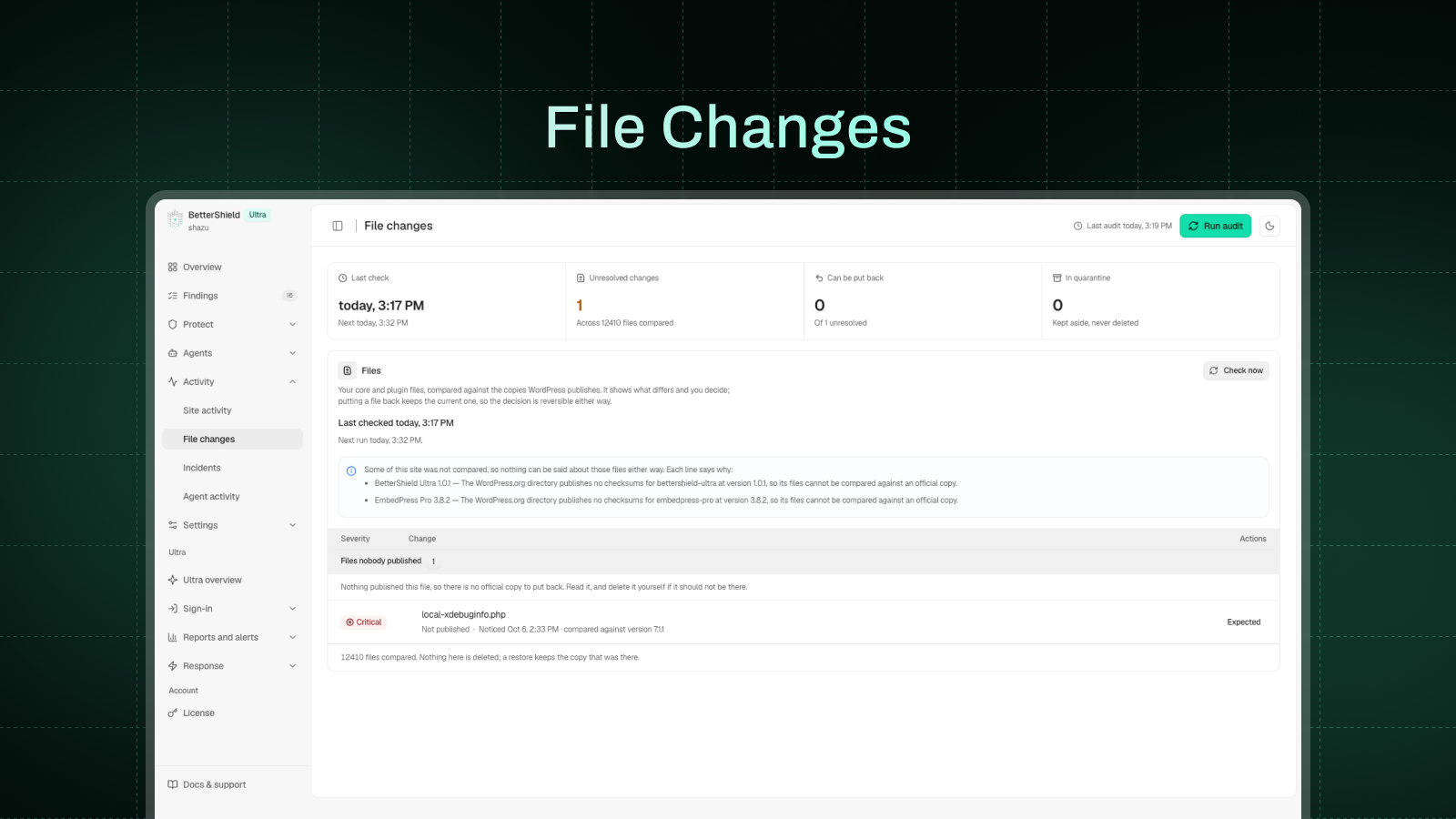
WordPress core and directory plugins are compared with WordPress.org’s official copies, showing exactly which lines changed. One click puts the official file back; the replaced file is kept, never deleted. Your theme, drop-ins, wp-config.php, .htaccess and other unpublished code are watched for changes.
AI explanations and AI assistants (MCP)
- With an AI provider connected under Settings > Connectors (WordPress 7.0 or newer), get any finding explained in plain language, up to 20 an hour for each account, or ask Explain My Audit for a summary.
- The MCP server lets assistants read your site’s security through twenty-eight bounded, read-only abilities. It is off until you turn it on under Agents > Connect.
- A second switch, off by default, lets an assistant apply and undo fixes and put a changed file back. Undoing, restoring and anything with no undo, such as ending sessions, wait for your approval, and every change is logged.
- Never possible through a connection: creating accounts or credentials, changing recovery, two-factor or alert settings, lifting lockouts, or deleting log rows.
Switching from another security plugin
BetterShield can bring over your old plugin’s settings, with a preview first and an undo.
For agencies: BetterShield Hub, WP-CLI and multisite
An optional dashboard for people who look after more than one site. Connect sites from BetterShield Hub to see every score and finding, apply or undo fixes across sites, with sign-in changes and undos waiting for your agreement, get downtime and grade-drop alerts, and invite your team.
- WP-CLI commands for audits, findings, hardening, activity, recovery, file checks, settings, alerts, lockouts, blocklist, reports and accounts
- Settings export and import, with preview and undo
- Multisite: every site’s score in one table, and two-factor and passkey rules set once for the network
BetterShield Ultra
BetterShield Ultra gives you full control of your site’s security. It needs this plugin active and adds:
- Two-factor setup at sign-in for the roles you choose, plus trusted devices
- Passkey reminders by role and a date for passkey-only sign-in
- A sign-in report by role, and your branding on the two-factor screens
- Alerts in Slack, Microsoft Teams, Google Chat, Discord, a JSON webhook or syslog; on WordPress 7.0 or newer, incidents in PagerDuty or Opsgenie and events in Splunk, Datadog or Elastic
- Scheduled client reports
- Temporary access that ends on its own
- Hourly check of key site files
- Cloudflare controls (WordPress 7.0 or newer, with a Cloudflare token)
- No hourly limit on explanations
- 90 days of activity history, up from 30
Plans and prices: https://bettershield.ai/ultra/
Who makes BetterShield
BetterShield is made by WPDeveloper. For help, use the support forum here on WordPress.org or https://bettershield.ai/support/. If it has been useful, a review here helps other site owners find it. Translations are welcome at https://translate.wordpress.org/projects/wp-plugins/bettershield/.
External services
BetterShield contacts nine outside addresses. It contacts four addresses operated by WordPress.org to verify and restore official files. It contacts your own AI provider only if you have connected one; Pwned Passwords and usage reporting each require opt-in.
api.wordpress.org: the published checksums for your WordPress version, when the file check runs on its schedule or when you start one; the request carries your WordPress version and language.
Once a day it also asks whether the directory still lists a few of the plugins you installed from it; that request carries the plugin’s slug only. Installs and updates started from BetterShield go through WordPress’s installer, from here and downloads.wordpress.org.
downloads.wordpress.org: checksums for a directory plugin at your exact version, during the same check and whenever a plugin is installed or updated, including automatic updates. For WPDeveloper’s Pro plugins and Ultra, the same question then goes to checksums.wpdeveloper.com, and for Ultra to bettershield.ai if that has no record. Each carries the plugin’s slug and version.
core.svn.wordpress.org and plugins.svn.wordpress.org: the official copy of one file, fetched when you press Restore on a changed file or open its difference. The request carries the version and the file’s path, and the copy is checked against the published checksum before anything is written.
api.pwnedpasswords.com: the Pwned Passwords service by Have I Been Pwned, only if you switch on “Leaked password check”, and only when someone signed in to your site sets or changes a password.
The password is hashed on your server and only the first five characters of the hash are sent; the comparison happens on your server. No password, account name, email, site address or identifier is sent. Documentation: https://haveibeenpwned.com/API/v3#PwnedPasswords, terms of use: https://haveibeenpwned.com/TermsOfUse, privacy policy: https://haveibeenpwned.com/Privacy
send.wpinsight.com: WPDeveloper’s usage service, only if you choose to share usage data (Allow & Continue on the first Quick Setup step; Skip sends nothing).
At most once a day, and once when you deactivate BetterShield, it sends your site address and title, administrator email, WordPress, PHP and web server versions, language settings, whether the site is multisite, the installed and active plugins, your theme and its version, BetterShield’s version and folder name, and the report reference.
If you choose to answer the question its Deactivate link asks, the report sent on deactivation also carries your reason and the few words you typed. It sends nothing else about your visitors, users, sign-ins or findings.
Turn it off under Settings > General. Terms and conditions: https://wpdeveloper.com/terms-and-conditions, privacy policy: https://wpdeveloper.com/privacy-policy
BetterShield Hub (hub.bettershield.ai, or the address a developer sets in wp-config.php), only if you connect the site and approve it on this site’s own consent page. Pressing Connect sends your browser to the hub with this site’s address, a return address, the access you chose and a single-use ticket.
Once connected, it reads the score, findings, tools and the activity log, which names the account behind each change and its truncated networks, and checks the front page every few minutes.
With the Hub link on, this site sends it security events every five minutes, accounts as digests and networks truncated, and a heartbeat of versions, digests and, when it changes, the list of installed plugins and themes, signed with a key kept here.
Turning the link off stops it; Disconnect ends both. Terms of service: https://bettershield.ai/terms, privacy policy: https://bettershield.ai/privacy
Your own AI provider, only if you have connected one to WordPress and only when you ask for an explanation: of one finding, of your open findings with Explain My Audit, or of an incident.
WordPress sends the request through your connector under Settings > Connectors; BetterShield never asks for, stores or sends the key, though Agents > Agent surface shows administrators its last four characters.
For one finding it sends that finding’s title, severity, description and recorded evidence. Explain my audit sends the titles, severities and recorded evidence of up to twelve open findings in one request. An incident’s explanation sends what was recorded about it, with accounts and files named only as placeholders such as “account-1”.
Web and email addresses are stripped, and file contents, usernames, keys and your site’s address are never sent.
None of the WordPress.org requests carries anything about your site: no site address, email, username, keys, file contents or identifier. The exception is WordPress’s own installer, which names your site address in its user agent, as every WordPress update does.
These requests happen on a schedule, when you press a button, or when a plugin is installed or updated, never while a visitor loads a page. If a service cannot be reached, the check says it could not run rather than reporting a file as unchanged.
The four WordPress.org addresses are provided by the WordPress Foundation. Privacy policy: https://wordpress.org/about/privacy/, cookie policy: https://wordpress.org/about/privacy/cookies/
Published vulnerability advisories (hub.bettershield.ai), only with vulnerability checks on under Settings: the slugs and versions of WordPress, plugins (must-use ones included) and themes, when enabled, daily, on request and after updates or removals. Nothing else; the server sees the connection’s IP address. Terms · Privacy.
What it keeps about people
Everything BetterShield keeps about a person is stored on your own server, with IP addresses truncated to a network first. If you connect BetterShield Hub, some of it leaves as described above. The FAQ describes each record, and Tools > Site Health > Info lists every record, why it is kept and for how long.
Source code
Everything that runs is readable in the plugin folder. The PHP in src/ is not generated, compiled or minified. The admin interface is compiled into assets/build/ from the sources in assets/js/ and assets/css/, which ship next to it. To rebuild, run npm install and then npm run build, which uses @wordpress/scripts from the included package.json.
Installation
- In your dashboard, go to Plugins > Add Plugin, search for “BetterShield”, then install and activate it. Or upload the folder to
/wp-content/plugins/bettershield. - On activation, a read-only security audit runs and your recovery link is emailed to the site’s admin address. If you pressed Activate on the Plugins screen, the Quick Setup opens.
- Open BetterShield in the admin menu to see your score and findings.
Apart from refusing requests to cloud-metadata addresses, no hardening fix, required two-factor or passkey-only sign-in is switched on until you choose it. A few protections start at activation, and each can be switched off:
- Refusing other plugins’ requests to cloud-metadata addresses
- Login attempt limits
- A hidden bot check on the login, registration, WooCommerce account and comment forms
- Limits on the comment, password reset and sign-up forms
- Minimum password lengths
FAQ
Is BetterShield free?
Yes. The audit, every plain-language explanation, all 30 fixes and their undo, two-factor authentication, passkeys, login protection, the recovery link, the activity log, incident response, the file check and the MCP server are free. BetterShield Ultra, for agencies, adds extras such as two-factor setup at sign-in for the roles you choose, a scheduled client report and longer history: https://bettershield.ai/ultra/
Does BetterShield include a firewall or malware scanner?
No. BetterShield does not include a firewall and does not scan for or remove malware. It audits your configuration, hardens it with fixes you can undo, secures logins, logs activity, groups suspicious changes into incidents, compares WordPress core and directory plugins with the official WordPress.org copies, and watches your theme and the files nobody publishes for changes. On a WooCommerce store it also looks for scripts that do what card-stealing code does, such as hiding where they send data, and names where each one is. It never says a site is clean.
Will the fixes break my site?
Every fix can show you what it will change before you apply it, and each can be undone at any time. Where an undo cannot reach everything, the fix says so first: people signed out by a key change stay signed out, and browsers that already saw the HSTS header keep insisting on HTTPS until it expires.
What happens if I lock myself out?
Open your latest recovery link and press its one button. BetterShield’s sign-in protections pause for one hour and your settings stay as they are.
You can generate a fresh link from Protection > Recovery at any time, which stops the old one working. Using a link issues the next one straight away, on the page and by email.
A link you never use stops working after 90 days, and BetterShield warns you in the last two weeks. Printed recovery codes are a second way back in.
Can two-factor authentication lock my users out?
Not by setting it up. Nothing is enforced until the app is proven to work and the backup codes are saved. Required two-factor comes with a grace period (14 days by default), with an email to the account three days before it ends.
If someone loses their phone, a backup code signs them in, and an administrator can turn two-factor off for them. If you are the only administrator and have lost both, use your recovery link: while safe mode is on, your password turns two-factor off under Protection > Two-factor, and the account is emailed about it.
Which authenticator apps work?
Any authenticator app that generates time-based one-time codes: Google Authenticator, Microsoft Authenticator, Authy, 1Password and the like. Setup also gives you ten single-use backup codes, and nothing is enforced until the app is proven to work.
What is a passkey?
A passkey is a sign-in credential kept on your phone, laptop or password manager and unlocked with a fingerprint, your face or the device PIN, using the WebAuthn standard. There is no password to phish. BetterShield stores only the public half of the key.
Anyone in the roles you choose, and your WooCommerce customers, can add one, and you can require passkey-only sign-in for a role once a working recovery option is in place.
Will it slow down my site?
The Overview measures it and shows the number for your own site, once it has seen enough page views.
For visitors, BetterShield runs the fixes you turned on, its login protection on sign-in, the limits on the comment, reset and sign-up forms, the opt-in missing-page limit, and a hidden bot check on the sign-in, registration and comment forms.
Audits, file checks and emails never run inside a visitor’s page view. On the WooCommerce cart and checkout, BetterShield adds no bot check, skips its sampling, checks and housekeeping, and only records security events.
Does it send my data anywhere?
Out of the box, BetterShield contacts WordPress.org to check your files and plugins, and WPDeveloper’s checksum servers (checksums.wpdeveloper.com and bettershield.ai) if you run our Pro plugins or Ultra. Those requests carry version numbers and plugin slugs, never your site address, email or username. Everything else stays off until you turn it on: usage sharing (the first Quick Setup step), vulnerability checks, the leaked-password check, your own AI provider and BetterShield Hub. External services below lists exactly what each one sends.
What does BetterShield keep about people?
Everything is stored on your own server, unless you connect BetterShield Hub (see External services). The main records:
- Activity log: what happened and who did it, with IP addresses truncated to a network before storage. Rows are removed after thirty days.
- Sign-in attempts: the username tried, the outcome, the truncated network and a keyed digest of the IP address, used for lockout decisions and pruned aggressively.
- Passkeys: the device name you gave, when it was added and when it was last used. Only the public half of the key is stored.
- Account records: two-factor setup, backup codes, password-policy status, two-factor deadlines and last sign-in.
Tools > Export Personal Data and Tools > Erase Personal Data both support BetterShield. A few security records are kept on purpose, and the erasure result says so: the date the account last signed in, lockout records, incident evidence and assistant activity.
Tools > Site Health > Info lists every record, how long it is kept, and what erasure does to it.
Can I use BetterShield alongside another security plugin?
Yes, with care. If another security plugin is active, Quick Setup asks which plugin should keep each shared job, such as login limits, so they don’t both do it. On the Hardening screen, a fix the other plugin already covers says so.
It does not catch every overlap, so check the other plugin’s settings too, and avoid turning on login or two-factor features in both.
How do I switch from another security plugin?
Install BetterShield and let the first audit run; the audit itself changes nothing. Settings > General can then bring over your old plugin’s protections, and its sign-in attempt limits once it stops limiting sign-ins (several popular security plugins are supported).
You see a preview first, it lists what it could not carry and why, the other plugin is only read, and you can undo the import. Apply any other fixes you want one at a time and switch the old plugin’s features off as you go.
Can my server’s firewall block the networks BetterShield locks out?
Yes, on a server that runs Fail2Ban. Turn on “Send lockouts to the server’s firewall” under Protection > Login & Access, or a host can turn it on for every site with the bettershield_host_ban_line filter.
Each lockout then writes one line to the server’s auth log naming the network (IPv4 /24, IPv6 /64), never an address or a username. A sample filter and jail ship in the plugin’s fail2ban folder. A network that holds an address on your allowed list writes no line.
Does BetterShield detect vulnerable plugins?
Yes, when you turn on vulnerability checks in Settings. BetterShield compares what you have installed with published advisories from BetterShield Hub. Where the Hub’s data comes from Patchstack, the result says so. The Hub answers from its own copy of that data, so nothing is sent to Patchstack.
You don’t need a Hub account or an Ultra license. The result shows its age, and if a refresh fails you keep the previous result with a warning.
BetterShield also flags plugins the WordPress.org directory has closed or that have had no update for years, and its file check shows any core or directory plugin file that no longer matches the official copy.
Is the activity log tamper-proof?
No, and it does not claim to be. It is tamper-evident: each finished day is sealed and chained to the day before. If a sealed day is later edited or deleted, the next daily check opens a high-severity finding.
Does it work with WooCommerce?
Yes. Customers can set up two-factor, add passkeys and see where they are signed in from a Sign-in security tab on My Account. BetterShield adds nothing to the cart or checkout pages.
Does it work on multisite?
Yes. Each site keeps its own findings, settings and fixes. The network admin gets every site’s score and open findings in one table, 200 sites at a time, two-factor and passkey rules set once as a floor under every site, and a recovery link for the network.
Do I need BetterShield Hub?
No. It is optional, and everything in the plugin works without it. The hub is for people who look after several sites and want their scores, findings and fixes in one place.
You connect each site from its own BetterShield Hub screen and approve it on that site. To end the connection, press Disconnect on the site: removing a site inside the hub does not end it.
What can BetterShield Hub see and change?
What you allow when you connect. Read-only lets it see the score, findings and a few security views, such as administrators by display name and role. Read-and-fix also lets it apply fixes that can be undone, and those take effect at once.
Changes to how people sign in, fixes that cannot be fully undone, and undoing a fix, which takes a protection off, show the site’s own plan first and wait for a person to agree each time.
Connecting switches on the plugin’s reading, changing and assistant connection settings if they are off. On the consent page, “Allow it to change this site” starts unticked; tick it only if you want the hub to apply fixes. Every change the hub makes is recorded in the site’s activity log.
The hub reads the site every few hours; if you also turn on the Hub link under BetterShield Hub, or tick it on the consent page, the site sends its security events and a heartbeat to the hub as they happen, so its alerts arrive in seconds. Turning the link off deletes the key it signs with.
Can an AI assistant change my site?
Only if you let it. The MCP connection is off until you turn it on under Agents > Connect, and reading and changing are separate switches. With only reading on, an assistant can look and change nothing. With changing on, it can apply fixes.
Undoing a fix, putting a changed file back, updating a plugin, moving files into quarantine and changing an account wait for you to agree to the plan it shows you. Every change is recorded in the activity log, and every one that can be undone has an undo.
A connection can be issued read-only whatever the switches say. Creating accounts or credentials, changing your recovery options, two-factor or alert settings, lifting lockouts and deleting log rows are never possible through a connection. Agents > Agent surface shows which abilities on your site, from any plugin, can make changes.
What happens if I delete the plugin?
Its records stay by default, including the activity log, findings and undo history, so reinstalling picks up where you left off. Fixes it applied, including .htaccess rules, stay applied too, so undo anything you do not want to keep before you delete.
Under Settings > General, “When BetterShield is deleted” can instead remove this plugin’s records, which also takes its server rules back off.
Copies of files it replaced are kept in wp-content/uploads/bettershield-quarantine/, because the version that was there may be exactly what somebody put on your site, and BetterShield leaves that decision to you. Remove them one at a time from Activity > File Changes before you delete the plugin, or delete the folder yourself afterward.
A third setting does both for you: it packages the copies into one zip file inside wp-content/uploads/bettershield-quarantine/ (in its handback folder), takes the copies away only once that archive has been written, and then removes this plugin’s records as above.
The zip gets a random name and nothing links to it, so collect it over SFTP or from your host’s file manager, and move it out if your server ignores .htaccess rules.
How do I get support?
Post on the support forum here on WordPress.org, or go to https://bettershield.ai/support/, which also has a section for anyone locked out. If you think you have found a security problem in BetterShield itself, send it through that page rather than the public forum.
Can other plugins add confirmed actions for an assistant?
Compatible plugins can register confirmed actions through the native WordPress Abilities API. The same permission checks, write opt-in, rate limits, target-bound plans and single-use confirmations apply when those abilities are carried over MCP.
Screenshots
Changelog
1.1.9 – 16/11/2026
- Added: Activity | An administrator session that opens without the sign-in form is now recorded. Each restore of a changed setting, role, account or plugin names what it put back, an undone restore is recorded too, and a session row names the plugin that opened it
- Improved: Findings | Apply Fix shows on a known security issue only when an update can install, Put Back in Activity opens the fixes it points to, and Done recently says the undo once with a link to more undos
- Improved: Login & Access | Each number is checked as you type and Save waits until it is in range, and a locked connection sees one notice on the sign-in page with the unlock link
- Improved: Two-Factor | The Sign-in Security page picker marks the pages that show the panel and lists them first, a page that holds it through a synced pattern counts, and the code field says it takes a backup code too
- Improved: Agents | The copied configuration carries the new key in full, another plugin’s AI connection is checked by asking it, and a connection stays paired when a refresh answer is lost on the way
- Improved: Settings | An import lists what it will change first, folds the rows that already match, and Save Policy confirms it saved
- Improved: Other Security Plugins | One more security plugin’s sign-in jobs are recognized, and they count only while it is doing them
- Fixed: File Integrity | A missing file that comes back closes its row, and undoing that puts it back
- Fixed: Audit | The check of the site’s REST routes no longer moves a theme’s widgets to Inactive
1.1.8 – 12/11/2026
- Added: Findings | On a WooCommerce store, a new finding names any script that does what card-stealing code does, says where it is, and lets you accept one you added. Themes the WordPress.org directory removed or stopped updating are named too
- Added: File Integrity | An added PHP file that decodes code and runs it, or hides behind a name starting with a dot, is marked worth a look, with the line
- Added: Email Alerts | Book planned maintenance ahead. It starts by itself, everyone you alert hears about the booking at once, and it ends at the booked time
- Added: WP-CLI | See and change one person’s sign-in methods and sessions with wp bettershield account, settle a finding from the terminal, and make wp bettershield audit –strict fail when a check could not run
- Added: Agents | An assistant shows a plan before each direct finding fix, Connect warns before the Hub’s reads are turned off, and Test Connection shows it ran
- Improved: Vulnerabilities | Each known security issue says whether it can be reached on this site, and the Hub’s results can come from either of its sources
- Improved: Passkeys | A saved passkey is offered in the username field, and one removed here stops being offered by the browser
- Improved: Screens | The light logo keeps its lower dots visible on light backgrounds
1.1.7 – 09/11/2026
- Added: Findings | I Manage This Myself on the Overview and Findings. The finding stops counting, stays marked after new scans and can be put back, and the score says how many you marked. A new low finding flags an administrator’s application password with no limits
- Added: Two-Factor | A Sign-in Security page for members kept out of wp-admin, background sign-in forms carry on to the code screen, recovery codes come over in the import, the My Account tab can be hidden on a store, a sign-in another plugin creates without the code is recorded, and undoing a brought-over authenticator app tells each account what is true
- Added: Hardening | Hide /wp-admin/ in the same save as the sign-in address and choose where signed-out visitors go. The address accepts underscores, one character and up to 200 characters, signed-in visitors go to the dashboard, the old address shows the theme’s 404 page, and developers get new hooks. What your host already enforces shows as on, locked and named, the address works beside another plugin using the same one, and it stays out of more signed-out pages
- Fixed: File Integrity | A plugin that loses its checksums is still compared, folders with a capital or a dot are checked, updates are recorded only for what landed, and a network checks shared code once with one alert
- Fixed: Passkeys | A prompt hidden on the sign-in page can now end, and Stop Waiting says nothing was changed
1.1.6 – 05/11/2026
- Changed: Sign-in | On every site, a lockout emails the account only when it has used that network before, or when its right password was used. Anyone else can ask for an unlock link on the sign-in screen. An account that hasn’t signed in within the last 30 days has no usual network on record yet, so its owner uses Email Me an Unlock Link
- Added: Two-Factor | When you switch another two-factor plugin off, accounts keep their authenticator app where it can move, and anyone who must set up again is named first. The Activity Log has an Undo
- Added: Overview | Migrate for a plugin still sharing sign-in limits or two-factor with BetterShield
- Added: Agents | Each assistant shows its own logo on Connect
- Improved: Screens | Times follow the site’s clock, as the emails do, and clearer wording across Findings, Hardening, Agents, Activity, Settings, the Overview, profile, sign-in and emails
- Fixed: File Integrity | Fewer false alerts from cache plugins, BetterShield’s own writes, paid plugin updates and updates run across a network. Tampering in wp-config.php stays critical
- Fixed: Email Alerts | One email for an event that opens an incident, a changed file counted once, and a moved sign-in address kept out of alert emails
- Fixed: Sign-in | A right password refused by another plugin no longer counts as a failed attempt, and a valid recovery code keeps working past the shared guessing limit
- Fixed: Two-Factor | Another plugin’s two-factor counts only for the accounts that use it, and a wrong code also points to backup codes
- Fixed: Passkeys | A prompt hidden behind another app no longer waits forever, a failed save says why, and a device with no passkey is told what to do
- Fixed: Multisite | A site’s lockdown signs out only the accounts within your reach, and the screen says who stays signed in
- Fixed: Findings | A finding still open no longer reads as fixed, and each check that could not run says what stopped it
- Fixed: Hardening | XML-RPC shows as in force when the host blocks it, and the sign-in address and HTTPS redirect are refused beside a plugin that already does them
- Fixed: Screens | A busy button keeps the normal cursor and a busy refresh icon turns on every screen
1.1.5 – 01/11/2026
- Changed: Email Alerts | On a new install, instant alerts and the weekly summary stay off until you turn them on in Quick Setup or Settings. Sites already running keep their alerts as they are
- Added: Findings | Fix five more findings in one press from the row or in bulk, with Undo: file permissions, folders anyone can write to, plugin updates, inactive plugins and themes, and dormant accounts
- Added: File Integrity | Check WPDeveloper’s paid plugins against their published checksums
- Added: File Integrity | Accept a paid plugin’s changes for one version at a time, on File Changes or from WP-CLI
- Added: Email Alerts | A host can take the routine alerts with wp bettershield alerts host-managed on. Only a new administrator, a role raised to administrator, the trap password or a changed code file emails at once, and the rest wait for the weekly summary
- Added: WP-CLI | Manage who gets alerts and the mute with wp bettershield alerts, record an update made outside WordPress’s updater with integrity record-update, and record a file your host wrote with integrity expect-file
- Improved: File Integrity | When a plugin’s version moved without WordPress’s updater, its changed files are rated high instead of critical. A hidden code file stays critical
- Improved: BetterShield Hub | A plugin or theme change reaches the Hub in about a minute instead of up to ten, and Connect opens in a new tab
- Improved: Hardening | Each protection is named for what it does, not as an action
- Improved: Screens | Clearer wording and layout on Alerts, Incidents, Agents, Site Activity, File Changes, Two-Factor and Findings, and score labels read correctly in right-to-left languages
- Fixed: Vulnerabilities | Records marked informational no longer count, so WordPress is not told to update to the version it already runs
- Fixed: Vulnerabilities | An advisory whose versions can’t be compared no longer hides the fix, so plugins such as Jetpack and Post SMTP name it again, and nightly WordPress builds can be checked
- Fixed: Security Audit | The upload check asks as each role, so plugins that change allowed file types, such as Bricks, are read correctly
- Fixed: Security Audit | The cached sign-in page check follows a custom login address instead of saying it could not be tested
- Fixed: Recovery | You can now confirm the recovery email arrived, and the Overview stays in step
- Fixed: Findings | Apply Fix carries on past an item it can’t change, the links rewrite keeps its Undo after its finding closes, and XML-RPC with only pingbacks blocked no longer reads as broken
- Fixed: Multisite | Subsite sign-in no longer runs out of memory, and site admins can read changes to shared code but not act on them
- Fixed: File Integrity | Every changed file now reaches the Activity Log, even when one scan finds hundreds
1.1.4 – 28/10/2026
- Added: Login & Access | See the networks and usernames tried most in the last 7 or 30 days, and block a tried name in one press
- Added: Email Alerts | Choose what each address gets: instant alerts, the weekly summary or both, and how serious an alert must be to send at once
- Added: Email Alerts | Alerts and weekly summaries arrive in each recipient’s own language
- Added: Email Alerts | Hold one event type for the weekly summary instead of an instant email. Critical events always send at once
- Added: Activity Log | Saves in the theme and plugin file editor, and network sites deleted, archived, deactivated or marked as spam
- Added: Findings | Apply Fix to several findings at once, and fix common usernames, proof of work and pingbacks from the finding, each with Undo
- Added: Findings | Turn on BetterShield’s own auto-updates in one press
- Added: Agents | AI assistants can propose more fixes, each applied only after you confirm it and each with a way back
- Added: Security Score | Credit for security headers, folder listing protection, backups and recovery your host already provides
- Improved: Security Audit | The score and Findings update on their own after a fix or a settings change, without Run Audit
- Improved: Findings | Check Again says what it still sees, and a finding’s link opens its setting
- Improved: Agents | A simpler Connect screen with one switch and the sign-in link first
- Improved: Screens | Clearer wording, labels and layout on Overview, Login & Access, Hardening, Two-Factor, Recovery, Settings, Site Activity, Agents and File Changes
- Improved: Screens | A refused action shows as a clear error with Dismiss, and large numbers are grouped
- Fixed: Security Audit | The upload check no longer reads an administrator who also holds a lower role, and blocked pingbacks are credited in the XML-RPC finding
- Fixed: Findings | Fix panels show the new score at once, mark what they fixed, and the recovery finding opens Recovery
- Fixed: Screens | The top bar, tables, cards, checkboxes and copy fields fit narrow and right-to-left screens, and focus rings show again
1.1.3 – 26/10/2026
- Changed: Security Score | The score is now 60 points for setup essentials and 40 for site health, capped at 74 while a critical finding is open. Your score will change after updating, so recheck any wp bettershield audit –fail-under threshold
- Added: Security Audit | New checks for admin accounts that sign in with only a password, an unconfirmed recovery method, browsable uploads folders, common usernames, unprotected forms, pingbacks and more
- Added: Settings Import | Bring over login limits and allowed IPs from Limit Login Attempts Reloaded and Loginizer
- Added: Findings | Many more findings now have a one-click fix or a step-by-step guide, each with Undo
- Added: Findings | Require sign-in for a REST API route you choose, after a week of seeing who uses it
- Added: Hardening | Protect password resets, email changes and the settings attackers change first, and turn off XML-RPC for everything but Jetpack
- Added: Hardening | Copy-ready nginx rules
- Added: Agents | Limit each connected AI app to the tools you choose, and monitor MCP endpoints and ability changes
- Added: File Integrity | Check BetterShield Ultra’s files against checksums published on bettershield.ai
- Improved: Screens | Plainer wording and consistent button labels across every screen, alert and email. The Activity Log now names events and changed settings in plain words
- Improved: File Changes | Search by path, filter across all changes, and select every match at once
- Fixed: Findings | Updating one plugin no longer drops the others from the list, and the list fits narrow screens
- Fixed: Passkeys | Passkey sign-in no longer needs the REST API, and a passkey that cannot sign in now says so
- Fixed: Settings | The security contact switch works on the first click and explains when it cannot turn on
- Fixed: File Integrity | More accurate reports for must-use plugins and restored files
1.1.2 – 22/10/2026
- Added: Vulnerability Checks | Optional vulnerability data from BetterShield Hub, no account needed, with version matching done on your site
- Added: Activity Log | Restore, remove or accept several file changes or quarantined copies at once
- Added: Settings | Preview the exact usage report before you share it, and cancel a settings import preview without changing anything
- Added: Recovery | Copy the network’s one-time recovery link, and see a clear page when a recovery link is invalid
- Added: Agents | Assistants can propose ending sessions, revoking another app or entering lockdown. An assistant you allowed to change the site applies each once you agree in the conversation; any other caller waits for approval under Agents > Requests. Only the site can lift lockdown
- Added: Agents | Assistants can triage confirmed file changes and handle incidents, with an undo for both
- Added: MCP Server | Write-scoped assistants can run audits, check files and recovery, refresh incident evidence, and start or stop observation, but cannot enforce a protection
- Added: MCP Server | New get-security-overview tool reads the score, history, findings with fixes, and recovery readiness
- Improved: Vulnerability Checks | Keep the last good result when a refresh fails, and never treat an unknown version or severity as safe
- Improved: Updates | Recheck components after changes and recognize security fixes on maintenance branches
- Improved: Passkeys | Clearer HTTPS setup help, optional passkey names, and plainer passkey-only explanations
- Improved: Agents | Set up browser sign-in without a manual credential, and tell assistants, issued credentials and application passwords apart
- Improved: Screens | Plainer wording, one line per control with details in an info tip, and layouts that fit laptops and phones
- Improved: Accessibility | Keep keyboard focus after actions, announce results, close confirmations with Escape, and label repeated row buttons by row
- Improved: Hardening | Switches respond instantly, and undo says what it left in place
- Improved: Activity Log | More events read in plain words, and search finds rows by what they name
- Improved: File Integrity | Show added code first, recheck a plugin after install or update, and flag server configuration inside plugin folders
- Improved: Findings | Apply fix says what it did and offers Undo
- Improved: Login & Access | Warn before leaving with unsaved changes, and mark switches that need Save
- Improved: Alerts | Instant alert emails use the site’s time zone and name who made each change
- Improved: WP-CLI | Page, filter and export the integrity list as CSV, reject unused options, and print times in the site’s time zone
- Fixed: Passkeys | Removing a passkey can no longer leave a passkey-only account with only an unverified key. Existing keys keep working
- Fixed: Login Protection | Close two information leaks through the sign-in address and blocked usernames, and send unlock links only to the locked-out account
- Fixed: Login Protection | Match the custom sign-in address in any letter case, and stop new pages and posts from taking its address
- Fixed: Two-Factor | Say a code was already used instead of saying it does not match
- Fixed: Password Policy | Refusals name the role they apply to, and BetterShield Ultra no longer counts as another plugin
- Fixed: Settings History | Refuse to restore a change that newer changes have built on
- Fixed: Hardening | Leave guard files someone else changed alone on undo, report the file editor correctly on multisite, and recognize rules the server already enforces
- Fixed: File Integrity | Prune closed file changes, return every quarantined copy, and restore the first 100 of a larger selection
- Fixed: BetterShield Hub | Ask for the password before turning off an event type sent to the Hub, and open the right dashboard when WordPress is in a subfolder
- Fixed: Multisite | Fix uninstall, new-site creation and the network floor, and clear every site on network deactivation
- Fixed: MCP Server | Access removed during a token refresh now stays removed
1.1.1 – 13/10/2026
- Added: Hardening | Disable XML-RPC pingbacks without affecting Jetpack or mobile app access
- Added: Login Protection | Block connections immediately when they use a blocked username
- Added: Login Protection | Log blocked connections for Fail2Ban firewall integration
- Added: Login Protection | Release all active login lockouts at once
- Added: Security Audit | Detect conflicts with other plugins that limit login attempts
- Added: WP-CLI | Manage lockouts, blocklists, and site lockdowns from the command line
- Added: BetterShield Hub | Send security events and signed heartbeats to the Hub for faster alerts
- Added: MCP Server | Access site security settings, updates, protection status, audit progress, and agent information through new read-only tools
- Added: Two-Factor | Allow users to disable their own two-factor authentication with a valid code
- Added: Settings | Show whether BetterShield is translated into the site’s language
- Added: Security Audit | Display audit progress and announce when audits start and finish
- Added: Agents | Allow users to decline pending agent plans immediately
- Added: Hardening | Refuse requests from plugins to cloud-metadata addresses and log requests into the server’s own network. This seventeenth fix is on by default, including on sites that update, and has an undo
- Added: Security Headers | Allow a source from the content policy reports, remove it again, or clear the report list, each with an undo
- Added: Two-Factor | Allow users in safe mode to turn off their own two-factor with their password, and send a high alert when they do
- Added: Two-Factor | Email users once, three days before their required two-factor deadline
- Improved: Dashboard | Redesign all BetterShield screens with a collapsible sidebar while preserving existing settings and actions
- Improved: Incidents | Make incident summaries, network incident management, and incident history available across all sites
- Improved: Recorded Changes | Allow changes to be suspended and restored on every site without BetterShield Ultra
- Improved: Quick Setup | Clarify setup choices, track skipped steps, and provide controls for applied security fixes
- Improved: Settings Import | Show before-and-after setting values and include the lockout allowlist in imports
- Improved: Agents | Simplify agent connection setup, explain denied requests, and enforce individual hourly change limits
- Improved: Agents | Detect reused assistant credentials and generate security alerts
- Improved: BetterShield Hub | Display the last synchronization time, confirm disconnections, and explain failed connections
- Improved: File Integrity | Provide clearer file change details, identify quarantined tools, and simplify incident timelines
- Improved: File Integrity | Run file integrity checks in the background and process results in batches
- Improved: Recovery | Display safe mode status across Protect tabs and clarify recovery email expiration
- Improved: Sessions | Show device details clearly and provide responsive session management controls
- Improved: Login Protection | Explain login delays caused by requests arriving too quickly after page load
- Improved: Overview | Link existing findings to their settings and display incident and agent request counts
- Improved: Activity Log | Display security evidence and automated update rollbacks in human-readable language
- Improved: Accessibility | Improve keyboard navigation, screen reader announcements, dialog structure, and action labels
- Improved: Right-to-left | Align navigation, arrows, and keyboard movement with right-to-left reading direction
- Improved: Translations | Improve plural handling and provide complete, context-rich strings for translators
- Improved: BetterShield Ultra | Allow BetterShield Ultra to register activity events, read capabilities, and settings export sections
- Improved: Alerts | Send an instant alert when a hardening fix is switched off by hand
- Improved: Alerts | Send an instant alert when BetterShield or BetterShield Ultra is deactivated, or when BetterShield’s records are set to be removed on deletion
- Improved: Overview | Show sign-in protection, password policy, alert and decoy page changes in “Since you last looked”, along with passkeys added, two-factor removed, or emails changed on privileged accounts
- Improved: Activity Log | Keep older history for 30 days before removing it when a longer retention period ends
- Fixed: Security | Tighten authentication and permission checks for application passwords, blocked usernames, passkeys, administrator two-factor changes, and network-level settings on multisite
- Fixed: Two-Factor | Correct hourly code limits and preserve checkout redirects after two-factor authentication
- Fixed: XML-RPC | Return consistent authentication responses for accounts using two-factor authentication or passkeys
- Fixed: Lockdown | Extend lockdown protection to all sessions, assistant credentials, Hub credentials, and network sites
- Fixed: Hardening | Prevent public user listing protections from exposing real accounts through password recovery and author sitemaps
- Fixed: Hardening | Prevent alternative registration endpoints, password-protected posts, and archive paths from revealing the custom login URL
- Fixed: Hardening | Hide the WordPress version on the login page when version publishing is disabled
- Fixed: Passwords | Enforce password policies and breached-password checks for passwords with surrounding spaces, bulk-created customers, and all writing scripts
- Fixed: Security Audit | Recognize leftover installers and search-and-replace scripts by reading them from disk, so the weekly check never runs them
- Fixed: File Integrity | Detect added files in vendor, node_modules, and .git directories, as well as single-file plugins
- Fixed: File Integrity | Prevent false tampering alerts during plugin updates and ZIP replacements, and clear missing-file records after plugin deletion
- Fixed: Activity Log | Prevent personal-data erasure and stored reasons from incorrectly resealing failed audit days, and preserve log integrity after updates
- Fixed: Activity Log | Preserve existing activity history during updates without shortening BetterShield Ultra retention periods
- Fixed: AI Explanations | Exclude the site’s domain from data sent to AI providers
- Fixed: Decoy URL | Prevent query parameters from bypassing decoy URL protection
- Fixed: BetterShield Hub | Revoke the previous Hub’s access when its address changes and list all signed-in apps under Agents Connect
- Fixed: Recovery | Print all recovery codes on a single page and restore printing functionality across other screens
- Fixed: Security Audit | Improve detection accuracy for XML-RPC restrictions, SPF and DMARC records, private domains, HTTPS settings, file editing restrictions, backup plugins, themes, file permissions, and PHP errors
- Fixed: Security Audit | Correct update-check results when cached update information becomes outdated
- Fixed: Vulnerabilities | Display accurate fixed-version information, prevent duplicate notices, and remove notices after updates
- Fixed: Security Headers | Prevent false warnings for server-provided headers, preserve embedded site posts, and restrict content policies to frontend requests
- Fixed: Alerts | Ensure mute-all disables every email alert and deliver notifications using the correct language and updated administrator address
- Fixed: Site Moves | Prevent false site-move warnings during atomic deployments and restore alerts, Hub connections, and usage data sharing (if allowed) after staging replacements
- Fixed: WooCommerce | Record customer sign-outs and redirect paused password resets to the store’s own page
- Fixed: Right-to-left | Prevent honeypot fields from causing horizontal scrolling on comment forms and My Account pages
- Fixed: Multisite | Preserve network passkeys, remove deleted-site data, restore policy grace periods, and maintain site-specific password policy settings
- Fixed: WP-CLI | Correct dry-run options, identify sites in multisite CSV exports, produce valid JSON, and display timezone-aware timestamps
- Fixed: Scheduled Tasks | Prevent failed scheduled tasks from breaking admin pages and remove all scheduled tasks during uninstall
- Fixed: Settings | Reject security switch requests that do not clearly turn a setting on or off
1.1.0 – 05/10/2026
- Added: Overview | See which checks opened, passed, changed severity or were marked not applicable since an earlier day, with the score then and now
- Added: Security Audit | Four new checks: unfiltered code below administrator, script uploads below administrator, this plugin’s automatic updates switched off, and world-writable folders under wp-content
- Added: Recovery | Checks that a recovery link or printed code works before any change to how people sign in, from the dashboard or
wp bettershield harden(--forceto go ahead) - Added: Incidents | An email change, a password change and a new application password on one privileged account within an hour are recorded together as one high signal
- Added: Incident Response | Re-checks the site after a response runs and lists what is still open
- Added: Overview | Notes when failed sign-ins or the scheduler’s timing are far outside this site’s last 30 days
- Added: AI Explanations | Explain my audit summarizes the open findings in three short paragraphs that cite each finding
- Added: Settings Import | Bring over protections and sign-in attempt limits from another security plugin, with a preview and an undo
- Added: MCP Server | Connect Claude, ChatGPT or any MCP assistant to read the audit, activity and file check, apply fixes you can undo and restore changed files, with every call logged
- Added: Agents | A new Agents section with Connect, Requests, Permissions and Surface tabs
- Added: Overview | A storage card that names a missing database table or column and offers a Repair
- Added: Uninstall | A third choice when deleting the plugin: pack the quarantined copies into one archive, then remove them
- Added: Hardening | A sixteenth fix: refuse new passwords found in known breaches, off by default
- Added: File Integrity | Reports a new .user.ini file that appears after the site’s configuration was recorded
- Added: Security Audit | Names PHP files and folders in the plugins folder that no installed plugin claims
- Added: Security Audit | Flags directory plugins with no update for two years, with the last-updated date
- Added: Form Protection | Comment bursts are held for moderation, and repeated password resets and sign-ups from one connection are paused
- Added: WooCommerce | Customers manage two-factor, passkeys and signed-in devices from a Sign-in security tab on My Account
- Added: Login Protection | Block a username from signing in
- Added: Security Audit | Finds installer and database tools left in the web root, with quarantine from the finding
- Added: Security Audit | Checks whether admin-ajax shares signed-in answers with other websites, and names where the policy was widened
- Added: Security Audit | Detects a sign-in page served by a page cache or CDN
- Added: Security Audit | Checks the domain’s SPF, DMARC and CAA records once a day
- Added: Security Audit | Warns when free disk space runs low
- Added: Findings | Snooze a finding for 7 or 30 days, with its own Snoozed filter and
wp bettershield findings --status=snoozed - Added: Plugins Screen | Add New shows whether a plugin is closed on WordPress.org or has had no update for two years
- Added: Application Passwords | Limit an application password to its REST routes, its network, or both, from Agents > Surface
- Added: Site Moves | When the site address or folder changes, the Overview asks whether it is a staging copy or a move, with one undo
- Added: Incident Response | Ask a privileged account for a new password, with an undo
- Improved: Request Protection | Each public form has its own threshold, window and closing time, with a replay of the last two days before you save
- Improved: Incidents | Evidence names each row’s network and links to the activity log for the incident’s days
- Improved: Activity Log | Open everything from one person or one network from any log row, and narrow agent activity to one account
- Improved: Multisite | The network overview shows how many sites it lists and loads more on request on …