

Description
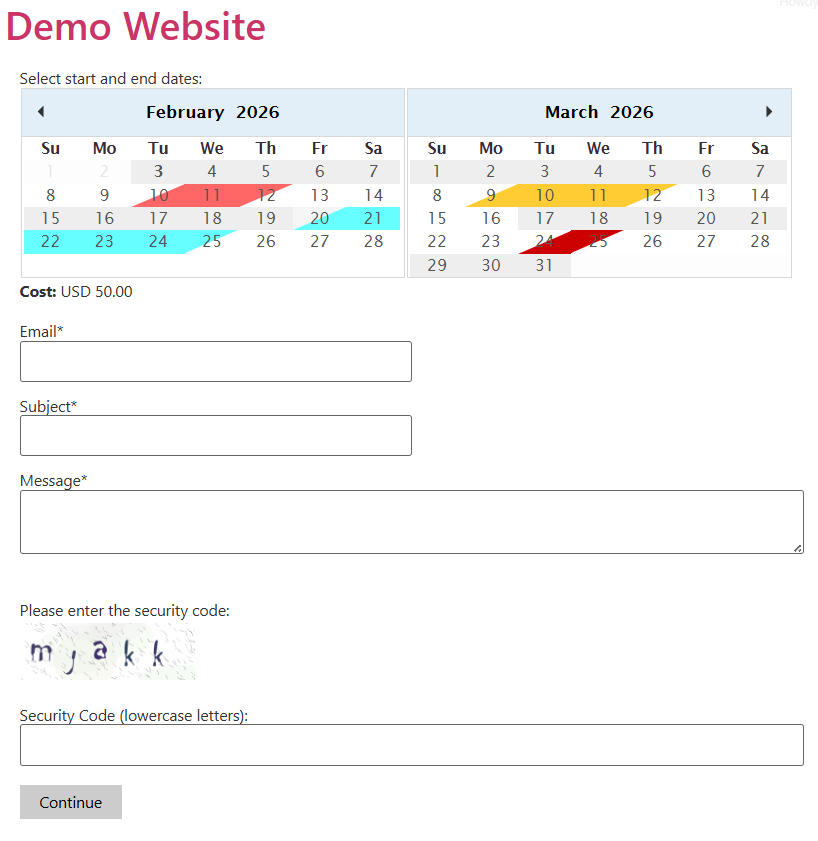
The Booking Calendar Contact Form plugin allows you to create a powerful and flexible booking form for your WordPress website. Easily create a reservation form with a booking calendar where users can select start and end dates (such as check-in and check-out) or single dates.
It is the ideal solution for hotels, property rentals, service providers, and anyone needing to accept bookings and payments online. The built-in PayPal integration (which is SCA-ready) allows you to securely process payments for reservations.
The reservation calendar is completely optional, so you can also use the plugin to create a general-purpose contact form or payment form.
🌟 Key Features of the Free Version
- PayPal Integration: Securely accept payments for your bookings. Fully compatible with SCA (Strong Customer Authentication) / PSD2.
- Reservation Calendar: Allow users to select:
- Start and end dates (e.g., check-in / check-out)
- A single date
- Flexible Booking Types: Supports full-day bookings (the entire day is blocked) or partial-day bookings (hotel-style, where check-out and check-in can happen on the same day).
- AI-Assisted Booking Replies: Reply directly to customer reservations from the Bookings List using a built-in AI assistant to draft polite, context-aware email responses in seconds, with all sent replies automatically logged in the booking record.
- Modern Administration Interface: Intuitive, tabbed settings dashboard, manual booking entry screen, and one-click shortcode publishing wizard.
- Availability Management: Optional date verification prevents double-booking by automatically blocking dates as they are reserved.
- Seasonal Pricing: Configure different prices for specific date ranges (e.g., high season, low season, holidays).
- Flexible Pricing Rules: Define prices based on the number of days selected (e.g., weekly rates, 3-day specials) or add length-of-stay supplements.
- Fixed-Length Bookings: Enforce specific booking durations (e.g., weekly-only bookings).
- Responsive & Mobile-Optimized: The form and calendar look and work great on all devices and screen sizes.
- Bookings Management & Export: Search, filter, export to CSV, or print a list of all bookings from your WordPress dashboard.
- iCal Export Link: Easily export your bookings to external calendars such as Google Calendar, Apple Calendar, Airbnb, and more.
- Configurable Emails: Customize the notification emails sent to the administrator and the confirmation emails sent to the customer.
- Customizable Messages: Configure all validation messages, button labels, and date format settings.
- Block Dates: Mark holidays or specific dates as unavailable with a single click.
- Built-in Anti-Spam: Includes a customizable CAPTCHA security image to protect your booking form.
- Multi-User Support: Assign a calendar to a specific WordPress user (e.g., an editor) so they can manage their own bookings.
- Calendar Styling: Includes multiple color presets and a built-in custom CSS/JavaScript editor.
A Flexible Solution for Any Website
- Hotel & Room Booking: Use the partial-day booking mode to manage hotel, inn, or B&B reservations.
- House & Apartment Rentals: Use the full-day booking mode for vacation homes, cabins, or equipment rentals.
- Service Bookings: Allow clients to book multi-day or single-day services, classes, or events.
- General Payment Form: Disable the calendar to create a simple contact or payment form connected directly to PayPal.
Note: Payments processed through the plugin are SCA-ready (Strong Customer Authentication) and compliant with the EU Revised Payment Services Directive (PSD2).
Looking for More Features?
This free version is packed with essential features, and our Commercial Versions unlock even more capabilities:
- Full Visual Form Builder: Unlock all field types, conditional logic (show/hide fields based on selections), file uploads, and multi-page forms.
- Two-Way iCal Sync: Synchronize with external calendars (Google Calendar, Airbnb, Booking.com, etc.) to both import and export availability.
- Flexible Payment Options: Allow customers to choose between “Pay Now” or “Pay Later,” plus integrate additional payment gateways.
- Coupons & Discount Codes: Offer promotional codes and special discounts.
- Optional Services & Add-Ons: Let customers select extra items or services (e.g., breakfast, cleaning, parking) that automatically update the total price.
For more details on the commercial versions, please visit the plugin’s website.
Language Support
The Booking Calendar Contact Form plugin is compatible with all character sets and supports translation through standard PO/MO files located in the /languages/ folder.
The following translations are included out of the box:
- Afrikaans (af)
- Albanian (sq)
- Arabic (ar)
- Armenian (hy_AM)
- Azerbaijani (az)
- Basque (eu)
- Belarusian (be_BY)
- Bosnian
- Bulgarian
- Catalan (ca)
- Central Kurdish (ckb)
- Chinese (China) (zh_CN)
- Chinese (Taiwan) (zh_TW)
- Croatian (hr)
- Czech (cs_CZ)
- Danish (da_DK)
- Dutch (nl_NL)
- English
- Esperanto (eo_EO)
- Estonian (et)
- Finnish (fi)
- French (fr_FR)
- Galician (gl_ES)
- Georgian (ka_GE)
- German (de_DE)
- Greek (el)
- Hebrew (he_IL)
- Hindi (hi_IN)
- Hungarian (hu_HU)
- Indonesian (id_ID)
- Italian (it_IT)
- Japanese (ja)
- Korean (ko_KR)
- Latvian (lv)
- Lithuanian (lt_LT)
- Macedonian (mk_MK)
- Malay (ms_MY)
- Malayalam (ml_IN)
- Norwegian (nb_NO)
- Persian (fa_IR)
- Polish (pl_PL)
- Portuguese (Brazil) (pt_BR)
- Portuguese (Portugal) (pt_PT)
- Romanian (ro_RO)
- Russian (ru_RU)
- Serbian (sr_RS)
- Slovak (sk_SK)
- Slovene (sl_SI)
- Spanish (es_ES)
- Swedish (sv_SE)
- Tamil (ta)
- Thai (th)
- Turkish (tr_TR)
- Ukrainian (uk)
- Vietnamese (vi)= Bookings List & AI-Assisted Replies =
Accessible via the Bookings List button on the calendar management screen.
- Search & Filter: Filter reservations by calendar, keyword, date range, or sort order, and export the filtered results to CSV or print them.
- Reply with AI Assistance: Click the Reply button on any booking to open the email reply modal. You can write a manual message or provide brief instructions (e.g., “Confirm the reservation and let them know check-in is at 2 PM”) and click Generate with AI to draft a polished response in the customer’s language.
- Automatic Reply Logging: Every reply sent from the Bookings List is automatically appended to the booking’s description with a timestamp for your records.
Troubleshoot Area
Located below the booking calendars list.
Important: Only change these settings if you experience script conflicts with third-party plugins/themes or character encoding issues.
- Script Load Method: Switch to “Direct” if the booking calendar does not appear on the public website. Otherwise, keep the default “Classic” setting.
- Character Encoding: Update the database table collation if special or non-Latin characters display incorrectly in forms or emails. Note: You may need to re-enter affected text after updating this setting.
Booking Duration Limits (Global)
- Minimum Nights: Bookings must be equal to or longer than this value.
- Maximum Nights: Bookings cannot exceed this value.
Price Supplements
Apply automatic price adjustments based on the length of the stay.
- Supplement for bookings between X and Y nights: Adds a one-time fee (or discount) for bookings falling within the specified night range.
General Calendar Settings
Settings applicable to both admin and public views:
- Calendar Pages: Number of months to display simultaneously.
- Calendar Language: Automatically detects the visitor’s browser/site language, or allows you to select a fixed language manually.
- Start Weekday: Sets the first day of the week (e.g., Sunday or Monday).
- Date Format: Choose between
mm/dd/yyyyordd/mm/yyyy. - Accept Overlapped Reservations: Setting this to “No” prevents double-booking (recommended).
- Reservation Mode: “Complete Days” charges the first and last days booked as full days. “Partial Days” charges them as half-days (ideal for hotel check-in/check-out).
Public Calendar Settings
Settings specific to the customer-facing calendar:
- Min/Max Available Date: Limits the selectable date range (e.g.,
2026-12-31,today, ortoday + 3 days). - Working Dates: Define which days of the week accept bookings (useful for disabling weekends or specific closing days).
- Disabled and Special Dates: Click specific dates on the mini-calendar to mark them as unavailable (e.g., holidays).
- Fixed Reservation Length: Restrict bookings to a specific duration (details below).
Fixed Reservation Length
Enable this option to require bookings to span an exact number of days (e.g., strictly 7-day rentals).
- Fixed Length (days): The required duration of the booking.
- Start Reservation Date: Restrict check-ins to specific weekdays (e.g., Mondays only).
- Disabled and Special Dates: When fixed mode is active, click twice on specific dates in the mini-calendar to mark valid start dates (useful for scheduled tours or courses).
Note: In fixed-length mode, customers only select their start date; the end date is calculated automatically.
Form Builder
The visual form builder included in the free version supports the most frequently used field types (“Single Line Text”, “Email”, “Text-area”, and “Acceptance Checkbox”). Commercial versions unlock the full set of field types, conditional logic, and multi-page forms.
Submit Button
Customize the Submit, Previous, and Next button labels.
- Styling: Use the CSS class
.pbSubmit. You can add custom CSS rules using the Customize CSS Styles editor on the main calendar list page. - Advanced: See the FAQ for ready-to-use CSS samples: https://bccf.dwbooster.com/faq#q82
Validation Texts
Translate or customize the error messages shown when form validation fails.
Price Configuration
Define your booking pricing structure:
- Currency: PayPal currency code (e.g., USD, EUR, GBP, CAD, AUD, JPY).
- Default Request Cost (per day): The standard daily rate.
- Total Request Cost for Specific # of Days: Overrides the daily rate with a fixed package price for specific booking lengths.
- Deposit Payment: Optionally charge only a percentage or fixed deposit amount at PayPal checkout.
- Seasons Configuration: Define custom daily rates and multi-day package prices for specific date ranges. Season prices override the default request cost.
PayPal Payment Configuration
- Enable PayPal: The free version supports On/Off. Commercial versions also support optional PayPal payments (allowing customers to choose between “Pay Now” or “Pay Later”).
- PayPal Email: The PayPal account email address that receives payments.
- Product Name: The item name displayed on the PayPal checkout page.
- Return URL (Success): The URL customers are redirected to after a successful payment (also used as the “Thank You” page when PayPal is disabled).
- Return URL (Cancel): The URL customers are redirected to if they cancel payment at PayPal.
- PayPal Language: Sets the language of the PayPal checkout screen.
- Taxes: Enter a percentage to apply tax at PayPal (e.g.,
10for 10%). - Discount Codes: (Commercial only) Create promotional codes to apply price reductions.
Optional Services/Items Field
Available in commercial versions. Create selectable add-on services or items with associated costs (e.g., Breakfast, Parking, Airport Transfer).
Notification Settings for Administrator(s)
Configure the alert email sent to the administrator when a booking is submitted:
- Notification “From” Email: The sender address used for outgoing notifications.
- Send Notification to Email: One or more comma-separated email addresses that receive booking alerts.
- Subject/Content: Customize the email subject and body. Keep the
%INFORMATION%tag to automatically insert the booking details.
Email Copy to User (Auto-Reply)
Configure the confirmation email sent to the customer:
- Email Field on the Form: Select which form field captures the customer’s email address.
- Subject/Content: Customize the confirmation message. Keep the
%INFORMATION%tag to insert the booking details.
Captcha Verification
Configure built-in anti-spam protection:
- Use Captcha Verification?: Enable or disable the CAPTCHA security code.
- Dimensions & Characters: Set the image width, height, and character count.
- Font Size & Styling: Customize the min/max font size, noise level, background color, border color, and font style with a live preview.
Installation
To install Booking Calendar Contact Form, follow these steps:
- Download and unzip the plugin archive.
- Upload the
booking-calendar-contact-formfolder to your/wp-content/plugins/directory (or install it directly via Plugins > Add New in WordPress). - Activate the Booking Calendar Contact Form plugin through the Plugins menu in WordPress.
- Configure your calendar and booking form settings under Booking Calend. Contact Form in the WordPress admin menu.
- Publish the booking form on any page or post using the Booking Calendar Contact Form Gutenberg block, the built-in Publish Wizard, or the shortcode
[CP_BCCF_FORM calendar="1"].
FAQ
Q: What does each field in the settings area mean?
A: The plugin’s documentation page contains detailed explanations for every setting and customization option:
https://bccf.dwbooster.com/documentation
Q: Can I customize the booking calendar colors?
A: Yes. You can select the reservation and selection colors directly in the calendar settings, or add custom CSS rules. Additional styling examples are available in the FAQ:
https://bccf.dwbooster.com/faq
Q: How do I disable the accommodation availability verification?
A: In the calendar administration settings, set “Accept overlapped reservations?” to “Yes”. This allows multiple reservations on the same dates without blocking availability.
Q: When is the reservation blocked and the email sent with the rental information?
A: When PayPal is enabled, clicking the submit button redirects the customer to PayPal to complete payment. Once the payment is confirmed (via PayPal IPN), the reservation is saved to the calendar, the booked dates become unavailable (if overlapped reservations are disabled), and notification emails are sent to both the administrator and the customer. If PayPal is disabled, the booking is confirmed and emails are sent immediately upon form submission.
Q: I got this error message at PayPal after clicking the book button: “We cannot process this transaction…”. What is the solution?
A: Go to Booking Calendar Contact Form > Manage Settings > Pricing & Payments > PayPal Payment Configuration and make sure you have entered your own valid PayPal Email address instead of the default placeholder (your@email.here.com).
Q: How do I translate the plugin texts?
A: If you prefer not to edit PO/MO translation files, you can customize the button labels and validation messages directly in the Form Builder & Texts tab of the calendar settings, or edit the language constants at the top of dex_scheduler.inc.php.
Q: Can I restrict the number of days a customer can book?
A: Yes. Use the “Minimum number of nights to book” and “Maximum number of nights to book” fields in the calendar settings. You can also enable “Fixed Reservation Length” if you want to allow only bookings of an exact number of days.
Q: The booking calendar form doesn’t appear on my page. What is the solution?
A: If the booking calendar does not render on the public website (often caused by caching or script-optimization plugins), go to the Troubleshoot Area at the bottom of the main Calendar List page and switch the Script Load Method to Direct.
Q: Can the booking calendar notification emails be customized?
A: Yes. In addition to editing the email subject and body text in the settings, you can use the following tags:
- <%itemnumber%>: Booking request ID.
- <%startdate%>: Start date of the booking.
- <%enddate%>: End date of the booking.
- <%totalcost%>: Total calculated cost.
- <%email%>, <%subject%>, <%message%>, <%fieldname1%>, <%fieldname2%>, …: Values entered into specific form fields.
Screenshots


Changelog
1.0.1
- Interface modifications
- Fix for iCal format bug (the events weren’t marked as all-day events)
- Compatible with the latest WP and jQuery versions
- Replaced YUI calendar with a jQuery calendar
- Added support for weekly bookings
- New language translations
- Several bug fixes and new features for deposit payments
- Fixed encoding issues at PayPal
- Fixed bug in the address of the corner images for partial days mode
- CSS styles updates to avoid conflicts with theme styles
- New options for customizing the emails
- New feature for applying taxes
1.0.2
- Compatible with the latest WordPress versions
- New language translations
- Fixed bugs in the language translations
- Interface updates
- Fixed warning that appeared with PHP safe mode restrictions
- Sanitized GET parameters used in queries
- Fixed issue with the site home URL in WP with folders in non-default locations
- Fixed bug in the URL generated for the IPN under HTTPS connections
1.0.3
- Fixed bug in the function that generates the URL for the IPN notification
- Update for SQL issues – sanitized values
- Update to make the IPN work over SSL connections
- Fixed bug in email processing
- Updates to minimize conflicts with third-party themes and plugins
1.0.4
- New feature to show/hide the calculated cost below the calendar
- CSS update to avoid conflicts with the new WP default theme
- Compatible with the latest WordPress 4.2.2 version
1.0.5
- Fixed notice warning in inactive feature
- Fixed bug in date calculation
- Fixed IPN address under SSL connections
- CSS update to fix the floating dialog height
- Fixed conflict of captcha image with zlib library
- Fixed bug in the path calculated for the admin area
- Translations updated
- Improved security
- Compatible with the latest WordPress 4.2.3
1.0.6
- Modification to prevent conflicts with zlib
- Update to the heading tags for the new WP version
- Fixed bug in IE 11
- Update to translations
- Implemented better submission process
- Compatible with the latest WordPress 4.3
1.0.7
- Value of POST parameter has been corrected
- Update to Dutch language file
- Code sanitization
1.0.8
- Fixed bug in admin area
1.0.9
- Added support for new charsets
1.0.10
- Added access for subscribers to manage their calendars
1.0.11
- Updated menu slug
1.0.12
- Interface updates
1.0.13
- Tested and compatible with WordPress 4.4
1.0.14
- Fixed style in the new WP 4.4 theme
1.0.15
- Fixed captcha issue
1.0.16
- Fixed null value issue in query
1.0.17
- CSS styles updated
1.0.18
- DB structure update
1.0.19
- Fixed captcha issue in Windows servers
1.0.20
- Improved captcha security
1.0.21
- Updates to admin interface
1.0.22
- Translation updates
- Captcha code updates
- Fixed Polish language ID
1.0.23
- Fixed PHP session issues
1.0.24
- Fixed XSS and SQL injection issues
1.0.25
- Updated API URLs
1.0.26
- Added nonces to delete actions
1.0.27
- Added price formatting
1.0.28
- Fixed bug in admin settings
1.0.29
- Fixed POST parameter in booking form
1.0.30
- Multiple language updates
1.0.31
- Compatible with WP 4.5
1.0.32
- Fixed posted data encoding
1.0.33
- Script load updates for WP 4.5
1.0.34
- Multiple destination emails supported
1.0.35
- Moved old changelogs to external file
1.0.36
- Changed init hook to avoid plugin conflicts
1.0.37
- New reply-to feature for admins
1.0.38
- Removed old versions of Booking Calendar Contact Form
1.0.39
- Fix in troubleshoot area
1.0.40
- Fix in email delivery
1.0.41
- New plugin doc and website
1.0.42
- Updates and docs
1.0.43
- Params sanitization
1.0.44
- Modified from email format
1.0.45
- Update about new versions
1.0.46
- Settings link fixed
1.0.47
- Added fr_CA language
1.0.48
- Compatible with WP 4.6
1.0.49
- New custom mod form
1.0.50
- Changed placeholder from email to avoid PHPMailer errors
1.0.51
- Removed stripslashes function
1.0.52
- Added additional security verification
1.0.53
- Improved magic quotes detection
1.0.54
- Instructions update
1.0.55
- Language update
1.0.56
- Interface update
1.0.57
- Corrections to French language
1.0.58
- Fixed lang identifiers
1.0.59
- Support link tracking
1.0.60
- DB structure updates
1.0.61
- PayPal IPN update
1.0.62
- Improvements to support docs and service
1.0.63
- Compatible with WP 4.7
1.0.64
- PayPal button update
1.0.65
- Instructions update
1.0.66
- DB updated
1.0.67
- New support area
1.0.68
- Captcha update
1.0.69
- Database improvements
1.0.70
- Additional config field
1.0.71
- Fixed bug in bookings list
1.0.72
- Product name update
1.0.73
- Admin interface update
1.0.74
- Dashboard updates
1.0.75
- Old update queries removed
1.0.76
- Security improvement
1.0.77
- Code improvements
1.0.78
- Compatible with WP 4.7.3
1.0.79
- Update related to the parameters in the PayPal IPN notification
1.0.80
- Decreased params number in PayPal IPN
1.0.81
- Tags updated to max 12
1.0.82
- Added email validation in admin
1.0.83
- Type email for email input fields in booking form
1.0.84
- Added more field validation to settings form
1.0.85
- Better captcha code for loading speed and security verifications
- Better SQL sanitization
1.0.86
- Optional review box
1.0.88
- Replaced link tags with wp_enqueue_style
- Removed notices from admin area when WP_DEBUG is enabled
1.0.89
- PayPal email sanitization
1.0.90
- Removed multiple CSS style references replaced by wp_enqueue_style
1.0.91
- Tested and compatible with WordPress 4.8
1.0.92
- Removed deprecated PayPal parameters
1.0.93
- Cleanup for PayPal parameters
1.0.94
- Accessibility updates
1.0.95
- New feature for exporting bookings through iCal link/file
1.0.96
- Moved plugin website and links to SSL
1.0.97
- Removed use of deprecated MySQL functions
1.0.98
- Validation updates
1.0.99
- PayPal return address sanitized
1.1.05
- Fixed number validation issue in Google Chrome
1.1.06
- Improved print option for bookings list
1.1.07
- Fixes in admin area
1.1.08
- Better PayPal currency selection
1.1.09
- Price number formatting
1.1.10
- Fixed bug in validation translations
1.1.11
- Added general default values
1.1.12
- Admin settings validation improvements
1.1.15
- Security improvement for query sanitization
1.1.16
- Improved file extension verification
1.1.17
- Encoding fix in public booking form
1.1.18
- Compatible with WordPress 4.9
1.1.19
- Optimized code. Removed blocks no longer needed.
1.1.21
- Improvements to the captcha settings area
1.1.22
- Fixed bug in review panel
1.1.23
- Added CSS and JavaScript customization panel
1.1.24
- Improved submission to prevent duplicated bookings
1.1.25
- Fixes to language settings
1.1.26
- Default script loading changed to classic
1.1.27
- Better currency auto-detection
1.1.28
- Fixed captcha settings issue
1.1.30
- Database structure update
1.1.31
- New feature for backup and restore forms
1.1.33
- Label updates to fix layout issues
1.1.34
- Improved CSS edition area
1.1.35
- Fixed conflict with Autoptimize plugin
1.1.36
- Fixed captcha reloading issue
1.1.37
- Better captcha notification messages
1.1.38
- Improvements to bookings list to match GDPR requirements
1.1.39
- Added min and max date validations
1.1.40
- Code speed optimizations and POST data sanitization
1.1.41
- Easier activation process
1.1.42
- Fixed initialization issue and added opt-in feedback
1.1.43
- Fixed bug in activation process
1.1.44
- Added support for INR – Indian Rupee and ARS – Argentine Peso currencies
1.1.45
- Database creation encoding fix
1.1.46
- New fix to activation issue
1.1.47
- Fixed conflict with Bootstrap calendar
1.1.49
- Compatible with Gutenberg
1.1.50
- Fix to Gutenberg integration
1.1.51
- Fixed conflict with Gutenberg editor
1.1.52
- Fixed magic quotes issue
1.1.53
- Interface icons updated
1.1.54
- Improved custom CSS and JS edition area
1.1.55
- Improved CSS customization
1.1.56
- Fixed jQuery slim conflict
1.1.57
- Currency setting clarifications
1.1.58
- Fixed conflict with third-party plugins
1.1.59
- Major update: new visual form builder, publishing wizard, improved interface
1.1.60
- Gutenberg compatibility updates
1.1.61
- Fixed conflict with page-loading plugins
1.1.62
- Interface updates and jQuery calendar fixes
1.1.63
- New option for adding bookings in the admin
1.1.64
- Major update: Fully responsive mobile-optimized calendar
1.1.65
- Fixed visualization issue
1.1.66
- Improved calendar rendering
1.1.67
- Improved interface and admin calendar
1.1.68
- New settings for calendar width and height
1.1.69
- New Gutenberg block. Optimized plugin size.
1.1.70
- Fixed data processing issue
1.1.71
- Improved data management
1.1.72
- Removed use of cURL
1.1.73
- Fixed bug in date selection
1.1.74
- Fixed bug in Gutenberg integration
1.1.75
- Improved language translations and interface styles
1.1.76
- Better email auto-config and compatible with latest WP version
1.1.77
- Fixed bug in email settings
1.1.78
- Fixed bug in saving data process
1.1.79
- Fixed conflict with lazy loading feature of Jetpack
1.1.80
- Fixed conflict with Yoast SEO
1.1.81
- Fixed calendar CSS styles issue
1.1.82
- Review link update
1.1.83
- Compatible with WordPress 5.2
1.1.84
- Added onchange event to date fields
1.1.85
- Compatible with Google Translate
1.1.86
- Update for compatibility with WordPress 5.2
1.1.87
- Code improvements
1.1.88
- Misc code improvements
1.1.89
- Fix to database encoding
1.1.90
- Updates to publish section
1.1.91
- Excluded captcha image from Smush optimization
1.1.92
- Better support for single-day bookings
1.1.93
- PSD2 compliant – SCA Ready
1.1.94
- Bug fixes and code improvements
1.1.95
- Compatible with WordPress 5.3
1.1.96
- Fixed bug in email delivery
1.1.97
- Fixed conflict with Bootstrap datepicker
1.1.98
- Interface improvements
1.1.99
- Rendering speed improvements
1.2.07
- New hooks for conversion tracking
1.2.08
- Compatible with WordPress 5.4
1.2.09
- Fixed conflict with third-party optimization plugin
1.2.10
- Update for WordPress Editor
1.2.11
- Faster form load speed
1.2.12
- Minimized script file size
1.2.14
- Fixed availability rendering bug
1.2.15
- Improved import/export area
1.2.16
- Compatible with WordPress 5.5
1.2.17
- Replaced deprecated jQuery code
1.2.18
- Compatible with WordPress 5.6
1.2.19
- New feature to locate the calendar in the form builder
1.2.20
- Script updates
- Compatible with WordPress 5.7
1.2.21
- Added feature for processing bookings without payment process involved
1.2.22
- Add-ons update and improvements
1.2.23
- CSS updates
1.2.24
- Database structure update
1.2.25
- PHP 8 compatibility updates
- CSS improvements
1.2.26
- Language support improvements
1.2.27
- Compatible with WordPress 5.8
1.2.28
- Improved price calculation
1.2.29
- Compatible with WordPress 5.9
1.2.30
- jQuery compatibility update
1.2.31
- Compatible with WordPress 6.0
1.2.32
- Validation fix
1.2.33
- Price calculation fix
1.2.34
- New price calculation fix
1.2.35
- Feedback panel update
1.2.36
- Compatible with WP 6.1
1.2.37
- Translation fixes
1.2.38
- Script fix
1.2.39
- PHP 8 fixes
1.2.40
- JavaScript and settings fixes
1.2.41
- Output encoding fix
1.2.42
- Output encoding fix
1.2.43
- PHP 8 update
1.2.44
- Compatible with WP 6.2
1.2.45
- WP 6.2 update
1.2.46
- Compatible with WP 6.3
1.2.47
- Duplicate email fix
1.2.48
- Compatible with WP 6.4
1.2.49
- iCal Export fix
1.2.50
- Compatible with WP 6.5
- Removed tags: calendar,payment form,paypal form,reservation calendar,calendar form,paypal booking,paypal calendar,paypal form
1.2.51
- Fixed activation issue
1.2.52
- Compatible with WP 6.6
1.2.54
- Improved bookings list
1.2.55
- Old WP compatibility
1.2.56
- Form builder fixes
1.2.57
- Compatible with WP 6.8
1.2.58
- WP 6.8 pre-fetch
1.2.59
- Code improvements
1.2.60
- Improvements
1.2.61
- More complete PayPal IPN
1.2.62
- Compatible with WP 6.8
1.2.63
- New modern captcha
1.2.64
- Access control modifications
1.2.65
- Form builder update
1.2.66
- Compatible with WP 7.0
1.2.67
- Compatible with WP 7.1
1.2.68
- Administration interface modernization
1.2.69
- New AI-assisted email reply feature in the bookings list
- Replaced browser date-selection alerts with inline validation notices
1.2.70
- AI assistance improved
1.2.71
- New IPN Logs feature
- Important Upgrade Note: Because PayPal IPNs always send the PRIMARY account email as “receiver_email”, forms using a secondary PayPal email address will reject IPNs until updated to your primary PayPal email