


Description
Activity Share for BuddyPress adds a Share button to every activity post, member profile and public group.
- Share anywhere: Facebook, X, LinkedIn, WhatsApp, Telegram, Bluesky, Reddit, Pinterest and email.
- Copy link: one tap copies the link, with a clear “Link copied” message.
- Phone share menu: on phones, “More options” opens the phone’s own share menu, so members can share to Instagram, Messages or any installed app.
- Visitors can share too: public posts can be shared by people who are not logged in. You can turn this off.
- Private stays private: activity in private and hidden groups never offers outside sharing.
- Looks right on phones: the menu opens as a bottom sheet with large touch targets.
- Fits your theme: follows your theme’s colours and dark mode (BuddyX, BuddyX Pro, Reign and most popular themes), with each network’s own colours or your theme’s accent.
- Good link previews: posts shared to Facebook, LinkedIn and WhatsApp show the post’s own image and text. If an SEO plugin (Yoast, Rank Math, AIOSEO, SEOPress) already adds preview tags, this plugin steps aside.
- Accessible: works with a keyboard and screen readers, and even without JavaScript.
- Translation ready, including right-to-left languages.
Settings
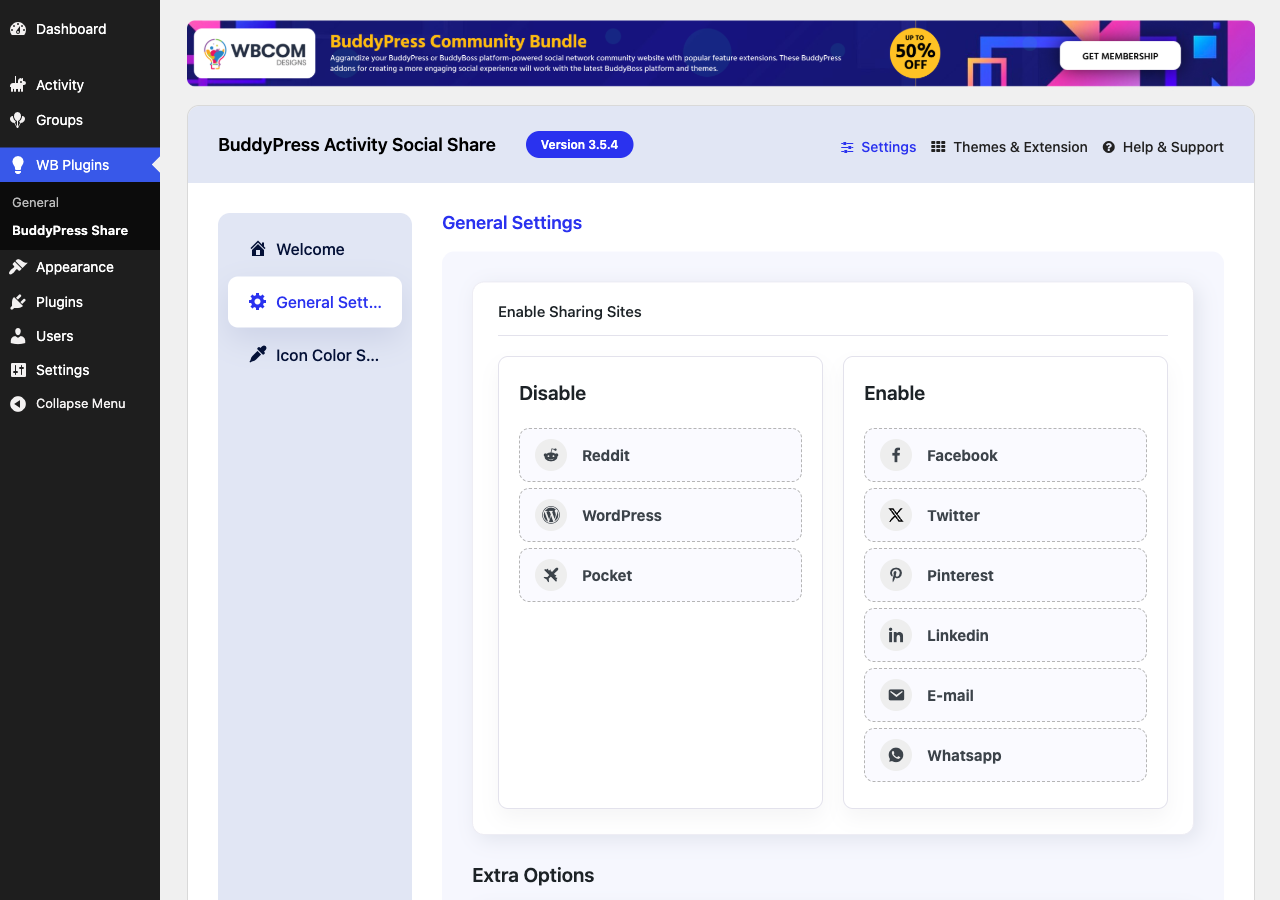
Go to WB Plugins > Activity Share:
- Networks: tick the networks to show and set their order.
- Who and where: visitors, member profiles, public groups.
- Appearance: button label, position before or after the other activity buttons, network colours or your theme’s colours, with a live preview.
Activity Share Pro
Activity Share Pro adds reposting inside your community (to your profile or a group, with a comment), sending posts privately to friends, sharing comment replies, share buttons on blog posts and any content type, share counts, a trending block, share rewards and share analytics.
For developers
Add your own network in a few lines:
add_action( 'bpas_register_networks', function () {
    bpas_register_network( 'mastodon', array(
        'label'     => 'Mastodon',
        'share_url' => 'https://mastodonshare.com/?url={url}&text={title}',
        'icon'      => '<svg ...>...</svg>',
        'color'     => '#6364FF',
    ) );
} );
The new network appears on the Networks screen, ready to switch on. Other hooks: bpas_share_context, bpas_share_menu_items, bpas_can_share_externally, bpas_share_url, bpas_open_graph_enabled. The share menu template can be overridden in your theme at bp-activity-social-share/share-menu.php.
Installation
Requires BuddyPress 12.0 or higher, or BuddyBoss Platform.
- Install and activate BuddyPress.
- Install Activity Share for BuddyPress from Plugins > Add New, or upload the zip.
- Activate it. Sharing works right away with sensible defaults.
- Optional: adjust networks and appearance under WB Plugins > Activity Share.
FAQ
Can members share to Instagram, TikTok or YouTube?
Those apps do not accept shared links from websites. On phones, members tap “More options” to open the phone’s share menu and pick any installed app, including Instagram.
Why can’t I share to a Facebook Group?
Facebook’s share window lets people pick where to post. Posting to a group depends on the member’s own Facebook permissions for that group.
Why don’t I see Share on a post in a private group?
Posts in private and hidden groups can only be seen by members, so sharing them to other sites would give everyone else a link they cannot open. Members can still copy the link for other members.
Can I change the word “Share”?
Yes. Go to WB Plugins > Activity Share > Appearance and type your own label, or leave it empty to use “Share” in each visitor’s language.
Can I move the Share button?
Yes. Choose “Before the other buttons” or “After the other buttons” on the Appearance tab.
How do I stop the plugin from adding link-preview tags?
It already stops automatically when Yoast, Rank Math, AIOSEO or SEOPress is active. To turn it off in other cases: add_filter( 'bpas_open_graph_enabled', '__return_false' );
Does it work with BuddyBoss?
It is built for BuddyPress and works with BuddyBoss Platform on a best-effort basis.
Does it work with Youzify?
No. Youzify has its own sharing, so this plugin stays inactive while Youzify is active.
Screenshots


Changelog
3.6.0 – November 2026
A fresh rebuild: faster, accessible, works for visitors, and fits any theme.
- New – Visitors can share public activity; switch it off under Who and where.
- New – A compact Share icon on member profiles and public groups, beside the profile’s own buttons.
- New – Copy link button with a “Link copied” message.
- New – “More options” opens the phone’s own share menu (Instagram, Messages and other apps).
- New – Telegram, Bluesky and Reddit sharing; X replaces Twitter.
- New – Choose the button label, its position, and network colours or your theme’s colours, with a live preview.
- New – Keyboard-friendly network ordering with up and down buttons.
- New – Developers can add their own networks with bpas_register_network().
- Improve – The share menu opens as a bottom sheet on phones with large touch targets.
- Improve – Follows your theme’s colours and dark mode automatically.
- Improve – The Share button and menu are styled by the plugin itself, so they look the same on any theme.
- Improve – Updates with nothing to share, such as “joined the group”, no longer show a Share button.
- Improve – New admin screen with grouped settings and quick links to the FAQ, documentation and support.
- Improve – Link previews use the post’s own image and step aside when an SEO plugin adds its own.
- Improve – Works with a keyboard, screen readers and right-to-left languages, and without JavaScript.
- Improve – Translations from translate.wordpress.org now load.
- Fix – Networks you turn off no longer appear on activity.
- Fix – Saving settings no longer shows an error when nothing changed.
- Fix – Posts in private and hidden groups no longer offer sharing to other sites.
- Fix – The share menu is no longer cut off inside profile headers and reply threads.
- Fix – The Share button now appears in member and group headers on BuddyBoss Platform.
- Fix – Upgrading to Activity Share Pro no longer causes an activation error.
- Fix – The share menu no longer opens behind sticky theme headers, such as Reign’s, near the top of the page.
- Security – Link previews and shared text now use the activity as the viewer sees it, so details other plugins hide, such as a check-in’s street address, no longer leak, and posts the viewer cannot see get no preview text.
- Dev – New bpas_is_shareable_activity filter decides which activity items get a Share button.
- Dev – New bpas_member_url() and bpas_group_url() return the right links on BuddyPress and BuddyBoss.
- Dev – Old settings are moved to the new format automatically and the old entries are removed.
- Compat – Requires WordPress 6.7 and PHP 8.1. Pair with Activity Share Pro 3.6.0.
3.5.4
- Fixed warnings and potential fatal errors in plugin functions to ensure stability.
- Excluded WhatsApp and Email services from popup behavior for improved user experience.
- Set default enabled services to Facebook, Twitter, LinkedIn, Email, and WhatsApp.
- Enhanced Email and WhatsApp sharing links with dynamic site title and URL for better personalization.
- Fixed issue with activity share icons not displaying correctly.
- Fixed icon color settings tab responsiveness on mobile devices.
- Managed Twitter icon color with backend settings.
- Resolved deprecated warnings for compatibility with the latest standards.
- Improved backend options responsiveness for better usability.
3.5.3
- Fix: Compatibility check with WordPress 6.5.0
3.5.2
- Fix: (#142) Fixed update twitter icon
- Fix: (#143) Fixed issue with bb platform pro reaction
- Fix: (#144) Fixed issue with mail share
3.5.1
- Fix: removed unused actions
3.5.0
- Fixed: CSRF vulnerability
3.4.0
- Fixed: (#111) Added Yozify media support for og meta
- Fixed: Fixed php fatal error on plugin activation
- Fixed: (#122) Icon Color Settings UI
- Fixed: Update color setting tab icon
- Fixed: Added color library and icon color default option
3.3.1
- Fixed: Updated Admin wrapper
3.3.0
- Fix: (#87) Hide copy option in social sites dropdown
- Fix: PHPCS fixes
3.2.1
- Fix: PHPCS fixes
3.2.0
- Fix: Install Free plugin from WordPress Wrapper
3.1.0
- Fix: (#80) Removed unnecessary inline-style
- Fix: (#80) Update backend UI and remove unnecessary inline-style
- Fix: (#79) Fixed hide share button if services are not enabled
- Fix: (#78) Fixed plugin redirect to page and display error
- Fix: (#71) Managed share button UI with Kleo
- Fix: Fixed adding new social links and sortable links
- Fix: Implemented sortable social links functionality
3.0.0
- Fix: Updated backend UI
2.9.1
- Fix – Fixed social site and remove social site options
2.8.0
- Fix – Fixed missed escaping functions
- Fix – Renamed plugin Title
2.7.0
- Enhancement – Added admin option for copy activity
2.6.0
- Enhancement – #54 Added Copy to Clipboard Functionality
- Enhancement – Added Whatsapp Icon
- Fix – #68 issues with BuddyBoss Theme
2.5.0
- Enhancement – Added support for BuddyBoss Platform
- Fix – Removed default fallback to avatars
2.4.0
- Fix – Added admin notice for review
2.3.0
- Fix – update BuddyPress activation condition
2.2.1
- Fix – Removed Google+ Option as this is no longer working. #39
- Fix – Nouveau – Improve the UI of the share button. #49
2.2.0
- Fix – Removed font-awesome 5.0 #37
2.1.0
- Fix – Fixed single page error. #34
- Enhancement – Add setting for user open graph enable/disable. #35
2.0.1
- Fix – Compatibility with BuddyPress 4.3.0. #33
2.0.0
- Enhancement – Improve the Backend UI so you can manage all the wbcom plugin’s settings in one place. #31
1.2.2
- Fix – Compatibility with BuddyPress 4.1.0. #29
1.2.1
- Fix – Share on wordpress and email popup fix.
1.2.0
- Fix – BuddyPress 3.1.0 Compatible
1.1.0
- Fix – Multisite Support
1.0.7
- Fix – Enqueue position of admin css and js files
1.0.6
- Fix – Extra content display on single post pages
1.0.5
- Fixing FB shares
1.0.4
- Fixed missing thumbnail after share activity post.
- Fix – Remove the glitch by clicking the share icon.
- Enhancement – Provide a filter to change the ‘Share’ button text.
- Enhancement – Provide a filter to add new social services’ in the front end.
- Enhancement – Change the view of social share button icons.
- Enhancement – I added post content for activity sharing on Facebook and Google Plus.
1.0.3
- Fix – Translation Fixes
- Enhancement – Enable sharing for logged-out users
- Enhancement – Allow to add more social icons
1.0.2
- Third Version.
1.0.1
- Second Version.
1.0.0
- first version.
1.0.0
- JS fixes for BP 2.7.