

Description
BuddyPress Favorite Notification closes the feedback loop in your community. When a member favorites an activity or a comment, the author is told about it right away through BuddyPress notifications, an optional email, and a realtime popup that appears without a page refresh.
It also adds a Facebook-style “who liked this” line under each activity, and gives site owners a dashboard showing what is trending. BuddyPress is required.
What you get
Notifications when content is appreciated
* A BuddyPress notification to the author whenever their activity or comment is favorited.
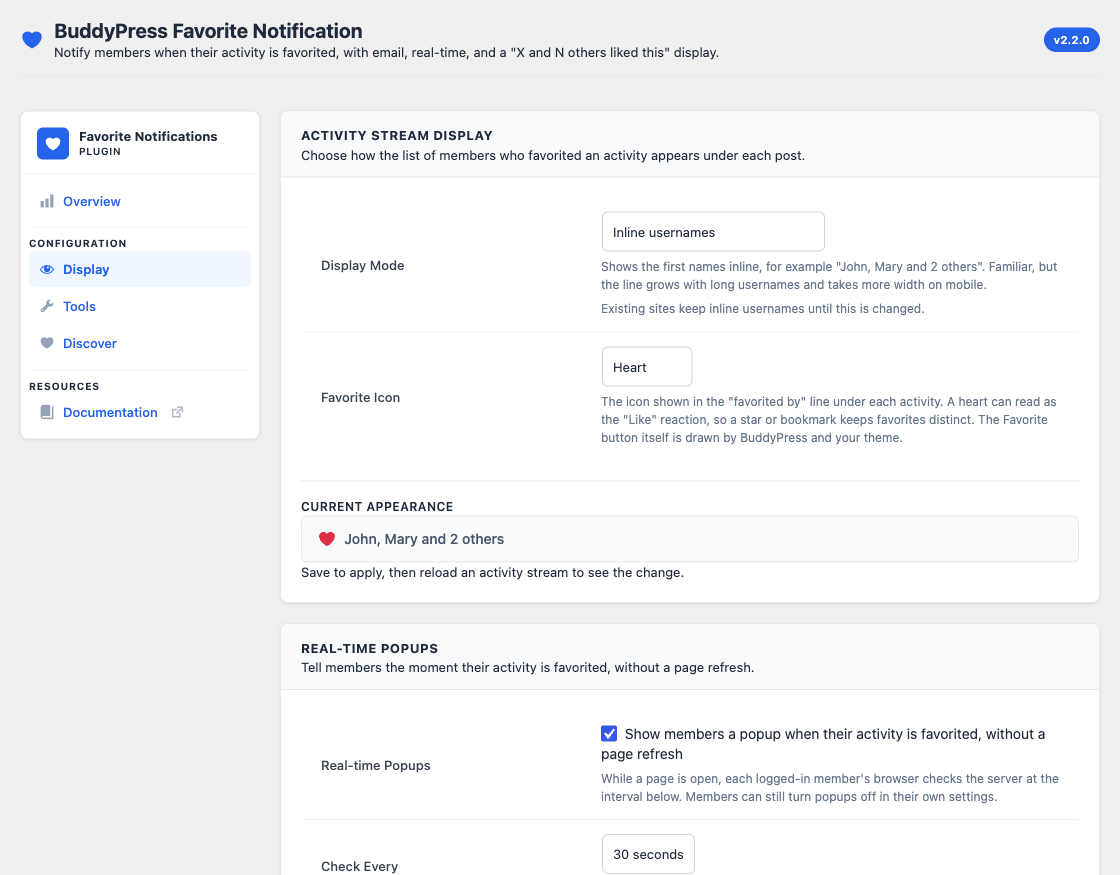
* Optional realtime on-screen popups powered by the WordPress Heartbeat API, so a member sees the favorite as it happens. Switched on by the site owner on the Display tab, checking every 30 or 60 seconds.
* Email alerts for favorited activities and favorited comments, sent through BuddyPress Emails. Edit the wording in Dashboard > Emails like any other BuddyPress email, and every email carries a working unsubscribe link.
* No notification when you favorite your own content.
* Works with all BuddyPress activity types, including group activities, blog posts, and comments.
Favorite count display
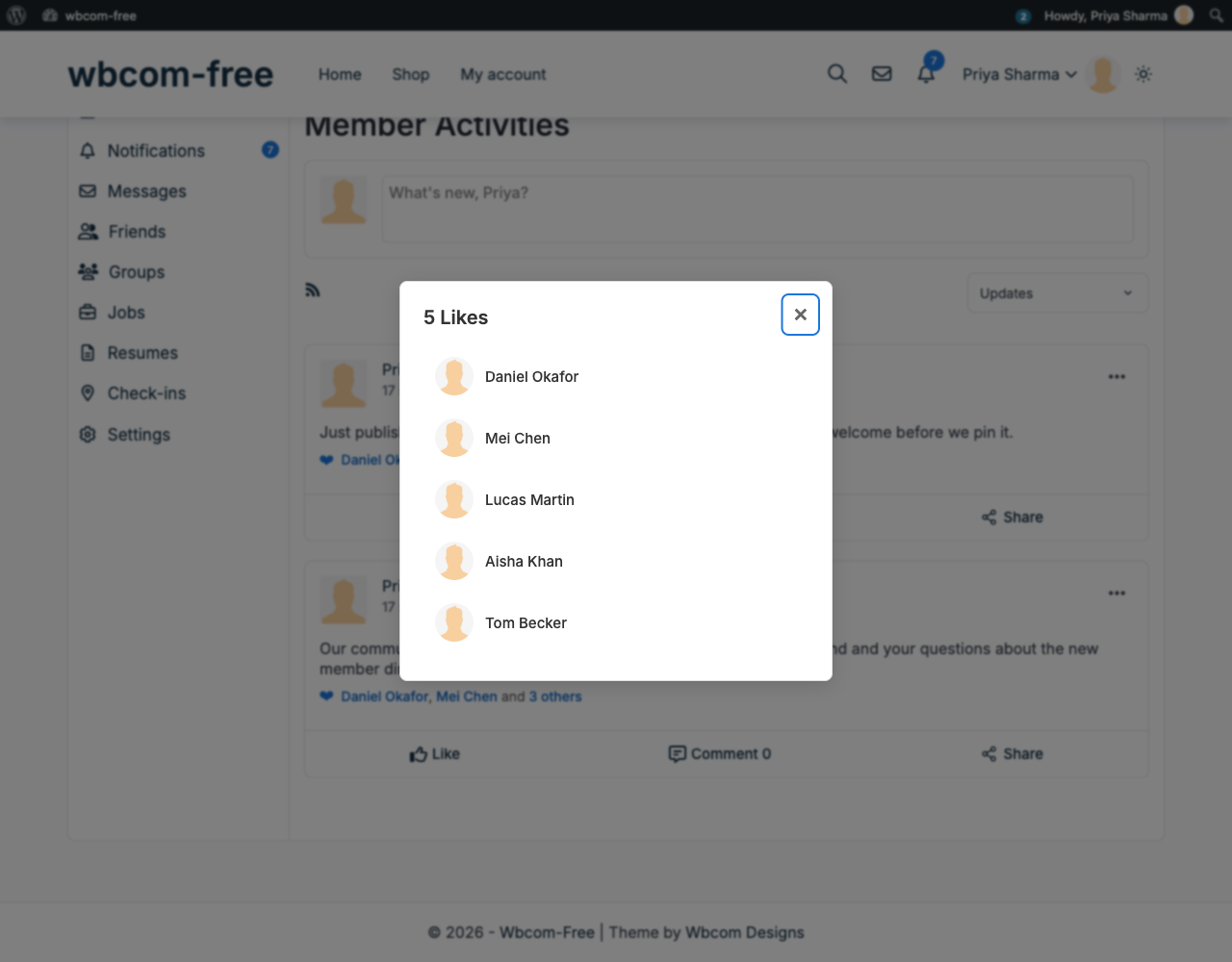
* Three display modes, chosen in Settings: inline usernames (“John, Jane, and 10 others”), an icon with the count, or an icon and count that opens the full list.
* A choice of icon for the “favorited by” line – heart, star, bookmark, thumbs up, or none – so favorites are not mistaken for the Like reaction. The Favorite button itself keeps the icon BuddyPress and your theme give it.
* A “View all” modal listing the members who favorited an activity, with clickable profile links. It loads a page at a time with a Load more control, so it stays usable on activities with thousands of likes. Set the page size with the bpfn_favorites_modal_per_page filter.
* Updates over AJAX as members like and unlike, with a 5-minute cache so the line loads instantly.
* The favorite display is shown to logged-in members only.
Admin dashboard
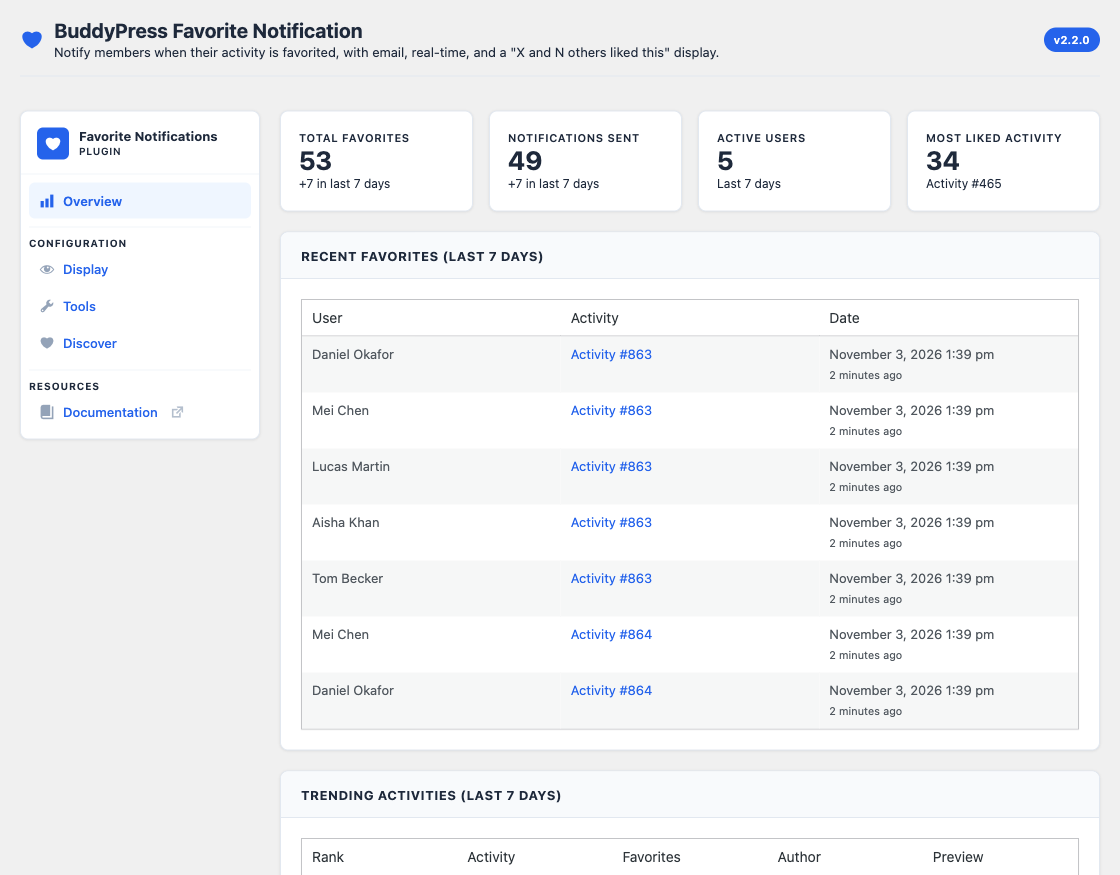
* Overview stats: total favorites, notifications sent, active users, and the most liked activity.
* Recent favorites from the last 7 days.
* Trending activities over the last 7 days and the last 30 days, top 10 each, with rank, content preview, author, and a direct link.
Tools and maintenance
* Optional automatic monthly cleanup of old read notifications, with a retention period of 7, 15, 30, 60, or 90 days. Off until the site owner turns it on.
* A manual cleanup button, the last cleanup result, and the next scheduled run.
* Chunked background migration of existing favorites, processed in batches so large sites do not time out, with progress tracking and a log.
Built for larger communities
* A custom, indexed favorites table for fast lookups instead of scanning user meta.
* Object caching on the favorite counts and the who-liked queries.
Member preferences
* Members choose favorite emails in their BuddyPress Settings > Email tab, next to every other BuddyPress email.
* A Settings > Favorite Notifications tab turns web notifications and realtime popups on or off per activity type (posts, comments).
* Everything is on by default, so members only visit these screens if they want less.
Developer friendly
* Action and filter hooks throughout, including bpfn_notification_string and bpfn_email_tokens.
* Display hooks for full control of the favorite line: bpfn_favorite_icon_html, bpfn_favorite_display_format, bpfn_favorite_display_html, bpfn_display_modes, and bpfn_favorite_icons.
* Modular architecture with separate notification, email, realtime, settings, admin, and favorite display modules.
* Translation ready with an included POT file, and RTL support.
Perfect For
- BuddyPress communities that want members to know when their posts land well
- Social networks where engagement and return visits matter
- Membership sites that use the activity stream as the main feed
- Any BuddyPress site that wants to see what content is trending
Premium Support
Our support team is ready to help with setup, configuration, and troubleshooting. Reach us through the links below.
Documentation
- Documentation – Setup, display settings, member preferences, and troubleshooting
- Developer guide – Every action and filter, with examples
Translations
- English (default)
- Ready for translation in your language with the included POT file
- RTL language support included
Links
Compatibility
- WordPress 6.5 and higher
- PHP 8.1 and higher
- BuddyPress required – the plugin deactivates itself and explains why if BuddyPress is not active
- Compatible with BuddyPress Nouveau and Legacy templates
- Works with modern WordPress themes, including BuddyX and Reign
More from Wbcom Designs
Favorite notifications bring members back. These help give them a community worth coming back to:
- BuddyNext – A complete WordPress community with activity streams, member spaces, profiles, messaging, and moderation.
- BuddyX – A free, fast community theme for BuddyPress with a modern layout and dark mode.
- WB Gamification – Reward members with points, badges, and leaderboards to keep engagement high.
Installation
Automatic Installation
- Log in to your WordPress admin dashboard
- Navigate to Plugins > Add New
- Search for “BuddyPress Favorite Notification”
- Click “Install Now” and then “Activate”
- Notifications start working right away, with no configuration needed
Manual Installation
- Download the plugin ZIP file
- Log in to your WordPress admin dashboard
- Navigate to Plugins > Add New > Upload Plugin
- Choose the downloaded ZIP file and click “Install Now”
- Click “Activate Plugin”
Post-Installation Setup
There is nothing to switch on. Once BuddyPress is active and the plugin is activated, favoriting an activity notifies its author, and the “who liked this” line appears under activities for logged-in members.
To review what is happening on your site:
- Visit WB Plugins > Favorite Notifications > Overview for favorite statistics and trending activities
- Open the Tools tab to run the favorites migration, set the automatic cleanup retention period, or run a cleanup now
- Members can review their own notification preferences at Settings > Favorite Notifications in their BuddyPress profile
- See the documentation for detailed instructions
Requirements
- WordPress 6.5 or higher
- PHP 8.1 or higher
- BuddyPress installed and active
FAQ
Does this plugin require BuddyPress?
Yes. BuddyPress must be installed and active. The plugin extends the BuddyPress activity and notification components, and deactivates itself with an explanation if BuddyPress is not available.
Do I need to configure anything?
No. Once the plugin is active, authors are notified and emailed when their activity or comment is favorited. The admin page, WB Plugins > Favorite Notifications, has an Overview tab for statistics, a Display tab for the favorite line and realtime popups, a Tools tab for cleanup and migration, and a Discover tab.
Will this work with my theme?
Yes. The plugin works with any theme that supports BuddyPress, and follows BuddyPress Nouveau and Legacy template standards. Its styles adapt to your theme’s colour palette, and it has been tested with BuddyX and Reign.
How do realtime notifications work?
Turn them on in the Real-time Popups card on the Display tab. They use the WordPress Heartbeat API, which checks for new notifications every 30 or 60 seconds while a page is open. When a new favorite is detected, a popup appears on screen without a page refresh. Popups are off on new installs, because every logged-in member’s browser makes a request at that interval.
Will I receive notifications for my own favorites?
No. Members are not notified when they favorite their own content.
Are notifications grouped?
Yes, when several members favorite the same activity. Those favorites collapse into one notification that reads “%d people favorited your activity” instead of one entry per member. Grouping is per activity, so if one member favorites several different activities of yours, you get a separate notification for each of them.
Can members control their notifications?
Yes. Emails are set in the BuddyPress Settings > Email tab, which has a row for favorited activities and one for favorited comments. Web notifications and realtime popups are set in Settings > Favorite Notifications. Everything is on by default; turning one off stops it.
Can I customize the emails?
Yes. Go to Dashboard > Emails and edit “favorited your update” or “favorited your comment” like any other BuddyPress email. They use your BuddyPress email design and sender settings, and your edits are kept when the plugin updates.
Who can see the “who liked this” display?
Logged-in members only. Logged-out visitors do not see the favorite count line under activities.
How many members does the “View all” modal show?
Everyone who favorited the activity, a page at a time with a Load more control. Developers can set the page size with bpfn_favorites_modal_per_page, or a maximum with bpfn_who_favorited_limit.
Will old notifications pile up in my database?
Only if you want them to. Turn on automatic cleanup on the Tools tab and it removes read notifications older than the retention period you choose (7, 15, 30, 60, or 90 days) once a month, starting a month after you enable it. You can also run it on demand and see the next scheduled run. Unread notifications are never removed.
I have an existing site with lots of favorites. Do I need to do anything?
The plugin moves existing favorites into its own indexed table. On large sites this runs in the background in batches so it does not time out, and you can watch its progress on the Tools tab.
Does it work with BuddyPress Groups?
Yes. The plugin works with all BuddyPress activity types, including group activities, blog posts, comments, and custom activity types.
Is it translation ready?
Yes. The plugin is fully internationalized and ships a POT file in the languages/ directory, plus RTL support.
Can developers extend this plugin?
Yes. The plugin has a modular architecture and provides action and filter hooks throughout, including bpfn_notification_string, bpfn_who_favorited_limit, bpfn_admin_tabs, and bpfn_email_tokens.
Where can I get support?
- Documentation – Setup and usage guides for this plugin
- Support – Get help from our team
- Contact us – Report bugs and request features
Does the plugin collect any personal data?
No. The plugin does not collect, store, or share personal data outside your WordPress installation. Notification data is stored in your own database, and emails go through your site’s configured mail system.
Screenshots



Changelog
2.2.0 – November 2026
Site owners now control every behaviour that costs them data or server load, and emails move into BuddyPress Emails.
- New – Emails are sent through BuddyPress Emails, so you can edit them in Dashboard > Emails and members get a working unsubscribe link.
- New – Added a Real-time Popups setting on the Display tab to switch popups on or off and check every 30 or 60 seconds.
- New – Members choose favorite emails in the BuddyPress Settings > Email tab, with separate rows for activities and comments.
- New – The plugin now redirects to its dashboard after activation.
- Improve – Automatic cleanup and realtime popups are off on new installs. Sites updating from an earlier version keep their current behaviour.
- Improve – The Recent Favorites table on the Overview tab shows the actual date and time as well as how long ago.
- Improve – The Settings saved notice can be dismissed.
- Improve – Realtime popups use the WordPress Heartbeat API only, and load only for members who have them switched on.
- Improve – Realtime popups are compact cards that use your theme’s surface colours, show at most two at a time (one on phones), and no longer cover the page when many favorites arrive together.
- Improve – On phones the who-favorited list opens as a bottom sheet sized to the list instead of a mostly empty full-screen panel.
- Improve – The admin settings sidebar no longer makes the plugin pages scroll sideways on phones.
- Improve – Every count now uses proper plural forms and brand names stay out of translatable text, so the plugin translates correctly into any language.
- Improve – German, French, Spanish, Italian, and Brazilian Portuguese translations are complete.
- Fix – The plugin’s member settings tab replaced the BuddyPress Email tab and its own Web and Real-time switches never appeared.
- Fix – Emails were not sent to members who had turned web notifications off.
- Fix – Closing a realtime popup did not mark the notification read, and opening it from the popup did not either.
- Fix – Favorited comments showed as “Activity not found” in the Overview trending tables.
- Fix – The Tools tab kept asking to migrate favorites that were already in the favorites table.
- Fix – Automatic cleanup could delete read notifications hours before the retention period ended when the database clock differed from WordPress.
- Fix – Favorite times on the Overview tab were shifted by the database server’s time zone.
- Fix – Enabling automatic cleanup ran it straight away instead of a month later.
- Fix – A failed automatic cleanup was shown as a successful run that deleted nothing.
- Fix – A retention period outside 7, 15, 30, 60, or 90 days could be saved and the Tools tab then showed a different value.
- Security – The who-favorited list no longer reveals who favorited activity in hidden or private groups.
- Security – Realtime popup text is escaped before it reaches the page.
- Dev – Removed the plugin email templates and the bpfn_email_templates, bpfn_email_template_key, bpfn_email_template_path, bpfn_email_data, bpfn_email_subject, bpfn_email_message, bpfn_email_headers, bpfn_email_from_name, and bpfn_email_from_email filters. Use Dashboard > Emails or the new bpfn_email_tokens filter.
- Dev – Removed the bpfn_log_event action, the bpfn_enable_logging filter, and the bpfn_check_notifications AJAX action.
- Fix – The plugin admin pages sat flush against the right edge of the screen on phones.
- Fix – The Documentation link in the plugin admin now opens this plugin’s guide directly.
- Fix – Sites with the BuddyPress Activity component turned off no longer crash on pages that show the notifications menu.
- Dev – Requires BuddyPress 12.0 or later.
- Compat – Requires PHP 8.1 or later and is tested up to WordPress 7.1.
2.1.0 – July 2026
Choose how the “who favorited this” line looks, and page through the full list of members.
- New – Added a Display tab with a Display Mode setting: inline usernames, icon and count only, or icon and count that opens the full list.
- New – Added a Favorite Icon setting (heart, star, bookmark, thumbs up, or none) so favorites can be told apart from the Like reaction.
- New – The who-favorited list now loads a page at a time with a Load more control, instead of stopping at the first 50 members.
- New – Added the bpfn_favorite_icon_html, bpfn_favorite_display_format, and bpfn_favorite_display_html filters for full control over the display markup.
- New – Added the bpfn_display_modes, bpfn_favorite_icons, and bpfn_favorites_modal_per_page filters.
- Improve – Existing sites keep inline usernames until the new setting is changed, so updating changes nothing on its own.
- Improve – Counter and Load more controls meet the 40px minimum tap target and keep keyboard focus inside the open dialog, returning focus to the counter on close.
- Fix – The favorite display and its post-favorite refresh were two separate copies of the same markup, so any format or icon change reverted the moment a member clicked like. Both now render from one code path.
- Fix – Favorite counts could stay stale for up to five minutes after a like. Cache entries are now versioned per activity and invalidated together, whatever page of the list produced them.
- Dev – bpfn_who_favorited_limit now defaults to 0 (no limit) and acts as a ceiling on the paginated list. Sites filtering it to a positive number keep that maximum.
2.0.1 – July 2026
- New – Added German, Spanish, French, Italian and Portuguese (Brazil) translations.
- Improve – Rebuilt the admin into the unified Wbcom card-panel UI under the shared “WB Plugins” menu, with Overview, Tools, and Discover tabs.
- Improve – Removed the “Enhanced Notifications” toggle. BuddyPress escapes notification descriptions down to a plain link, so the setting could never change what members saw.
- Improve – Frontend design tokens now chain through the active theme palette (BuddyX –bx-color-*, then block-theme colour presets) so the heart, notification count badge, and realtime toasts pick up the site’s brand colours instead of fixed literals.
- Improve – Added a shared –bpfn-primary / secondary / tertiary accent scale and defined the realtime toast stacking z-index token, so activity, comment, and mention toasts keep three distinct hues on every theme.
- Improve – Converted directional CSS to logical properties (margin-inline, inset, text-align:start) across the frontend and admin so every surface mirrors correctly under RTL.
- Improve – Admin action buttons now meet the 40px minimum tap target and show a disabled/processing state while their request is running, preventing double submits.
- Improve – Added keyboard focus-visible rings to the who-liked list links, realtime toast action links, and the permission role chips.
- Fix – The plugin never registered its text domain, so bundled translations could never load. Added the Domain Path header, which WordPress 6.7+ needs to find them.
- Fix – The ‘and N others’ summary and the ‘x ago’ timestamp were assembled from separate fragments, which cannot be translated correctly in every language. Each is now a single translatable phrase.
- Fix – Toast and screen-reader strings in the realtime notifier had no translatable source.
- Fix – Activity-favorite email now uses one coherent orange accent for header, excerpt, and button instead of a blue header paired with orange buttons.
- Fix – Per-user notification preferences (member Settings > Favorite Notifications) now load and save correctly – the settings module was previously never loaded.
- Fix – Migration-notice dismissal now persists (added the missing AJAX handler).
- Fix – Replaced native browser confirm() dialogs in the admin with an accessible confirm modal.
- Fix – Removed a duplicate registration of the bpfn_options setting and corrected the text domain to match the plugin slug.
- Fix – Added a sanitize callback for register_setting and removed the deprecated load_plugin_textdomain call.
- Fix – Per-user notification preferences now take effect. A member who turned favorite notifications off still received them on every channel: the enabled-check returned true for any request made through admin-ajax, which is how BuddyPress favoriting works, so the saved preference was never read.
- Fix – A safety-net handler re-added notifications without checking the member’s preference, undoing the choice even once the check above was honoured.
- Fix – Email notifications ignored the preference for ordinary activity posts, because the type was mapped to a preference key the settings screen never writes.
- Fix – The Tools tab “Clear Old Notifications Now” button appeared to do nothing; its result notice now renders in the visible Manual Cleanup card instead of a hidden header node, the loading spinner is styled, and a real database error is reported instead of silently shown as “0 cleared”.
- Dev – WordPress Coding Standards compliance across all PHP files.
- Dev – Removed two debug log entries that were written on every request.
- Dev – Resolved 12 PHPStan level 5 findings (undefined template variables, always-true checks) with defensive guards.
- Dev – Removed dead admin CSS (unused role-grid, license, and legacy button-spinner blocks), dead admin JS (unused toast helper and globals), and two unused component properties; added the missing spinner, badge, preview, and migration-progress styles.
- Compat – Tested up to WordPress 7.0.
2.0.0 – 2025-11-24
Major release with a favorite count display, an analytics dashboard, an indexed favorites table, and critical bug fixes.
- New – Favorite count display: a Facebook-style “who liked this” line on activities, formatted as “John”, “John and Jane”, or “John, Jane, and 10 others”.
- New – A “View all” modal for 3+ favorites, listing members with clickable profile links.
- New – Real-time AJAX updates on the favorite display when members like and unlike, with a 5-minute cache.
- New – Custom wp_bp_activity_favorites table with B-tree indexes on activity_id and user_id, a unique constraint against duplicates, and a favorited_at timestamp.
- New – Chunked background migration for existing favorites: 50 users per batch at 5-second intervals, auto-enabled past 100 users, with AJAX progress tracking and a log.
- New – Admin analytics dashboard: overview stat cards, recent favorites from the last 7 days, and top 10 trending activities over 7 and 30 days with rank, preview, author, and direct links.
- New – Automatic monthly cleanup of old read notifications, with a retention period setting, an enable/disable toggle, last-run stats, the next scheduled run, and a manual cleanup button.
- New – Unified admin interface on a single consolidated page.
- Improve – Simplified asset loading logic.
- Improve – Email module cleanup: removed duplicate hooks.
- Improve – Admin dashboard uses WordPress native postbox styling, with consistent section spacing and clickable activity links throughout.
- Improve – Object caching with a 5-minute TTL for favorite counts, and indexed database queries in place of user-meta scans.
- Fix – Duplicate email notifications: members were receiving two identical emails for each favorite action.
- Fix – Realtime popup notifications now work correctly.
- Fix – Updated the deprecated bp_core_get_user_domain() to bp_members_get_user_url().
- Dev – New modules: BPFN_Module_Favorite_Display and BPFN_Favorites_Migration.
1.2.3 – 2024-11-23
- Improve – Code quality assessment and documentation.
1.2.0 – 2024-11-20
- New – User notification preferences UI.
- New – Activity type detection.
- Improve – Notification formatting.
1.1.0 – 2024-11-15
- New – Email notification support.
- New – Customizable email templates.
- New – Notification grouping.
- Improve – Performance improvements.
1.0.6 – 2024-11-10
- New – Initial release: favorite notifications, BuddyPress integration, and user preferences.