

Description
Move beyond basic coupons and revolutionize your WooCommerce store’s promotions with CampaignBay.
CampaignBay is a powerful, user-friendly marketing tool that empowers you to create sophisticated, automated discount campaigns directly from your WordPress dashboard. Whether you’re running a Black Friday flash sale, rewarding customers for bulk purchases, or creating urgency with a limited-time offer, CampaignBay provides the robust features you need to drive sales and engage customers.
With its intuitive dashboard, flexible campaign types, and high-performance discount engine, you get unparalleled control over your marketing strategy without sacrificing site speed.
Why Store Owners Love CampaignBay:
- Set It & Forget It – Campaigns auto-start and auto-stop on your schedule.
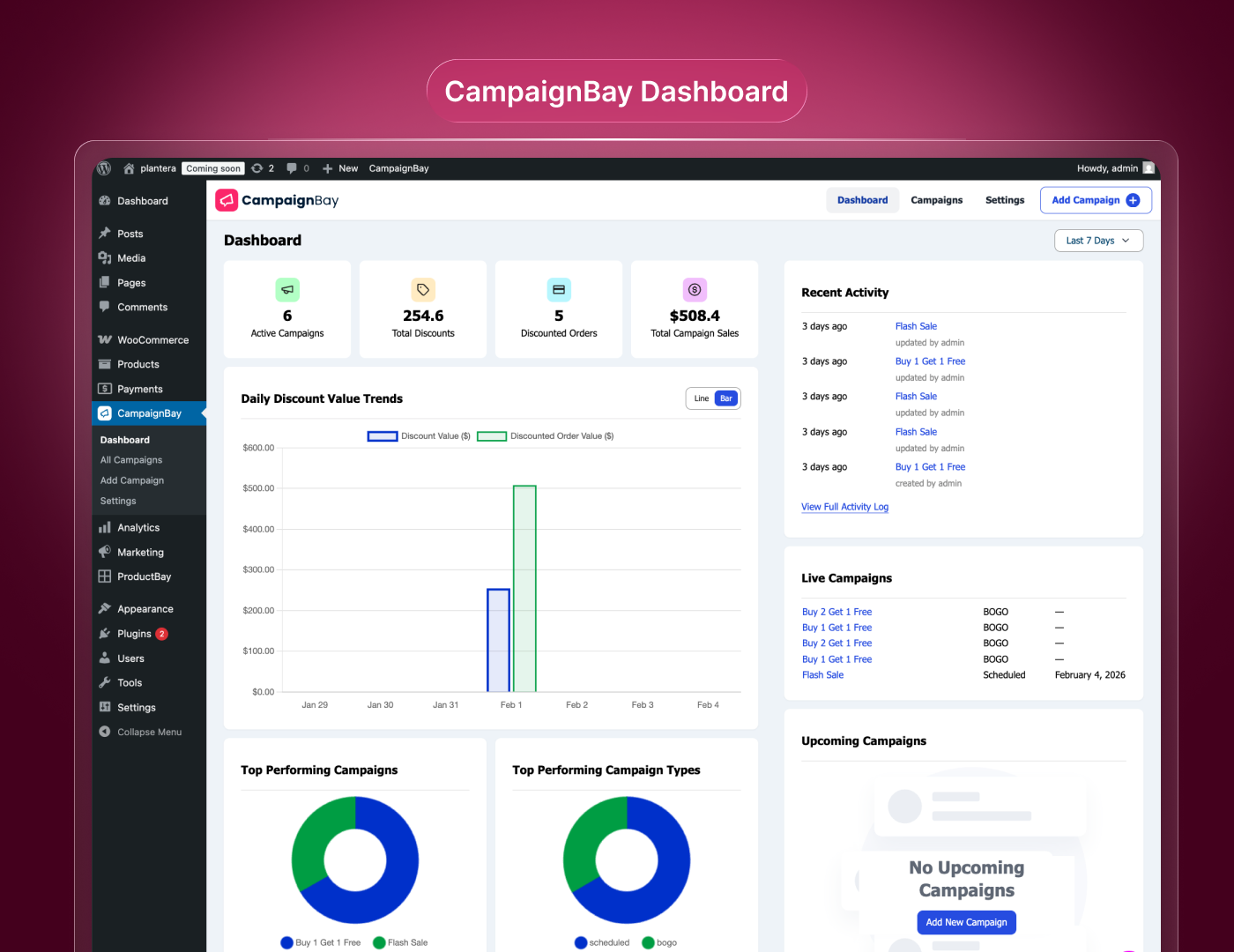
- Beautiful Dashboard – Real-time analytics show you exactly how your promotions are performing.
- Lightning Fast – Multi-level caching keeps your store blazingly fast.
- Campaign Calendar – Workable and effective calendar to enable users to have more control over campaigns.
- 100% Free Core Features – No artificial limits. Create unlimited campaigns.
New: Campaign Calendar: An informative and interactive calendar with neat visuals that enables users to edit, manage, monitor and evaluate campaigns in a more sophisticated way.
Key Features:
- Scheduled Discounts – Run time-limited sales with automatic start and end dates.
- Quantity Based Discounts – Tiered pricing like “Buy 3+, get 10% off.”
- Early Bird Discounts – Reward the first X customers with special pricing.
- BOGO (Buy One Get One) – Classic “Buy 2, Get 1 Free” deals.
- Analytics Dashboard – Track KPIs, charts, and top campaigns.
- Campaign Calendar: A manageable, campaign initiator tool that doubles as an informative guide.
- Flexible Targeting – Target entire store, specific products, or categories.
- Product & Category Exclusions – Fine-tune which items are excluded from discounts.
- User Role Conditions – Restrict campaigns to Wholesalers, VIPs, or any role.
- Cart Total Conditions – Apply discounts only when the cart total meets specific criteria.
- Smart Stacking Logic – Control how discounts interact with each other.
- Coupon Compatibility – Works seamlessly with WooCommerce coupons.
- Customizable Messages – Dynamic placeholders for promotional text.
- Product Page Display – Discount tables and banners on product pages.
- Cart Integration – Automatic discounts with strikethrough pricing.
- Campaign Templates – Pre-built templates for quick setup.
- Full Scheduling & Automation – Reliable WP-Cron based activation/deactivation.
- Performance Optimized – Multi-level caching for fast storefronts.
Campaign Types:
-
Scheduled Discounts – Run classic time-limited sales. Set a start and end date, choose percentage or fixed discount, and target your entire store or specific products. Perfect for holiday sales or weekly specials.
-
Quantity Based Discounts – Encourage bulk purchases with tiered pricing. “Buy 3+, get 10% off. Buy 5+, get 20% off.” Customers see a pricing table on the product page.
-
Early Bird Discounts – Create urgency and reward early customers. Offer a discount to the first 50 or 100 buyers. A live counter shows remaining slots.
-
BOGO (Buy One Get One) – The classic deal. “Buy 2, Get 1 Free” or “Buy 1, Get 1 at 50% Off.” Free items are added directly to the cart.
Analytics Dashboard:
- Active Campaigns – See how many promotions are running.
- Total Discount Value – Track discounts given over any period.
- Discounted Orders – Monitor orders that benefited from campaigns.
- Sales from Campaigns – Measure revenue from promotions.
- Interactive Charts – Line, bar, and pie chart visualizations.
- Top Performing Campaigns – Identify winners at a glance.
- Recent Activity Log – Track campaign creation and updates.
- Live & Upcoming Campaigns – Quick view of active and scheduled promotions.
Documentation & Support:
- CampaignBay Pro – Get more advanced features.
- Official Documentation – Step-by-step guides.
- Live Demo – Try before you install.
- Support Forum – Get help from our team.
Live Demo
Experience the power of CampaignBay firsthand on our interactive demo site. See how campaigns look on the frontend and explore the admin dashboard.
Upgrade to CampaignBayPro
Need more advanced features? Get CampaignBayPro and unlock:
- BOGO Advanced – Buy from Category A, get a discount on Category B.
- Product In Cart Discounts – Trigger discounts when specific products are in cart.
- Advanced Conditions – Target by order history, specific products in cart, payment or shipping method, and more.
- Priority Email Support – Direct access to our development team.
Use Cases
- Boost Average Order Value – “Buy 3+, save 10%. Buy 5+, save 20%.”
- Black Friday Automation – Schedule sales to start and end automatically.
- Product Launch Buzz – 30% off to the first 100 buyers.
- Clear Old Inventory – “Buy 2, Get 1 Free” on last season’s items.
- Wholesale Pricing – Exclusive bulk discounts for Wholesaler roles.
- Category Promotions – 20% off specific categories for a limited time.
Installation
Requirements: WooCommerce must be installed and activated.
From WordPress Dashboard (Recommended)
- Navigate to Plugins → Add New.
- Search for “CampaignBay”.
- Click “Install Now”, then “Activate”.
Manual Upload
- Download campaignbay.zip from WordPress.org.
- Go to Plugins → Add New → Upload Plugin.
- Upload the zip file and click “Install Now”.
- Click “Activate”.
Getting Started
After activation, find CampaignBay in your admin sidebar. Click “Add New Campaign” and follow our guide to create your first promotion in under 2 minutes!
FAQ
Does CampaignBay require WooCommerce?
Yes. CampaignBay is built specifically for WooCommerce and requires it to be installed and active.
Is CampaignBay free?
Yes! The core plugin is 100% free with no artificial limits. A Pro version is available with advanced features.
What are the system requirements?
WordPress 5.8+, PHP 7.0+, and WooCommerce installed.
Can I track campaign performance?
Yes. The built-in analytics dashboard shows real-time KPIs, charts, and top-performing campaigns.
What discount types are supported?
Scheduled Discounts, Quantity Based Discounts, Early Bird Discounts, and BOGO.
Can discounts stack?
By default, only the best discount applies. You can enable stacking in Settings → Cart Settings.
How does scheduling work?
Set a start and end date. CampaignBay uses WordPress Cron to automatically activate and deactivate campaigns.
Can I limit discounts to specific user roles?
Yes! Use the Conditions feature to restrict campaigns to specific roles.
Where can I get support?
Visit our Support Forum.
Screenshots


Changelog
1.2.2
- New: A dismissible Black Friday deals notice from WPAnchorBay for administrators, on the Plugins screen and CampaignBay’s own admin pages, through 20 December 2026. Closing it hides it for a few days, and it comes back on a few key sale dates, such as just before Black Friday and Cyber Monday.
1.2.1
- Fix: Discounted cart totals and prices now stay correct when a coupon is checked through the REST API or the block cart.
- Fix: A shopper’s individual-use coupon now replaces a CampaignBay coupon-mode discount, as WooCommerce coupons normally do.
- Fix: Countdown timers no longer show when CampaignBay is switched off in settings.
- Fix: Pressing Escape cancels an inline edit instead of saving it.
1.2.0
- New: Countdown timers on product, shop, cart and via shortcode.
- New: CampaignBay sale badge, category/shop offer messages and campaign promo blurbs.
- New: Quantity-tier labels and a cards layout for the discount table.
- New: A fixed quantity discount can apply per unit or once to the whole line.
- New: Per-campaign minimum, maximum and step quantity limits.
- New: Product tag targeting, “guest vs logged-in” and “cart item quantity” conditions.
- New: “Most recently started wins” priority method.
- New: Dashboard 90-day, 1-year and custom date ranges.
- Fix: Fee-mode quantity discounts on tax-inclusive stores; empty and zero dates; tag lookup and tag names when reopening a campaign; block checkout countdown.
- Fix: Conditions on product-level rules are now honoured in the cart pass.
- Fix: The “show quantity table” setting is bound to the right option.
- Fix: Ordinary coupons are removed from the classic cart when stacking is off.
- Fix: PHP warnings on partial REST requests; dashboard chart fill warning.
- Fix: An Early Bird tier whose uses are spent no longer gives a discount, warnings or a sale badge.
- Fix: A usage limit of N now expires the campaign after N orders, not N-1.
- Fix: The variable product price range uses the true minimum and maximum.
- Fix: The admin script URL filtered for the legacy build is now the one enqueued.
- Fix: No countdown timer for an Early Bird whose tiers are used up.
- Fix: Campaign fields now validate as true booleans and strings; REST clients must send real booleans (true/false, 1/0) rather than values like “yes”.
- Fix: Product and cart prices now respect the “prices entered with/without tax” and display-tax settings for quantity and fixed-price discounts.
- Fix: Importing a campaign keeps its usage count and only expires it when the limit is really reached; cancelling an order re-activates a campaign that expired from its usage limit.
- Fix: Duplicating a campaign now keeps its conditions.
- Fix: Campaign labels shown on the cart’s discount line are escaped (XSS hardening).
- Fix: The “Sale!” badge no longer shows when a fixed-price campaign leaves the price at or above the regular price.
- Fix: Stale CampaignBay coupons are removed from the cart after the campaign changes.
- Fix: Cart-total conditions are evaluated once per cart state, so shipping changes refresh them correctly.
- Fix: Quantity-discount, fixed-price and cart-fee campaigns can no longer be saved with no tiers.
- Fix: A deleted product in the cart no longer causes a PHP error; importing campaigns with array fields no longer returns a server error.
- Dev: New filters for Pro/third-party extensions (coupons with discounts, cart condition items and totals, campaign types that require tiers).
1.1.12
- Fix: Scheduled campaigns saved without a start date now activate immediately instead of getting stuck in “Scheduled” status forever.
- Fix: Campaign fields intentionally left blank (e.g. optional tier limits) are no longer rejected by validation.
- Fix: Open-ended (no upper limit) quantity discount tiers now apply correctly at checkout, not just in the admin preview.
- Fix: Bulk-deleting campaigns no longer errors out when the batch includes an ID that was already deleted.
1.1.11
- Fix: Resolved a fatal error on the storefront for category-targeted Scheduled and Early Bird campaigns involving variable products.
- Fix: Resolved a fatal error when BOGO campaigns were saved without a complete tier configuration.
- Fix: Product/category-targeted campaigns created or updated without a full set of target items no longer crash the storefront.
- Fix: Campaign save requests are no longer rejected with a generic server error when optional fields are left blank; the underlying validation error is now returned instead.
- Fix: Quantity discount tiers can now be left open-ended (no upper limit) on the final tier.
- Fix: Cart Total “equals” conditions now match reliably instead of being defeated by floating-point rounding.
- Fix: Editing or deleting a campaign that no longer exists now returns a proper “not found” response instead of a server error, including within bulk actions.
- Fix: A campaign’s quantity tiers, target products/categories, and other settings could be unintentionally wiped when only part of the campaign was updated (e.g. a status toggle); updates now only affect the fields actually sent.
- Fix: Scheduled campaigns saved with an end date but no start date no longer expire silently without ever activating.
- Fix: Corrected a misspelled placeholder token shown in the discount message editor that could cause customer-facing messages to display unreplaced.
- Fix: Cleaned up default discount message wording (punctuation and phrasing).
- Security: License key is now masked wherever it appears in the admin UI and REST responses.
- Fix: Saving unrelated settings could not accidentally overwrite the stored license key or other settings.
- Fix: The deactivation feedback library is now correctly bundled and reaches the right endpoint.
1.1.10
- Fix: Resolved several bugs affecting campaign conditions, dashboard statistics, and cart discounts.
1.1.9
- Fix: Bug fixes.
1.1.8
- New Feature: Deactivation Feedback — a friendly modal now asks for optional feedback when you deactivate, helping us improve CampaignBay.
- New Feature: Review Reminder — a non-intrusive admin notice gently asks for a review after a few days of use (easily dismissible per user).
1.1.7
- New Feature: Cart Total Conditions — now you can restrict campaigns based on the total value of the customer’s cart.
- Enhancement: Improved condition evaluation engine for better performance.
1.1.6
- Fix: Minor stability improvements and UI refinements.
1.1.5
- Fix: Minor Bug Fixes.
1.1.4
- Enhancement: UI Optimization.
1.1.3
- Fix: Small UI Improvements.
1.1.2
- New Feature: Campaign Calendar Page — a dedicated calendar view to easily manage and visualize all your campaigns.
- Enhancement: Month, Week, and Year layout options for flexible campaign planning.
- Enhancement: Color-coded campaign bars — each campaign type (BOGO, Scheduled, Quantity, Early Bird, etc.) has its own distinct color for quick identification.
- Enhancement: Easily spot upcoming and currently active campaigns at a glance.
- Enhancement: Campaign type filter toggles to show or hide specific campaign types on the calendar.
- New Feature: Dashboard Calendar Widget — a compact calendar on the Dashboard with dot indicators on dates that have active campaigns.
1.1.1
- Added close button to the campaign onboarding modal with a confirmation prompt.
1.1.0
- Major Update: Complete UI Redesign! The entire admin interface has been rebuilt for a cleaner, faster, and more intuitive experience.
- New Feature: Multi-select campaign filters—now filter by multiple types and statuses simultaneously.
- Enhancement: Modernized dashboard with improved data visualization.
- Enhancement: Streamlined campaign editor with better form layouts.
- Enhancement: Refreshed settings pages with improved navigation.
- Enhancement: Performance improvements and codebase optimizations.
- Enhancement: Updated documentation links.
1.0.9
- Enhancement: UI refinements for a smoother experience.
1.0.8
- New Feature: Campaign Templates! Pre-built templates for Flash Sales, BOGO, Bulk Discounts, and Early Bird offers.
- Enhancement: Visual template selector with example previews.
- Enhancement: Campaigns now default to “Active” status for faster onboarding.
1.0.7
- New Feature: Conditional Discounts! New “Conditions” section with User Role targeting.
- Enhancement: Major UI upgrade across campaign editor and settings pages.
1.0.6
- New Feature: Options to disable promotional messages on cart and product pages.
1.0.5
- Enhancement: BOGO architecture upgrade—free products now added as separate cart items.
- Enhancement: Improved hook system and standardized discount data structure.
- Fix: Variable product message and table formatting issues.
1.0.4
- Fix: Activation error introduced in 1.0.3.
1.0.3
- Fix: Minor bug fixes and stability improvements.
1.0.2
- Enhancement: Interactive Tour Guide for new users.
1.0.1
- Enhancement: Updated plugin display name for better discoverability.
- Refactor: Migrated admin interface to TypeScript for improved code quality.
1.0.0
- Initial release of CampaignBay.