


Description
A growing list of U.S. states (California, Utah, Maine, New York, Colorado, Texas and others), the EU AI Act and consumer-protection regulators expect businesses to tell people when they are talking to AI rather than a person. Some of those laws allow private lawsuits with set damages per violation. A notice that appeared once and cannot be proven afterwards does not help much.
Candorline AI Disclosure Notice does three things:
- Shows the notice. A small, readable card appears beside your chat widget when a visitor opens the chat. It takes your site’s font and colours, repeats on the schedule your states ask for (every three hours, hourly for minors where required), and comes with a ready-made line for your bot’s instructions so it answers “are you a bot?” truthfully.
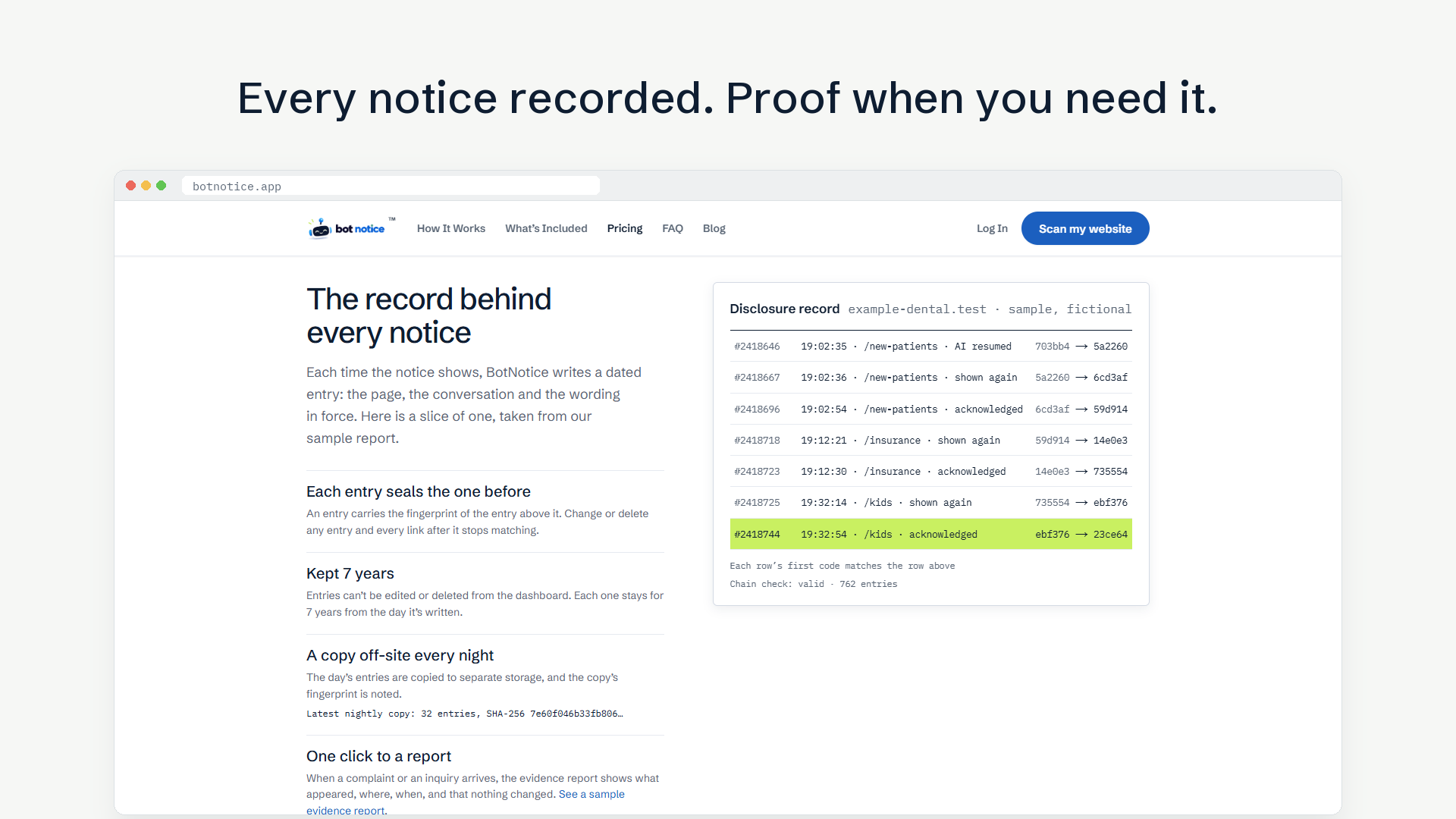
- Keeps the record. Every time the notice appears or a visitor acknowledges it, a dated entry goes into a tamper-evident ledger in your account. Export it as a report if anyone ever asks.
- Watches the laws. When a state passes or changes an AI disclosure rule that applies to you, you get an email that says what changed and what, if anything, to do.
26 languages. The notice can show in one language you choose, or in each visitor’s own language (all 24 official EU languages, plus Norwegian and Icelandic).
Works with Tidio, HubSpot, Intercom, LiveChat, Tawk.to, Crisp, Zendesk, Chatbase, Voiceflow, Botpress, Gorgias, Freshchat, Smartsupp, Chatwoot, Chatway, AI Engine and custom chatbots. The settings page tells you which chat plugins it found on your site.
Not sure whether your site needs a notice? The settings page links to a free scan that names the laws that apply to your site and what is missing.
Requires a plan. The plugin does nothing on its own; the notice, the records and the law watch are the service at botnotice.app, operated by J&B Partner Solutions, Inc. Chatbot Disclosure ($12.99 a month per website) shows the notice. Disclosure + Records adds the timestamped record kept seven years, the evidence report, the hosted AI disclosure statement page, your logo on the notice and the AI content register. Managed Compliance adds monitoring of the laws that apply to you, a monthly review and disclosure updates as requirements change. New accounts get a 14-day free trial of Disclosure + Records (card required, cancel any time before the first charge). The plugin itself has no time limit and no locked features; the trial is on the service. Current prices are at https://botnotice.app/pricing. The website scan is free and needs no account.
Hybrid AI and human chat? A small JavaScript API pauses the repeat timer while a person is chatting and shows the notice again when the bot resumes.
This plugin is the WordPress connector for that service. The notice itself is a small script served by botnotice.app, because that is where each appearance is recorded; the plugin adds the script tag, holds your site key and talks to the service from the admin screen.
Candorline AI Disclosure Notice provides software and records, not legal advice.
Third-party service
This plugin loads a small script from botnotice.app on your public pages and sends disclosure events to botnotice.app so they can be recorded for you: your site key, the event type (notice shown, acknowledged, repeated, handoff), the page path, a random conversation id and, where your chat shows one in the page, the chat’s own conversation id (kept only as a hash when it is an email address or phone number). Country and region come from the hosting network. No visitor names, messages or IP addresses are stored. The script sets no cookies; what it keeps in the visitor’s browser is listed at https://botnotice.app/legal/subprocessors
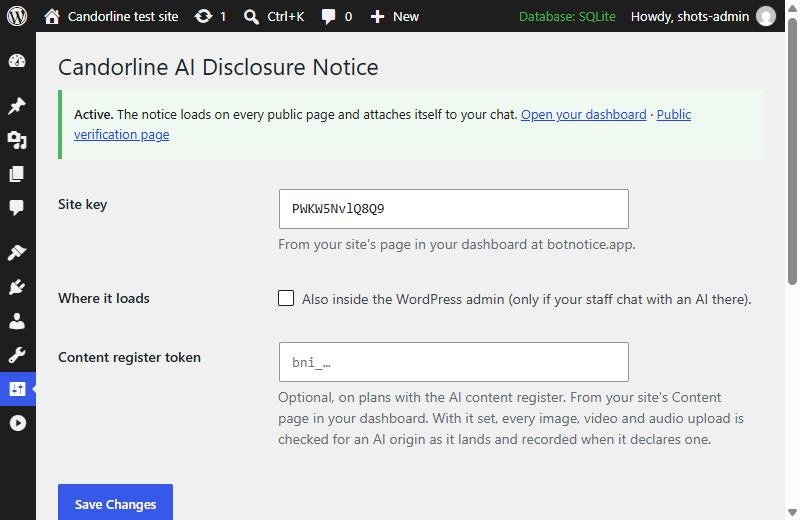
With a content register token set (optional), the addresses of new media uploads are sent to botnotice.app so their provenance data can be read; the files themselves are read from your site’s public URLs.
The settings page makes one request an hour to botnotice.app to confirm your site key. Its links to botnotice.app carry a tag (utm_source=wordpress and the link’s name) so the service can count visits that came from the plugin; the tag says nothing about your site or you.
Terms: https://botnotice.app/legal/terms
Privacy: https://botnotice.app/legal/privacy
Data Processing Agreement (EU, UK and Swiss data): https://botnotice.app/legal/dpa
Installation
- Create an account at https://botnotice.app, choose a plan, add your website and copy its site key.
- Install and activate the plugin.
- Go to Settings → AI Disclosure, paste the site key and save. The page confirms the key and lists the chat plugins it found.
- Open your site and open the chat: the notice appears beside it.
FAQ
Is this legal advice?
No. The plugin and the service implement published requirements and link to the primary sources. Talk to a lawyer about your situation.
Does it slow my site?
The script is about 8 KB, loads asynchronously in the footer and adds one element to the page when the chat opens.
Can I change the wording, colours or position?
Yes, in your dashboard at botnotice.app. Keep the words “AI” and “not a human” so the notice still says what the laws require. By default the card picks up your page’s font and background, and the accent colour from your logo.
What if I do not have a chat widget?
Then you probably do not need this plugin yet. Run the free scan from the settings page; it tells you which laws apply to your site today.
Does it record AI phone calls?
Not through WordPress: phone calls never pass through your website, so the plugin cannot see them. The service can. On your site’s Voice page at botnotice.app, connect your voice platform (your CRM through the LeadConnector marketplace app, Retell AI, Vapi, Bland, Twilio or your own code) and each AI call gets a dated record: when it started, whether the AI disclosure was spoken, when a person took over and when it ended. Setup for each platform: https://botnotice.app/voice
Can I keep the notice off certain pages?
Yes. The candorline_load filter returns false to skip a page, for example in your theme’s functions.php:
add_filter( 'candorline_load', function ( $load ) { return ! is_page( 'careers' ); } );
Does it work with caching plugins?
Yes. The plugin only adds one script tag; the notice itself is built in the visitor’s browser.
Screenshots

Changelog
1.2.4
- Links from the settings page to botnotice.app are tagged as coming from the plugin.
1.2.3
- Settings page: the notice’s 26 languages, and links to the Data Processing Agreement and the list of what the notice keeps in a visitor’s browser.
- Third-party service section lists the chat’s own conversation id, which the service now records so each entry can be matched to its conversation.
1.2.2
- Settings page and FAQ explain how to keep a record of AI phone calls, which are set up on the service, not in WordPress.
1.2.1
- Added plugin owner to Contributors.
1.2.0
- Settings page confirms the site key with the service and lists the chat plugins it found on the site.
- Link to the free scan that names the laws that apply to this site.
candorline_loadfilter to keep the notice off chosen pages.- Clearer wording throughout. The service address is fixed to botnotice.app (the old self-host setting is gone).
1.1.0
- Content register: with a register token set, every image, video and audio upload is sent to the service for provenance reading (C2PA Content Credentials, IPTC digital source type, generator metadata) and recorded when it declares an AI origin. “Send existing media library” checks what is already there.
Older versions: see changelog.txt in the plugin folder.