


Description
Shoppers now ask ChatGPT, Perplexity, Claude or Gemini what to buy, and some let an AI agent go to the store and add the product to the cart. CanItBuy Agent Ready shows what happens in your WooCommerce store when they do, and what to fix.
Light on your server. For an ordinary shopper the plugin only compares the browser’s name with a list of AI agents: no database write and no outside request. A visit from an AI agent adds one small daily counter. The heavier checks (catalog, pages and feed) run only when you click, the catalog in steps of 25 products. The plugin’s screen, styles and animation load only on its own admin page, never in your store. In our WooCommerce test store, page time and memory use were the same with and without the plugin.
AI agent visits. Counts visits from AI agents and crawlers that say who they are: ChatGPT agent (signed requests), ChatGPT-User, OAI-SearchBot, GPTBot, Claude-User, Claude-SearchBot, ClaudeBot, Perplexity, Meta, Amazon and more. You see which agents read product pages and which reach the cart and checkout. Visits are counted per day, without IP addresses, and ordinary visitors are never recorded.
Signed agents, confirmed. Agents such as ChatGPT agent sign their requests with a public key (Web Bot Auth, HTTP Message Signatures). Turn on “Check agent signatures” and the plugin confirms each signature, so you can tell real agents from visitors that only borrow their name. Off by default.
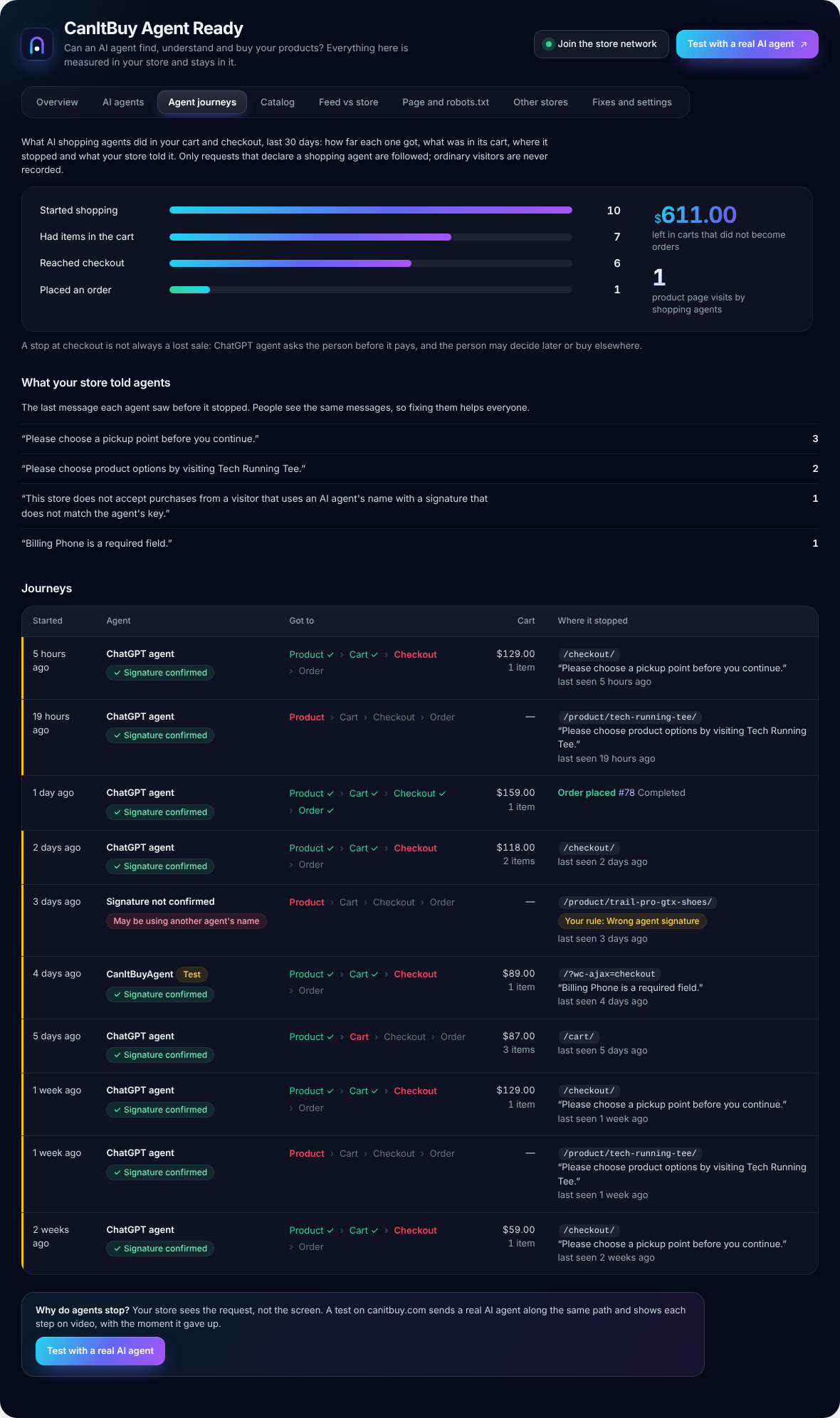
Agent journeys. Follows declared shopping agents, such as ChatGPT agent, from the first product they put in the cart to the order: how far each one got, what was in its cart, where it stopped and the last message your store showed it (“Please choose product options”, “Billing Phone is a required field”). You see the value left in carts that did not become orders, and the store messages that stop agents most often.
Rules for AI agents. Decide what agents may do: stop visitors that use an agent’s name with a wrong signature, let only agents with a confirmed signature check out, or let agents fill the cart while the person places the order. Off by default; nothing changes for people.
Compared with other stores (optional). Join the CanItBuy store network and see how your store compares with other WooCommerce stores: AI agent visits, shopping agents that reach checkout, the share of orders from AI assistants, catalog readiness and what stops agents most often. Off until you click “Join the network”; before that you can see exactly what would be shared. Once a week the plugin sends last week’s totals with a random id instead of your store address, and never anything about visitors or customers, product names, prices or order amounts. Comparisons appear when at least 5 stores share the same week, and leaving deletes everything your store sent.
Sales from AI. Sums the orders that AI assistants sent to you, using WooCommerce order attribution (chatgpt.com, perplexity.ai, claude.ai, gemini.google.com, copilot and others), and marks orders placed by an AI agent itself.
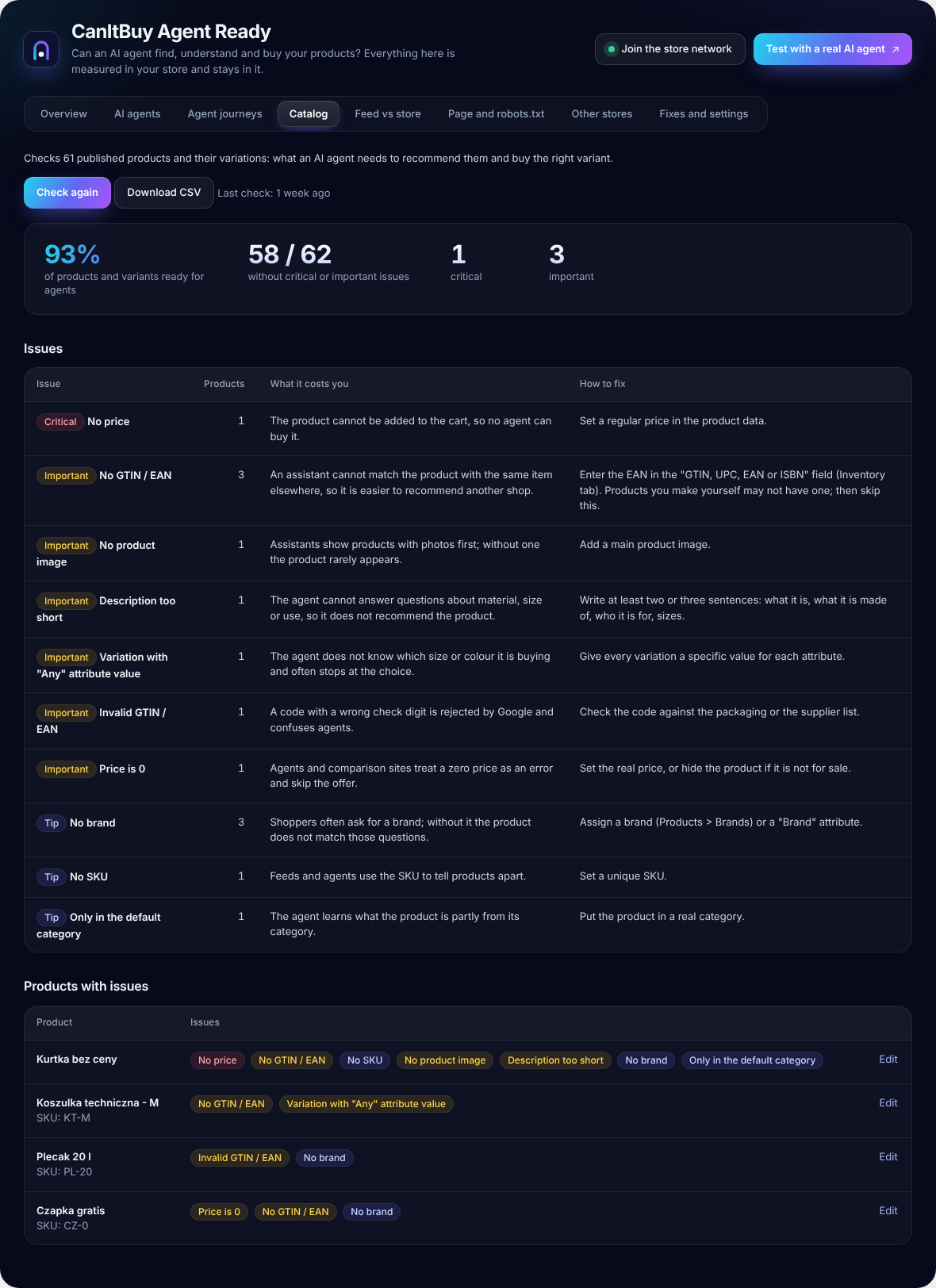
Catalog audit. Checks every product and variation for what an agent needs to recommend it and buy the right variant: price, variations with an “Any” attribute, GTIN / EAN with check digit validation, image, description, SKU, brand and category. Each issue says what it costs you and how to fix it. Export the list to CSV for your team.
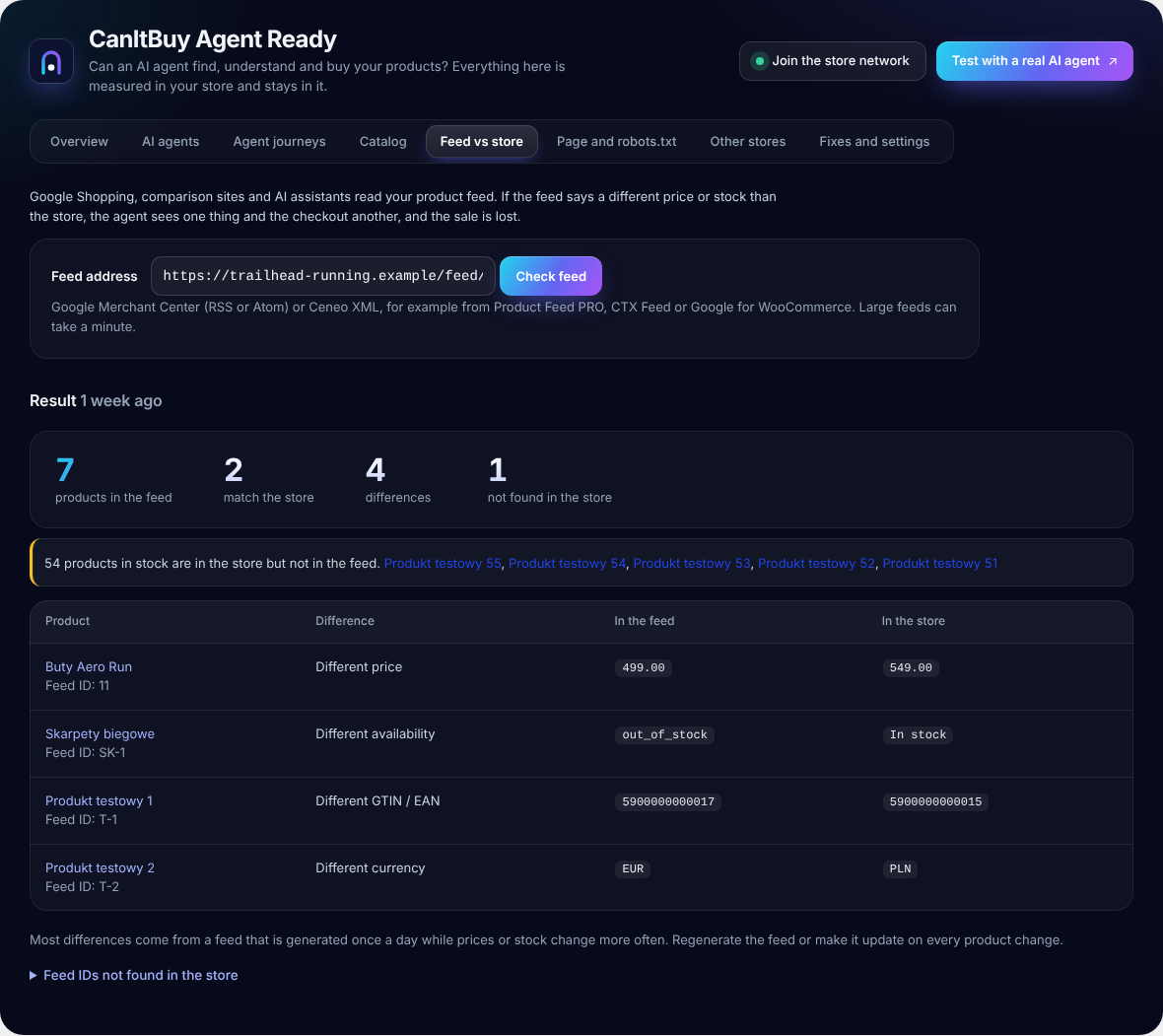
Feed vs store. Compares your Google Merchant Center feed (RSS or Atom) or Ceneo XML with the store: price, availability, GTIN and currency, plus products in stock that the feed leaves out.
Page and robots.txt. Reads robots.txt the way AI bots do and shows which of them may read your home page and product pages. Fetches a few product pages and compares the product data on the page (JSON-LD) with WooCommerce, to catch stale caches and plugins that output a second, different price.
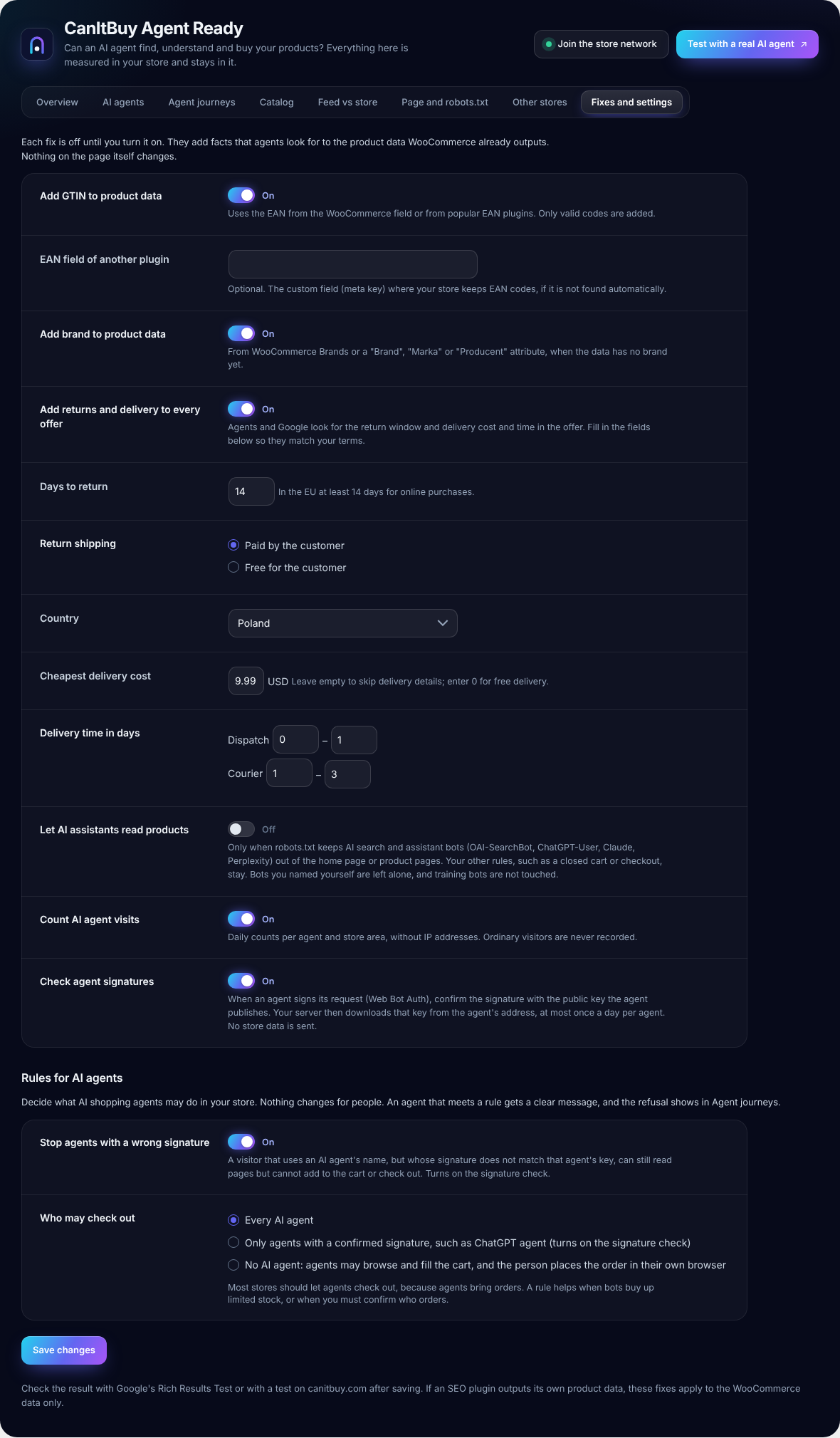
Fixes, off until you turn them on.
- Add the GTIN from WooCommerce or popular EAN plugins to product data.
- Add the brand from WooCommerce Brands or a brand attribute.
- Add your return window and delivery cost and time to every offer.
- Let AI search and assistant bots read products when robots.txt shuts them out, keeping your other rules and never touching bots you named yourself.
The plugin is in English and ready for translation on translate.wordpress.org.
Test with a real AI agent
The plugin measures your store from the inside. To watch a real AI agent try to buy in your store, with a recording and a score, run a test on canitbuy.com.
Privacy
- Only declared AI agents and crawlers are counted, as daily totals per agent and store area, with the page path but without the query string, IP address or any visitor identifier.
- For declared shopping agents the plugin keeps a short journey: the agent’s name, the time, how far it got (cart, checkout, order), the number of items and the cart value, the last page path and the last message the store showed it, with e-mail addresses and long numbers masked. No IP address and no customer data. The journey is linked through the cart session WooCommerce already uses; the plugin sets no cookie of its own. Journeys are deleted after 180 days.
- Orders placed by an AI agent get a private order note with the agent’s name (for example “chatgpt-agent”).
- Unless you join the store network, nothing is sent to CanItBuy or anyone else. The page, robots.txt and feed checks are requests from your server to your own store or to the feed address you enter, made only when you click.
- If you join the store network, the plugin sends canitbuy.com last week’s totals once a week (see External services). The report carries a random id, not your store address, and contains no data about visitors or customers, no product names, prices or order amounts and no text of store messages. Leaving the network deletes every report your store sent.
- With “Check agent signatures” on, your server downloads the public key of an agent that signs its request, at most once a day per agent. No store or visitor data is sent.
External services
With its default settings the plugin does not call external services on its own.
- Key directories of signing AI agents (optional, off by default). When you turn on “Check agent signatures” and an AI agent sends a signed request, the plugin downloads that agent’s public key from the address named in the request’s Signature-Agent header (for example https://chatgpt.com/.well-known/http-message-signatures-directory), at most once a day per agent and at most 20 new addresses an hour. No store or visitor data is sent apart from a standard HTTP request. The key belongs to the agent’s operator; for ChatGPT agent that is OpenAI: Terms of use, Privacy policy.
- canitbuy.com store network (optional, off by default). Only after you click “Join and compare” under WooCommerce > CanItBuy > Other stores, the plugin sends last week’s totals to https://canitbuy.com/api/sensor once a week and receives the combined numbers of all stores in return. What is sent: AI agent visits per agent and store area; how many shopping agent journeys reached the cart, checkout and an order, and the kind of message that stopped them; the share of orders referred by AI assistants and the number placed by agents; results of your last catalog, page and feed checks as percentages; country, currency, language, catalog size as a range, WordPress, WooCommerce and plugin versions; which of the plugin’s options are on; and a random id. The request uses the plugin’s own user agent, without your site address. The exact report is shown on the Other stores screen. “Leave the network” deletes everything your store sent. Reports are kept for 26 weeks. Terms, Privacy policy.
- Your product feed. When you click “Check feed”, the plugin downloads the feed from the address you enter. Usually that is your own store. No data is sent apart from a standard HTTP request.
- canitbuy.com. The “Test with a real AI agent” button is a link that opens canitbuy.com in your browser with your store’s domain filled in. Nothing is sent until you start a test there. Terms, Privacy policy.
Installation
Install
- In WordPress go to Plugins > Add New Plugin, search for “CanItBuy Agent Ready”, click Install Now and then Activate. WooCommerce 8.5 or newer must be active.
- Open WooCommerce > CanItBuy. Counting AI agent visits starts at once. There is nothing to set up and no account to create.
Your first 10 minutes
- Catalog. Open the Catalog tab and click “Check the catalog”. You see the share of products ready for agents and a list of issues, each with what it costs you and how to fix it. Click “Download CSV” to hand the list to your team (screenshot 4).
- Page and robots.txt. Click “Check pages and robots.txt”. The table shows which AI bots your robots.txt lets in, and whether the price and availability in the product data on your pages match WooCommerce (screenshot 6).
- Feed vs store. If you send a product feed to Google Merchant Center or Ceneo, paste its address and click “Check feed”. You see products whose price or stock differs between the feed and the store, and products in stock that the feed leaves out (screenshot 5).
- Fixes and settings. Turn on the fixes you need (GTIN, brand, returns and delivery in the product data) and click “Save changes”. Every fix is off until you turn it on (screenshot 7).
Once a week
- Overview. AI agent visits, shopping agents, sales from AI and the state of your checks on one screen (screenshot 1).
- AI agents. Which agents visit, what kind they are (shopping agent, reads a page for a user, AI search, model training) and which parts of the store they reach (screenshot 2).
- Agent journeys. How far each shopping agent got, what was in its cart and the last message your store showed it. Fix the messages that stop agents most often; people see the same messages (screenshot 3).
- Run the catalog, page and feed checks again after you change products, the theme or plugins.
Optional
- Check agent signatures (Fixes and settings) confirms Web Bot Auth signatures of agents such as ChatGPT agent. Off by default.
- Rules for AI agents (Fixes and settings) can stop visitors with a wrong agent signature or decide which agents may check out. Off by default.
- Other stores compares your store with other WooCommerce stores. Off until you click “Join and compare”; you see exactly what is shared before you join (screenshot 8).
- Test with a real AI agent opens canitbuy.com, where you can watch a real AI agent try to buy in your store, with a recording.
FAQ
Will it slow down my store?
No measurable slowdown in our tests. For ordinary visitors the plugin does not write to the database or call any outside service; it only checks whether the visitor says it is an AI agent. Catalog, page and feed checks run only when you click them in the admin, and the admin screen’s styles load only on the plugin’s own page. If your store uses a page cache, cached pages are served without WordPress, so the plugin costs nothing there (and cannot count AI visits to those pages).
Why do I see no AI visits?
Counting starts when the plugin is activated. If your store uses a page cache, cached pages are served without WordPress and are not counted; cart and checkout are usually not cached, so buying attempts are.
Can it recognise every AI agent?
No. Agents that run in a normal browser and do not identify themselves, such as Claude in Chrome or Comet, look like people. ChatGPT agent signs its requests and is recognised. Any visitor can pretend to be someone else, so the numbers are declared visits, except for signed visits confirmed with “Check agent signatures”.
What is an agent journey?
When a declared shopping agent (for example ChatGPT agent, which signs its requests) adds a product to the cart, fails to, or opens the checkout, the plugin follows it to the order or to the point where it stopped. Ordinary visitors are never followed. A stop at checkout is not always a lost sale: ChatGPT agent asks the person before it pays.
Can I stop AI agents from buying?
Yes, under Fixes and settings > Rules for AI agents. You can stop visitors that use an agent’s name with a wrong signature, let only agents with a confirmed signature check out, or let no agent check out. The agent gets a clear message and the refusal shows in Agent journeys. People are never affected.
What does joining the store network share?
Last week’s totals: AI agent visits, how far shopping agents got and the kind of message that stopped them, the share of orders from AI assistants, and the results of your last checks as percentages, with a random id instead of your store address. Never your store address, visitors, customers, product names, prices, order amounts or the text of messages. You see the exact report before you join, and leaving deletes it. The combined numbers of all stores are public at canitbuy.com/pulse, but only for weeks with at least 5 stores, so no single store can be read from them.
Does it change my product pages?
Not by default. The fixes add facts to the structured data WooCommerce already outputs, and only when you turn them on.
My SEO plugin outputs its own product data.
The fixes apply to WooCommerce product data. The page check shows if two plugins output different prices; then turn off product schema in one of them.
Does it work with HPOS and the block checkout?
Yes. Orders are read through the WooCommerce API, and orders placed through the block checkout (Store API) are marked too.
Screenshots




Changelog
1.3.2
- New look in the CanItBuy style: a dark admin screen with clear cards, large numbers, a tab bar and switches for settings. It loads only on the plugin’s own page.
- Join the store network from the overview, the header or the Other stores tab, with what is shared listed next to the button.
- A card on the overview links to a free test with a real AI agent on canitbuy.com.
1.3.1
- Links to canitbuy.com (the store test and the network’s weekly numbers) open the English site. You can switch to Polish on the site.
1.3.0
- New: Other stores. Join the CanItBuy store network (off by default) and compare your store with other WooCommerce stores. You see the exact report before joining; leaving deletes it.
- Agent journeys sort each stop into a kind of message (options, stock, required field, shipping and others) for the comparison, without sharing the text.
1.2.0
- New: Agent journeys. Follow declared shopping agents through the cart, checkout and order, with the value left in carts and the store messages that stopped them.
- New: Rules for AI agents. Stop visitors with a wrong agent signature, let only confirmed agents check out, or let no agent check out. Off by default.
- The overview shows shopping agents next to visits and sales.
1.1.3
- Page check: a product without a price now says so, instead of blaming the theme for the missing product data.
1.1.2
- The plugin name is now CanItBuy Agent Ready, the same as its WordPress.org address. Nothing else changed.
1.1.1
- Tested with WordPress 7.1.
- The overview marks agent visits whose signature was confirmed.
1.1.0
- New: “Check agent signatures” (off by default) confirms Web Bot Auth signatures of agents such as ChatGPT agent and marks visits as “Signature confirmed” or “Signature not confirmed”.
- New: CanItBuyBot, the CanItBuy scanner, is recognised alongside the CanItBuy test agent.
- Orders placed by an AI agent also record whether its signature was confirmed.
1.0.0
- First release: AI agent visits, sales from AI, catalog audit with CSV, feed vs store (Google, Ceneo), robots.txt and page data check, structured data fixes. English and Polish.