


Description
LiqPay payment gateway for WooCommerce stores in Ukraine. The customer pays on the secure LiqPay checkout page, and the order is marked as paid automatically when LiqPay calls your site back. Card data never touches your site.
LiqPay is the internet acquiring service of PrivatBank. The LiqPay page shows the payment methods enabled on the Checkout tab of your merchant account: Visa and Mastercard cards, Privat24, Apple Pay, Google Pay, a QR code for the Privat24 app and others.
What it does
- Redirects the customer to the LiqPay checkout page in Ukrainian or English, following the site language.
- Confirms the order through the serviceUrl callback. The callback signature is checked with your private key, and the URL is sent with every payment, so nothing has to be set in the LiqPay account.
- Re-checks the transaction through the LiqPay Status API when the customer returns to the shop, so a payment is not lost if the callback is late.
- Compares the paid amount and currency with the order. A mismatch puts the order on hold for manual review.
- A payment cancelled on the LiqPay page or declined by the bank fails the order with the reason in the order notes.
- A payment that LiqPay reports as reversed marks the order as refunded.
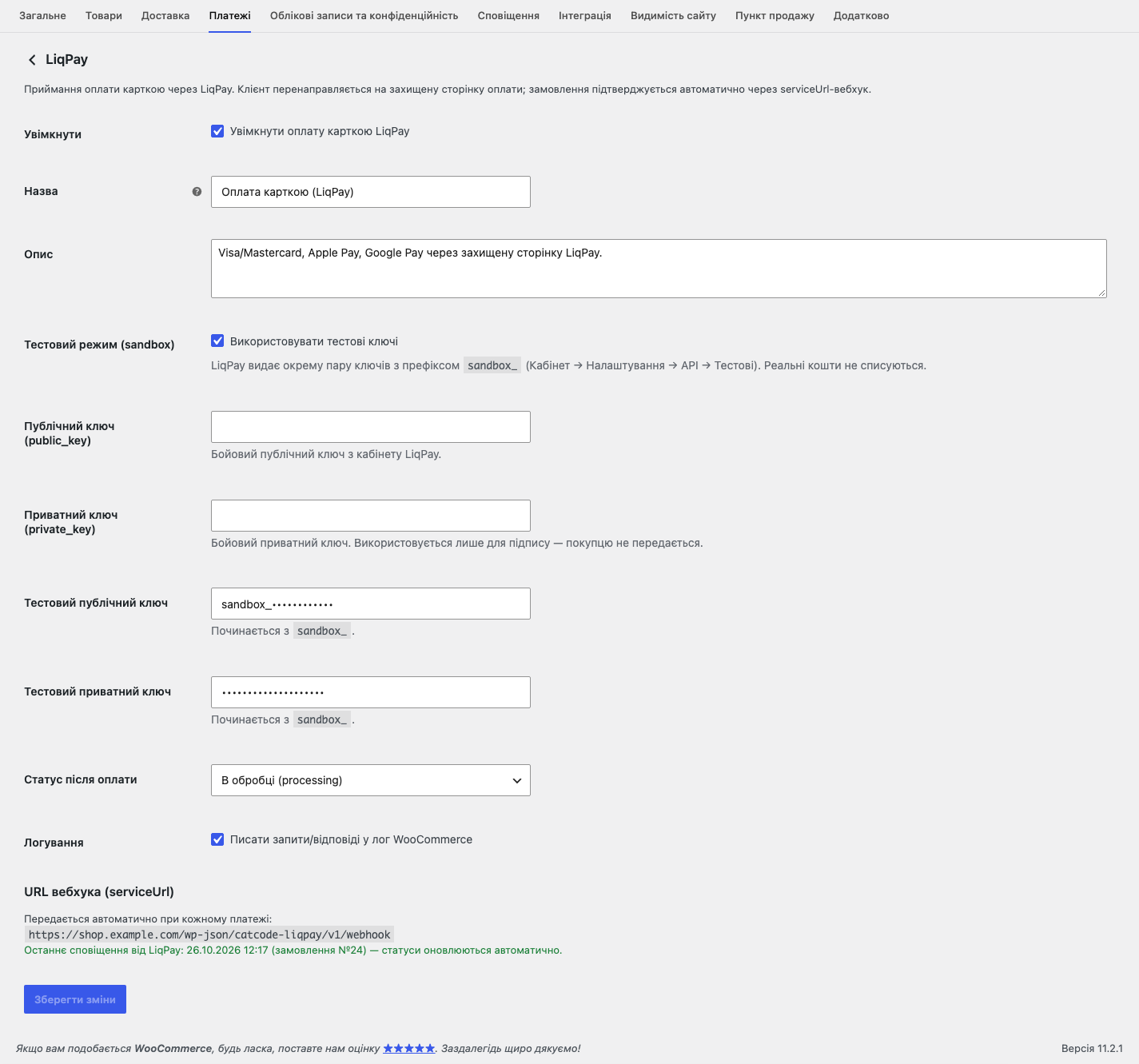
- The settings page shows when the last notification from LiqPay arrived, so a server that blocks LiqPay is noticed at once.
- Test mode with sandbox keys: place a full test order before you sign a contract.
- Order status after payment: Processing or Completed.
- Classic checkout and block checkout, HPOS compatible.
- Currencies: UAH, USD, EUR.
- Optional logging to the WooCommerce log.
Need refunds from the order screen?
The Pro version on catcode.com.ua adds a payment log with manual reconciliation, two-step payments (hold and capture when the order is fulfilled) and full or partial refunds right from the order. This free plugin works on its own and has no time limit.
LiqPay and Privat24 are services of PrivatBank. This plugin is an independent integration and is not affiliated with, endorsed by, or sponsored by LiqPay or PrivatBank. You need your own LiqPay merchant account to accept live payments.
LiqPay для WooCommerce — опис українською
Платіжний модуль ЛікПей (LiqPay) для інтернет-магазину на WooCommerce: еквайринг ПриватБанку, оплата карткою Visa і Mastercard, Приват24, Apple Pay і Google Pay. Покупець оплачує замовлення на захищеній сторінці LiqPay, а замовлення стає оплаченим автоматично, щойно LiqPay надішле сповіщення на ваш сайт.
- Сторінка оплати LiqPay українською або англійською, за мовою сайту.
- Підтвердження оплати через callback serviceUrl з перевіркою підпису. Адреса передається з кожним платежем, у кабінеті LiqPay нічого налаштовувати не треба.
- Звірка статусу платежу, коли покупець повертається в магазин.
- Сума і валюта платежу звіряються із замовленням, розбіжність переводить замовлення на утримання.
- Скасований чи відхилений банком платіж видно в нотатках замовлення з причиною.
- Тестовий режим із sandbox-ключами: повне тестове замовлення до підписання договору.
- Класичне і блокове оформлення замовлення, валюти гривня, долар, євро.
Журнал платежів, двоетапна оплата (холд і списання) і повернення коштів з картки замовлення є в Pro-версії на catcode.com.ua.
Інші безкоштовні плагіни CatCode: Нова Пошта для WooCommerce, пРРО і фіскальний чек, оплата частинами ПриватБанку, monobank і А-Банку.
External services
This plugin connects to the LiqPay payment API (a service of PrivatBank) to process payments. This connection is required for the plugin to work — without it no payment can be created or verified.
What is sent, and when:
- When a customer places an order with this gateway, the plugin sends the order number, the amount, the currency, the order description, your public key and the return/callback URLs of your site to
https://www.liqpay.ua/api/3/checkout. The customer then enters card details on LiqPay’s own page — card data never reaches your site. - When the customer returns from the payment page, and when LiqPay calls your site back, the plugin requests the current state of that transaction from
https://www.liqpay.ua/api/request(actionstatus) to confirm whether the order is paid.
Every request is signed with your private key, which never leaves your server. No data is sent to LiqPay unless a customer starts a payment or returns from the payment page.
Service provider: LiqPay / PrivatBank.
Terms of service: https://www.liqpay.ua/en/information/user
Privacy policy: https://privatbank.ua/terms
Installation
- Install and activate the plugin.
- Go to WooCommerce → Settings → Payments → LiqPay.
- To try it out, keep “Test mode (sandbox)” on and paste your
sandbox_key pair. For live payments turn test mode off and enter the production public and private keys from your LiqPay account. - The callback address (serviceUrl) is sent with every payment, so there is nothing to set in the LiqPay account.
FAQ
Where do I get the LiqPay keys?
In your LiqPay account: Settings → API. The live public and private keys are there, and a separate test pair with the sandbox_ prefix is under Test.
Do I need a LiqPay contract to test the plugin?
No. Turn on test mode and use the sandbox_ key pair, so you can place a full test order without charging real money.
Why is a paid order still “Pending payment”?
The order is confirmed by the LiqPay callback. LiqPay cannot reach localhost or a site behind HTTP authentication, and some firewalls block its requests because they come without a User-Agent. The settings page shows when the last notification arrived; if there is none, allow POST requests to the callback address shown there. As a fallback the plugin also re-checks the status when the customer returns to the shop.
Does it work with the block checkout?
Yes, both the classic checkout and the block checkout are supported.
Which currencies are supported?
UAH, USD and EUR. The method is hidden at checkout if the store currency is different.
Can I refund a payment from WooCommerce?
Not in this free plugin: make the refund in your LiqPay account. Full and partial refunds from the order screen are part of the Pro version.
Where is the card data processed?
Entirely on the LiqPay side. The customer enters card details on LiqPay’s own page, so nothing is entered on or stored by your site.
Screenshots


Changelog
1.0.5
- Fixed: a payment cancelled on the LiqPay page is noted as cancelled instead of “payment declined. Payment not found”, and the buyer sees “The payment was cancelled”.
- Fixed: a bank refusal gives its reason, and the buyer sees “The bank declined the payment”.
- Fixed: the payment note reads “Payment via LiqPay (transaction)”; the LiqPay note shows the masked card.
- New: the settings show when the last notification from LiqPay arrived.
1.0.4
- Fixed: on sites with a language prefix in every URL (Polylang) the buyer came back from LiqPay to “Page not found”.
1.0.3
- Fixed: the callback and the buyer’s return could both complete the same order (double payment note and stock reduction).
1.0.2
- Ukrainian translation and the Domain Path header added.
1.0.1
- Translations are served by translate.wordpress.org.
1.0.0
- First release.