


Description
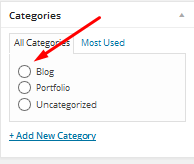
If you need to restrict your WordPress posts to select only one category, this plugin automatically changes the category/taxonomy checkboxes to radio buttons in the post editor. This simplifies category selection for users who only want to assign one category to a post.
For full documentation, please visit Documentation.
You can watch this video tutorial for a quick guide: YouTube Video
Installation
This section describes how to install the plugin and get it working.
- Upload
plugin-name.phpto the/wp-content/plugins/directory. - Activate the plugin through the ‘Plugins’ menu in WordPress.
- Once activated, the category checkboxes will automatically change to radio buttons in your post editor.
FAQ
How do I install this plugin?
- Upload
plugin-name.phpto the/wp-content/plugins/directory. - Activate the plugin through the ‘Plugins’ menu in WordPress.
How do I use this plugin?
Simply install and activate the plugin. Once activated, go to your post editor and check the category/taxonomy section. The checkboxes will have changed to radio buttons, allowing you to select only one category at a time.
Will this plugin work with Gutenberg?
Yes, the plugin supports both the Classic Editor and Gutenberg block editor.
Screenshots
Changelog
2.0.1
- Added full Gutenberg editor support.
- Updated plugin compatibility to WordPress 6.6.
- Updated readme for better documentation.
1.1
- Added support for WordPress 4.3.
1.0
- Initial release.