


Description
AUTOMATED PLUGIN FOR ALL OF YOUR SECURITY SCANNING NEEDS
The CloneGuard Security Scanning plugin helps increase the Trust level of your website visitors.
Easily add a certified CloneGuard Security Seal widget anywhere on your website or cart, by using your existing WP theme. You can also place the seal with the shortcode [cloneguard_seal icon="cs-secure-dark" size="md" position="relative"] (sizes: lg, md, sm; positions: relative, left, right).
View, start, create, modify, enable/disable your PCI ASV Scans, Vulnerability Scans, GDPR Scans, or Pentests.
Start your website’s easy certification process today:
- Place your order (use our discount code below for WordPress users)
- Install the CloneGuard WP plugin
- Login with your credentials that you’ve created in step 1 above
- Schedule your scan(s) and let the automated AI platform perform them
- Place the Security Seal widget anywhere on your website
YOUR DISCOUNT
WordPress users can get a discount by using a first-time order code: WORDPRESSNEW8
Support
Our clients enjoy our 24×7 support services. We’ve created a stable security solution so that you can focus on your website. Contact us for additional information and technical support.
External services
This plugin connects to services run by Clone Systems, Inc.
Scanning portal API. The admin pages read and manage your scans, reports, vulnerabilities, schedules, targets and notifications through the API of the portal set in CloneGuard > Settings (by default pciscan.clone-systems.com). Requests are made from your server only when an administrator opens a CloneGuard admin page or performs an action there. Each request sends your User Token and Key, the data of the action (for example a target’s name and hosts), the plugin version and your site’s address.
Trust Seal. Pages that show the CloneGuard Seal widget or the [cloneguard_seal] shortcode load the script https://www.clone-systems.com/generate-seal/get-seal.js and the seal image from www.clone-systems.com in the visitor’s browser. The seal links to the security report for your site’s domain at https://www.clone-systems.com/report/?dn={your domain}. After the page has loaded, the script also asks the WordPress.com mShots service (s.wordpress.com/mshots) for a screenshot of your home page, so the report can show it. No visitor data is sent by the plugin itself; the browser sends its usual request information (such as IP address and user agent) to these hosts.
Clone Systems Subscription Agreement and Privacy Policy. WordPress.com mShots is provided by Automattic: Terms of Service and Privacy Policy.
Installation
- Upload clone-guard-security-scanning to the
/wp-content/pluginsdirectory. - Login to the WordPress admin panel and go to the the plugins page. On the plugins page, activate the CloneGuard Security Scanning plugin.
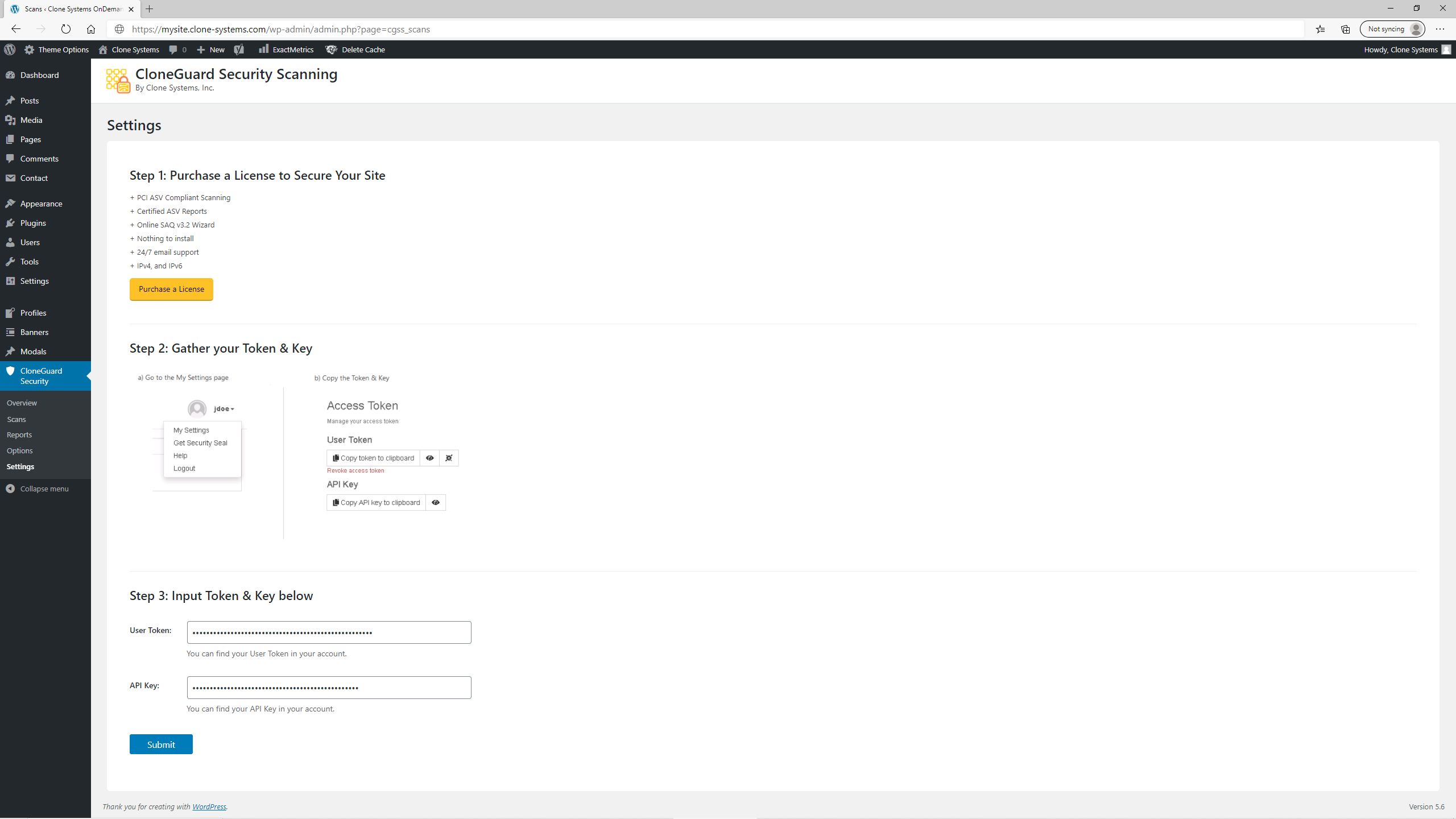
- Navigate to the CloneGuard > Settings page.
- Enter your CloneGuard User Token and API Key (if you do not have these, you will need to access them on the Clone Systems website).
- The CloneGuard Security Scanning plugin is now fully active.
- Navigate to the CloneGuard > Scans page to view your scans.
Screenshots


Changelog
2.6
- Tested up to WordPress 7.1.
- Compatibility fixes for PHP 8.2 to 8.4.
- Security hardening: output escaping, input sanitizing, and nonce and capability checks on all admin actions.
- The Security Seal widget now shows the current Clone Systems Trust Seal, with seal, size and position options. Existing widgets keep their size.
- New [cloneguard_seal] shortcode to place the seal in posts and pages.
- Faster admin pages, and a clear message when the scanning portal cannot be reached.
- Updated purchase link, Settings page text and screenshots.
- Minimum requirements raised to WordPress 5.9 and PHP 7.4.
2.5
- Uploaded new Validation Report screenshot
- Tested plugin up to 6.5.2 WordPress version
2.4
- Made minor Overview page styling enhancements.
- Added new product screenshots to the Overview page.
2.3.3
- Changed the Banner with a new one.
2.3.2
- Changed Plugin description texts
- Fixed icons position text in Scans Page
- Added Banner on the WordPress Plugin Directory.
2.3.1
- Added multi-select capability to the exception submission process
2.3
- Added capability to submit vulnerability exceptions
2.2.2
- Visualization updates on vulnerabilities and overview pages
2.2.1
- My Settings fixes
- Updated images
2.2.0
- Added vulnerabilities page
- Added vulnerability details page
- Responsive functionality fixes
2.1.0
- Added overview page
- Implemented scan profiles for vulnerability management
- Implemented scan profiles for pentesting
- Added portal URL customization for partner portals
2.0.0
- Added vulnerability scanning module
- Added penetration testing module
- Implemented tabs functionality
- Implement bulk actions functionality on Options page
1.8.0
- Added Options page
- User can now manage schedules, targets, and notifications
1.5.2
- Added image folder
1.5.1
- Added screenshots
- Fixed New Notification button alignment
1.5.0
- Design Improvements
1.0.0
- Initial release