


Description
Here is a list of the functionality that Coffeeblack BBPress Extended Lite will add:
- Change the BBPress Editor to be TinyMCE & TeenyMCE (and set as default).
- Convert TinyMCE & TeenyMCE to be BBCode rather than HTML.
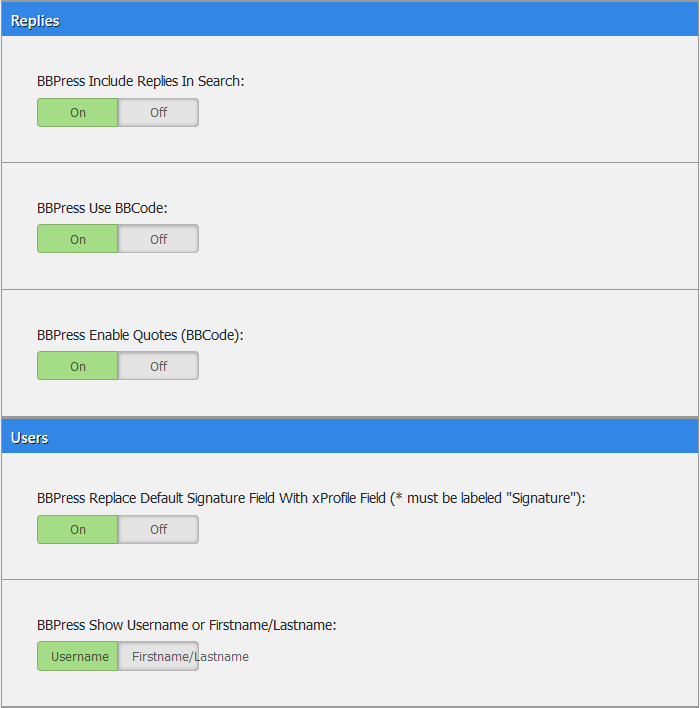
- Enable BBCode on BBPress Replies.
- Ability to change the template that the forum is using, to be a more readable one ? view here.
- Enable Shortcode in BBCode Content.
- Set default login & logout redirect links.
- Include Forums, Topics, and Replies in search.
- Show New Topic & New Reply links in the header of specific pages.
- Show First/Lastname or Username on the front of the Forums.
- Set xProfile Field as forum signature (if installed).
Installation
- Upload the files to the
/wp-content/plugins/cb_bbpressdirectory, or install the plugin through the WordPress plugins screen directly. - Activate Coffeeblack BBPress Extended Lite through the ‘Plugins’ screen in WordPress
- Use the Coffeeblack->BBPress screen to configure the plugin
FAQ
Coming Soon!
Screenshots



Changelog
1.1.0
- Bug Fix
- Add Screenshots and Icons.
- Add Module Information.
1.0.1
- Bug Fix regarding installation issue.
1.0.0
- Initial Release.