


Description
Accept Bitcoin and Lightning payments in WooCommerce
Coinsnap for WooCommerce is an open-source Bitcoin payment plugin that adds Bitcoin payments directly to the native WooCommerce checkout.
Customers can pay with Bitcoin via Lightning or on-chain while merchants keep their existing WooCommerce order, checkout, tax, shipping, coupon and fulfillment workflows.
When using Coinsnap, merchants do not need to operate their own Bitcoin or Lightning payment infrastructure. Coinsnap follows a non-custodial / self-custody model and does not hold merchant Bitcoin.
Coinsnap is Bitcoin payment software for merchants and a brand of Onlineshop24 d.o.o., Serbia.
Key features
- Accept Bitcoin and Lightning payments in WooCommerce
- Support for Lightning and Bitcoin on-chain
- Native integration into the WooCommerce checkout
- Automatic WooCommerce order status updates after payment
- Works with existing WooCommerce order, tax, shipping and coupon workflows
- Customizable payment method name, checkout text, icon and redirect behavior
- Optional Bitcoin discount as a fixed amount or percentage
- No own Lightning node or Bitcoin payment server required when using Coinsnap
- Non-custodial / self-custody payment model
- Settlement to a configured Bitcoin or Lightning wallet
- Optional fiat settlement through supported off-ramp partners
- Support for BTCPay Server for merchants who prefer self-hosted Bitcoin payment infrastructure
- Open source and free to install
How it works
- Create a Coinsnap merchant account.
- Install and activate the Coinsnap for WooCommerce plugin.
- Open the Coinsnap settings in WooCommerce.
- Select Coinsnap or BTCPay Server as your payment provider.
- Connect the selected provider.
- Enable Bitcoin as a payment method in WooCommerce.
- Optionally configure a Bitcoin discount and customize the checkout.
- Customers select Bitcoin at checkout and pay by scanning the displayed QR code.
- The WooCommerce order status is updated automatically after payment.
Coinsnap or BTCPay Server
The plugin supports two payment-provider modes:
- Coinsnap – for merchants who want to accept Bitcoin without running their own payment infrastructure.
- BTCPay Server – for merchants who operate their own BTCPay Server and want to connect it to WooCommerce through the same plugin.
Bitcoin discount
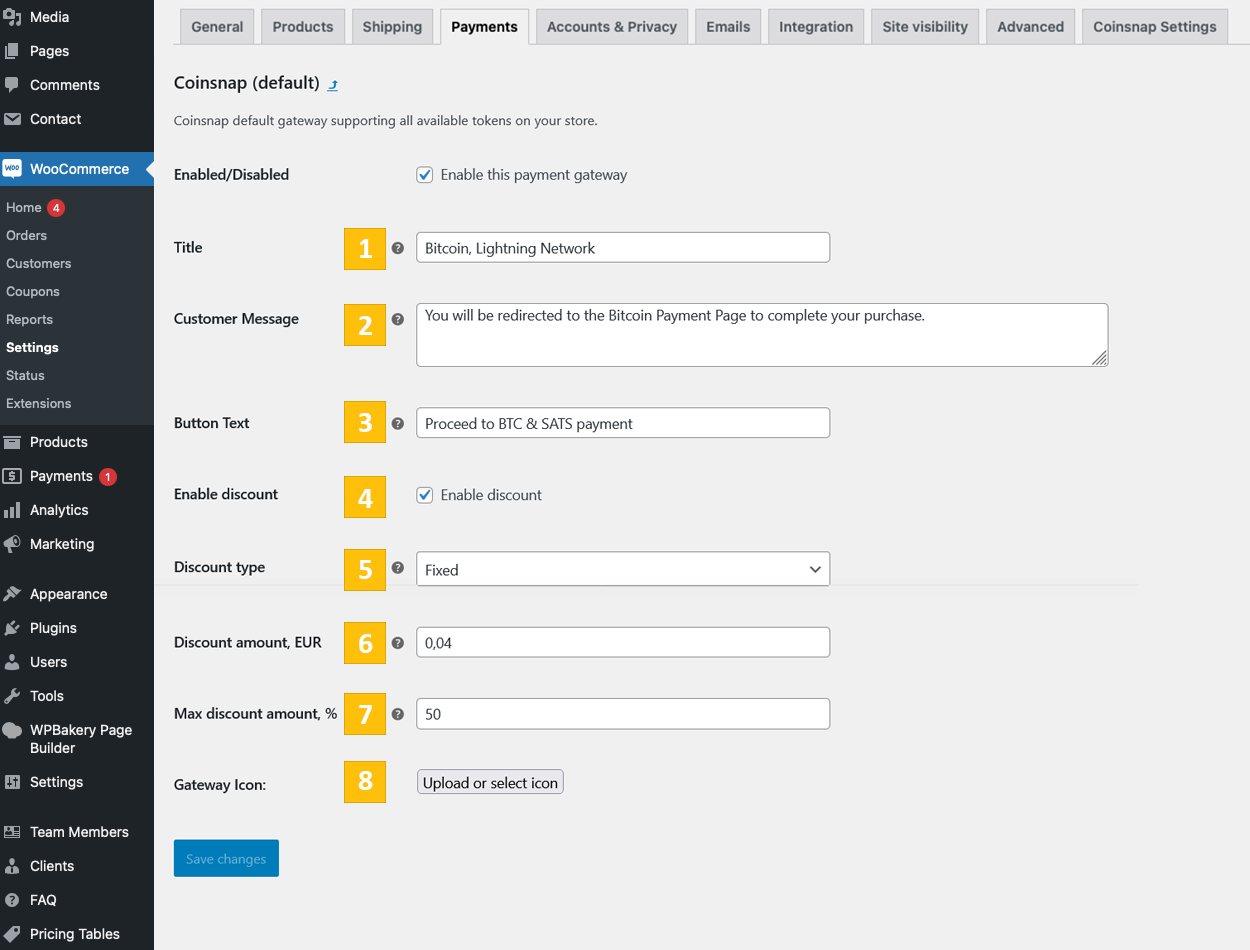
Merchants can configure a fixed or percentage-based discount that applies when customers choose Bitcoin as their payment method.
This can be used to encourage Bitcoin payments directly at checkout.
Fees
Coinsnap charges a 1% transaction fee. The fee is charged separately against the merchant’s Coinsnap credit because Coinsnap does not deduct fees from the Bitcoin payment itself.
Settlement
Bitcoin payments can be settled to a compatible Bitcoin or Lightning wallet.
One option is the Coinsnap Wallet, which combines a self-custodial Bitcoin wallet with merchant and point-of-sale functionality.
Depending on the merchant setup and supported partner integrations, Bitcoin payments can also be converted and settled to a bank account.
More information
- Demo Store: https://woocommerce.coinsnap.org/
- Product page: https://coinsnap.io/shop-systems/woocommerce/
- User Guide: https://coinsnap.io/user-guides/woocommerce-bitcoin-user-guide/
- GitHub: https://github.com/Coinsnap/Coinsnap-for-Woocommerce
- WordPress Plugin Directory: https://wordpress.org/plugins/coinsnap-for-woocommerce/
- Coinsnap Wallet: https://coinsnap.io/wallet/
Installation
Install from WordPress.org
- In WordPress, go to Plugins → Add New.
- Search for Bitcoin payment for WooCommerce or Coinsnap.
- Click Install Now and activate the plugin.
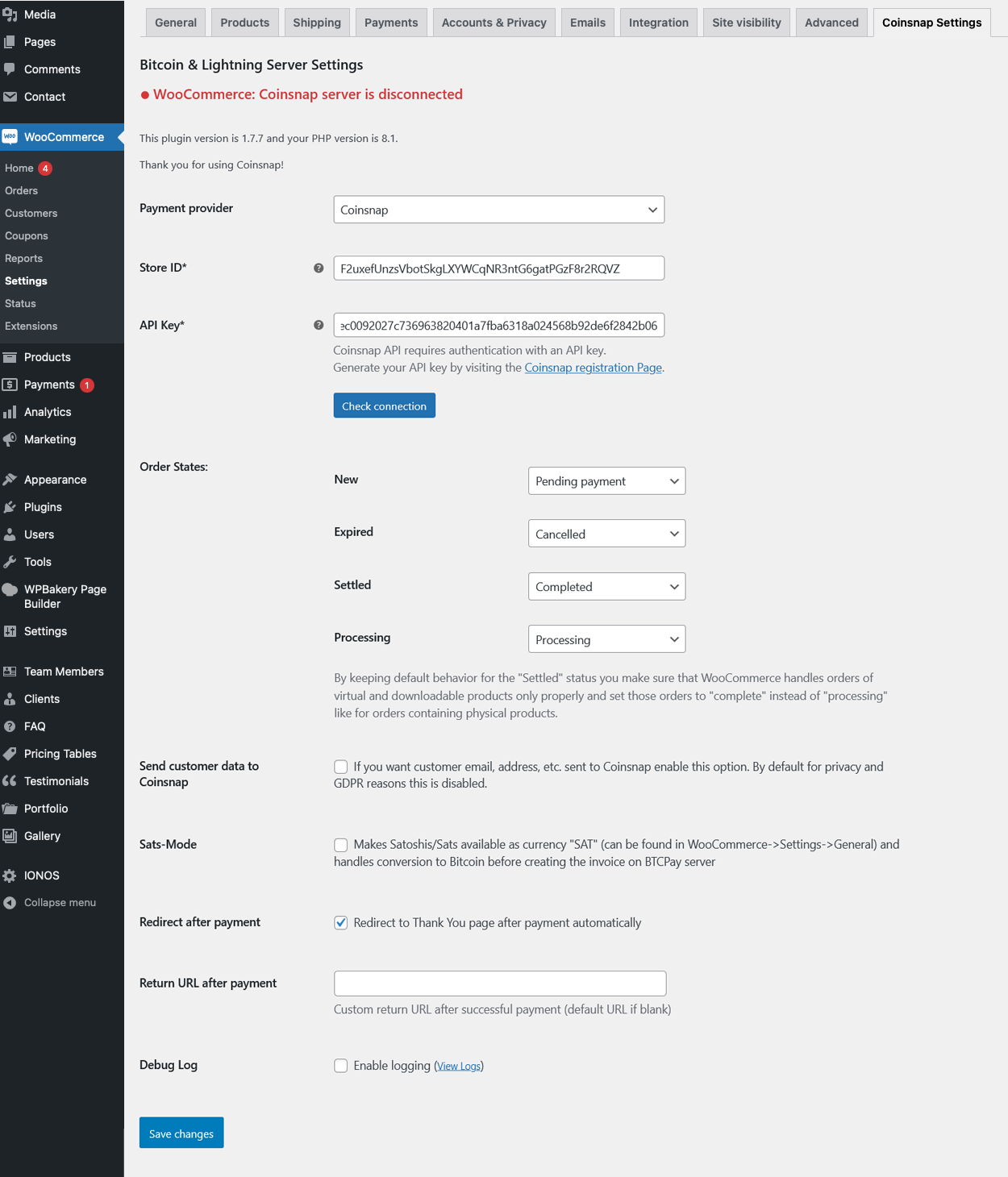
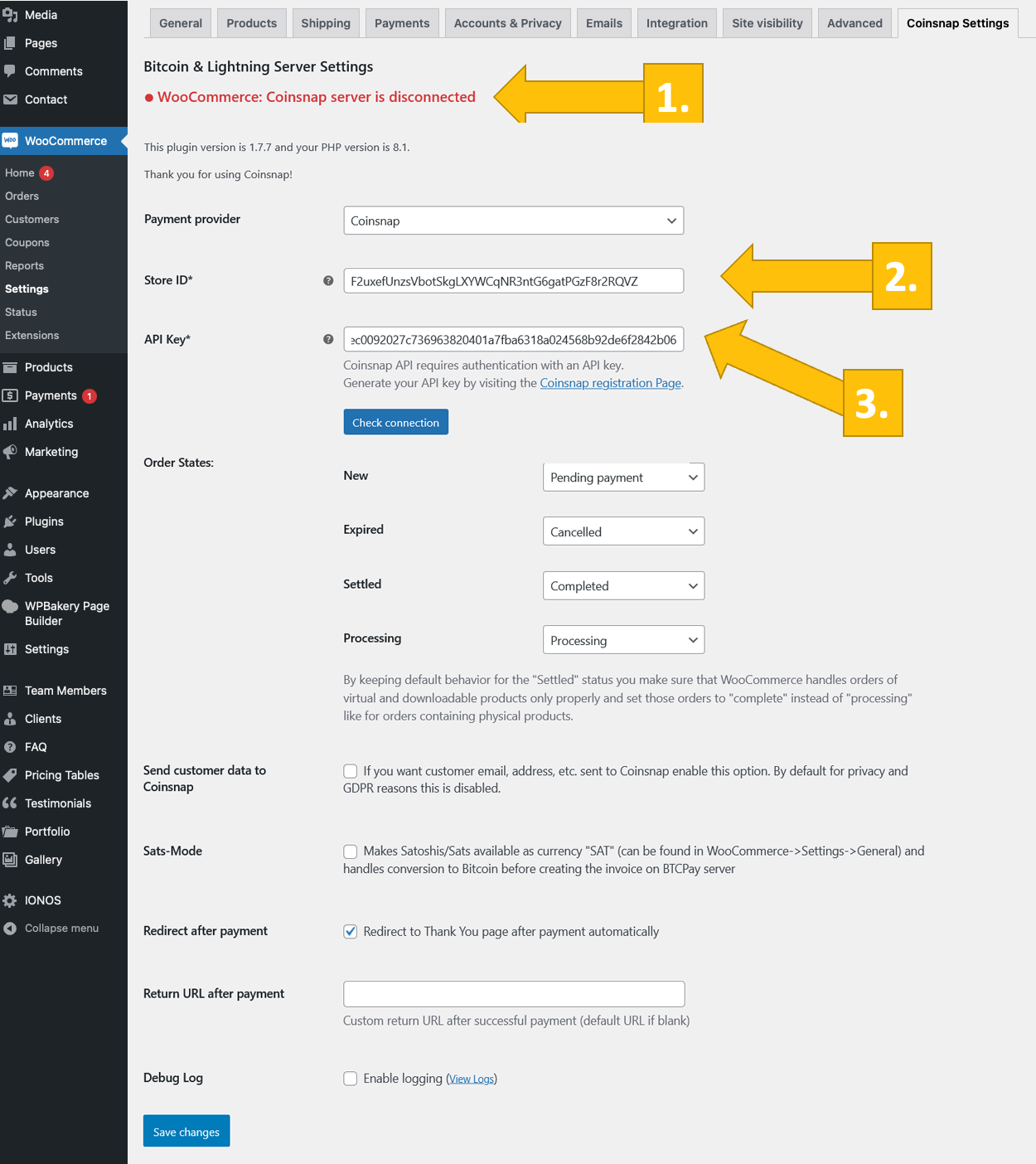
- Go to WooCommerce → Settings → Coinsnap Settings.
- Select Coinsnap or BTCPay Server as the payment provider.
- Enter the required credentials and check the connection.
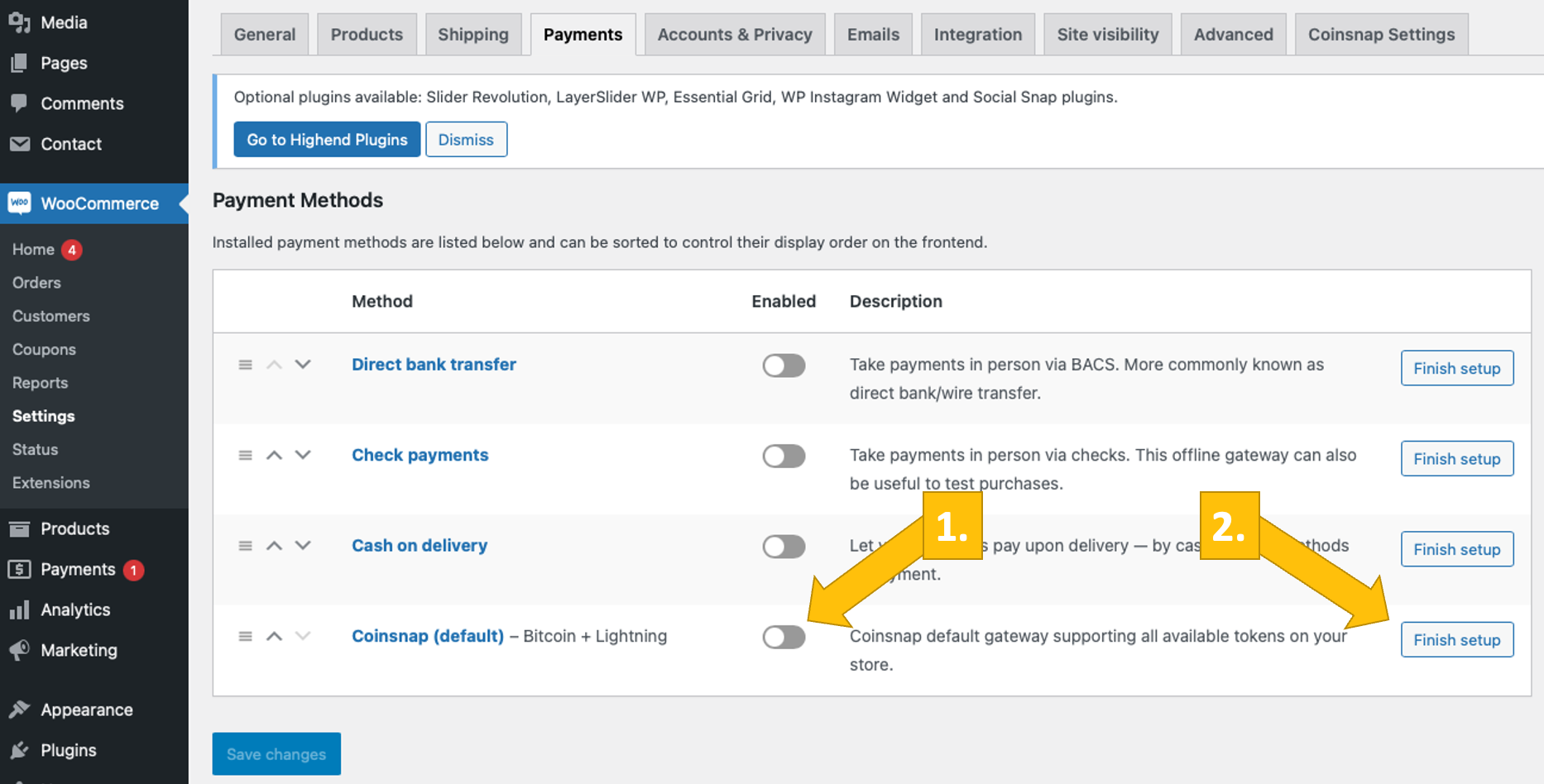
- Go to WooCommerce → Settings → Payments and enable the Bitcoin payment method.
- Customize the payment method text, icon, redirect and optional Bitcoin discount.
- Make a test payment before going live.
Install from GitHub
- Download this repository as a ZIP archive.
- In WordPress, go to Plugins → Add New → Upload Plugin.
- Upload, install and activate the plugin.
- Configure Coinsnap or BTCPay Server as described above.
FAQ
What are the requirements for accepting Bitcoin in my WooCommerce store?
You need WordPress 6.0 or newer, WooCommerce 6.0 or newer, PHP 7.4 or newer, and either a Coinsnap merchant account or your own BTCPay Server.
Can customers pay with both Lightning and Bitcoin on-chain?
Yes. The plugin supports both Lightning and Bitcoin on-chain payments.
Can I use my own BTCPay Server instead of Coinsnap?
Yes. The plugin supports BTCPay Server as an alternative payment provider.
Can I offer a Bitcoin discount?
Yes. You can configure a fixed or percentage-based discount for customers who choose Bitcoin at checkout.
Can I customize the Bitcoin checkout?
Yes. You can define the payment method name, upload your own icon or logo, customize checkout text and configure the redirect after successful payment.
Do I need my own Lightning node?
No. When using Coinsnap, you do not need to operate your own Lightning node or Bitcoin payment server.
Which Bitcoin or Lightning wallets can I use?
You can use a compatible Bitcoin or Lightning wallet for settlement. One option is the Coinsnap Wallet. Other compatible wallets may include Wallet of Satoshi, Blink and Zeus, depending on the settlement setup you choose.
Does Coinsnap hold my Bitcoin?
No. Coinsnap follows a non-custodial approach and does not hold merchant Bitcoin.
What fees does Coinsnap charge?
Coinsnap charges a 1% transaction fee. The fee is charged separately against the merchant’s Coinsnap credit and is not deducted from the Bitcoin payment.
Can I receive settlement in my bank account?
Depending on the merchant setup and supported partner integrations, Bitcoin payments can be converted and settled to a bank account.
Can customers charge back a Bitcoin payment?
Bitcoin payments do not support card-style chargebacks. Merchants should still handle refunds according to their own store policies.
Is the plugin available worldwide?
Yes. The plugin is designed for merchants worldwide, subject to any legal or service restrictions that apply in the merchant’s jurisdiction.
Where can I get support?
Use the support area in your Coinsnap merchant account or visit the official Coinsnap website.
Screenshots





Changelog
1.0.0 :: 2023-08-03
- First public release for testing.
1.0.5 :: 2023-12-12
- Payment button text setting is added.
1.1.0 :: 2024-02-28
- Basic WordPress Blocks support is added.
1.1.1 :: 2024-03-22
- Restructured loader.
1.1.2 :: 2024-05-08
- Payment status display update.
- Fix: Payment status changing.
1.1.3 :: 2024-07-03
- Order number and order ID separation.
- Full order metadata array transmission.
1.1.4 :: 2024-10-03
- WordPress library update.
- Data output security update.
- Compatibility with WooCommerce 9.3.x. is tested
- Fix: order ID variable type is ?string.
1.1.5 :: 2024-10-11
- WordPress library update.
- Fixed error on checkout.
1.1.6 :: 2024-11-06
- Coinsnap connection errors exception update.
- Update of Coinsnap gateway icon upload functionality.
- Update of payment method name by default (Bitcoin-Lightning)
1.1.7 :: 2024-12-10
- Fixed bug in ConnectException handler.
1.1.8 :: 2024-12-24
- Fixed mismatch variables types bug in ConnectException function call.
1.1.9 :: 2025-01-18
- Fixed webhook creation bug in processWebhook function call.
- Update of webhook payload response statuses.
1.1.10 :: 2025-01-27
- Added Coinsnap server connection check indication in backend.
1.1.11 :: 2025-02-09
- Update: Coinsnap server connection check indication in backend marks as “WooCommerce”.
- Default WooCommerce status for “Settled” is “Completed”.
- Compatibility with WooCommerce 9.6.x. is tested.
1.1.12 :: 2025-03-09
- Fixed WordPress warning about non-used wp_get_attachment_image() method for Coinsnap payment gateway icon in WooCommerce payment settings.
- Compatibility with WooCommerce 9.7.x. is tested.
1.2.0 :: 2025-04-04
- Update: Woocommerce currencies list is limited by currencies, supported by Coinsnap.
- Update: After plugin activation or update non-supported currency switches to USD.
- Update: Added option “Redirect after payment automatically”.
- Update: Prevented redirect to payment gateway if payment amount is less than 1 SAT or currency in not supported by Coinsnap.
- Update: Error message changed to “Coinsnap server is disconnected” if Coinsnap server is not connected or there is webhook error.
1.3.0 :: 2025-04-16
- Update: BTCPay server added as a Bitcoin payment gateway
- Update: Added discount for payment with Coinsnap functionality
- Compatibility with WooCommerce 9.8.x. is tested.
- Compatibility with WordPress 6.8 is tested.
1.3.1 :: 2025-05-01
- Update: If BTCPay server is chosen as a Bitcoin payment gateway, we don’t limit WooCommerce currencies list.
- Compatibility with WordPress 6.8.1 is tested.
- Compatibility with WooCommerce 9.8.3. is tested.
1.3.5 :: 2025-05-05
- Update: Prevented redirect to BTCPay server if payment amount is less than 0.000005869 BTC (0.50 EUR) for onchain payments, 0.000001 BTC (1 SAT) for Lightning payment or currency is not supported.
- Update: BTCPay setup wizard is added in BTCPay server settings.
1.3.6 :: 2025-05-06
- Update: Minimum order amount is added to connection status notice.
- Update: Woocommerce store admin can choose where to show connection status notice and hide it from all the Admin pages.
- Compatibility with WooCommerce 9.8.4. is tested.
1.3.7 :: 2025-05-13
- Update: Coinsnap WordPress library.
- Update: Permissions check is added to BTCPay server request handler on BTCPay server connection setup process.
- Compatibility with WooCommerce 9.8.5. is tested.
1.3.8 :: 2025-05-18
- Fixed bug in payment process when discount is disabled.
- Fixed bug with discount fields turning on on payment settings page.
1.3.9 :: 2025-05-19
- Updated connection check errors handler
1.3.10 :: 2025-05-27
- Fixed bug in payment process when payment provider wasn’t chosen.
- Updated gateway connection status displaying conditions.
1.4.0 :: 2025-06-10
- Fixed bug in webhook payload process when payment provider wasn’t chosen.
- Update: Checking and deleting all the inactive webhooks for the store.
- Compatibility with WooCommerce 9.9.3. is tested.
1.4.1 :: 2025-06-20
- Update: Unique name for BTCPay server setup Wizard return URL is set.
1.4.2 :: 2025-07-19
- Update: Added nonce check for BTCPay server request in Wizard setup flow.
- Updated Generate API Key button behavior.
- Compatibility with WooCommerce 10.0. is tested.
- Compatibility with WordPress 6.8.2 is tested.
1.5.0 :: 2025-08-03
- Updated BTCPay server minimum payment amount calculation system
- Updated BTCPay server events and webhook payload handler
- Compatibility with WooCommerce 10.0.4 is tested.
1.5.1 :: 2025-08-16
- Added action ins in plugins list
- Compatibility with WooCommerce 10.1.0 is tested.
1.5.2 :: 2025-08-30
- Fixed error with webhook registration on BTCPay server
- Compatibility with WooCommerce 10.1.2 is tested.
1.5.3 :: 2025-09-12
- Updated webhook payload handler
1.5.4 :: 2025-09-18
- Update: Coinsnap is active payment method on checkout if no payment method is set.
1.6.0 :: 2025-09-23
- Update: Bitcoin discount is indicated in payment methods list on Checkout page.
1.6.1 :: 2025-10-10
- Update: Added non-supported by BTCPay server currencies handler on invoice request flow.
- Update: Added custom redirect after payment page in module settings.
- Compatibility with WordPress 6.8.3 and WooCommerce 10.2.2 is tested.
1.6.2 :: 2025-10-17
- Fixed bug with order amount check method
1.6.3 :: 2025-10-24
- Fixed PHP 8.2+ warnings
- Compatibility with WooCommerce 10.3.0 is tested.
1.6.4 :: 2025-11-16
- Updated stored webhooks filtration
- Fixed redirection warnings
- Compatibility with WooCommerce 10.3.5 is tested.
1.6.5 :: 2025-11-18
- Fixed AbstractGateway::getDiscount() method return value
1.7.0 :: 2025-11-23
- Updated \Coinsnap\Client\Store class
- Updated \Coinsnap\Client\Store::getStore() method data usage
- Updated orders list page and order details page in backend – link to payment details page on the gateway’s side is added
- Fixed backend warnings on PHP 8.3+
1.7.1 :: 2025-12-04
- Compatibility with WooCommerce 10.3.6 is tested.
- Compatibility with WordPress 6.9 is tested.