

Description
Corvet Stats answers the questions a content or affiliate site owner actually has: what gets read, where the traffic comes from, and which pages send clicks to partners.
It sets no cookies, uses no browser storage, stores no IP addresses and sends nothing to third parties. Statistics are stored as small daily counters in your own database, so the data stays on your server.
Affiliate and outbound click tracking, no setup
- Every click on a link to another domain is counted.
- Links with
rel="sponsored"are counted. - Cloaked affiliate links on your own domain (Pretty Links, ThirstyAffiliates, manual redirects) are counted by path prefix (
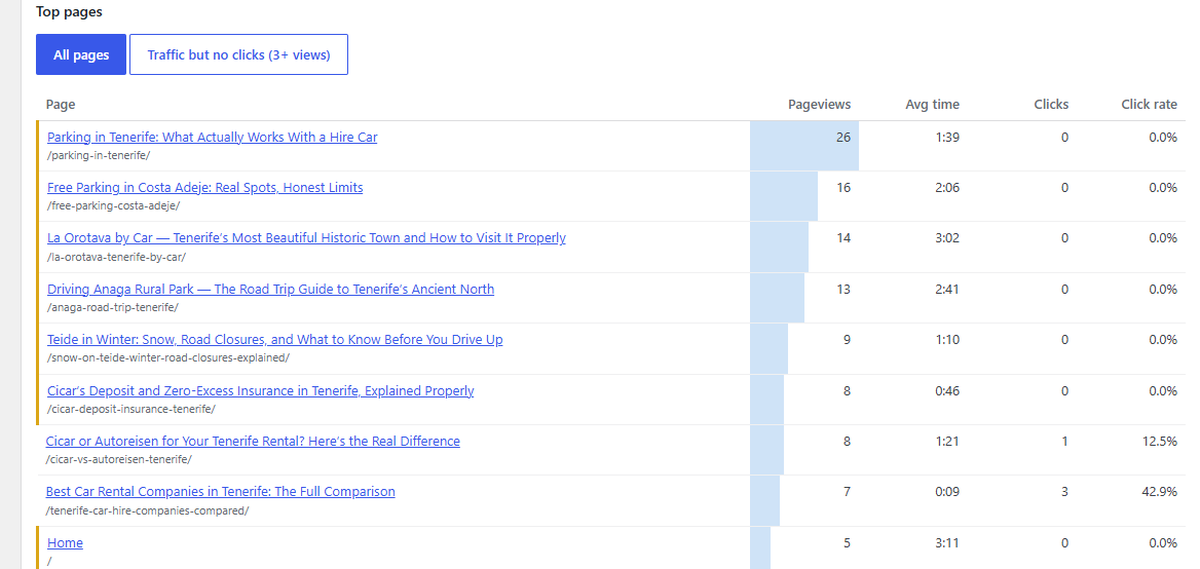
/go/,/out/,/recommends/,/refer/by default, changeable with a filter). - See which page sent which click to which destination, the click rate of every page and category, and a list of pages that have traffic but no clicks.
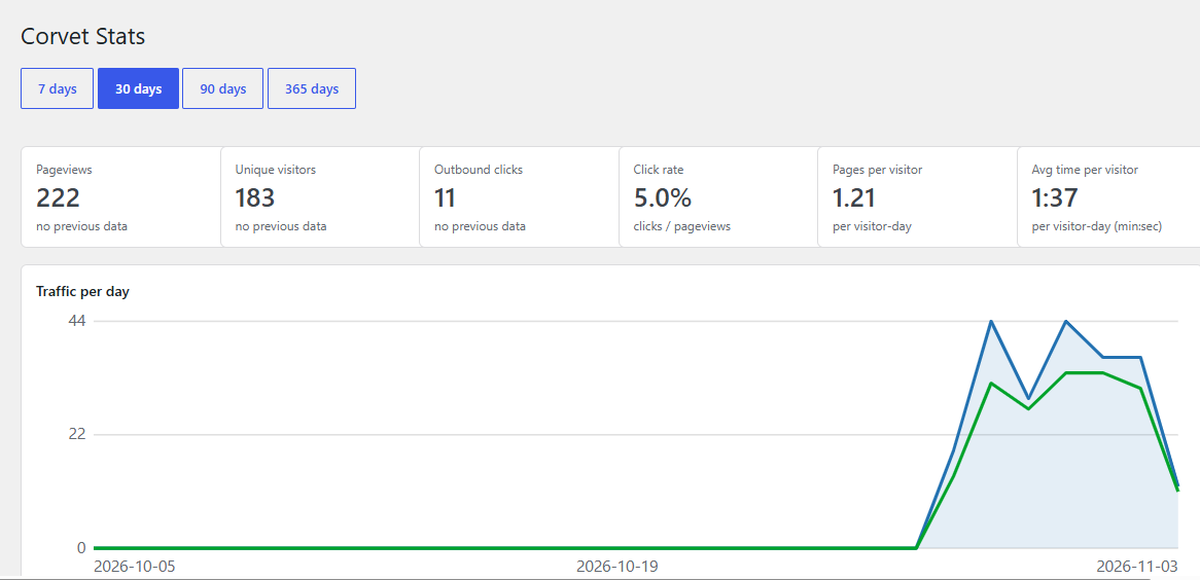
What the dashboard shows (Tools → Corvet Stats, 7 / 30 / 90 / 365 days)
- Pageviews and unique visitors with comparison to the previous period
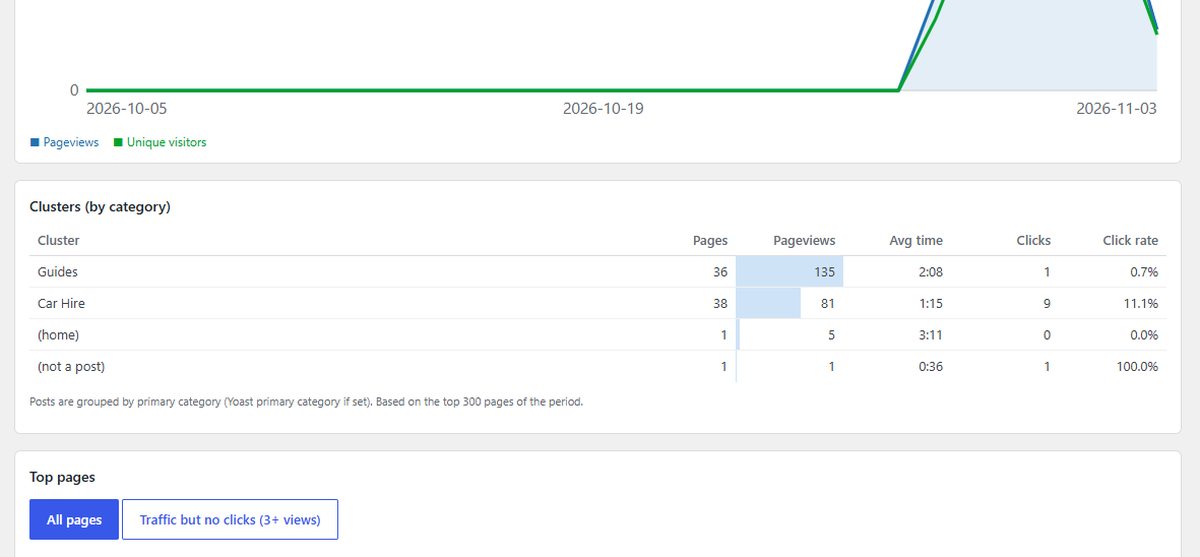
- Click rate, pages per visitor, average time on page
- Content clusters: the same numbers grouped by primary category (Yoast primary category is respected)
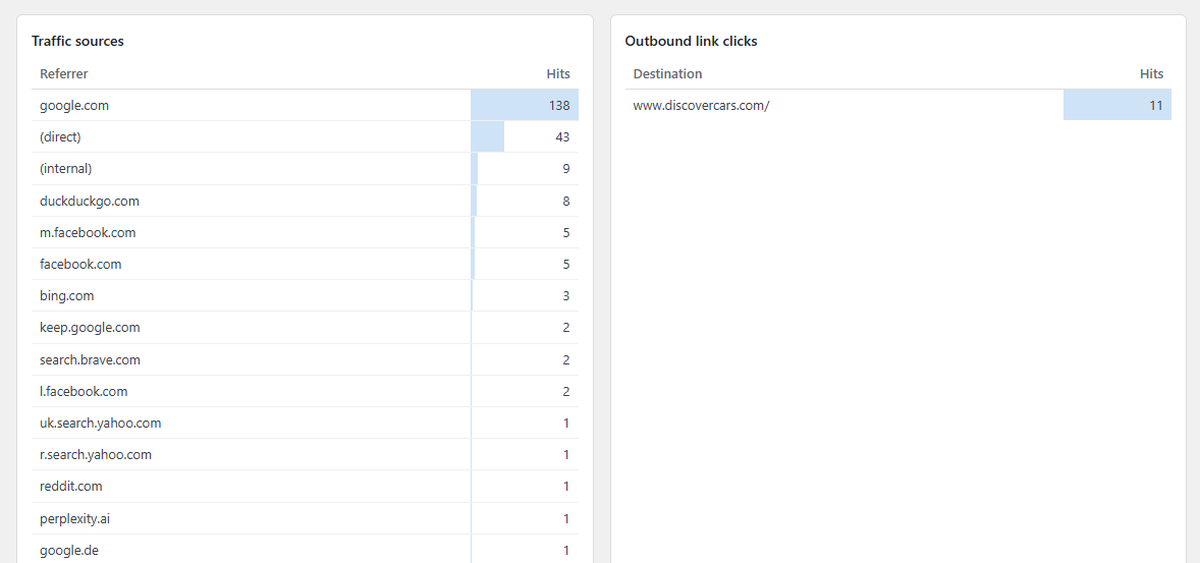
- Top pages, traffic sources, outbound destinations
- Estimated revenue per page and per cluster, with revenue per 1,000 views (optional, you set the payout per click)
- Export any table as CSV or JSON, or all tables at once as one JSON file
- Clicks and click rate by device and by country
- Traffic by hour of day, top page-to-page transitions
Built for real sites
- Works with full-page caching: tracking uses a tiny script and a REST endpoint.
- Bot filtering, signed page tokens and a per-visitor daily event limit protect the tracking endpoint from floods and fake data.
- Logged-in editors and administrators are not counted.
- Old data is removed automatically (400 days; page-to-page transitions 90 days).
- Uninstalling removes all plugin data.
Countries are optional. The plugin never calls IP-lookup services and does not bundle a geo database. It reads the visitor’s country from your server or CDN (Cloudflare, or a GeoIP module on your server). Without a source, the Countries box is simply hidden.
Privacy
Corvet Stats does not set cookies, does not use localStorage or sessionStorage, and does not store IP addresses or any per-visitor record. It stores daily aggregated counters: pageviews and unique-visitor totals per page, referrer domains, countries, device types, time on page, clicks on outbound links, and internal page-to-page navigation. A short anonymous hash of IP address, user agent, date and a secret key is kept for at most two days to count visitors once per day and to limit abusive traffic. No data is sent to third parties.
Installation
- Upload the
corvet-statsfolder to/wp-content/plugins/, or install the plugin from the Plugins screen. - Activate Corvet Stats.
- Open Tools → Corvet Stats. Statistics start collecting from the moment you activate the plugin.
If you use a page cache, purge it once after activating, so cached pages include the tracking script.
FAQ
How is estimated revenue calculated?
You enter, one per line, a destination text and your average payout per click, for example discovercars.com = 0.40 or /go/discovercars = 0.40 for a cloaked link. Take the payout from your partner report (earnings divided by clicks). The dashboard then multiplies the clicks each page sent to a matching destination by that payout. It is an estimate based on an average, not your real earnings: sales happen on the partner’s site and the plugin never reads partner reports. Clicks to destinations without a rule count as zero.
Can I export the data?
Yes. Every table on the Corvet Stats page has Export links (CSV and JSON), and the top of the page has a button that downloads all tables as one JSON file. The export uses the period you have selected (7, 30, 90 or 365 days). Page exports contain all pages of the period (up to 2,000), not only the top 50 shown on screen. CSV files are UTF-8 and open correctly in Excel and Google Sheets; text that could be read as a spreadsheet formula is made safe. Exports are created on request for administrators only and are not stored on the server.
Do I need a cookie banner?
Corvet Stats sets no cookies and uses no browser storage. Rules differ by country and by how you use the data, so check your own legal situation. Consider mentioning anonymous, cookieless statistics in your privacy policy. The plugin adds suggested text to the Privacy Policy Guide.
How are unique visitors counted without cookies?
For each pageview the server computes a short hash of the visitor’s IP address and browser user agent, the current date and a secret site key. The hash only answers “already counted today?” and limits events per visitor. The IP address is never stored, the date is part of the hash so a person cannot be followed from one day to the next, and hashes are deleted after two days. The figure for a period is the sum of daily uniques, not unique people across the whole period.
Does the plugin send data to other websites?
No. It makes no external requests and does not use third-party services.
Why are affiliate clicks on my own domain not counted?
Cloaked links such as https://example.com/go/partner look internal to the browser. Corvet Stats counts links whose path starts with /go/, /out/, /recommends/ or /refer/, and links with rel="sponsored". To add your own prefix:
add_filter( 'lstats_affiliate_prefixes', function ( $prefixes ) {
    $prefixes[] = '/visit/';
    return $prefixes;
} );
How do I get country statistics?
Put the site behind Cloudflare (the free plan is enough; the Cloudflare headers are only trusted when the request really comes from Cloudflare), or provide a country code from your server, for example with the nginx GeoIP2 module or Apache mod_maxminddb (GEOIP_COUNTRY_CODE / MM_COUNTRY_CODE). Other CDNs that send a country header (CloudFront, Vercel) can be enabled with add_filter( 'lstats_trust_country_headers', '__return_true' );. You can also plug in your own source with the lstats_country filter, which must return a two-letter country code.
I use Cloudflare but my server already restores the real visitor IP. Countries are missing.
Add add_filter( 'lstats_trust_cloudflare', '__return_true' ); so the plugin trusts the Cloudflare headers on your setup.
Can I stop tracking for some visitors?
Yes. Return false from the lstats_should_track filter, for example for visitors who opted out on your site.
Nothing is counted.
Purge the page cache, then check in your browser’s network tab that a POST to /wp-json/lstats/v1/hit returns status 204. A security plugin or firewall may block the REST route; allow /wp-json/lstats/. A JavaScript optimizer that delays or removes inline scripts can also stop the counter: exclude the script with id corvet-stats-tracker.
Which database versions are supported?
MySQL 5.7+ or MariaDB 10.2+. On older versions the plugin shows an admin notice because its tables cannot be created.
Screenshots


Changelog
1.10.0
- New: export. CSV and JSON for every table (daily totals, pages, clusters, clicks by page and destination, traffic sources, destinations, countries, devices, hours, page-to-page transitions) and one JSON file with all tables.
1.9.1
- Plugin name, tags and description updated so the plugin is easier to find in the directory. No functional changes.
1.9
- New: estimated revenue. Set an average payout per click for each partner destination and see estimated revenue per page, per cluster and for the whole site, with a comparison to the previous period, revenue per 1,000 views, and sorting of top pages by estimated revenue.
- Uninstalling also removes the new settings.
1.8
- Security: Cloudflare and other CDN headers (real IP, country) are now trusted only when the request really comes through that CDN, so they cannot be forged on other sites.
- Security: all server and request input is unslashed and sanitized, and all dashboard output is escaped.
- Fix: uninstall.php had a wrong letter case and did not run on Linux servers; uninstalling now removes all data, also on multisite.
- Fix: URLs with non-Latin characters (percent-encoded paths) are now tracked as separate pages instead of being merged.
- New: admin notice if the database tables cannot be created, privacy policy text,
lstats_should_trackandlstats_trust_*filters. - Dashboard is faster on large sites (page titles are cached for 15 minutes) and styles are loaded the WordPress way.
- The tracking script is printed with wp_print_inline_script_tag. Requires WordPress 5.7 or newer.
1.7
- Cloaked affiliate links are counted as outbound clicks.
1.6
- Table “Outbound clicks: from page to destination”; the Countries box is hidden when no country data is available.
1.5
- Abuse protection for the tracking endpoint, GPL-2.0-or-later license header, country detection from several sources.
1.0 – 1.4
- Pageviews, referrers, unique visitors, outbound clicks, time on page, clusters, devices, hours, page-to-page transitions and the redesigned dashboard.