


Description
Crawl Hunt is an AI-powered SEO plugin for WordPress that helps you find SEO issues, fix them faster, and keep your website optimized for search engines and AI-powered search.
From technical SEO audits and broken link detection to AI-generated meta tags, image ALT text, structured data, internal linking, and website performance analysis, Crawl Hunt helps you manage your website’s SEO from one connected platform.
Most SEO audit tools show you what’s wrong. Crawl Hunt helps you take the next step with AI-assisted fixes, actionable recommendations, and ongoing website monitoring.
Connect your WordPress website to the CrawlHunt platform to start analyzing and optimizing your website.
Powerful SEO Features in One Platform
AI-Powered SEO Audit & Analysis
Crawl Hunt scans your website to uncover SEO issues and helps you understand what needs attention.
- Comprehensive website SEO auditing
- Technical and on-page SEO analysis
- Missing and duplicate meta title detection
- Meta description analysis
- Image ALT text issue detection
- Broken internal and external link detection
- HTTP 404 and other crawl error monitoring
- Canonical URL and indexability checks
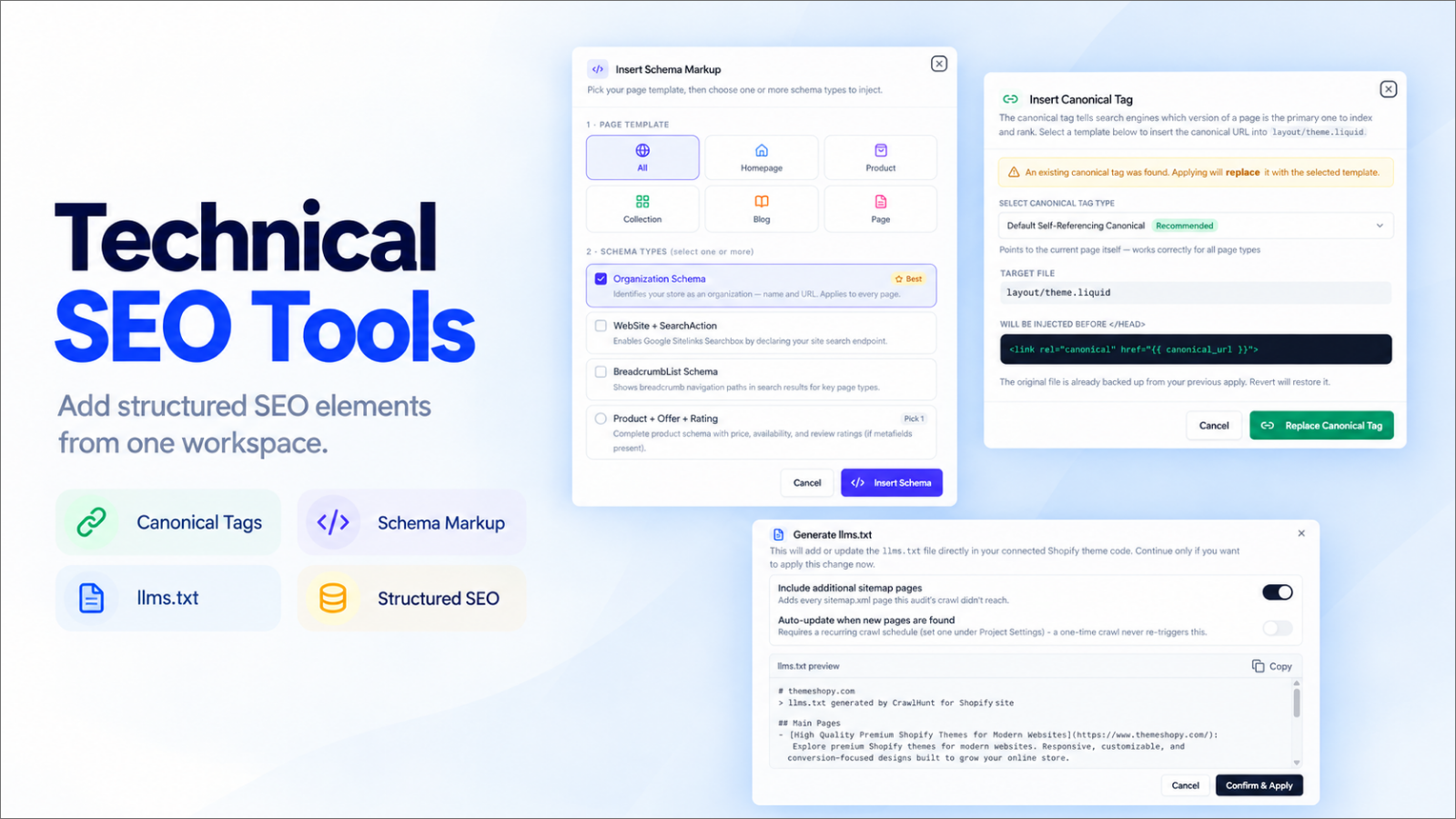
- Structured data and schema analysis
- Heading structure and content SEO analysis
- Website SEO health scores and issue prioritization
Learn more about SEO audit tools and technical SEO auditing.
AI SEO Fixes & Smart Optimization
Don’t just discover SEO issues. Start fixing them.
Crawl Hunt helps you resolve eligible SEO problems using AI-powered suggestions and supported optimization workflows.
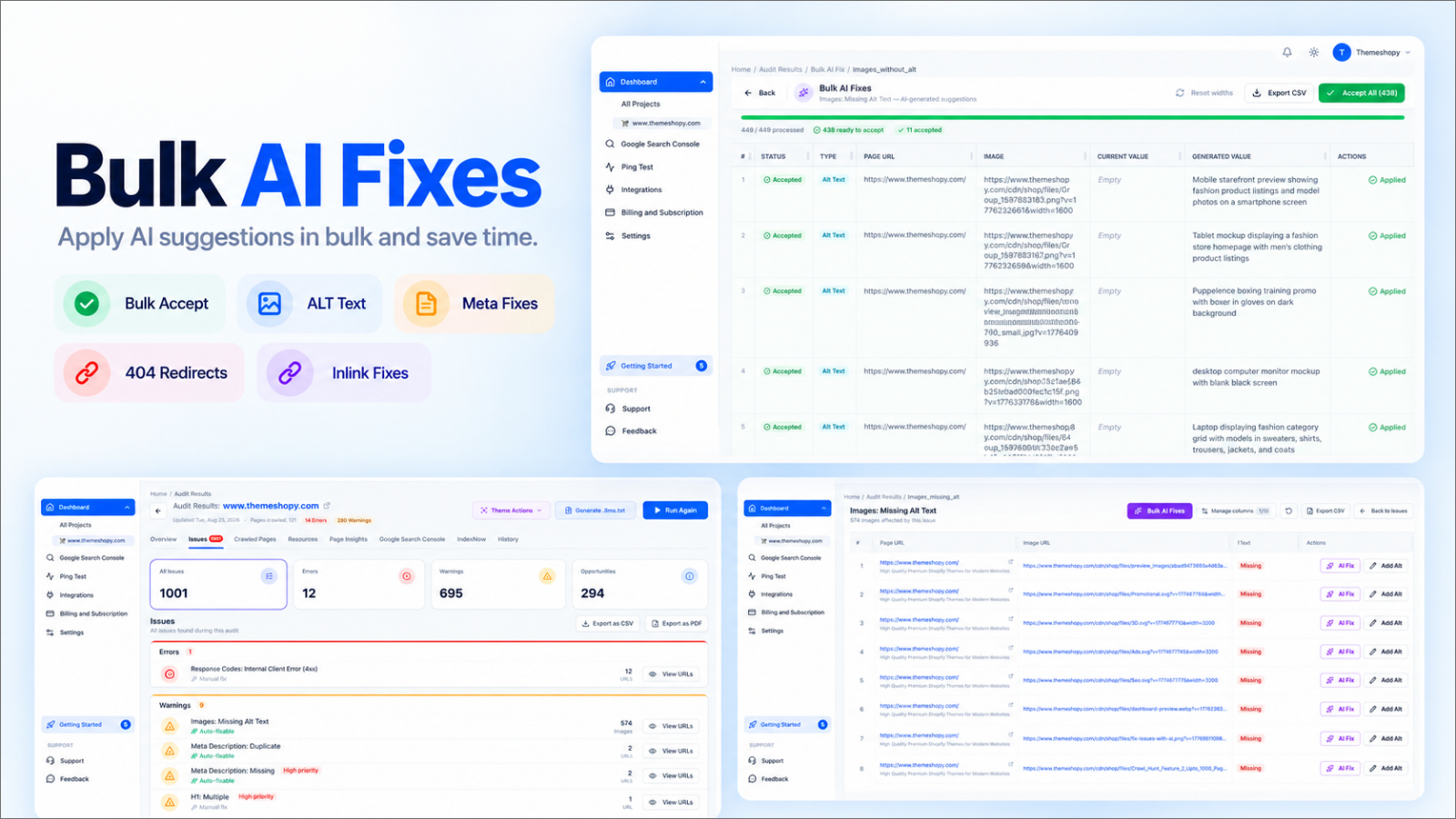
- AI-generated SEO titles and meta descriptions
- AI-assisted image ALT text optimization
- Recommendations for technical SEO problems
- Metadata optimization for posts and pages
- AI-assisted SEO improvements
- Review and apply supported fixes
- Recheck website issues after optimization
Fix availability depends on the connected WordPress integration, selected plan, and type of issue.
Broken Links, 404 Errors & Redirect Management
Keep your website’s navigation and internal links healthy.
- Detect broken website links
- Identify 404 errors and inaccessible URLs
- Review redirect opportunities
- Get AI-assisted redirect recommendations
- Find broken internal links
- Improve website navigation and crawlability
Learn how to fix 404 errors.
Technical SEO & Website Health
Find the technical issues that can prevent search engines from properly crawling and understanding your website.
- Robots.txt analysis
- XML sitemap checks
- Canonical tag validation
- Crawlability and indexing issue detection
- Structured data and schema checks
- Website architecture analysis
- Internal linking insights
- Duplicate SEO signal detection
- HTTP response monitoring
Explore our technical SEO checklist and recommended technical SEO tools.
SEO, AEO & GEO Optimization
Get your website ready for traditional and AI-powered search.
Crawl Hunt provides SEO, Answer Engine Optimization (AEO), and Generative Engine Optimization (GEO) readiness insights.
- SEO technical readiness analysis
- AEO optimization recommendations
- GEO readiness assessments
- Content structure and accessibility checks
- Structured data recommendations
- AI crawler accessibility insights
- Content optimization opportunities
Readiness insights identify improvement opportunities and do not guarantee rankings or mentions in AI-generated answers.
Google Search Console & PageSpeed Insights
Bring essential search and performance information into your SEO workflow.
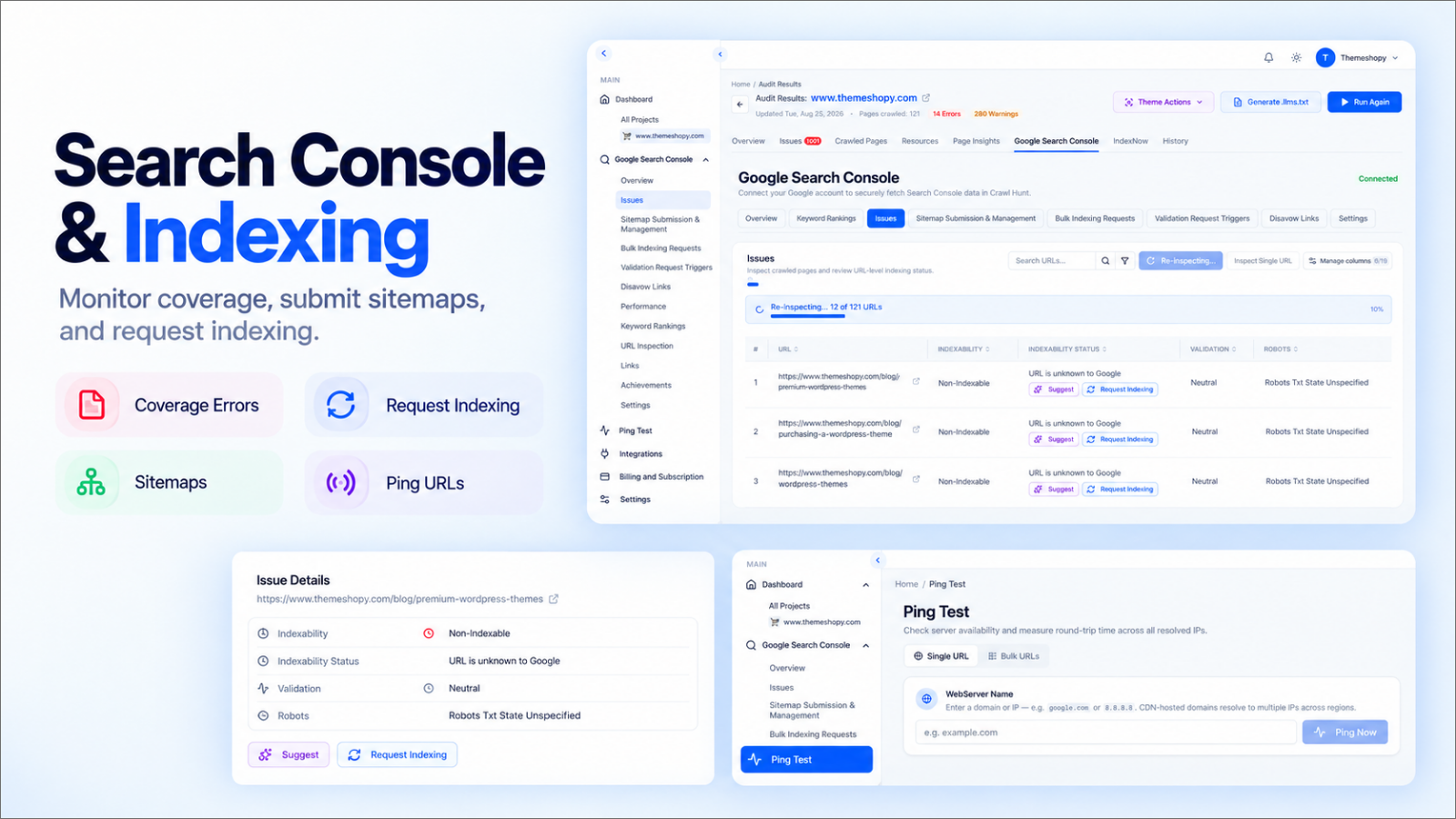
- Google Search Console integration
- Search performance insights
- Indexing information
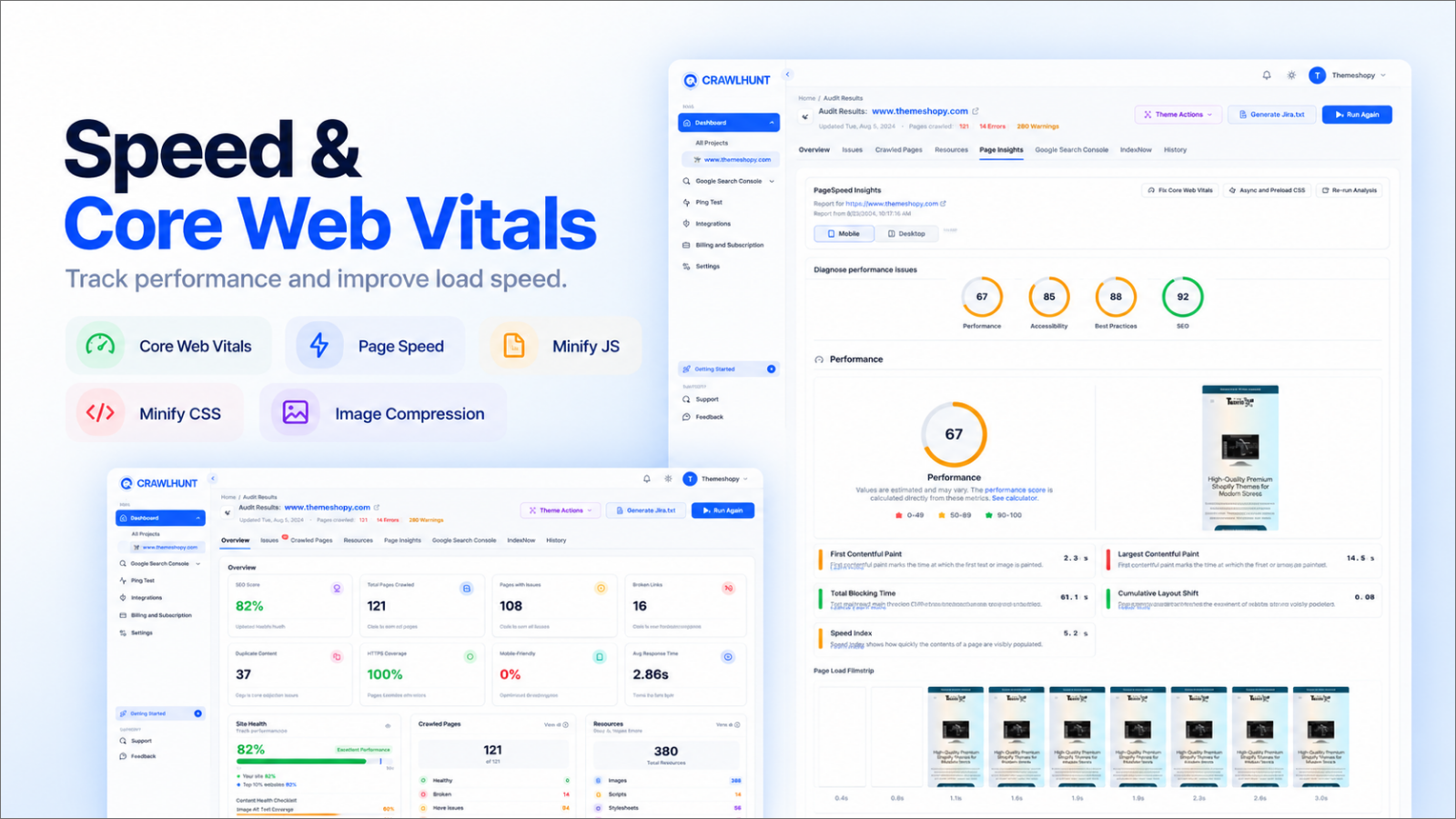
- PageSpeed Insights analysis
- Core Web Vitals monitoring
- Website performance recommendations
- SEO health and crawl monitoring
Google account authorization is required for connected Search Console features.
AI Blog SEO & Internal Linking
Optimize your WordPress posts, pages, and content structure.
- Blog SEO auditing
- AI-assisted content optimization recommendations
- Meta title and description suggestions
- Heading and content structure analysis
- Internal linking opportunities
- Broken internal link detection
- Blog performance and SEO health insights
Learn more about the CrawlHunt Blog SEO Manager.
Some advanced blog management capabilities depend on the connected platform.
Automated Crawling & SEO Reports
Stay informed about your website’s SEO health.
- Automated website crawling
- URL status tracking
- SEO issue detection
- Crawl logs and available history
- Website health reports
- Issue severity and prioritization
- Repeatable SEO audits
- Optimization progress monitoring
Crawl limits and monitoring features depend on your CrawlHunt plan.
Why Choose Crawl Hunt?
Find Issues. Fix Smarter.
Crawl Hunt is designed for website owners who want to do more than receive another SEO report.
✔ AI-Assisted Fixes: Get help resolving eligible SEO issues instead of only identifying them.
✔ All-in-One SEO Insights: Analyze technical SEO, metadata, images, broken links, and website health in one place.
✔ SEO + AEO + GEO Readiness: Understand how your website follows best practices for traditional and AI-powered search.
✔ Actionable Recommendations: Know what needs attention and what you can do next.
✔ Built for WordPress: Connect your existing WordPress website through a dedicated plugin.
✔ Continuous Improvement: Run new audits, review fixes, and track ongoing optimization progress.
Get Started in 3 Simple Steps
1. Install Crawl Hunt
Install and activate the plugin on your WordPress website.
2. Connect Your Account
Click Connect Crawl Hunt in the WordPress admin area and securely authorize your CrawlHunt account.
3. Scan, Optimize & Monitor
Run an SEO audit, review detected issues, apply supported AI-assisted fixes, and continue monitoring your website’s SEO health.
Need help getting started? Follow our guide on how to perform an SEO audit.
Who Is Crawl Hunt For?
Crawl Hunt is suitable for:
- WordPress website owners
- Bloggers and content creators
- SEO professionals and consultants
- Digital marketing agencies
- Small and growing businesses
- Ecommerce website owners
- Website developers and administrators
Whether you’re managing a business website, blog, or growing content library, Crawl Hunt helps simplify SEO auditing and optimization.
Free & Paid Plans
Crawl Hunt offers a free plan with usage limits and optional paid subscriptions.
Advanced features, AI usage, crawling limits, and monitoring capabilities depend on your selected plan.
Visit CrawlHunt to view available features and subscription options.
External Service – CrawlHunt
This plugin connects your WordPress website to the external CrawlHunt service for SEO auditing, website crawling, AI-assisted recommendations, reporting, and supported optimization features.
Connection and Consent
The plugin requires your explicit action to connect to CrawlHunt. After installation, click Connect Crawl Hunt to authorize the connection. Site data is not sent to the CrawlHunt service through the account connection workflow before you opt in.
Data Sent to CrawlHunt
Depending on the features used, data transmitted to the service may include:
- WordPress website URL
- Account authentication or authorization token
- Dashboard requests initiated by the user
- Website URLs and crawl information
- SEO metadata and publicly accessible page content used for analysis
- Requested optimization details and supported updates
- Crawl results and related diagnostic information
The CrawlHunt service processes this information to provide the requested SEO features.
Service Provider: CrawlHunt
Terms of Use: CrawlHunt Terms and Conditions
Privacy Policy: CrawlHunt Privacy Policy
SEO Resources
Start Optimizing Your WordPress Website
Stop just finding SEO issues. Start fixing them with Crawl Hunt.
Run smarter SEO audits, discover optimization opportunities, and simplify website SEO with AI-powered assistance.
Installation
- Go to Plugins > Add New in your WordPress admin panel and search for “Crawl Hunt”, or upload the plugin ZIP file via Plugins > Add New > Upload Plugin.
- Click Install Now and then Activate the plugin.
- A new Crawl Hunt menu item will appear in your WordPress sidebar — click it to open the plugin home screen.
- Click the Connect button. A popup will open taking you to the Crawl Hunt website. If you do not have an account, create a free one at https://www.crawlhunt.com.
- Sign in to your Crawl Hunt account. The popup will close automatically and your WordPress site will be connected.
- Return to the Crawl Hunt plugin in WordPress — the status banner will now show Connected.
- Click Open Crawl Hunt Application to open the Crawl Hunt dashboard in a new tab.
- In the Crawl Hunt dashboard, go to Projects and click Run Audit to start your first SEO crawl of your WordPress site.
- Once the crawl completes, navigate to the Issues tab to review all detected SEO problems grouped by type and priority.
- Use the AI Fix or Edit actions on each issue to apply changes — updates are written back to your WordPress site automatically through the plugin.
FAQ
Do I need to connect my Crawl Hunt account?
Yes. Click “Connect” in the plugin interface to authorize the plugin to access your account.
How do I integrate with external crawlers?
You can use the REST API endpoint at /wp-json/crawl-hunt/v1/log to send crawl data. Include your API key in the X-API-Key header if configured.
Does this plugin load external code?
No. All scripts and styles are bundled with the plugin. The external Crawl Hunt service is contacted only after you connect your account.
Screenshots


Changelog
1.0.12
- Improved: New plugin description and updated screenshots on WordPress.org covering SEO audits, technical SEO tools, on-page and bulk AI fixes, Core Web Vitals, and Search Console indexing.
1.0.11
- Added: The plugin now tells Crawl Hunt when it is disconnected or uninstalled, so your account’s install history stays accurate. This is a short, best-effort notice that never blocks disconnecting or uninstalling.
- Improved: Uninstalling the plugin now also removes the stored Crawl Hunt connection token from your site.
- Improved: Theme asset scans now report whether each JS/CSS file is currently deferred.
1.0.10
- Added: New Theme Fix — “Disallow Files” lets you block selected file types (e.g. feeds) from being crawled by adding matching Disallow rules to your site’s live robots.txt.
- Added: New Theme Fix — Blog Image Dimensions scans published posts for
<img>tags missing explicit width/height, and can apply fixes in bulk to reduce Cumulative Layout Shift (CLS), with the ability to revert to the original content. - Added: IndexNow key file hosting — the plugin can now write and remove the IndexNow verification key file at your site root as part of the IndexNow integration.
- Improved: Enqueued stylesheets are now actually rewritten into non-blocking preload tags (with a
<noscript>fallback) instead of being left untouched — previously this filter was a compliance-only no-op. - Improved: Dashboard and Home page redesigned with a refreshed visual style, including a personalized “Good morning, {site name}” welcome greeting.
1.0.9
- Improved: Dashboard primary stats (SEO Score, Total Pages, Pages with Issues, Broken Links) now animate with a count-up effect when the page loads.
- Improved: Core Web Vitals bars and metric tiles are now color-coded green / amber / red using official Google thresholds (LCP, FCP, TBT, CLS).
- Improved: Thematic Reports cards (Crawlability, HTTPS, Accessibility) now display inline SVG icons above each badge for faster visual scanning.
- Improved: Errors and Warnings section redesigned as metric cards with a colored icon badge, large value, title, and description — replacing the plain number layout.
- Improved: HTTPS Coverage and Mobile-Friendly stat cards now include a progress bar below the value for at-a-glance coverage visibility.
- Improved: All five Lighthouse score cards (Performance, Accessibility, Best Practices, SEO, PWA) now display a tooltip on hover explaining what each score measures.
- Improved: Hover lift animation unified across Dashboard and Home — both now use translateY(-1px).
- Improved: Stat value font sizes normalized — metric-container values reduced from 48 px to 36 px to match the primary stats grid.
- Improved: Status badge colours (2xx / 3xx / 4xx) now match the exact palette used by the Pages by Status Code bar chart.
- Improved: Responsive breakpoints standardised — Pages by Status Code chart, Lighthouse metrics grid, and Thematic Reports grid all now collapse at 1024 px instead of 900 px.
- Improved: Empty state padding increased from 28 px to 32 px across all dashboard sections for better visual breathing room.
1.0.8
- Improved: Connection status banner now displays a pulsing ring animation on the connected indicator dot and applies a green-tinted background with matching border when the site is connected.
- Improved: Home page hero section redesigned with a blue gradient background, animated feature icons, staggered card animations on load, a highlighted final-CTA box, and an animated arrow on CTA buttons.
- Improved: Dashboard stats grid now shows colored left-border accents per stat, alternating table row striping with hover highlight, and Lighthouse score cards color-coded by performance tier.
- Improved: Dashboard loading state replaced with a shimmer skeleton layout matching the page structure.
- Improved: All four empty-state messages in the dashboard upgraded with centered layout, inline SVG icons, and improved typography.
1.0.7
- Fixed: Bulk AI Fix no longer fails with “Page not found for URL” for taxonomy archive pages (WooCommerce product categories, product tags, and any other public custom taxonomy). The plugin now correctly resolves these URLs and applies SEO meta updates via Yoast SEO and Rank Math.
- Improved: Error messages for URLs that cannot be resolved now explain specifically why the fix could not be applied — covering cases such as a different domain, date archives, author archives, search results pages, and deleted or renamed pages — instead of showing the generic “Page not found for URL” error.
1.0.6
- Added: Plugin now redirects to the Crawl Hunt home screen automatically after activation.
- Added: Product tour for first-time users — guides through the Connect button, Open App button, How It Works section, and the final CTA. Accessible at any time via the “Take a tour” link.
- Improved: Connect flow redesigned to match the Shopify integration. Clicking Connect now registers the site with Crawl Hunt, creates or links the user account using the WordPress admin email, and opens a short-lived login link in a popup — no pre-existing crawlhunt.com session required.
- Improved: Popup closes automatically after a successful connection and the status banner refreshes in place without a page reload.
- Improved: “Open Crawl Hunt Application” button now reads “Start Free SEO Scan” when the site is not yet connected.
- Fixed: Tour popover font rendering — added explicit font-smoothing and font-family declarations to counteract driver.js
all: unsetreset. - Fixed: Tour popover was rendering as a small invisible dot because driver.js CSS was not being extracted by wp-scripts. Base styles are now enqueued as a standalone stylesheet.
1.0.5
- Fixed: readme.txt external service links now render as proper anchors on WordPress.org.
- Fixed: Data sent to service list now renders as proper unordered list on WordPress.org.
- Improved: Expanded installation instructions with a full 10-step guide covering connection, audit, and fix workflow.
1.0.4
- Fixed: Replaced manual canonical and schema tag output paths with WordPress built-in canonical/script APIs.
- Fixed: Updated asset loading and path handling for WordPress.org compliance.
1.0.3
- Fixed: Removed Shopify references from the plugin settings page to comply with WordPress.org guidelines.
- Fixed: Removed all locked or restricted built-in features to comply with Guideline 5 (no trialware or feature gating).
1.0.2
- Fixed: Replaced raw inline script output with wp_print_inline_script_tag() in auth.php
- Fixed: Debug log paths now use wp_upload_dir() and WP_CONTENT_DIR instead of hardcoded ABSPATH references
- Fixed: Renamed JavaScript global crawlHuntConfig to crawlHuntSEOAudit for uniqueness
1.0.1
- Fixed: Resolved WordPress database query warnings in auth.php
- Improved: Optimized meta query for OAuth state validation
1.0.0
- Initial release
- Basic crawling log functionality
- Admin dashboard and settings
- REST API integration