

Description
Custom Login URL (CLU) is a lightweight plugin that allows to customize default WP login, registration and password
reminder URLs without modifying any files, simple and swift.
Why would anyone would want to use this plugin? Well, after developing some sites it turned
out that site owners do not want to reveal to customers that they are using WordPress, hence the plugin that will mask
original URLs.
What the plugin can do:
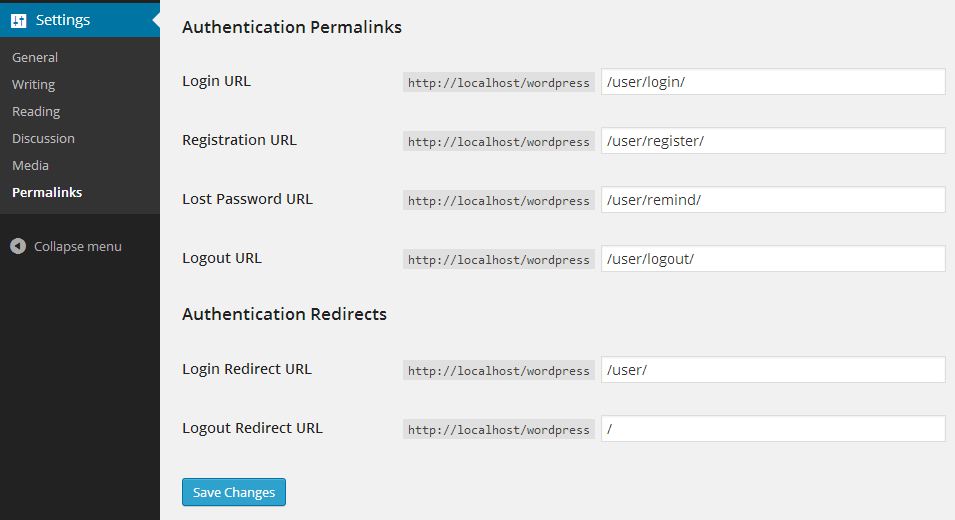
- change /wp-login.php to for example /user/login/
- change /wp-login.php?action=register to for example /user/register/
- change /wp-login.php?action=lostpassword to for example /user/remind/
- change /wp-login.php?action=logout to for example /user/logout/
- you can define your own custom paths for each URL above
- set successfull login and logout redirect URLs
In order to make the plugin work you need to have Permalinks enabled in WP Settings.
Installation
- Upload
custom-login-urlfolder to the/wp-content/plugins/directory - Activate the plugin through the ‘Plugins’ menu in WordPress
- Go to wp-admin / Settings / Permalinks and configure your custom URLs
Screenshots
Changelog
1.0.3
- FIXED: Broken Access Control vulnerability
- FIXED: Warnings in the wp-admin -> Settings -> Options when no custom links are set.
1.0.2
- FIXED: Some ‘notices’ and ‘warnings’
- FIXED: Correct stable tag set.
1.0.1
- FIXED: Automatic Login Rewrite Activation
1.0
- Initial release