

Description
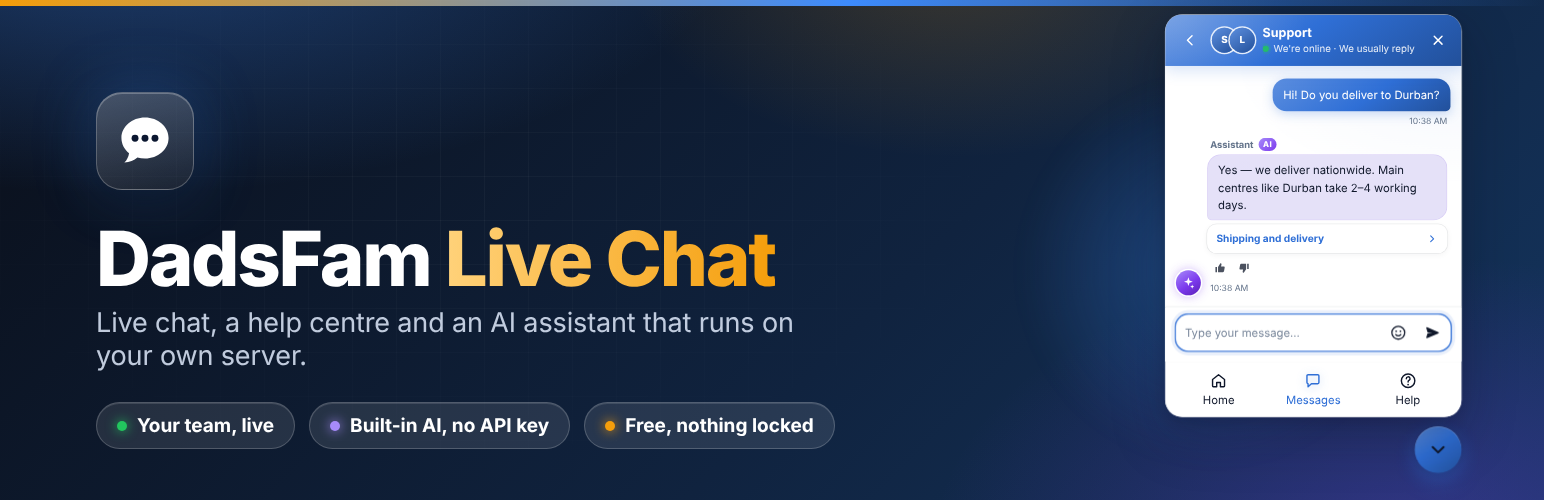
DadsFam Live Chat puts a modern chat window on your site, gives your team a proper Inbox to answer from, and adds a help centre — with an AI assistant built in that looks after visitors whenever nobody is around.
Everything runs on your own WordPress site. There is no account to create, no cloud service, no API key and no monthly fee. Conversations are stored only in your own database, and nothing is sent to an outside service.
The built-in AI assistant
The assistant runs entirely inside your WordPress, on your own server. It does not use OpenAI, ChatGPT, Claude or any other outside service, there is no API key, and nothing about your visitors or their conversations leaves your site. It costs nothing to run.
- It reads your site. Pages, posts, products and help articles — you choose which. It keeps up by itself whenever you save a change.
- It understands questions however they are typed. Spelling mistakes are corrected against the words your own site uses, words are matched by their roots (“delivered”, “delivery”, “deliveries”; “bit” and “bitten”), and it knows everyday words that mean the same thing (courier and delivery, kids and children, Amex and American Express). Chat spelling and South African English are fine too: “hoe much 4 a big dog per nite”, “can I fetch my dogs on Sunday?”. A greeting or a thanks around the question (“Hi there, quick question… Thanks!”) and short questions (“need a referral from my GP?”) are read as the question itself.
- It works things out instead of just matching words. “If I cancel 10 days before, do I get my money back?” finds your rule for 7 to 14 days. “We’ll only get there at 11pm” finds what you say about arriving after 20:00. “My clutch is slipping. How long will you need the car?” finds the clutch row of a long price table and answers with just that row. “What’s your cheapest room?” compares the prices in your table.
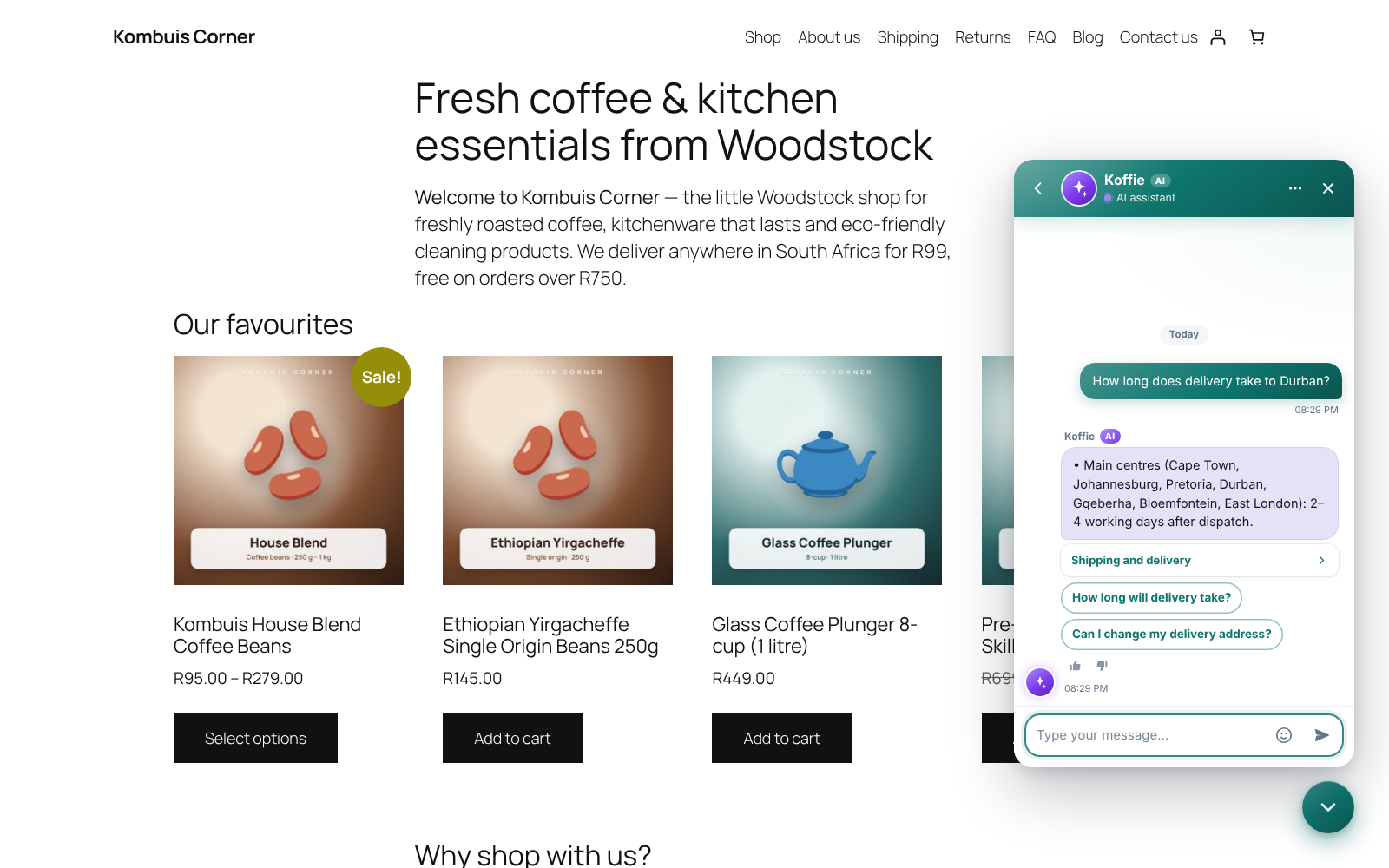
- It answers with the exact sentences that matter, not a whole page, and adds a link to read more. Ask two things at once (“What time is check-in? Is breakfast included?”) and it answers both.
- It never guesses. When it is not sure, it says so, offers a person, or takes the visitor’s email for your team. You choose how sure it must be.
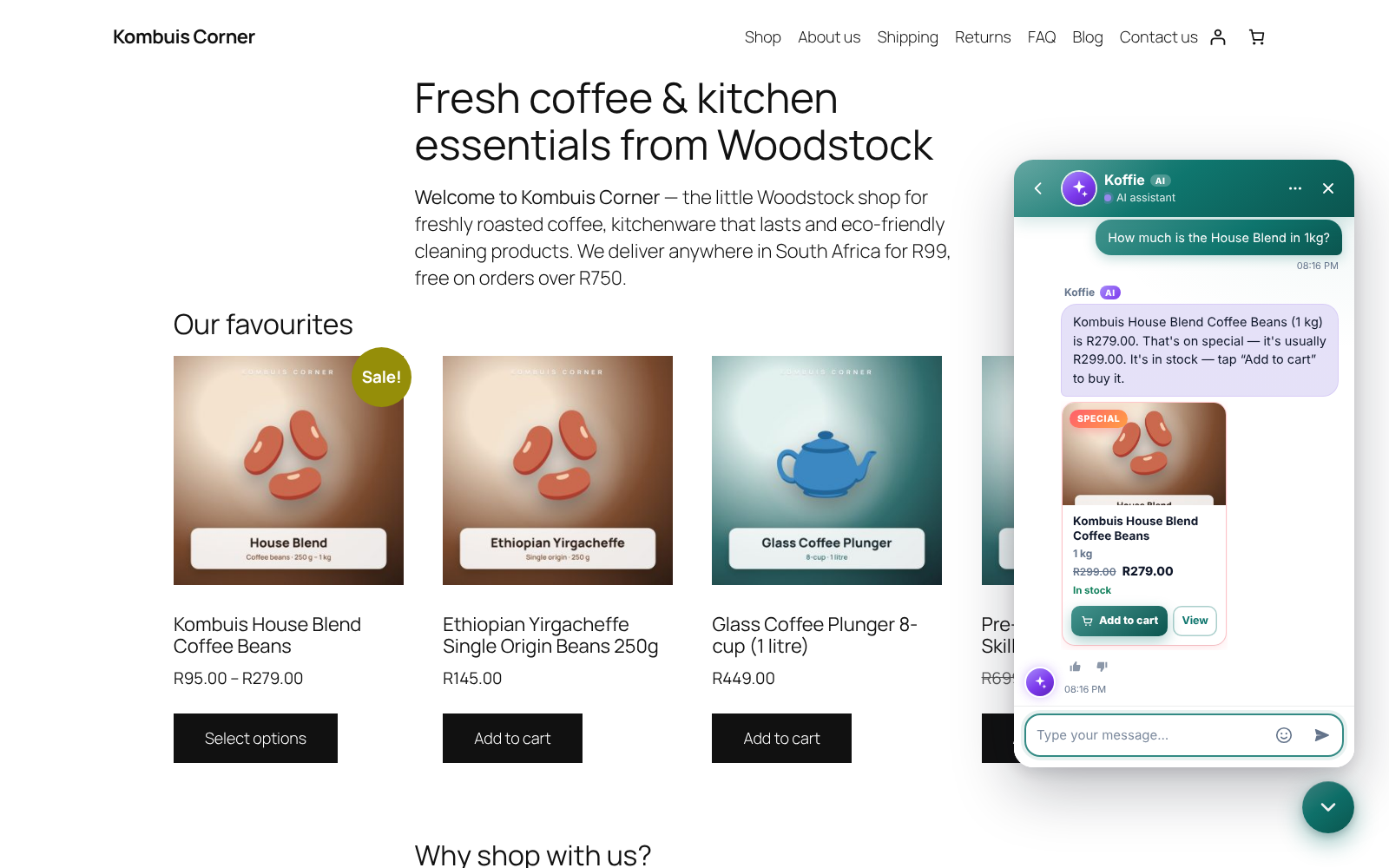
- WooCommerce aware. It answers “do you have…” and “anything under R500?” with product cards showing live prices and stock, finds the exact option asked for (“48 rolls, 350 sheets”) with an Add to cart button, and answers “any specials?” from your live sale prices. Signed-in customers see their own orders; anyone else checks an order safely, as the order number and the email address it was placed with must both match. Sign-in, password and guest-checkout questions are answered from your WooCommerce settings.
- It knows the basics — your opening hours (including “are you open on Saturday?”), phone, email and address, even if they are only written on your pages — and hands over to a person whenever a visitor asks, or seems unhappy.
- It tests and trains itself. After it reads your site, and every week, it asks itself the questions your FAQs, help articles and products answer, checks each reply against what your site says, and repairs what it got wrong. Its report card on the AI Assistant screen shows the score, what it fixed by itself, and what needs you — with the answer ready to save in one click.
- It advises, not just answers. “I mostly come in on weekday mornings, which membership suits me?” picks the cheapest option on your own price list that fits the times, the person and what they want included. “What’s the difference between a standard and a deep clean?” compares the two rows side by side, and “do you come to Gardens?” checks the areas you list.
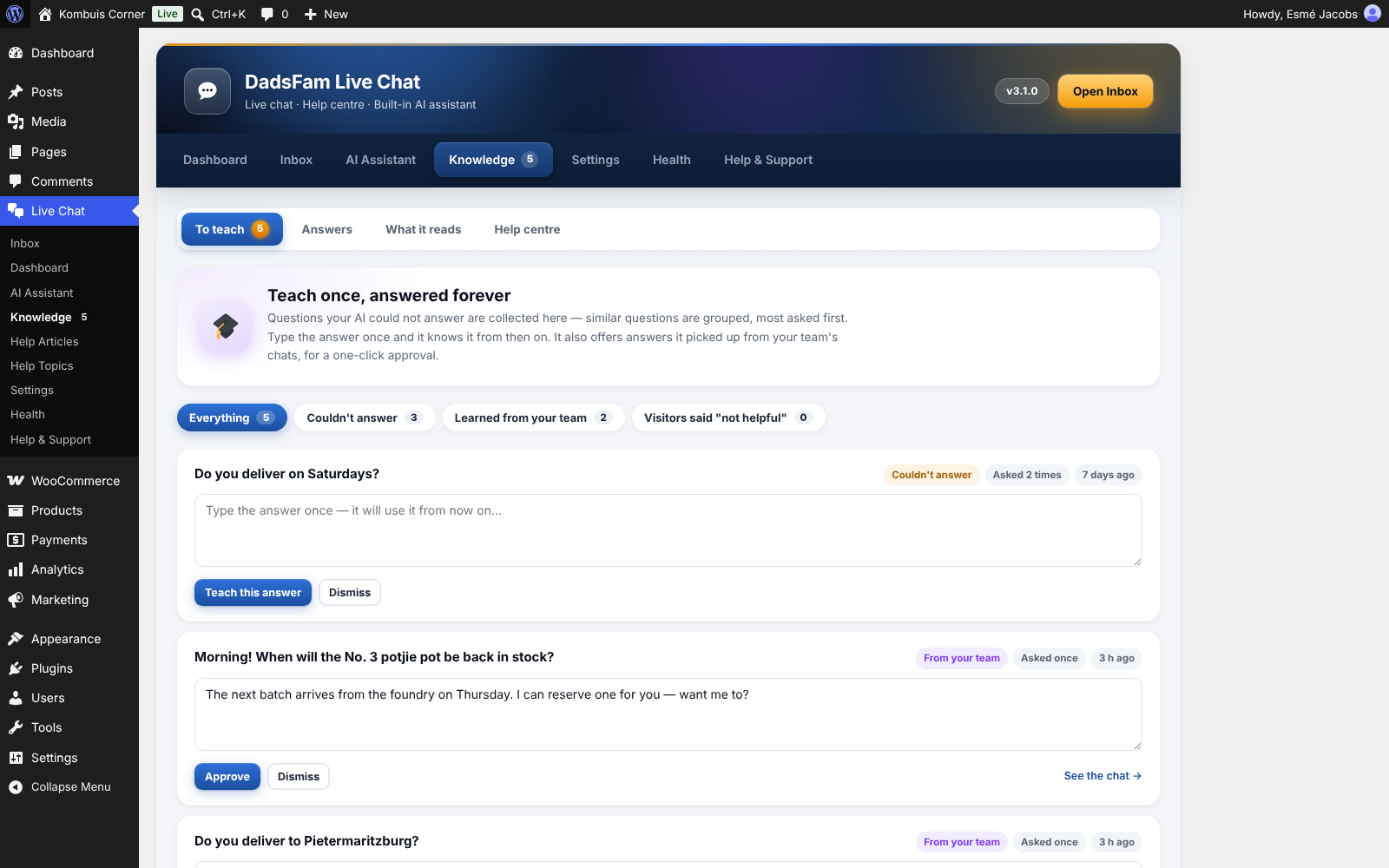
- It learns. Questions it could not answer are collected for you to answer once. Answers your team gives in chats are picked up for your approval (or straight away once two chats get the same answer). Visitors’ 👍 and 👎 push good answers up and poor ones down — and so does what they say: “thanks, perfect!” after an answer counts as a 👍, “that’s not what I asked” as a 👎. When a visitor rewords a question it could not answer and the second try works, it links the two, so the first wording works for the next visitor.
- It shows its working. The AI Assistant screen has a test chat that shows how it understood a question, what it found and how sure it was.
How it works, for the curious: questions are broken into word roots, corrected, and expanded with related words; every passage of your site is ranked the way search engines rank pages, with extra weight where the words asked appear together and where amounts, times and dates fit; and the best-matching sentences are picked out to form the answer. It is not a large language model, so it cannot make things up — every answer comes from your own site or from what you taught it.
You decide when it talks: only when your team is away (the default), first on every chat with people on request, or never — just suggesting replies to your team.
Live chat your visitors will like
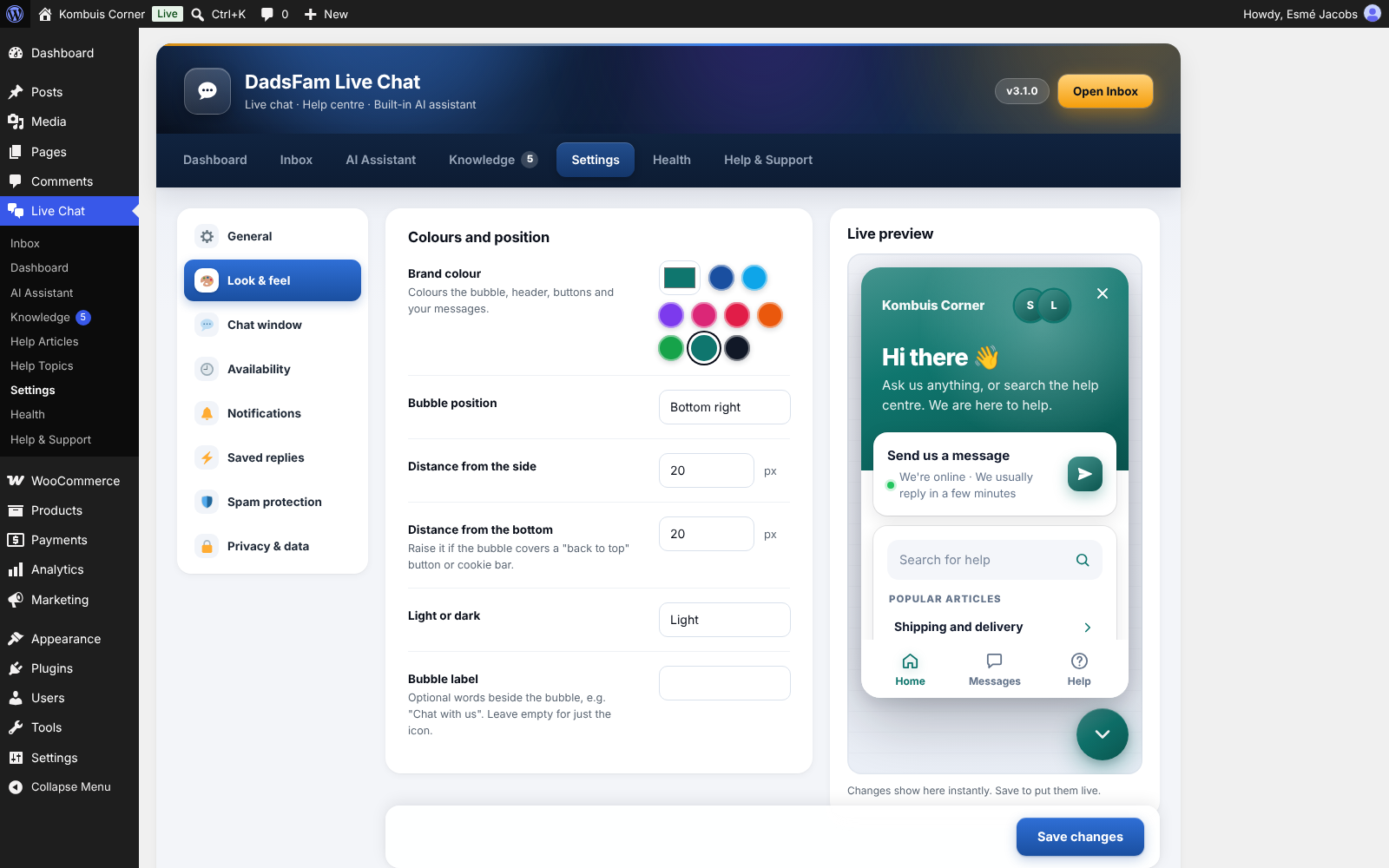
- A clean chat window that matches your brand colour, in light or dark, on desktop and phone.
- Home, Messages and Help tabs: a greeting, who is online, instant answers from your help articles and the conversation itself.
- Quick-reply buttons, “Seen” receipts, typing indicators, emoji, ratings, transcripts by email and a leave-a-message form when nobody is around.
- Chats carry on across pages and tabs, and survive a dropped connection.
- It costs nothing until it is used: the chat bubble loads without a single request to your server.
- Draws itself in its own sealed-off area, so your theme’s styles cannot break it — and it cannot break your theme.
An Inbox your team will actually enjoy
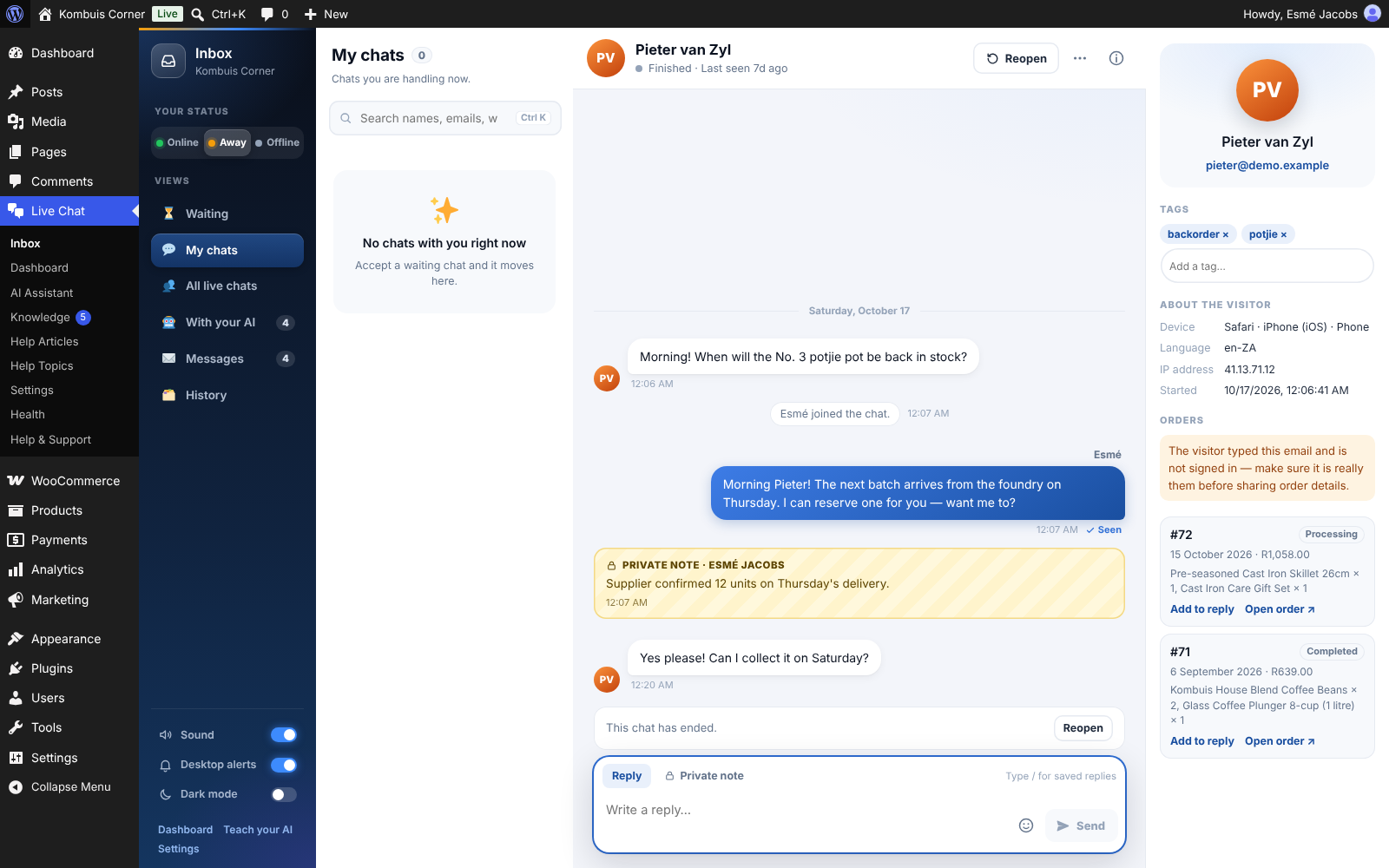
- Waiting, My chats, All live chats, With your AI, Messages and History.
- Reply suggestions from your saved answers, your site and your saved replies, right above the reply box.
- Type / for saved replies. Private notes inside the conversation. Transfers, tags and keyboard shortcuts.
- The visitor’s details beside the chat: the page they are on, the pages they visited, their device, their earlier chats and their WooCommerce orders.
- Take over from the AI assistant at any time, and teach it with one click from any reply you send.
- Sound and desktop alerts, dark mode, and it works properly on a phone.
- A “Chat Agent” role for staff who should answer chats without being able to edit your site.
Messages your customers can follow
- Every chat and message gets its own reference, like AB-261115-K7QZ, made from your site’s initials.
- Your reply emails have a “View and reply” button. It opens that one conversation, so customers can read everything and reply without an account.
- Signed-in customers see every message they have sent, whether you have replied, and the whole conversation, and can send a new one. It works on a page of its own with no setup, or put the
[dadsfam_chat_messages]shortcode on any page. - Customers can mark a message as solved. If they reply later, it opens again with its history.
- Your own contact forms can send their messages straight into the Inbox, with the same reference the customer sees (see the FAQ).
A help centre
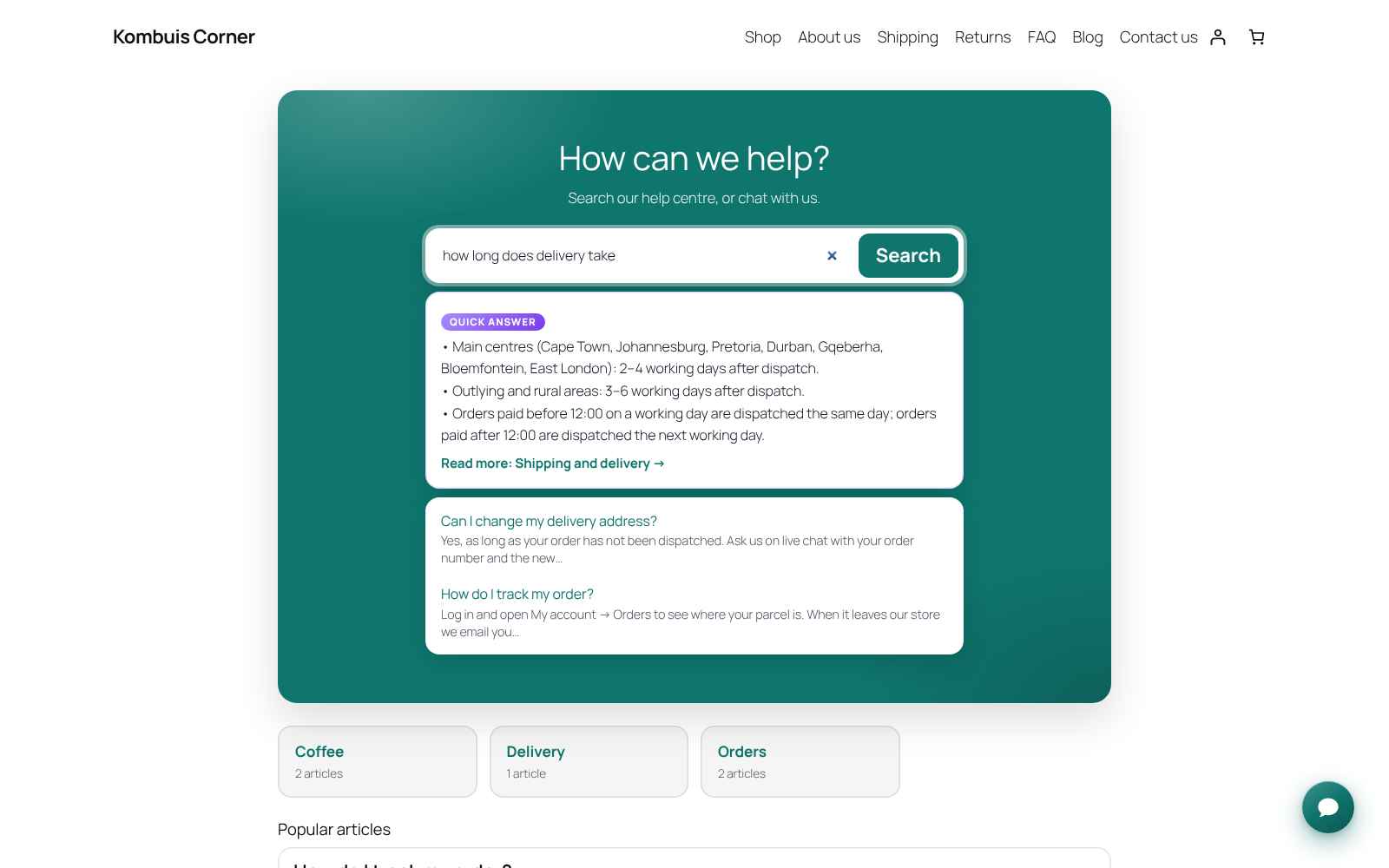
- A help centre at an address you choose (yourdomain.com/help/ by default): a search box that answers as people type, your topics, the most helpful articles and every article, laid out to suit your theme.
- Put the same help centre on any page with the “Help Centre” block or the
[dadsfam_help_center]shortcode. - “Was this helpful?” on every article, related articles, and the same articles inside the chat window.
- A “Chat Button” block and
[dadsfam_chat_button]shortcode. Any link to#chatopens the chat too.
It looks after itself
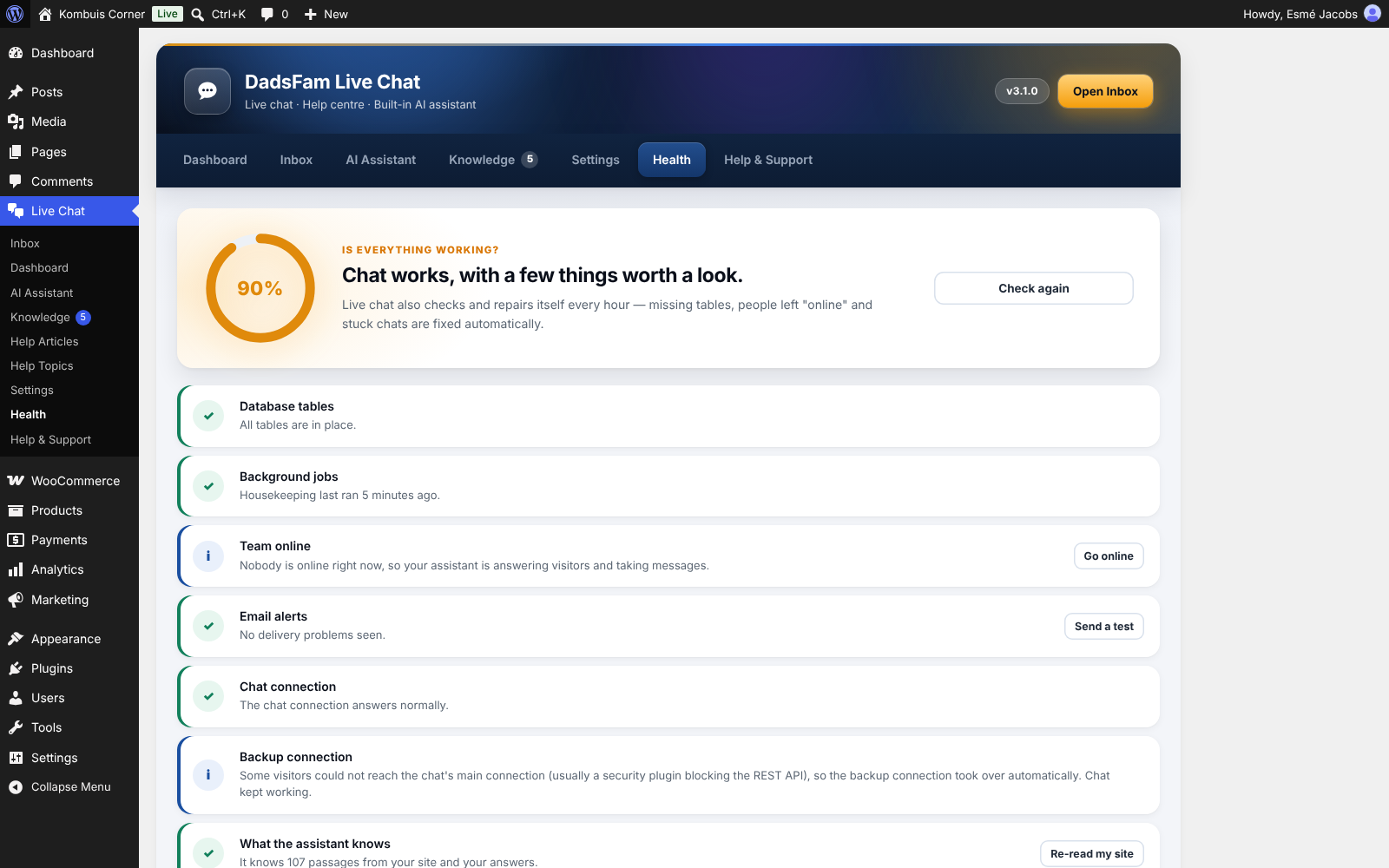
- An hourly check repairs missing database tables, sets forgotten “online” team members to away, tidies stuck chats and keeps the assistant’s knowledge fresh.
- If a security plugin or your host blocks the WordPress REST API, the chat switches to a backup connection by itself.
- The Health screen checks everything in plain English and fixes most problems with one click.
Safe and private
- Bots are stopped with signed tickets, a hidden trap field and rate limits. Blocklists understand IP ranges (IPv4 and IPv6), email domains and words, and throwaway email addresses can be refused.
- Visitors’ IP addresses cannot be faked to get around a block, and you can shorten or not store IP addresses at all.
- Finished chats can be deleted automatically after the number of days you choose.
- Works with WordPress’s own Export and Erase Personal Data tools and suggests privacy-policy wording.
- Works alongside DadsFam AntiSpam when it is installed, so its blocklists and checks apply to chats too.
For developers
- AI tools connected to WordPress through the Abilities API (WordPress 6.9 and later) can read and answer chats, check health and teach the assistant.
- Open the chat from your own code with
DadsFamLiveChat.open(). - Send a message from your own form into the Inbox with
dadsfam_live_chat_open_ticket(). It returns the reference and a private link for your customer. - Show a customer where their messages stand on your own dashboard with
dadsfam_live_chat_customer_messages(): each message’s reference, subject, whether you have replied, and unread replies. - Filter where the widget shows with
dadsfam_live_chat_show_widget.
A word about PRO
Right, let me be straight with you, because I hate being sold to as much as you do.
There is no PRO version of Live Chat. Everything above is free and it stays free. The AI assistant, the Inbox, the help centre, the WooCommerce product answers and order checks, saved replies, transcripts and the rest are not premium features, and if I put them behind a paywall I would be taking the mickey. No trial, no locked buttons, no “upgrade to unlock” anywhere.
I am a dad in Cape Town, and I built this because my own shops needed a chat that did not cost a fortune every month or send my customers’ conversations to somebody else’s server. That is the honest reason. Not “unlock your potential”, not “supercharge your workflow”.
So if it does everything you need, brilliant. Genuinely. Use it, and I hope it saves you a few late-night messages. The rest of what I build is at plugins.dadsfam.co.za.
Either way, thanks for using something I built. — Zak, DadsFam
External services
This plugin does not connect to any service of its own. It has no home-phoning, no analytics and no licence checks. The AI assistant, the chat and the help centre all run on your own WordPress site, and conversations are stored only in your own database.
Two things are worth knowing:
- The Health screen checks that chat can connect by making one request from your site to its own REST API address (a “loopback” request). It is sent to your own domain and nothing is sent anywhere else.
- Team members’ pictures in the Inbox come from WordPress’s own avatar setting, which uses Gravatar by default. You can change or switch this off under Settings → Discussion. The plugin itself sends nothing to Gravatar.
Installation
- In WordPress, go to Plugins → Add New, search for “DadsFam Live Chat”, then Install and Activate. (Or upload the ZIP under Plugins → Add New → Upload Plugin.)
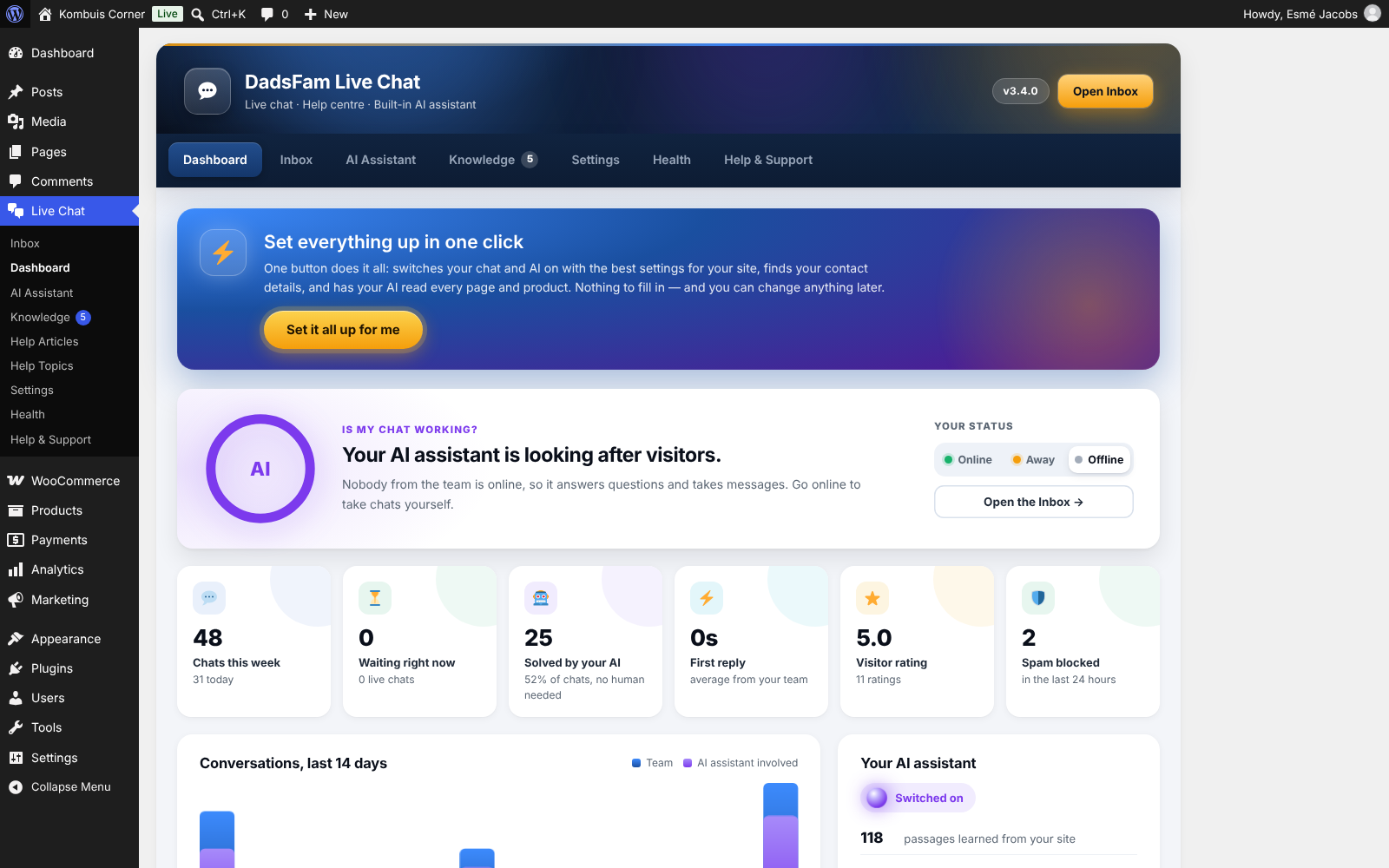
- Click Set it all up for me — on the Plugins screen right after activating, or at the top of Live Chat → Dashboard. One click switches the chat and the AI assistant on with the best settings, finds your contact details on your own pages and has the assistant read your whole site.
- Open the Inbox and switch yourself Online to take chats.
- Under Live Chat → AI Assistant, try the assistant out and tell it anything your site doesn’t say.
- Make it yours under Live Chat → Settings — brand colour, greeting, opening hours and email alerts.
FAQ
Does the AI assistant send my data to OpenAI, ChatGPT or anyone else?
No. The assistant runs inside your own WordPress. It reads your own pages, products and help articles, understands questions with a language engine built into the plugin, and does all its work on your own server. There is no outside AI service, no API key and no fee.
How do I switch the AI assistant off?
Untick “Switch the AI assistant on” under Live Chat → AI Assistant. To keep it off whatever the settings say, add define( 'DADSFAM_LIVE_CHAT_AI_OFF', true ); to wp-config.php. Live chat, the Inbox and the help centre carry on exactly as before.
Is it a real AI?
It is a language-understanding and search engine built for one job: answering questions from your own content. It corrects spelling, understands word forms and related words, ranks every passage of your site and picks out the sentences that answer the question — and it learns from your team and your visitors. It is not a large language model, which is exactly why it never invents answers.
What does it do when it doesn’t know?
It says so honestly. If someone from your team is online it offers to bring them in; if not, it takes the visitor’s email so you can reply, and adds the question to Knowledge → To teach so you can answer it once for good.
Do I need WooCommerce?
No. With WooCommerce active the assistant also answers product questions with live prices and stock, and checks order status, and the Inbox shows each visitor’s orders.
Will it slow my site down?
No. The chat script loads after your page has finished, and the bubble is drawn without asking your server anything. The server is only contacted once a visitor opens the chat or already has a conversation going.
Does it work with caching plugins?
Yes. The chat talks to your site through its own connection that tells every page cache, CDN and browser never to cache it. If you change the chat’s settings and do not see the change, clear your page cache once.
My security plugin blocks the REST API. Will chat still work?
Yes. If the REST API is blocked, the chat and the Inbox switch to a backup connection by themselves, and Health tells you it happened.
Who can answer chats?
Administrators, Editors and Shop Managers by default, plus anyone you give the “Chat Agent” role. Choose which roles under Settings → Availability.
Can I change how the help centre looks?
Yes. With a block theme, the help centre and its articles are templates you can edit like any other in Appearance → Editor → Templates (“Help centre” and “Help article”). With a classic theme, the help centre uses your theme’s header and footer; add an archive-dadsfam_help.php template to your theme if you want to replace it. The help centre’s colour follows the chat’s brand colour.
Can I put a chat button on a page?
Yes. Use the “Chat Button” block, the [dadsfam_chat_button text="Chat with us"] shortcode, or link any text or button to #chat.
Can my own contact form send its messages to the Inbox?
Yes. Once your form has checked and saved a message, pass it on:
$ticket = apply_filters( 'dadsfam_live_chat_open_ticket', null, array( 'name' => $name, 'email' => $email, 'subject' => $subject, 'message' => $message, 'source' => 'Contact page' ) );
The filter does nothing when Live Chat is not active, so your form keeps working without it. You get back an array with the message’s reference, a private link for your customer and its status, or a WP_Error (for example when the email address is missing). Optional keys: user_id (so it shows in their list of messages), reference (keep the reference your form already gave), topic, details (label => value pairs only your team sees), receipt (email the customer a link to follow it), team_email (where to email your team about it and the customer’s replies, whatever the chat’s own alert settings), notify_team, portal_url and page_url. You can also call dadsfam_live_chat_open_ticket( $args ) directly.
Where do customers see their messages?
The “View and reply” button in your reply emails opens the conversation on a page of its own. To show messages inside your theme instead, add the [dadsfam_chat_messages] shortcode to a page (for example “My messages”) and choose that page under Live Chat → Settings → Visitors → Messages. Signed-in customers see all their messages there. Switch the whole feature off on the same card.
What happens to my chats from version 2?
They move across automatically when you update, along with your settings and saved replies. Version 2’s leftover files are removed, and the old tables are only removed once every conversation is confirmed as moved.
Email alerts are not arriving.
Open Live Chat → Health and press “Send a test”. If the test never arrives, your server cannot send email reliably — an SMTP plugin fixes that.
What happens if I delete the plugin?
Your chats, settings, help articles and everything the assistant learned are kept, in case you reinstall — unless you switch on “Delete everything when the plugin is deleted” under Settings → Privacy & data.
Screenshots


Changelog
3.11.1
Sharper answers after 3.11.0, and a customer’s dashboard can show where their messages stand.
- Fixed: a section whose heading asks the very question (“What can you ask the Brain?”) could be pushed down by another page that only had the same words in its title. It comes first again.
- Fixed: the site’s own name no longer counts as the subject of a question (“Who is AdsOff for?” is not about the page called “AdsOff Family”).
- Fixed: a better-looking page no longer replaces a closer answer when it matches less well, so a fair answer is not turned into “I’m not sure”.
- Improved: “a copy of my data”, “delete my data” and “what you know about me” find how to get your own personal information, while “do you sell my data?” still gets your privacy policy.
- New for developers:
dadsfam_live_chat_customer_messages()gives a customer’s messages with where each one stands (waiting for you, replied, closed) and unread replies, so a customer dashboard can say “Support replied”. The messages box can open a message (DadsFamMessages.open()) and tells the page when a reply is read or sent. - Checked by comparing 400 questions on two test sites before and after: nothing else changed.
3.11.0
Messages your customers can follow, and a sharper AI assistant.
- New: every chat and message gets a reference (like AB-261115-K7QZ, from your site’s initials). It shows in the Inbox, in search and in every email.
- New: your reply emails have a “View and reply” button. It opens a private page for that conversation, so customers can read it all and reply without an account. The link works for that one conversation only.
- New: signed-in customers see all their messages, whether you have replied, and the whole conversation, and can send a new message. Use the page the plugin gives you, or the new
[dadsfam_chat_messages]shortcode on a page of your own (Settings → Visitors → Messages). - New: customers can mark a message as solved, and a reply to a closed message opens it again with its history. Your team gets an email when a customer replies.
- New: other plugins and themes can send a form’s message into the Inbox with
dadsfam_live_chat_open_ticket()or thedadsfam_live_chat_open_ticketfilter, keeping their own reference. The Inbox shows where the message came from and any details the form sent.dadsfam_live_chat_customer_messages()tells a customer dashboard which messages are waiting for you and which have a new reply. - Improved: the assistant tells your own contact details apart from someone else’s. “What is your phone number?” or “what is your physical address?” no longer gives the Information Regulator’s details from your privacy page, unless the visitor asks about the regulator.
- Improved: “Where are you based?” uses your business facts (“Made in Cape Town”) when you have not given an address, with how to reach you.
- Improved: the page about what was asked comes first (“what does the cache plugin do?”), an exact version is found (“WordPress 7.1.4”, not 7.1), a “How to…” section answers “how do I…?”, and “a copy of my data” finds how to get your own personal information.
- Improved: tables read cleaner (no more “Details” before every value), and buttons such as “Show street address” are no longer read as content.
- Improved: a message your team has picked up stays open for 14 days after its last message, so the customer’s answer finds it open (an idle live chat still closes after a day).
- Your site’s content is re-read once in the background after updating. In our test set of 40 questions about a real site, the assistant now answers all 40 correctly (3.10.1: 29), and a little faster.
3.10.1
A fix release for the AI assistant: questions about sending your proof of payment get the right answer, and a taught answer keeps every way of asking you give it.
- Fixed: “Where do I send my proof of payment?” and “How do I send proof of payment?” were answered as if the visitor wanted an invoice. They now get your own answer, or the line your checkout gives (“email proof of payment to …”). “Can you send me proof of payment?” still gets the reply about invoices.
- Fixed: an answer with more than 20 ways of asking kept only the first 20 and dropped the rest without saying so. One answer now holds up to 50, the Knowledge screen counts them as you type, and more than 50 is refused with a message instead of being cut short.
- Improved: “POP” is read as proof of payment when it is sent, attached or received (“Who do I send the POP to?”), while “can I pop in?” is still a visit.
- Improved: an answer you taught about invoices (“Can I get a tax invoice?”) now comes before the assistant’s general reply about invoices.
- Your site’s content is re-read once in the background after updating.
3.10.0
A big optimisation release for the AI assistant: the plain questions every visitor asks — “How much do you charge?”, “What are your prices?”, “Any specials?”, “Are you open on weekends?” — are answered straight from your site, and it works out far better what a question really asks.
- New: plain price questions — “How much do you charge?”, “What are your prices?”, “What are your rates?”, “Is it expensive?”, “Do you have a price list?” — are answered with your own price list. When your site lists no prices, the assistant says how your work is priced (for example “every repair is quoted first”) or points to your shop, instead of passing the question on.
- New: the price of a job is told apart from a product. “How much to fix my Ender 3?” gives your repair prices, “what do you charge to look at a printer?” your diagnostic fee, and “how much to clean my carpets?” the carpet row of your price list.
- New: “Any specials?” finds an offer on your own pages (“November special: book a Full Service by 30 November and pay R750 instead of R950”) when nothing is on sale in your shop.
- New: “Why should I choose you?” and “what makes you different?” answer with your “Why us” section, and “what services do you offer?” with what your business does, in its own words.
- Improved: “how long does a repair take?” gives how long the work takes, not how long the warranty lasts; “is there a warranty?” gives your warranty, not what it leaves out; and “what if my printer can’t be fixed?” finds the line for that very case.
- Improved: “are you open on weekends?” gives Saturday and Sunday; “can you come to my house?” finds your on-site or call-out service; “do I need an appointment to drop off?” keeps your “you do not need an appointment”; and “is the honeymoon suite included?” finds the Honeymoon Loft.
- Improved: price rows read naturally (“Diagnostic and quote: R350”, not “…: Price R350”).
- Your site’s content is re-read once in the background after updating.
3.9.0
A big optimisation release for the AI assistant: it reads messages the way people really type them — with typos, greetings, short forms and other words for the same thing — and picks the right line of your price lists, FAQs and team page far more often.
- New: typos are put right before anything else reads the message, using the words on your own site. “Do you offer seadtion?”, “is your packaging reycclable?”, “can I pay by card onilne?” and “do I need an acocunt to order?” are answered exactly as if they were typed correctly. Everyday words your site never uses (“reset”, “chargers”, “losing”) are left alone.
- New: the question inside a friendly message is found. “Hi there, quick question. Do I need a referral from my GP? Thanks!” and “Just wondering, what happens on the day?” get the same answer as the question on its own.
- New: short questions without “do I” or “can I” — “need a referral from my GP?”, “change or cancel my order?” — get your FAQ’s answer, with its yes or no.
- Improved: price tables. “Price to neuter my cat?” gives the cat row, not the rabbit row; “my dog weighs 8 kg, how much to neuter him?” and “to spay a dog under 10 kg?” give the row for that weight; “how much is a consultation?” gives the consultation, not every row that mentions one; and rows with a time in them (“After-hours consultation (weekdays after 18:00…)”) are read properly.
- Improved: an FAQ written as a question and its answer in one block is matched when the visitor uses another word (“guarantee” for “warranty”) and answered with confidence, and a section headed with the very question asked (“Do you offer sedation?”) answers with its whole list.
- Improved: “does the price include the cone?” answers with the line that says what is included, “do I pay extra for the stitches to come out?” with “the stitch removal check is free”, and “do I have to pay a deposit?” with your deposit rule.
- Improved: “who owns the clinic?”, “when did the clinic open?” (from “Dr Priya Naidoo opened … in 2011”) and “which vet does the operations?” find the people on your team page.
- Improved: everyday wording — “can I bring my dog in at night?”, “how do I make an appointment?”, “can I just walk in?”, “how much notice do I need to give to cancel?”, “can I pay off my bill monthly?”, “can my dog eat before his op?”, “can my pet stay overnight?” — and “and the frankincense one, how much is that?” after a list of options gives that option’s price.
- Your site’s content is re-read once in the background after updating.
3.8.0
A major release for the AI assistant: it tests itself on your own site, repairs what it gets wrong and shows you a report card — and it now recommends, compares and checks your service areas like a person would.
- New: self-training. After it reads your site, and every week, the assistant asks itself the questions your FAQs, help articles and products answer, checks every reply against what your site says, and repairs what it got wrong by itself. The new report card on the AI Assistant screen shows its score, what it fixed by itself and what needs you, with a “Teach the answer” button that opens the answer ready to save. Your Dashboard shows the score too.
- New: it recommends. “I mostly come in on weekday mornings, which membership suits me?”, “I’m a student and train in the evenings, what would you recommend?” or “my wife and I want to use the pool, which membership?” pick the cheapest option on your own price list that fits the days and times, the person (students, over 60s, couples) and what they want included.
- New: “What’s the difference between a standard and a deep clean?” answers with both rows of your price table, side by side.
- New: service areas. “Do you come to Gardens?” says yes with your line and its travel fee; “do you clean in Somerset West?” says it isn’t one of your areas and lists the ones you cover.
- Improved: price lists. “How much is membership?” gives every price on the list, “how much is a student membership?” just that row, and “do you do a student discount?” or “any discount for over 60s?” finds their price. “No joining fee until 30 November” is recognised as an offer for “any deals on?”.
- Improved: “When will my order be sent?” gives your dispatch times (“order by 1pm…”), not the delivery times, and “can I pay by card online?” no longer says yes when cards are only taken when collecting.
- Improved: a rule for some comes with the rule for the rest (“classes are included with Anytime Plus… everyone else pays £5”), “what time does the pool close?” gives your hours with your “30 minutes before the club” line, and “is the pool open on 18 November?” says that part is closed then.
- Improved: everyday wording — “I broke my leg, can I pause my membership without paying?”, “I left my water bottle there yesterday”, “a trainer who works with pregnant women”, “can I bring a friend?”, “hw much is pt”, “whatsapp nr?”, “can you come today?”, “can I get the same cleaner every time?”, “can you get rid of mould?”, “do I have to sign a 12 month contract?” and “who owns it?” (from “opened in 2019 by …”).
- Improved: a help article titled with the question (“What happens on installation day?”) answers with its list, and a line that starts “They…” is read with the line before it.
- Your site’s content is re-read once in the background after updating, and the first self-check runs when that is done.
3.7.0
A big step up for the AI assistant: it learns from what visitors say, reads your price lists, size tables and opening hours properly, understands long messages and follow-ups, and compares things side by side.
- New: the assistant learns from every chat by itself. “Thanks, perfect!” after an answer counts as a 👍 and “that’s not what I asked” as a 👎. When a visitor rewords a question it couldn’t answer and the second try works, it links the two words, so the first wording works next time — for products too (after two visitors call your coffee “java”, “java” finds your coffees).
- New: “Are you open in the evening?”, “how late are you open?”, “what time do you close on Saturday?”, “are you open tomorrow?” and “can I pop in after work?” get a straight yes or no with the times, from your hours settings or the opening-hours table on your site. “Do you do lessons in the evenings?” uses your lesson times, not your office hours, and “can I get to my unit at 11pm?” uses your access hours.
- New: “What’s the difference between a basic and a full service?” or “Thorn 29 vs Ridge 29?” answers each one, side by side.
- New: size and price tables are read row by row. “What’s the biggest unit you’ve got?”, “the smallest unit?” and “I’ve got about £100 a month, what’s the biggest unit I can get?” pick the right row (by the monthly price when that is what was asked), “the 45 cm one” finds your 45 cm row, and “cover for about 5k worth of stuff?” finds your £5,000 row.
- New: “What’s your most expensive e-bike?” and “cheapest kids’ helmet?” use your shop categories, so the answer really is a kids’ helmet — and it says when the most expensive one is out of stock.
- New: an offer’s closing date is checked: “if I move in on 1 December, do I still get the half-price month?” gets your “move in by 30 November” line.
- Improved: price lists. “How much is a puncture repair?”, “do you do tubeless setups?” and “what do you charge to fix a puncture?” find the right row (“Puncture repair: R80”) instead of a product kit, “how much to hire a mountain bike for the day?” finds your hire rates, and “do you do van hire?” comes with your prices. A refundable deposit is never given as the price, and an old “Our prices for 2023” post is never used for today’s price.
- Improved: “Where are you?” finds an address written without a street number, the way farms and villages write it (“Foxglove Farm, Lubenham Road, Market Harborough”), and a line such as “Office 8.30am to 5.30pm” is never taken for an address. “Where are you exactly?” works too, and “is there parking nearby?” or “which bus can I catch to get to you?” is answered from your directions.
- Improved: delivery. A town your delivery page lists under a zone (“That includes Stellenbosch, Paarl…”) gets that zone’s price, and a rule for one kind of item (“we can’t courier live plants”, “bags of 15 kg or more”) is only given when the visitor asks about that item. “Do you take Diners Club?” and “Amex?” are answered card by card.
- Improved: long messages. “My son turns 10 and he’s been nagging for a proper mountain bike… I don’t want to spend more than R5000” finds the junior bike that fits the budget, and a story before a question (“I came off on the trail… now my wheel is skew, can you sort that out?”) gets the answer to the question, not the story.
- Improved: corrections and follow-ups: “sorry, I meant the kids’ one”, “I meant for my daughter’s bike”, “and Pietermaritzburg?” after a delivery question, “lekker! and the e-bike?” after a hire price, “cheers mate! and do you do van hire?”, and “Mountain Bikes” tapped from a list of kinds.
- Improved: the right line of the right page. “Can I move in on a Sunday?” finds the line that says both (“there are no move-ins on Sundays”), “which internet provider is the best?” the line that names it, “can I get new seedlings under the guarantee?” your list of what the guarantee doesn’t cover, “when is the next kids class?” your class dates, “who does balayage?” or “who does dry needling?” the people who do it, “do your gift vouchers expire?” your “valid for 3 years” line, and “can my 14-year-old come in on her own?” your rule for under-16s.
- Improved: “Who owns the shop?” names every co-owner on your team list, and “who started it, and since when?” gives the founders and the year.
- Improved: heights, ages and years are matched to your charts and rules: “what size for someone 1.82 m tall?”, “my daughter is 10, which bike?”, “my bike is from 2013, can I still trade it in?”.
- Improved: everyday words: “used bikes” means second-hand, “swop” is swap, “e-bike” and “MTB” are understood, “docs” are documents, “if I fail” finds “If you don’t pass”, UK chat such as “just having a nosey”, “I’ll give you a ring” and “you’ve lost me” is understood, and ordinary English words are never “corrected” into something else (“spend” is not “speed”).
- Improved: “Can I pay the driver cash?”, “we’re a group of 8, any discount on hire?”, “is that included in the hire price?”, “can I give my leftover lessons to my brother?”, “can I use a gift voucher to pay for a consultation?” and “what if the instructor cancels last minute?” each find the right line, and a list of what to bring is given in full.
- Improved: an FAQ’s “Yes.” or “No.” is only repeated when the visitor asked that same question (or one half of it: “can I cancel my order?” for “Can I change or cancel my order?”), so a question put the other way round never gets a misleading “Yes”.
- Improved: holidays. A holiday break says when you open again (“lessons start again on Monday 11 January”), your “Public holidays” line answers “are you open on Heritage Day?”, Good Friday, Easter Monday (Family Day) and the UK bank holidays are known, and a festive table such as “28 to 30 December” or “Friday 25 December to Monday 4 January: closed” is read as dates, so “can I book for 2 January?” says you’re closed then.
- Improved: “Are you hiring?” gives your open positions with their closing dates, and an out-of-stock product gives its back-in-stock date.
- Your site’s content is re-read once in the background after updating.
3.6.0
Sharper answers on dates, sizes, services, delivery days and stock, an honest “I don’t know” for details your site never gives, and quicker replies.
- New: “Are you open on 16 December?” looks for a holiday break on your site that takes that day in and answers “No, we’re closed then” with your own line and the day you open again. On any other date it says which weekday it is and gives that day’s hours, with a note when it is a public holiday.
- New: “I’m between a 34 and a 36”, “do they run small?” and “what size boots if I’m a 9.5?” get your fit advice (“go one size up”) instead of the list of sizes.
- New: “How much is embroidery?” or “how much is screen printing?” is answered from your priced service page, not with products that happen to mention embroidery.
- New: asking to buy a product that is out of stock says so, with the restock date when the product page gives one. A product that needs something first (“we need your vet’s authorisation”) says so before the cart.
- Improved: “Do you deliver on Saturdays?” uses every delivery line on your site, such as your couriers’ weekdays and your own van’s Saturday run, and “weekends?” says yes for Saturdays and no for Sundays.
- Improved: “Can I bring my own jackets for you to embroider?” and “what do you need from us?” are answered by your policy, not a product. A word written in capitals (“SECURITY printed on our jackets”) finds the line that writes it the same way.
- Improved: “Do you have accommodation?” finds your “Stay at…” page, “any Fridays still open in November?” lists the free dates, “can we get married on New Year’s Eve?” finds your closed-over-New-Year line, and “how do we get there from the airport?” gives the route from the airport.
- Improved: everyday chat with a sound or a few extra words around it is understood: “eish ok, that’s all for now thanks”, “huh? I don’t get it”, “hold on, let me ask my mom”, “never mind, I’ll phone you guys”, “who built this chat thing?” and “can I chat to one of your consultants?”.
- Improved: corrections and follow-ups keep the question they belong to: “how much is one lesson?” then “sorry, I meant automatic”, “a code 10 lesson?” then “I meant code 14”, and “the 10-lesson package for manual?” then “and in an automatic?” each give the right price.
- Improved: “Can I pick up my order?” is about collecting, “can I collect my order?” says where, and “can I collect on a Saturday then?” after a delivery question gives your Saturday hours.
- Improved: “I can only drop the car at 9pm” and “is anyone with the dogs at night?” find your after-hours and overnight lines, and “if I bring the car back with half a tank, what’s the charge?” finds your fuel rule.
- Improved: “the last day to order before Christmas” finds your shutdown post, “do you still install in Fourways? I saw a post” goes by your current page rather than the old post, and “Are you hiring?” finds your careers page.
- Improved: “Do you have a WhatsApp number?” on a site without one offers the phone number and email address from your contact page instead of passing the question to your team. A line that says “call the emergency line” comes with the number.
- Improved: the assistant says it doesn’t know rather than guessing when your site never gives the detail asked for: “the waterproof rating in mm”, “how many calories”, or “is it halaal?”.
- Faster: lookups repeated while the assistant works out one reply are reused instead of fetched from the database again.
- Your site is re-read once after the update.
3.5.0
The assistant handles the whole conversation the way a person would: goodbyes, “End chat”, names, thanks, emoji and small talk — and it never passes chit-chat to your team.
- Fixed: “Nope, that’s all”, “no thanks, I’m good” and “that’ll be all, thanks for your help” get a friendly goodbye. Before, some were treated as questions and passed to your team.
- Fixed: typing “End chat”, “close this chat” or “you can end the chat now” ends the chat, just like the End chat button — also after the chat was passed to your team.
- New: “Hi, I’m Sarah” or “my name is John from Durban” gets a hello by name, and the name is saved on the chat for your team. “Hi, I’m Sarah — do you deliver to Durban?” answers the question with “Hi Sarah!”.
- New: “Can you email me this chat?” sends the visitor a copy (when transcripts are on), asking for their email first if needed. “My email is …” updates the address on the chat, and “my number is 082 …” is noted and passed to your team for a call back.
- New: “I have a question”, “one more thing”, “hang on”, “just browsing”, “never mind”, “sorry, my bad”, “this is urgent” and “I’m new here” each get the right short reply. “I don’t understand” and “what do you mean?” get an apology and a fresh try, and “can you repeat that?” repeats the last answer.
- New: emoji are understood: 👍 👌 🙏 as a yes or thanks, 😂 as a laugh, 😢 with concern, and 😡 👎 🙄 as a complaint.
- New: “Do you speak Afrikaans?”, “hoe gaan dit?”, “who made you?”, “what’s the time?”, “what is 2+2?” and off-topic questions such as “who won the rugby?” get a sensible reply instead of going to your team.
- Improved: “Thanks! Do you deliver to Durban?” and “ok cool, what are your hours?” answer the question after the thanks. A plain “Do you deliver?” says yes and lists your delivery options (it could pick an unrelated “Not at the moment” line before).
- Improved: “I’ll take it”, “I’ll order now” and “I’ll take the first one” use the product just shown, never a new search.
- Improved: “What should I feed my 10-week-old lab puppy?” finds the puppy food, “my cat stays inside and is getting chubby” the light and indoor food, and “can you courier a 20 kg bag to Joburg?” or “300 shirts to Joburg?” leads with your own rule for heavy or big orders.
- Improved: “How much discount on 150 golf shirts?” picks the row of your discount table that 150 falls in, “do you deliver to Windhoek?” knows Windhoek is in Namibia, and “the cheapest pair of boots” is a boot, not boot socks. A Pargo or PUDO point is no longer offered as collecting from your shop.
- Improved: “Are you open on the 16th of December?” and “is Saturday 12 December available?” find the line that names that date, or the dates around it. “What’s the corkage?” uses today’s prices, not an old post with last year’s, and “how long have you been around?” finds “In 1996 we…”.
- Improved: FAQs written as bold questions are read one question at a time, so each answer stays with its own question. (Your site is re-read once after the update.)
- Improved: a short message that asks nothing (“test”, “ok cool”, “asdfgh”) is never passed to your team as an unanswered question.
3.4.0
One-click Quick setup, and a sharper AI assistant.
3.3.0
The AI assistant knows the business it works for, explains how ordering works, reads “not”, “except” and “what if…” questions properly, and knows when to pass a question on instead of guessing.
3.2.0
The AI assistant keeps helping after it hands a chat to the team, understands everyday chat (“ok”, “hello?”, “sorry, I meant…”), and walks customers from product to checkout.
3.1.0
The AI assistant now handles real shop conversations from your own WooCommerce data, and visitors can end their chat again.
3.0.0
A complete rebuild.
2.0.4
Mobile polish: the iPhone keyboard no longer hides the message box, pop-ups no longer stack on top of each other, and buttons no longer stay highlighted after a tap.
2.0.3
Fixed: the History button now works on phones.
2.0.2
Fixed: the staff portal now works on iPhone.
2.0.1
Fixed: the chat queue now works on a second device at the same time.
2.0.0
First free release: faster, safer and fixed for mobile.