


Description
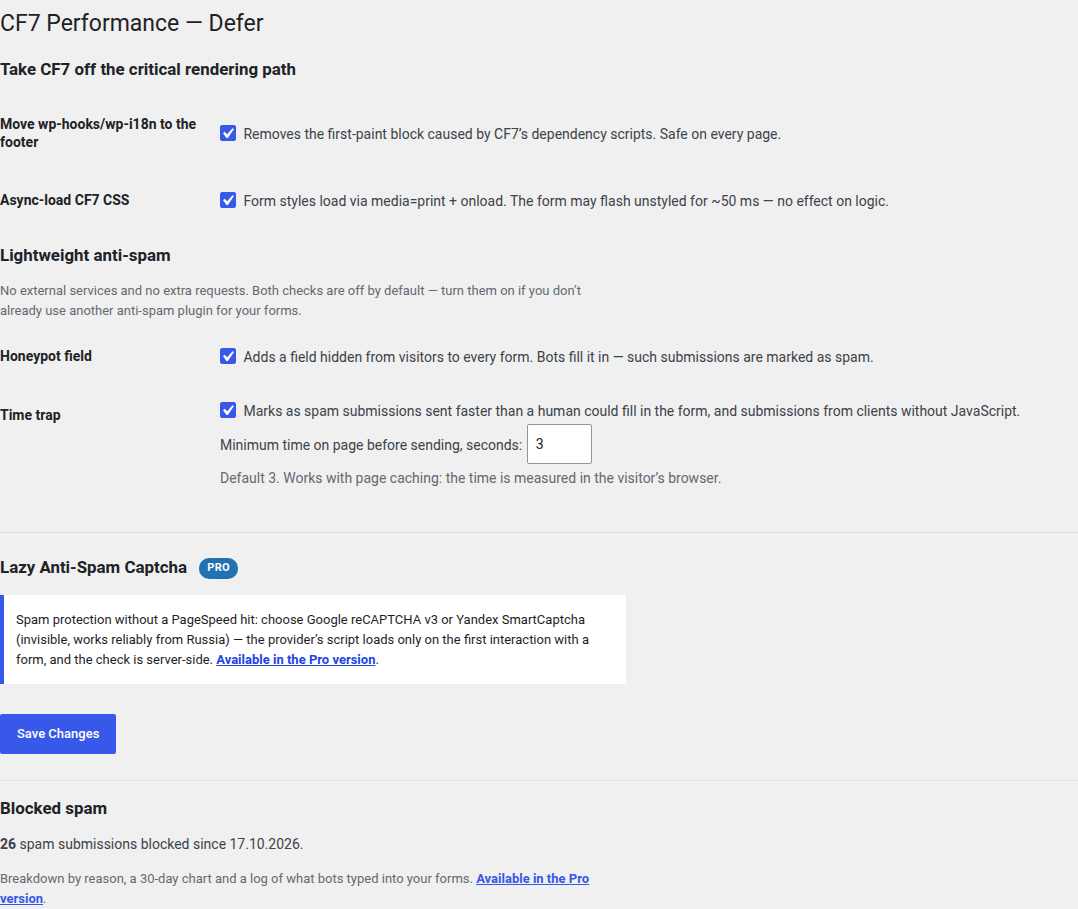
On every page Contact Form 7 loads its dependencies (wp-hooks, wp-i18n) and its CSS into the <head>, blocking first paint. This plugin fixes that:
- Defer CF7 core — moves wp-hooks/wp-i18n to the footer (you cannot
deferthem: an inlinewp.i18n.setLocaleDatablock runs synchronously and would throw “wp is not defined”). CF7’s scripts leave the critical path. - Async CSS — the form stylesheet loads via
media=print+ onload-swap.
Both optimizations are idempotent and safe on every page. Strict dependency: with Contact Form 7 inactive, the plugin does nothing.
Lightweight anti-spam
Two spam checks that need no external service and add no extra requests. Both are off by default — enable them under Contact → Performance if you don’t already run another anti-spam plugin for your forms.
- Honeypot field — a field hidden from visitors is added to every form; bots fill it in and the submission is marked as spam.
- Time trap — submissions sent faster than a human could fill in the form (configurable, 3 seconds by default) or sent without JavaScript are marked as spam. The time is measured in the visitor’s browser, so it works with page caching.
The settings page shows how many spam submissions have been blocked.
A note on jQuery
This plugin does NOT defer jQuery — on purpose. Deferring jQuery is only safe when EVERY jQuery-dependent script on the site is also deferred or in the footer; on an arbitrary site that is not guaranteed and breaks inline scripts in the head.
Pro version
Defer for Contact Form 7 Pro adds lazy-loaded anti-spam captcha — spam protection without a PageSpeed hit. Pick one provider (they are not run at the same time):
- Google reCAPTCHA v3 — score-based. api.js loads only on the first interaction with a form, so it never appears in Lighthouse/PSI. The score check is server-side; a fresh single-use token is fetched for every submission. The badge is hidden with the required Google disclaimer (GDPR-friendly); configurable score threshold and action label.
- Yandex SmartCaptcha — invisible mode, no widget shown unless the visitor looks suspicious. Same lazy-loading approach, binary server-side check. A practical alternative for sites served from Russia, where Google’s services aren’t always reliable.
- Cloudflare Turnstile — privacy-friendly and free; a “Verify you are human” checkbox appears under the form only if Cloudflare needs it. Same lazy-loading approach, binary server-side check. The site does not have to be on Cloudflare.
Switch from another captcha in one click. If the site already uses Contact Form 7’s built-in reCAPTCHA or Turnstile, or the “Captcha by Yandex for Contact Form 7” plugin, the settings page offers to move their keys over. All of them load their script on every page of the site; after the switch the captcha loads only when a visitor starts filling in a form. The keys on CF7’s “Integration” tab are cleared at the same time, leftover [yandex_captcha] tags in forms are hidden (and can be removed with one more click).
Pro also adds detailed spam statistics: a breakdown by reason (honeypot, time trap, captcha), a 30-day chart and a log of what bots typed into your forms. The log stores no IP addresses, cuts every value to 100 characters and keeps entries for 30 days.
The free version stays fully functional on its own.
External services
This plugin can connect to the following third-party services:
- Freemius (free and Pro) — licensing, updates and the optional usage-data opt-in. Nothing is sent unless the site administrator opts in (or activates a Pro license). When enabled, it sends the site URL, WordPress/PHP/plugin versions and the administrator’s name and email. Terms, Privacy Policy.
- Google reCAPTCHA v3 (Pro only, when selected and configured) — the visitor’s browser loads
https://www.google.com/recaptcha/api.json the first interaction with a form; on submit the site sends the captcha token and the visitor’s IP address tohttps://www.google.com/recaptcha/api/siteverify. Terms, Privacy Policy. - Yandex SmartCaptcha (Pro only, when selected and configured) — the visitor’s browser loads
https://smartcaptcha.cloud.yandex.ru/captcha.json the first interaction with a form; on submit the site sends the captcha token and the visitor’s IP address tohttps://smartcaptcha.cloud.yandex.ru/validate. Terms, Data processing notice. - Cloudflare Turnstile (Pro only, when selected and configured) — the visitor’s browser loads
https://challenges.cloudflare.com/turnstile/v0/api.json the first interaction with a form; on submit the site sends the captcha token and the visitor’s IP address tohttps://challenges.cloudflare.com/turnstile/v0/siteverify. Terms, Privacy Policy, Turnstile privacy addendum.
Support
Questions, bug reports or feature requests: the plugin’s support forum on WordPress.org, or https://rowan-web.ru/en/blog/defer-for-contact-form-7/
Installation
- Upload the
defer-for-contact-form-7folder to/wp-content/plugins/, or install the ZIP via Plugins → Add New → Upload. - Activate the plugin. Contact Form 7 must be active.
- Both optimizations are on by default — there is nothing else to configure.
- To toggle them, go to Contact → Performance.
FAQ
Does this work with caching/optimization plugins?
Yes. Version 1.2.0 was tested with WP Rocket, Autoptimize, W3 Total Cache, WP-Optimize and LiteSpeed Cache, including page caching, JS/CSS combining, “defer all JS” and “delay JS execution”. Note that when an optimizer combines CSS into one file, the form stylesheet is loaded the way that optimizer decides, so the async CSS option has no effect there.
The plugin’s own tiny scripts (time trap, Pro captcha loader) are marked so that optimizers don’t delay them — otherwise a visitor who autofills the form and submits right away could be flagged as spam.
Does the plugin send any data anywhere?
The deferring, async CSS, honeypot and time trap features make no external requests. The only external service in the free version is the optional Freemius opt-in — see “External services” below. Blocked-spam counters are stored in your own database and contain no submission content.
Will the honeypot conflict with my other anti-spam plugin?
It can run alongside other checks, but there is no need to double up — that’s why both checks are off by default. Turn them on only if your forms are not protected yet.
Does this support Yandex SmartCaptcha and Cloudflare Turnstile?
Yes, in the Pro version — as alternatives to Google reCAPTCHA v3. Choose the provider under Contact → Performance; only one is active at a time.
I already use Contact Form 7’s built-in reCAPTCHA or Turnstile. Do I have to set everything up again?
No. The free version tells you on its settings page when one of them (or the “Captcha by Yandex for Contact Form 7” plugin) is active and loads its script on every page. The Pro version moves the keys over in one click.
Screenshots
Changelog
1.3.0
- Pro: Cloudflare Turnstile as a third captcha provider, loaded lazily like the others.
- Pro: one-click switch from Contact Form 7’s built-in reCAPTCHA or Turnstile and from the “Captcha by Yandex for Contact Form 7” plugin: keys are moved over and CF7’s own integration is turned off.
- Pro: the form no longer gives up after 10 seconds while the visitor is solving a visible captcha challenge (Yandex SmartCaptcha, Turnstile).
- New: the settings page tells you when another captcha loads its script on every page of the site.
- Leftover
[yandex_captcha]tags are hidden in forms after “Captcha by Yandex” is deactivated. - After an update with notable changes, a short dismissible “Thanks for updating” notice with a link to the release notes appears once — only on the Plugins screen and the plugin’s settings page. It replaces the 1.1.0 announcement that was shown on every admin screen.
1.2.2
- Fix: the plugin’s settings page (Contact → Performance) is shown in the admin menu again with Contact Form 7 6.2 and later, which moved its top-level menu.
- Updated Russian translation.
1.2.1
- Hardening: every database query now goes fully through
$wpdb->prepare(), with table names passed as identifiers (%i). Requires WordPress 6.2 or later. - A one-time request for a review on WordPress.org, shown only on the plugin’s settings page, not earlier than 14 days after installation. Any click on it hides it for good.
1.2.0
- New: honeypot field and time trap — lightweight anti-spam with no external services. Off by default.
- New: blocked-spam counter on the settings page.
- Pro: spam statistics — breakdown by reason, 30-day chart and a log of blocked submissions.
- Fixed: possible fatal error “Cannot redeclare class ComposerAutoloaderInit…” when another plugin bundles an identical Composer autoloader.
- The Pro section of the settings page is now a plain description instead of disabled fields.
- Inline scripts and styles moved to enqueued files.
- Async CSS now rewrites the stylesheet tag with the WordPress HTML API (no duplicate media attribute).
- Pro: the form no longer hangs if the captcha provider never responds (wrong key, blocked script) — after 10 seconds it is submitted and checked on the server.
- Tested with WordPress 7.1 and with WP Rocket, Autoptimize, W3 Total Cache, WP-Optimize and LiteSpeed Cache.
1.1.0
- Pro: added Yandex SmartCaptcha (invisible mode) as an alternative anti-spam provider alongside Google reCAPTCHA v3 — switch between them under Contact → Performance.
- Updated the bundled Freemius SDK to 2.13.4.
1.0.0
- Initial release: CF7 core defer + async CSS.