


Description
DidYouSEO is an SEO plugin built for search engines and AI assistants. It writes the tags Google and social networks read, helps ChatGPT, Copilot and Perplexity find and quote your content, checks your writing as you type, and audits the published page.
Search appearance for every post and page
- SEO title and meta description, with character counters and a live Google preview. Leave them empty and DidYouSEO uses sensible defaults: “Post title – Site name”, and the excerpt or opening text, trimmed to about 155 characters.
- Canonical URL for content that lives at more than one address.
- Hide from search engines (noindex) and nofollow per post or page. Hidden pages are left out of the WordPress sitemap.
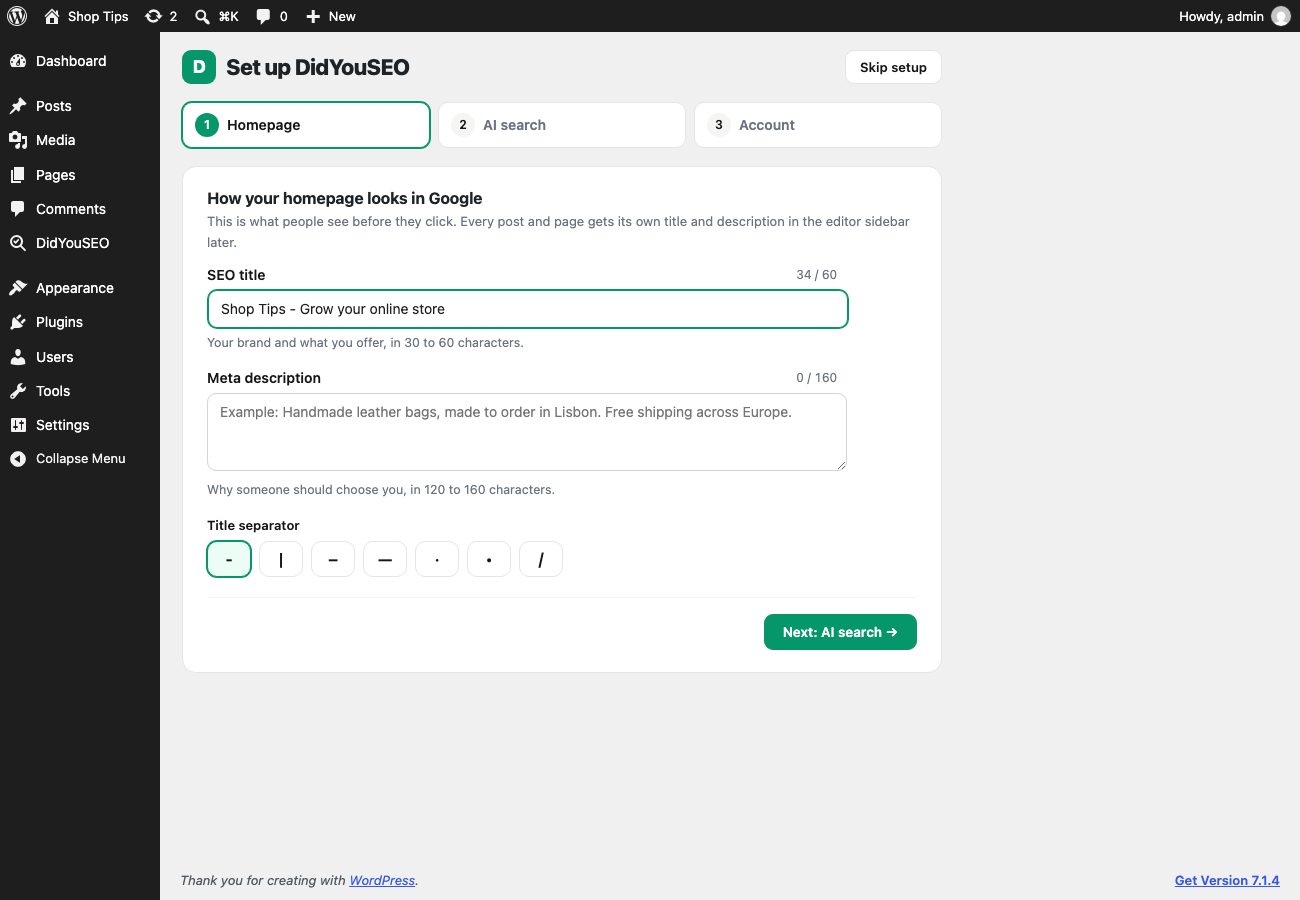
- Homepage title and description, and a title separator, under DidYouSEO → Search appearance.
Tags DidYouSEO adds to your pages
- The SEO title and meta description.
- Canonical and robots rules, through WordPress’s own functions.
- Open Graph and X (Twitter) tags, so shared links show a title, description and the featured image.
- Structured data (JSON-LD): Organization and WebSite for the site, and BlogPosting for each post, with the author, dates and featured image.
- FAQ and HowTo structured data, built from what readers see: an H2 called “FAQ” with questions under it gets FAQ schema automatically, and you pick the section that holds your steps for HowTo schema. AI assistants use this markup to quote your answers and steps.
Faster indexing with IndexNow
Turn on IndexNow and DidYouSEO tells Bing, Copilot, Yandex, Naver and Seznam the moment you publish or update a post, so they can crawl it within minutes instead of days. DidYouSEO creates and serves the key file for you. Hidden and password-protected posts are never sent, and staging sites never send anything.
Choose which AI crawlers can read your site
Allow or block the AI bots one by one, or pick a quick choice: allow all, block AI training but stay in AI answers, or block all. DidYouSEO groups them by what they do (live AI answers, AI search indexes, AI training) and explains what blocking each group costs. Your choices go into the robots.txt WordPress serves. Nothing is blocked until you choose.
See which AI crawlers read your site
The AI search page shows which AI bots visited in the last 30 days (ChatGPT, Claude, Perplexity, training crawlers and more), how often, and which pages they read most. Visits are stored in your own database only: the bot’s name, the page and the time, never an IP address. Turn it off any time.
llms.txt
Turn on a /llms.txt file built from your pages and recent posts, kept up to date as you publish. Hidden and password-protected content is left out. It is off by default: it is cheap to add, but few AI tools are known to read it yet.
Live checks while you write
Set a focus keyword and the editor sidebar checks the SEO title, meta description, URL, introduction, subheadings, image alt text, keyword density, content length, links and readability. A ? next to each check explains why it matters and how to fix it. The checks run in your browser and update as you type, and a Writing score from 0 to 100 shows in the editor toolbar.
Page audits with a DidYouSEO account
Connect a DidYouSEO account (a 7-day free trial, then a paid plan) to audit the published page for 40+ technical issues (speed, structured data, accessibility, broken links and more). The editor shows every problem with its fix, the Posts list gets an SEO Score column, the dashboard shows your site score, and you can get an alert when a score drops.
Content calendar
On the DidYouSEO Growth plan, plan articles in your DidYouSEO content calendar and let AI write the drafts. You review every article there. When you approve it, it arrives in WordPress as a scheduled post, or a draft if you prefer. Nothing is published without your approval.
One SEO plugin at a time
Two SEO plugins on one site print two sets of tags, which confuses search engines. If another SEO plugin is active, DidYouSEO stops printing its tags automatically and tells you. The live checks and audits keep working.
External services
The SEO tags and live checks work without any external service. IndexNow, if you turn it on, uses the IndexNow service. The page audits and the content calendar use the DidYouSEO API (https://didyouseo.com/api/v1), a service run by DidYouSEO. Nothing is sent until you connect an API key in Settings → DidYouSEO.
- When you connect: your API key is checked, and your site’s address and name are registered with your DidYouSEO account.
- When a page is audited (you click “Audit now” or “Audit this page”, or “Audit on publish” is on): the page’s public URL and this site’s webhook address are sent. DidYouSEO then fetches the public page, as a search engine would, and sends the result back to the webhook address. Post content is never sent from your site.
- When you connect, and once after each plugin update: your site’s REST API address and the plugin version are sent, so DidYouSEO knows where to deliver the articles you approve. Disconnecting removes it.
- When you approve an article in your DidYouSEO content calendar: DidYouSEO sends the article (title, text, URL slug, meta description, focus keyword and publish date) to
/wp-json/didyouseo/v1/contenton your site. The plugin accepts it only with a valid signature for your connection, and creates or updates one post. - When you open the Page audit section in the editor: the details of that page’s latest audit are requested once and stored in WordPress. Opening the panel again does not send another request.
- When the dashboard widget or the DidYouSEO Overview page loads: your site’s score is requested, at most once an hour.
IndexNow (off until you turn it on): when you publish or update a post, its public URL, your site’s host name and your IndexNow key are sent to IndexNow (https://api.indexnow.org), which shares them with the participating search engines. Hidden (noindex) and password-protected posts are never sent, and nothing is sent from staging sites or while “Discourage search engines” is on. IndexNow’s terms apply.
The live checks in the editor run in your browser. They do not send your content anywhere.
The service’s Terms of Service and Privacy Policy apply.
Installation
- Install the plugin from Plugins → Add New, or upload the
didyouseofolder to/wp-content/plugins/. - Activate it. SEO titles, descriptions, social tags and structured data start working straight away.
- Open DidYouSEO in the admin menu. The Overview shows what’s set up and what’s left; set your homepage title and description under Search appearance.
- Optional: start a 7-day free trial at didyouseo.com, create an API key under Settings → API Keys, paste it under DidYouSEO → Account, and click Connect to turn on page audits.
FAQ
Do I need a DidYouSEO account?
No, not for the SEO tags, the live checks and the AI search tools. A DidYouSEO account adds page audits, scores in the Posts list and the dashboard widget. New accounts start with a 7-day free trial; after that, audits need a paid plan.
Where do I set the SEO title and meta description?
In the block editor, open the DidYouSEO sidebar (the score button at the top right) and use Search appearance.
Can I use DidYouSEO with another SEO plugin?
Use one SEO plugin at a time. If another SEO plugin is active, DidYouSEO stops printing its tags automatically, so your pages never get duplicates. You can change this under Settings → DidYouSEO → Print SEO tags.
Does auditing use up my plan?
Each audit is one API request. The Starter plan and the trial allow 500 requests a day, and the dashboard widget caches its score for an hour so it doesn’t use them up.
Where is my API key stored?
In your WordPress database (the wp_options table). It is never shown in the settings page after saving, and Disconnect deletes it.
How do scores get back into WordPress?
When an audit finishes, DidYouSEO sends the result to /wp-json/didyouseo/v1/webhook on your site. Each delivery is signed with a secret unique to your API key, and the plugin rejects anything without a valid signature.
Can I test on a local site?
Yes. DidYouSEO needs to reach your pages for audits, so expose your local site with a tunnel (for example ngrok) and enter its address under Public URL (local development only).
What happens when I delete the plugin?
Its settings, SEO fields, stored scores and scheduled tasks are removed. Posts it created stay. Your DidYouSEO account and its data are not affected.
Screenshots


Changelog
1.5.1
- Changed: DidYouSEO accounts now start with a 7-day free trial instead of a free plan. Page audits need a trial or a paid plan; the SEO tags, live writing checks and AI search tools still need no account.
1.5.0
- New: two-minute setup for new sites: your homepage in Google, AI search, and an optional free account.
- New: see which AI crawlers read your site, how often, and which pages they read most. Stored in your own database, no IP addresses.
- New: llms.txt built from your pages and recent posts, kept up to date. Off by default.
- New: plugin name “DidYouSEO – SEO & AI Visibility”.
- Improved: after a week of use, DidYouSEO may ask once for a review. One click hides it.
1.4.0
- New: DidYouSEO has its own menu, with Overview, Search appearance, AI search and Account pages. The Overview shows a setup checklist and your site score. Old Settings → DidYouSEO links still work.
- New: redesigned settings with clearer sections, switches and one Save button per page.
- New: IndexNow. Tell Bing, Copilot, Yandex, Naver and Seznam about new and updated posts within minutes. Off until you turn it on.
- New: AI crawler controls. Allow or block AI answer, AI search and AI training bots in robots.txt, one by one or with a quick choice.
- New: FAQ and HowTo structured data from your post’s FAQ section and steps, with a Structured data section in the editor sidebar.
1.3.0
- New: SEO title, meta description, canonical URL, noindex and nofollow for every post and page, with a live Google preview and character counters.
- New: DidYouSEO now prints the SEO title, meta description, Open Graph and X (Twitter) tags, and structured data (Organization, WebSite, BlogPosting).
- New: homepage title and description, and a title separator, in Settings → DidYouSEO.
- New: hidden (noindex) pages are left out of the WordPress sitemap.
- New: a “?” next to every live check explains why it matters and how to fix it.
- Changed: DidYouSEO uses only its own fields. If another SEO plugin is active, DidYouSEO stops printing tags to prevent duplicates.
1.2.0
- New: Settings and Content Calendar links on the Plugins screen.
- New: receives articles you approve in the DidYouSEO content calendar and schedules them as posts.
1.1.0
- New: live on-page SEO checks in the block editor, with a focus keyword, a Writing score and a Google search preview.
- New: the editor sidebar lists every problem from the page’s DidYouSEO audit, with how to fix it.
1.0.0
- First release.