
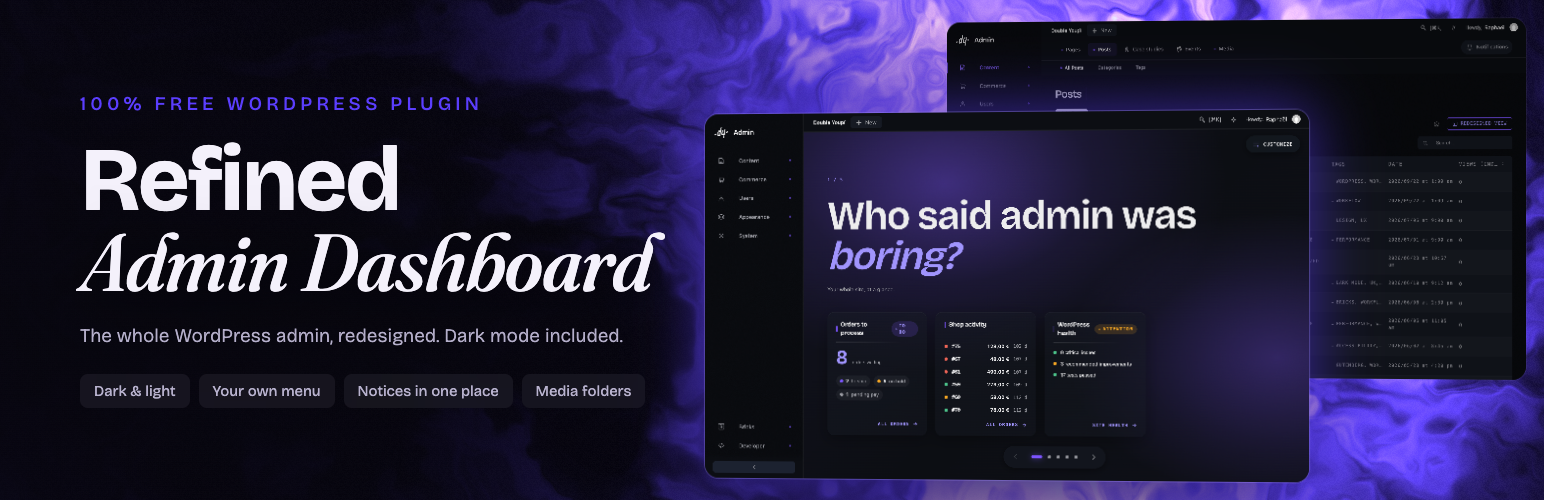

Description
Double Youpï Refined Admin Dashboard (RAD) is a free WordPress plugin, with no Pro version, that redraws the whole admin in dark or light using WordPress’s own components, so your other plugins keep working. It includes Refined Media Library (RML), which adds folders and collections to the media library.
You get a menu you can reorder, every notice in one place, a dashboard per role and a media library with folders. Deactivating it brings the admin back as it was.
The admin is where you spend your days: a sidebar that every plugin adds a line to, a dashboard full of widgets nobody reads. It might as well be pleasant.
The 4-minute film, shot on the real interface:
A dark theme that actually arrives dark
- Dark by default, light on demand, switched from the admin bar. Your choice is remembered and applied before the first paint, so you never see the old interface flash past.
- One design system across every screen. Tables, forms, metaboxes, notices, tabs, buttons and fields all speak the same language.
- Your accent colour, picked once. Text contrast against it is computed for you, so it stays readable whatever you choose.
- Your logo, in the admin and on the login screen.
- Contrast meets WCAG AA in both themes, every control has a name for screen readers, and no text is smaller than 11px.
A sidebar you can finally organise
- Menu entries are grouped into themed lines rather than piled up in one long list.
- The rail is resizable and collapsible, and remembers how you left it.
- A second bar shows the sub-pages and the useful tabs of the current screen, so you stop going back and forth.
- An editor lets you reorder, move, hide, promote or demote any entry, without touching code. Menu entries from newly installed plugins go to the section that fits them best, and are listed in the Developer tab so you can move them.
A dashboard you compose
- Arrange widgets by dragging them, add headings and text, save the layout under a name.
- Assign a default layout per role, and let each person adjust their own.
- Ready-made presets if you would rather not start from a blank page.
Configurations by role: give editors, shop managers or clients their own menu, screens and dashboard, and see the admin as they see it with “View as…”. Export the whole setup and lay it on your next site.
Every notice in one place
Plugins compete for the top of your screen. All those notices are collected into a single counter, opened when you want them. Action feedback still appears immediately, as a brief toast, because that one you asked for.
Reimagined lists and editor
- List tables keep every native action and every action your plugins add, deduplicated and shown on hover instead of stacked under each row.
- The classic post editor gets the same care, canvas included.
A media library with folders
Redrawing the admin and leaving the Media screen alone would have been a strange promise, so it is not the one made here.
- Folders and collections, by drag and drop. A file can sit in one folder and in as many collections as you like.
- A detail panel that opens beside the grid rather than over it, with the fields you actually edit.
- Where a file is used, before you delete it.
- WebP and AVIF generated on upload, and alt text filled from the filename when it is missing.
- Coming from FileBird, Real Media Library, HappyFiles or another folder plugin? Your folders are imported in one click, and nothing is deleted.
- Folders, collections and WebP/AVIF copies are available to headless fronts through WPGraphQL and the REST API.
This is the whole of Double Youpï Refined Media Library, a free plugin of ours that is also published on its own. Same folders, same collections, same settings: if you already run it, activate this one and everything is where you left it. If you only ever wanted the media library, that plugin on its own is the right choice.
Made for sites you hand over
- Keep Double Youpï settings to yourself: other administrators keep the redesigned admin, without its settings.
- Hide the Feedback button and review requests in one click.
- The rail only shows each account the pages it can open.
It steps aside when it should
Some plugins manage their own interface. When one of them owns the screen, this plugin stops theming it rather than fighting for control. Page builders, and anything that ships a full admin of its own, are left alone.
Learn more
Documentation and news: doubleyoupi.com/plugins/refined-admin-dashboard.
Contributing
The code of every release is on GitHub: github.com/double-youpi/refined-admin-dashboard. Found a bug? Open an issue there. Questions and help requests stay on the support forum here.
External services
This plugin sends a report to doubleyoupi.com when you use the “Send feedback” tab, and only then. Nothing is sent while you use the admin, and nothing is sent in the background.
When it happens. Only when you open the feedback tab, write a message and tick the consent box. The dialog shows you the exact report before it leaves.
What is sent. Your message and, if you attached one, your screenshot. The title and address of the admin screen you were on, with any token removed. The plugin or theme that screen belongs to. Version numbers for WordPress, PHP, your theme and this plugin. Your browser’s user agent string and window size. A site identifier that is a truncated one-way hash of your site address, so reports from one install can be grouped without knowing which site it is. If, and only if, you ask for a reply, your email address and your site address.
What is never sent. No posts, pages, media files, users, passwords or database content.
Reports are kept for 24 months, then deleted, screenshot included. You can ask for access, correction or deletion at any time.
Service provider: Double Youpï, https://doubleyoupi.com
Terms of use: https://doubleyoupi.com/terms
Privacy policy: https://doubleyoupi.com/privacy
Installation
- Install it from the Plugins screen, or upload it to
/wp-content/plugins/doubleyoupi-refined-admin-dashboardby hand if that’s your thing. - Activate it.
- Open Double Youpï Refined Admin Dashboard > Settings. Pick your accent colour and your logo if you want them. The rest already works.
FAQ
I build sites for clients. Can I keep the settings to myself?
Yes. In Settings, Team, turn on “Keep Double Youpï settings to myself”. Other administrators keep the redesigned admin, but not its settings, the Feedback button or review requests. The plugin stays listed in Plugins, like any other. To hide only the Feedback button and review requests, use the switch just above it.
Do I also need Double Youpï Refined Media Library?
No. This plugin includes the whole media library: folders, collections, the detail panel, unused media, WebP and AVIF on upload. If both are installed, Refined Media Library steps aside on its own and your folders stay as they are; you can deactivate it.
I don’t like the WordPress 7 admin. Does this change it?
Yes. It redraws every admin screen, in dark or light, and it is tested up to WordPress 7.1. Deactivate it and the admin is back as it was before.
Does it have a dark mode for the whole admin?
Yes, and it is the default. Light is one click away in the admin bar. Your choice is applied before the page is drawn, so the old interface never flashes past.
Can I get rid of admin notices and plugin banners?
They are collected rather than deleted. Every notice from WordPress and your plugins goes into a single counter at the top of the screen, opened when you want it. Feedback on something you just did still shows as a brief toast.
Can I reorder or hide admin menu items without code?
That is one of the main points. An editor lets you reorder entries, move them between themed lines, hide what you never use, and reset everything in one click if you change your mind. Menu entries from newly installed plugins go to the section that fits them best, and are listed in the Developer tab so you can move them.
What is the difference with other admin themes?
It restyles WordPress’s own screens and components instead of drawing a new interface on top of them, so your plugins keep their pages, and deactivating it brings the admin back as it was. It is not a white-label tool: it stays listed in Plugins, where it can be deactivated like any other. It is also young: version 1.0 came out on October 14, 2026.
I already use an admin theme or a menu editor plugin. Should I switch?
It covers some of the same ground: a menu editor, a dark mode, your logo and colour, a dashboard per role. Its approach is to restyle WordPress’s own components rather than draw a new interface, so your plugins keep their screens. It is free, with no Pro version. Try it on its own, with the other plugin deactivated; if it is not for you, deactivating it brings the admin back as it was.
Is it really free? Will there be a Pro version?
It is free and it will stay free. There is no Pro version, nothing held back, no banner asking you to upgrade.
Does it work with my page builder and with WooCommerce?
It was built and run on real sites, mostly with Bricks, and works with Bricks, Elementor, the block editor, WooCommerce, Yoast SEO, Rank Math, ACF and WPForms. Page builders keep their own interface: they are detected and left alone. With WooCommerce active, the dashboard offers widgets for this month’s revenue, orders to process, low stock, best sellers and the last 7 days of sales.
Is the interface translated?
Yes. It ships in English, French, Spanish, German, Italian, Brazilian Portuguese, Hindi and Russian, plus British English.
Does it break my other plugins?
It shouldn’t. The redesign styles WordPress’s native components rather than replacing them, so a plugin that uses standard markup is styled along with everything else. A plugin that ships its own full interface is detected and left alone.
Can I turn it off for some users?
Yes. By default it applies to everyone. You can switch on a mode where each account decides for itself, so one person can go back to the stock admin without affecting anyone else.
Does it slow the admin down?
No. The theme is CSS on native markup, the brand font is self-hosted, and the body text uses the fonts already on your machine. Nothing is fetched from a third party.
Is the code open source?
Yes. It is released under the GPL (version 2 or later), and the code of every release is published on GitHub: github.com/double-youpi/refined-admin-dashboard. Bug reports are welcome there as issues; for help, use the support forum here.
Screenshots


Changelog
1.2.5
- Change: with WooCommerce, the Commerce section opens on what a shop is run with: Orders first, then Products, Customers, Analytics, Marketing and Payments, and “WooCommerce” (home, reports, settings, status) last. Orders and Customers are entries of their own instead of sitting under “WooCommerce”.
- Fix: WooCommerce Analytics and Marketing light their own entry, no longer “WooCommerce”.
1.2.4
- Fix: in the redesigned lists, the Trash shows each item’s title again; every row read “Restore”.
1.2.3
- Change: this readme lists the latest versions only; the complete history is in changelog.txt, in the plugin folder, and on GitHub.
1.2.2
- Fix: WS Form: the form editor’s header (form name, Save, Publish) and its fields panel are no longer covered by the top bars.
1.2.1
- Fix: ACF and Secure Custom Fields: the Save button is back on the screens that edit a post type, a taxonomy or an options page. Only field groups kept it.
1.2.0
- New: “Edit” dashboard widget, the counterpart of Create: a short list of content to open in its editor, with a link to the full list. Show the latest changed entries of a type, its drafts to finish, or the content you choose (for example a client’s Home and Contact pages). Each person only sees what they may edit, and content built with Bricks, Elementor, Divi, Beaver Builder, Brizy or Visual Composer opens in its builder.
- New: the “Editor” and “Minimal” dashboard layouts carry the Edit widget. Minimal is now the pages to edit and a note, without Create.
- New: “Default theme” (Settings, Brand): System, Dark or Light, for the accounts that have not picked a theme. System, the default, follows each person’s computer and changes with it. Everyone can still switch from the top bar, and a one-time hint points to the switch.
- Change: an account that never picked a theme now follows its computer’s light or dark setting instead of always starting dark. Choose “Dark” as the default theme to keep the former behaviour.
- Fix: in the redesigned post editor, a side column taller than the window scrolls on its own; its end no longer waits at the bottom of the page.
The complete history is in changelog.txt, in the plugin folder, and on GitHub: https://github.com/double-youpi/refined-admin-dashboard