


Description
Why sell on Faire?
- Reach new buyers: Boost your business with exposure to over 600,000 verified independent retailers worldwide.
- Get secure, on-time payment—guaranteed: We take care of payment processing, pay you directly, and cover 60-day payment terms for your customers.
- Save time and money: Grow efficiently with easy order management, plus free marketing and customer tools.
Features
With Faire and WooCommerce, you can get more sales at home and abroad. Selling on Faire includes:
- An online store: Get a free e-commerce storefront for your products.
- Easy order fulfillment: Fulfill new orders and create invoices.
- Customer management: Keep track of all your customers in one place.
- Marketing campaigns: Promote your brand with rich content emails.
- Built-in analytics: Get insights about how your business is doing.
- Messaging system: Connect with your retailers through the Faire platform.
Benefits for customers
Two powerful platforms working together to manage your business seamlessly.
- Order syncing Orders received on Faire will be automatically pushed into WooCommerce, so you can manage everything from one place. No more emailing orders by hand.
- Inventory syncing Inventory counts on Faire and WooCommerce will be continuously updated to prevent backorders, eliminate manual data entry and so retailers know when products are out-of-stock.
- Product importing When you create new products on WooCommerce, you will be able to directly import them to Faire without recreating product listings and continuously sync new products to your shop on Faire
- Shipment tracking To send a shipment to Faire, open the order in WooCommerce and, while it is Processing, enter the carrier, shipping cost and tracking code in the “Faire order management” box. The shipment and tracking code then appear in your Faire brand portal. Changing an order’s status in WooCommerce does not update Faire.
Third-Party Service Use Disclosure
This plugin utilizes third-party services as described below. To remain transparent and comply with WordPress guidelines, here is a full disclosure of what data is shared, the purpose of the integration, and links to the Terms of Use and Privacy Policy.
- Service URL:
- production: https://www.faire.com/external-api/v2/
- staging: https://www.staging.faire.dev/external-api/v2/ (sandbox for testing)
- Purpose: This APIs are used to fetch product and order data from Faire’s system, integrating it into your WordPress site.
- Data Sent: Various data may be sent based on the API endpoint called, including, but not limited to, product details, or order information. Requests also carry the plugin version, the product sync mode, and whether the plugin creates WooCommerce products and variations from Faire. After you change settings, and about once a day, they also carry a summary of the plugin’s settings (such as sync modes and schedules, default values and which product details sync). The summary is only codes, on/off values and numbers, with no product, order or customer details, names, URLs or keys.
Installation
Your first step will be to set up your Faire shop—then it takes only 3 minutes to connect your WooCommerce account. From there you’ll follow a few quick steps:
- Download the plugin directly from this page.
- In your WooCommerce website navigate to Plugins -> Add Plugin.
- Select ‘Upload plugin’ and upload the zip file that downloaded from this page.
- Once installed, you will see a screen that says “Plugin Installed!” Activate the plugin.
- On the Plugins page, click Set up Faire and follow the three steps: connect your Faire account, choose your sync defaults, then link your products and finish. Step-by-step directions are in Faire’s Help Center.
If you need help along the way you can reach us at integrations.support@faire.com.
FAQ
Which version of WooCommerce do I need?
You need to have a WooCommerce PHP of 7.4 or higher installed to use this integration.
Do my language and location on WooCommerce need to match what is on Faire?
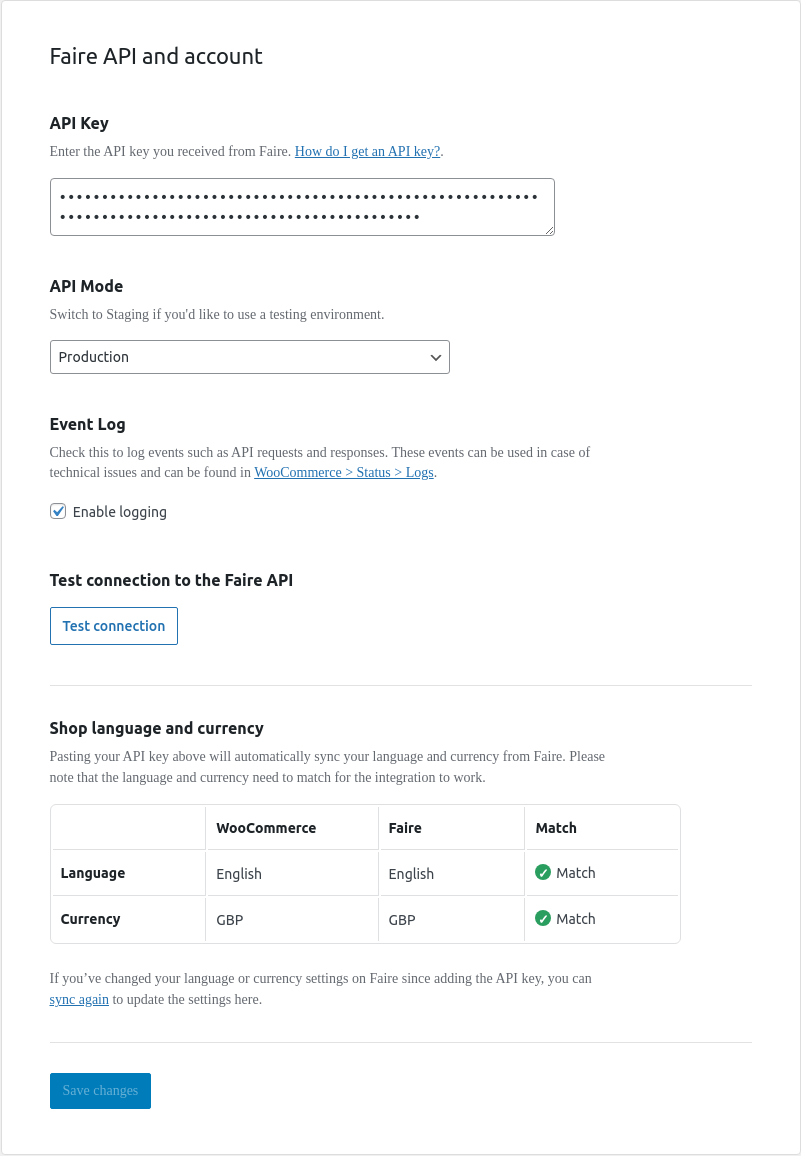
Yes, we require that this information matches between the two platforms in order for the integration to work.
Why is the product syncing section greyed out?
This is likely because your location and currency on WooCommerce and Faire do not match. We require that these match in order for this integration to work.
Why aren’t my orders syncing?
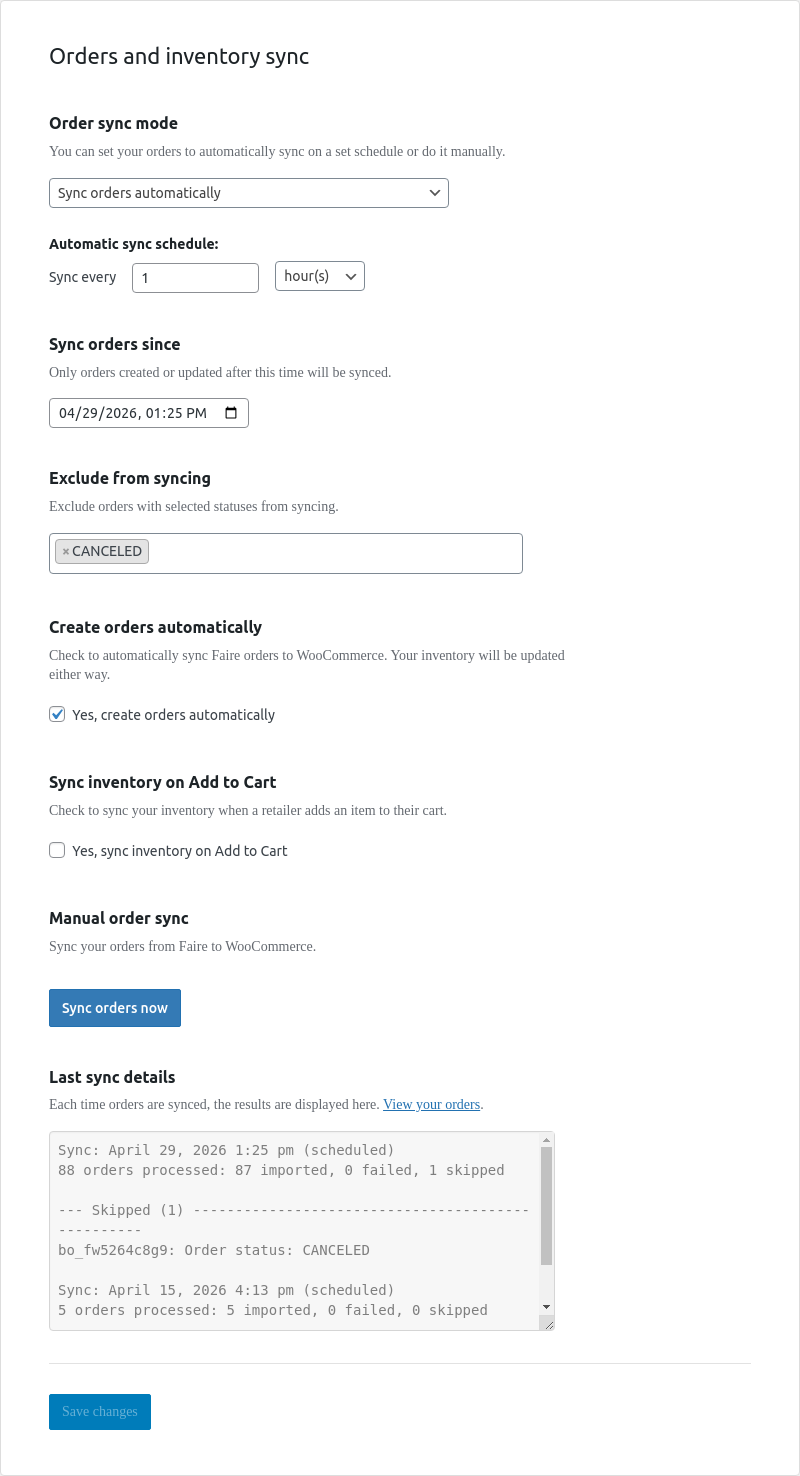
This is likely because products have not been synced or linked.
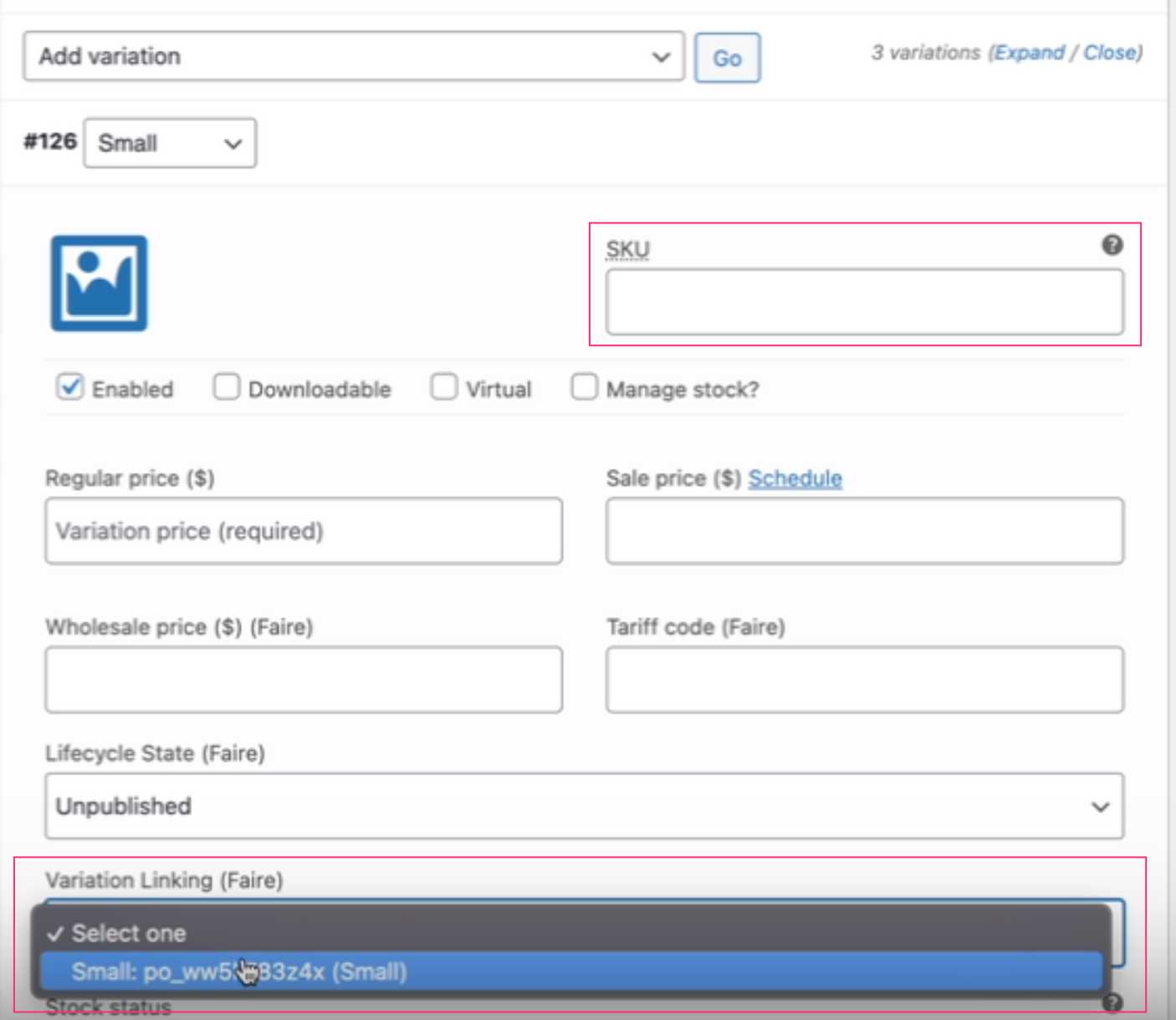
If you’d like to sync new products from WooCommerce to Faire, you can do that by following the steps in the help center. If you have existing products on Faire, you can link the existing products to products in WooCommerce following the steps in the help center.
Why did product or order sync stop?
Scheduled product and order sync run on WP-Cron, which only runs when someone visits your site. On a quiet site, or when WP-Cron is turned off (DISABLE_WP_CRON), syncs run late or not at all, and the plugin shows a warning on its Overview and Preferences pages. Once WP-Cron runs, stock changes are sent to Faire shortly after they happen, if inventory syncing is on. Stores set up with the setup guide send other product changes a few minutes after you save them, and sync products and orders every 30 minutes. Other stores send product changes and import new Faire orders at their next scheduled sync.
To run sync on time, ask your host to set up a server cron job that calls wp-cron.php every 5 minutes, for example:
*/5 * * * * curl -s https://example.com/wp-cron.php?doing_wp_cron > /dev/null 2>&1
or, with WP-CLI:
*/5 * * * * wp cron event run --due-now --path=/path/to/wordpress > /dev/null 2>&1
Can I only sync inventory?
Yes – you can choose to only sync inventory from WooCommerce to Faire.
I don’t want to sync all product details from WooCommerce to Faire (I use different images/prices/etc)
You have the ability to select any details you wouldn’t like to sync over by adding them to the ‘exclude sync fields’ settings on WooCommerce. This will prevent those details from being overwritten on Faire with details from WooCommerce.
Screenshots



Changelog
1.17.0
- Add: A setup guide for new stores. After you activate the plugin, click “Set up Faire” on the Plugins page and follow three steps: connect your Faire account, choose your sync defaults, then link your products and finish. Your catalog is then sent to Faire, product and order sync run every 30 minutes, product edits reach Faire within a few minutes, and order import starts from the moment you finish.
- Add: A new Overview page shows how product and order sync are doing, with alerts for products that failed to send, orders that didn’t fully import, linking issues and stock, and buttons to sync products or orders now.
- Add: A redesigned Preferences page, with switches for inventory syncing, product content syncing and order syncing, a way to pause product sync while you work on your catalog, store-wide default minimum order quantity and case size, and catalog linking tools.
- Add: A Faire Products page where you can review, search, link and unlink your Faire products, and mark the ones you don’t sell on WooCommerce.
- Add: The plugin shows a banner and holds syncing when Faire rejects your API key, when your store’s language or currency doesn’t match your Faire brand, or when scheduled tasks stop running on your site.
- Add: The buttons and help text in the Faire boxes on the WooCommerce order page now show in Danish, Dutch, French, German, Italian, Polish, Portuguese, Spanish and Swedish for admins who use one of those languages in WordPress.
- Tweak: “Link products” now runs in the background and links a product only when its SKU matches exactly one product. Products that share a SKU are held until you fix the SKU or link them by hand.
- Tweak: Stock changes are sent to Faire by a background job, and cancelling a stock-only order on Faire now gives its stock back in WooCommerce.
- Tweak: A blank minimum order quantity or case size on a linked product no longer overwrites the value on Faire.
- Tweak: Large catalogs are sent 100 products at a time, and missing sync schedules are put back on their own.
- Tweak: The plugin log is always on, and the Event Log setting is gone. The Faire environment setting (API Mode) moves to Advanced settings on the Preferences page; leave it on Production.
- Tweak: Dates and times on the plugin’s pages follow each admin’s WordPress language, for example 05.11.2026, 16:12 in German. This needs PHP’s intl extension; without it, the plugin uses your site’s date and time formats as before.
- Tweak: The plugin sends Faire a short summary of its settings (such as sync modes and schedules, default values and which product details sync) with requests it already makes, after you change settings and about once a day. The summary holds no product, order or customer details.
- Fix: Many fixes to product linking, variations and order import, including orders for linked variations, order items with no SKU, duplicate products, repeated failed sends and blank pre-order dates.
1.16.0
- Add: Sends the plugin version and sync settings to Faire with each request, helping Faire support stores on each version.
- Fix: Stops the Faire API token and retailer details from being written to logs.
- Add: Adds permission checks to settings, sync, product and order actions, and to linking CSV downloads.
- Fix: Fixes an issue that saved the same linking error on every product when multiple matches were found.
- Add: Logs product-linking failures to the WooCommerce log.
- Fix: Products that were never linked, were unlinked, or came from a copied site are now matched to their existing Faire product by SKU, instead of being created on Faire a second time. If more than one Faire product matches, the product is not sent, and a notice lists it until you link it.
1.15.0
- Add: New setting “New products arrive on Faire as” (Published or Draft). New products now go to Faire as Published by default, instead of Unpublished.
- Add: “Default” option in a product’s Faire lifecycle state dropdown. It follows the new setting.
- Add: Tracking codes from Faire shipments are added to WooCommerce orders when the WooCommerce Shipment Tracking extension is active.
- Fix: Products linked to Faire were set to Unpublished on Faire at the next sync. They now keep their state on Faire. Products an earlier version unpublished stay unpublished: set them to Published in WooCommerce and sync to put them back on sale.
- Fix: Orders with a Faire brand discount failed to import when some of their products were not in WooCommerce. The discount now shows as a “Faire brand discount” fee, so the order total matches Faire.
- Fix: An order that failed to import left an empty “Pending payment” order behind, and the sync report stayed on “Sync in progress”. The failed order is now listed in the sync report with its error, and the sync finishes.
- Fix: Products with “<” in their name failed to sync.
- Fix: Product descriptions were cut off at a “<” character.
- Fix: Product updates could fail with a “2 hero images” error.
- Fix: Deleting a product linked to Faire ended in a PHP error, even though Faire had deleted it.
- Fix: Staging mode could not connect to Faire.
- Fix: Some failed requests to Faire caused a PHP error instead of being logged.
- Fix: Plugin logs were split across two log files. They are now in one faire-for-woocommerce log.
- Tweak: Products that are not published in WooCommerce (for example drafts or private products) go to Faire as Draft.
- Tweak: If Faire refuses to publish an incomplete product (for example one with no image), it is saved on Faire as Draft, and the product’s Faire sync log shows why.
- Tweak: Duplicating a product in WooCommerce no longer copies its Faire lifecycle state.
- Tweak: WordPress 7.1 and WooCommerce 11.2 compatibility.
1.14.1
- Fix: Inventory sync silently dropped updates. Migrated to Faire’s current inventory endpoint (the old one now returns 410 Gone), and fixed API error responses being logged as “info” so failed requests now surface in the log.
- Fix: Product updates rejected by Faire with “must have options”. Always include each variant’s Faire option ID, recovering a missing ID by matching on SKU.
- Fix: Product image sync failing with a “2 hero images” 400. Tag exactly one hero image in the outgoing payload.
- Tweak: WordPress 7.0 and WooCommerce 10.9 compatibility.
1.14.0
- Add: Per-product “Exclude from Sync (Faire)” option with matching bulk actions and products list filter; excluded products are skipped by every sync path.
- Tweak: Increase product description maximum length from 1000 to 3000 characters to match Faire API spec change.
1.13.0
- Add: VAT/tax from imported orders. Tax line items now created from Faire payout_costs data.
- Add: Order Sync report now shows last 3 syncs instead of only the latest.
- Fix: Missing order meta box when HPOS is enabled.
- Fix: Order deletion not updating import status for HPOS.
- Fix: Duplicate order processing caused by multiple hook registrations.
1.12.0
- Refactor: Order sync reporting.
- Fix: Product lifecycle state translation for unknown status.
1.11.1
- Refactor: Faire Order Import.
- Tweak: Use Woo product regular price in product sync.
1.10.0
- Add: SKU to Unlinked and Tester products name and meta on order import.
- Add: Hide API key in Setting UI.
- Fix: Warning issue when Faire discount code was not set.
- Fix: Setting field descriptions and links.
- Tweak: WordPress 6.9 and WooCommerce 10.4 compatibility.
1.9.2
- Add: Tester products support for order sync.
1.9.1
- Add: User-Agent param to request headers.
1.9.0
- Add: Allow unlinked Faire products to be added to Woo Orders on Order import.
- Add: Automatically attempt to find new product after previous was deleted.
- Add: Make order import async.
- Add: Compatibility with wholesale plugins.
- Add: Updater and transform variant_id data format in meta.
- Fix: Always round up price when 1.25 multiplier is applied.
- Fix: Last time sync.
- Tweak: WooCommerce 10.2 compatibility.
1.8.0
- Add: Automatically unlink products deleted on Faire.
- Fix: Html entity characters in product name.
- Fix: Trim product name and description to max allowed by Faire API.
- Fix: Issue preventing Publishing/Updating product when field contained invalid value.
- Tweak: WP 6.8 compatibility.
- Tweak: WooCommerce 9.8 compatibility.
1.7.8
- Fix: Fix WPML compatibility language locale mismatch,
- Fix: Fix saving pricing policy option.
1.7.7
- Fix: WordPress Security and Coding Standards.
1.7.6
- Fix: WordPress Security and Coding Standards.
- Fix: Fix Uncaught TypeError in Logger.
1.7.5
- Fix: Fix Uncaught TypeError in Logger.
1.7.4
- Add: Allow to set order sync statuses.
- Add: Allow to set order sync since datetime.
- Add: Faire product ID to product edit screen.
- Add: Filter to allow map custom WooCommerce order statuses to Faire order statuses.
- Add: Filter to suppress updating WooCommerce order status.
- Add: Action filter to allow programmatically trigger Sync_Product and Sync_Order methods.
- Fix: Fix inventory sync issue when orders creation setting is disabled.
- Fix: Product sync issue when per_style_minimum_order_quantity is set on Simple product.
1.7.3
- Add: Prevent calculating woo taxes on faire orders.
- Add: Settings logging.
- Add: Improve error messages.
- Change: Geo constrain logic.
1.7.2
- Fix: CSV Download.
1.7.1
- Change: Allow to create (link) products with duplicate SKU by not setting the SKU.
- Add: WordPress 6.5 compatibility.
- Fix: Installation process.
- Fix: Is WooCommerce active for multisite install.
- Fix: Product backorder status.
- Fix: Product attribute mismatch during link and sync process.
- Fix: Summary for product linking.
1.7.0
- Add: High Performance Order Storage compatibility.
- Fix: Faire order import when order contain Discounts.
1.6.3
- Fix: Installation process issues.
1.6.2
- Fix: “Create orders automatically” setting.
1.6.1
- Add: Allow to exclude product stock when syncing.
- Fix: Stock update when stock tracking is not enabled.
- Fix: Measurements for product variations.
1.6.0
- Add: New Admin UI.
1.5.4
- Add: Support for order discounts.
- Fix: Wholesale price when importing linked product.
- Fix: Prevent duplicated images.
1.5.3
- Add: Allow variable product sync when some of the variations has invalid attribute set.
- Change: Faire product already linked log severity from ERROR to INFO.
- Fix: Simple product linking, save variation id in simple product meta.
- Fix: WP Multilingual (WPML) default locale.
- Fix: Price rounding.
- Fix: Remove measurements from update request when empty.
1.5.2
- Fix: Measurements sync from WooCommerce to Faire.
1.5.1
- Add: Product measurements.
- Fix: Values of mutually exclusive inventory fields.
- Fix: Log when order status is already up to date.
1.5.0
- Add: Option to cancel order sync process.
1.4.1
- Change: Order status log message type from ERROR to INFO when status is already up to date.
- Fix: Shipment update initiated from WooCommerce Order Edit screen.
1.4.0
- Added WP Multilingual Plugin (WPML) support.
1.3.10
- Fix: Order already in sync error when sync wan’t running.
1.3.9
- Fix: Add default values for unit multiplier and minimum order quantity.
1.3.8
- Enable API logging active by default.
1.3.7
- Fix product unlinking bug on variant ids.
1.3.6
- Added product unlinking.
1.3.5
- Fixed country code in imported orders had format ISO_3166-1 alpha-3.
- Minor fixes to code format in class settings.
1.3.4
- Fixed orders sync should import orders 30 days back only first time.
- Fixed Faire orders should be skipped, synced or updated depending on status.
1.3.3
- Added case sizing fields to products.
1.3.2
- Fixed duplicating products linked to original faire products.
1.3.1
- Fixed supported browsers list for assets building.
- Order Sync: some address fields in Faire order could be empty.
- Order Sync: set order currency attending to first order item.
- Order Sync: fixed order item price when currency is not USD.
1.3
- During product sync, truncate description > 1000 chars and save as Draft.
- Fix product pricing rounding when calculating wholesale/retail price from base price.
- Added a filter to suppress currency matching.
1.2
- Add settings to exclude lifecycle state and taxonomy type during product sync.
1.1.1
- Fix product sync warnings.
1.1.0
- Product linking feature.
1.0.5
- Added a filter to customize products during orders sync.
- Strip HTML from long description. Add filter to disable stripping HTML.
- Pass empty short description
1.0.4
- Add wholesale/retail price settings.
- Geo constraint fix.
1.0.3
- Fixed sync was disabled because shop locale and currency were not correctly checked.
1.0.2
- Plugin settings: fixed price policy statement for EU and not EU countries.
1.0.1
- Remove short description from sync.
1.0
- First public release.