

Description
Is your WordPress website ready for both traditional search engines and AI-powered answer engines?
Search Visibility (AI & GEO Audit) is your complete on-site visibility auditor, AI assistant, and task manager. It runs deep diagnostic checks on your content, structure, technical directives, and AI crawler accessibility, consolidating everything into a prioritized, actionable checklist right inside your WordPress dashboard.
Whether you run a business site, publish a blog, or manage client sites for an agency, Search Visibility helps you uncover what is working, identify what needs attention, and systematically improve your on-site visibility.
And best of all, Search Visibility complements your existing SEO setup. It works harmoniously alongside Yoast SEO, Rank Math, All in One SEO, or SEOPress without conflict, duplicate schema, or theme tampering.
What Is Generative Engine Optimization (GEO)?
Traditional SEO focuses on helping search engine crawlers index and rank your pages. Generative Engine Optimization (GEO) evaluates how clearly AI search and answer systems (such as ChatGPT, Google AI Overviews, Perplexity, and Claude) can discover, parse, extract, and reference your website’s content.
Search Visibility calculates a deterministic, heuristic GEO Readiness Score (0–100) based on 6 core categories:
1. Entity Clarity: Business identity, site purpose, About and Contact pages, and social reconciliation.
2. Content Structure: Clear headings (H1–H3), logical hierarchy, internal linking, and content depth.
3. Answerability: Direct opening statements, factual summaries, definitions, and FAQ-style clarity.
4. Site Discoverability: XML sitemap status, robots.txt directives, and canonical indexing flags.
5. Structured Data: Schema presence (Organization, LocalBusiness, Article, Breadcrumbs).
6. AI Machine Readability: Optional curated llms.txt guide for AI crawlers.
Important Note: The GEO Readiness Score is a local diagnostic heuristic. It does not predict or guarantee rankings, traffic, or citations in any third-party AI product.
Key Features & Benefits
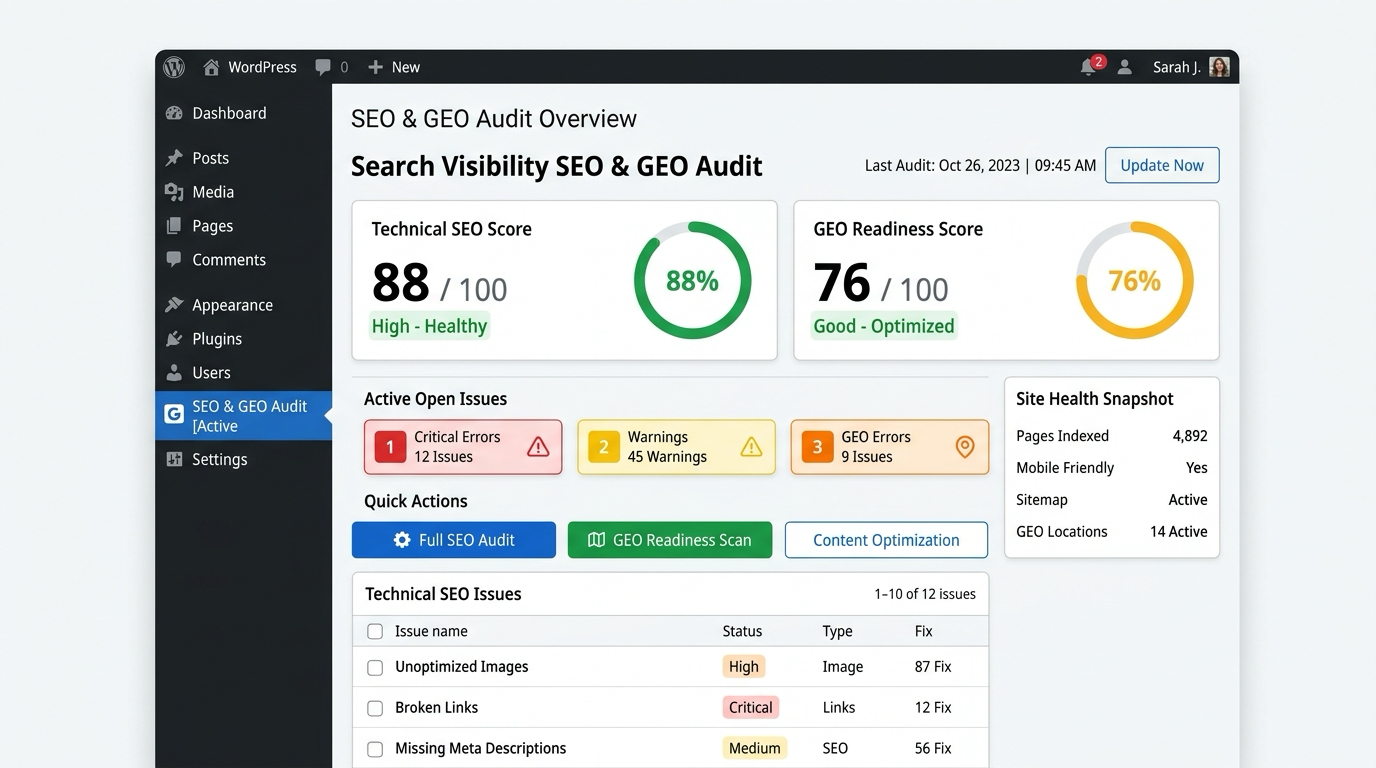
- Unified Visibility Dashboard: Get an instant high-level overview of your site’s SEO health score, GEO readiness score, open issues, and scan activity.
- On-Site SEO Audit: Inspects public pages for title lengths, meta descriptions, heading structures, canonical URLs, noindex directives, and schema presence.
- AI Alt Text Generator (Powered by OpenAI): Bulk-generate descriptive, accessible image alt text or improve existing descriptions using your own OpenAI API key. Features an interactive preview modal to edit text before applying.
- 1-Click Alt Text Restore: Every AI change is backed up in attachment history. Revert any image to its original alt text with a single click.
- AI-Powered llms.txt Generator: Automatically curates a clean, valid Markdown
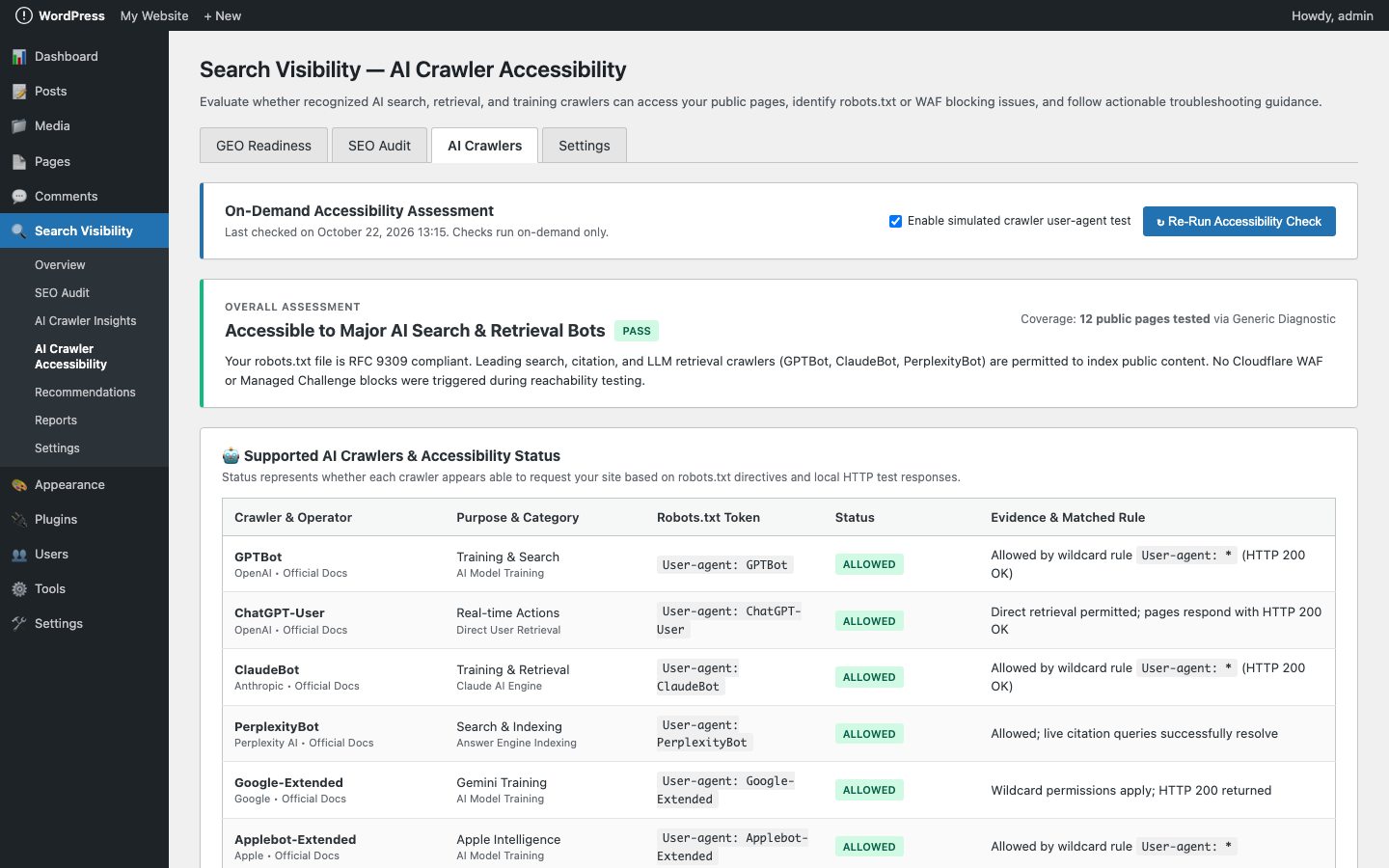
llms.txtfile based strictly on your verified public content, with physical conflict detection and downloadable fallback. - AI Crawler Accessibility Diagnostics: Checks RFC 9309 robots.txt compliance and runs bounded diagnostic tests to verify whether crawlers like GPTBot, ClaudeBot, PerplexityBot, and Google-Extended can reach your public pages.
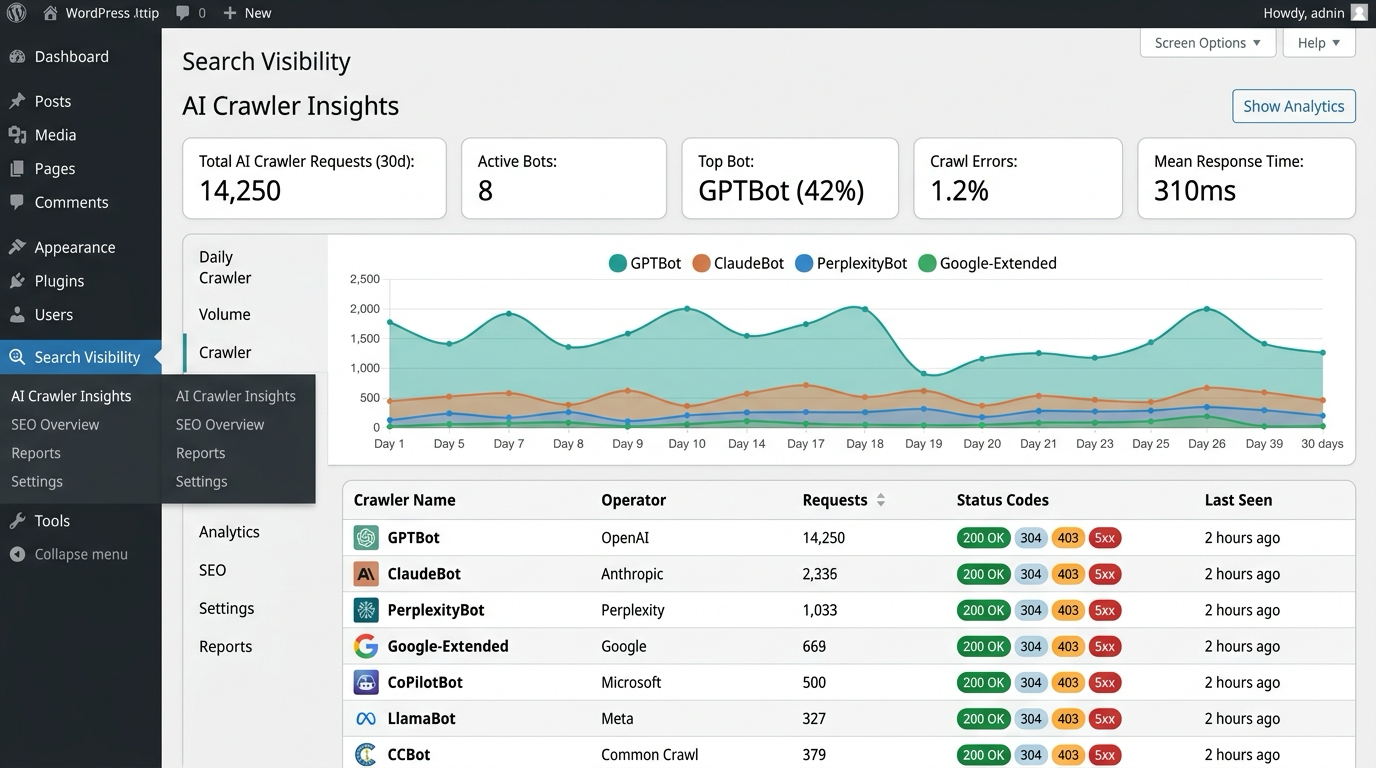
- AI Crawler Insights: Connect your Cloudflare read-only token or upload server access logs (Nginx/Apache) to see actual crawler traffic, request distributions, top visited URLs, and HTTP status codes.
- Analytics Tag Detection: Verifies the presence of Google Analytics 4 (GA4) and Google Tag Manager (GTM) tags on public pages without loading tracking scripts.
- Search Engine & Google Search Console Checklist: Inspects robots.txt, verifies XML sitemaps, provides a manual GSC checklist, and connects read-only property stats.
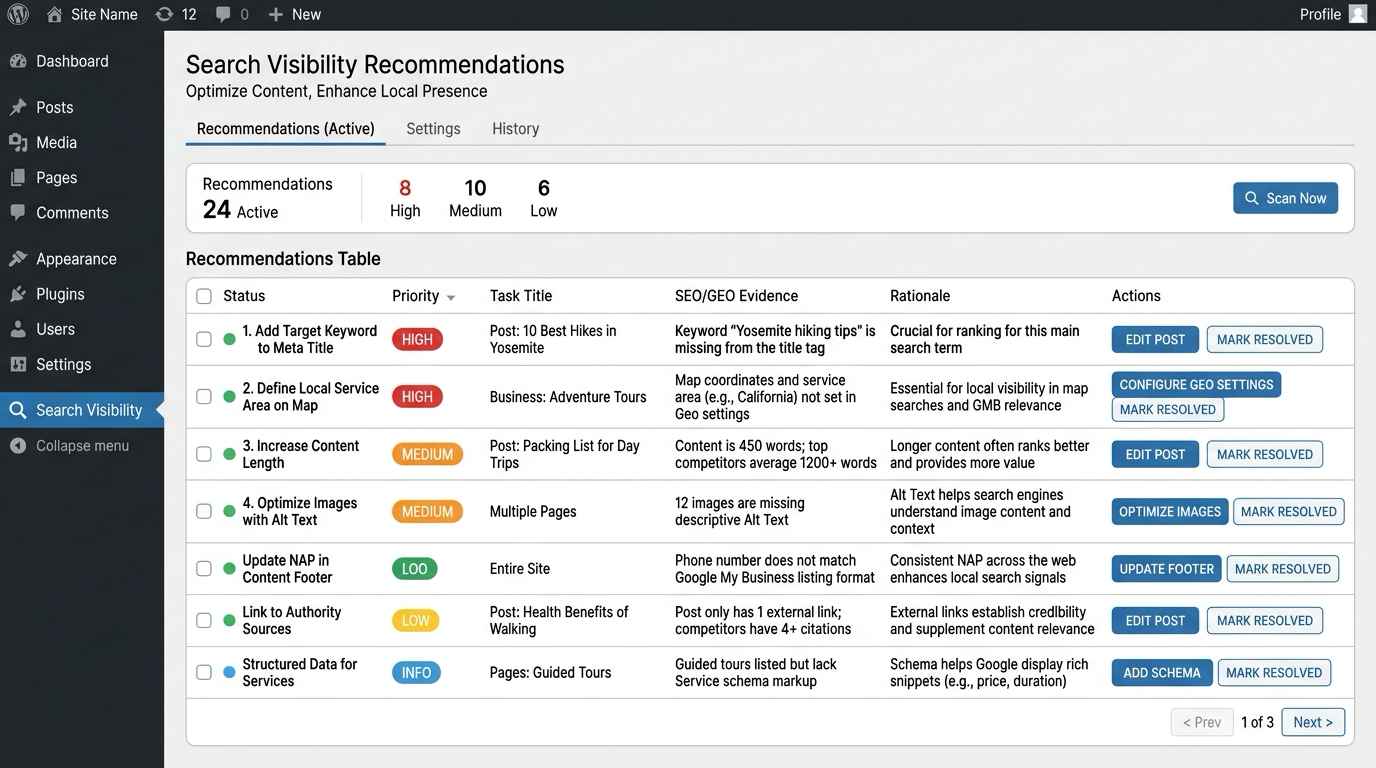
- Prioritized Recommendations Engine: Issues across all modules are consolidated and prioritized (High, Medium, Low, Info) with clear evidence, rationale, and direct edit links. Mark items resolved as you fix them.
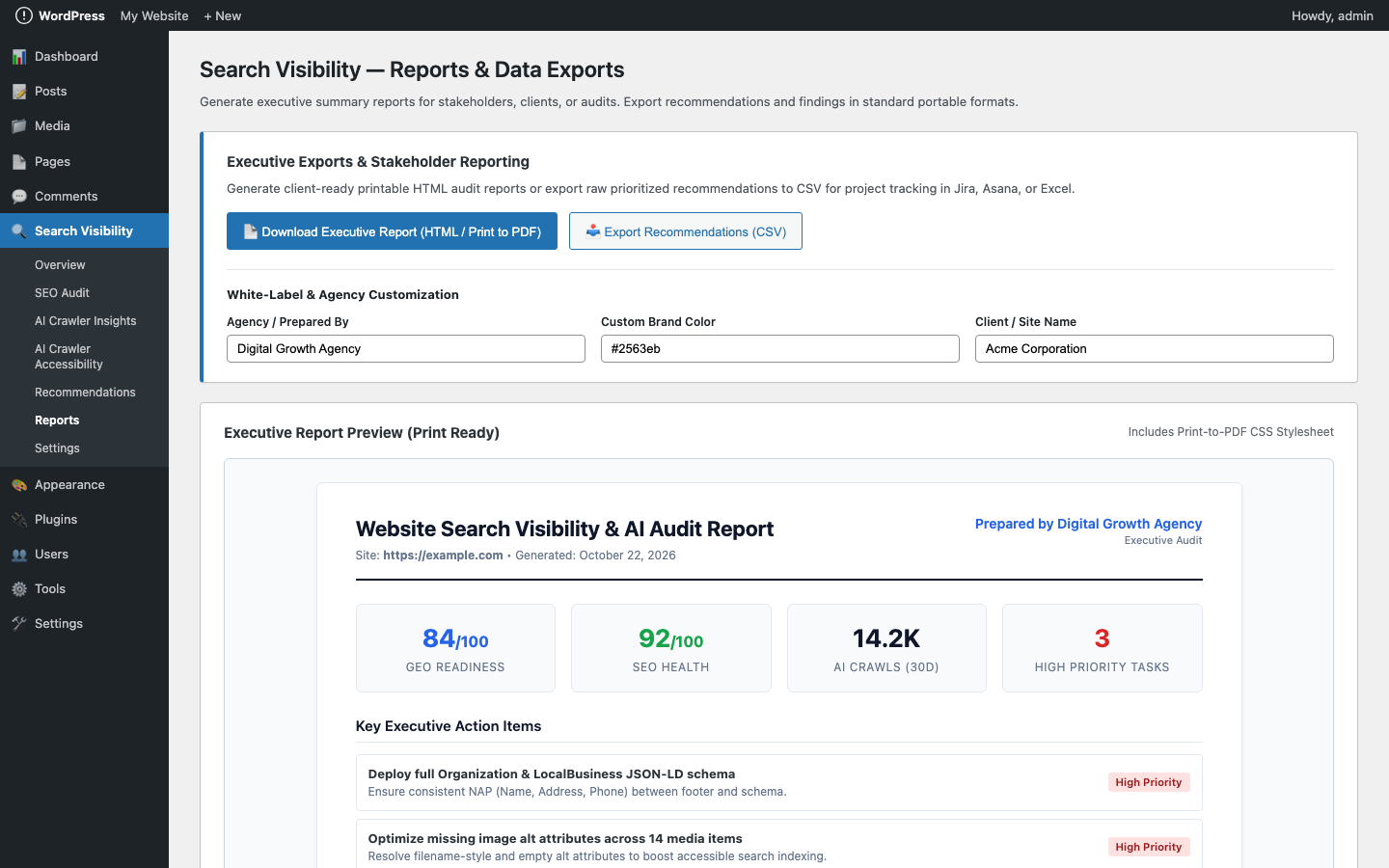
- Executive Reports & CSV Exports: Download clean, printable executive HTML reports and structured CSV data files for clients or team reviews.
- 100% Privacy by Default: All core audits run locally on your server. Zero AI API keys required for auditing. AI assistant features are strictly opt-in using your own credentials.
AI Assistant: Full Control & 1-Click Restore
Unlike tools that silently overwrite your website content, Search Visibility puts you in full control:
1. You own your key: Enter your own OpenAI API key. Your key is stored securely, masked in the dashboard, and never exposed to visitors or logs. (You can also define GEO_OPTIMIZER_OPENAI_API_KEY in wp-config.php).
2. Review before applying: Every AI alt text suggestion is presented in an interactive preview modal where you can edit the copy or mark images as decorative (alt="").
3. Safe application: Changes are written to the standard WordPress Media Library attachment meta.
4. 1-Click restore: Change history is logged per attachment, enabling instant 1-click restore to original values.
How It Works
- Install & Activate: Upload or search for Search Visibility and click activate. Initial scans run automatically in the background.
- Review Your Visibility Dashboard: Open Search Visibility → Dashboard to see your SEO Health Score, GEO Readiness Score, and open tasks.
- Audit Images & Content: Head to SEO Audit to inspect missing alt text, headings, and metadata.
- Generate AI Alt Text (Optional): Select images with missing alt text, click Generate AI Alt for Selected, review/edit suggestions, and apply with confidence.
- Publish Your llms.txt (Optional): Curate a structured guide for AI search systems and publish it directly or download the
.txtfile. - Track Recommendations: Use the Recommendations screen as your daily task checklist to steadily improve your website’s search readiness.
Who Is It For?
- Small Business Owners: Understand why your website isn’t showing up clearly in search, without needing an expensive SEO agency.
- Content Publishers & Bloggers: Ensure every post has proper headings, accessible image descriptions, and structured metadata.
- Freelancers & SEO Consultants: Run comprehensive audits, generate professional executive HTML reports, and export CSVs for your clients.
- WordPress Agencies: Systematically audit client websites during onboarding and maintenance with zero impact on existing SEO plugins.
Get Started
Take the guesswork out of your website’s search and AI visibility. Install Search Visibility, run your baseline audit, and start addressing prioritized recommendations today.
External services
This plugin operates entirely on-site by default. It can optionally connect to the following external third-party services. All external connections require explicit administrator opt-in and configuration; none are enabled by default:
-
OpenAI API (Optional AI Assistant)
- What data is sent: Only the specific metadata required for the requested AI task: image filename, attachment title, caption, page title, and surrounding page URL (or public page URLs/titles for llms.txt generation). Passwords, user profiles, authentication cookies, and database records are NEVER sent.
- When it is sent: Strictly on-demand when an authorized administrator clicks “Test API Connection”, triggers image alt text generation, or generates llms.txt. Zero automated background calls occur.
- Service Endpoint:
https://api.openai.com/v1 - Terms of Service: https://openai.com/policies/terms-of-use/
- Privacy Policy: https://openai.com/policies/privacy-policy/
-
Google Search Console API
- What data is sent: Read-only OAuth authorization requests and verified property URL query parameters. No website page content, visitor analytics, or user passwords are sent.
- When it is sent: Only when an administrator explicitly opts in and clicks “Connect Google Search Console” via OAuth 2.0 authorization-code flow, or manually triggers “Sync Data”.
- Service Endpoint:
https://www.googleapis.com/auth/webmasters.readonlyand Google OAuth token endpoint (https://oauth2.googleapis.com/token). - Terms of Service: https://policies.google.com/terms
- Privacy Policy: https://policies.google.com/privacy
-
Cloudflare GraphQL Analytics API
- What data is sent: Read-only GraphQL queries transmitting the administrator-provided Cloudflare API token and Zone ID to retrieve aggregated crawler request counts and HTTP status codes. No page content, site data, or visitor IP addresses are sent.
- When it is sent: Only when an administrator explicitly enters and saves a read-only Cloudflare API token and triggers a crawler insights refresh or enables scheduled cron synchronization.
- Service Endpoint:
https://api.cloudflare.com/client/v4/graphql - Terms of Service: https://www.cloudflare.com/terms/
- Privacy Policy: https://www.cloudflare.com/privacypolicy/
-
GreeLogix Product Insights
- Who is GreeLogix: GreeLogix is the digital solutions and software engineering firm founded and operated by the plugin author (Abuzer).
- What data is sent: Only explicitly consented data categories selected via granular checkboxes in settings: minimal feature adoption events, sanitized website technical environment (WordPress version, PHP version, plugin version, and site domain), aggregate diagnostic scores, or voluntary consultation contact requests (full name, work email address, and inquiry notes). No page content, visitor data, credentials, or visitor IPs are ever transmitted.
- When it is sent: Strictly opt-in; transmitted over HTTPS with HMAC-SHA256 request signatures only when an administrator explicitly checks one or more consent boxes, clicks “Test Connection”, or triggers an explicit audit push. Zero transmissions occur by default. Consent can be revoked and integration data deleted at any time from Settings.
- Service Endpoint:
https://api.greelogix.com/v1/insights(or a custom HTTPS webhook URL configured by the administrator). - Terms of Service: https://greelogix.com/terms/
- Privacy Policy: https://greelogix.com/privacy/
-
Data Retention & Removal: Deleting the plugin runs
uninstall.phpand purges all plugin data, options, user metadata, and cached transients.
Installation
- Upload the
firdousi-search-visibilitydirectory to/wp-content/plugins/, or install directly via the WordPress Plugins screen. - Activate Search Visibility.
- Open Search Visibility → Dashboard to access the unified visibility overview.
- (Optional) Enter your OpenAI API key in Settings to enable AI Alt Text and
llms.txtgeneration. - (Optional) Connect Cloudflare or import access logs in AI Crawlers to monitor actual crawler visits.
FAQ
What is an SEO audit?
An SEO audit analyzes your website’s public pages to verify that search engines can easily crawl, understand, and index your content. Search Visibility checks essential elements like page titles, meta descriptions, heading structure (H1–H3), canonical URLs, schema presence, and image alt text.
What is Generative Engine Optimization (GEO)?
GEO focuses on how well generative AI engines (like ChatGPT Search, Google AI Overviews, Perplexity, and Claude) can discover, parse, and cite your content. The plugin audits entity clarity, answer-oriented formatting, structured data, and crawler accessibility.
Does this plugin guarantee better rankings or AI citations?
No. No ethical plugin can guarantee search engine rankings or AI citations. Search Visibility is a diagnostic auditor and assistant that helps you identify and fix technical and content gaps on your site.
Does the plugin require an OpenAI API key?
No! All core SEO audits, GEO readiness evaluations, crawler accessibility tests, recommendation checklists, and executive reports run 100% locally on your WordPress server without any API key or external service. An OpenAI API key is only needed if you choose to use the optional AI Assistant to generate alt text or curate an llms.txt file.
Does it automatically overwrite my content or alt text?
Never. All AI-generated suggestions are displayed in an editable preview modal. You must review and approve them before they are saved. Furthermore, the original alt text is always preserved in history, allowing 1-click restore.
Does it replace Yoast SEO, Rank Math, or All in One SEO?
No, and it is intentionally designed not to replace them. Search Visibility acts as an independent auditor and checklist manager. You keep your favorite SEO plugin for title templates, XML sitemaps, and schema generation. Search Visibility audits their output and alerts you to gaps.
How does AI Assistant billing work?
If you choose to use the AI Assistant, you provide your own OpenAI API key. OpenAI bills usage directly to your OpenAI account per token. Using the recommended model (gpt-4o-mini), generating alt text for 100 images typically costs under $0.01 USD. A ChatGPT Plus or Team subscription ($20/month) is for web chat and is separate from OpenAI API platform credits. You can set monthly budget limits inside your OpenAI account.
Can I define my OpenAI API key in wp-config.php?
Yes! You can define GEO_OPTIMIZER_OPENAI_API_KEY in wp-config.php or set an environment variable OPENAI_API_KEY. When defined, the key input is locked in the admin dashboard and safely loaded from your server configuration without being editable in the browser.
What is llms.txt?
A Markdown file served at /llms.txt listing curated public URLs for AI crawlers. Generating and serving it is completely optional.
How does AI Crawler Insights work?
Crawler Insights aggregates request data from one of two sources:
1. Cloudflare GraphQL Analytics API using a user-provided, read-only API token.
2. Uploaded server access logs (Nginx or Apache combined log format) parsed locally with query-string redaction.
WordPress does not attempt to read arbitrary server log paths directly.
Are any analytics or telemetry sent automatically?
No. The plugin includes zero telemetry by default. The optional GreeLogix Product Insights integration is strictly opt-in and consent-first, with granular checkboxes for adoption events, technical environment, diagnostics, and voluntary contact.
Where can I get support or report a bug?
For community support, questions, or bug reports, please post in the official WordPress.org Support Forum. You can also visit greelogix.com to learn more about the developer and our digital solutions.
Screenshots
Changelog
1.2.0
- Added: AI SEO & GEO Assistant powered by OpenAI (bring your own API key).
- Added: AI Alt Text Generator for Media Library attachments and in-content images with interactive preview, inline editing, and 1-click restore.
- Added: AI llms.txt Generator to curate and structure clean Markdown documentation based strictly on inspected public WordPress pages.
- Added: Physical llms.txt conflict detection with safe publishing and downloadable .txt fallback.
- Added: Secure OpenAI API configuration screen with key masking, instant AJAX connection verification, model selector (GPT-4o mini, GPT-4o, GPT-3.5 Turbo), and constant override support (
GEO_OPTIMIZER_OPENAI_API_KEY). - Added: Full attachment change history tracking (
_geo_optimizer_ai_alt_history) with safe non-destructive restoration of original alt text. - Added: Provider_Interface and AI service architecture designed for seamless future extension to hosted credit-based AI services.
- Added: Comprehensive unit and integration test suite with 100% mocked HTTP requests.
1.1.4
- Added: Modular admin navigation with dedicated sidebar pages for Search Engines & GSC, Analytics Setup, Prioritized Recommendations, and Reports & Data Exports.
- Added: Clean unified navigation tab bar across all 8 plugin screens and direct links from overview KPI cards.
- Improved: Streamlined the main GEO dashboard by removing lengthy duplicated sections into their own dedicated screens.
- Added: Automatic initial scans run on plugin activation so users see scores, recommendations, and audit data immediately without manual action.
- Added: Installer_Scan_Runner class with fail-safe isolated try-catch blocks for each scan module (GEO Audit, llms.txt, SEO Scan, Image Audit, Search Engine, Analytics, AI Crawlers, Nudge).
- Added: Fallback admin_init hook ensures scans run on first admin visit if activation was constrained (e.g. WP-CLI).
- Added: Proper cleanup of initial scan options in uninstall.php.
1.1.3
- Added: Image SEO & Alt Text Audit module to the SEO Audit screen with non-blocking AJAX batch processing and live progress bar.
- Added: Scans Media Library attachments and in-content images parsed via WP_HTML_Tag_Processor (core/image, gallery, cover, and classic img tags).
- Added: Comprehensive issue detection flagging missing alt (High), empty unconfirmed alt (Medium), filename/generic/short/long alts, keyword stuffing, duplicate alts across 5+ images, and caption conflicts.
- Added: Performance checks for missing width/height attributes, oversized files (>300 KB), and non-WebP/AVIF formats (Low).
- Added: Filterable results table with thumbnail previews, library vs content alt comparison, captions, and used-in post links.
- Added: Image SEO health summary cards to the Unified Overview dashboard and executive HTML/CSV reports.
- Added: Fully filterable thresholds and transient result caching.
1.1.2
- Fixed: Resolved AI Crawler Accessibility table layout and squished column rendering by removing WordPress core .card 520px max-width clamp.
- Added: Responsive horizontal table wrapper with minimum column widths, refined typography, and full-width card styling.
- Added: Proper status badge color styling for Pass (green), Warning (amber), Critical (red), and Review (blue) badges.
1.1.1
- Fixed: Added missing Report_Actions::create() factory method to resolve fatal error on plugin boot.
- Fixed: Normalized argument type handling in Recommendations Engine to prevent TypeErrors with null or uninitialized store data.
- Fixed: Added missing Seo_Plugins::sentence() helper in SEO Audit panel.
- Fixed: Added Google Search Console status constants in Settings_Schema to prevent undefined constant errors.
- Fixed: Added has_imported_logs() method to Crawlers\Store to correctly display local access log status.
- Added: High-resolution screenshots for WordPress.org directory listing.
1.1.0
- Added unified 9-section Website Visibility Dashboard (Overview, SEO Audit, Analytics Setup, Search Engine Setup, AI Crawler Insights, AI Crawler Accessibility, Recommendations, Reports, and Integrations & Privacy).
- Added AI Crawler Insights module supporting Cloudflare GraphQL Analytics and server access-log import (Nginx & Apache formats) with automatic query string parameter redaction and deduplication.
- Added AI Crawler Accessibility diagnostic page with RFC 9309 robots.txt analysis and bounded simulated crawler HTTP checks.
- Added consolidated Recommendations Engine with cross-domain priority sorting (High/Medium/Low/Info) and persistent task resolution tracking.
- Added executive printable/downloadable HTML reports and structured CSV data exports.
- Added optional Google Search Console OAuth 2.0 read-only integration.
- Added optional GreeLogix Product Insights consent-first integration with granular sharing controls and HMAC-SHA256 signed webhooks.
- Hardened security across all modules: AES-256 credential encryption, strict SSRF bounds, and LibXML XXE hardening.
- Resolved PHP 8.4
fputcsv()deprecation notices and ensured full WordPress VIP coding standards compliance.
1.0.2
- Updated display name to Search Visibility (AI & GEO Audit).
- Cleaned up in-admin branding and labels.
1.0.1
- Public slug:
firdousi-search-visibility.
1.0.0
- First public release: on-demand GEO and SEO audits, task lists, optional llms.txt.