


Description
Want more sales without a bigger ad budget? Let other people sell for you, and pay them only when a sale sticks.
FlyAffiliate is an affiliate marketing plugin for WordPress, made by weDevs, the team behind Dokan, WP User Frontend and weMail. It gives every affiliate a referral link and a dashboard. It gives you a commission ledger that always knows which money is earned, which is owed and which is paid.
It runs an affiliate program the way store owners actually run one. Someone signs up and confirms their email, or you approve each one yourself. They share their referral link, and orders come in. Each commission waits out its hold period, and then you pay everyone in one batch through the channel you already use.
Everything stays on your own site. Visitor data never leaves it, and FlyAffiliate sends no usage data unless you choose to share it (see Usage Data below). It also stores nothing that identifies a visitor.
How FlyAffiliate Works
- An affiliate joins. They sign up through the registration form with just an email address, or you add them from the admin. Every affiliate is a WordPress user with the Affiliate role.
- They share their referral link. Each affiliate gets one link. Adding
?affiliate=IDto any product URL sends visitors straight to that product. FlyAffiliate records the visit and sets a first-party cookie that remembers who sent them. - An order comes in. FlyAffiliate creates one pending commission per order item. It uses your default rate, capped at the maximum you allow.
- The commission follows the order. It turns unpaid as soon as the order is paid. A failed or cancelled order rejects it, and so does a refund if you switch that on. When an order recovers, its commission comes back.
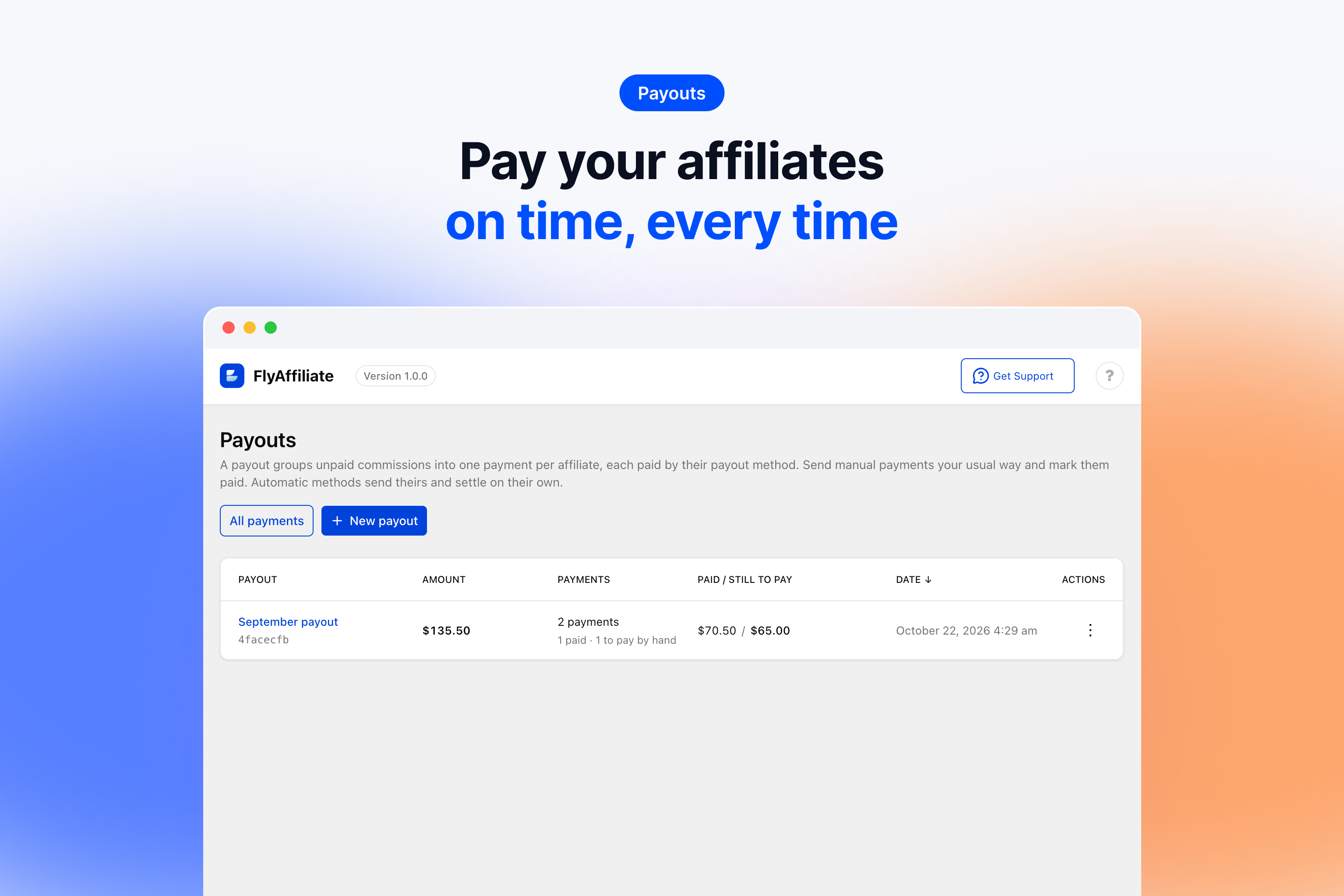
- You pay in batches. A payout turns every unpaid commission whose hold period is over into one payment per affiliate, for affiliates above your minimum payout. You send the money your way, mark each payment paid and export the batch as CSV.
Commission Tracking for Store Owners
- Per-item commissions. Each order item gets its own commission line, so you can see exactly which products earned what.
- A default rate with a hard cap. Set one default rate and a maximum rate, and no commission ever goes above the maximum. Developers can give a product its own rate through the
_flyaffiliate_rateproduct meta. Shipping and tax stay out of the commission unless you say otherwise. - A hold period. Every commission waits out a hold period, 30 days by default, before it can go into a payout, so a refund has time to show up before you pay. The hold date is fixed when the commission is created, so a new hold period applies to new orders only.
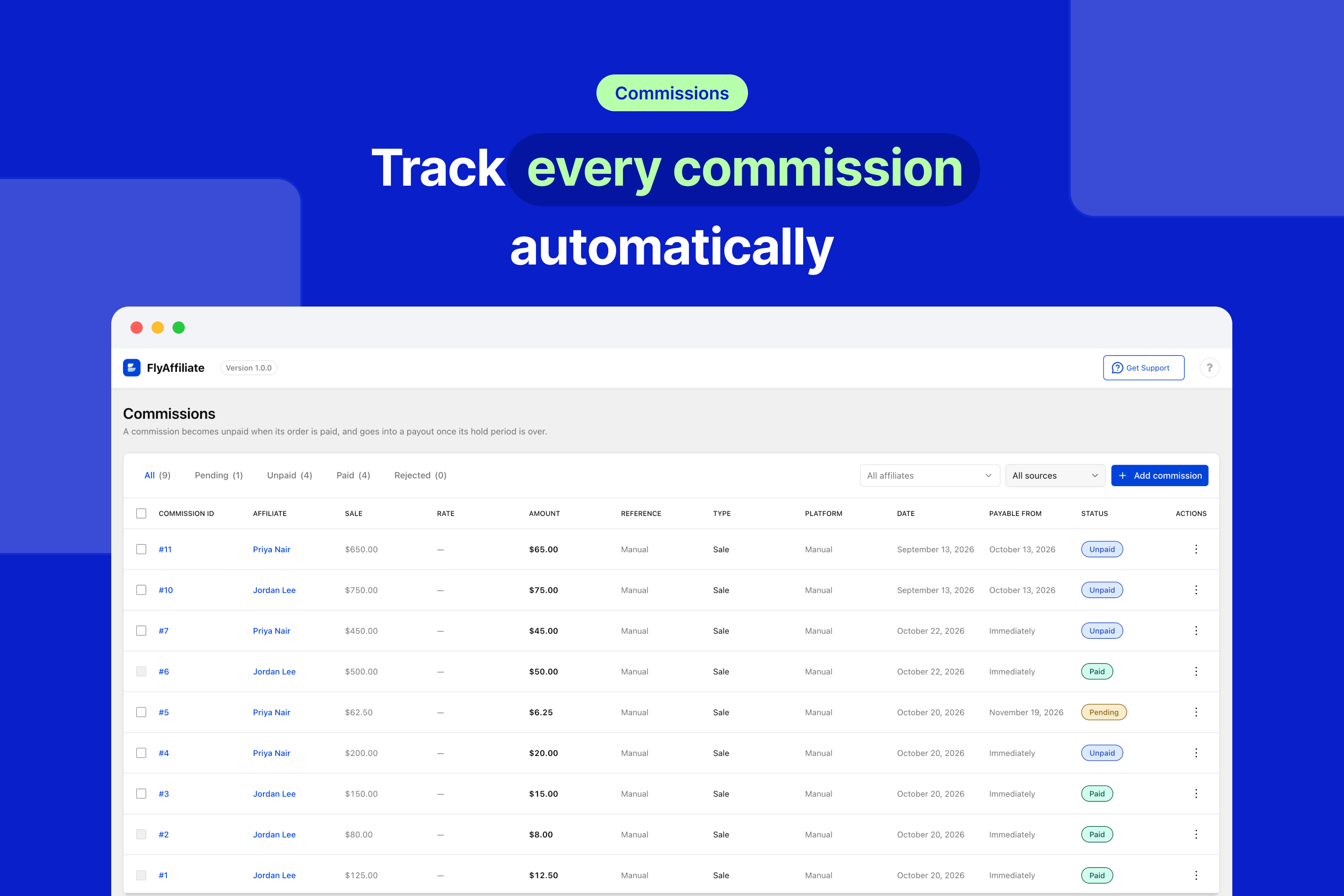
- Statuses that follow the order. Every commission is pending, unpaid, paid or rejected, and it moves with the order.
- Two-step payouts. Create the payout, send the money, then mark it paid. An order can never delete or move a commission inside a payment. You can still correct it by hand.
- Hand-entered commissions. Record bonuses, corrections and offline sales with the affiliate, amount, reference, origin, date, type and status.
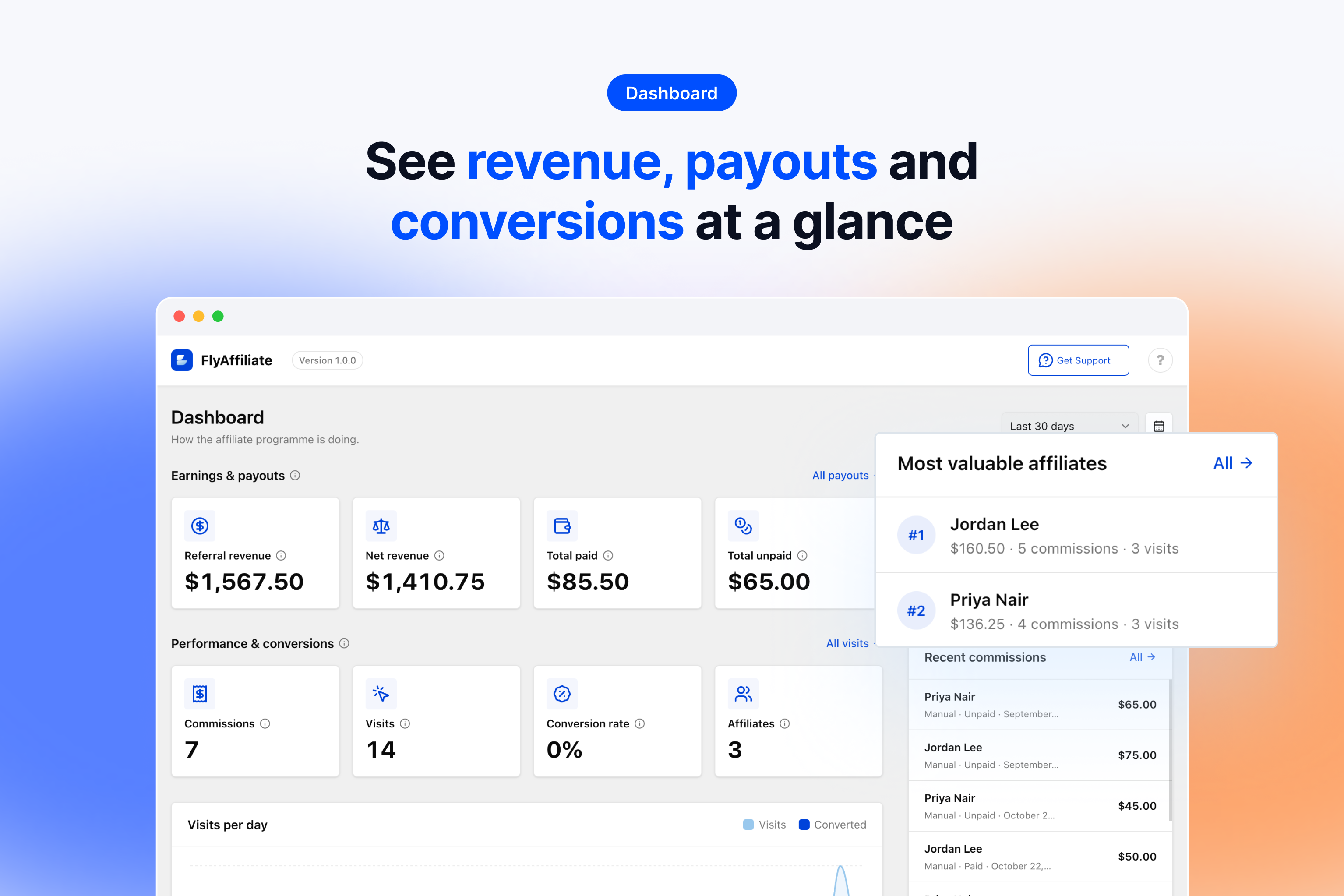
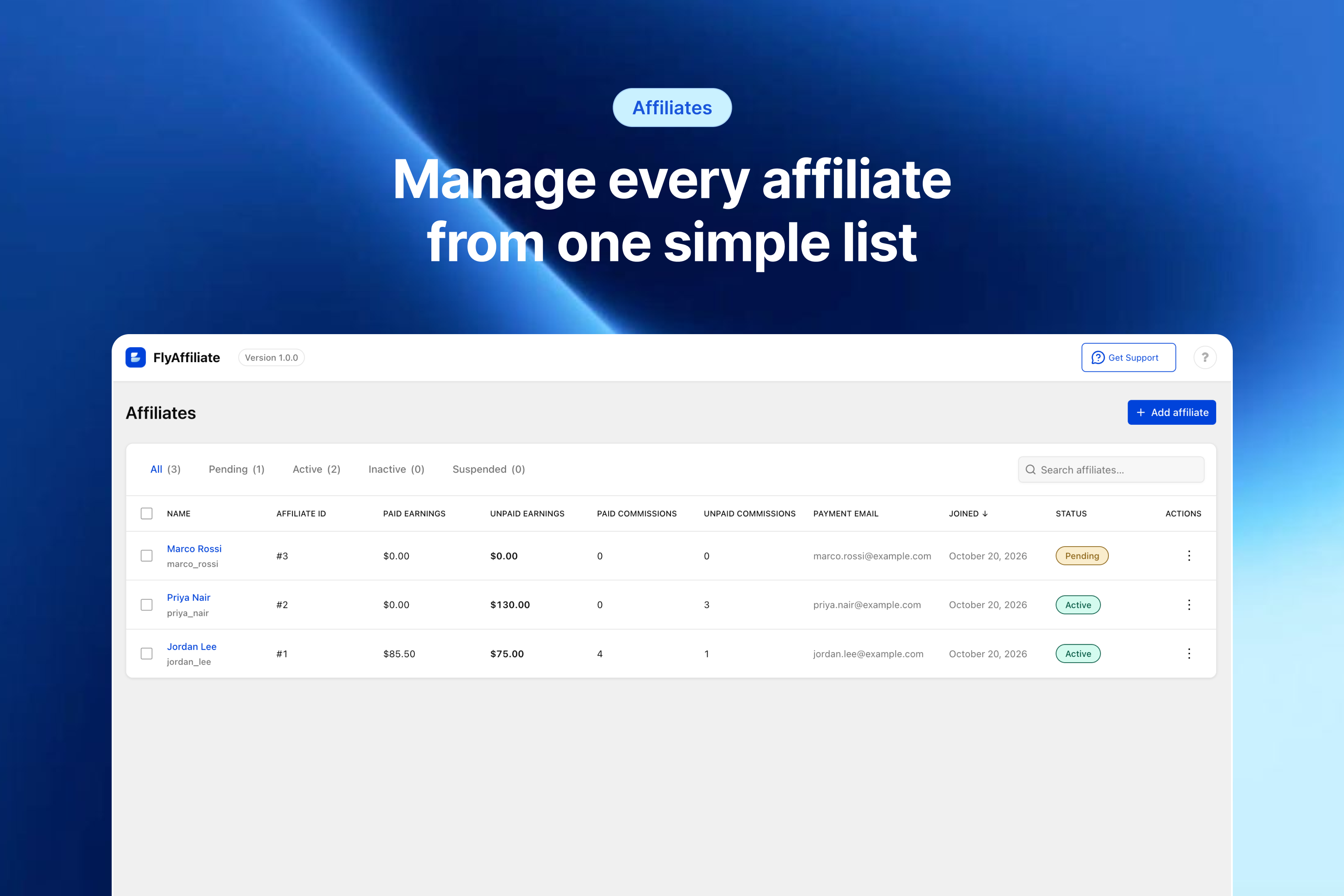
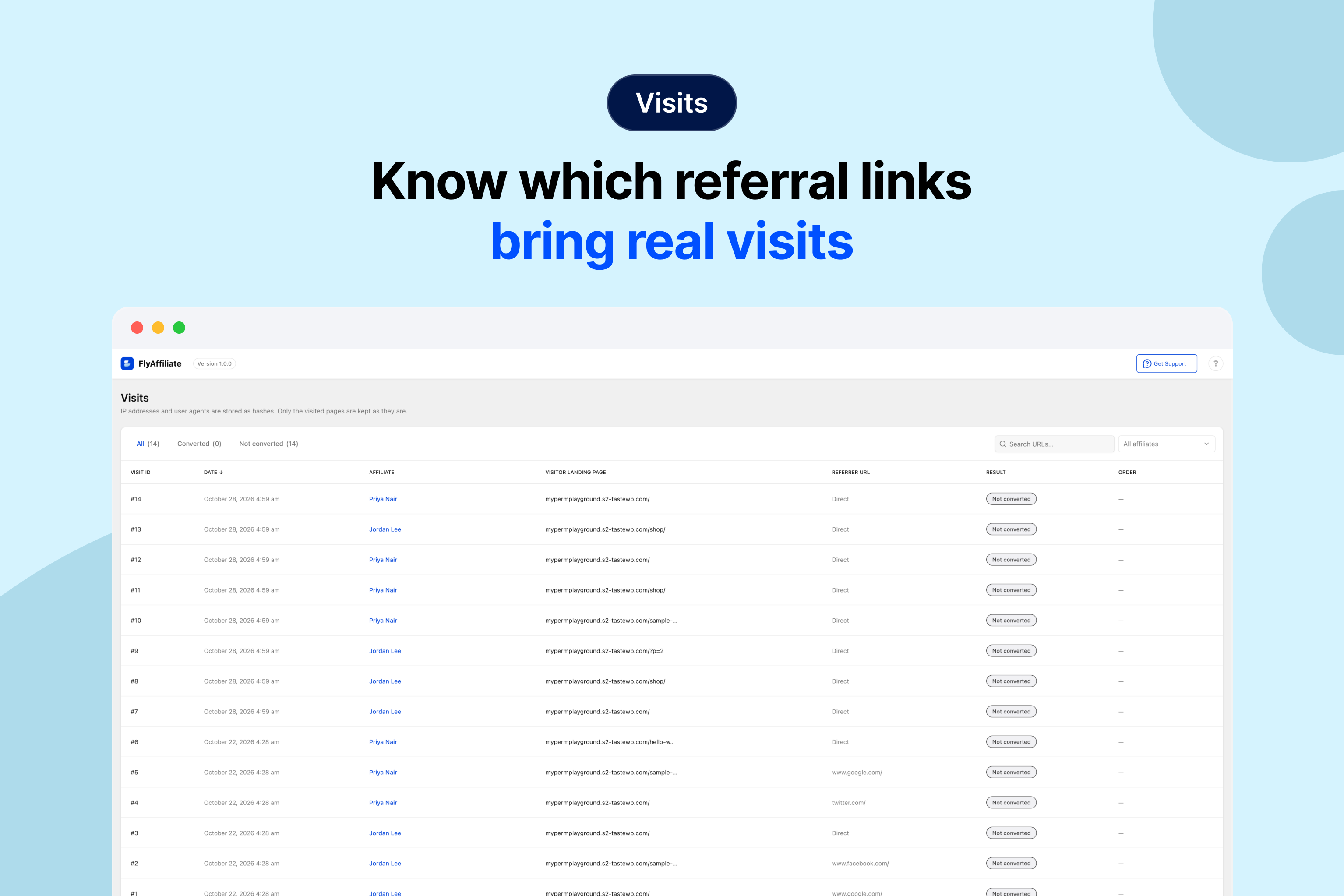
- Admin screens for affiliates, commissions, visits, payouts and settings. The dashboard shows the numbers that matter and flags any application that is waiting.
- A setup wizard that asks for the three numbers every program needs. These are your default rate, your maximum rate and your hold period.
Referral Tools for Affiliates
- An affiliate dashboard with their referral link, balance, commissions, visits, payouts and payment settings. Add it anywhere with
[flyaffiliate_dashboard]. - A referral link generator. Affiliates turn any page of your site into a referral link, and every link they create is saved with its own visit count.
- A simple registration form that needs only an email address. Add it with
[flyaffiliate_register]. - Self-referral protection. Nobody earns a commission on their own order unless you allow it.
FlyAffiliate creates the Affiliate Dashboard and Affiliate Registration pages for you on activation.
Works With or Without WooCommerce
FlyAffiliate is a standalone affiliate plugin. Affiliates, referral links, visit tracking, hand-entered commissions and payouts all work on WordPress alone.
WooCommerce is the first integration. When WooCommerce is active, FlyAffiliate creates commissions from its orders on both the classic and block checkout, and adds an Affiliate Commission box to WooCommerce Analytics. Dokan marketplaces are supported through FlyAffiliate Pro.
What’s in the Free Version
Everything you need to run a single-tier affiliate program, at no cost.
- Affiliate signup with just an email address and a one-time activation link, or affiliates you add yourself
- Affiliate statuses: pending, active, inactive and suspended
- One referral link per affiliate, plus a link generator that saves each link with its visit count
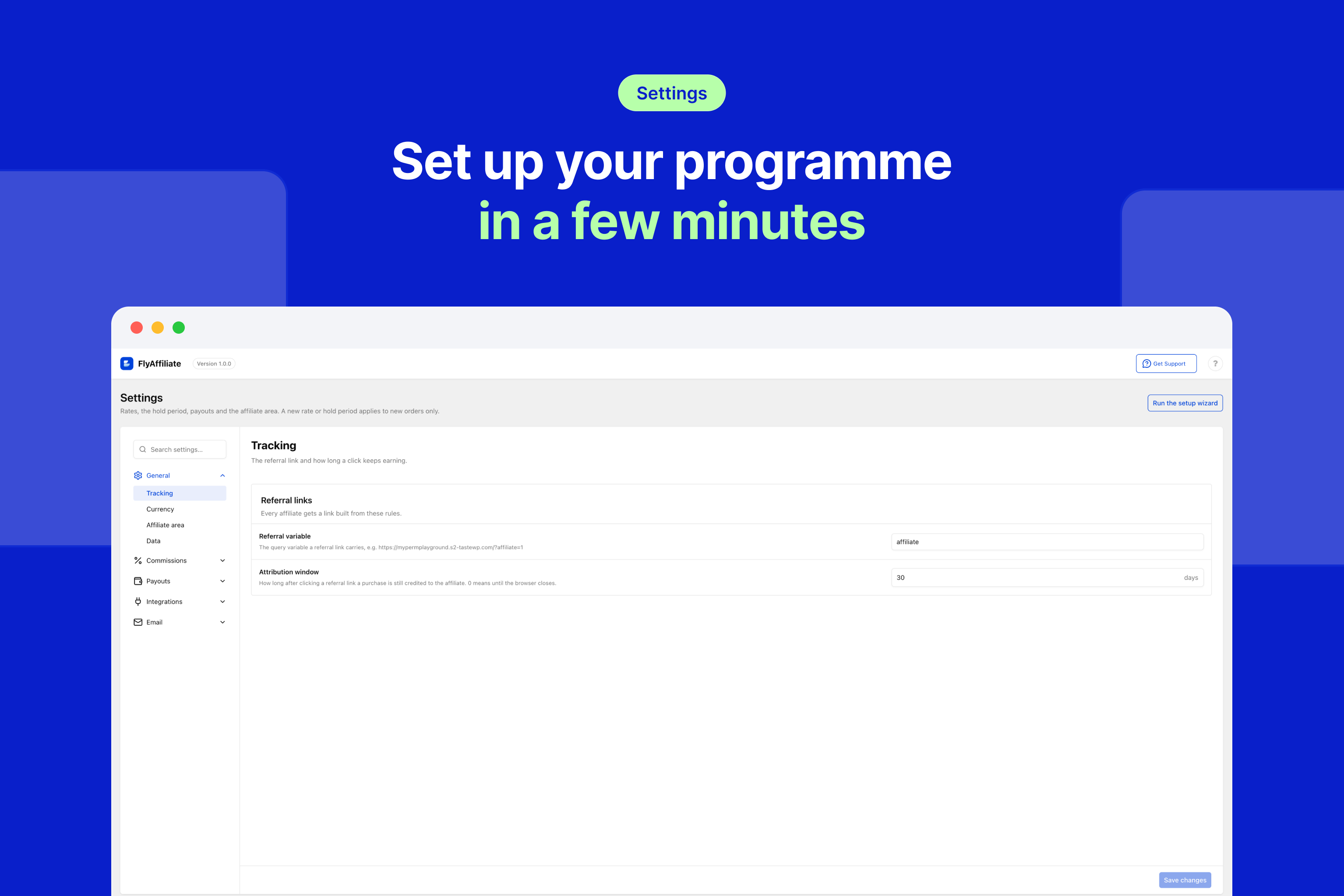
- A visit log with hashed visitor data and a signed first-party cookie (30-day attribution window by default)
- Per-item commissions with a default rate (10% by default) and a maximum rate (50% by default)
- Shipping and tax left out of commissions by default
- A hold period, 30 days by default
- Commission statuses that follow the order, with an optional switch to reject commissions on refunds
- Self-referral blocking
- Hand-entered commissions for bonuses, corrections and offline sales
- Batch payouts with a preview, a minimum payout and CSV export, paid by the Manual method
- An admin dashboard with referral revenue, payouts, conversion rate and your most valuable affiliates
- A front-end affiliate dashboard and registration form
- WooCommerce integration for classic and block checkout, HPOS compatible, with an Affiliate Commission box in WooCommerce Analytics
- A setup wizard, an activation email and an optional welcome email
- A REST API,
flyaffiliate_hooks, overridable templates and WP-CLI demo data for developers
What’s in FlyAffiliate Pro
FlyAffiliate Pro adds extensions you switch on from one Extensions page. It needs the free plugin active.
- PayPal Payouts. Connect your PayPal Business account once and send every affiliate’s payment to their PayPal account in one batch. Affiliates add their PayPal email in their dashboard. Each payment shows its real status, from sent to paid, and a failed payment stays unpaid so you can send it again. One payout can mix PayPal and manual payments.
- Vendor affiliate programs for Dokan. Each vendor on a Dokan marketplace can run their own affiliate program and fund it from their own earnings, while the marketplace keeps its full share. See the Dokan section below for how a sale splits.
- Automatic updates and support with your license key.
Vendor Affiliate Programs on Dokan
The Dokan extension in FlyAffiliate Pro lets each vendor on a Dokan marketplace switch on an affiliate program for their own store. Anyone can then promote that vendor’s products and earn a commission on what they sell. It needs WooCommerce and Dokan 5.3.2 or newer. Dokan Pro is optional.
The vendor funds the commission out of their own earnings, and the marketplace keeps its full share. Take a $100 sale on a marketplace that keeps 20%, with a vendor affiliate rate of 15%.
- The marketplace keeps $20.
- The affiliate earns $15, held until the order settles.
- The vendor withdraws $65.
It is the vendor’s marketing budget, the vendor’s rate and the vendor’s call. The commission comes out of the vendor’s earning at the sale, and that deduction falls away if the commission is rejected, so an order that never completes costs them nothing.
Keep Your Affiliate Data Private
FlyAffiliate stores no personal data about a visitor. A visit record keeps only a hashed IP address and a hashed user agent. Both are salted with your site’s own key, so they cannot be reversed or matched on another site.
Attribution uses one first-party cookie called flyaffiliate_ref. It holds two numbers, the affiliate ID and the visit ID, and it is signed so nobody can forge it. The cookie is HttpOnly, is never shared and lasts for the attribution window you set, which is 30 days by default.
Usage Data (Appsero)
FlyAffiliate uses the Appsero SDK to collect usage data, only once you allow it. This helps us troubleshoot problems faster and improve the plugin.
Choosing No thanks, or leaving Share Essentials off, tells Appsero only that this site declined. When you deactivate the plugin, a form asks why. Submit & Deactivate sends your answer with the data above, and Skip & Deactivate sends nothing.
Learn more about how Appsero collects and uses this data.
Extend It Your Way
FlyAffiliate follows the same architecture as Dokan. You get service providers, manager classes, overridable templates, flyaffiliate_ hooks and a REST API under flyaffiliate/v1 for every resource. Developers can also seed demo data with wp flyaffiliate seed.
Contribute on GitHub
FlyAffiliate is built in the open on GitHub. Bug reports, pull requests and ideas are all welcome there.
The JavaScript and CSS in assets/ are compiled from the TypeScript and SCSS sources under src/ in that repository. Running npm run build reproduces them.
Installation
- Go to Plugins > Add New Plugin and search for FlyAffiliate, or upload the plugin to
/wp-content/plugins/flyaffiliate. - Activate the plugin. FlyAffiliate creates the Affiliate Dashboard and Affiliate Registration pages for you, and the setup wizard opens on a first install.
- If you sell with WooCommerce, keep it active so FlyAffiliate can create commissions from its orders.
- Follow the setup wizard, or go to FlyAffiliate > Settings and set your default rate, maximum rate and hold period.
- Share the registration page. Affiliates confirm their email and they’re in. Prefer to vet everyone? Turn off the activation email under FlyAffiliate > Settings > Email and approve each affiliate under FlyAffiliate > Affiliates.
FAQ
Do I need WooCommerce?
No. Affiliates, referral links, visits, hand-entered commissions and payouts all work on WordPress alone. Commissions from orders come from WooCommerce today, and that integration switches on by itself when WooCommerce is active. More platforms are planned.
Do affiliates get a user role?
Yes. Every affiliate carries the Affiliate role (flyaffiliate_affiliate), so you can filter them on the Users screen. The role grants nothing beyond reading the site. Whether someone is an active affiliate is set on the FlyAffiliate > Affiliates screen.
How is a commission calculated?
Per order item. FlyAffiliate applies your default rate to each item and always caps the result at your maximum rate. A product can carry its own rate through the _flyaffiliate_rate product meta, which still respects the maximum. Shipping and tax are left out of the amount unless you turn that off.
When does a commission become payable?
Two things must be true. The hold period has passed since the order, and the order is processing or completed. For cash on delivery, the order must be completed. With a hold period of zero, the commission is payable as soon as the order is paid.
What happens when an order is refunded?
By default, nothing changes. Turn on Reject commissions on refund under Commissions > Rules and a refunded order rejects any commission that has not been paid yet. A failed or cancelled order always rejects its commissions, and an order that is paid again brings them back. A commission that has already been paid out is never reversed.
Can I add a commission by hand?
Yes. Go to FlyAffiliate > Commissions > Add commission and enter the affiliate, amount, order reference, sale amount, origin, date, type and status. A hand-entered commission linked to a WooCommerce order follows that order like any other.
How do affiliates get paid?
You create a payout from the unpaid commissions, with a minimum amount you can set, and pay through the channel you already use. FlyAffiliate records one payment per affiliate. You mark each one paid once the money has gone out, and you can export the whole batch as CSV. The free version has no automated transfers. FlyAffiliate Pro adds PayPal Payouts, which sends the payments for you.
Can an affiliate earn a commission on their own purchase?
Not by default. Self-referrals are blocked, and you can allow them under Commissions > Rules if your program works that way.
Does FlyAffiliate use cookies?
It uses one first-party cookie, flyaffiliate_ref. It is set when someone arrives through a referral link and holds the affiliate ID and the visit ID. That way a purchase made later in the same browser is credited to the right affiliate. The cookie is HttpOnly and lasts for your attribution window, which is 30 days by default. No third-party cookie is set and no visitor data leaves your site.
Can I change the referral link variable?
Yes. The default is affiliate, as in ?affiliate=15. You can change it under FlyAffiliate > Settings > General > Tracking.
Can I override the templates?
Yes. Copy a file from the plugin’s templates folder into a flyaffiliate folder in your theme, keep the same path, and WordPress uses your copy instead.
Does FlyAffiliate work with Dokan?
Yes, with FlyAffiliate Pro. Its Dokan extension lets each vendor run their own affiliate program and fund the commissions on their own products, while the marketplace keeps its full share. It needs Dokan 5.3.2 or newer.
Does FlyAffiliate support multi-level or tiered commissions?
No. FlyAffiliate focuses on single-tier affiliate programs.
Screenshots

Changelog
v1.0.2 ( Nov 12, 2026 )
- new: A commission marked paid by hand now shows an info icon beside its Paid status in the admin lists and on the affiliate dashboard, so it no longer looks the same as one a payout paid.
- new: The commission form now warns, when you set a commission to Paid for an affiliate paid through an automatic payout method, that saving sends no money, and links to Payouts.
- new: Affiliates now see the transaction reference of a payout an automatic payout method sent, on their Payouts tab and in the payout’s details.
- update: The admin’s not-found page now follows Dokan’s 404 page and says what is missing, with a way back.
- update: The commission note in the affiliate’s commission details now sits behind its info icon, as it does in the lists.
- fix: The referral variable can no longer be set to one of WordPress’s own query variables, such as
porpage_id, which credited affiliates for ordinary visits; a site that already saved one falls back toaffiliate. - fix: A payout preview that is refused, such as one with no affiliate chosen, now clears the previous preview, so it can no longer be paid by mistake.
- fix: A referral link now tracks only a plain affiliate ID; values such as
-5,5abcor an array no longer credit an affiliate. - fix: Settings now refuse a switch value other than on or off instead of saving it.
- fix: Affiliates can no longer save an invalid payment email from their dashboard.
- fix: Removing the last commission from a payment is now refused, so no empty payment is left; delete the payment instead.
- fix: Opening a payment that does not exist now shows the not-found page instead of an empty payment.
- fix: Paying a payout that does not exist through the REST API now returns not found, and a payout period must be a real calendar date.
- fix: The affiliate dashboard’s tabs now wrap on a phone instead of pushing the page sideways.
- fix: Long names and amounts on the admin dashboard and in stat cards are now cut with an ellipsis, the full value in a tooltip, instead of overlapping.
v1.0.1 ( Nov 02, 2026 )
- update: Rewrote the plugin page with a clearer description, the free and Pro feature lists, and new FAQ answers.
v1.0.0 ( Oct 29, 2026 )
- new: Affiliates, with email-only signup and a one-time activation link, an Affiliate user role, pending, active, inactive and suspended statuses, and an admin form with payment email, website, promotion method and an optional welcome email.
- new: Tracking, with a referral link per affiliate, a visit log with hashed visitor data, and a signed first-party cookie for the attribution window.
- new: Referral links, where affiliates generate a link to any page of your site from their dashboard and keep the ones they use, each with its visit count, which you also see on the affiliate’s page.
- new: Commissions, with one commission per order item at checkout (classic and block), a product meta then default rate order capped at a maximum, optional shipping and tax exclusion, and self-referral blocked by default.
- new: Hold period, where every commission carries the date its hold ends, fixed when it is created, and a payout takes a commission only once that date has passed.
- new: Order sync, where commissions are pending at checkout and unpaid once the order is paid, failed, cancelled and (optionally) refunded orders reject them, a recovered order restores them, and a paid commission is never reversed.
- new: Hand-entered commissions with affiliate, amount, reference order (checked against WooCommerce), reference amount, origin, date, type and status.
- new: Payouts, with a preview grouped by payout method, one payment per affiliate, mark paid or unpaid, remove a commission, delete an unpaid payment and CSV export, and each payment keeps the address it was sent to.
- new: Payout methods, with Manual payouts to the affiliate’s payment email and room for more methods, and affiliates choose how they are paid in their dashboard.
- new: WooCommerce Analytics, with an Affiliate Commission box on Analytics > Overview that counts the orders the report counts.
- new: A React admin with a dashboard and chart, affiliates, commissions, visits, payouts, settings and a setup wizard that opens on a first install only, with other plugins’ notices kept off its screens.
- new: Extensions, a page that previews FlyAffiliate Pro’s extensions while Pro is not active.
- new: Affiliate dashboard shortcode
[flyaffiliate_dashboard]with the referral link and link generator, balance, commissions, visits, payouts and settings, and registration shortcode[flyaffiliate_register]. - new: Usage data, with opt-in Appsero Insights that sends nothing until an administrator allows it (see Usage Data).
- new: REST API under
flyaffiliate/v1for affiliates, commissions, visits, referral links, payouts, payout methods, settings and the affiliate’s own data. - new: WP-CLI command
wp flyaffiliate seedfor demo data.