

Description
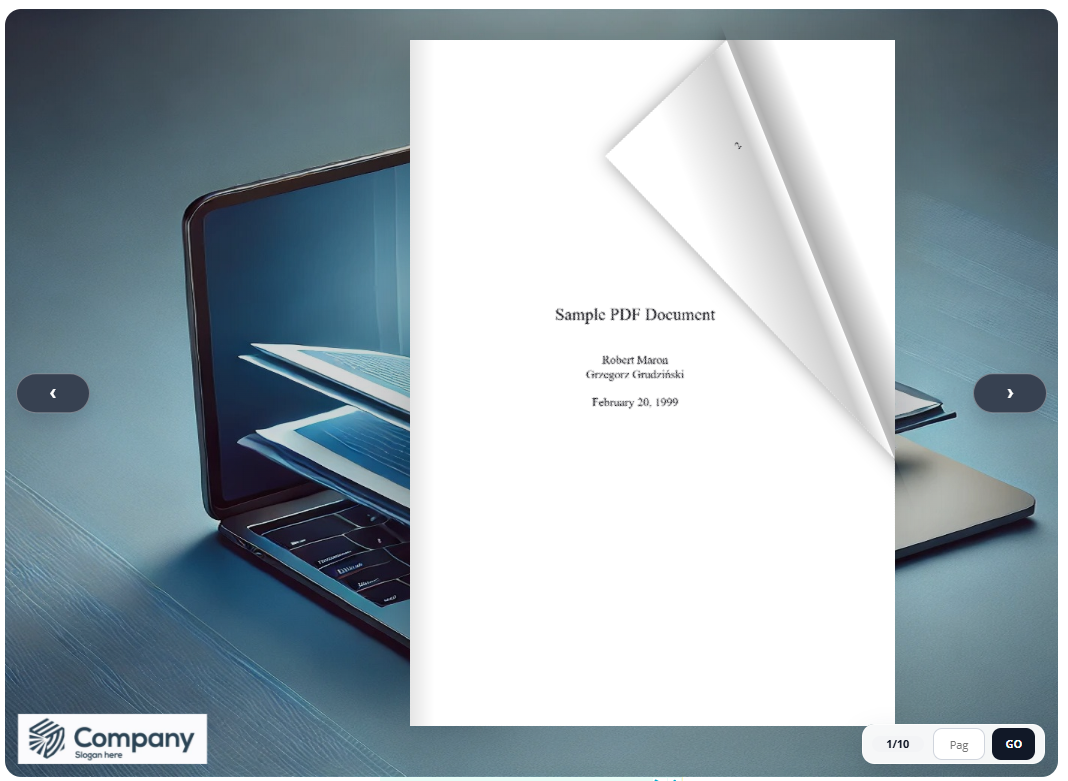
Free PDF to Flipbook lets you quickly transform PDF files into realistic, interactive flipbooks directly inside WordPress.
The plugin is useful for catalogs, brochures, magazines, eBooks, portfolios, restaurant menus, product sheets and online documents. You can upload a PDF from your computer, select a PDF from the WordPress Media Library, generate a shortcode and place the flipbook inside any page or post.
The flipbook is rendered locally on your WordPress site using the bundled PDF.js and Turn.js libraries. No external conversion service or third-party API is required.
Main Features
- Convert PDF files into interactive flipbooks
- Upload PDFs from your computer
- Select existing PDFs from the WordPress Media Library
- Simple shortcode embed
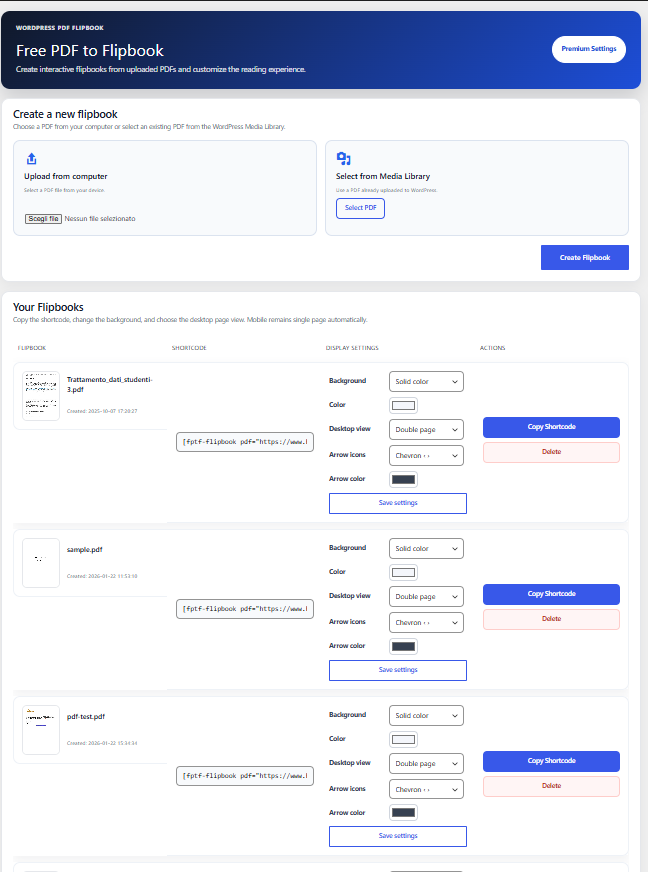
- One-click Copy Shortcode button in admin
- Responsive layout for desktop, tablet and mobile
- Automatic single-page mode on mobile
- Choose single-page or double-page view on desktop
- Solid color background customization
- Automatic PDF hyperlink detection
- Clickable internal and external PDF links
- Smooth page-turn animation
- Zoom and drag support
- Built-in fullscreen button on supported browsers (hidden on iPhone Safari), with multilingual labels and Esc to exit
- Previous and next navigation arrows
- Page counter and quick page jump
- Support for multiple flipbooks on the same page
- Works with most WordPress themes
- No external services required
- Local rendering for better privacy
Admin Options
- Modern admin interface
- Upload PDF from local computer
- Select PDF from Media Library
- Manage created flipbooks in a clean table
- Copy shortcode quickly
- Customize flipbook background color
- Choose desktop page mode
- Choose navigation arrow style
Premium Options
Premium options are available for users who want more control over the appearance and branding of their flipbooks.
- Remove the Free PDF to Flipbook watermark
- Upload a custom logo
- Use image backgrounds
- Customize navigation arrow color
- Enable advanced page counter and quick page jump tools
- Automatic clickable hyperlink detection inside PDF pages
Shortcode
Use this shortcode to display a flipbook:
[fptf-flipbook pdf="https://yoursite.com/file.pdf"]
You can place the shortcode inside posts, pages, custom post types or page builders that support shortcodes.
Plugin Sources
This plugin uses the following open-source libraries:
- PDF.js – Apache 2.0
https://github.com/mozilla/pdf.js
Included files: js/pdf.js, js/pdf.worker.js
- Turn.js – GPL
https://www.turnjs.com/
Included file: js/turnV5.js
All libraries are bundled with the plugin and used according to their licenses.
Installation
- Upload the plugin ZIP file via Plugins > Add New > Upload Plugin
- Activate the plugin
- Open the PDF TO FLIPBOOK menu in your WordPress dashboard
- Upload a PDF or select one from the Media Library
- Copy the generated shortcode
- Paste the shortcode into any page or post
FAQ
How do I add a flipbook to a page?
Upload your PDF from the plugin admin page, copy the generated shortcode and paste it into any WordPress page or post.
Can I use a PDF from the Media Library?
Yes. You can upload a new PDF from your computer or select an existing PDF from the WordPress Media Library.
Can I add more than one flipbook on the same page?
Yes. The plugin supports multiple flipbooks on the same page or post.
Does it work on mobile devices?
Yes. Flipbooks are responsive and mobile-friendly. On mobile devices, the plugin automatically uses single-page view for better readability.
Can I choose single-page or double-page mode?
Yes. You can choose the desktop view mode from the plugin admin area. Mobile view remains single-page automatically.
Are links inside the PDF clickable?
Yes. PDF hyperlinks are automatically detected. Internal page links and external URLs can be opened directly from the flipbook.
Does the plugin use external services or APIs?
No. PDF rendering happens locally in your WordPress site using bundled JavaScript libraries.
Can I customize the flipbook background?
Yes. The free version supports solid color backgrounds. Premium users can also use image backgrounds.
Can I remove the watermark?
The free version displays the Free PDF to Flipbook watermark. Premium users can remove it or replace it with a custom logo.
Does it work with page builders?
Yes. You can use the shortcode with most page builders that support WordPress shortcodes.
Screenshots
Changelog
2.0.1
- Fixed iPhone zoom exit: a second double-tap now explicitly resets zoom even when Safari does not dispatch a dblclick after touch panning.
- Preserved one-finger zoom panning, desktop drag, mobile orientation and fullscreen behavior.
2.0
- Version 2.0 release, including the fullscreen, responsive orientation, PDF link positioning, and mobile zoom/panning enhancements introduced in the 1.9.x series.
- No functional changes to the 1.9.10 implementation.
1.9.10
- Fixed mobile touch panning while zoomed: prevent the surrounding WordPress page from scrolling when dragging within the enlarged flipbook.
- Normal page scrolling remains enabled outside the flipbook and when zoom is off.
- Improved touch target handling and refreshed JavaScript/CSS asset versions.
1.9.9
- Fixed one-finger panning of zoomed flipbook pages on iOS and Android; touches no longer trigger page turning while dragging a zoomed page.
- Preserved double-tap zoom and existing desktop mouse dragging.
1.9.8
- Fix iPhone orientation changes: single page in portrait and double page in landscape.
- Synchronize Turn.js display and size to prevent empty right-hand pages or squeezed spreads after rotation.
- Hide fullscreen button on iPhone where fullscreen for arbitrary HTML elements is unreliable.
1.9.7
- Fix link hotspot alignment in fullscreen and during page turns: attach PDF annotation hotspots to a dedicated canvas-sized transparent overlay and use normalized percentage coordinates.
- Keep the 1.9.5 fullscreen page-size behavior and premium/free link actions unchanged.
1.9.6
- Fix link hotspots misaligned in fullscreen: calculate their positions from normalized PDF annotation coordinates and the actual fitted canvas, including centering offsets.
- Reposition links on every resize and when links are loaded asynchronously, without changing fullscreen sizing or turn navigation.
1.9.5
- Fix fullscreen page resize: use Turn.js public size API, recalculate PDF canvases after fullscreen layout, and keep link overlays aligned.
- Reapply fullscreen dimensions after transitions and prevent stale cached scripts.
1.9.4
- Fix fullscreen pages staying at embedded size: TurnV5 initializes via data().opts/data().done, not data(‘turn’); resize now executes correctly.
- Retain proportional fit by viewport width and height, and update versioned JS/CSS URLs to avoid stale assets.
1.9.3
- Use actual fullscreen viewport dimensions instead of the embedded post container width, so the magazine fills the available screen while preserving page proportions.
- Force the inner container to expand in fullscreen, including themes with max-width constraints.
- Move Exit fullscreen to the top-right, away from the Premium pagination controls at the bottom-right.
- Keep the embedded layout unchanged.
1.9.2
- Fit fullscreen pages to both available width and height, preventing cropped lower content.
- Keep a stable reference page for all resizing, avoiding inconsistent page scaling during page turns.
- Refit all pages, including those temporarily detached by Turn.js, on fullscreen enter/exit.
- Preserve original embedded flipbook layout and fullscreen button placement.
1.9.1
- Moved the fullscreen button below the flipbook in a dedicated row, avoiding overlap with Premium page controls and branding.
- Kept the fullscreen exit control visible inside the fullscreen viewport.
1.9
- Added a built-in fullscreen toggle to each flipbook (Free and Premium).
- Added localized fullscreen labels and automatic fullscreen state updates.
1.8
- Preview in admin interface
- Fix minor bugs
1.7
- Improved admin interface
- Added upload from computer and Media Library selection
- Added cleaner flipbook management table
- Added background color customization
- Added desktop single-page / double-page mode option
- Added automatic single-page mode on mobile
- Added navigation arrow style selection
- Added improved page counter and quick page jump design
- Added support for multiple flipbooks on the same page
- Improved PDF rendering for non-standard PDF sizes
- Improved clickable PDF link detection
- Improved watermark visibility
- Added Premium options for custom logo, image background, watermark removal and arrow color customization
- Fixed layout issues on first and last pages
- Fixed link positioning when multiple flipbooks are used on the same page
1.6
- Added clickable PDF links support
- Improved rendering accuracy
- UI improvements
1.4
- Added upload from Media Library
1.3
- Performance optimizations
1.2
- Added custom post type support
1.1
- Added shadow gradient
1.0
- Initial release