


Description
FrostBanner adds a GDPR cookie banner (cookie consent popup) to your WordPress site in about two minutes. Click “Connect”, sign in, and the banner is live. It blocks Google Analytics, Meta Pixel, YouTube and Google Maps until the visitor agrees, sends Google Consent Mode v2 signals and records every choice in a consent log.
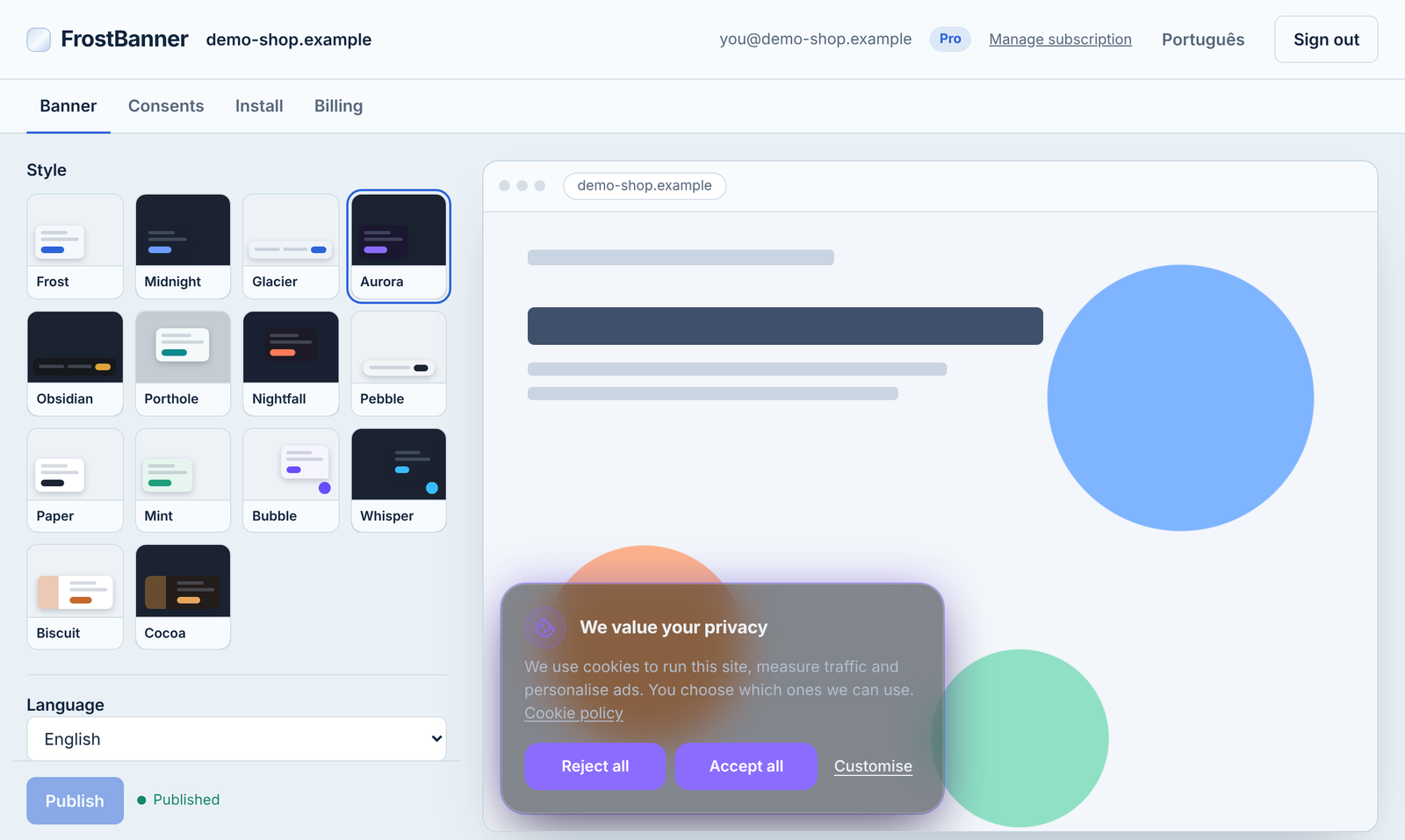
You design the banner in the FrostBanner dashboard and it appears on your site without editing your theme. It works with any theme and page builder.
Why FrostBanner
- Free plan with no pageview or page limit. Many cookie banners stop working or ask you to upgrade when your traffic grows. FrostBanner’s free plan covers one website with unlimited pageviews.
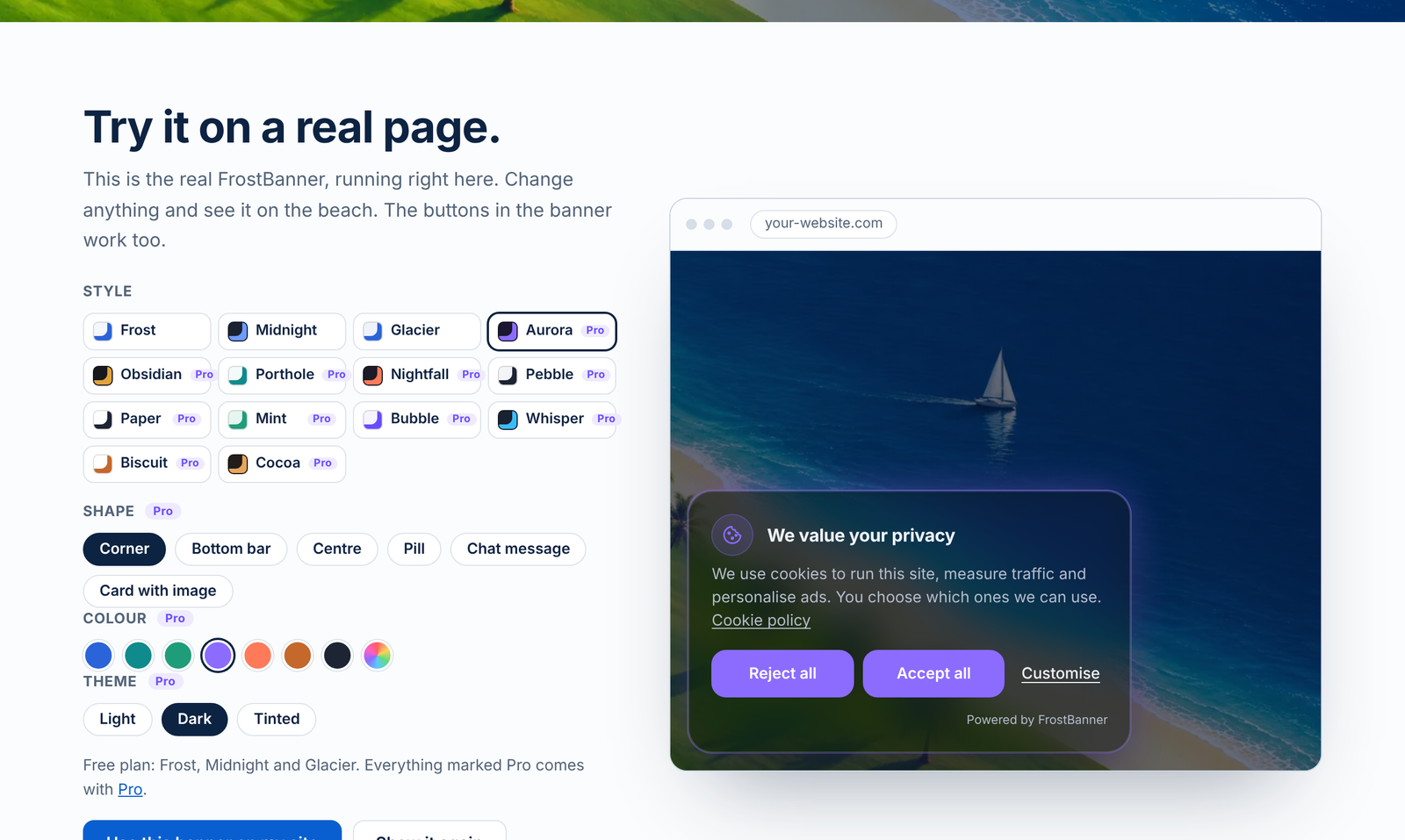
- Looks good out of the box. 14 modern styles instead of a grey bar at the bottom of the page.
- Light. About 18 KB compressed, no jQuery, no extra database tables on your site.
- Honest by default. “Reject all” is as easy as “Accept all”, and nothing optional runs before consent.
- Made in Portugal (EU).
This plugin connects your site to the FrostBanner service at frostbanner.com. You need a FrostBanner account to use it. A free plan is available. See “External services” below for what is sent and when.
Features
- 14 styles in 6 shapes: corner card, bottom bar, centred window, pill, chat message and card with image
- Light, dark and tinted themes, your own colour
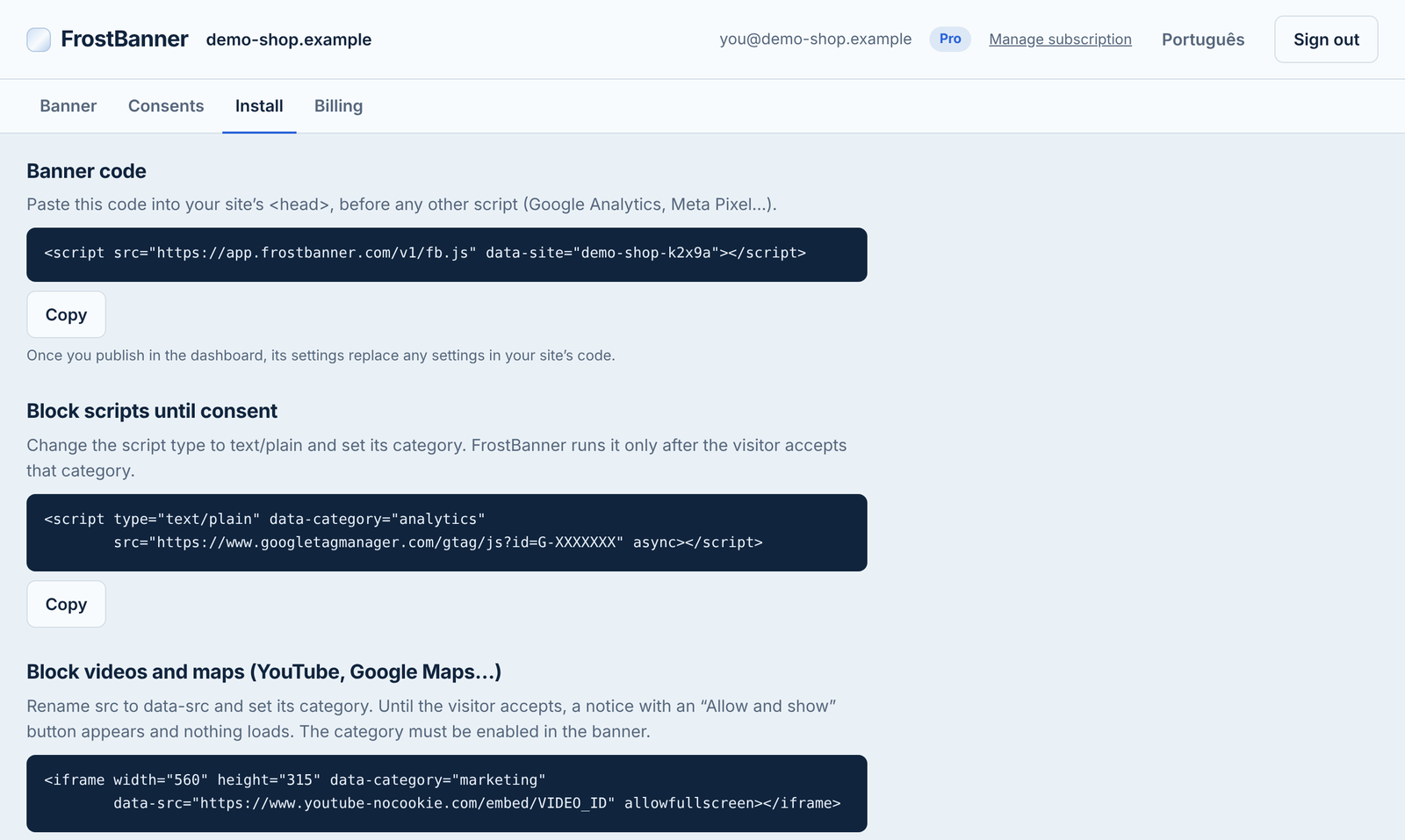
- Blocks scripts until consent: Google Analytics, Meta Pixel and anything else you mark with a category
- Blocks YouTube, Google Maps and other iframes until consent, with an “Allow and show” placeholder
- Google Consent Mode v2 signals
- Equal “Accept all” and “Reject all” buttons, granular categories, a floating button to change the choice at any time
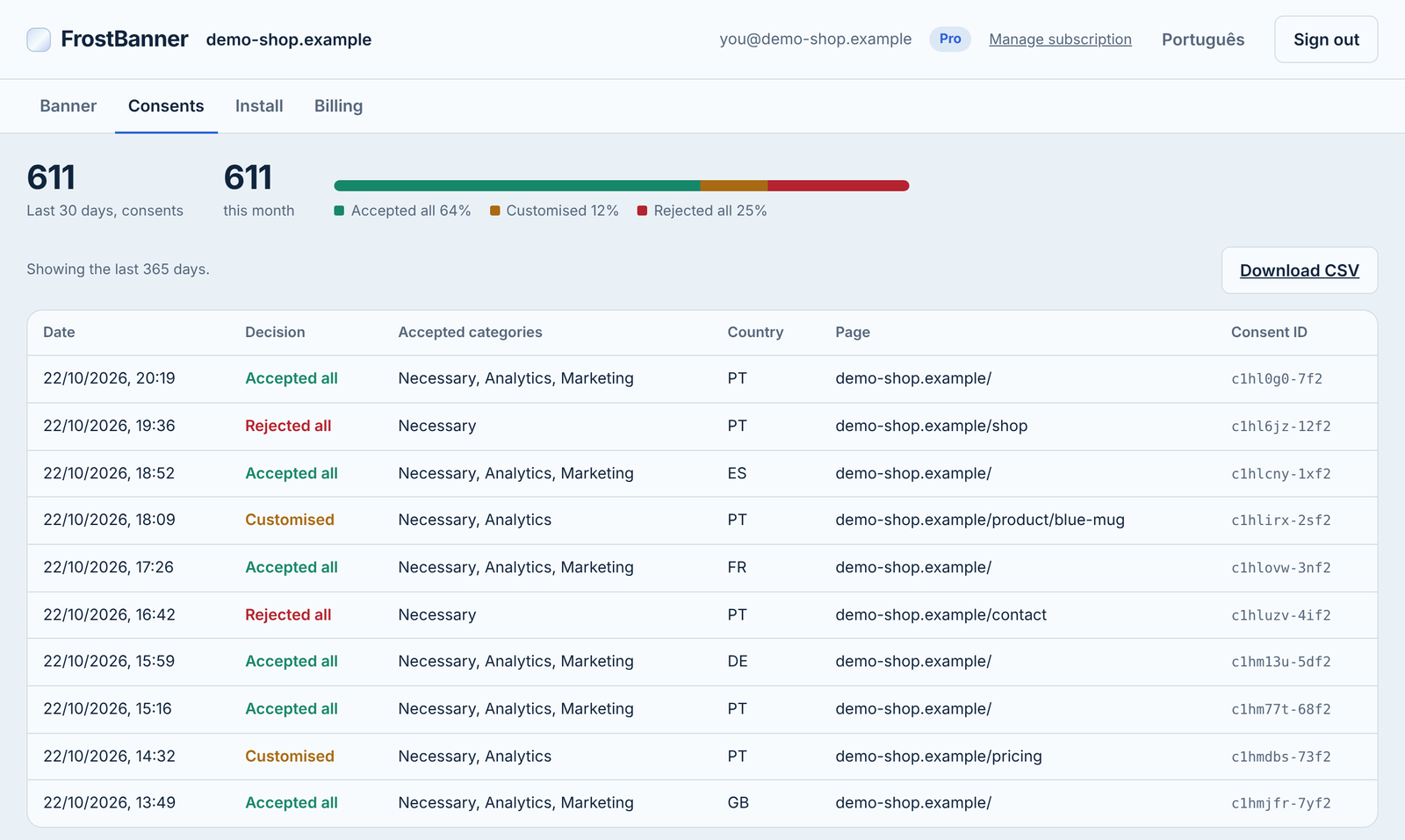
- Consent log with CSV export, in your FrostBanner dashboard
- Built-in texts in 29 languages (all EU languages plus Norwegian, Catalan, Turkish, Ukrainian and Russian), all texts can be replaced
- About 18 KB compressed, no dependencies, does not touch your site’s CSS (Shadow DOM)
The banner script is open source (MIT): https://github.com/automatept-ai-pt/frostbanner
How to set it up
- Install and activate the plugin.
- Go to Settings → FrostBanner and click “Connect to FrostBanner”.
- Sign in with Google, GitHub or your email (a free plan is available). Your site is added and connected automatically, and you come back to WordPress.
The banner appears right away with the default style. Already have a FrostBanner site? You can also paste its site ID by hand in Settings → FrostBanner.
Style, texts, categories and language are changed in the FrostBanner dashboard and published to your site automatically.
Block a script until consent
Change the script type to text/plain and add its category. FrostBanner runs it only after the visitor accepts that category:
<script type="text/plain" data-category="analytics" src="https://www.googletagmanager.com/gtag/js?id=G-XXXXXXX" async></script>
Cookie settings link
Use the shortcode [frostbanner_settings] in your footer or cookie policy page to show a link that reopens the preferences. Change the text with [frostbanner_settings label="Manage cookies"].
External services
This plugin relies on the FrostBanner service, operated by automate-ai.pt (Portugal). Nothing is loaded and no data is sent until you connect the site or save a site ID in Settings → FrostBanner.
- Connecting. Only when an administrator clicks “Connect to FrostBanner”, the browser opens
https://app.frostbanner.com/app/with this site’s domain, the WordPress admin address to return to and a one-time security code. After you sign in and confirm, FrostBanner sends the site ID back to that address.
After a site ID is saved:
- Banner script. Every visitor’s browser loads the banner script from
https://app.frostbanner.com/v1/fb.json each page view. As with any web request, the visitor’s IP address and browser information reach the server. - Banner settings. The script loads the style and texts you published from
https://app.frostbanner.com/v1/config/<your site ID>. Only your site ID is sent. A copy is kept in the visitor’s local storage. - Consent log. When a visitor accepts, rejects or changes their choice, the script sends to
https://app.frostbanner.com/v1/consent: your site ID, a random consent ID, the chosen categories, the banner version and the page address. The service stores the country and a salted hash of the IP address, never the IP address itself.
On the visitor’s device the script stores one first-party cookie and a local storage value named fb_consent with the consent ID, the choices, the banner version and the date.
FrostBanner terms of service: https://frostbanner.com/terms/
FrostBanner privacy policy: https://frostbanner.com/privacy/
Data processing agreement: https://frostbanner.com/dpa/
The free plan shows a small “Powered by FrostBanner” text (not a link) inside the banner. It is added by the service, not by this plugin.
FAQ
Is FrostBanner free?
Yes. The free plan covers one website with no limit on pageviews or pages. It includes script blocking, Google Consent Mode v2, a 30-day consent log and three styles, and shows a small “Powered by FrostBanner” text. The Pro plan costs €5.99 a month or €59 a year (plus VAT) and adds all 14 styles, your own colours, a 12-month consent log with CSV export, automatic language per visitor and removes the text.
Do I need an account?
Yes. The banner, its settings and the consent log are provided by the FrostBanner service. A free plan is available at https://app.frostbanner.com/app/.
Does the plugin work without the FrostBanner service?
No. Without a site ID the plugin does nothing.
What is in the paid plan?
The paid plan is part of the FrostBanner service: for example all 14 styles, your own colours and no “Powered by FrostBanner” text. The plugin itself is the same for everyone and has no locked features. Prices: https://frostbanner.com
Will it slow down my site?
The banner script is about 18 KB compressed, has no dependencies and the plugin adds no database tables. It draws the banner inside a Shadow DOM, so it does not load extra CSS into your theme.
Does it work with caching plugins?
Yes. The plugin only adds one script to the page. The banner’s style and texts are loaded by the visitor’s browser from FrostBanner, so you don’t need to clear your page cache after changing the banner.
Does it support Google Consent Mode v2?
Yes. Before the visitor chooses, FrostBanner sets all Google consent types to “denied” (except security). After the choice it updates analytics_storage, ad_storage, ad_user_data, ad_personalization and the other types to match the accepted categories. Google Analytics 4 and Google Ads tags read these signals.
Which languages are included?
Built-in texts in 29 languages: all EU languages plus Norwegian, Catalan, Turkish, Ukrainian and Russian. You can replace every text. On the Pro plan the banner shows each visitor’s own language automatically.
I already added the FrostBanner script by hand.
Remove the manual script (from your theme or a code snippet plugin) before you save the site ID here, otherwise the banner is loaded twice.
Does it make my site GDPR-compliant?
FrostBanner helps you collect valid consent: nothing optional runs before consent, rejecting is as easy as accepting and every decision is recorded. You remain responsible for listing the cookies your site uses and for your cookie policy. This is not legal advice.
Can I use it with Google AdSense?
FrostBanner is not an IAB TCF / Google-certified CMP, so it is not suitable for sites that show Google AdSense or Ad Manager ads to visitors in the EEA, the UK or Switzerland.
Screenshots
Changelog
1.1.1
- New: after two weeks, a one-time reminder on the Dashboard and Plugins screens asking for a review. “Maybe later” hides it for 30 days, “Don’t ask again” for good.
- Improved: clearer connection texts when your site is already in your FrostBanner account.
1.1.0
- New: “Connect to FrostBanner” button. Sign in and your site is added and connected automatically, no need to copy the site ID.
1.0.0
- First release.