


Description
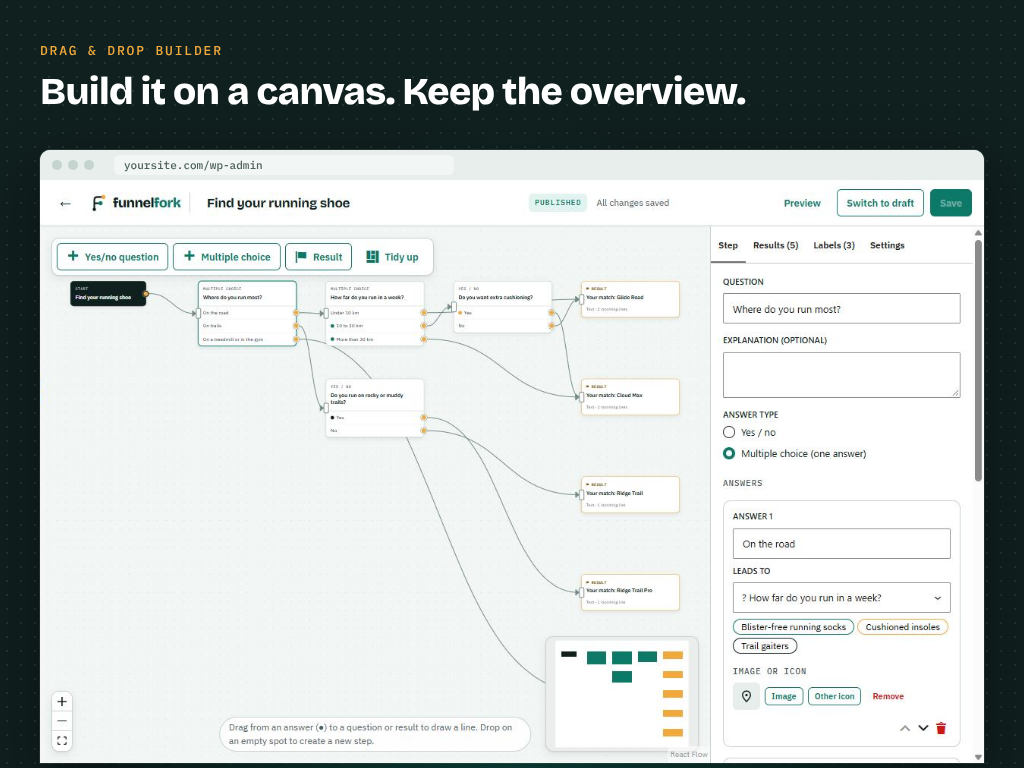
Build a quiz like you draw a flowchart. FunnelFork is a visual quiz builder for WordPress: add questions, connect every answer to the next question or to a result, and see your whole funnel on one canvas. No conditional logic rules to puzzle out, no dead ends: every visitor reaches a result.
Use it for a product recommendation quiz in your WooCommerce store, a decision tree, an assessment or scorecard, a lead generation quiz or a product finder. Your visitors answer one question per screen and end on a personal result, with advice that fits their answers.
Try it right away with the Live Preview button on this page: a ready-made coffee quiz in WordPress Playground, nothing to install. More examples are on funnelfork.com.
What you can build
- Product recommendation quiz for WooCommerce – “Which product fits me?” Send every shopper to the product, category or package that matches their answers.
- Assessment or scorecard – “How ready is your business for…?” Give every answer points and show a result per score range.
- Lead generation quiz and lead magnet – a quiz or self-test that visitors actually finish, with a lead form in FunnelFork Pro.
- Price indication or cost estimate – “What would your new website cost?” Lead visitors to the price range or package that fits.
- Decision tree or eligibility check – “Do I qualify?”, “Which option do I need?”, troubleshooting and support flows.
- Personality quiz and interactive content – fun quizzes that keep visitors on your site and lead them to the right page.
- Advice tool or product finder – collect labels along the way and show personal advice on the result.
Why FunnelFork
- You see the logic. Every answer is a line on the canvas. You see at a glance where each visitor ends up, and the editor warns you about empty questions, steps nobody can reach and overlapping score ranges.
- Flow mode and score mode, both free. Let the lines decide the result, like a decision tree, or give every answer points and pick the result by score range.
- No limits. Unlimited quizzes, questions, results and visitors, also in the free version.
- Fast. The front end is plain JavaScript without dependencies, and it only loads on pages that show a quiz. It works with page caching.
- Privacy-friendly. The free plugin stores nothing a visitor answers and sends nothing to external services. The statistics are anonymous counters, without cookies or IP addresses.
- Looks like your site. Quizzes take over the colours, fonts and buttons of your theme.
- Accessible. Keyboard-friendly, respects “reduced motion”, moves the focus to every new step and announces it to screen readers.
Features
- Visual drag & drop editor: place questions and results on a canvas and draw the answer logic with lines. Loops are impossible, so every visitor reaches a result.
- Two kinds of quizzes:
- Flow mode – the lines decide the result, like a decision tree.
- Score mode – every answer has points and every result a score range (for example 0–10, 11–20, 21 or more). Ideal for assessments and “how do you score?” quizzes.
- Yes/no questions and multiple choice questions, each with an optional explanation.
- Multiple results, clearly marked, with one default result for answers without a line or a score outside every range.
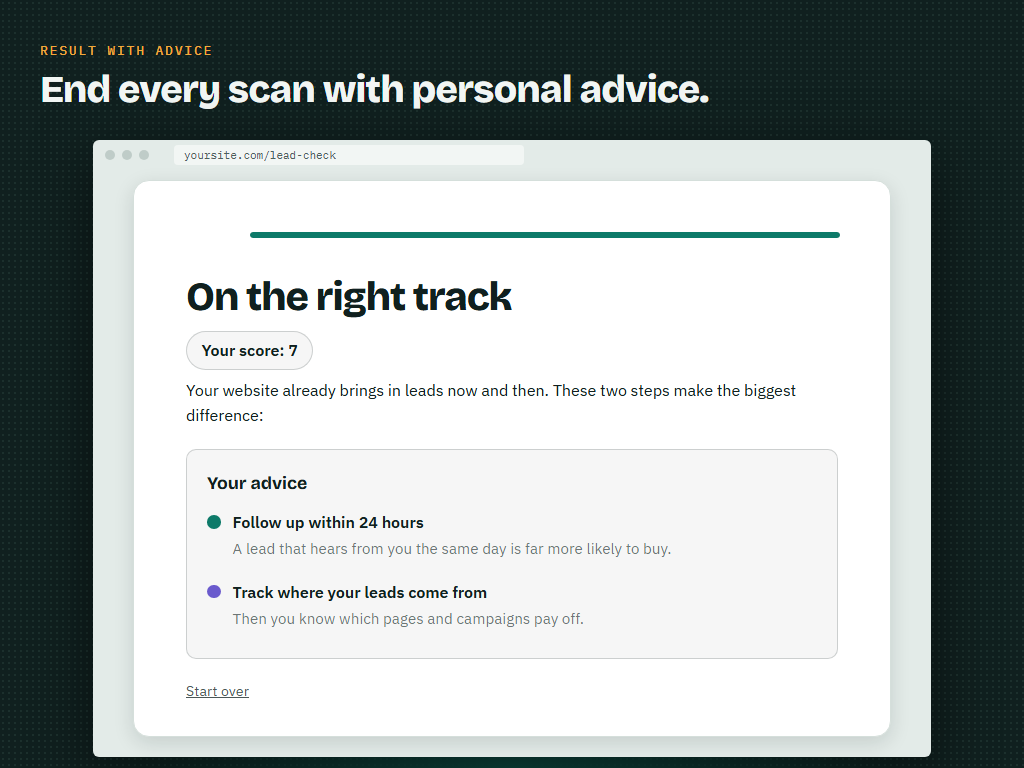
- Labels: attach labels (for example products or pieces of advice) to answers and show the collected labels as personal advice on the result.
- Optionally show the given answers and the score on the result.
- An optional start screen, then one question per page that slides smoothly into view, with a back button and a progress bar.
- Statistics: views, starts, completions and the completion rate of every quiz over the last 30 days, in the overview, in a dashboard widget and in the editor, with a chart per day. Bots and logged-in editors are not counted.
- Block and shortcode
[funnelfork id="123"], so it works in the block editor and in every page builder (Elementor, Bricks, Divi, Beaver Builder and others). - Works with WooCommerce: link every result to a product or category.
- Translation-ready. Translations are delivered through translate.wordpress.org.
- For developers: JavaScript events (
funnelfork:step,funnelfork:answer,funnelfork:complete) for your own analytics, PHP and JS hooks, and--funnelfork-*CSS custom properties.
FunnelFork Pro
Want to know where visitors leave, turn them into leads or sell more? FunnelFork Pro is an add-on with a yearly license and no limit on responses:
- WooCommerce product picker – show the right products on every result as cards with price and an Add to cart button, each with a short “why it fits”.
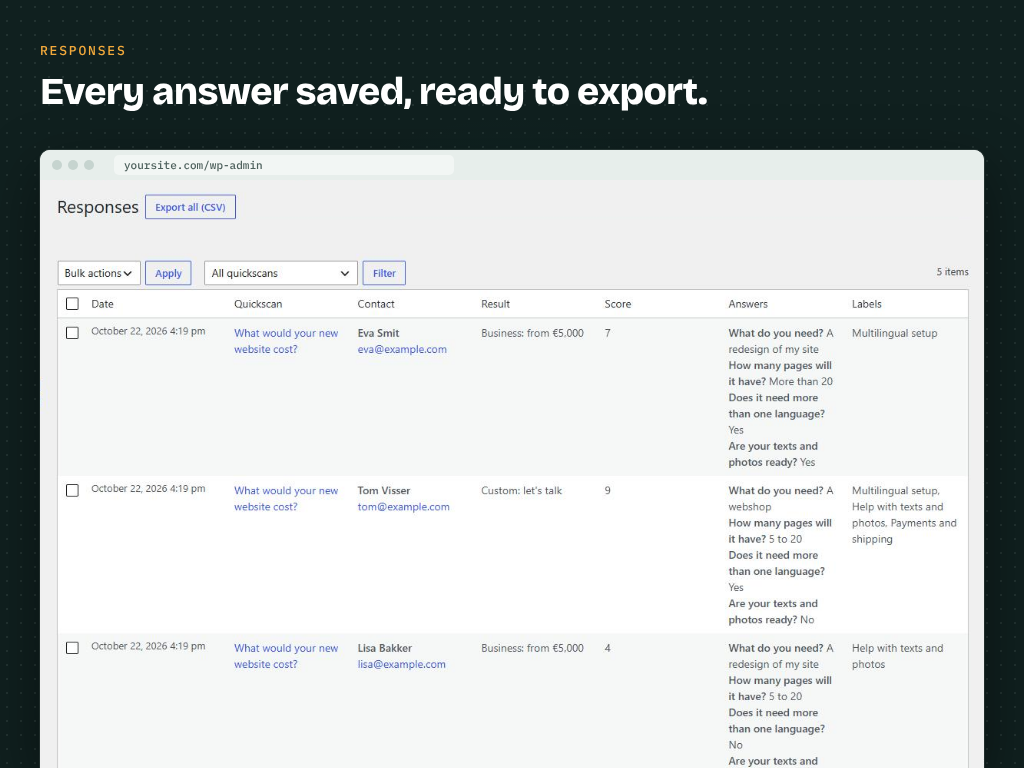
- Funnel statistics – drop-off per question right on the canvas, how often every answer, result and label is chosen, leads, product clicks and add to cart, for any period and compared with the period before, with CSV export.
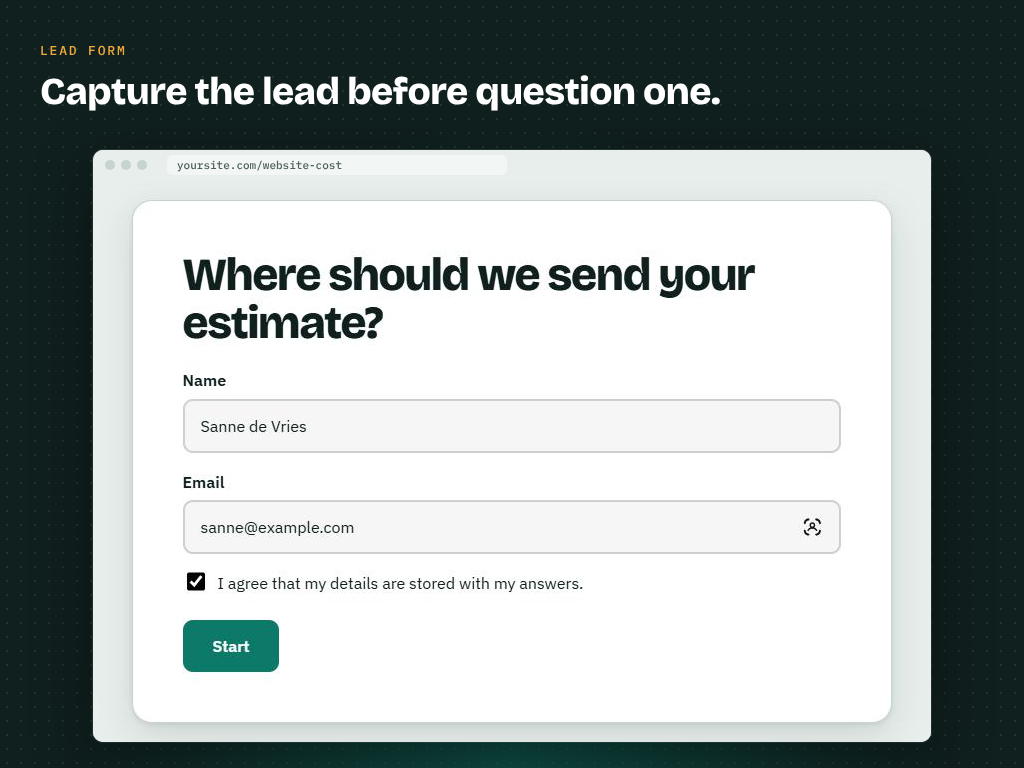
- Lead form before the first question or just before the result, protected against spam bots, and every response saved with CSV export.
- Result by email to the visitor, with the advice, the score and the recommended products.
- Notifications by email and webhook (Zapier, Make, n8n or your CRM) for every lead and result.
- Redirect from a result to any page, optionally with the result in the URL.
- GA4, Google Tag Manager and Meta Pixel events with one switch.
- Multilingual quizzes with WPML and Polylang: one quiz for every language.
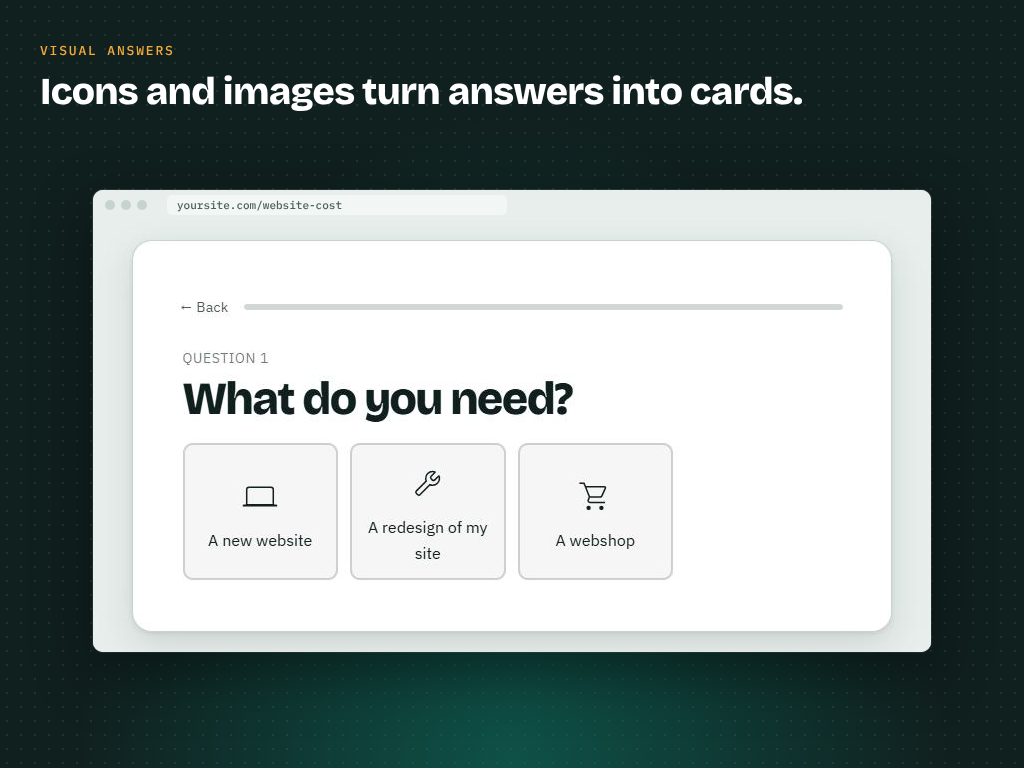
- A Gravity Forms form or any shortcode on a result, images and icons for answers, more transitions and your own styling.
Every Pro license comes with a 30-day money-back guarantee. Compare Free and Pro.
External services
FunnelFork uses the Freemius SDK for the optional opt-in and to offer FunnelFork Pro. Only when you click “Allow & Continue” are the admin’s name and email, the site URL and the WordPress, PHP and plugin versions sent to Freemius; “Skip” sends nothing. The Add-ons screen loads FunnelFork Pro details from Freemius, and Pro purchases are handled by Freemius (Terms, Privacy Policy). Visitor answers and statistics are never sent to an external service; they stay on your own site.
Installation
- Go to Plugins → Add New, search for “FunnelFork” and click Install and Activate. Or upload the plugin zip under Plugins → Add New → Upload Plugin.
- Go to FunnelFork → Add quiz and give your quiz a title.
- Add questions and results, draw a line from every answer to the next step, and press Publish.
- Place the “FunnelFork quiz” block or the shortcode
[funnelfork id="123"]on a page. - Follow the views and completions in the Statistics tab of the editor.
FAQ
How do I create a product recommendation quiz in WordPress?
Make a result for every product, category or package, add the questions that tell them apart, and draw each answer to the result it points to. With labels you can also collect several products or tips along the way and show them together on the result. Place the quiz with the block or the shortcode, and you are done.
Does it work with WooCommerce?
Yes. Link every result to the WooCommerce product or category that fits. With FunnelFork Pro you pick the products per result (or a whole category), and shoppers see them as cards with the price and an Add to cart button, right in the quiz. See the WooCommerce product quiz guide.
What is the difference between flow mode and score mode?
In flow mode the lines decide where a visitor ends up, like a decision tree. In score mode every answer gives points and the total score picks the result; lines are optional and only set the order of the questions.
What happens with an answer that has no line?
It leads to the default result. Every quiz has exactly one default result, marked in the editor. In score mode an answer without a line goes to the next question.
Can a flow loop back to an earlier question?
No. Loops are prevented so that every visitor always reaches a result.
Are there limits on quizzes, questions or responses?
No. You can make as many quizzes, questions and results as you like, and there is no limit on visitors or responses, in the free version and in Pro.
Can I see how my quiz performs?
Yes. The free plugin counts views, starts and completions per quiz and shows the completion rate for the last 30 days. FunnelFork Pro adds funnel statistics: at which question visitors leave, which answers and results they get, leads, product clicks and add to cart, for any period.
Can I collect email addresses or leads?
The free plugin does not collect personal data. FunnelFork Pro adds a lead form (name, email, phone, optional consent) before the first question or just before the result, saves every response with CSV export, emails the result to the visitor, and sends an email or a webhook (Zapier, Make, n8n) for every lead and result.
Can I send visitors to a page or product after the quiz?
In the free plugin you link to a page or product in the text of a result. FunnelFork Pro can redirect visitors from a result straight to any URL, optionally with the result, score and labels in the URL.
Does it work with Google Analytics, Tag Manager or the Meta Pixel?
Yes. Developers can use the JavaScript events of the free plugin. FunnelFork Pro sends ready-made events (quiz_start, question_view, quiz_complete, generate_lead and add_to_cart) to GA4, Google Tag Manager and the Meta Pixel with one switch, without personal data.
Is it a survey or a form builder?
FunnelFork is made for guided flows: every visitor answers one question at a time and ends on a personal result. For long surveys with many open questions a form plugin is a better fit; for quizzes, assessments, product finders and decision trees FunnelFork is.
Does it work with my theme and page builder?
Yes. The quiz takes over the colours, fonts and buttons of your theme. Use the “FunnelFork quiz” block in the block editor, or the shortcode [funnelfork id="123"] in any page builder (Elementor, Bricks, Divi and so on).
Does it slow down my site?
No. The front-end script has no dependencies and only loads on pages that show a quiz, and it works with page caching.
Does FunnelFork store personal data?
The free plugin does not store or send anything a visitor answers. The statistics are anonymous counters per quiz per day (views, starts, completions), without cookies or IP addresses. Saving responses and lead forms are part of FunnelFork Pro, which works with the WordPress privacy export and erase tools and never stores IP addresses.
Is FunnelFork translated?
The plugin is translation-ready, and translations are delivered through translate.wordpress.org. Your own questions and results are in the language you write them in.
Can developers react to answers?
Yes. The .funnelfork element fires the funnelfork:step, funnelfork:answer and funnelfork:complete events, for example for your own tracking. The complete event contains the answers, the collected labels, the score and the result.
Where is the source code of the JavaScript?
The uncompiled source is included in the src folder. Run npm install and npm run build to build the files in build (with @wordpress/scripts).
Screenshots




Changelog
1.1.3
- Updated: the “FunnelFork Pro” page now lists every feature of FunnelFork Pro 1.3, including the WooCommerce product picker, funnel statistics, the result email, analytics events, redirects and multilingual quizzes.
1.1.2
- New: the “FunnelFork Pro” page explains how to install FunnelFork Pro after you bought it.
- Improved: when FunnelFork Pro is installed but its license is not active yet, the links to FunnelFork Pro lead to the license activation instead.
- New: a dismissible notice on the FunnelFork screens while FunnelFork Pro has a time-limited offer. It disappears by itself when the offer ends.
- New for developers: the
funnelfork_pro_license_urlandfunnelfork_dealfilters.
1.1.1
- New for developers: the
funnelfork_frontend_graphfilter, to change the texts of a quiz right before it is shown (for example to translate them). The editor never sees these changes.
1.1.0
- New: statistics. Views, starts, completions and the completion rate per quiz for the last 30 days, in the overview, in a dashboard widget and in the new Statistics tab of the editor. Anonymous counters per day; bots and logged-in editors are not counted.
- New for developers: the
funnelfork:beforecompleteevent to hold the quiz before a result, and editor filters for the Statistics tab and the canvas.
1.0.2
- New name: FunnelFork – Visual Quiz Builder for Product Recommendations & Decision Trees.
- Updated short description and tags.
- Live Preview: try FunnelFork with a ready-made coffee quiz in WordPress Playground, straight from this page.
- A friendly request to review FunnelFork, shown once your first quiz is published.
1.0.1
- New name: FunnelFork – Visual Quiz & Quickscan Builder for Lead Generation.
1.0.0
- First release.