
Description
GoConsent is a free cookie consent banner for WordPress that really blocks trackers, writes your privacy policy from what your site actually uses, and keeps proof of consent on your own server. Built for visitors anywhere: opt-in for the EU, UK, Quebec and Brazil, the opt-out rules of California (CCPA/CPRA) and the other US state laws, and 18 more privacy laws worldwide, in 10 languages.
Free means free. No visit limits, no account, no cloud service and no forced branding. Everything runs on your own WordPress server, so nothing about your visitors leaves your site.
At a glance
- Real tracker blocking: Google Analytics, Google Ads, Meta Pixel, TikTok, Microsoft Clarity, Hotjar and 450+ other services wait until the visitor agrees, with Google Consent Mode v2, Global Privacy Control (GPC) and the IAB Global Privacy Platform (GPP).
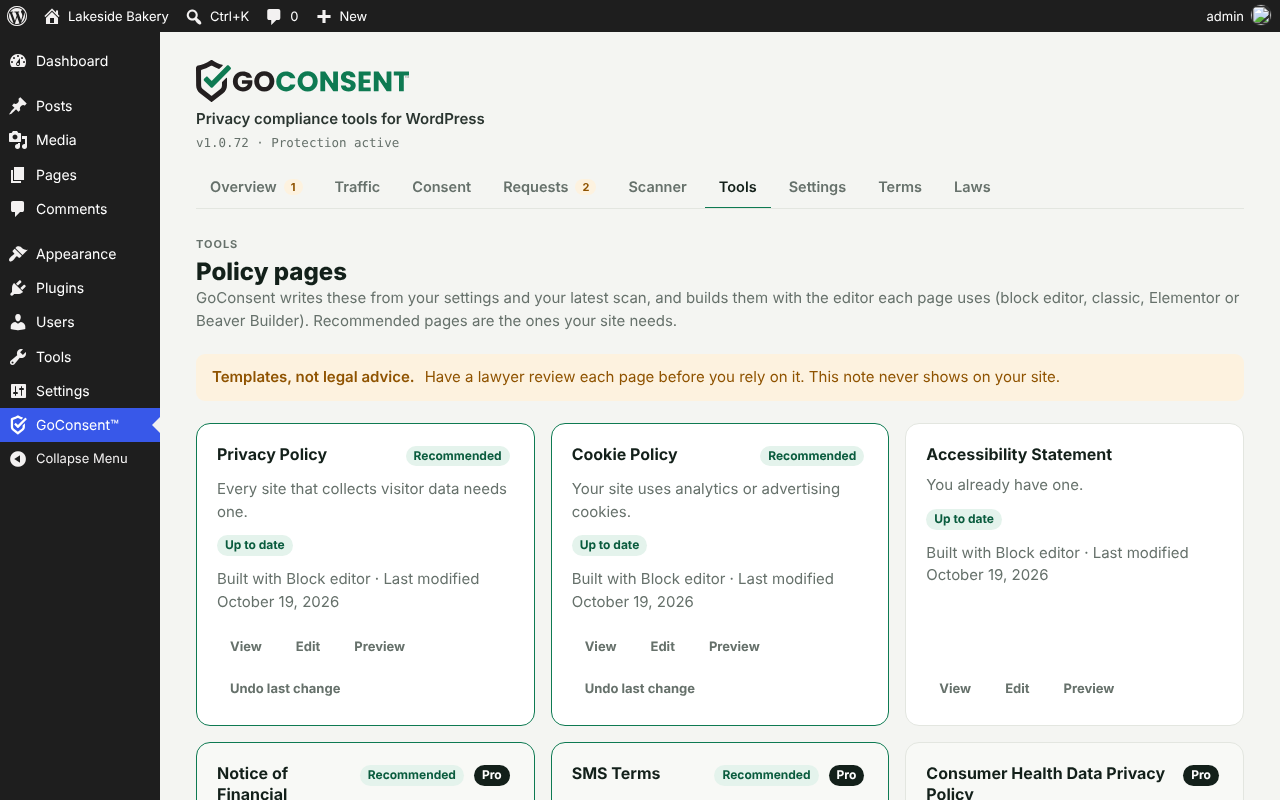
- Privacy policy generator: a Privacy Policy with a California Notice at Collection section, a Cookie Policy, a Refund & Returns Policy, a Shipping Policy, a Cancellation Policy, an Accessibility Statement and, for real estate, a Fair Housing Statement, written from your settings and your latest scan.
- Proof of consent on your own site: every choice recorded in your WordPress database, kept 24 months and downloadable as CSV.
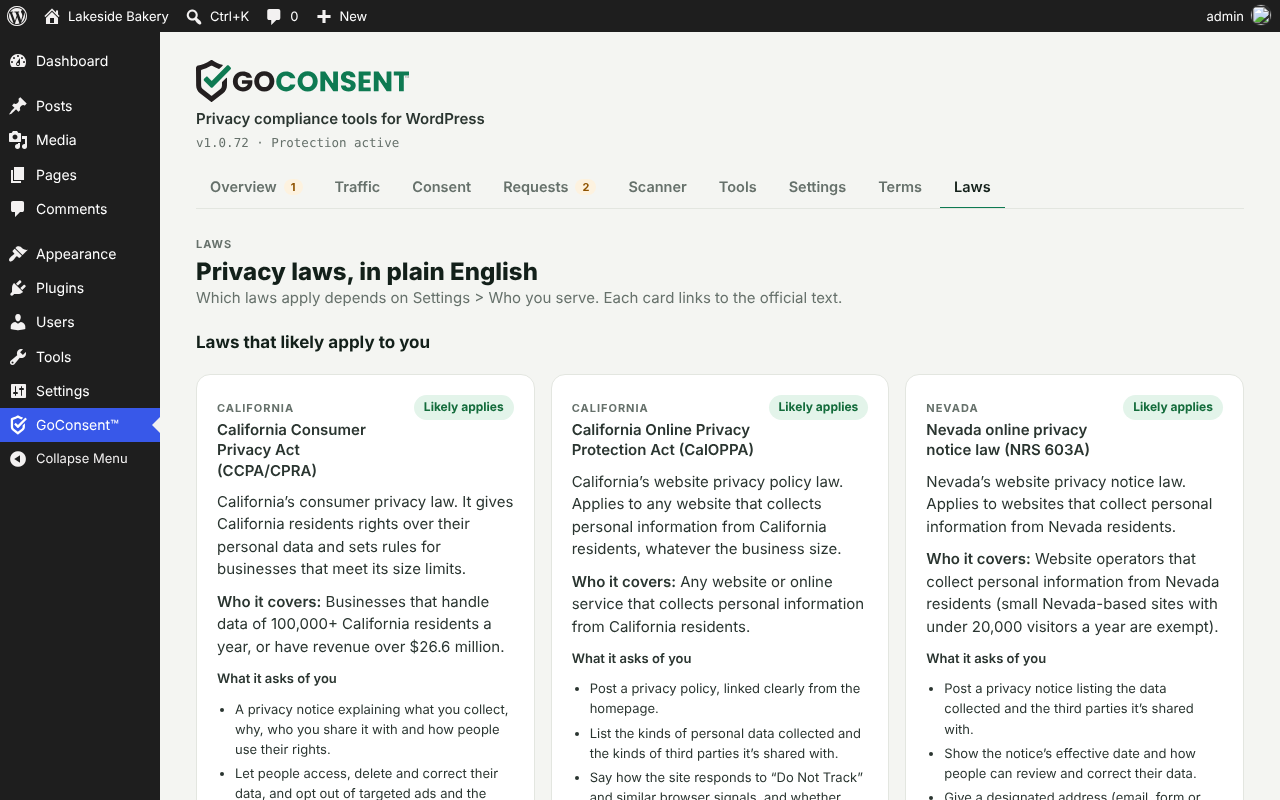
- Worldwide privacy laws: GDPR, UK GDPR, Quebec’s Law 25, Brazil’s LGPD, CCPA/CPRA and 18 other state privacy laws, and laws from Canada and Switzerland to Australia, Japan and India, in plain English with links to the official text.
- Knows where each visitor is: the country your CDN or host adds, else a built-in country database on your own server, else the browser’s time zone. No IP address is stored or sent anywhere.
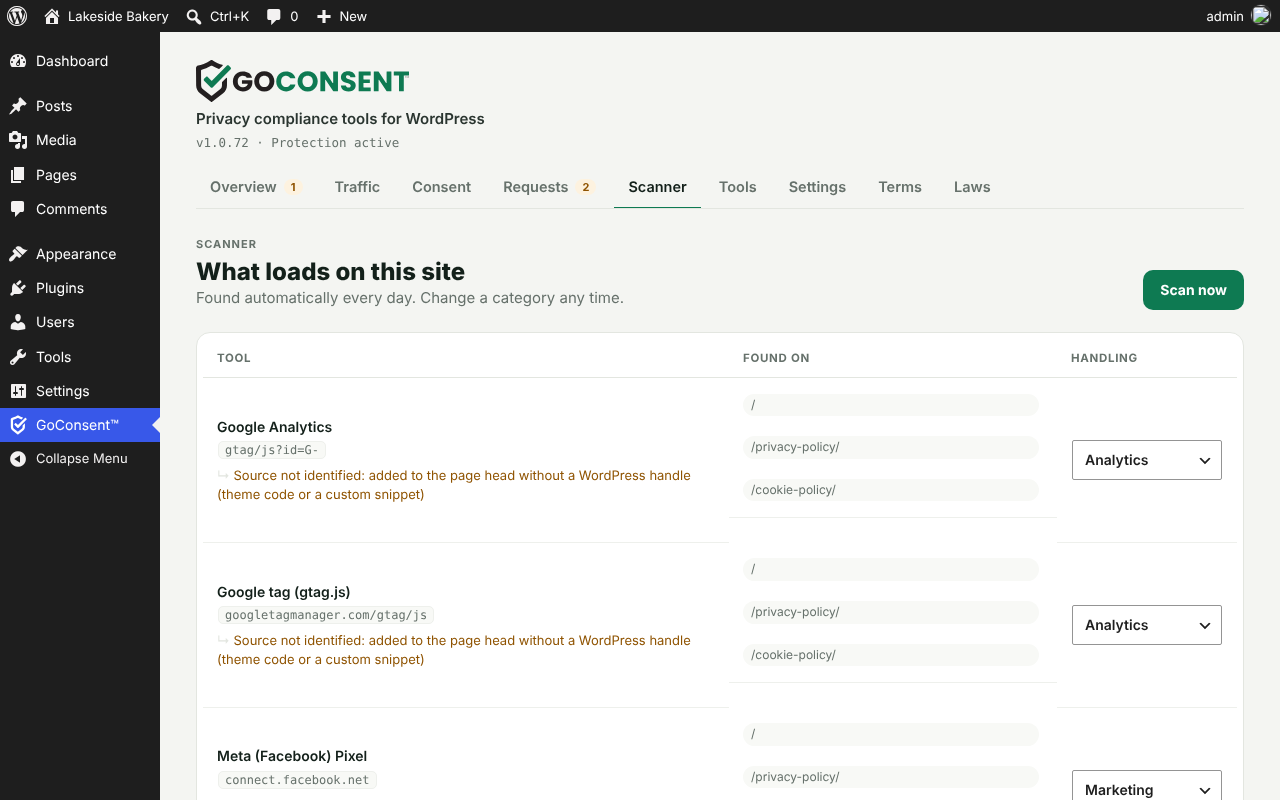
- Cookie scanner: every tracker, pixel, embed and cookie on your pages and inside Google Tag Manager, and what adds each one.
- Free consent self-check: a clean browser tests your banner four ways (before any choice, after Reject All, after Accept All and with GPC on) and explains how to fix each problem.
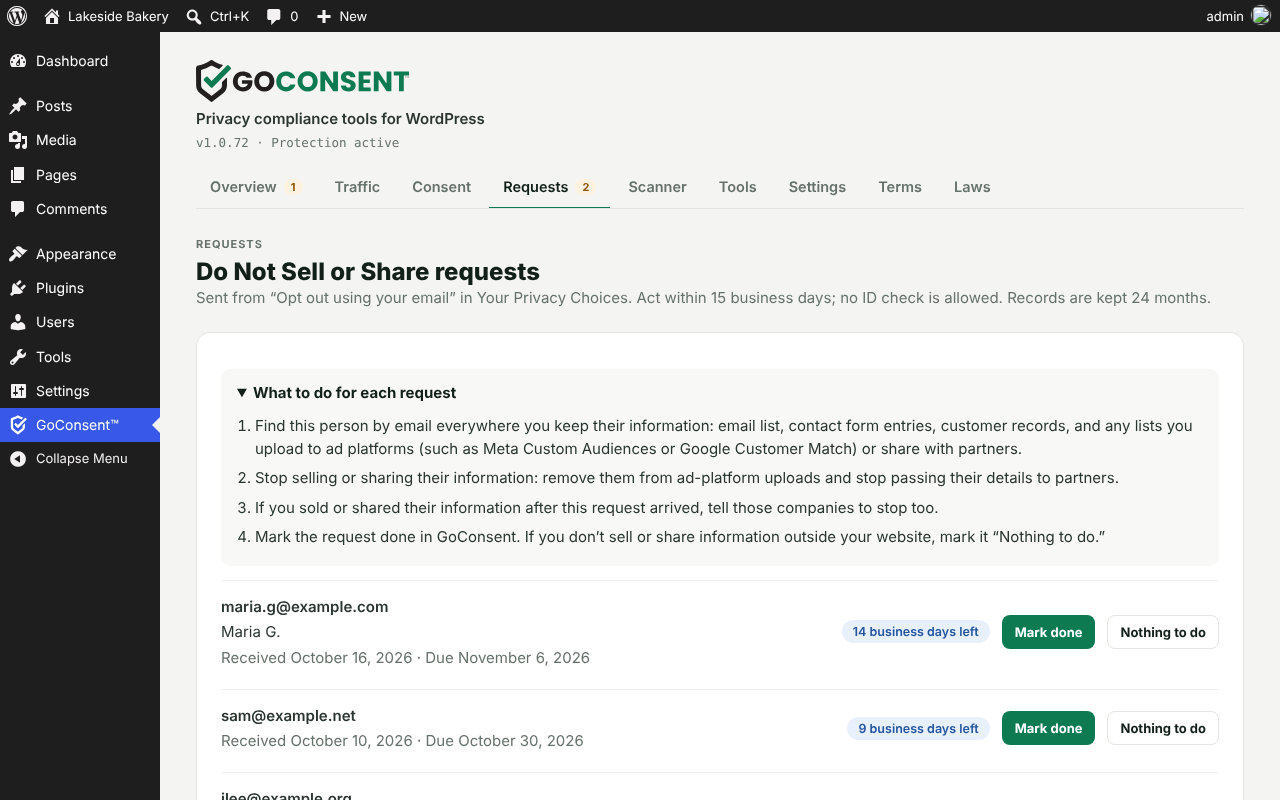
- Do Not Sell or Share requests with deadlines, a checklist and reminder emails.
- 20 business types, from online stores, software sellers, real estate agents, salons, gyms and contractors to law firms, insurance agencies, venues, wineries, schools, nonprofits, hotels and manufacturers, each with its own checks and policy wording. Licensed businesses (real estate, lending, contractors, dealers, law firms) get their license number and brokerage in every policy, plus a [goconsent_license] shortcode.
- Accessible banner, tested against WCAG 2.2 AA on every release, in 10 languages.
Who GoConsent is for
- Small and mid-size businesses that want the privacy basics done right without a monthly bill.
- Sites with visitors from many countries: each visitor gets the banner their law expects, in their own language.
- Agencies and web designers managing many client sites, including multisite networks. Booking, ordering and listing widgets keep working.
How it works
- Install and accept the terms. Nothing runs and nothing leaves your site until you do.
- Tell GoConsent about your business: where you are, your business type and where your customers live. It works out which privacy laws likely apply to you.
- Scan. GoConsent reads your own pages and your Google Tag Manager container and lists every tracker, pixel, embed and cookie.
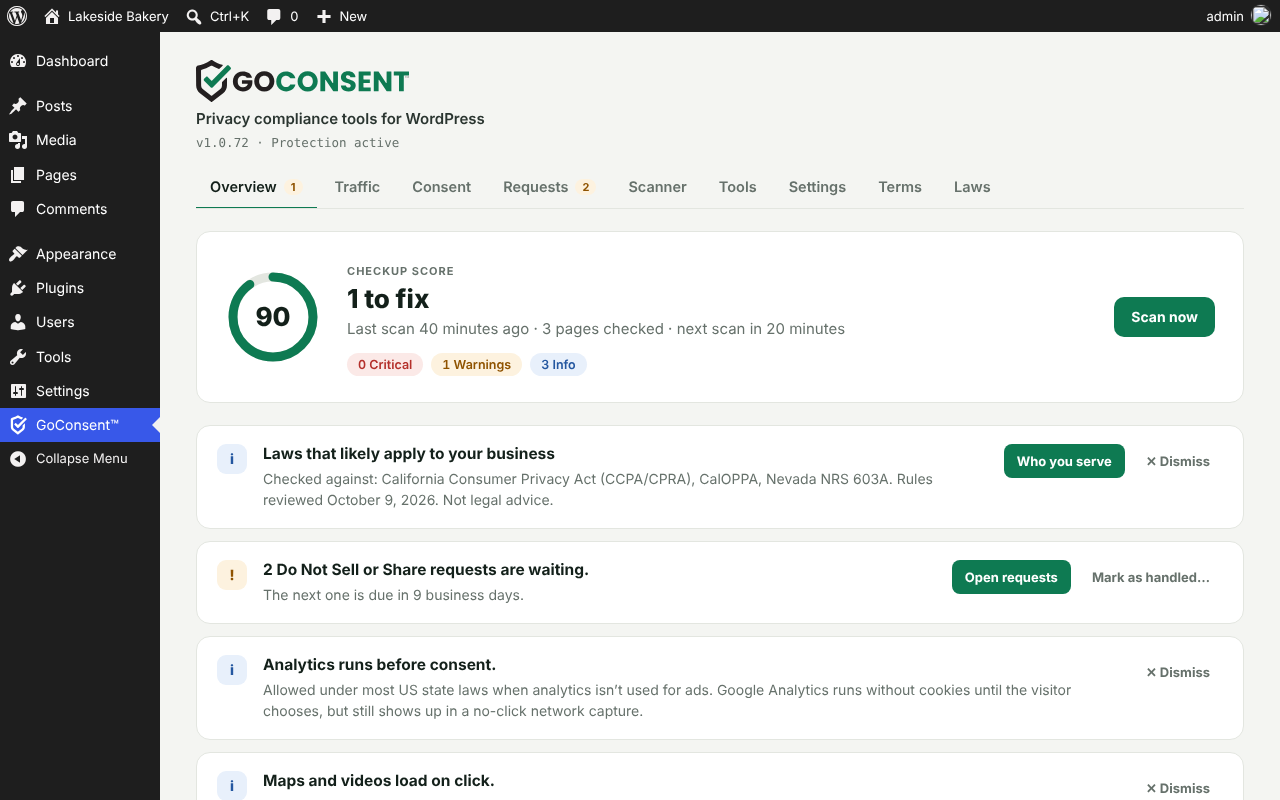
- Fix. The Overview shows a checkup score and plain-English issues, sorted by what the law requires and what is best practice. Most fixes take one click.
- Publish your policies in your own editor, and keep them current as your site changes.
Cookie consent banner that blocks trackers before consent
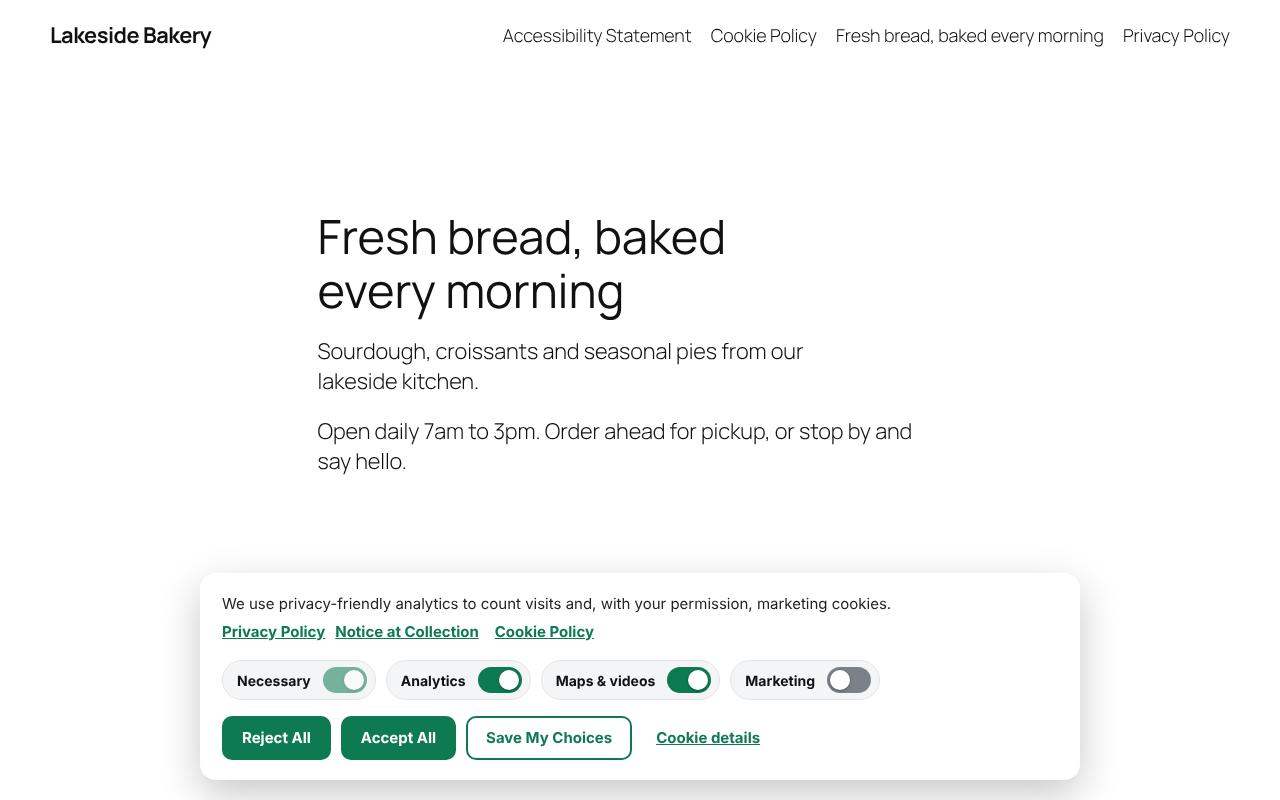
- Equal Accept All and Reject All buttons, with category switches on a compact banner that links to your Privacy Policy, Notice at Collection and Cookie Policy.
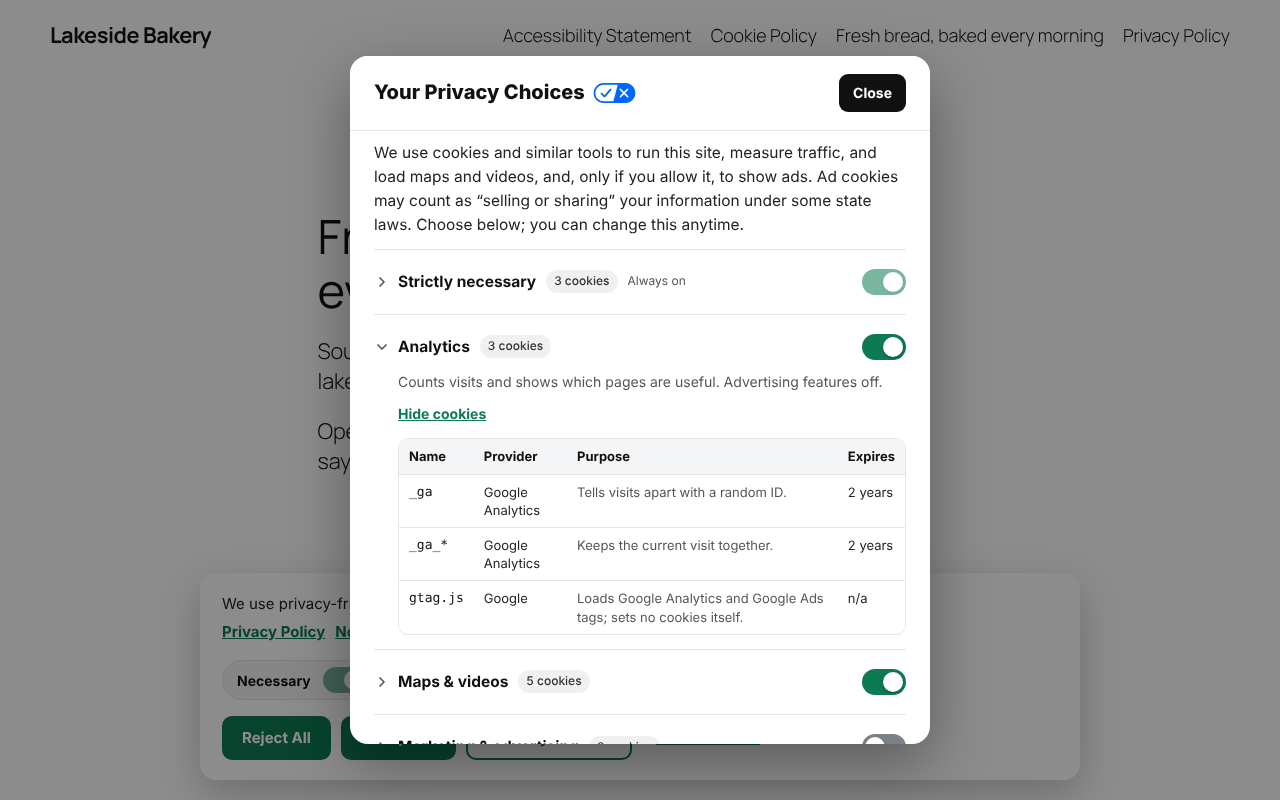
- “Your Privacy Choices” panel with a short notice at collection, one collapsible section per category and its cookies, a consent receipt, and California’s official opt-out icon on the footer link.
- Real blocking, not just a notice. Tags wait until the visitor agrees, including scripts other plugins add later.
- Google Consent Mode v2 with every signal “denied” until consent and ad data redaction on. Meta Pixel gets the same consent signal.
- Global Privacy Control honored automatically, as California, Colorado and other states require. Visitors are told the signal was honored, and a signed-in visitor’s opt-out follows them to every device.
- “Opt out using your email” for information you hold outside the browser, with no account or ID.
- Click-to-load maps, videos and widgets: Google Maps, YouTube, Vimeo, and booking, chat, review and form widgets that carry trackers wait behind a placeholder. Widgets your business type relies on keep working.
- Analytics from the first page, privately: for US visitors, Google Analytics can count visits without cookies until they choose. EU and UK visitors get stricter defaults automatically.
Privacy policy generator and policy pages
- Privacy Policy, Cookie Policy, Refund & Returns, Shipping and Cancellation Policies, Accessibility Statement and Fair Housing Statement, written from your settings and your latest scan, naming the services your site actually uses.
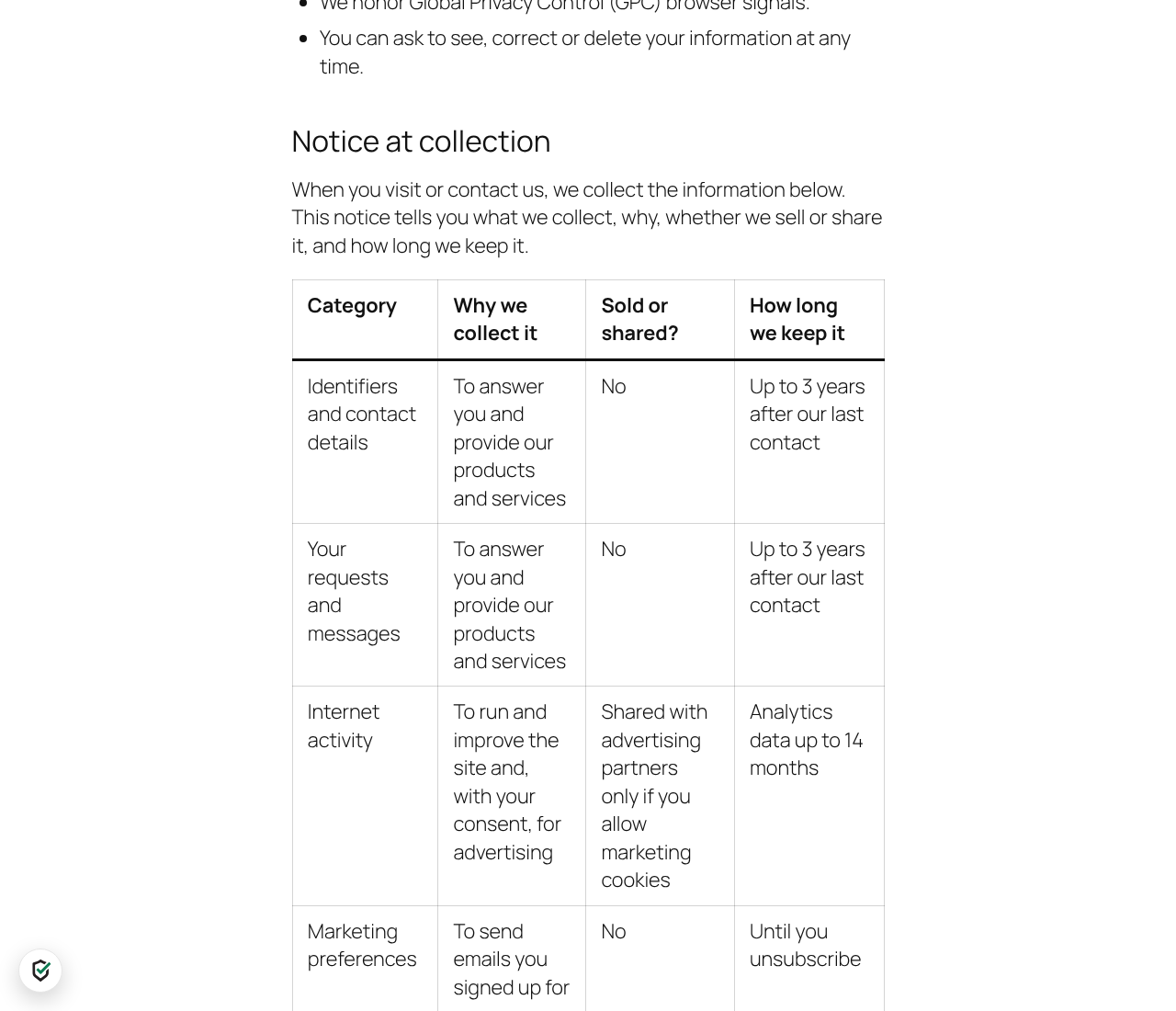
- Notice at Collection section in your Privacy Policy (what you collect, why, whether it is sold or shared, how long you keep it), linked from the banner.
- Country sections for each place you serve: rights and response times, the regulator, Quebec’s person in charge, Brazil’s encarregado, EU and UK representatives and transfers abroad.
- Works with your editor: the block editor, the classic editor, Elementor and Beaver Builder.
- Safe updates: GoConsent updates only its own sections, keeps your edits and lets you undo any change.
Cookie scanner and checkup
- Daily scan of your own pages finds tracking tags, pixels, embeds and unknown scripts, and shows which plugin, theme or page adds each one.
- 450+ services recognised in 22 groups, from analytics, session recording and ad pixels to chat, maps, payments, bookings and real estate IDX, each with its company, purpose and cookies. See the full list.
- Plugins handled automatically: WooCommerce, Site Kit, MonsterInsights, PixelYourSite, Jetpack, HubSpot, Klaviyo, the big form plugins and page builders. Another consent plugin is flagged.
- Checkup score with plain-English issues and one-click fixes, plus suggested privacy policy wording.
- Consent self-check: a clean browser visits your site four times and shows which trackers loaded when they shouldn’t have, including trackers hidden inside other companies’ embeds. Results show on your screen only. Up to 3 checks per site per day.
Privacy laws in plain English
Pick the countries, states and regions you serve, and the Laws tab shows each law with who it covers, its cookie rule, response deadlines and the regulator, with a link to the official text. GoConsent covers the EU GDPR and ePrivacy rules, UK GDPR and PECR (including the Data (Use and Access) Act 2025), Switzerland, Canada (PIPEDA), Quebec (Law 25), Brazil (LGPD), Australia, New Zealand, Japan, South Korea, India, South Africa, Singapore, Mexico, Argentina, Colombia, Chile, Türkiye, Israel and China, and in the US: CCPA/CPRA, CalOPPA and 18 other state privacy laws, Washington’s My Health My Data Act, COPPA and GLBA. Laws that start soon are flagged before they apply. Read the law summaries.
A plain-English guide, not legal advice. GoConsent tells you what each law asks for; it doesn’t make you compliant on its own.
Built for everyone
- Accessible: the banner, Your Privacy Choices, the cookie dialog, the privacy button, placeholders and the footer link are tested against WCAG 2.2 AA on every release, with automated axe-core checks and scripted keyboard tests. Read the accessibility conformance report.
- 10 languages: English, Spanish, French, German, Italian, Portuguese, Dutch, Polish, Swedish and Japanese, with regional versions. The banner can follow each visitor’s browser language, or WPML, Polylang and TranslatePress. On WordPress.org, a language pack from translate.wordpress.org may replace the bundled translation.
- Your team works undisturbed: administrators and editors never see the banner, so page builders keep working.
- Multisite: network activation sets up every site, and each site keeps its own settings and records.
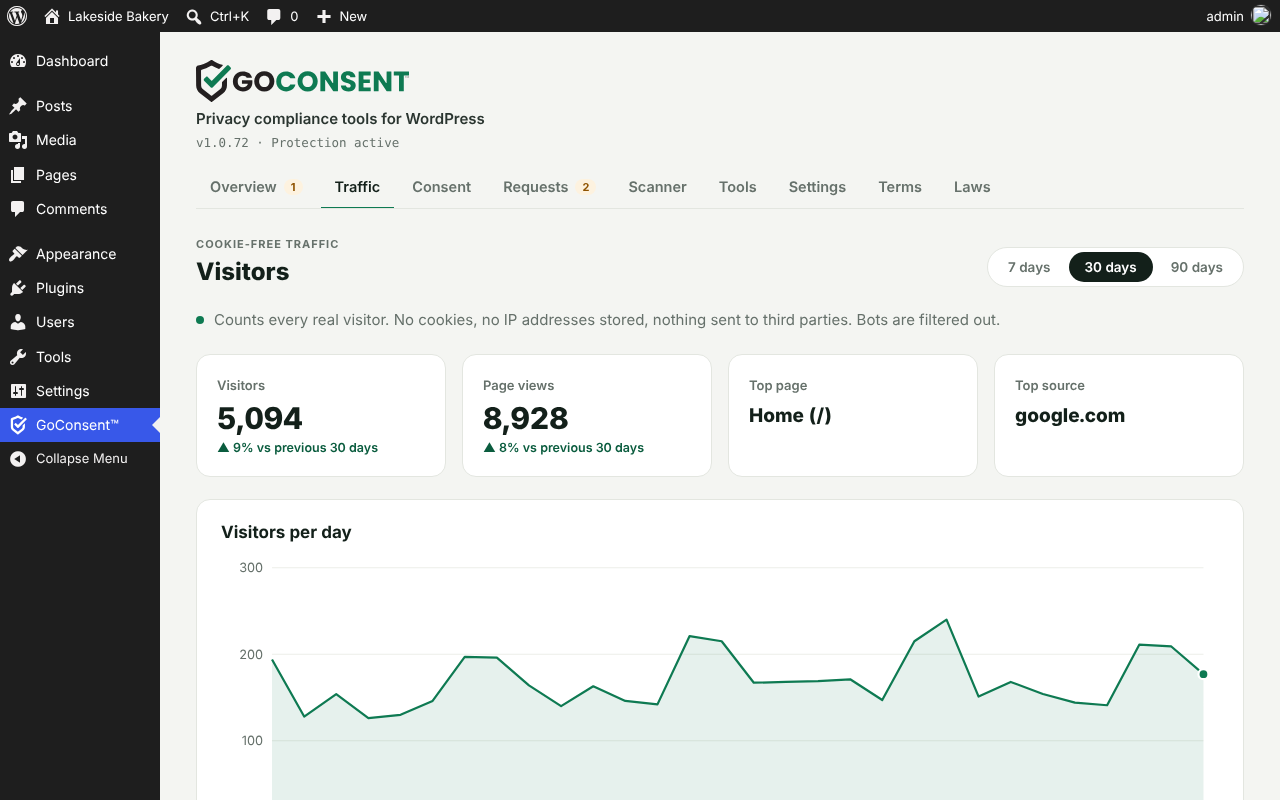
- Cookie-free traffic stats on your own server: visitors, pages, sources, devices and UTM campaigns, with no cookies and no stored IP addresses.
GoConsent Pro
Pro adds the tools that save time when your site or the law changes:
- Leads and visit sources: calls, form sends, directions and emails counted per page, plus visits from search, AI assistants and social. Still no cookies.
- Law updates: when a privacy law starts to apply to you, GoConsent drafts the new policy wording and waits for your OK. Alerts and a monthly report.
- Evidence Scan: the four-visit check saved as evidence, with a PDF report, HAR recordings, screenshots and a private share link for your lawyer. Consent ID lookup and every policy version saved with dates.
- Thirteen more policy pages, including Terms & Conditions, a Disclaimer, Children’s Privacy, SMS Terms and Impressum.
Compare plans at getgoconsent.com/pricing.
Learn more
- Docs: setup, the banner, scans, policy pages and requests, step by step.
- Privacy laws: what each law asks of a website, in plain English, with sources.
- Compare consent plugins: free and paid plans side by side, from each vendor’s own pages.
- Free website privacy audit: check any site for trackers, a privacy policy and opt-out links.
GoConsent is a compliance tool, not legal advice. Have a lawyer review your policies.
External services
GoConsent makes no outside requests on activation, and none until an administrator accepts its terms.
-
Consent self-check (roxxistudios.com and Google Cloud) — only when an administrator clicks Run self-check (Scanner tab). GoConsent sends roxxistudios.com the site’s address, the addresses of up to 10 of its public pages, the banner mode, the list of tracking services GoConsent recognizes (names, host names and cookie names, in your categories) and the GoConsent version. To confirm the request came from this site’s own admin, roxxistudios.com then reads a one-time code from this site’s REST API (goconsent/v1/selfcheck/proof); the code exists only while a check is starting. roxxistudios.com passes the job to the GoConsent Scanner on Google Cloud Run, which visits those public pages in a clean browser as any visitor would. Only a short result comes back (which checks passed and which trackers loaded). The scanner’s recordings, screenshots and report are deleted as soon as they reach roxxistudios.com, no share link is made, and the server deletes its record once your site has the result (or after 24 hours). Your site keeps only the latest result, for you. No visitor data is sent. RoxxiStudios privacy policy: https://roxxistudios.com/privacy-policy/ Google Cloud terms: https://cloud.google.com/terms and privacy notice: https://cloud.google.com/terms/cloud-privacy-notice
-
Help videos (roxxistudios.com, and YouTube only if you play a YouTube video) — on GoConsent’s own screen. When an administrator opens GoConsent and its copy of the help video list is more than 12 hours old, your server asks roxxistudios.com for the current list. The request contains the product name, “free”, the GoConsent version and the names of GoConsent’s own tabs and cards; no site address, visitor data or personal data. Plays aren’t reported. A hosted video plays from roxxistudios.com in the administrator’s browser only when they click its button. A YouTube video loads from youtube-nocookie.com (YouTube’s privacy-enhanced mode) only after they click Play video; before that nothing loads from YouTube. RoxxiStudios privacy policy: https://roxxistudios.com/privacy-policy/ YouTube terms: https://www.youtube.com/t/terms and Google privacy policy: https://policies.google.com/privacy
-
Google Fonts (fonts.googleapis.com, fonts.gstatic.com) — optional, off by default. Only when you turn on Host Google Fonts on this site (Consent tab), and only for Google Fonts your theme or plugins already load, your server downloads those font files once and GoConsent serves them from your own site, so visitors’ browsers never contact Google. The request contains the font stylesheet address and no visitor or site data. Google’s terms: https://policies.google.com/terms and privacy policy: https://policies.google.com/privacy
Everything else stays on your site:
- The scanner requests pages of your own site: once a day after the terms are accepted, or when you click Scan now.
- Google Tag Manager (www.googletagmanager.com) — only if your site already uses it. When the scanner finds a Google Tag Manager container id (GTM-…) on your pages, your server downloads that public container file once per scan to list the tags inside it. The request contains only the container id. Google’s terms: https://policies.google.com/terms and privacy policy: https://policies.google.com/privacy
- The “Powered by GoConsent” credit in Your Privacy Choices is off by default and only shows if you turn it on (Share the love, Consent tab). It is a plain link to getgoconsent.com; nothing loads from it unless a visitor clicks it.
- Visitor location: GoConsent’s built-in country database ships inside the plugin and is refreshed with each GoConsent release. Lookups run on your own server. Nothing is downloaded and no outside service is called; the visitor’s IP address is never stored or sent anywhere.
- Maps and videos (Google Maps, YouTube, Vimeo) are your site’s own embeds. GoConsent adds none; it holds them until the visitor allows them, then the visitor’s browser loads them as it normally would.
- Banner language: the translations are static files inside the plugin (assets/i18n), loaded from your own site only when a visitor’s language differs from the page’s.
- Traffic statistics and consent records are stored in your own database and are never sent anywhere.
Developer notes
- IAB GPP:
__gpp()with the US National section (usnat), CMP ID 1 (unregistered). - REST:
POST /wp-json/goconsent/v1/requestreceives “Opt out using your email” requests. - Multisite: network activation sets up every site; each site accepts the terms and keeps its own settings and records.
- JavaScript API:
GoConsent.open(),GoConsent.get(),GoConsent.loadScript( src, attrs, onload ),GoConsent.onChange( callback ). - REST:
GET /wp-json/goconsent/v1/wherereturns the visitor’s{ c: country, r: US state or Canadian province, g: region }from CDN or host headers, else the built-in country database (never cached; no IP in the answer). - Events:
goconsent:changeandgoconsent:where(the visitor’s region is known) ondocument;goconsent_updatein the dataLayer.window.GoConsentStatehasregion,country,stateandlocated(iportz). - Filters:
goconsent_signatures,goconsent_scan_urls,goconsent_issues,goconsent_law_rules,goconsent_industries,goconsent_render_footer_link,goconsent_filter_page,goconsent_alert_recipients,goconsent_visitor_ip,goconsent_trusted_proxies(IP ranges whose X-Forwarded-For, CF-Connecting-IP and X-Real-IP headers are believed; Cloudflare’s by default, plus private networks),goconsent_geo_database(path to the country database file, or ” to turn it off),goconsent_visitor_country(two-letter code, or ” to use the time zone; the source is passed too, e.g.cloudflareordatabase),goconsent_visitor_region. - Action:
goconsent_loaded.
Third-party assets
GoConsent includes California’s official privacy opt-out icon (assets/img/ca-privacy-options.svg), unchanged. It is published by the California Attorney General for businesses to use on their websites with a “Your Privacy Choices” link, as the California Consumer Privacy Act regulations require: https://oag.ca.gov/privacy/ccpa/icons-download. It is loaded from your own site, never from outside servers.
GoConsent includes a country database (data/geo-country.dat) built from “user-country” by ip-location-db (https://github.com/sapics/ip-location-db), dedicated to the public domain under the Open Data Commons Public Domain Dedication and License (PDDL) 1.0: https://opendatacommons.org/licenses/pddl/1-0/. It is compiled from the five …
Installation
- In WordPress, go to Plugins > Add New, search for GoConsent and click Install Now, then Activate.
- Open GoConsent in the admin menu and accept the terms to turn on protection.
- In Settings, set your business location, business type and where your customers are. GoConsent then checks your site against the laws that likely apply to you.
- Click Scan now on the Overview, fix what the report shows, and create your policy pages in Tools.
FAQ
Does GoConsent help with CCPA and CPRA?
GoConsent gives you tools for key California requirements: an opt-out for the sale and sharing of personal information, Global Privacy Control support, a “Your Privacy Choices” link with the state’s official opt-out icon, and a privacy policy that covers your rights. Compliance also depends on how your business handles data, so have a lawyer review your setup.
Does it work for GDPR and the UK?
It’s built for it. Visitors choose before any analytics or advertising cookies load, and the Privacy Policy includes a legal basis section, rights, response times and the regulator when you serve the EU or UK. For the UK you can turn on the Data (Use and Access) Act exception, which lets statistics-only analytics run with a free way to object.
Which privacy laws does GoConsent cover?
US state privacy laws (California’s CCPA/CPRA and 18 others, plus laws starting soon), CalOPPA, COPPA, GLBA and US health data laws, and outside the US: the EU GDPR and ePrivacy rules, UK GDPR and PECR, Switzerland’s FADP, Canada’s PIPEDA, Quebec’s Law 25, Brazil’s LGPD, Australia’s Privacy Act, New Zealand’s Privacy Act, Japan’s APPI, South Korea’s PIPA, India’s DPDP Act (coming 2027), South Africa’s POPIA, Singapore’s PDPA, Mexico’s LFPDPPP, Argentina’s Law 25,326, Colombia’s Law 1581, Chile’s Law 21.719 (coming Dec 1, 2026), Türkiye’s KVKK, Israel’s Protection of Privacy Law and China’s PIPL. The laws that apply to you depend on the countries and states you choose under Who you serve. Each one adds its checks to the report and its rights, deadlines and regulator to your generated Privacy Policy. GoConsent is a tool, not legal advice.
Which visitors get opt-in (nothing tracks until they agree)?
With Stricter defaults for opt-in regions on (the default): visitors from the EU and EEA, the UK, Quebec and Brazil, plus China and Argentina when you serve them. Canadian visitors whose province isn’t known count as Quebec when you serve Quebec. Swiss visitors always see the banner with a Reject option. US visitors get the opt-out rules their states expect. In GoConsent Pro you can set your own rule for each region.
Can the banner show in my visitor’s language?
Yes, by default (Banner language: Visitor’s browser language, on the Consent tab). The banner, Your Privacy Choices and the cookie dialog then show in the visitor’s browser language when it is one of GoConsent’s 10 (English, Spanish, French, German, Italian, Portuguese, Dutch, Polish, Swedish and Japanese, with regional versions for Spain and Mexico, France and Canada, and Brazil and Portugal). Other visitors see your site language. The page itself stays the same for everyone, so page caching keeps working: the browser loads a small translation file from your own site only when it needs one. Trackers stay held while it loads, and consent records are the same in every language. Policy pages stay in your site language. If you use WPML, Polylang or TranslatePress, the banner follows each page’s language instead.
Does it really block Google Analytics and the Meta Pixel before consent?
Yes. Tracking tags are held until the visitor agrees, including tags added later by other scripts. Google Consent Mode v2 is set to “denied” by default.
How does GoConsent know where a visitor is?
In this order, and only the country (plus the US state or Canadian province when a header gives it):
- The country your CDN or host already adds to each request: Cloudflare (turn on IP Geolocation under Network in Cloudflare), Amazon CloudFront, Vercel, Pantheon, Akamai, WP Engine, Kinsta and other hosts with GeoIP.
- If there’s no header, GoConsent’s built-in country database. It ships inside the plugin, so it works on every host. The visitor’s IP address is checked against it on your own server, then forgotten: it is never stored, logged or sent anywhere, and no outside service is called.
- If neither can tell (a private network, say), or the answer takes longer than 0.8 seconds, the browser’s time zone.
Pages stay cacheable: the banner asks your own site with a tiny request that is never cached. Trackers stay held until the answer is in, so nothing loads early. Proxy headers such as X-Forwarded-For are only believed from Cloudflare or a proxy on your own network, so a visitor can’t fake a country. The database gives the country, not the US state, so without a state header US visitors get your US rules (one set for every state) and Global Privacy Control is honored everywhere. See what your server uses on the Consent tab under Visitor location, with the Check button. Developers can supply their own country with the goconsent_visitor_country filter.
Which services and plugins does GoConsent recognise?
450+ services, from Google Analytics, Google Ads, Meta Pixel, TikTok and LinkedIn to Matomo, Plausible, Hotjar, HubSpot, Klaviyo, Intercom, Calendly, Stripe, booking engines, IDX feeds and other consent tools. See “Integrations” above for the full list by group. Popular plugins such as WooCommerce, Elementor, Site Kit, MonsterInsights, PixelYourSite, Jetpack and OptinMonster are set up automatically. Scripts from other companies are still found and sorted by what their address looks like, and you can change any category.
Does it work with Elementor, Beaver Builder and page caching?
Yes. The banner works with any theme and with page caching. Policy pages can be created and updated in the block editor, the classic editor, Elementor and Beaver Builder.
Does GoConsent use cookies?
One first-party cookie, goconsent, remembers each visitor’s choice for 12 months. Traffic statistics use no cookies. When your host provides the visitor’s country, the banner also keeps it in the browser’s session storage (goconsent_where, deleted when the browser closes) so it doesn’t ask again on every page.
Will visitors who click Reject still be counted?
Yes, in GoConsent’s cookie-free traffic stats. They are not tracked by Google Analytics or advertising tools.
Can I let Google Analytics run before consent?
Yes, by default. “Analytics before consent” (Consent tab) is on for new installs: Google Analytics counts visits from the first page, without cookies until the visitor chooses. Advertising stays blocked, visitors can still opt out, and EU & UK visitors keep analytics off until they choose. Turn it off in the Consent tab.
How do I add the “Your Privacy Choices” link somewhere else?
Use the [goconsent_choices] shortcode, or link any menu item to #privacy-choices. The floating privacy button (Consent › Banner look) can sit bottom left or bottom right, at any height, or be turned off.
How do I show the list of cookies on a page?
Use the [goconsent_cookie_table] shortcode. Add category="analytics" (or necessary, media, marketing) to show one category. The Cookie Policy page GoConsent builds already includes it.
Are there visit limits or a paid plan required?
No. The free version has no visit or page limits, needs no account and adds no forced branding. Everything runs on your own server, except the consent self-check, which uses the GoConsent server only when you click Run self-check.
Does GoConsent write my privacy policy?
Yes, in the free version. The Tools tab builds a Privacy Policy (with a California Notice at Collection section), a Cookie Policy, a Refund & Returns Policy, an Accessibility Statement and a Fair Housing Statement from your settings and your latest scan, so the services your site really uses are named. Pages are written into your own editor; GoConsent updates only its own sections, keeps your edits and can undo any change. Have a lawyer review them.
Can I export consent records?
Yes. Every choice is kept in your own WordPress database for 24 months (random consent ID, time, policy version and anonymized IP) and can be downloaded as a CSV file. Nothing is stored with an outside service.
Is GoConsent right for enterprise sites?
GoConsent is built for small and mid-size sites, single sites and multisite networks. It doesn’t include IAB TCF or Google-certified CMP status (needed only by publishers selling personalized ads to EU and UK visitors), and it doesn’t share one consent choice across separate domains. If you need those, an enterprise consent platform is a better fit.
Does it support IAB GPP and TCF?
GoConsent sends an IAB Global Privacy Platform (GPP) US National signal that matches each visitor’s choice and Global Privacy Control. IAB TCF (needed only for sites that serve personalized Google ads to European visitors) is not included.
Does it work with WooCommerce?
Yes. Shop managers count as staff, so the banner never gets in their way. Checkout and payment scripts (Stripe, PayPal) are treated as necessary. GoConsent also sets the WP Consent API, which WooCommerce and other plugins read to respect each visitor’s choice.
Does it work with caching plugins?
Yes. The banner and choices run in the visitor’s browser, so cached pages work. When GoConsent changes how pages load, it asks Hummingbird, LiteSpeed Cache, Breeze, SiteGround Optimizer, WP Rocket, W3 Total Cache and WP Super Cache to clear their caches.
Does it work on multisite?
Yes. Network activation sets up every site. Each site accepts the terms, chooses its settings and keeps its own consent and request records.
Is the banner accessible?
It is tested against WCAG 2.2 AA on every release. Automated axe-core checks run inside the banner across three banner positions, phone and desktop widths, 200% and 400% zoom, light and dark pages, extreme button colors, right-to-left text, Windows high contrast, reduced motion and all 13 bundled languages, with 0 violations. Scripted keyboard tests cover Tab and Shift+Tab, Enter, Space and Escape, focus moving into and back out of dialogs, visible focus, page focus never hidden behind the open banner, and announced status messages. The accessibility conformance report lists every WCAG 2.2 AA criterion as Supports, Partially supports or Not applicable, with notes. It is a self-assessment; an independent audit is planned. Your theme and page content are outside what GoConsent can test.
Will my team see the banner?
No. Administrators and editors never see it, so page builders and admin tools work normally. Authors, contributors and CRM roles skip it too unless you untick them. Use Preview on the Consent tab to see the banner as visitors do.
What happens when I delete GoConsent?
Deleting the plugin removes its settings, scans, reports, consent and request records, traffic stats and stored fonts from every site where it ran. Deactivating keeps everything, in case you turn it back on. If GoConsent Pro is also installed, the shared data is kept for it.
What is the consent self-check?
A test of your banner in a real browser, from outside your site. Click Run self-check on the Scanner tab: a clean browser visits your site four times (before any choice, after Reject All, after Accept All, and with Global Privacy Control on) and reports which trackers loaded when they shouldn’t have. For each problem you get a short “How to fix”, such as “Set Hotjar to Analytics in Scanner”. A check takes about 4 to 5 minutes; you can leave the page and come back. It’s free, up to 3 checks per site per day.
Is the self-check saved or shared anywhere?
No. The result shows on your own admin screen only. GoConsent keeps just the latest result on your site, for you. The GoConsent server deletes the scanner’s recordings, screenshots and report as they arrive, makes no share link and deletes its record once your site has the result. If you need proof you can keep or send to a lawyer (a PDF report, raw recordings and a share link), that’s GoConsent Pro’s evidence scan.
What is a HAR file and why does it matter?
A HAR (HTTP Archive) file is a browser’s own record of every request it made while loading pages: each address, response status, redirect, header, cookie and timing. GoConsent Pro’s evidence scan saves one for each of its four visits, made by GoConsent’s own clean test browser, so there is no visitor data in them, and page contents aren’t saved. They show exactly which trackers loaded before and after a choice, with timestamps, which is the kind of technical record experts and lawyers look at when a demand letter claims a site tracked people without consent. The PDF report lists a SHA-256 fingerprint for each file so anyone can check it wasn’t changed. The free self-check keeps no HAR files. It’s not legal advice. See HAR files: your evidence, explained.
Can someone else run a self-check on my site?
No. Only an administrator signed in to your site can start one. The GoConsent server checks with your site that the request came from your own admin before it starts.
Does GoConsent send my data anywhere?
No visitor data ever leaves your site. Scans, reports, consent records and traffic stats stay in your own WordPress database. Only when you click Run self-check does GoConsent send your site’s address, page addresses and its tracker list to the GoConsent server. See External services below.
After 14 days of protection, GoConsent’s own screen may ask once for a review on WordPress.org. Nothing is sent anywhere: the button just opens WordPress.org in a new tab, and your answer is saved on your own site.
I’m not getting GoConsent’s emails
Click Send me a sample in Settings › Alerts & extras. GoConsent emails you a sample right away and tells you whether WordPress could send it, the From address it used and how it was sent. Most sites can send email, but it lands in spam or is rejected because the host doesn’t prove it’s really from your site. The fix is usually a free mail plugin such as WP Mail SMTP or FluentSMTP connected to your email provider or your host’s mail. Step by step: Fix WordPress email (3 minutes). Important alerts also show on the Overview, so you won’t miss them.
Screenshots
Changelog
1.0.149
- Legal links: on a page that fits on one screen and has a full-width strip pinned to the bottom (an app page or an agency credit), Automatic puts the links inside that strip instead of adding a bar under it, so the page no longer scrolls. The links take the strip’s colors and stay readable.
1.0.148
- The Tools tab is now called Policies, and shows a number when live policy pages have an update waiting. Links to #tools still open it.
- Policies: live pages come first (updates waiting at the top), then recommended pages to create, optional pages, Pro pages not included, and last the ones marked Not needed.
1.0.147
- New: help videos from RoxxiStudios. A “Watch how” button appears beside the heading of a tab or the title of a card that has a video, and Help videos in the header lists them all. Hosted videos play with captions; YouTube videos play in privacy-enhanced mode and only after you click Play. New videos are marked until you watch them.
1.0.146
- Legal links: Automatic now works on pages built with no footer. If the links land in a menu that isn’t visible (a header or phone-only menu), a slim bar shows them at the bottom of the page instead.
- Fix: buttons in GoConsent no longer fail with “Cookie check failed” after you sign in again or leave the page open; it gets a fresh session and retries.
- Pro: a Managed WP+ site that was just approved in Roxxi API updates right away, instead of waiting for the hourly license check.
- Legal links: the bar leaves room for a fixed strip at the bottom of the screen (an agency or theme tag), so nothing covers the links.
- Legal links: Automatic no longer uses header, mobile or off-canvas menus, and ignores the Menu choice unless Where is set to Menu.
1.0.145
- Settings: the Text messages card follows your business type. A restaurant sees ORDER, menus and Square or Toast; a Realtor sees HOME, riders and open houses. Real estate wording no longer shows for other types.
1.0.144
- Tools: Not this page on a policy card when GoConsent picked one of your pages that isn’t that policy. GoConsent stops using it (the page isn’t changed) and looks again.
- Tools: Not needed on a recommended page that doesn’t apply to your business, and Recommend again to undo it.
- Fix: a “Security Vulnerability Disclosure Policy” page was taken for the Affiliate Disclosure. Affiliate pages now need “affiliate” or “FTC” in the name.
1.0.143
- Fix: a real estate site’s “Buy a home” links made GoConsent suggest Software & digital. Buy and subscribe links now count only when no other business type explains the site, and only for plan-style addresses such as /buy/personal/. Plugins, digital products and checkout platforms still count for every site.
1.0.142
- Legal links bar, Match my footer: the bar now continues the footer row right above it (its background, link color, font and letter spacing), on themes and page builders that stack several footer sections, and always keeps the text readable.
1.0.141
- Legal links: new Look setting. Match my footer (as before, now matching the footer right above the bar on themes with several), or Custom: background, text and link colors, text size and alignment, for the slim bar and the links GoConsent adds to your footer.
- Legal links › Pages to include now also lists recommended pages you haven’t created yet, greyed out, so it’s clear they come from the Tools tab.
1.0.140
- Four new business types, each with its own checks, suggested privacy policy wording and text message wording: Events & tickets (all-in ticket prices under the FTC’s fees rule, your ticketing platform, photos and video at events), Beauty & fitness (client health and intake details, before-and-after photos, booking software, fingerprint and face check-in under Illinois’ BIPA and similar laws), Insurance (GLBA, state insurance privacy laws, who receives quote requests, license number) and Alcohol & cannabis (adults 21 and over, ID checks).
- A policy page you publish for the first time is now added to your footer’s legal links automatically (except the Email and Comment policies, which belong next to your sign-up form and comments). Unticking it later is respected.
1.0.139
- Software & digital is now also suggested for sites whose pricing pages link to their own buy or subscribe addresses (such as /buy/personal/) that hand off to a hosted checkout, and for Stripe pricing tables. GoConsent never opens those links, so no checkout is started.
1.0.138
- New business type: Software & digital (plugins, apps, SaaS, online courses, downloads, memberships and online services), with checks for a refund policy, automatic renewal terms, your software or content license, and the data your software sends you (license and update checks), with suggested privacy policy wording.
- For Software & digital sites that don’t sell physical goods, the Refund Policy is rewritten for licenses, subscriptions and services: a money-back guarantee (days set in Settings), renewals and online cancellation, what happens to a license after a refund, services, EU and UK cancellation rights, and no returns or shipping.
- Settings suggests Software & digital when the site shows signs of selling it, with or without WooCommerce: store and membership plugins (Easy Digital Downloads, SureCart, MemberPress, LearnDash and others), virtual or downloadable WooCommerce products, and checkout or course platforms found on its pages (Stripe payment links, Paddle, Lemon Squeezy, Gumroad, Freemius, Kajabi, Teachable and others). The scan now also checks pricing and plans pages.
1.0.137
- Health: new checks for ad pixels on health pages (FTC Health Breach Notification Rule, Washington’s My Health My Data Act) and the HIPAA Notice of Privacy Practices.
- Finance: new checks for credit checks (Fair Credit Reporting Act) and the FTC Safeguards Rule.
- Kids: new checks from the updated COPPA rule (a data retention policy, separate consent before sharing children’s data) and for state teen laws.
- Calls and texts check for health, finance, automotive, legal, education, hospitality and nonprofit sites; call tracking and recording check for health, finance, automotive and legal. Each comes with suggested privacy policy wording.
1.0.136
- Shipping Policy is recommended when your WooCommerce store has shipping turned on, whatever your business type, so a restaurant that also ships merchandise gets it, and a store that only takes pickup orders doesn’t.
1.0.135
- Fix: a page like “Affiliate Account” was taken for the Affiliate Disclosure; affiliate and earnings pages now need “disclosure” or “disclaimer” in the name.
1.0.134
- New policy page: Shipping Policy (free), recommended for stores: shipping time from Settings, costs at checkout, where you ship (with duties for international orders), late orders under the FTC’s Mail Order Rule, and lost or damaged packages.
- New policy page: Cancellation Policy (free), recommended for restaurants, hospitality, home services, health, education and automotive: free cancellation window from Settings, late cancellations and no-shows, deposits, all mandatory fees shown up front, and what happens if you cancel.
- Texas real estate: GoConsent adds TREC’s required homepage links, “Texas Real Estate Commission Information About Brokerage Services” (to your IABS form, set in Settings) and “Texas Real Estate Commission Consumer Protection Notice”, to your legal links in at least 10-point type, and the Overview reminds you if the IABS link is missing.
- Policy updates catch more old repeats: maps, DMCA notice steps, repeat infringers, counter-notices and accessibility standards.
1.0.133
- Fix: removing old Elementor widgets during a policy update didn’t happen; the choices were dropped on the way to the server and remembered as unticked.
1.0.132
- Elementor pages: when your policy’s own text sits in separate Heading and Text Editor widgets around GoConsent’s, an update now offers to remove the ones GoConsent covers (same topic, an old “Introduction” or “Last Modified” line, or a heading left with no text above GoConsent’s), so the page reads as one policy. They’re ticked in the preview, and Undo brings them back. Pages with them now show “Update available”.
1.0.131
- Policy updates now spot your page’s older sections that say the same thing as GoConsent’s in different words, such as a second “Limitation of Liability”, “Contact Information” or “SMS / Text Messaging Privacy”, and offer to remove them so the page doesn’t contradict itself. They’re ticked in the preview; untick any you want to keep, and Undo brings them back. Arbitration clauses are never touched.
1.0.130
- Fix: the tab bar no longer shows a scrollbar under the selected tab’s underline.
1.0.129
- Tools: the “Use my page” list is now in alphabetical order.
1.0.128
- Settings: on wide screens, the shorter Alerts & extras column stays in view while you scroll the Business settings.
1.0.127
- Tools: GoConsent now finds your existing policy pages by keywords in their title or address too, such as “Privacy Notice”, “Website Terms” or /legal/fair-housing-act-statement/, so fewer pages show “Not created”.
- Tools: new Use my page button on every policy card. Pick any of your pages and GoConsent treats it as that policy, without changing its text. Pages it already found get Change page, to pick a different one.
1.0.126
- New policy page: Fair Housing Statement (free), recommended for real estate. It has HUD’s Equal Housing Opportunity statement, who is protected (with California’s full list for California businesses), reasonable accommodations, advertising, and where to report discrimination (HUD, and California’s Civil Rights Department in California).
- Existing Fair Housing pages are found under common names, such as “Fair Housing Act Statement” and “Equal Housing Opportunity”.
- The real estate Fair Housing check now passes when the statement is on a Fair Housing page or in the Disclaimer.
1.0.125
- Pro: “Previous versions” under a policy page now lines up with the page’s text, with any theme or page builder, and uses smaller, tidier text instead of the theme’s large heading and link styles.
1.0.124
- Fix: existing policy pages are found under more names, such as “Digital Millennium Copyright Act (DMCA)”, “DMCA Takedown Policy”, “Text Messaging Terms & Conditions”, “Children’s Privacy” and “Notice of Financial Incentive”, so the Tools tab no longer says “Not created” for them.
1.0.123
- Real estate: six new checks, each with suggested privacy policy wording: calls and texts to leads (TCPA and state texting laws), call tracking and recording, IDX home search and listing alerts, where leads go (CRM, team and brokerage), passing clients to lenders, title, escrow and other services (state “sale” rules and RESPA), and a Fair Housing statement in the Disclaimer.
- New: License number and Brokerage or company in Settings › Business, shown when you pick Real estate, Finance, Home services, Automotive or Legal. They appear in the contact section of every policy and in the new [goconsent_license] shortcode for your footer or listings. The Overview reminds licensed businesses to add them.
- Pro: SMS Terms are now written for your business type instead of one template for everyone. A real estate site gets property questions, showings, listing alerts and closing updates; a clinic keeps health details out of texts; a law firm says texting doesn’t make you a client. New Text messages card in Settings: what you send (replies only, updates, or marketing), how people sign up (website forms, checkout, texting your number from signs, ads or cards, in person), an optional keyword and your texting service.
- Pro: SMS Terms now cover people who text the number on a sign, rider or ad, keep marketing texts to 9 a.m.–8 p.m. or the narrower hours a state sets (Florida, Oklahoma, Maryland, Washington, Texas and others), say consent isn’t a condition of buying, selling or renting property, and name your texting service.
- Pro: Your sign and first reply in the Text messages card: ready-to-copy text for a sign, rider, ad or card and for your automatic first reply, with your keyword, number and SMS Terms link, and a live count of characters and text parts.
- Pro: Disclaimer adds HUD’s Equal Housing Opportunity statement for real estate, and a Licensing section for licensed businesses.
- SMS Terms are now recommended for real estate, automotive, health, legal, finance, hospitality and education sites, and for any site with a text keyword.
- Fix: real estate, restaurant and finance details now show in the Notice at collection too, not only in “Information we collect”.
- Settings › Where your customers are: clearer help text. Tick only the places where you go after customers, not everywhere visitors come from.
1.0.122
- Plugin description: clearer summary, the privacy policy generator and proof of consent listed up front, a shorter description that WordPress.org shows in full, and new questions on policies, exporting consent records and enterprise sites. Older changes are on getgoconsent.com/changelog.
- The built-in country database is now data/geo-country.dat (was .bin, a file type WordPress.org doesn’t accept). Same data, same results.
1.0.121
- Settings switches no longer flash a checkbox while they save.
1.0.120
- New business type: Manufacturing & B2B (manufacturers, distributors, wholesalers, industrial suppliers). Seven checks, each with suggested privacy policy wording: business contacts (California’s CCPA has covered them since its B2B exemption ended on January 1, 2023; GDPR has none), quote and contact forms and your CRM, passing inquiries or dealer-locator searches to dealers and distributors, dealer and customer portals, trade-show and lead-list sources, B2B marketing email (CAN-SPAM, Canada’s CASL, EU and UK rules) and product registration and warranty forms. Choosing it never removes consumer privacy laws: most state laws exempt business contacts, so those checks are required only where the CCPA or GDPR applies.
- New business type: General / other, for sites that fit none of the others. It applies the standard checks only and adds nothing to your policies. It can’t be combined with a specific type: ticking it unticks the others, ticking another type unticks it, and a note under the tiles says what changed. Sites with no type picked stay as they are.
- The Overview’s “Laws that likely apply” now names your business types.
- Fix: the details each business type collects (job, vehicle, legal matter, student, donation, booking and profile details) now show in the Privacy Policy’s “Information we collect” table, and in the Notice at collection with why we collect it, whether it’s sold or shared and how long it’s kept. They had landed in the wrong columns of the Notice at collection.
- Translations updated in all 12 bundled languages.
1.0.119
- New: “Send me a sample” in Settings › Alerts & extras (the card was called Policy & alerts) emails you a sample checkup alert, labelled “[Sample]”, even with Email alerts off. It shows the address it went to and the From address WordPress really used, says if a mail plugin (WP Mail SMTP, FluentSMTP, Post SMTP, Easy WP SMTP, SMTP Mailer, MailPoet, WP Offload SES, SendGrid, Mailgun, Brevo) or your host’s SMTP sent it, shows WordPress’s error when the site can’t send, and after 5 minutes offers help if it didn’t arrive, with a new guide: Fix WordPress email (3 minutes). Limited to 5 samples per 10 minutes.
- Contact fields are checked as you type and when they save: phone numbers (international formats, extensions with x, ext. or #, 7 to 15 digits), emails (with a “Did you mean gmail.com?” fix for common typos), representatives’ email addresses and the age gate exit link. An invalid value isn’t saved and the reason shows under the field. Saved values that look wrong are kept, marked on the field and listed on the Overview (“Your phone number may be wrong”).
- Phone numbers in your policies and emails are now tel: links in international format (your country’s calling code is added when it can be told, extensions use ;ext=), and the privacy officer’s and representatives’ emails are mailto: links. Request receipts now list your privacy contact email and phone as links.
- Accessibility: the selected Legal links option’s description now has enough contrast.
1.0.118
- Emails now look like GoConsent: branded HTML with a plain-text copy, sent as GoConsent (or your site name for visitor receipts).
1.0.117
- A one-time, easy-to-dismiss review request after 14 days of protection, shown only on GoConsent’s own screen.
1.0.116
- Readme: explains HAR files.
1.0.115
- Accessibility: full WCAG 2.2 AA audit of everything visitors see, with fixes in both the free and Pro builds. New public accessibility conformance report.
- The open banner now comes first in the keyboard and screen reader order (it stays where it is on screen), and never traps focus.
- After Accept All, Reject All or Save, “Your privacy choices have been saved.” is announced to screen readers and focus moves to the privacy button instead of the top of the page. “Copied” is announced too.
- Dialogs: marked modal and described; each category’s toggle is now a heading, so screen reader users can jump between categories; focus returns to whatever opened the dialog, or the privacy button.
- 400% zoom and short screens: the banner scrolls inside itself and never covers more than three quarters of the screen; the dialog header stops sticking on short screens. Long German, Dutch and French button labels wrap instead of being cut off, also with text spacing increased.
- Colors: mid-tone button colors such as #777777 now get black text (4.5:1 or more), and the age gate uses the same contrast-checked colors as the banner. Windows high contrast: switches show their on/off state, and the banner, dialogs and privacy button keep their outlines.
- Focus: a white ring keeps the privacy button’s focus visible on dark pages; click-to-load cards get a white focus ring; footer and legal links use the page’s own text color. Page links you tab to stay clear of the open banner, right to the end of the page.
- Click-to-load maps, videos and booking widgets: each placeholder is a named group, its button is described by the notice, the loaded frame gets a title, and focus moves into it after loading. The placeholder takes the banner’s language.
- Footer “Your Privacy Choices” link answers the Space key, and footer, legal and banner links have 24px targets.
- Age gate (Pro): the page behind it is inert for keyboard and screen reader users, and date-of-birth errors are flagged on the fields.
- Policy pages and the proof-of-consent receipt: table headers are marked as column headers.
- Admin: toasts are announced once, errors stay until closed, and the tabs work with the arrow keys.
- New text is translated into the 10 included languages.
1.0.114
- New: global privacy laws. GoConsent now covers 20 laws outside the US: EU GDPR and ePrivacy, UK GDPR and PECR, Switzerland (FADP), Canada (PIPEDA), Quebec (Law 25), Brazil (LGPD), Australia, New Zealand, Japan (APPI), South Korea (PIPA), India (DPDP, from 2027), South Africa (POPIA), Singapore (PDPA), Mexico, Argentina, Colombia, Chile (from Dec 1, 2026), Türkiye (KVKK), Israel and China (PIPL). Each has a Laws tab card with who it covers, its cookie rule, response deadlines and regulator.
- New: “Where your customers are” lists 20 countries and regions in four groups and saves as you click. Until you choose, GoConsent suggests them from your site language and WooCommerce store.
- New: opt-in visitors. “Stricter defaults for opt-in regions” (was “for EU & UK visitors”) now also covers Quebec and Brazil, plus China and Argentina when you serve them. Canadian visitors whose province isn’t known get Quebec’s rules when you serve Quebec. Switzerland always gets the banner with Reject.
- New: UK analytics without consent (off by default). Since Feb 5, 2026, UK law lets statistics-only analytics run if visitors are told and can object for free; advertising and maps & videos still wait.
- New: your generated Privacy Policy adds “Your rights by country and region” (rights, response times and a link to each regulator), Quebec’s person in charge, Brazil’s encarregado, your EU and UK representatives and transfers to other countries. The Cookie Policy says which visitors are asked first, and adds the Swiss, UK and Japanese notices when they apply.
- New settings: Privacy officer and email, EU representative, UK representative. Location now includes these countries and Quebec.
- New checks: “Quebec visitors need opt-in for tracking”, “Your policy doesn’t name a privacy officer (Quebec Law 25)”, “LGPD: name your encarregado”, EU and UK representatives, rights and regulators outside the US, transfers abroad, French for Quebec, and Australia’s automated decision rule.
- Change: UK, Swiss, Quebec and Australian visitors are now their own region. Swiss visitors move from opt-in to banner-with-Reject, as Swiss law allows; Quebec and Brazil visitors now get opt-in. Sites that chose Canada keep Quebec.
- All new text is translated into the 10 included languages.
1.0.113
- New: 450+ services recognised (up from 70+). One catalogue now drives the scanner, the tracker blocker, the browser guard, the cookie list, the consent self-check and the Pro Evidence Scan: analytics, session recorders, A/B testing, advertising pixels and ad tech, affiliate networks, email and CRM tools, pop-ups, chat, social embeds, video and audio players, maps, fonts, security and spam tools, forms and scheduling, payments, reviews, booking engines, call tracking, real estate IDX, other consent tools and accessibility overlays.
- Each service lists the company behind it, what it does, its cookies (name, purpose and how long they last) and a link to its privacy policy where known. The Scanner tab shows this under each row, and your cookie list and Cookie Policy table fill in by themselves.
- New: “Plugins handled automatically” on the Scanner tab. GoConsent recognises WooCommerce, Elementor, Divi, Beaver Builder, Gravity Forms, WPForms, Contact Form 7, MonsterInsights, Site Kit, Jetpack, Yoast SEO, Rank Math, PixelYourSite, Facebook for WooCommerce, MC4WP, HubSpot, Klaviyo, OptinMonster, Smash Balloon, WP Go Maps and more, and shows the category it uses for each. Check again re-reads the list.
- New checks: another consent tool’s script on your pages (two banners), a script from polyfill.io (a domain that served harmful code in 2024), leftover code from retired tools such as Google Optimize and AddThis, and accessibility overlays (noted, not blocked).
- Embeds of known services are named (for example “Spotify embeds” instead of open.spotify.com) and list that service’s cookies. Booking, form, payment and scheduling embeds your visitors need no longer show as “loads on every visit”.
- “Added by the … plugin” now names more plugins (PixelYourSite, Smash Balloon, MC4WP, HubSpot, Klaviyo, OptinMonster, WP Go Maps, Gravity Forms, WPForms, Contact Form 7, Rank Math, Yoast and others).
- Faster matching: scripts are matched through a host index, so checking a page with 50 scripts takes about the same time as before with five times as many services. The browser guard stays small: it carries the trackers it always did plus only the services found on your site.
- Session recorders that are removed on checkout pages and that stop US no-banner mode now include Inspectlet, Contentsquare and Quantum Metric.
- All new text is translated into the 10 included languages.
Full history: getgoconsent.com/changelog.