


Description
Stop calculating jewelry prices by hand. Set your price per gram once, enter each product’s weight, and the plugin does the math.
Price = Metal Rate per Gram × Product Weight
Quick Example
- Gold rate: $100/g
- Product weight: 5g
- Product price: $500
Gold rate goes up to $110/g? The same product automatically becomes $550. No need to edit every product.
Video Tutorials
Watch how to set it up in a few minutes:
Simple Product Setup
Variable Product Setup
Key Features
- Set Gold, Silver, and Platinum price per gram in one place
- Choose a metal type for each product
- Works with Simple Products and Variable Products
- Different weight and metal for each variation
- Prices update automatically when you change a metal rate
- Works with your store’s currency
Premium Version
Need more than a manual price per gram? Premium gives you live metal rates and a complete jewelry pricing setup for both Simple and Variable Products. Features depend on your plan and version.
Live Metal Rates
- Prices fetched automatically from a live metal rate API
- Connects with your license key, no separate API key needed
- Choose how often prices update (for example, every 5 minutes)
- Choose your metals (Gold, Silver) and your base currency
- Choose your weight unit (for example, Gram or Ounce)
- Add a store-wide Premium Charge that applies to all products
- Set a separate Premium Charge on individual products when you need a different one
- Metal Log to see past price updates
Price by Karat and Purity
- Gold: 24K, 22K, 21K, 20K, 18K, 16K, 14K and more, each with its own purity % and price
- Silver: 999, 998, 995, 958, 950, 935 and more, with names like Fine Silver and Britannia Silver
- Show a “Price with Premium” for each karat or purity
- Turn any karat or purity on or off
Gemstone Prices
- Set prices per carat for diamonds, such as VVS EF, VS-SI GH, SI-J, Fancy Color, and Flawless
- Lab Grown diamond rates included
- Turn any gemstone category on or off
Extra Charges
- Making Charge
- Wastage Charge
- Miscellaneous Charge
- Additional Charge
- Local Tax / VAT / GST
- Premium Charge
- Add your own custom charges
- Turn any charge on or off
Settings on Every Product
On each Simple Product or Variation you can:
- Enable metal pricing
- Pick the metal type, weight, and purity or karat
- Add more than one metal to a product with “+ Add More”
- Set each charge for that product, as a percentage or another type you choose
- Add a gemstone with its type, rate type, and weight
Premium Example
Silver item, 999 purity, 250g, silver price $1.85/g, Premium Charge 21%:
- Silver value: 250g × $1.85 = $462.50
- Premium charge: 21% = $97.13
- Final price: $559.63
Add a making charge, wastage, tax, or a gemstone and they are added to the price too. The numbers above are an example only.
Try the Premium Demo
- Premium live demo
- Username: gold-price-plugin
- Password: goldpriceplugin@123
Please use the demo for testing only. Do not enter personal, financial, payment, or confidential information.
Premium Video
How It Works
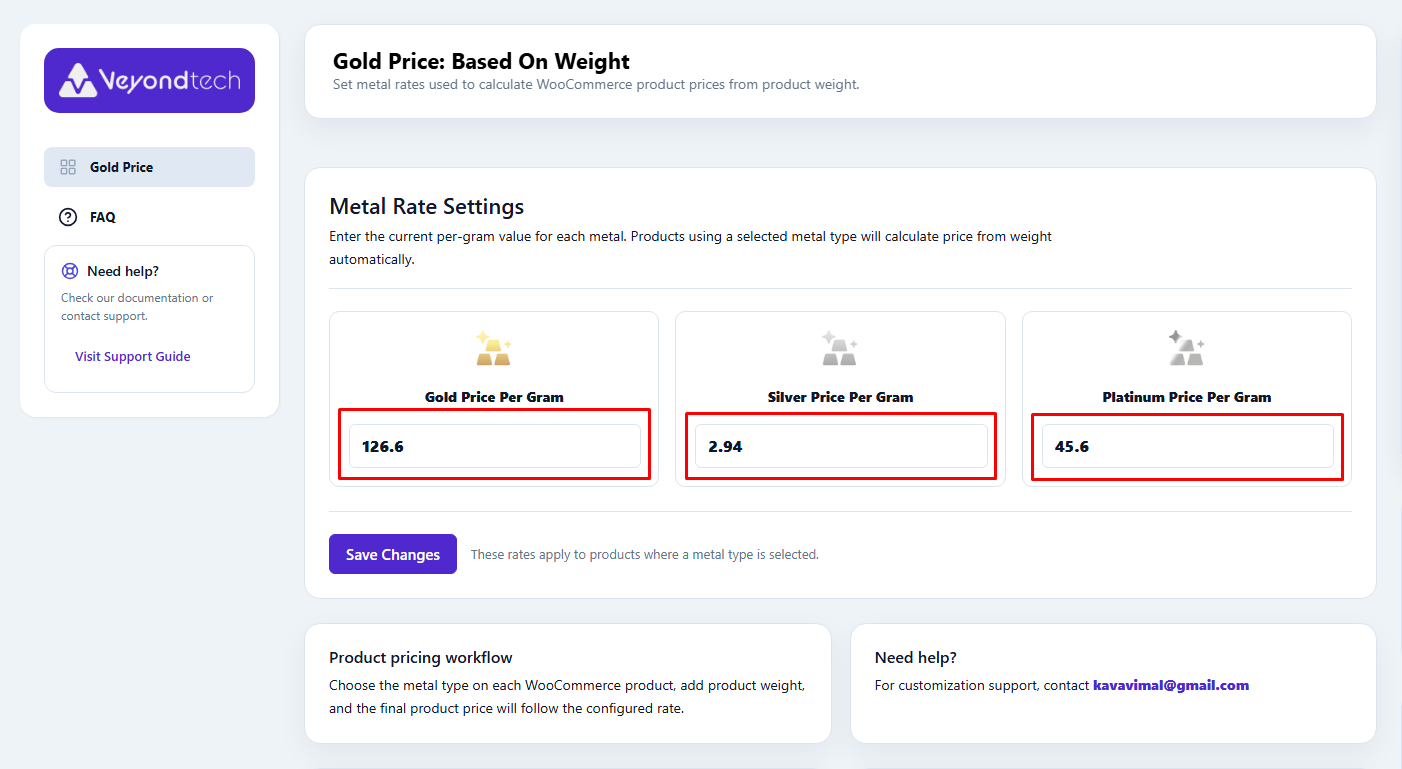
- Set your rates. Go to the plugin settings and enter the price per gram for Gold, Silver, and Platinum.
- Edit a product. Choose the metal type and enter the weight.
- Done. The price is calculated for you.
Simple Product Example
Gold rate: $100/g
- Ring – 2g = $200
- Bracelet – 5g = $500
- Chain – 10g = $1,000
Variable Product Example
One product, three sizes, Gold at $100/g:
- Small – 2g = $200
- Medium – 5g = $500
- Large – 10g = $1,000
Other Metals
- Silver at $1/g, 100g item = $100
- Platinum at $35/g, 10g item = $350
These numbers are examples only. The plugin uses the rates you enter in your store.
Support
Support, customization requests, and Premium inquiries: kavavimal@gmail.com
Installation
- Go to Plugins > Add New and search for “Gold Price Based on Weight”.
- Click Install Now, then Activate.
- Open the Gold Price settings and enter your Gold, Silver, and Platinum price per gram.
- Edit a WooCommerce product, select the metal type, and enter the weight.
- Save the product.
WooCommerce must be installed and active.
FAQ
How is the price calculated?
Metal Price Per Gram × Product Weight = Product Price.
What happens when I change the metal rate?
Every product using that metal gets its price recalculated with the new rate.
Does it support Variable Products?
Yes. Each variation can have its own metal type and weight.
Does it fetch live gold prices?
Not in the free version. You enter the price per gram yourself. The Premium version fetches live metal rates automatically.
Can I use different metals in one store?
Yes. Choose Gold, Silver, or Platinum for each product.
Which currency does it use?
Your WooCommerce store currency. The $ amounts here are examples only.
Is WooCommerce required?
Yes.
Can I try Premium first?
Yes. Use the Premium demo link above.
Can you customize the plugin for my store?
Yes. Email your requirements (a short description, and screenshots or examples if you have them) to kavavimal@gmail.com. Customization may involve additional development charges.
Screenshots


Changelog
4.0
- Simplified plugin documentation and examples.
3.6 – 3.9
- Updated compatibility with the latest WordPress and WooCommerce versions.
3.4 – 3.5
- Improved security, sanitization, and escaping.
- Improved WordPress coding standards compliance.
- Fixed admin settings validation and product/variation pricing stability.
2.4 – 2.9
- Fixed variable product pricing issues.
- Documentation fixes and compatibility updates.
2.1 – 2.2
- Added FAQ section.
- Improved security, localization, and text domain consistency.
1.7 – 2.0
- Settings page UI redesign, plugin documentation link, and compatibility updates.
1.4
- Added support for variable products.
1.0 – 1.3
- Initial release, design fixes, and price calculation improvements.