


Description
PressBot by GreenScript connects your AI apps to your WordPress site, and adds an AI chatbot that answers your visitors from your own content.
Connect your AI apps to WordPress (MCP server)
PressBot includes a free MCP server. MCP (Model Context Protocol) is the open standard that lets AI apps and coding tools work with other software. Any app that supports MCP can connect, such as Claude, Cursor and Codex. Turn it on and your AI app can read your site and check its health, from the app you already use.
Set it up in three steps:
- Install PressBot and go to PressBot → Connections. Turn on the MCP server.
- Copy your site’s MCP address (
https://your-site.com/wp-json/pressbot/v1/mcp) into your AI app. - Sign in when your AI app asks. PressBot supports sign-in through your browser (OAuth), or a WordPress Application Password if your app needs one.
What your AI app can do with the free version:
- Read your site – Posts and pages, plugins, comments, site information and your PressBot settings.
- Check your site’s health – Run Site Check to look for signs of a hack: PHP files in your uploads folder, changed WordPress core files, and whether your PHP version still gets security fixes.
- See what changed – List recent changes on the site, explain a timeline of changes, and run a health probe.
- Search your knowledge – Your knowledge base notes and chatbot conversations.
The free tools only read. They cannot change your site.
The MCP server is off until you turn it on, and only administrators can use it. It runs on your own site: there is no PressBot account and no outside service in between.
Let AI make changes, safely (Pro)
PressBot Pro lets your AI app act on your site: write and edit posts, fix SEO titles and descriptions, manage menus, comments, plugins and WooCommerce products, and read Google Analytics and Search Console. Every change made through MCP is recorded on your PressBot Home screen and keeps an undo copy, so you can see what the AI did and reverse it. See Pro.
An AI chatbot for your visitors
PressBot also adds an AI chatbot to your site that answers visitor questions from your own content: your pages, posts, products and the notes you give it. You connect your own AI provider key, so you pay the provider directly for what you use, with no PressBot subscription and no markup.
How it works:
- Paste an API key from Anthropic (Claude), Google (Gemini), OpenAI, DeepSeek or Ollama Cloud.
- Pick your colors, greeting and position.
- PressBot finds the answer on your published pages and products, and links to the page it came from.
- Add knowledge base notes for anything that isn’t on the site yet: opening hours, policies, pricing details.
Answers from your site
- Site Answers – The chatbot searches your published pages, posts and WooCommerce products, reads the best match, and links its source. You choose which content types it can use, in priority order.
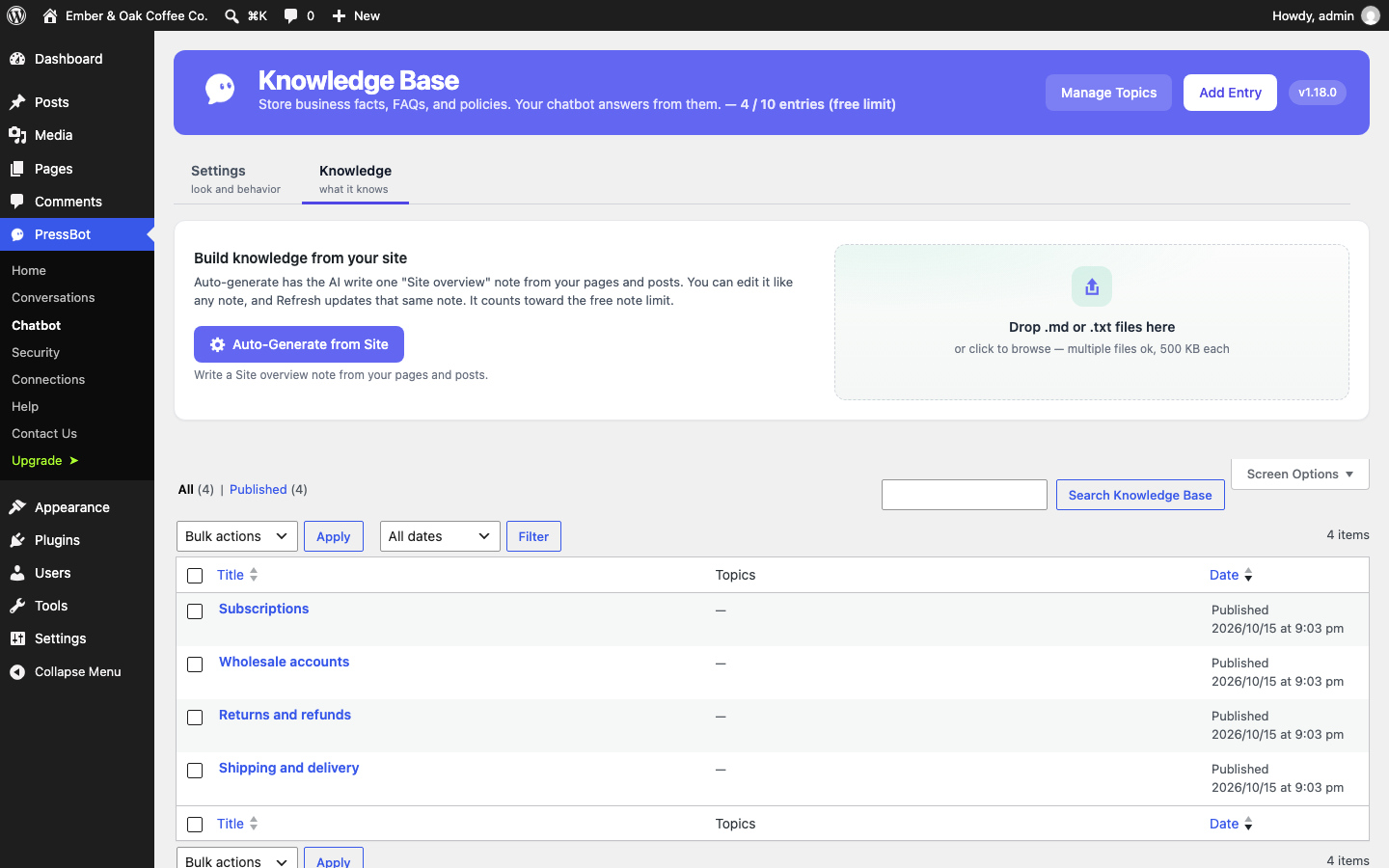
- Knowledge Base – Write notes for anything not on your site (up to 10 in the free version). They’re plain WordPress posts you can edit any time.
- Focus Mode – On by default. The chatbot stays on your site’s topics and politely declines unrelated requests, like writing an email or doing homework, so nobody uses your API key as a free AI assistant.
- External Knowledge – Optionally connect your own search endpoint for documents that live outside WordPress.
Made for your visitors
- Streaming replies – Visitors see the answer as it’s written.
- Customizable widget – Brand colors, position, greeting, suggested questions and an optional featured video.
- Explain buttons – Add “Ask PressBot” buttons next to any section with a shortcode, a data attribute or the JavaScript API, so visitors can ask about exactly what they’re reading.
- Works with page caching – The widget loads asynchronously and talks to the WordPress REST API.
In control of cost and privacy
- Bring your own key, kept safe – Keys are encrypted with modern authenticated encryption, never shown again after saving, and hidden from everything PressBot sends back. Conversations go only to the AI provider you chose.
- Keys outside the database – Set keys in
wp-config.phpor server environment variables if you prefer, or keep your Claude key off your server entirely with Key Relay in your own Cloudflare account. - Key Freeze – Lock your stored keys away with an unfreeze code that only you hold. While frozen, nobody on your server can read them, PressBot included, and the chatbot keeps helping visitors with your offline message and matching pages.
- Rate limiting and a monthly budget – Limit how many requests the chatbot takes and set a monthly spending cap.
- Conversation history – Read past conversations and visitor feedback in the dashboard, with AI summaries of what visitors ask about.
Supported AI providers
- Anthropic Claude – Claude Haiku 5.5 is the recommended default: fast, low-cost, and the most reliable model in PressBot’s own tests.
- Google Gemini – Gemini 3.8 Flash and lower-cost Flash Lite options.
- OpenAI – GPT-6 models.
- DeepSeek – A very low-cost option for simple sites.
- Ollama Cloud – Open models such as GLM, with a free starter plan.
PressBot Pro
PressBot Pro adds an AI admin agent that runs your site from a chat box: edit and publish posts, fix SEO titles and descriptions in bulk, manage menus, comments, plugins and WooCommerce products, read Google Analytics and Search Console, and more, with 132 tools in all. Changes show a review card before they run, and most can be undone. Pro also adds lead capture, proactive messages, Telegram alerts, PressBot Shield login protection, and the full MCP tool set. See Pro.
External services
PressBot contacts outside services only as described here. Nothing is sent until the site owner configures the feature.
AI providers (the chatbot’s answers). The chatbot sends each visitor message to the one AI provider the site owner selects and adds an API key for. Each request includes the visitor’s message, the recent messages in that conversation, and the site context PressBot adds to answer it: the site name, instructions, knowledge base notes, and passages from the site’s published pages or products that match the question. Requests go directly from your server to the provider. The provider’s terms and privacy policy apply:
- Anthropic (Claude), api.anthropic.com. Terms, Privacy Policy
- Google (Gemini API), generativelanguage.googleapis.com. Terms, Privacy Policy
- OpenAI, api.openai.com. Terms, Privacy Policy
- DeepSeek, api.deepseek.com. Terms, Privacy Policy
- Ollama Cloud, ollama.com. Terms, Privacy Policy
Optional Key Relay (Anthropic only). If the site owner turns on Key Relay in Connections, Claude requests go to the owner’s own Cloudflare Worker (set up from https://github.com/greenscript/pressbot-key-relay), which forwards them to api.anthropic.com. PressBot sends nothing to the relay until the owner enters its URL and token.
When you click Test Connection in Settings, PressBot sends a short test message to the selected provider to check the key.
PressBot Cloud (optional, off unless the site owner connects it). PressBot Cloud, run by GreenScript at cloud.pressbot.io, lets the site owner pay for AI usage from prepaid credit instead of using their own API key. Nothing is sent to it until the owner clicks Connect in Connections and approves the site in their PressBot Cloud account. At that moment PressBot sends the site URL, the site name, the WordPress and PressBot versions, and the Freemius install ID (if the site has one), and receives a site token. After that, each AI request (the same content described under AI providers above, for the chatbot and for features like Improvements) goes to PressBot Cloud’s gateway instead of directly to the provider, and PressBot asks the gateway for the remaining credit balance. PressBot Cloud records only request metadata (time, site, model, token counts, cost), not the prompts or answers, and forwards each request to the AI model host, which processes it: Anthropic (Claude) and, for some features, an open-model host. Disconnecting in Connections stops all of this and revokes the token. Terms, Privacy Policy
Cloudflare API (optional, off unless the site owner connects it). If the site owner pastes a Cloudflare API token in Connections, PressBot sends requests to api.cloudflare.com with that token: to check the token and find this site’s zone, to ask Cloudflare to clear the cached copies of pages that changed (their URLs only), and, in Pro, to read this site’s Cloudflare analytics for the Analytics page, to add and remove firewall rules for addresses Shield has locked out (Edge Shield, only when the owner turns it on; the rule holds the blocked IP address and a short reason), and to switch Cloudflare’s Markdown for Agents setting when the owner asks. No other visitor data is sent; Disconnect in Connections stops all of it. Terms, Privacy Policy
Cloudflare Turnstile (optional, off unless the site owner turns it on). If the site owner turns on Turnstile for the chatbot or the login page, the visitor’s browser loads Cloudflare’s check from challenges.cloudflare.com on those pages (for the chatbot, only when the visitor sends a first message), and PressBot sends the resulting one-time token and the visitor’s IP address to challenges.cloudflare.com to confirm it. Terms, Turnstile Privacy Addendum
Cloudflare Web Analytics (Pro, optional, off unless the site owner adds a token). If the site owner pastes a Web Analytics token on the Analytics page, visitors’ browsers load Cloudflare’s beacon from static.cloudflareinsights.com, which measures page load performance without cookies or personal data. Terms, Privacy Policy
Cloudflare AI Gateway (optional, off unless the site owner adds a gateway URL). If the site owner enters their own AI Gateway URL in Connections, PressBot sends its requests to Claude, OpenAI, Gemini and DeepSeek through gateway.ai.cloudflare.com in the owner’s Cloudflare account instead of directly; the requests carry the same content and API keys as direct calls (see those services above), plus the owner’s gateway token if they set one. Terms, Privacy Policy
php.net (PHP security check). To tell you whether your server’s PHP still gets security fixes and is on its latest patch release, PressBot asks php.net for the public list of current PHP releases (php.net/releases/active.php). This happens at most once a day (once an hour if php.net cannot be reached), when Site Check or the security audit runs, including from a scheduled task, the REST API, or WP-CLI. No information about your site is sent. If php.net cannot be reached, PressBot falls back to a built-in table of end-of-life dates. Terms, Privacy Policy
Your own knowledge endpoint (optional). If you connect an External Knowledge endpoint in Settings, PressBot sends the visitor’s question to the URL you enter. That service is yours or your vendor’s; its terms apply.
YouTube (optional). If you add a featured video to the chat widget, the YouTube player loads from youtube-nocookie.com only after the visitor clicks Play. Terms, Google Privacy Policy
Error reports to pressbot.io (off by default). If you turn on error reporting in Settings, PressBot sends plugin errors to pressbot.io so we can fix them: the error type, code, and message (with file paths, API keys, and long tokens removed, cut to 500 characters), where it happened, the AI provider, a one-way hash of your site URL, the plugin, WordPress, and PHP versions, and the list of active plugins. Nothing is sent while the setting is off. Terms, Privacy Policy
Freemius (optional). PressBot uses the Freemius SDK for the optional Pro upgrade. On activation you can opt in to share basic site and usage information with Freemius, or skip it; skipping sends nothing. If you fill in the optional feedback form when deactivating the plugin, your answer is sent to Freemius. Terms, Privacy Policy
Source code
The JavaScript in assets/js is compiled from the TypeScript in src/ with Vite. To rebuild it, run npm install and then npm run build:prod in the plugin folder. package.json, vite.config.ts, and tsconfig.json are included. PHP dependencies in vendor/ are managed with Composer; composer.json and composer.lock are included.
Installation
- In your dashboard go to Plugins → Add New, search for “GreenScript PressBot”, then click Install Now and Activate. (Or upload the
greenscript-pressbotfolder to/wp-content/plugins/and activate it.) - Go to PressBot → Settings and choose your AI provider.
- Paste your API key and click Test Connection.
- Pick your widget colors and greeting. The chatbot appears on your site right away.
Getting an API Key:
- Anthropic Claude: Sign up at platform.claude.com and create an API key
- Google Gemini: Get a key at aistudio.google.com
- OpenAI: Create an API key at platform.openai.com
- DeepSeek: Create an API key at platform.deepseek.com
FAQ
Does WordPress have an MCP server?
WordPress doesn’t include one yet. PressBot adds one to your site: install the plugin, turn on the MCP server in PressBot → Connections, and add your site’s MCP address to your AI app.
How do I connect an AI app like Claude or Cursor to my WordPress site?
Install PressBot, turn on the MCP server in PressBot → Connections, then add your site’s MCP address (https://your-site.com/wp-json/pressbot/v1/mcp) as an MCP server or connector in your AI app. The app opens your browser so you can sign in as an administrator.
Which AI apps work with it?
Any app that supports MCP over HTTP, including Claude, Claude Code, Cursor and Codex.
Is it safe to let an AI app work on my live site?
The free MCP tools are read-only, so they can’t change anything. With Pro, changes made through MCP are recorded on your PressBot Home screen and keep an undo copy. The MCP server is off by default, and only administrators can sign in to it.
Do I need an AI API key to use the MCP server?
No. Your AI app does the thinking with its own account. You only need an API key for the visitor chatbot.
Do I need a paid API key?
PressBot uses your own AI provider API key. Anthropic, OpenAI, and DeepSeek require paid API access. Google Gemini has a Free tier for testing in supported models, projects, and request regions; use a paid Google project for a live site. Ollama Cloud (early access) offers a free plan with starter credits. Typical chatbot usage is low-cost for most sites.
Which AI model should I use?
For the visitor chatbot, Claude Haiku 5.5 or Gemini 3.8 Flash are strong defaults, while Gemini 3.5 Flash Lite, DeepSeek-V4.1-Flash, and GPT-6 Luna are lower-cost options. OpenAI is a good fit when you want broader multimodal or web-enabled workflows on supported surfaces.
Is my API key stored securely?
Yes. All of this is in the free version:
- Encrypted at rest. Keys and tokens are encrypted with authenticated encryption (XChaCha20-Poly1305 via PHP’s built-in sodium library). Each key gets its own encryption key, derived from your
wp-config.phpsecurity keys or a dedicatedPRESSBOT_VAULT_KEY. A key copied from one field or site to another will not decrypt. - Never shown again. After you save a key, Connections shows only its first and last few characters. PressBot also hides its own keys from everything it sends back: admin screens, the chatbot, connected AI apps, error messages and logs. Automated tests check this on every release.
- Your choice of where the key lives. Keep it in the database, set it in
wp-config.phpor an environment variable so it never touches the database, or remove it at any time with one click. - Only your provider sees it. Your key is sent only to the AI provider you chose (or your own Key Relay), never to PressBot or anyone else.
Can I keep my key off my server entirely?
For Claude, yes. With Key Relay, your Claude key lives in a small open-source relay in your own Cloudflare account (the free plan is enough). Your site only stores a limited token that you can lock to your server’s address, restrict to the models you allow, and revoke in one click without touching your Claude key. If your site is ever compromised, the attacker gets that token, not your key.
What should I do if a serious WordPress or PHP flaw is announced?
Freeze your keys. Key Freeze seals every stored key with an unfreeze code that only you hold, so nothing on the server can read them until you unlock them with your password and that code. Your chatbot keeps answering visitors with your offline message and links to matching pages in the meantime. Site Check also tells you whether your PHP version still gets security fixes. If you think a key was already exposed, rotate it with your provider.
How do I report a security issue?
Please use the form on our security page. We read every report.
Can I customize what the chatbot knows?
Yes. PressBot answers from your published pages and products by default, and you can add knowledge base notes for anything that isn’t on the site. You also choose which content types it searches.
Does this work with page caching?
Yes. The chatbot widget loads asynchronously and communicates via the WordPress REST API, so it works with all major caching plugins.
Will the chatbot make things up?
PressBot tells the AI to answer from your pages, products and knowledge base notes, and to say when it doesn’t know. It links the page each answer came from, so visitors can check. Like any AI, it can still be wrong, so review your conversations now and then and add a knowledge base note when an answer misses.
Can visitors use my chatbot as a free ChatGPT?
Not with Focus Mode on, which is the default. The chatbot declines requests that aren’t about your site, such as writing, translating, homework or code, and rate limits and the monthly budget cap the cost.
How much does it cost to run?
PressBot is free; you pay your AI provider for usage. With Claude Haiku 5.5 or Gemini Flash, a typical visitor conversation costs a fraction of a cent. Set a monthly budget in Settings to cap it.
Does it work with WooCommerce?
Yes. Site Answers can search your products, so visitors can ask about prices, stock and details. PressBot Pro adds product and order tools for the admin agent.
What’s the difference between free and Pro?
The free version is the complete visitor chatbot, plus Site Check and the read-only MCP server. Pro adds the admin agent that manages your site through chat, plus lead capture, proactive messages, Telegram alerts, login protection and analytics. Pro is priced per site and every plan has the same features.
Where are conversations stored?
Conversations are stored in your WordPress database. They are sent to your chosen AI provider for processing but are not stored by PressBot on any external server.
Screenshots




Changelog
1.27.0
- Security: A crafted link in a chat message could run code in an administrator’s browser when they opened, translated or summarised that conversation. Fixed, with smaller hardening fixes. Please update.
- Security: Switching the chatbot off now also stops the chat address from answering. Freezing your keys no longer turns off the Turnstile check on login.
- Improved: Faster page loads. PressBot no longer checks its database tables on every request, and its front-end settings load together.
- Improved: On a new site the chat bubble appears once an AI key is added. Your own test question is not counted as a visitor. A quieter Connections screen, and Help guides for advanced settings.
- Improved: Help says where a license key goes, and a licensed site that moves to the WordPress.org copy is told to install PressBot Pro.
- Fix: Booking times follow the site’s date and skip times already past. An Ollama Cloud model chosen for a pipeline stage is kept. Deactivating clears PressBot’s scheduled jobs, and “delete data” removes everything it lists.
- Change: The plugin is now named GreenScript PressBot – MCP Server & AI Chatbot. PressBot.explain() needs the Explain switch on.
1.26.0
- New: Cloudflare in one place. Connect with one scoped token, turn on the recommended features in one click, and see proof for each. Free: cache clearing on publish, Turnstile on login and chatbot, Content-Signal, your own AI Gateway, redirects for missing pages.
- New (Pro): Edge Shield blocks Shield lockouts at Cloudflare. Markdown for AI readers. Cloudflare panels on Analytics: AI readers, attacks stopped, broken and slow pages, real visitor speed.
- New (Pro): AI overview on Analytics. One plain-English summary of all your numbers with next steps for the Inbox and the agent, made only when you ask, or written by your own AI app over MCP. Edge activity on Shield.
- New: MCP tools for Cloudflare: free get_cloudflare_status; Pro manage_cloudflare and a status section in get_cloudflare_report.
- Improved (Pro): Analytics is one dashboard: your main numbers, the AI overview and charts in one place, loading in the background, with an “Ask” button on each chart and the visitors AI sends back. The Inbox opens without waiting.
- Fix (Pro): Approved agent actions no longer report a crash after they ran (since 1.20.11).
1.25.2
- New: The Improver. PressBot suggests real improvements written by your AI from evidence, and you approve each one, with undo. Free: missing search descriptions. Pro: tags, unclear sections, outdated facts, knowledge base answers, alt text, measured results, an optional nudge, and rules learned from your choices.
- New (Pro): Site report (AI Visibility) moved into the Inbox. A cleaner Inbox with a sidebar and search result previews.
- Improved (Pro): Telegram remembers the last few messages of a chat; send /new to start over.
- Fix: Pages the agent edits keep their maps, forms and scripts. Testing a new AI key works when the chatbot uses another provider. Ollama Cloud summaries work. Improver search descriptions fit Google’s snippet.
1.24.0
- New (Pro): Freeze your keys from Telegram (“freeze keys” and a one-time button) or from the admin agent. Nothing remote can unfreeze.
- New: Site Check warns when PHP session upload progress is on, with the one-line fix.
- Improved (Pro): Inbox “Show full text” shows long changes side by side with differences highlighted. The unfreeze screen reminds you to patch first.
- Fix: Pages the agent edits get proper headings and lists instead of raw markdown symbols.
1.23.0
- New (Pro): Edit before applying. In the Inbox, untick individual changes and reword short text (title, excerpt, SEO title, meta description, focus keyphrase, tags) before applying. Apply does exactly what you saved, and undo still works.
- Fix: Home and the Inbox now show the same number of ideas and changes waiting for you, and expired plans no longer count. The Inbox page is the same width as the other pages.
- Fix: With Key Relay selected, Connections shows clearly whether a Claude key is also saved on the site.
1.22.1
- New: Key Freeze. Lock your stored AI keys away with an unfreeze code; while frozen, your chatbot shows visitors an offline message and the best matching pages from your site.
- New (Pro): Inbox. Review exactly what will change, apply it in place and undo it for 30 days.
- Security: A custom login URL covers more routes (logged-out /wp-admin/ links now show a 404), Site Memory is private, the chatbot exposes less, and Shield is harder to overload or fool. Admin addresses need 5x the failures before a lockout.
- Fix: Rate-limited chat visitors get a friendly offline reply. A hand-written Explain shortcode without the explain- prefix no longer loads Knowledge Base content.
Older releases: see the full changelog.