


Description
GreetPlayer (formerly Greet Bubble) is an all-in-one video player, floating video bubble, audio player and playlist plugin for WordPress. Greet visitors with a personal video message, embed beautiful video and podcast players anywhere with a shortcode, and turn views into leads with call-to-action buttons — all managed from one unified Media screen.
Create a floating video bubble that welcomes visitors on any page, post, WooCommerce product or custom post type. Add a fully customizable video player with five skins, captions, chapters, branding and timed CTA overlays. Publish an audio-only (podcast) player in Compact, Card or Minimal layouts, or group your media into playlists with Sidebar and Grid layouts.
Play self-hosted files from your Media Library, YouTube, Vimeo or any external URL. Built-in analytics show views, plays, completion rates, watch time, unique viewers and trends for both your bubbles and your players — so you know exactly which videos work.
Lightweight, accessible and fully responsive: the bubble works with a keyboard and screen readers, can wait until the visitor scrolls, and can hold its video back until it’s needed. GreetPlayer is translation-ready and works with any theme, WooCommerce, multisite and RTL languages.
🌐Website | 👁️View Live Demo | 🚀Upgrade to Pro | 📖Documentation | 👩🏼💻Get Support | 🌟Leave a Review
One Plugin for Video Bubbles, Video Players, Audio Players & Playlists
GreetPlayer replaces several single-purpose plugins. Use a floating video bubble to welcome visitors, a video player to showcase products and tutorials, an audio player for podcasts, and playlists for courses and series — with one consistent design and one analytics dashboard.
Key Features of GreetPlayer
Unified Media Management
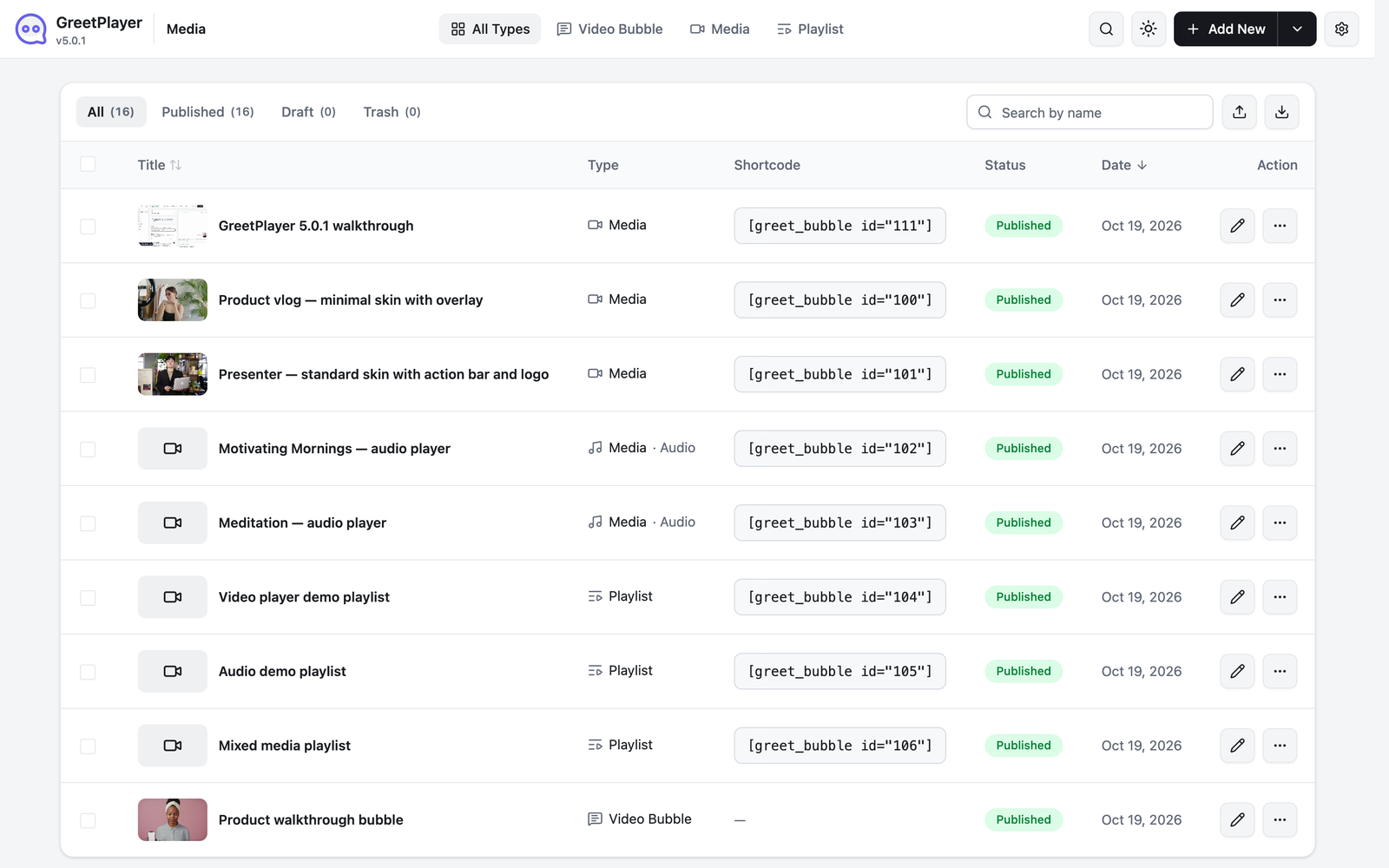
- One Media Screen: Create and manage floating bubbles, video players, audio players and playlists in one place, with search, type filters, list and grid views, bulk actions, duplicate and trash/restore.
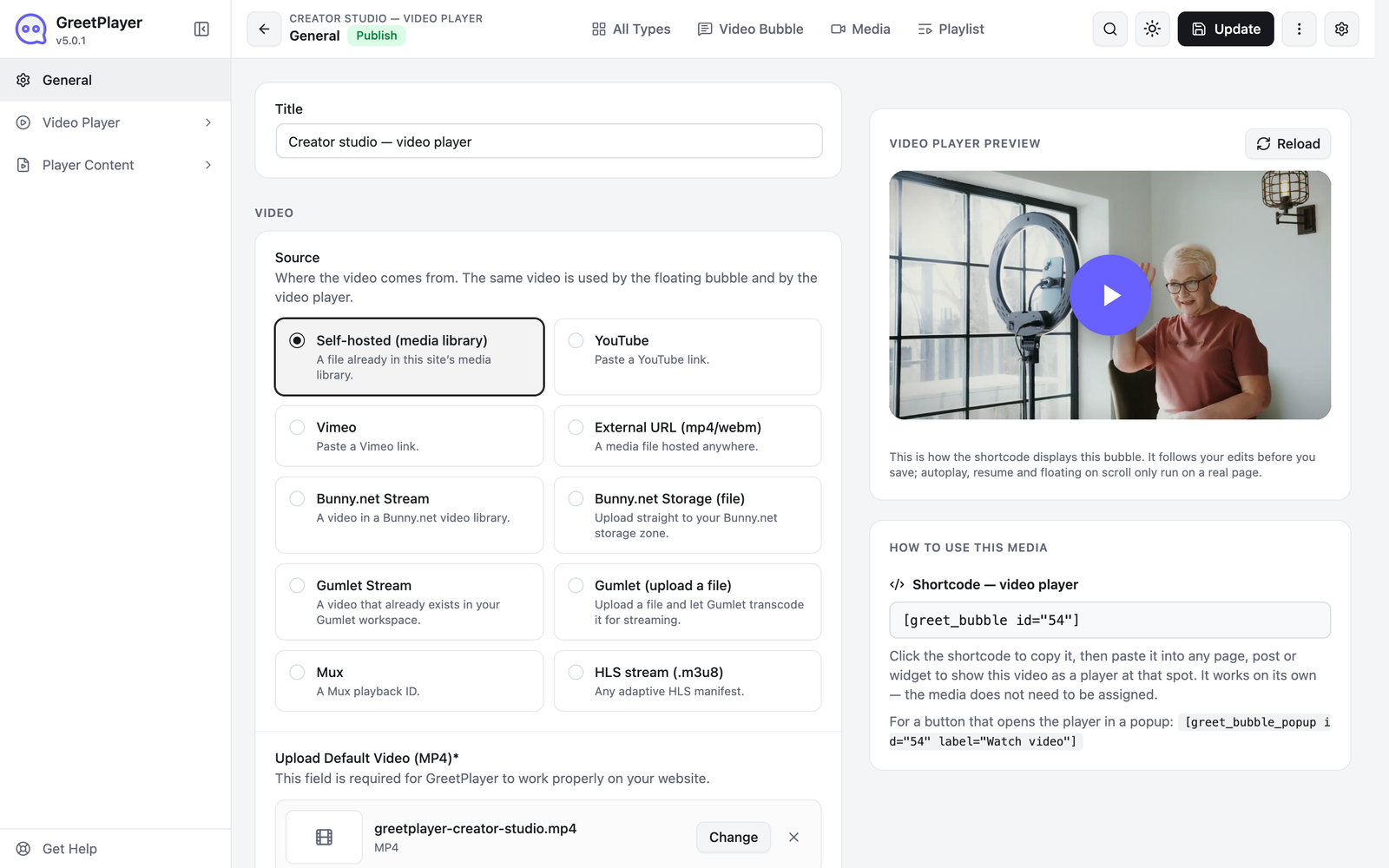
- Live Preview: See every change to your bubble or player instantly while you edit.
- Copy-Ready Shortcodes: Every media item gets its own shortcode to place it on any page, post or widget area.
- Import & Export: Move media between sites with CSV, XML and JSON import/export.
- Multiple Video Sources: Play videos and audio from the Media Library, YouTube, Vimeo or any external URL.
Floating Video Bubble
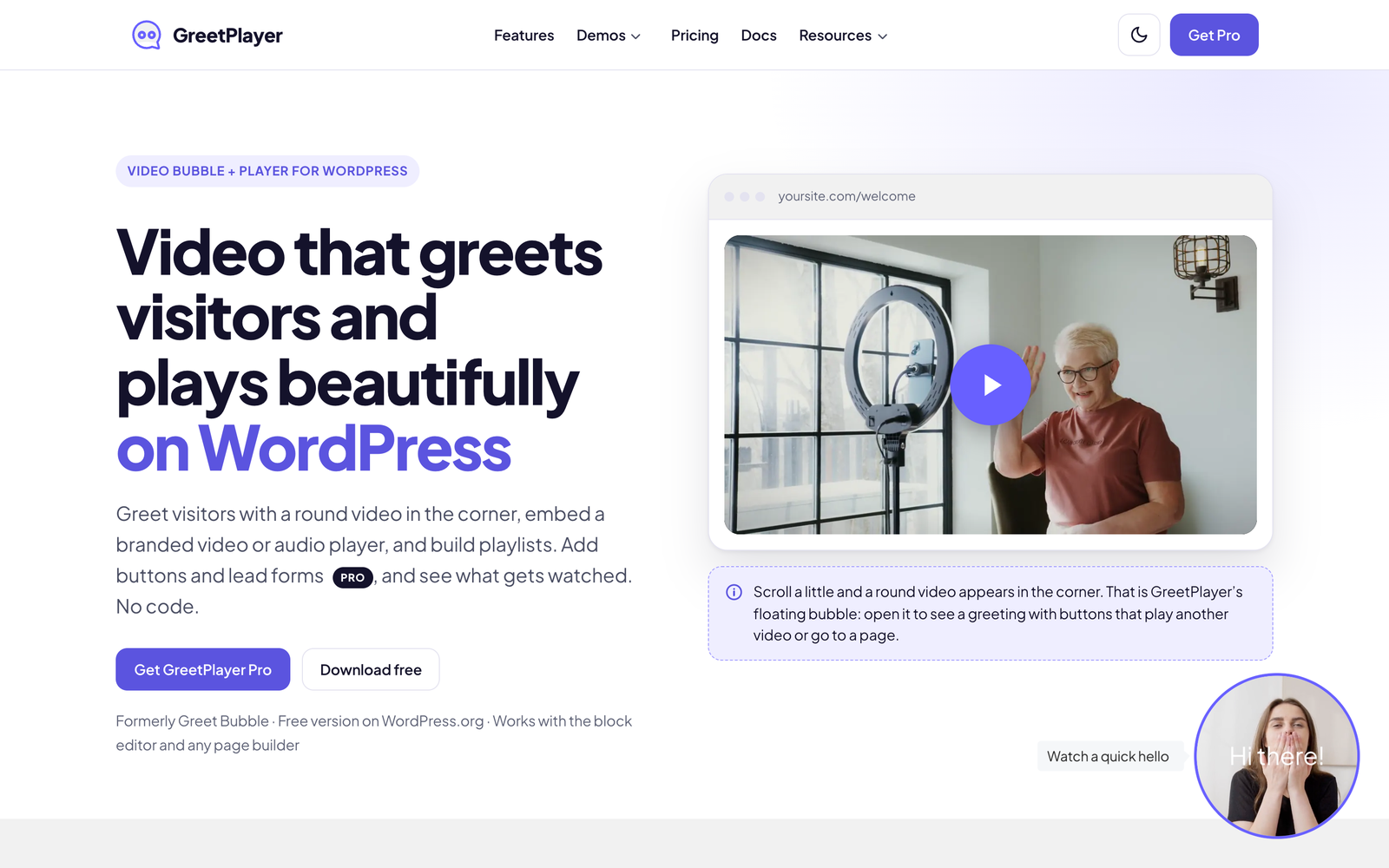
- Video Welcome Popup: Greet visitors with an introductory video in a floating bubble that expands into a full video popup.
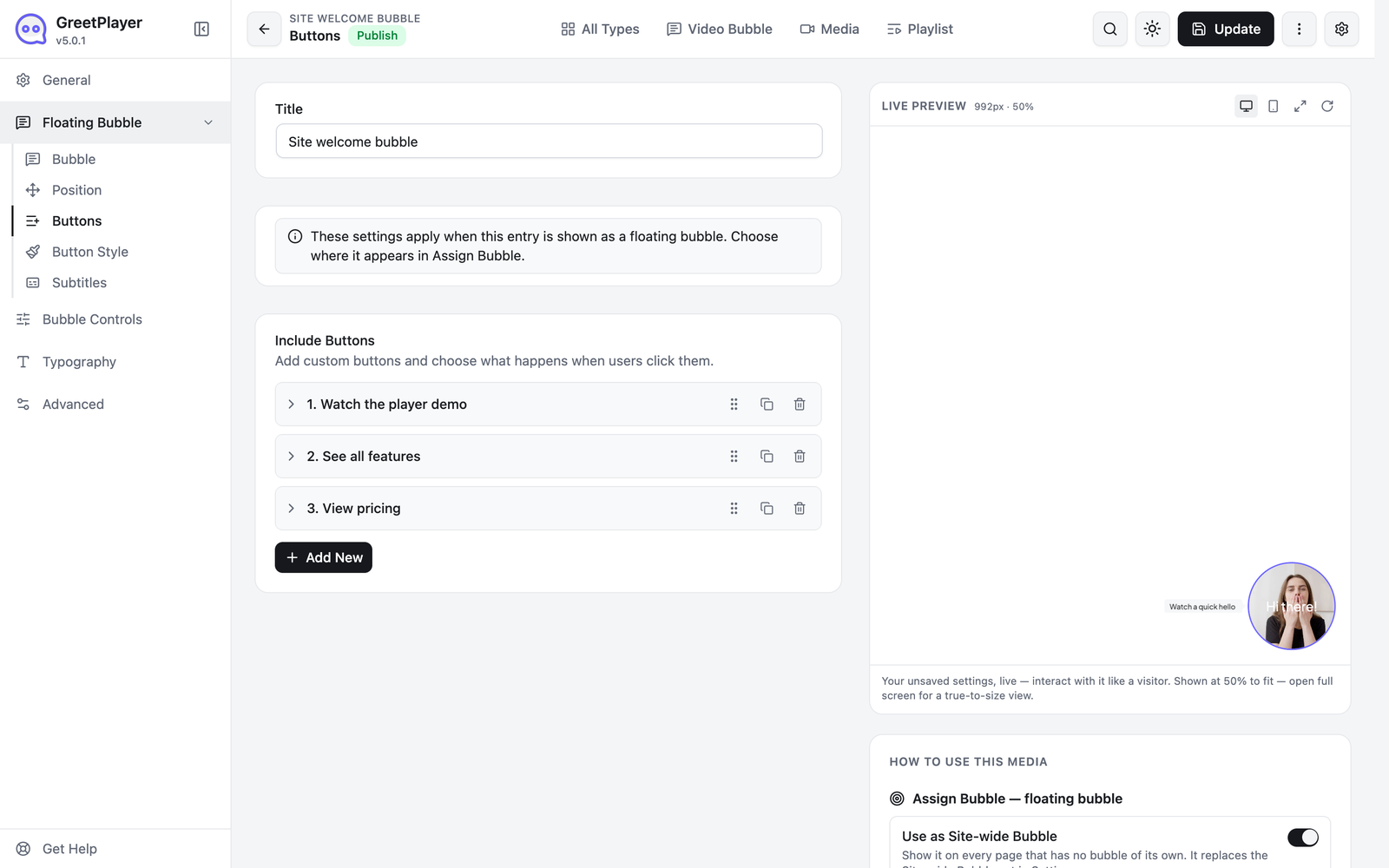
- Interactive Buttons: Add call-to-action buttons that play another video or open an internal page or external URL.
- Multiple Videos per Bubble: Let visitors switch between videos with buttons, and reorder them with drag-and-drop.
- YouTube, Vimeo & Subtitles: Use YouTube, Vimeo or external videos in the bubble, with subtitle support.
- Video Preview: Play the closed bubble muted, show only its poster until the visitor hovers or taps, or start it when it comes into view. Visitors who prefer reduced motion or save data always see the poster first.
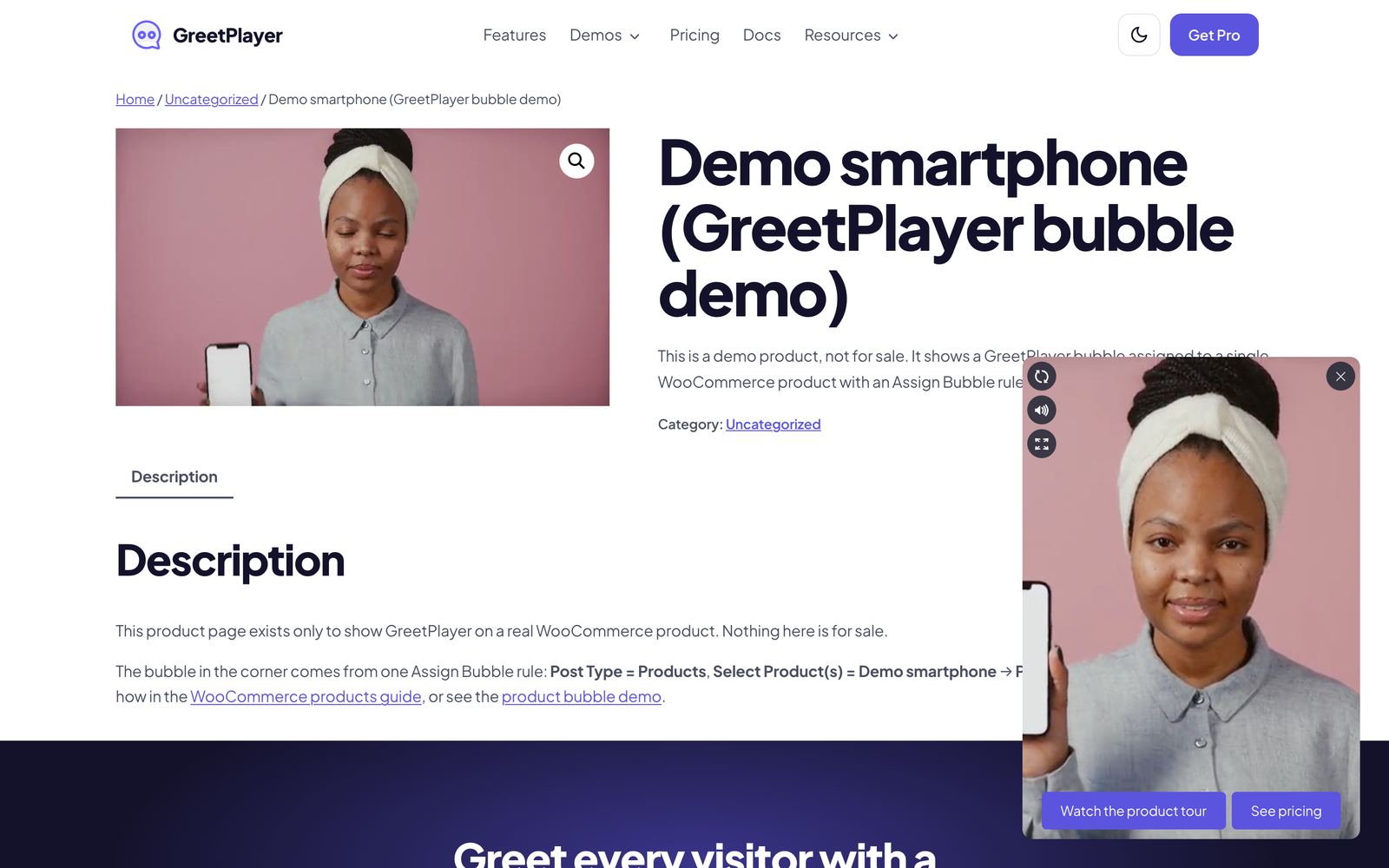
- Per-Page Assignment: Besides the Site-wide Bubble, assign a bubble to chosen pages, posts, WooCommerce products, custom post types or categories with one Assign Bubble rule (unlimited rules in Pro).
- Site-wide Visibility Rules: Show or hide the bubble on specific pages and posts.
- Custom Video Poster & Intro Text: Set a poster image and the greeting text shown on the bubble.
- Positioning Controls: Place the bubble bottom-left or bottom-right with precise px, em or % offsets.
- Plays Well with Menus & Popups: Set the bubble’s stacking order to keep it under a sticky header, and hide it while a menu or popup is open.
- Attention Effect, Time-Based Loading & Show After Scrolling: Draw the eye with an attention animation, and show the bubble after a delay, after the visitor scrolls a set distance (px or % of the page, optionally on mobile only), or whichever comes first.
- Keyboard & Screen Reader Friendly: Visitors can reach the bubble with Tab, open it with Enter or Space and close it with Escape; every control has a name and a visible focus ring.
- Pause on Tab Switch: Automatically pause the video when the visitor switches browser tabs.
- Button Styling: Text-only or icon + text buttons, square or rounded shapes, border radius, colors, hover colors and tooltips.
Video Player
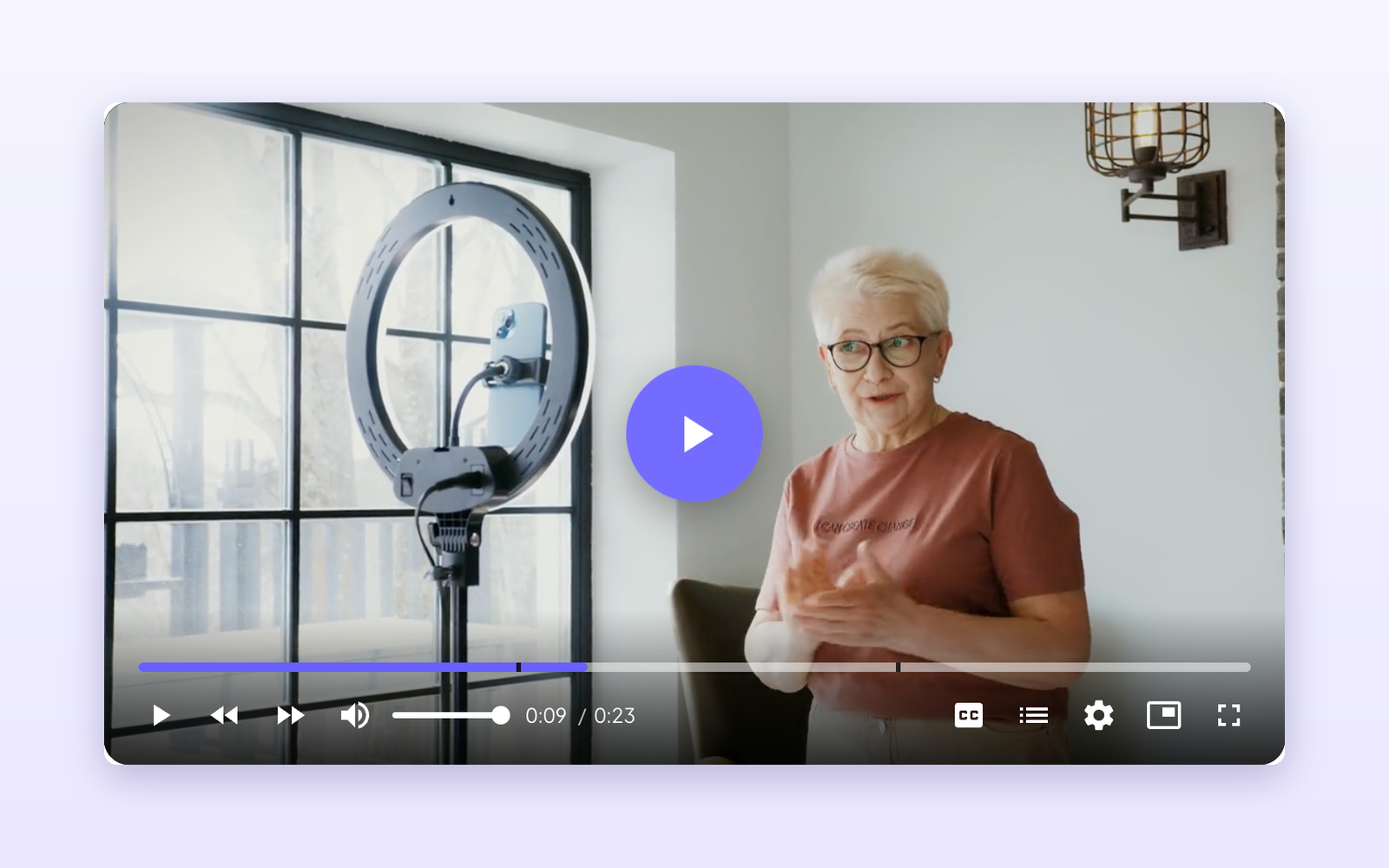
- Five Player Skins: Pick a skin that matches your site, with two seek bar styles.
- Playback Controls: Choose which player controls visitors see.
- Subtitles & Chapters: Add subtitles and chapter markers for long-form videos.
- SEO-Friendly: Players add VideoObject structured data, with an optional search engine description.
- Branding: Add your logo to the player.
- CTA Overlays & Action Bar: Show timed overlays and an action bar to drive clicks while the video plays.
- Custom CSS: Fine-tune each player’s styling.
Audio Player & Playlists
- Audio-Only (Podcast) Player: Compact, Card and Minimal layouts for podcasts, music and voice notes.
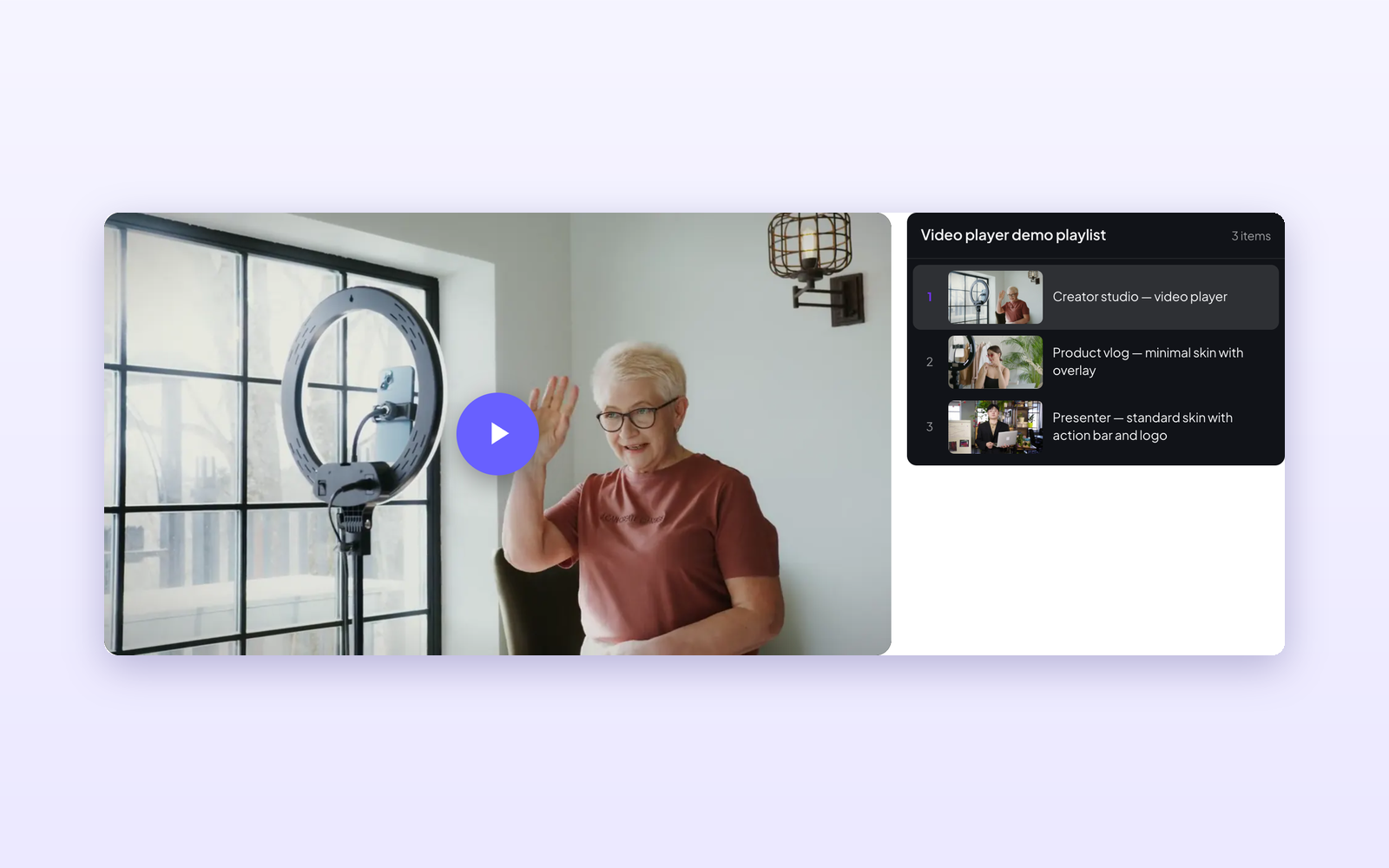
- Playlists: Sidebar and Grid layouts with automatic play of the next item — perfect for courses, series and product tours.
Analytics
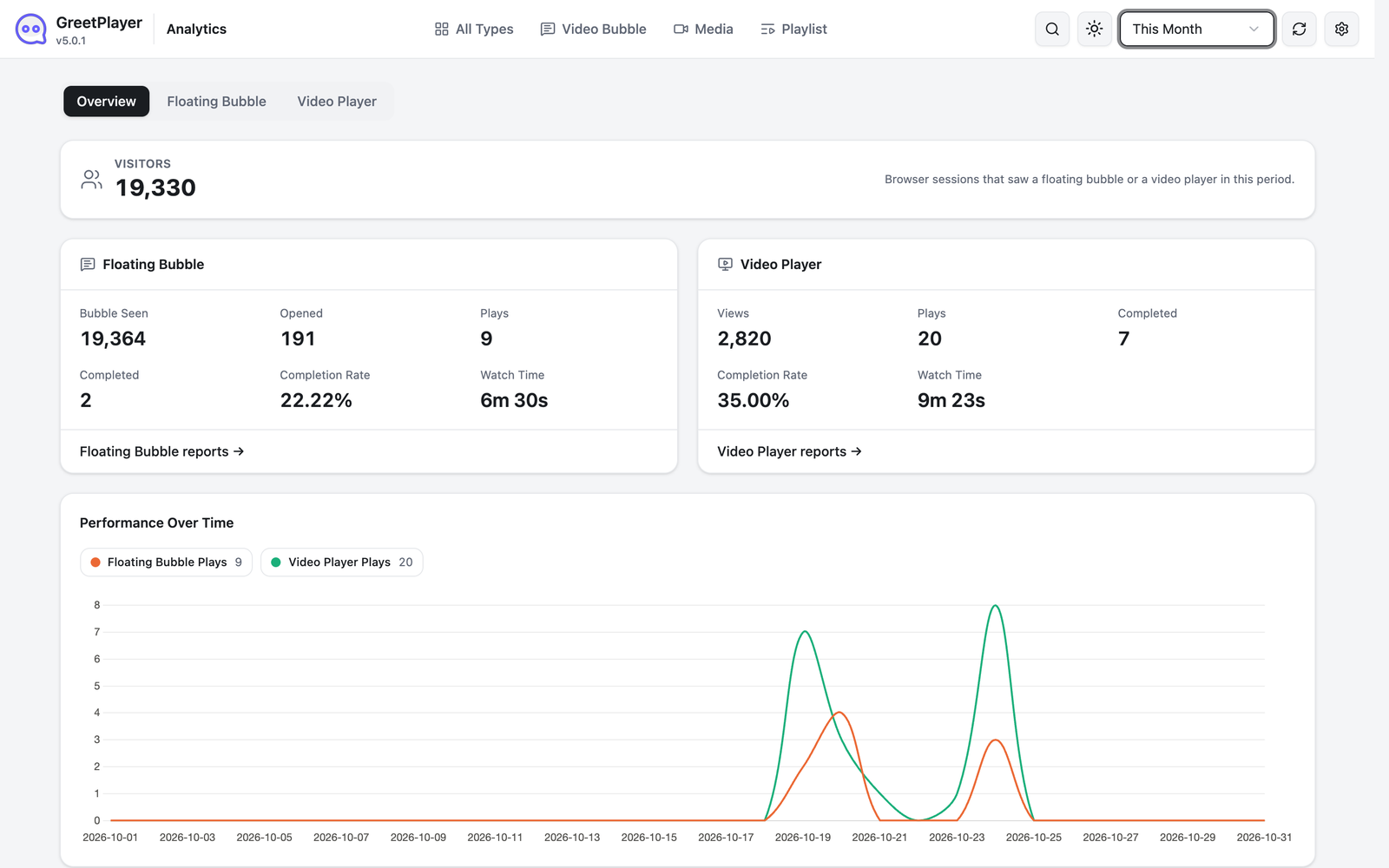
- Bubble & Player Analytics: Track views, plays, completion rates, watch time and unique viewers.
- Overview Dashboard & Trend Charts: Compare your bubbles and players side by side and spot trends over time.
- Automatic Cleanup: Set a data retention period and clean up old analytics automatically or manually.
Design & Developer Friendly
- Modern Admin: A fast, React-based admin with settings search (Ctrl/Cmd + K), light/dark mode and responsive layouts.
- Customizable Colors: Predefined and custom colors for the bubble, buttons and player.
- Custom CSS & JavaScript: Add your own code from the settings panel.
- Settings Backup & Restore: Export and import your settings to reuse them across sites.
- Responsive & Lightweight: Looks great and loads fast on desktop, tablet and mobile: the bubble uses a 2 KB icon font, posters and thumbnails load right-sized images, and playlists don’t shift the page as they load.
- Multisite, Multilingual & RTL Ready: Works with WordPress multisite and translation plugins. On right-to-left sites the bubble and the player layout are mirrored and the player’s menus read right to left; the media controls (play, seek, volume) keep the usual left-to-right order.
- Theme & Browser Compatibility: Works with all WordPress themes and all major browsers.
- Documentation & Fast Support: Detailed documentation and a responsive support team.
GreetPlayer Pro Features
Upgrade to GreetPlayer Pro to unlock:
- Lead Capture Forms: Open a contact form from a bubble button — Web3Forms, WhatsApp or any form plugin shortcode.
- Premium Video Sources: Bunny.net, Gumlet, Mux and HLS streaming.
- Extra Player Skins: Floating and Ambient skins, plus the Rapid Engage seek bar.
- Advanced Analytics: Video watch funnel, top media, button performance, devices, top pages, browsers, countries and custom date ranges.
- Device Targeting: Show the bubble only on desktop, tablet or mobile, with separate positions per device and your own mobile and tablet screen sizes.
- More Positions & Effects: Middle-left/right positions, draggable bubble, icon-only buttons and six attention effects.
- More Visibility Rules: Target theme pages, WooCommerce products, categories and tags.
- Bubble Controls: Loop video, hide for session, and hide replay, mute and fullscreen buttons.
- Typography: Full font control with 940+ Google Fonts.
- Automatic Updates & Priority Support.
Use Cases
- Greet new visitors with a personal video welcome bubble
- Show product-specific video bubbles and players on WooCommerce product pages
- Embed product demos, tutorials and testimonials with a branded video player
- Publish podcasts and audio content with a lightweight audio player
- Build course lessons, video series and product tours with playlists
- Guide visitors with interactive video messages and call-to-action buttons
- Measure which videos engage visitors with built-in analytics
OTHER AMAZING PRODUCTS FROM ThemeAtelier
➡️ Eventful – Events Showcase and Filter Bar for The Events Calendar – An event display plugin for The Events Calendar that helps you showcase events in clean, modern, and fully responsive layouts without any coding.
➡️ Darkify Dark Mode – A lightweight and customizable WordPress dark mode plugin for a sleek, accessible, and eye-friendly experience on both the frontend and admin dashboard.
➡️ ChatHelp – WhatsApp Chat Help Plugin – A flexible WhatsApp chat plugin that helps website visitors start instant conversations with you directly from your WordPress site.
➡️ Domain For Sale – A domain listing and offer management plugin that helps you list domains, collect buyer offers, and manage secure sales with escrow payments directly from WordPress.
➡️ Eventful for Elementor – Events Showcase For The Events Calendar and Elementor – An Elementor addon for The Events Calendar that lets you design and display events using Elementor widgets with advanced, responsive layouts.
➡️ Better Chat Support For Messenger – A Facebook Messenger chat plugin that allows visitors to contact you instantly through Messenger with customizable chat bubbles.
Installation
AUTOMATIC INSTALLATION (EASIEST WAY)
- Visit Plugins > Add New
- Search for GreetPlayer
- Install and activate the GreetPlayer plugin
MANUAL INSTALLATION
Uploading in WordPress Dashboard
- Download greet-bubble.zip
- Go to Plugins > Add New in your WordPress dashboard
- Click on the “Upload Plugin” button
- Choose the greet-bubble.zip file from your computer
- Click “Install Now”
- Activate the plugin after installation
Using FTP
- Download greet-bubble.zip
- Extract the greet-bubble folder on your computer
- Upload the greet-bubble folder to the /wp-content/plugins/ directory
- Activate the plugin from the Plugins menu in WordPress
After Activation
- Go to the “GreetPlayer” menu from the left sidebar in your WordPress dashboard
- Open Media to create a video bubble, video player, audio player or playlist
- Use Settings to assign bubbles to pages and adjust global options
FAQ
Is GreetPlayer the same plugin as Greet Bubble?
Yes. Greet Bubble has been renamed to GreetPlayer to reflect its new video player, audio player and playlist features. Your existing bubbles, settings, assignments and analytics carry over automatically when you update.
How do I add a floating video bubble to my website?
Go to GreetPlayer > Media, click Add New, choose Video Bubble, pick your video and customize it. Then assign it to specific pages from Settings > Assign Bubble, or show it site-wide.
How do I add a video player, audio player or playlist to a page?
Create the item from GreetPlayer > Media, then copy its shortcode and paste it into any page, post or widget area.
Which video sources are supported?
The free version plays videos and audio from your Media Library, YouTube, Vimeo and external URLs. GreetPlayer Pro adds Bunny.net, Gumlet, Mux and HLS streaming.
Can I show different video bubbles on different pages?
Yes. The free version has a Site-wide Bubble plus one Assign Bubble rule, which can cover many pages, posts or terms with the same bubble. GreetPlayer Pro has unlimited rules, so each page can have its own bubble.
Does GreetPlayer include analytics?
Yes. The free version tracks views, plays, completion rates, watch time, unique viewers and trends for bubbles and players. Pro adds the watch funnel, button performance, devices, pages, browsers, countries and custom date ranges.
Can I add a contact form inside the video bubble?
Yes, with GreetPlayer Pro. A bubble button can open a Web3Forms, WhatsApp or shortcode-based contact form to capture leads.
Does this plugin work with WooCommerce products?
Yes, GreetPlayer works with WooCommerce and lets you show product-specific video bubbles and players on product pages.
Can I add buttons or links inside the video bubble?
Yes, you can add call-to-action buttons that play another video or link to internal pages and external URLs.
Are the players mobile-friendly?
Yes, the floating video bubble, video player, audio player and playlists are fully responsive on desktop, tablet and mobile.
Can I customize the appearance?
Yes, you can customize colors, positions, animations, button styles, player skins, controls and more to match your website design.
Will GreetPlayer slow down my website?
No, GreetPlayer is lightweight and optimized for performance. The bubble loads a 2 KB icon font, posters and thumbnails load right-sized images, and with Video Preview set to Poster only or Play when visible the bubble’s video isn’t downloaded until it’s needed.
Do I need coding skills to use this plugin?
No, GreetPlayer is beginner-friendly with live previews and an easy settings panel. Developers can still add custom CSS and JavaScript.
Does GreetPlayer collect any data?
Only if you allow it. After activation, an administrator sees one notice on the Dashboard and the Plugins screen asking whether GreetPlayer may share usage data. Until you click Allow, GreetPlayer sends nothing, and No thanks sends nothing either. Your answer is remembered, also after deactivation, so you are asked once.
If you click Allow, GreetPlayer uses Appsero to send this once a week: your site name and URL, the first administrator’s name and the site’s admin email address, the WordPress, PHP, MySQL and server versions, the site language, the number of users and of active and inactive plugins, the GreetPlayer version, and the site’s public IP address (looked up through icanhazip.com when the data is sent). The deactivation feedback form is shown only after you have allowed this. See the Appsero privacy policy. To stop it, click Stop sharing usage data under GreetPlayer on the Plugins screen. Nothing is collected while GreetPlayer Pro is active.
Why does my bubble show its poster instead of playing?
A bubble’s Video Preview setting (Floating Bubble → Bubble) decides what the closed bubble does: Autoplay muted (the default) plays the video without sound as soon as the page loads, Poster only waits until the visitor hovers over, focuses or taps the bubble, and Play when visible waits until the bubble appears on screen. Visitors who have asked their device for reduced motion, or who have data saving (Save-Data) on, always see the poster first, in every mode, including the default; the video loads and plays when they open the bubble.
Screenshots





Changelog
5.0.5
- Update: Plugin homepage moved to https://greetplayer.com/
5.0.4 – 06 November 2026
- Improved: Analytics no longer sends a request for every event. The bubble and the video player queue their events (views, plays, the 25/50/75% milestones, completion, clicks and watch time) and send them a few seconds after they happen, bundled with whatever else happened meanwhile, plus once more when the visitor leaves or hides the page. Pausing sends the watch time so far; seeking and progress ticks send nothing.
- Improved: The tracking endpoint now does one database write per batch and nothing else: no reads of the analytics table, no option or meta writes. Each batch carries a site token, is size-limited and validated, and duplicate one-time events are dropped.
- Improved: The Analytics page reads daily summary tables, instead of counting every raw event on each load. New events are folded in when the page loads, so a view shows up as soon as the visitor’s batch arrives, as before; reports are otherwise cached for 10 minutes and a background job keeps the summaries current every 15 minutes. On a site with 300,000 events, the “This Year” reports went from 1.2–2.8 s of database time per tab to about 0.15 s (0.03 s when cached).
- Added: Settings → Advanced → Analytics → Exclude Editors: don’t track logged-in users who can edit posts. Off by default.
- Added: Settings → Advanced → Analytics → Keep Raw Event Log For (default 90 days). Raw events are removed in small daily batches once they are in the daily summaries; your reports keep their full history. Auto Cleanup Analytics Data still controls how long report history is kept.
- Added: Known bots, crawlers, uptime monitors and headless browsers are not tracked.
- Added: Per-IP and per-session rate limits on the tracking endpoint on sites with a persistent object cache (Redis, Memcached) or APCu.
- Changed: Database upgrade (analytics schema 2.0.0): two summary tables are added and five raw-table indexes only the old reports used are removed. Existing history is summarized in the background after the update, a month at a time; no data is lost. Pages cached with the previous tracking script keep working for 14 days.
- Fixed: Opening a Video Bubble that is already playing its muted preview now counts as a play. Before, it only counted if the video was paused and started again, so Plays could stay flat while people watched.
- Note: “Unique viewers” and “Visitors” are now summed per day and per video, so a visitor who watches two videos, or whose visit crosses midnight, counts once for each.
5.0.3 – 02 November 2026
- Added: GreetPlayer block for the block editor. Choose a media item or playlist, or add new media and change its source without leaving the post; the editor shows the real player. Show it as the player on the page or as a button that opens it in a popup.
- Added: GreetPlayer widget for Elementor, with the same options as the block: the media, Show As, the button’s label and icon (from Elementor’s icon library or an uploaded SVG), and its styles (typography, colors, hover colors, border, radius, box shadow, padding and margin, with per-device values).
- Added: Popup button styles in the block’s Styles tab: text, background and border colors with their hover colors, border width and style, radius, box shadow, font size and weight, padding, margin, and the icon’s display, position, size and colors. Or use your theme’s button style.
- Changed: The popup button (
[greet_bubble_popup]) now has a design of its own instead of taking the theme’s button style. Addbutton_style="theme"to the shortcode to keep the theme’s look.
5.0.2 – 02 November 2026
- Added: WordPress plugin automate update release.
5.0.1 – 24 October 2026
- Added: Video Preview setting for the bubble: autoplay muted (as before), poster only, or play when visible. Visitors who prefer reduced motion or save data see the poster first.
- Added: Show After Scrolling: the bubble can wait until the visitor has scrolled a distance (px or % of the page), optionally on mobile only. With Time-Based Loading too, it appears at whichever comes first. Off by default.
- Added: Stacking Order setting under Floating Bubble → Position, to put the bubble below a sticky header or menu. Default 9999, as before.
- Added: Hide While a Menu or Popup Is Open: the closed bubble steps aside while the WordPress navigation menu, a Bootstrap or Kadence modal or a dialog is open. Off by default.
- Added: Search Engine Description for players, used only in the page’s structured data. When no description is set, the title is no longer repeated as the description.
- Fixed: The plugin no longer rebuilds the site’s permalinks (rewrite rules) on every page load.
- Fixed: Activating the plugin with WP-CLI or with bulk activation is no longer interrupted by a redirect to the welcome screen.
- Fixed: A JavaScript error stopped the bubble when its greeting text was empty.
- Fixed: An Assign Bubble rule for the blog posts page was ignored.
- Fixed: The “Assign Bubble” and “Analytics” admin pages could show “Sorry, you are not allowed to access this page.” when opened directly.
- Fixed: The bubble’s tooltip now fits on small screens instead of running off the edge.
- Fixed: On narrow players, the big Play button no longer sits under the control bar, so it can always be tapped.
- Fixed: A PHP warning on pages without a post when a category or tag rule exists.
- Fixed: “Undefined array key” warnings in the bubble template.
- Fixed: The bubble’s styling and the bubble shown could come from different bubbles.
- Fixed: Help links point to the current GreetPlayer documentation.
- Fixed: Deleting the plugin with “Clean-up Data on Deletion” on now removes all of its data; one internal record was left behind.
- Improved: The bubble works with a keyboard and screen readers: it can be reached with Tab, opened with Enter or Space, closed with Escape, and every control has a name and a visible focus ring.
- Improved: The bubble’s close button and the audio player’s seek bar are larger touch targets (at least 24 × 24 px).
- Improved: The admin screens are easier to use with a keyboard and screen readers: every control has a name, focus is always visible, colours have enough contrast, and headings and landmarks are in order.
- Improved: Playlist items are announced with their number, matching what is shown.
- Improved: On right-to-left sites the player’s menus (chapters, subtitles, settings) read right to left. The readme now describes RTL support accurately: the bubble and the player layout mirror, while the media controls keep the usual left-to-right order.
- Improved: The bubble loads a 2 KB icon font instead of the 547 KB full icon font, unless a button uses an icon you picked.
- Improved: Player posters, audio cover art and playlist thumbnails load a right-sized image (srcset) and have width and height, so pages download much less.
- Improved: Playlists no longer shift the page when they load; the first video is in place straight away.
- Changed: Editor labels are clearer: a bubble button’s video is “Button Video”, captions are “Subtitles” everywhere, and the bubble’s buttons have their own Buttons tab, with their styling in a separate Button Style tab.
- Changed: Per-post bubble boxes were replaced by Assign Bubble rules in 5.0.0 (GreetPlayer → Settings → Assign Bubble). This note was missing from the 5.0.0 changelog.
- Changed: Appsero usage data is now strictly opt-in: nothing is sent unless you agree. (Correction: the 4.1.22 changelog said Appsero was removed; it was not.)
- Changed: The readme describes the free plugin’s page targeting accurately, and the readme and the Help screen no longer show unverifiable review quotes.
5.0.0 – 16 October 2026
- Changed: Greet Bubble is now GreetPlayer — a new name for a plugin that now covers video players, audio players and playlists as well as video bubbles.
- Added: Redesigned GreetPlayer with floating Video Bubble and Video Player features managed from a unified Media screen.
- Added: Customizable Video Player with five skins, playback controls, captions, chapters, branding, CTA overlays, custom CSS, and more.
- Added: Audio-Only (Podcast) player with Compact, Card, and Minimal layouts.
- Added: Playlists with Sidebar and Grid layouts, including autoplay of the next item.
- Added: Support for self-hosted videos, YouTube, Vimeo, and external URLs, with additional sources and features available in Pro.
- Added: Live previews, media shortcodes, type filtering, and CSV, XML, and JSON import/export.
- Added: YouTube, Vimeo, and external URL playback with captions for floating Video Bubbles.
- Added: Redesigned Analytics for floating bubbles and video players, including views, plays, completion rates, watch time, unique viewers, and trend charts.
- Added: Automatic analytics cleanup with configurable retention and manual cleanup controls.
- Changed: Migrated Global Bubble settings into Media and moved Assign Bubble and Site-wide Bubble Visibility into Settings.
- Changed: Reorganized settings to match GreetPlayer Pro, with Pro-only features displayed as locked options.
- Changed: Migrated
manage_bubbletogreet_media, preserving existing entries, settings, assignments, and analytics. - Improved: Settings backup and restore, admin search, and media management workflows.
- Fixed: Analytics reporting and cleanup to handle trashed, draft, and permanently deleted media correctly.
4.3.1 – 28 September 2026
- Tested: WordPress 7.1.2 compatibility.
- Changed: Settings section names now read General, Appearance, Controls, Typography and Advanced instead of all capitals, matching the naming used across the other ThemeAtelier plugins. This affects the sidebar on the settings screens and in the bubble editor. Your settings, their values and their links are unchanged.
4.3.0 – 24 August 2026
- Added: The entire admin panel is now a single-page React application — Global Settings, Manage Bubble, Assign Bubble and Help share one fast, modern interface instead of the old multi-page options framework.
- Changed: The interface is built on the shadcn/ui design system, so every button, input, select, switch, card, dialog, tooltip and separator is consistent throughout, with the same spacing, typography and corner radii on every screen.
- Added: Navigation lives in a single left sidebar listing every settings section with its tabs beneath it, so there is exactly one place to answer “where am I?”.
- Added: The sidebar collapses to an icon rail and remembers your choice between visits. It stays a full screen tall with its own scrolling, so the logo and Get Help never scroll out of reach on a long page.
- Added: Every screen has a sticky toolbar carrying the page title, the section it belongs to, and that page’s actions — Save stays reachable no matter how far down a long tab you have scrolled.
- Added: Settings search. Press Ctrl+K (Cmd+K on Mac) anywhere in the admin to jump straight to any setting; the field is highlighted briefly when you land on it.
- Added: A light / dark / system appearance switcher, available from the toolbar on every screen.
- Added: “Reset all settings”, alongside the existing per-section reset, both now behind a proper confirmation dialog instead of the browser’s plain confirm box.
- Added: Manage Bubble is now a real list screen — search, status filter, date range, sortable columns, list and grid views, bulk actions, duplicate, and trash/restore — replacing the generic WordPress post list.
- Added: A first-class Help page with the video tutorial, documentation, support and plugin resources, replacing the old help screen.
- Improved: Clicking any Greet Bubble admin menu item now navigates instantly within the app instead of triggering a full page reload.
- Improved: Long settings tabs are now a centred column of grouped cards rather than one continuous list, so related options read as a set.
- Improved: Colour fields are a single control combining the swatch, the value and a reset button, with a full picker (gradient, hue and opacity sliders, eyedropper, and HEX/RGB/HSL entry).
- Improved: Switch rows put the label and description on the left with an On/Off read-out and the switch on the right, matching every other setting row.
- Improved: Real loading, empty and error states throughout, instead of a blank screen while settings load.
- Improved: Responsive behaviour across desktop, laptop, tablet and phone — the sidebar becomes a slide-in drawer on small screens, and wide tables scroll on their own instead of pushing the page sideways.
- Improved: Accessibility — keyboard navigation, focus rings, labelled controls and semantic headings across every screen.
- Fixed: The WordPress admin menu is pinned on Greet Bubble’s screens, so a long menu on a site with many plugins no longer stretches the page past the app. Menus taller than the screen scroll on their own, and other plugins’ hover fly-out submenus keep working.
- Fixed: The page no longer shifts sideways when switching between a short tab and one long enough to scroll.
- Fixed: Pro-only settings are properly separated again. Fields the configuration has always marked Pro-only (the Controls switches, the tablet/mobile positioning and draggable-position toggles, the typography settings) and Pro-only choices within a free field (Right/Left Middle positions, Icon Only buttons, the Pro attention effects) now render as clearly badged, read-only previews, and the server refuses to store them at all — so a Pro value can never be saved from the free plugin, whatever a request claims.
- Added: A tab where every setting is Pro-only — Controls — now shows a single Upgrade card over the faded settings rather than a badge on every row.
- Removed: The retired options framework and its stylesheets and scripts, which are no longer loaded in wp-admin.
- Note: This release changes the interface only. Every setting, bubble and assignment rule is stored exactly as before and carries over as-is — no reconfiguration is needed.
4.2.5 – 27 July 2026
- Added: “Show Specific Pages Only” and “Disallowed Pages” options under Appearance > Others to control which pages the bubble appears on.
- Added: “Show Specific Posts Only” and “Disallowed Posts” options under Appearance > Others to control which posts the bubble appears on.
4.2.4 – 24 June 2026
- Update: Plugin title updated to highlight WooCommerce product support.
3.1.3 – 20 May 2026
- Added: “Bubble Attention Effect” option under Appearance animation styles to draw visitor attention to the floating bubble. Animation pauses on hover, while dragging, and while the expanded video modal is open.
- Fixed: Reset Section button in plugin settings now correctly restores fields in the active tab to their default values.
4.2.2 – May 08 2026
- Fixed: Taxonomy-based bubble assignment now skips non-singular pages to prevent incorrect matches.
- Fixed: Bubble assignment now correctly resolves WooCommerce Shop, Checkout, and Cart pages using
wc_get_page_id(). - Improved: Group field cloneable item title now displays the first field value for cleaner readability.
- Improved: Post type selector in Assign Bubble now conditionally shown only when “Specific Posts” mode is active.
4.2.1 – 28 April 2026
- Fix: Early translation loading notice.
- Update: Moved Help page from Settings menu to main menu for easier access.
4.2.0 – 05 April 2026
- Added: The Manage Bubbles feature.
- Added: The Assign Bubble feature.
- Added: The option to show the unique bubble for a specific post.
- Fixed: Minor CSS issues.
- Tested: WordPress 7.0 compatibility.
4.1.23 – 27 January 2026
- Update: Documentation link.
4.1.22 – 26 January 2026
- Removed: Appsero integration. (Correction, 5.0.1: Appsero was not removed in this release. It stayed, and since 5.0.1 it is strictly opt-in.)
- Update: Some CSS codebase.
4.1.21 – 21 December 2025
- Update: Readme updated as suggested by WordPress.org.
4.1.20 – 21 December 2025
- Update: Codebase improvements.
4.1.19 – 10 December 2025
- Tested: WordPress 6.9 compatibility.
- Fixed: Missing composer.json file when using Composer.
- Update: Admin UI/UX improvements for better usability.
- Update: Code improvements and compliance with the latest WordPress Plugin Review Guidelines.
- Security: Ensured all data is properly sanitized, validated, and escaped.
- Security: Escaped all variables and options before output.
4.1.18 – 13 November 2025
- Update: Ensured all data is properly sanitized, validated, and escaped.
4.1.17 – 25 October 2025
- Tested: WordPress 6.8.3 compatibility.
- Update: Codebase improvements.
4.1.16 – 02 September 2025
- Update: Improved help text across plugin settings for clearer user guidance.
- Fixed: Minor CSS issues.
4.1.15 – 29 July 2025
- Update: Improved label text for settings options.
- Update: Refined Free vs Pro comparison text for clarity.
- Update: Optimized parts of the plugin codebase for better performance.
4.1.14 – 22 April 2025
- Fixed: Translation-related warning found in WordPress 6.8.
4.1.13 – 08 April 2025
- Tested: WordPress 6.8 compatibility.
- Update: Plugin help page content.
- Update: Plugin readme content.
4.1.12 – 05 March 2025
- Fixed: Video control issue for the Themefy Ultra theme.
4.1.11 – 03 March 2025
- Added: Help tab in the admin panel.
- Added: Review notice.
- Improved: Codebase improvements.
4.1.10 – 18 February 2025
- Tested: WordPress 6.7.2 compatibility.
- Update: Codebase improvements.
4.1.9 – 15 December 2024
- Tested: WordPress 6.7.1 compatibility.
4.1.8 – 12 November 2024
- Added: Time-based loading for bubble animation.
- Fixed: CSS issues for better compatibility with different themes.
- Tested: WordPress 6.7 compatibility.
4.1.7 – 04 November 2024
- Fixed: Bubble scaling CSS issue.
4.1.6 – 30 September 2024
- Added: Option to position the bubble button with specific dimensions.
- Added: Positioning option for the floating chatbox.
- Added: Renamed option tab names.
- Added: Reordered admin options for better accessibility.
- Added: Button tooltip.
- Update: Code compatibility improvements.
4.1.5 – 25 September 2024
- Fixed: Admin options data saving issue.
- Tested: WordPress 6.6.2 compatibility.
4.1.4 – 17 September 2024
- Added: New option for positioning from the bottom-left.
- Added: New option for positioning from the bottom-right.
4.1.3 – 13 September 2024
- Added: Unlimited icons from the Icofont library.
- Added: Icons in the Appearance tab options.
4.1.2 – 10 September 2024
- Fixed: PHP 8.1.12 compatibility issue.
- Fixed: WordPress 6.6.1 compatibility issue.
4.1.1 – 07 September 2024
- Added: Button icon options.
- Update: Appearance UX changed to tab style.
- Added: Button display type option.
- Fixed: Minor issues.
4.1.0 – 20 August 2024
- Fixed: Old data migration issues.
4.0.2 – 20 August 2024
- Added: Repetitive video option.
- Added: Multiple video option.
- Added: Multiple links option.
- Fixed: Dashboard icon issues.
4.0.1 – 08 August 2024
- Fixed: Plugin settings URL redirection issue.
4.0.0 – 06 August 2024
- Fixed: Code structure issues.
- Update: Code compatibility with the latest WordPress version.
- Update: Code compatibility with the latest PHP version.
- Update: Plugin description.
3.6.2
- Fixed: Button link target issue.
3.6.1
- Updated: Language file for the latest language strings.
- Added: Plugin short description as per WordPress recommendations.
3.6.0
- Added: Default video poster option.
- Updated: Language file for the latest language strings.
- Added: Compatibility with the latest WordPress version.
- Added: Compatibility with the latest PHP version.
- Added: Option to add custom CSS and JS from the admin panel.
- Removed: Pro version banner.
- Added: Controls section.
- Added: Pro version comparison fields.
- Update: Codebase improvements.
- Fixed: Video reply button click JavaScript error.
- Fixed: Video push button not disappearing when returning from another browser tab.
3.5.0
- Added: Compatibility with the latest WordPress version.
- Added: Compatibility with the latest PHP version.
3.4.10
- Fixed: Push icon visibility issue when switching browser tabs.
3.4.9
- Added: Help video in the admin panel.
3.4.8
- Fixed: JavaScript code conflict issue.
3.4.7
- Updated: Coding standards for better performance.
3.4.6
- Improved: Admin UI.
3.4.5
- Fixed: Video circle issue in the Firefox browser.
3.4.4
- Updated: Admin UI for improved user experience.
- Added: Translation strings.
3.4.3
- Added: Compatibility with WordPress 6.4.2.
3.4.2
- Updated: All language strings.
- Added: Compatibility with WordPress 6.3.2.
3.4.1
- Added: Auto preload poster to avoid blank screens on iPhone devices.
3.2.0
- Added: Multiple button groups.
3.0.0
- Added: Completely new admin options panel.
- Added: Option to pause video when leaving the page.
- Added: Button customization options (color, border, text, etc.).
- Added: Two button styles: Square and Rounded.
- Added: Export and import options to reuse settings across websites.
1.2
- Added: Option to set the button as an external link.
1.0.1
- Updated: Code structures.
1.0
- Initial release.