

Description
The AI CRM and marketing automation plugin for WordPress. Create flows and email campaigns, and let AI agents work in your CRM, all on your own site.
The AI CRM for WordPress, with replies and a mobile app
Build flows, send email, and run your whole CRM from inside WordPress, with no limits on contacts, flows or emails.
Groundhogg’s Flow Editor makes it the most powerful marketing automation tool currently available for WordPress. Seriously, no other WordPress CRM comes close, we checked.
Create beautiful flows that convert leads into customers! Your customers will thank you.
Do your business a favor and switch to Groundhogg.
✨ What’s new
Ten releases in six weeks. Here are the highlights from 4.8 to 4.10.
- 🤖 An AI CRM: AI agents can work inside it. The new AI agent tab in Tools connects ChatGPT, Claude, Codex, Cursor, Gemini CLI, VS Code and custom connectors in a few clicks. Agents can build and edit flows, schedule broadcasts, and manage contacts, all within the permissions of the user they act as.
- 💬 Replies land in your CRM. Turn on Incoming Messages and replies to your emails are saved to the contact, laid out like a chat in a new Messages tab, with a Replies widget on your dashboard. (Needs an active license.)
- 📱 A mobile app for your CRM. Install it from the Tools menu with a QR code. Look up contacts, call, text or email them, work through tasks, add notes and answer replies from your phone.
- ⚡ A much faster Flow Editor. Changes show right away and save in the background, and undo and redo cover step settings, duplicated steps and pasted steps. Only one person can edit a flow at a time, and you choose what happens to contacts waiting at steps you delete.
- 🗓️ Broadcasts in a calendar. See what’s going out and when, and click any day to schedule a new one.
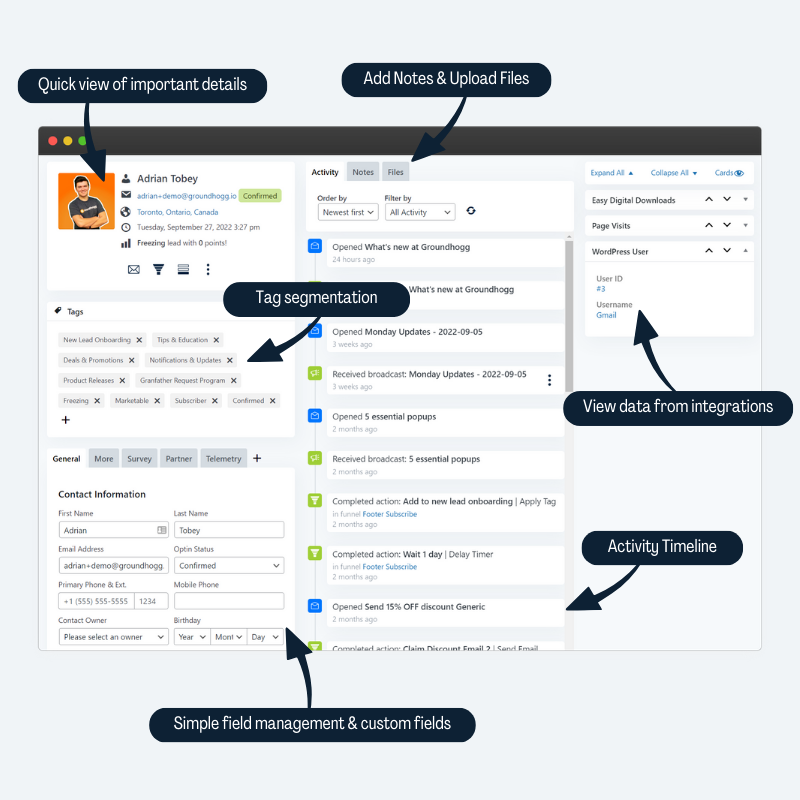
- 🕰️ A redesigned contact timeline. Flow runs and browsing sessions are grouped, opens and clicks sit under their email, and failed flow events show the error.
- 🎨 Interface themes. Light, Paper, Slate or Midnight. Saved per user, and also found in the command palette (Ctrl or Cmd + K).
Epic WordPress AI CRM, Email & Marketing Automation
Businesses that switch to Groundhogg save on average $240/m on CRM fees.
👉 Official Site | 📃 Documentation | 🎓 Training
🌎 Facebook Group | 📺 YouTube Channel | Ⅹ (Twitter)
🚀 Free 14-day demo! Try before you buy.
Groundhogg CRM & Marketing Automation for WordPress can help you dramatically improve how you acquire leads and make more sales!
Our WordPress CRM is the very best alternative to Keap, ActiveCampaign, HighLevel, HubSpot, MailChimp and other SaaS platforms.
You don’t have to sacrifice CRM features when you switch to our self-hosted solution. In fact you can save $1,000s per year and have the added benefit of owning all your information.
If you are an agency, WaaS, WordPress developer, LMS/Course Creator, WordPress freelancer, or CRM implementation service provider then the Groundhogg CRM and Marketing Automation suite is for you.
🪓 Axe the “Success Tax”
Other SaaS (Software as a Service) CRM platforms will charge you more as your list grows.
But not us!
When using the Groundhogg CRM & Marketing Automation suite free or with any of our paid plans, we’ll never charge you more!
🚫 There are no limits on:
- Number of contacts
- Number of flows (automations)
- Number of emails sent
Unlike other SaaS platforms, you will never be limited on the amount of anything.
💽 You own your data!
Putting your data in a SaaS CRM is like renting an apartment, but with less protection and stingier landlords. You can get evicted at any time, for any reason, and your business is exposed if your CRM is turned off.
With Groundhogg you actually own your data! No one except you can make impactful changes.
🌎 The resources you need
- 🚀 Try the premium features with the free 14-day pro demo.
- 📃 Find answers in the documentation.
- 🤝 Get a done-for-you setup.
- 📺 Watch over 60 hours of easy YouTube tutorials.
🤷♂️ Who can benefit from Groundhogg CRM and Marketing Automation?
If your business is using WordPress, you can use Groundhogg. It’s used by 3,000+ businesses in over 35 countries, including digital marketing agencies, WordPress freelancers, LifterLMS, LearnDash and TutorLMS sites, WooCommerce stores, WaaS multisite platforms, blogs and news sites, coaches and trainers, educators and public speakers, and business directories.
💡 Made by people who know CRM & Marketing Automation!
Our team is based in Niagara Falls, Canada! We’ve been helping small businesses implement CRM and Marketing Automation since 2014, working with tools like Keap, ActiveCampaign, and HubSpot.
There was a desperate need in the WordPress ecosystem for a CRM and Marketing Automation tool that could match SaaS platforms on features and reliability, so starting in 2018, Adrian Tobey (founder) and his team built it.
You can trust us to provide stellar software and support, plus guidance on the kinds of flows and automation you should be building to get maximum value from our products.
❤️ Businesses Love Groundhogg CRM & Marketing Automation!
3,000+ businesses in 35+ countries are using Groundhogg CRM & Marketing Automation to launch their flows, grow their lists and scale their businesses.
Our customers rate us 5.0 out of 5 across 41 customer reviews, and 28 of them switched from another CRM. Here’s what a few of them had to say about our products and support!
Price, better integrated with WordPress and WooCommerce than ActiveCampaign, more flexible, and perfect support.
Wojciech Habało, A4 Academy, switched from ActiveCampaign
My #1 reason for leaving HubSpot was cost. I also used Outreach with another company and it was also way too expensive for a small consultancy. I like that Groundhogg is integrated with my website, like HubSpot before it.
Gary Feldman, Consultant @ i-BN, switched from HubSpot
It’s so nice having a CRM that is natively connected to your actual data.
Clifton Griffin, Founder of CheckoutWC
Read all the reviews. There are also over 110 ⭐⭐⭐⭐⭐ reviews for Groundhogg on WordPress.org and even more reviews on our Facebook Page!
Kris Britton of the KAYBE marketing agency moved all of his clients from HubSpot to Groundhogg!
Features
Here are the tools you can use to launch your funnel, grow your list, and scale your business faster with Groundhogg CRM & Marketing Automation!
🤖 AI CRM & MCP Ready
Groundhogg is an AI CRM: let ChatGPT, Claude, Gemini, Cursor and other AI agents work inside it, safely.
- Set up in a few clicks. The AI agent tab in Tools installs the MCP Adapter plugin, creates an application password, and has setup steps for ChatGPT, Claude, Codex, Cursor, Gemini CLI, VS Code and custom connectors. (WordPress 6.9 or later.)
- Build flows by asking for them. Agents can build a flow with branches from scratch, activate it, and read and edit an existing one. Changes to a live flow are staged until they’re published.
- Try before you publish. Agents can simulate what a flow would do for a contact, with no side effects, before anything goes live.
- Contacts: find, create, update and search contacts, read and add notes, and manage tags, owners, custom fields and saved searches.
- Email and broadcasts: list saved emails and sender profiles, send a saved or one-off email to specific contacts, schedule a broadcast to a segment, cancel one, and read open and click reports.
- Campaigns, settings and add-ons: create campaigns, read and change registered settings, and see which official add-ons are installed and licensed.
- Every action runs through the same capability and per-object permission checks as the rest of Groundhogg. An agent can only do what its user is allowed to do.
📱 Works Where You Do
- Mobile app. Install it on your phone from Tools > Mobile app. Look up contacts, call, text or email them, work through your tasks, add notes and reply to messages. It only shows what the person using it is allowed to do.
- Interface themes. Choose Light, Paper, Slate (dark) or Midnight (dark) for the admin, per user.
- Command palette. Jump to settings, admin page tabs and themes with Ctrl or Cmd + K on WordPress 7.0 and later.
- Made for small screens. Admin pages, the preferences center and campaign archives work on phones.
🕺 Straightforward CRM & Contact Management
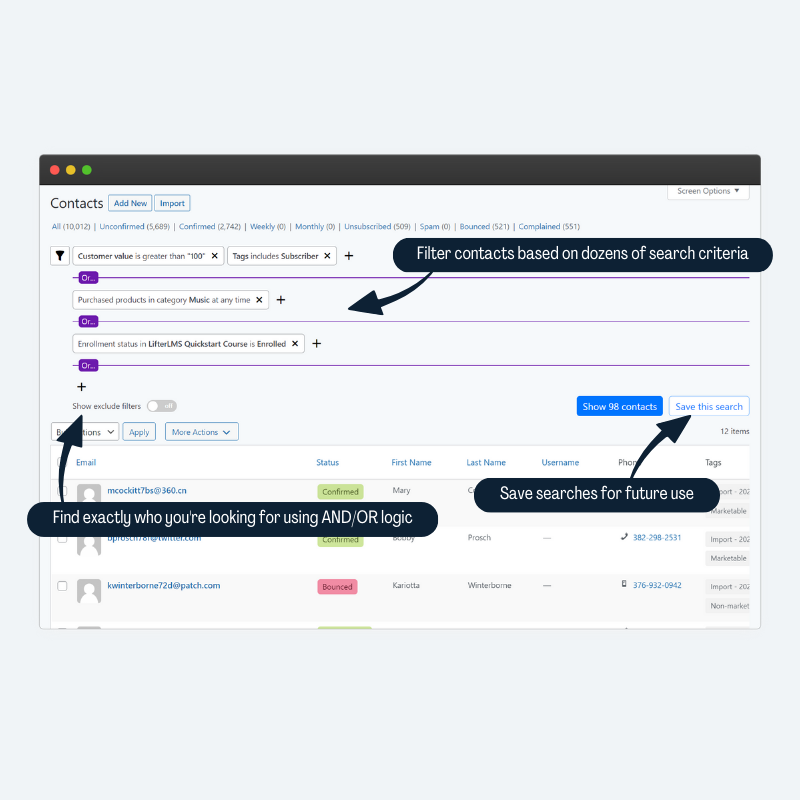
- Advanced searching and filtering on any data
- Unlimited CRM custom fields
- Segmentation with tags
- A timeline of every flow run, browsing session, email open and click, with filters by flow, email, broadcast or activity type
- Activity and email history
- Profile pictures
- Automatic location discovery
- CRM Notes
- CSV importing & exporting
- Sync contacts in the CRM with WordPress users
- View aggregated information from other WordPress plugins in the contact record.
Segment your list with Groundhogg’s unrivaled search filter system! Our integrations with WooCommerce, AffiliateWP, LearnDash, and more add additional search filters you can use to create powerful segments so you can send hyper targeted messages.
⚙️ Flows & Marketing Automation Features
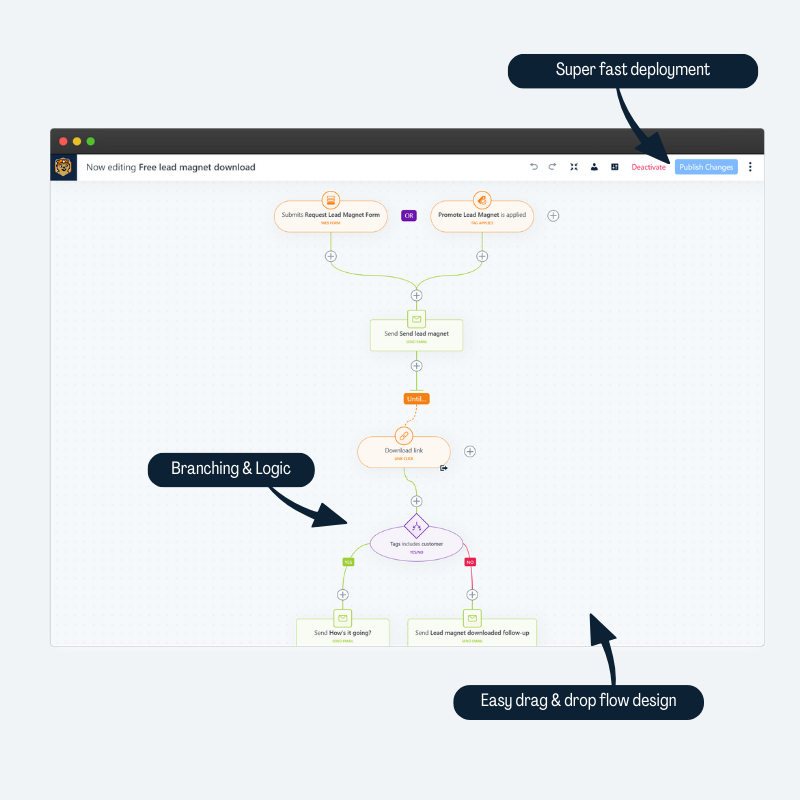
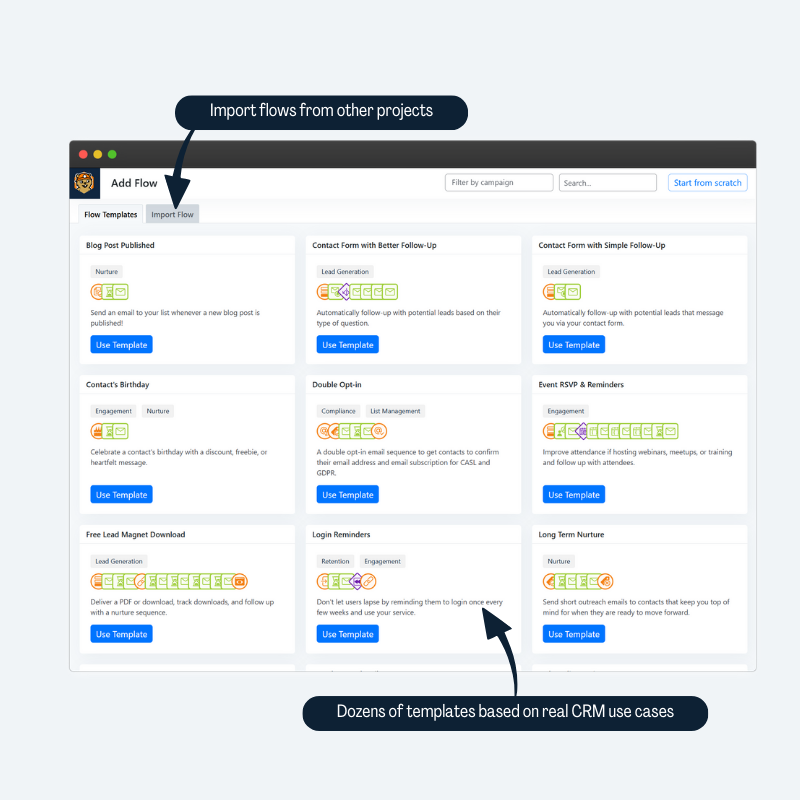
- Create highly effective customer journeys with our easy to learn flow builder.
- A rebuilt, much faster Flow Editor with undo and redo for every change.
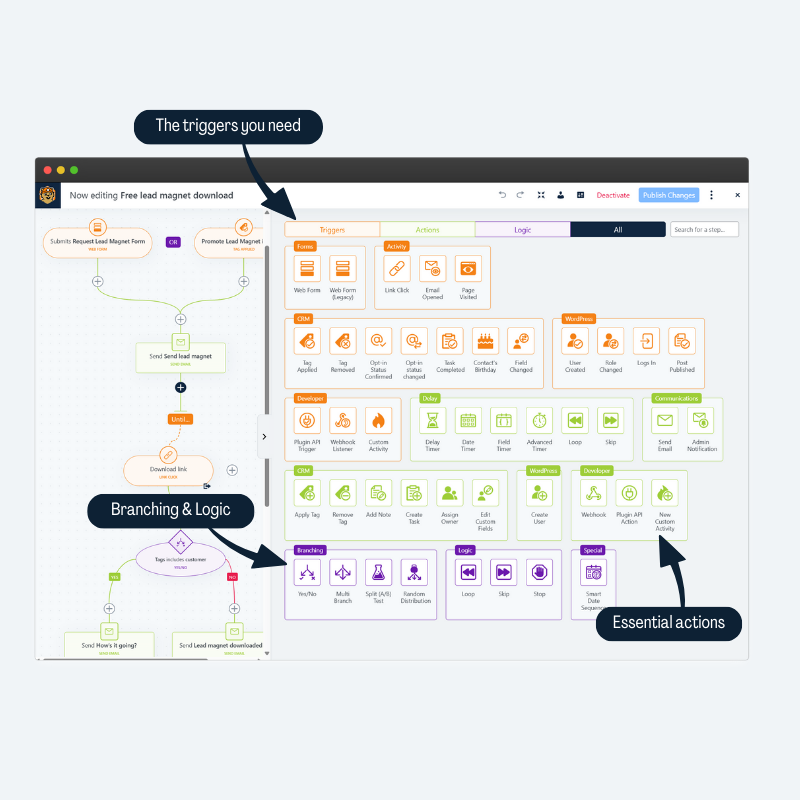
- Start flows from forms, payments, new users, and more!
- Create simple flows or complex ones, with branches, split tests and timers.
- Test a flow before you publish it with the built-in simulator.
- Publish changes to a live flow when you’re ready, and choose what happens to contacts waiting at the steps you removed.
- Measure the effectiveness of your flows with easy to read metrics.
- Add-ons and integrations connect the CRM with your favorite WordPress plugins.
- Open API to add your own triggers & actions.
📧 Simple Email Marketing & SMTP
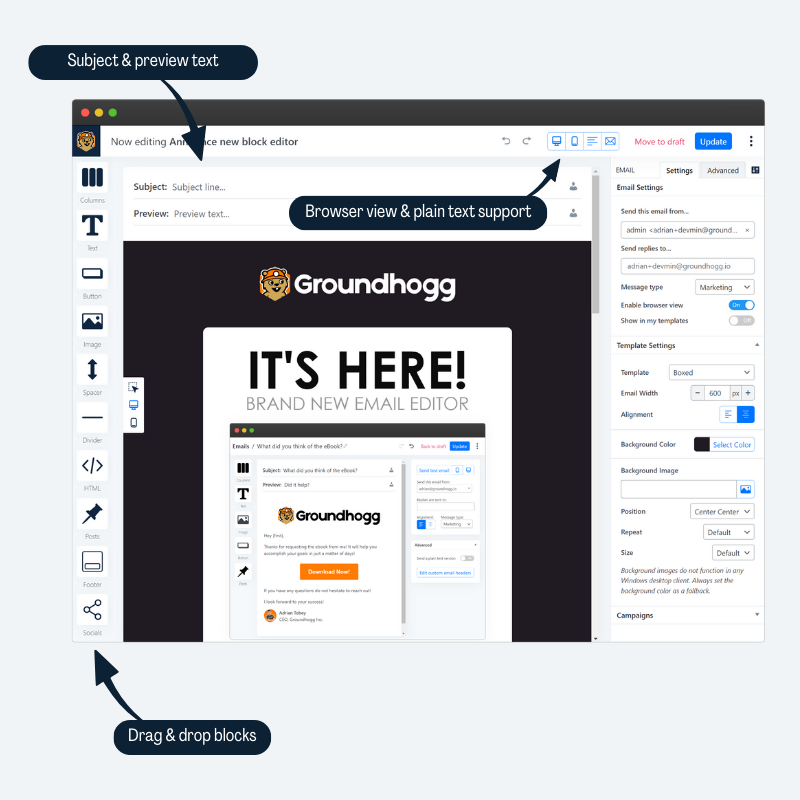
- Use images, headers, paragraph and more.
- Simple preview & testing.
- Perfect for sales emails, newsletters, transactional notifications and more.
- Send broadcast emails to your contact lists, and see them all in a calendar.
- Compose an email to a contact from any of your sender profiles.
- Distinguish between transactional and marketing emails.
💬 Replies in Your CRM
- Replies to your emails are saved to the contact who replied, instead of going to your own mailbox.
- A Messages tab on every contact shows your whole conversation, laid out like a chat.
- A Replies widget on your dashboard lists who has replied and what you haven’t read yet.
- BCC your site’s private inbox address to keep a copy of emails you send from your own mailbox.
- Handle bounces from an IMAP inbox with a manual “Handle Bounces Now” check.
Incoming Messages needs an active Groundhogg license.
📈 Unmatched Analytics Reporting
- We track EVERYTHING in the CRM!
- Granular details of how your site is performing.
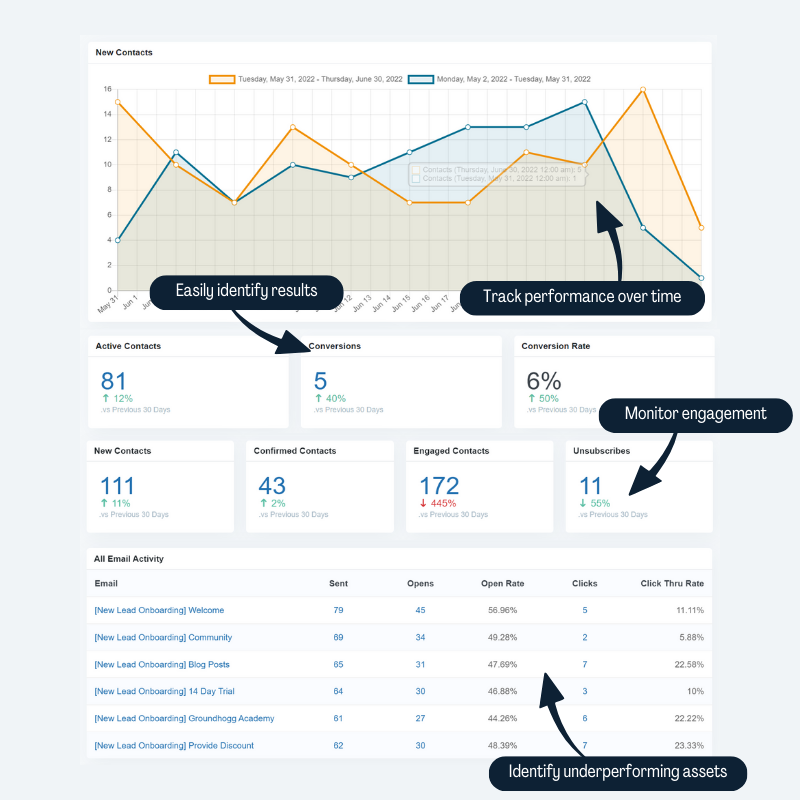
- See open rates, click through rates and conversions at a glance.
- Detailed results from your flows and broadcast emails.
- Integrate with Ecommerce to see revenue from your marketing.
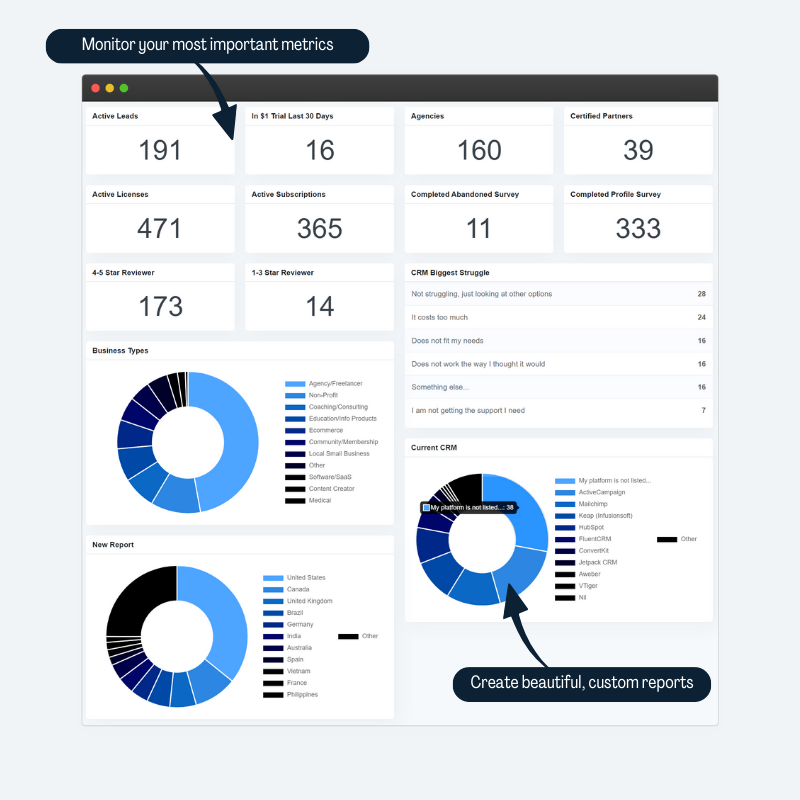
- Learn more about your audience with demographic reporting.
- See which flows/emails are under-performing.
- Build custom reports, including tables and pie charts grouped by tag.
- Reports and segments are cached and indexed so dashboards load fast on big lists.
Use campaigns to make comparing reporting results easier
🇪🇺 GDPR Ready
- Simple GDPR features to keep you compliant.
- Automatic preferences center, data download, and opt out.
- Track GDPR consent in your CRM
- Prevent marketing to those who withdraw consent.
🙌 Add-ons and integrations
Groundhogg does a lot on its own, and add-ons and integrations make it do more. Connect it to the WordPress plugins you already use, and add features like a sales pipeline, booking calendars and lead scoring.
👉 Browse the add-ons and integrations, or bundle all of the premium add-ons into a flat rate plan.
You can also use our ⏱️ free 14-day demo to see a preview of the premium features.
External services & APIs
This plugin connects to several 3rd party services to provide crucial functionality. Each is listed below with what services are used and what information is shared, if any.
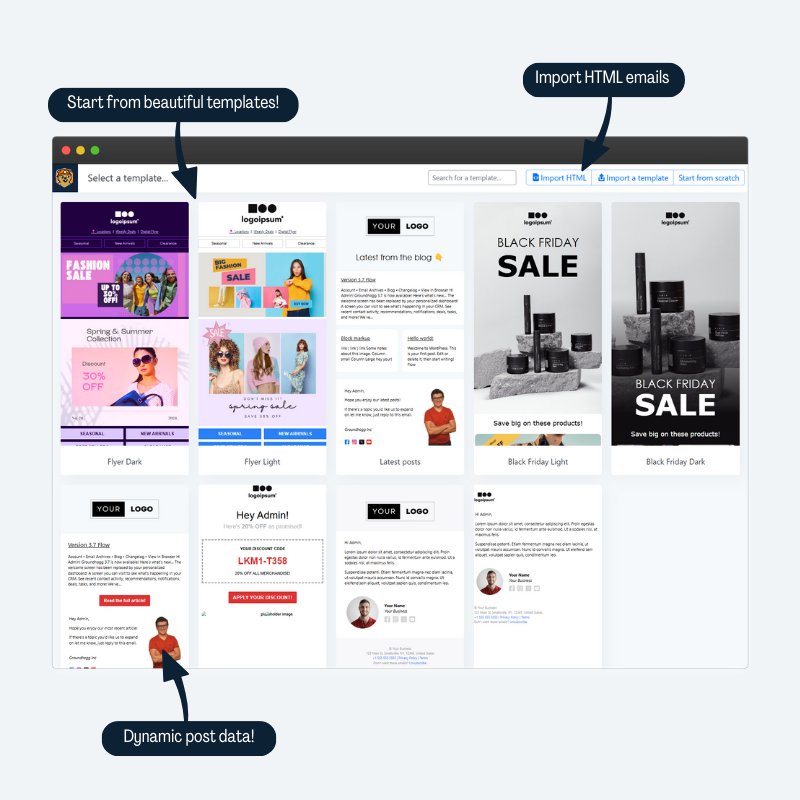
Email and flow templates
Email and flow templates are pulled periodically from a remote repository via API at https://library.groundhogg.io. No information about you or your site is shared or logged in this request.
Dashboard notices and widgets
Recent blog posts from https://groundhogg.io are shown in the dashboard and are fetched periodically. No data or information is logged or shared.
Important notifications and dashboard notices are pulled from https://groundho.gg periodically. No data or information is logged or shared.
Telemetry and usage
Sharing usage data is opt-in. You can turn it on or off from Groundhogg » Settings » Misc » Danger Zone » Share usage data, or in the guided setup. When it is on, the following information will be shared with https://groundhogg.io once a week: Your admin email address; Whether your site has a valid and active license from groundhogg.io; The license if one exists; Whether Groundhogg is white labelled; System information such as WordPress version, PHP Version, the Groundhogg plugin version, the site time zone, and site language; Usage statistics such as the number of active flows, the number of new contacts, and the number of broadcasts sent; The list of active Groundhogg add-ons on the site;
No information is shared or collected when telemetry sharing is disabled.
Google Recaptcha
If you have the Google Recaptcha integration enabled, scripts will be loaded from https://www.google.com/recaptcha/api.js and requests will be made to https://www.google.com/recaptcha/api/siteverify sharing only essential information (such as your recaptcha site key) to facilitate the integration.
Cloudflare Turnstile
If you have the Cloudflare Turnstile integration enabled, scripts will be loaded from https://challenges.cloudflare.com/turnstile/v0/api.js and requests will be made to https://challenges.cloudflare.com/turnstile/v0/siteverify sharing only essential information (such as your turnstile site key) to facilitate the integration.
Geolocation services
Groundhogg will attempt (if licensed) to geolocate a contact (country, region, timezone, etc…) based on their IP address using our Geolocation service https://ipinfo.groundhogg.io. No data is stored remotely and no PII is used. We use a third party based in Romania to provide geolocation services.
Installation
Plugin Repo
- Install Groundhogg CRM and Marketing Automation
- Activate
- Complete the guided setup
- Start Marketing
FTP
- Upload the zip archive
- Unzip
- Activate through the plugins manager
- Complete guided setup
- Start Marketing
FAQ
Is Groundhogg an AI CRM?
Yes. AI agents like ChatGPT, Claude, Gemini and Cursor connect to Groundhogg through MCP from the AI agent tab in Tools, then build flows, write emails, schedule broadcasts and manage contacts for you. They can only do what the WordPress user they connect as is allowed to do.
Does Groundhogg need any additional marketing software like MailChimp?
No, Groundhogg is a completely standalone, lightweight CRM and marketing automation system designed to save you $1,000s while helping you generate more revenue.
Does Groundhogg require and external transactional email service like SendGrid?
No, but it is highly recommended. Without a proper transactional email service your emails are likely to end up in spam.
Groundhogg provides a number of recommended solutions:
- MailHawk
- SendGrid
- AWS SES
- Elastic Email
- Basic SMTP for other services.
Groundhogg will automatically use the mail solution you have configured on your WordPress website.
Does Groundhogg have any required monthly fee or upgrades?
No, you can use Groundhogg CRM and Marketing Automation for free forever. Groundhogg is a Open Source project designed to democratize CRM and email marketing automation and provide simple easy to use tools to new and non-tech-savvy business owners.
That being said, our premium upgrades can seriously help your business! Use our proven tools and strategies to supercharge your marketing and WordPress site!
Does Groundhogg connect to Woocommerce or other plugins?
Yes, Groundhogg has integrations for the most popular WordPress plugins around to create an even more powerful CRM.
Does Groundhogg work with my theme?
Groundhogg is theme agnostic, meaning it will work with every and any theme. Groundhogg is mostly administrative and very little is seen by visitors.
Does Groundhogg track my subscribers?
Yes, Groundhogg has a very smart tracking system that will allow you to monitor your clients interactions with your emails and your site.
Does Groundhogg Integrate with my membership plugin?
Yes, Groundhogg has a builtin connection with the WordPress user API, meaning it will automatically use user roles in your site, like from a membership plugin.
Is Groundhogg secure?
We follow all best WordPress security practices. Plus it’s open source, so we have a large community looking out for potential weaknesses when it comes to your data.
Is Groundhogg GDPR, CANSPAM, or CASL compliant?
Yes, we have tools available to meet the criteria of all the worlds ANTI-SPAM & privacy legislation.
Is Groundhogg better than my current CRM/Marketing Automation tool?
Well, that’s up to you! We’ll never say Groundhogg is better than anyone, but it is different. And sometimes different is better than better.
Where can I upgrade to premium?
You can purchase a premium plan for access to support and our premium add-ons & integrations on our pricing page.
How can I report security bugs?
You can report security bugs through the Patchstack Vulnerability Disclosure Program. The Patchstack team helps validate, triage and handle any security vulnerabilities. Report a security vulnerability.
Screenshots

Changelog
4.11 (2026-11-16)
- ADDED Build, edit and set up with an AI assistant connected over MCP.
- “Build with AI” on the Add Email and Add Flow screens, and “Edit with AI” in the email and flow editors, give you a prompt to copy into your assistant, after walking you through connecting one.
- The guided setup can hand the whole setup to an assistant. It finds what’s left with
groundhogg/get-setup-statusand does what doesn’t need a person: cron, senders, settings, importing contacts and flow templates. - Anyone who can view contacts can connect their own assistant. It counts as connected once it signs in, including through the Claude and ChatGPT apps.
- The assistant asks before anything reaches contacts, never asks for passwords or keys, and answers how-to questions from the documentation.
- ADDED A
view_contact_piicapability. Users without it, administrators included, can still work with contacts but see[redacted]in place of names, email addresses, phone numbers and other personal details, and can’t search or filter by them. Every role that can view contacts gets it on update, so nothing changes until you take it away.- It covers the admin, the REST API and the AI abilities, so an AI agent connected as such a user is limited too. Exports, imports and contact files are closed to them.
- Grant or revoke it from the Personal information checkbox on a user’s profile.
- Personal details in notes and tasks are redacted, and custom fields marked Contains personal information are hidden.
- ADDED An opt-in daily My day email with your overdue and due tasks, unread replies and new contacts, at the time you choose. Snooze or complete tasks from it without signing in. Turn it on from the Notifications card of your profile, which a new dashboard recommendation points to.
- ADDED Every admin notification email has a link to unsubscribe from it without signing in.
- ADDED Tools › Site Health checks what quietly stops email and automation: late events, cron not running, emails only logged or sent by PHP mail or an SMTP plugin that doesn’t report bounces, failed events and emails, stuck background tasks, pending database updates, plain permalinks, safe mode, and unlicensed extensions. Each result links to the fix.
- ADDED The Email settings tab recommends MailHawk again, installs it and opens its Connect screen.
- ADDED Settings tabs with several cards have a table of contents that follows you down the page.
- ADDED Abilities for AI agents.
groundhogg/edit-emailchanges part of an email, all or nothing: text, a block’s content or settings, adding, moving or deleting blocks, or a piece of an HTML email.groundhogg/update-contactsandgroundhogg/bulk-update-contactsupdate many contacts at once.groundhogg/send-test-emailsends a design or simulated test, and the email abilities return apreview_url.- Setup:
get-setup-status,get-cron-status,set-up-cron,save-sender-profile,delete-sender-profile,sync-users,import-contacts,list-flow-templatesandimport-flow-template, and about 20 more settings forupdate-settings. get-authoring-guidefor writing emails and flows,search-mediaandupload-mediafor images, andsearch-docsfor the documentation.
- TWEAKED Email abilities:
get-email-templatereturns an outline of a block email or the text of an HTML email, withfind,blocksandviewfor more.create-email-templateandupdate-email-templateacceptblocksas short specs and write the markup the editor would, refusing what the editor couldn’t open. - TWEAKED
send-email-template,add-to-flowandsimulate-flowacceptevent_args, for replacement codes that need them. - TWEAKED The mobile app is named and colored after its site, so apps for different sites are easy to tell apart.
- SECURITY
{post_title}could output unescaped HTML from a post title saved by a Contributor. Credit: Wordfence PRISM, via Wordfence. - HARDENED Email previews are sandboxed, so a script in an email can’t run.
- FIXED A setting, webhook value, form field or export column named after a method, like
deleteorunsubscribe, could run it on the contact, deleting or unsubscribing them. - FIXED Excluding contacts with any of several tags only excluded those with all of them, and excluding those with all of them excluded those with any.
- FIXED Saving in the email editor changed blocks that hadn’t been edited, and could overwrite changes an AI agent made while it was open. It now asks first.
- FIXED Link Click redirects could be cached by a page cache or CDN, skipping the trigger, and missed visitors on sites that answer on both
example.comandwww.example.com. - FIXED “Disable page tracking” did nothing, and disabling open tracking stopped page tracking instead.
- FIXED
groundhogg/send-email-broadcastignoredexclude_segmentand counted skipped contacts inestimated_recipients. - FIXED A name like “Malik M” lost letters from the first name when split.
- FIXED The Last Updated date of an email never changed after it was created.
- FIXED A single step, form submission or page visit couldn’t be read, edited or deleted through the REST API.
- FIXED The event queue and background tasks put a 60 second limit on processes that had none, like a server cron job.
- FIXED The email service recommendation was done once MailHawk was active, before it was connected.
- FIXED A form integration trigger couldn’t be added in the flow editor before a form was picked.
- FIXED
groundhogg/list-settingsfailed on a new site. - FIXED The AI agent tab said the MCP Adapter was active when another plugin bundled its own copy.
- FIXED Incoming Messages couldn’t be turned on for a white labeled subsite using the main site’s licenses.
- FIXED Items added with the
groundhogg/admin/checklist_itemsandgroundhogg/admin/recommendation_itemsfilters weren’t shown. - FIXED The profile of a sales manager who can’t delete users raised an error.
- DEV
Groundhogg\Piiis the policy for contact personal information:Pii::is_restricted(),Pii::REDACTED,Pii::restricted_error(),Pii::scrub_text()andGroundhogg.functions.contactLabel(), extended with thegroundhogg/pii/*filters. A custom field is personal whenpiiis set. - DEV
Email_Block_Document,Email_Block_RendererandEmail_Html_Documentparse, edit and render email content. Add-on blocks register withgroundhogg/email/block_typesandgroundhogg/email/block_renderers. - DEV
Notices::add_notification()adds a notification to the notifications feed, andgroundhogg/notices/readandgroundhogg/notices/dismissedfire when people read or dismiss them. - DEV Add Site Health tests and info with
groundhogg/site_health/testsandgroundhogg/site_health/info_fields, and run them withSite_Health::run(). - DEV Reading a method’s name as a property of an object now returns false, with a
_doing_it_wrongnotice, instead of calling the method. - DEV The REST API’s email update refuses a stale
versionwith agroundhogg_email_changed409 error, andBase_Object_Api::prepare_update_data()lets an object type add to an update. - DEV
is_demo_environment()recognises demo and sandbox sites: InstaWP, TasteWP, WordPress Playground and our own demos. - DEV Usage data sharing is rebuilt (weekly snapshot, lifecycle events and getting-started milestones, never the site’s address or license key) but stays off until its endpoint is live. Turn it on with
GROUNDHOGG_TELEMETRY_V2, seedocs/telemetry.mdin the repository. - DEV
Main_Roles::map_meta_cap()maps the step, submission and page visit capabilities, andgroundhogg/email_reports/my_day_sectionsadds sections to My day.
Older versions are in the full changelog on groundhogg.io.