


Description
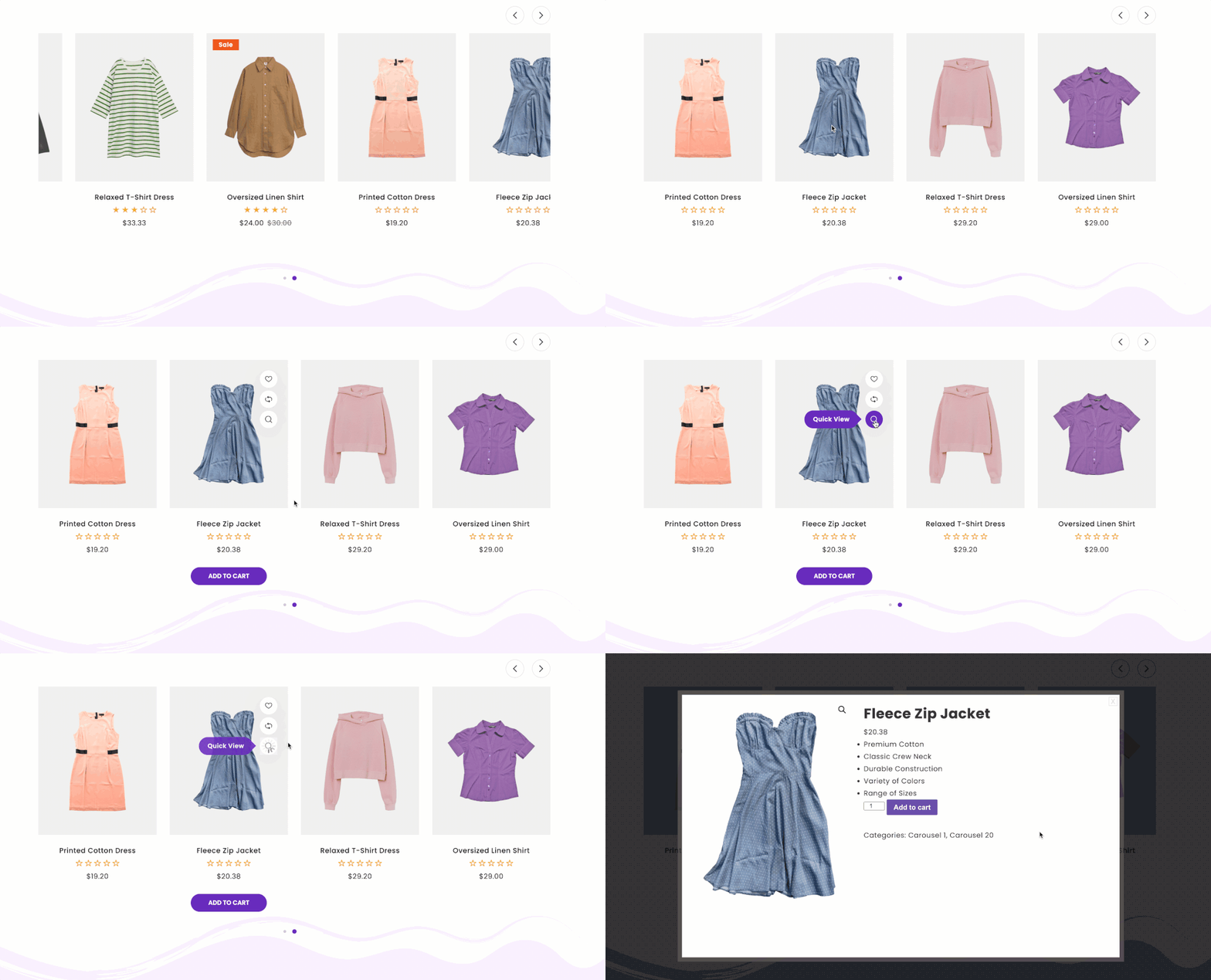
GS Product Slider for WooCommerce puts your products where shoppers will see them. Show your latest products, or products from chosen categories, as a carousel or grid on your homepage, landing pages, blog posts or anywhere else. Shoppers see the image, price, rating and sale badge, and can add to cart straight from the slider.
Pick a design in the shortcode builder, see it in the live preview, and paste one shortcode.
👉 Live demo · Documentation · Pro features · Pricing · Support
Who it’s for
- Store owners: a “New arrivals” slider on the homepage, or a category slider on landing pages.
- Bloggers who sell: product carousels inside posts, next to the content that sells them.
- Agencies: reusable product sections for client shops.
Why store owners choose GS Product Slider
- Set up in minutes: a shortcode builder with live preview, and ready-made sample shortcodes.
- Shoppers can buy from the slider: price, rating, sale badge and add to cart button on every product.
- Looks right on every screen: set columns and spacing for desktop, tablet and mobile.
- Lightweight: scripts load only on pages that show a slider, and images are lazy loaded.
Free features
- Carousel and grid views with 5 designs.
- Shortcode builder with live preview: create, edit, clone and delete product sliders.
- Show your latest products, or include and exclude product categories.
- Show or hide the title, rating, price, description, add to cart button, sale badge and out-of-stock badge.
- Sale badge as text or percentage.
- Carousel controls: speed, autoplay, delay, loop, pause on hover, items to move, arrows and dots.
- Colors for titles, prices, badges and buttons.
- Responsive columns and spacing for desktop, tablet and mobile.
- Editable front-end text and custom CSS.
- Elementor widget, and a shortcode that works in the block editor and any page builder.
- Translation ready.
Pro features
GS Product Slider Pro adds:
- Smart product lists: top rated, best selling, most viewed, recently viewed, on sale, featured, related, upsells and cross-sells.
- More ways to choose products: by tag, SKU, price range, stock status, specific products, or free and in-stock products.
- Ticker and masonry views, plus list layouts.
- 32 more designs.
- Brand support for products.
- Priority email support.
Plans start at $49 per year, with a 7-day money-back guarantee. Compare Pro plans.
How it works
- Make sure WooCommerce is installed and active.
- Go to Product Views > Shortcode, create a shortcode and pick a view and design. The live preview updates as you change settings.
- In the Query tab, choose which products to show, then copy the shortcode, for example
[gswoo id=1], into any page or post.
Each shortcode has three tabs:
- General: view, design, columns and spacing, which product details to show, and carousel settings.
- Style: colors for ratings, prices, titles, badges and buttons, plus carousel arrows and dots.
- Query: how many products to show, sorting, and which products to include or exclude.
Shortcode usage
[gswoo id=1]
In a theme file:
<?php echo do_shortcode( '[gswoo id=1]' ); ?>
See the documentation for every option.
Support
Free users get help in the WordPress.org support forum. Pro users get priority email support through our help desk. We reply as soon as we can, excluding holidays.
More plugins from GS Plugins
- GS Variation Swatches: color, image and button swatches for WooCommerce variations.
- GS WooCommerce Brands: add brands to products with logos, filters and sliders.
- GS Logo Slider: client, partner and sponsor logos in sliders, carousels, tickers and grids.
- Solid Testimonials: customer reviews and quotes in sliders, grids and masonry layouts.
- GS Team Members: team pages and staff directories with profiles and social links.
- GS Portfolio: show your work in grid, slider, list and filterable layouts.
- GS Projects Showcase: case studies with client, dates, value and project links.
- GS Books Showcase: a book library with covers, ISBN and publication details.
- GS Coach: coach and trainer profiles with experience and education.
- GS Posts Grid: recent and category posts in grid, list and slider layouts.
- GS Pinterest Portfolio: embed Pinterest pins and boards.
- GS YouTube Gallery: YouTube videos, playlists and channels in galleries.
- PowerUp: redirects, restrictions and admin tools for WordPress.
Installation
WooCommerce must be installed and active.
From your WordPress dashboard
- Go to Plugins > Add New and search for GS Product Slider for WooCommerce.
- Click Install Now, then Activate.
- A Product Views menu appears in your dashboard, with sample shortcodes ready to edit.
By uploading the zip file
- Download
gs-woocommerce-products-slider.zip. - Go to Plugins > Add New > Upload Plugin, choose the file and click Install Now.
- Activate the plugin.
By FTP
- Upload the
gs-woocommerce-products-sliderfolder to/wp-content/plugins/. - Activate the plugin from Plugins in your dashboard.
Then add [gswoo id=#] where you want the products to show. See the setup guide for screenshots of each step.
FAQ
Do I need WooCommerce?
Yes. The plugin shows WooCommerce products, so WooCommerce must be installed and active.
How do I add a product slider to my homepage?
Go to Product Views > Shortcode, edit one of the sample shortcodes or create a new one, choose which products to show, then paste the shortcode into your homepage.
Can I show products from certain categories only?
Yes. In the Query tab, include the categories you want, or exclude the ones you don’t. You can pick several at once.
Can I show best sellers, on-sale or top rated products?
Yes, with Pro. Pro adds smart lists such as top rated, best selling, most viewed, recently viewed, on sale, featured, related, upsells and cross-sells.
Can I choose products by tag, price or SKU?
Yes, with Pro. You can include or exclude products by tag, SKU, price range, stock status or by picking specific products.
Can shoppers add to cart from the slider?
Yes. Turn on the add to cart button in the General tab.
Does it work with my theme and page builder?
It works with any theme that follows WordPress and WooCommerce standards. It has an Elementor widget, and the shortcode works in the block editor’s Shortcode block and in any page builder.
How do I use the shortcode in a theme template?
Use <?php echo do_shortcode( '[gswoo id=1]' ); ?> and replace 1 with your shortcode’s ID.
What is the difference between the free and Pro versions?
The free version gives you carousel and grid views with 5 designs, latest products or chosen categories, and add to cart, prices, ratings and sale badges. Pro adds smart product lists such as best sellers and on sale, product selection by tag, SKU, price and stock, ticker, masonry and list views, 32 more designs, brand support and priority support. See the Pro features and plans.
Screenshots


Changelog
Version 3.0.9 [28th Oct 2026]
- [Fixed]: Broken pricing links.
Version 3.0.8 [30th Sep 2026]
- [Added]: Countdown timer.
- [Added]: WooBoost support.
- [Fixed]: Ticker single page issue.
- [Fixed]: List column layout.
- [Fixed]: Thumbnail sizing.
- [Fixed]: Masonry view.
- [Fixed]: Fatal error.
- [Fixed]: Product image height.
- [Fixed]: Image cropping and price range.
- [Fixed]: Top Rated products.
- [Fixed]: Compare and Wishlist buttons.
Version 3.0.7 [28th Jul 2026]
- [Added]: Filtering options for featured, on-sale, and related products.
- [Added]: Cart visibility support for Theme 7.
- [Added]: Compatibility with WCP Countdown Timer plugin.
Version 3.0.6 [23rd Jul 2026]
- [Added]: Rating icons customization option.
- [Added]: Navigation color group settings.
- [Added]: Theme accent color and hover styles.
- [Added]: Sorting and order functionality.
- [Added]: Color button group and theme-wise description visibility.
- [Fixed]: Carousel hover issue.
- [Fixed]: Free/PRO activation and dependency issues.
- [Fixed]: Minor issues and overall stability improvements.
Version 3.0.5 [6th Jul 2026]
- [Added]: Default setting for showing products set to “All”.
- [Added]: Autoplay enabled by default.
- [Fixed]: Carousel design issue when selecting one or two products.
Version 3.0.4 [6th Jul 2026]
- [Added]: Top Rated, Best Selling, Most Viewed, Recently Viewed, Upsells, Cross Sell, SKU, Price Range, and Stock filtering
- [Added]: Brand support (PRO).
- [Added]: Theme visibility field.
- [Added]: Attribute filtering improvements.
- [Added]: PRO plugin pricing link.
- [Fixed]: Price filtering issues.
- [Fixed]: Filter “none selected” display after save.
- [Fixed]: Columns tab issues.
- [Fixed]: Style tab issues (styles not applying).
- [Fixed]: Theme CSS issues.
- [Fixed]: Plugin activation and dependency issues (Free/PRO).
- [Fixed]: Duplicate issues in include/exclude and sale badges.
- [Fixed]: Console errors and HTML element violations.
- [Fixed]: Input color type issue.
- [Fixed]: General filtering issues.
- [Improved]: Default ordering by date (DESC).
- [Improved]: Overall filtering system and performance.
Version 3.0.3 [4th Jun 2026]
- [Fixed]: Post Type Warning Notice.
Version 3.0.2 [17th Apr 2025]
- [Fixed]: Unauthenticated Arbitrary Shortcode Execution.
Version 3.0.1 [22nd Nov 2024]
- [Updated]: Query.
Version 3.0.0 [17th Apr 2024]
- [Updated]: Rewritten the plugin.
Version 1.6.1 [31st Jan 2023]
- [Removed]: All Admin Notices From the Woocommerce Products Slider Pages.
Version 1.6.0 [30th Jan 2023]
- [Updated]: Free, Pro Plugins Pages & Help Page.
- [Fixed]: Page Redirection on the Plugin Activation.
Version 1.5.9 [29th Jan 2023]
- [Fixed]: Sanitize Issue.
Version 1.5.8 [24th May 2021]
- [Fixed]: PHP 7.3 Compatibility.
- [Fixed]: Deprecated Function Warning.
Version 1.5.7 [17th Dec 2020]
- [Updated]: AppSero Client.
- [Removed]: Affiliate Admin Notice.
- [Updated]: WordPress 5.6
Version 1.5.6 [13th Sep 2020]
- [Added]: Admin Notice.
Version 1.5.5 [15th Aug 2020]
- [Updated]: For WordPress 5.5
Version 1.5.4 [24th Jun 2020]
- [Updated]: Appsero Client.
Version 1.5.3 [31st May 2020]
- [Added]: Shortcode Generator.
Version 1.5.2 [20th Nov 2019]
- [Fixed]: Domain name with www & fixed all urls.
- [Fixed]: WordPress latest version support.
Version 1.5.1 [22nd Oct 2019]
- [Fixed]: Domain name changed & fixed all urls.
- [Fixed]: Admin CSS.
- [Added]: New Contributors.
Version 1.5
- Added Review system
- Activation redirects added
- Coupon Code added
Version 1.4
- Fixed – Menu Position
Version 1.3
- Fixed – Hidden product issue. If Product is set to Hidden in WooCommerce under product visibility then hidden product will exclude from Slider.
- Fixed admin CSS
Version 1.2
- Added Video & other docs
Version 1.1
- Initial release