


Description
GT Link Manager is a free WordPress link manager and URL shortener for branded short links, affiliate link management, country-based redirects, and opt-in click analytics. Create reusable links, find out where they are clicked, and manage them from the WordPress admin, block editor, or REST API. There are no premium tiers or upsells.
Redirects use indexed custom database tables and resolve before theme templates load. Advanced Analytics adds no visitor tracking scripts, cookies, or beacon requests.
Your links follow a clean URL pattern: yoursite.com/go/your-slug (the prefix is configurable, can be removed on individual links, or dropped for every link).
Product Page | Documentation | REST API & AI Tools Guide
Advanced Analytics: See Where Your Links Get Clicked
Advanced Analytics adds reports alongside the existing lifetime click counter. It stays off until you explicitly enable it under GT Links > Analytics > Settings. No analytics tables, options, records or maintenance jobs are created before opt-in.
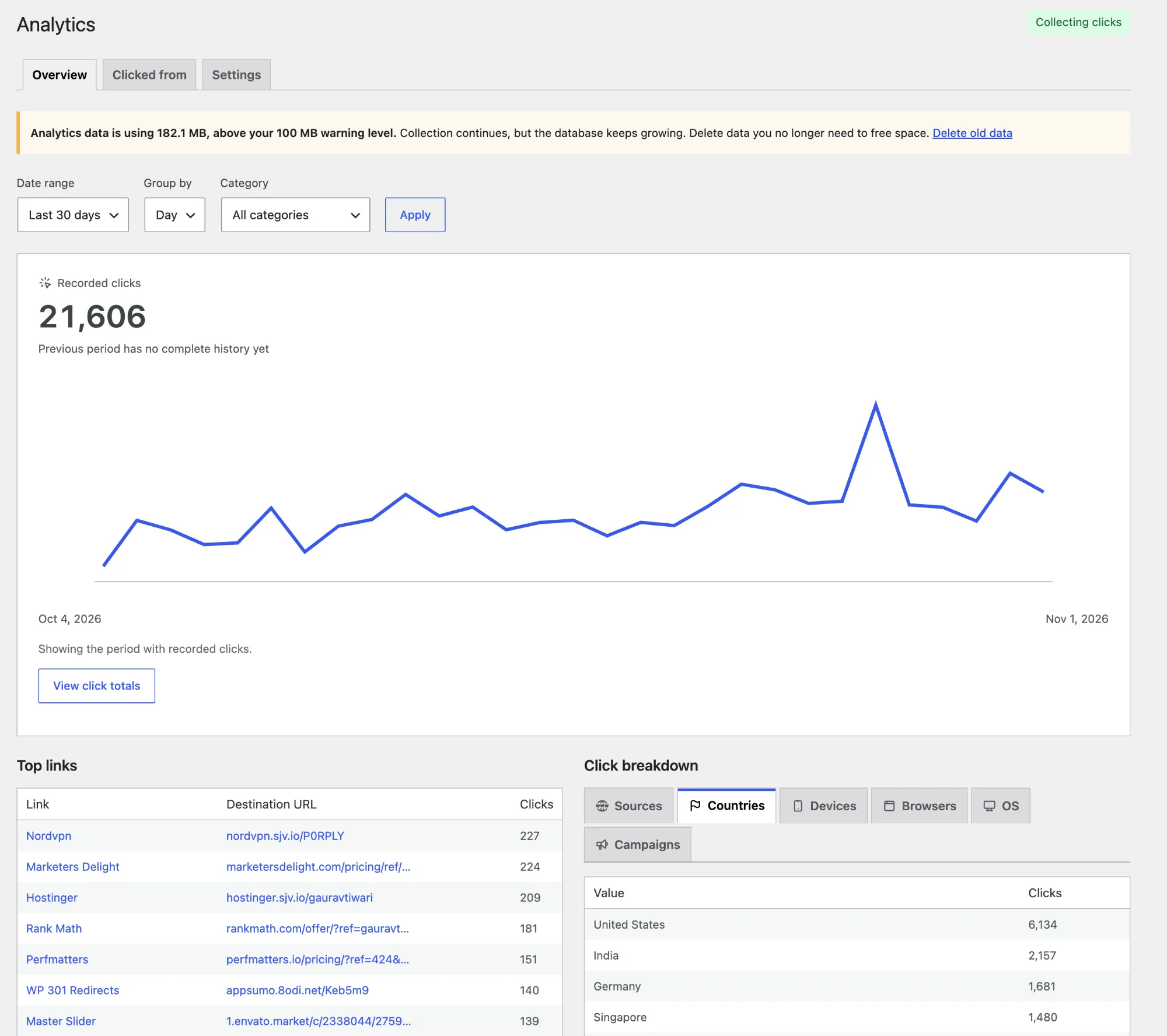
- Find your strongest links. View click totals, daily or hourly trends, and the links used within a selected period or category.
- See the referring post or URL. The separate Clicked from report lists every matching recorded entry with pagination and resolves published WordPress post titles where possible. Open a page report to see which links were clicked there, then inspect an individual link within that same page.
- Switch breakdowns instantly. Sources, countries, devices, browsers, operating systems and configured campaigns are loaded with the report. Switching tabs does not reload the page or fetch another report.
- Read the chart clearly. The chart fits the recorded activity period while preserving real time spacing. View click totals opens a scrollable popup with exact values.
- Use WordPress time. Dates, hourly/day grouping and CSV dates follow the timezone configured in WordPress, including fractional offsets and daylight-saving changes.
- Keep the context when exporting. Date, category, link and referring-page selections carry into CSV exports. Configured UTM combinations can be tracked as campaigns.
- Choose what to retain. Individual click records, with their time to the minute, default to seven days; after that, clicks are kept only as daily totals, and those reports default to ninety days. Choose Forever to keep daily reports until you delete them; individual records still expire separately.
- Pause or remove analytics independently. Turning collection off keeps existing reports under their retention policy. Deleting analytics removes its records and jobs while preserving links and basic counts.
Collection uses a compact server-side write on eligible GET redirects. PHP-FPM can finish the redirect response before recording the event; other hosts complete that write synchronously. No visitor JavaScript, cookies, beacons, IP storage, fingerprinting or external analytics service is added. Referring URLs omit credentials, query strings and fragments; raw user agents are not retained.
Recognized bots, prefetches and signed-in link managers are excluded. These reports count eligible redirect requests, not unique people or conversions. Browsers may report an external website, only its origin, or no referrer. Earlier clicks without page information remain Page unavailable, with a short explanation. External referrers are kept and explained rather than automatically treated as spam.
Reports and page-specific breakdowns are summarized by a bounded maintenance worker. Keep WordPress cron or a system scheduler running; collection pauses only if maintenance stops running for fifteen minutes. Storage is never capped: past a warning level you set (100 MB by default), the plugin asks you to delete old data, and the delete compacts the tables so the space is released. Historical data can be viewed in date windows of up to ninety days. Advanced Analytics currently supports single-site installations.
The Privacy and data section links to WordPress’s suggested Privacy Policy text. Administrators control analytics by default; developers can use gtlm_analytics_capability for report access and gtlm_analytics_should_record to suppress events, including consent integrations. Site-owner opt-in is not a legal consent exemption.
Fast Branded Redirects
GT Link Manager stores links in custom database tables, not custom post types. Redirect resolution runs on init at priority 0 using a UNIQUE-indexed slug lookup, before theme templates load. Missing, inactive and trashed branded short links return a real 404 instead of serving the homepage.
Key Features
- Advanced Analytics. Optional click trends, referring-page drilldowns, instant breakdown tabs, WordPress-time reports and CSV export, with no visitor scripts or cookies.
- Fast direct redirects. Resolves links on
init(priority 0) via direct DB lookup, no CPT overhead - 301, 302, and 307 redirects. Choose the right redirect type for SEO, temporary, or method-preserving redirects
- Rel attribute controls. Set
nofollow,sponsored, andugcper link for proper SEO attribution - Noindex support. Sends
X-Robots-Tag: noindexheader to prevent search engines from indexing redirect URLs - Categories and tags. Organize links into categories with parent/child hierarchy and free-form tags
- Full admin list table. Search, filter by category/status, sort by any column, and perform bulk actions
- Quick Edit. Update URL, slug, redirect type, rel, category, and status inline without leaving the list
- Activate / Deactivate. Disable a link without deleting it; inactive links stop redirecting but stay in the database
- Trash and restore. Soft-delete links to trash with the option to restore or permanently delete
- CSV import and export. Import links from CSV with column mapping preview, or export filtered links; includes LinkCentral and Pretty Links compatible presets. Manual column mapping also supports compatible CSV exports from ThirstyAffiliates, ClickWhale, Lasso, BetterLinks, GeniusLink, and others. Map the name and destination URL fields, review the preview, and choose how to handle duplicates.
- Block editor integration. Search and insert managed links into rich text and the core Button block without leaving the editor
- Branded URL preview. See the full branded URL as you type, with one-click copy
- Novashare short links. Use your own branded links when posts are shared through Novashare, with no code or API key
- Prefix-free and regex redirects. Route ordinary paths without
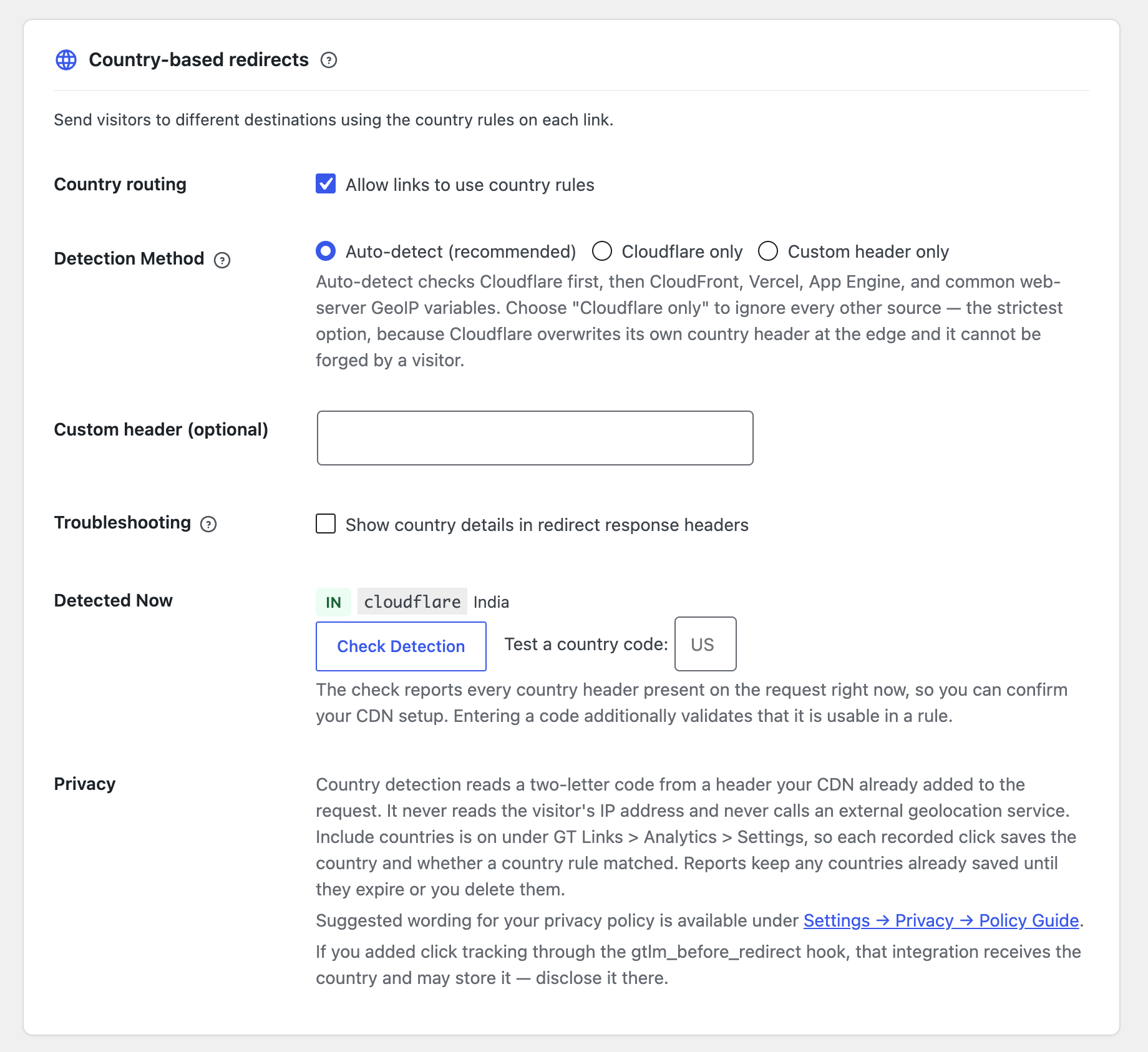
/go/, or use regular expressions and capture groups for more complex rules. Protected WordPress endpoints cannot be claimed by redirect rules. - Geolocation targeting. Send visitors from different countries to different destinations on a per-link basis (e.g. India to amazon.in, the US to amazon.com). The country comes from a header your CDN already sends, whether that is Cloudflare, CloudFront, Vercel, App Engine, or an nginx/Apache GeoIP module, so there is no GeoIP database to install and no external lookup. Links without country rules skip country detection.
- Independent lifetime counts. Optional running totals remain separate from Advanced Analytics. When analytics is enabled, click a count in All Links to open that link’s report.
- Analytics integrations. Send short link clicks to Google Analytics 4, Independent Analytics, Plausible (beta), Matomo and 16 other tools from one settings screen, with no code
- AI and REST API workflows. Create, update, categorize, trash and restore links through authenticated endpoints. The settings page links directly to the AI-tools guide.
- Safer CSV handling. Preview and map columns before import. Temporary files stay outside public uploads, and spreadsheet-style formulas are neutralized on export.
- Data cleanup controls. Restore trashed links, configure trash retention, and choose whether uninstall removes plugin data.
- Developer-friendly. Actions and filters for redirect interception, URL modification, capability control, cache TTL, and more
Developer Hooks
GT Link Manager has actions and filters for redirects, capabilities, caching, geolocation, click counting and integrations. The hooks and filters reference documents them. The Developer Reference has step-by-step guides for custom click logging, a dashboard widget, UTM passthrough, webhooks for Zapier, Make and n8n, role-based and geo-based redirects, and custom response headers.
Independent Click Counting
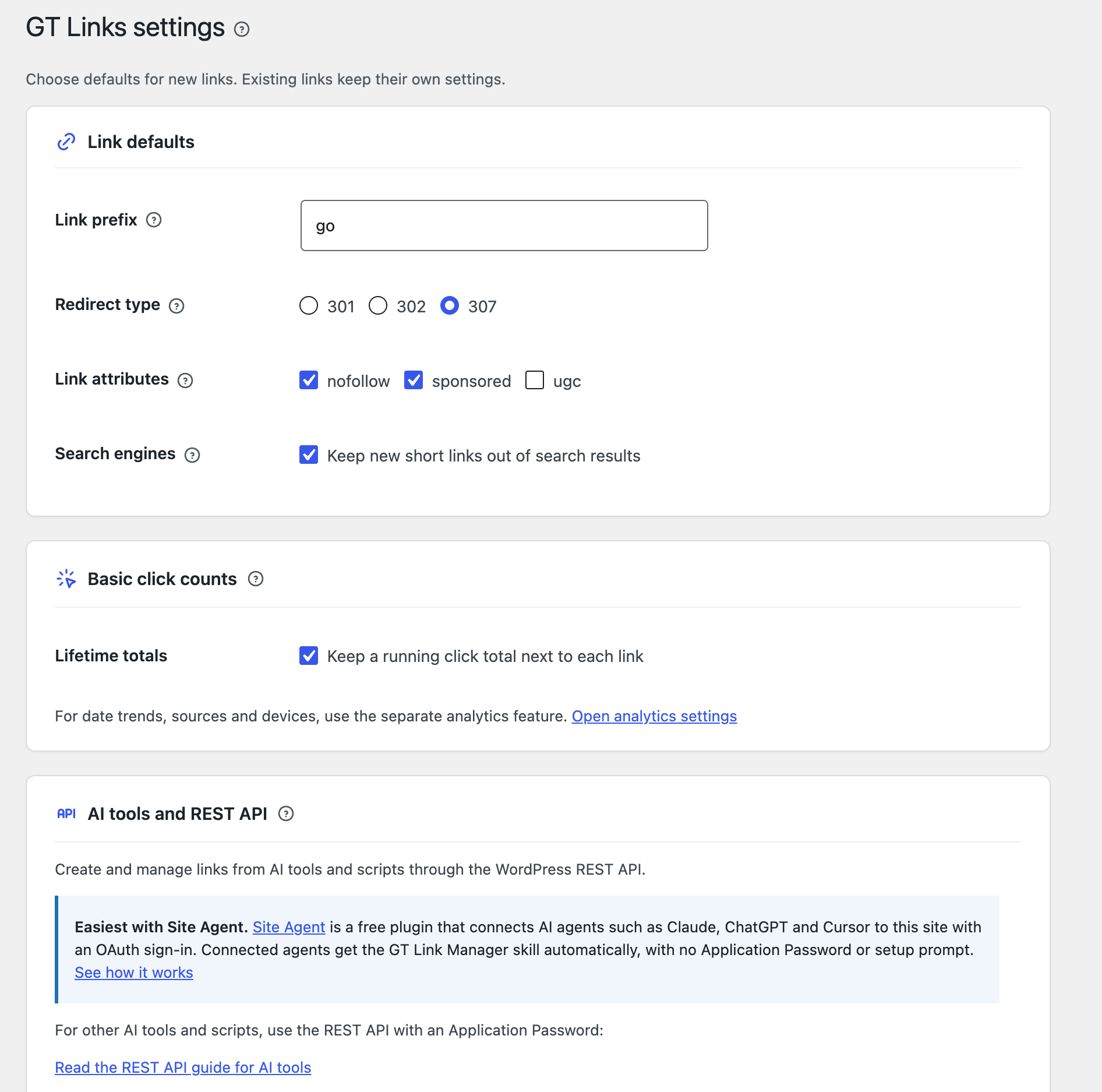
Basic click counting is off by default. Enable it under GT Links > Settings to keep one lifetime total per link. It stores no visitor details, IP addresses, user agents, referrers or timestamps. With basic counts and Advanced Analytics both off, GT Link Manager stores no request analytics.
Counts appear in the sortable Clicks column, the read-only REST API total_clicks field and CSV exports. Use Reset Clicks for a single link or gtlm_count_click to exclude requests. When Advanced Analytics is enabled, a count links to that link’s report.
Updates are atomic. PHP-FPM can finish the response before recording a count; other hosts write synchronously. Basic totals and dated analytics have independent settings. Choose consent requirements according to your site and integrations.
Documentation and Guides
The free GT Link Manager documentation covers setup, links, categories, settings, redirects, the block editor, import and export, geolocation, the REST API, hooks and troubleshooting. Popular pages:
- Getting Started
- Move from Pretty Links or ThirstyAffiliates
- Cloak and Manage Amazon Affiliate Links
- Send Visitors to Their Local Amazon Store
- Change an Affiliate Link Everywhere
- Keep UTM Tags Through a Redirect
- Block Editor Integration
- REST API Reference
- Troubleshooting
Source, Support and Data Ownership
The full source, including the compiled block editor assets’ source code, is on GitHub. See Releases for builds and changelogs.
Use the WordPress.org support forum for help or GitHub Issues for bugs. Include your WordPress and PHP versions, link slug, configured prefix, expected behavior and any CDN or page cache. Send security reports privately to the maintainer.
CSV export keeps your links portable, including geo rules and advanced redirect configuration. Uninstall removes data only when you enable that option. There are no Pro tiers, trials, required accounts, telemetry or upsell notices.
GT Link Manager does not perform automatic keyword linking. Country detection depends on a trusted CDN or server header; a header supplied directly by a visitor can be forged. Basic counts measure requests, while Advanced Analytics adds eligible-click reports; neither identifies unique visitors or verifies conversions.
Analytics Integrations
Send short link clicks to the analytics tool you already use. Open GT Links > Integrations and turn on the ones you want. There’s no code to write, and everything is off until you turn it on.
- WordPress plugins, recorded on your own site. Independent Analytics, Koko Analytics, WP Statistics, Burst Statistics, SlimStat Analytics, Statify, and Matomo for WordPress.
- Services, sent from your server. Google Analytics 4, Plausible (beta), Matomo, Umami, Simple Analytics, PostHog, Mixpanel, Amplitude, Rybbit, and Clicky. Plausible is in beta because Plausible Cloud can drop clicks sent from a server address unless you share visitor data.
- Browser tags, for tools with no server API. Google Tag Manager, Fathom Analytics, and Microsoft Clarity. GA4 can also send through your existing tag if you’d rather not create an API secret.
- Your existing setup is detected. MonsterInsights, ExactMetrics, Analytify, Site Kit, GA Google Analytics, Plausible Analytics, Connect Matomo, Clicky, and GTM4WP settings are picked up when you leave a field blank.
- No delay for visitors. Your server sends the event after the redirect has gone out, so a slow or broken analytics service can’t hold anyone up.
- Bots stay out. HEAD requests, prefetches, recognized bots, and logged-in link managers are not sent.
- IP addresses stay home by default. Services get the short link, its destination, the referring page, and the browser’s user agent. Sharing the visitor’s IP address and country is a separate setting, and it’s off until you turn it on.
Server-side delivery counts clicks that ad blockers would hide, including links opened from email and social posts. Browser tags can only see clicks on your own pages.
Novashare Short Links
GT Link Manager works with Novashare, a separate social sharing plugin. Novashare’s Custom link shortener can use your branded links, so a shared post carries yoursite.com/go/ns-1a2b3c4d instead of a third-party short URL.
- Off by default. Turn it on under GT Links > Integrations > Social sharing, then choose Custom as the shortener in Novashare.
- No code or API key. GT Link Manager answers Novashare’s
novashare_short_link_urlfilter on your own site and adds no external request. - One link per shared URL. Each link is created on first share, uses your link defaults, and goes in a Novashare category.
- Published content only. Only published posts, pages and other public post types on your site are shortened, so a link can’t be made to point anywhere else.
REST API & AI Tools
GT Link Manager has a full REST API that works with AI tools for programmatic link management. The REST API & AI Tools Guide covers authentication setup, all available endpoints, and integration with AI platforms including Claude Code, OpenAI Codex, WP-MCP, Novamira, Claudeus WordPress MCP, and WordPress MCP Adapter. Settings includes a copyable setup prompt that asks the AI to read the guide, reuse supplied configuration and request missing details.
External services
GT Link Manager contacts no external service by default. It only contacts a service below if you turn it on under GT Links > Integrations and enter your own account details. Each service is contacted from your server after a visitor follows a short link, or when you click Save and send test event.
Every service receives the short link’s address, name and slug, its destination URL and domain, its category name, the redirect status, the referring page without its query string, and the visitor’s browser user agent. A random identifier is sent with each click. The visitor’s IP address, the country detected for the redirect, and an identifier that stays the same for a visitor for one day are only sent if you turn on IP address and country on the same screen.
- Google Analytics 4 (Google). Measures traffic. Data goes to
www.google-analytics.comorregion1.google-analytics.com. The visitor’s existing Google Analytics client and session identifiers are included when they have those cookies. Terms, Privacy Policy. - Plausible Analytics (beta). Measures traffic. Data goes to
plausible.ioor the self-hosted address you enter. Terms, Privacy Policy. - Matomo. Measures traffic. Data goes to the Matomo address you enter. Terms, Privacy Policy.
- Umami. Measures traffic. Data goes to
gateway.umami.isor the self-hosted address you enter. Terms, Privacy Policy. - Simple Analytics. Measures traffic. Data goes to
queue.simpleanalyticscdn.com. Terms, Privacy Policy. - PostHog. Product analytics. Data goes to
us.i.posthog.com,eu.i.posthog.com, or the self-hosted address you enter. Terms, Privacy Policy. - Mixpanel. Product analytics. Data goes to
api.mixpanel.com,api-eu.mixpanel.com, orapi-in.mixpanel.com. Terms, Privacy Policy. - Amplitude. Product analytics. Data goes to
api2.amplitude.comorapi.eu.amplitude.com. Terms, Privacy Policy. - Rybbit. Measures traffic. Data goes to
app.rybbit.ioor the self-hosted address you enter. Terms, Privacy Policy. - Clicky. Measures traffic. Data goes to
in.getclicky.com. Terms, Privacy Policy.
The browser tags (Google Tag Manager, Fathom Analytics, Microsoft Clarity, and GA4 in browser mode) make no request of their own. The plugin’s script calls the tag that’s already on your page, and that tag sends the short link’s slug and address under its own terms.
Installation
- Upload the plugin folder to
/wp-content/plugins/. - Activate it from Plugins.
- Go to GT Links in your wp-admin sidebar.
- Create your first link and test it using your prefix (default: yoursite.com/go/your-slug).
You can change the prefix from GT Links > Settings at any time.
FAQ
Is this a Pretty Links replacement?
Yes. GT Link Manager is built for speed and simplicity. It uses custom database tables instead of custom post types, which means redirects resolve faster and don’t pollute your posts table.
Does it track clicks?
Yes. Basic click counts keep independent lifetime totals. Advanced Analytics adds date trends, referring posts and websites, page-to-link reports, countries, devices, browsers and campaigns. Both are opt-in and can be enabled separately.
Advanced Analytics adds no visitor script or cookie. It counts eligible redirect requests rather than unique visitors.
Does it work with Google Analytics, Independent Analytics, or my analytics plugin?
Yes. Open GT Links > Integrations and turn on your tool. GA4, Plausible (beta), Matomo, Umami, Simple Analytics, PostHog, Mixpanel, Amplitude, Rybbit, and Clicky get each click from your server. Independent Analytics, Koko Analytics, WP Statistics, Burst Statistics, SlimStat, Statify, and Matomo for WordPress record it in their own reports. Google Tag Manager, Fathom, and Microsoft Clarity have no server API, so a small script reports clicks on your own pages.
Jetpack Stats and Cloudflare Web Analytics aren’t supported because neither documents a way to record custom events. Clicks also count as page views in Independent Analytics and Koko Analytics, because a page view is what their free versions can record.
Will analytics integrations slow down my redirects?
No. The redirect goes out first and the analytics work happens afterwards. Each service gets a two-second limit, so a service that’s down costs a little server time and nothing for the visitor.
Do I need consent to use analytics integrations?
That depends on your tools and where your visitors are. GT Link Manager’s suggested privacy policy text updates to name the tools you’ve turned on. To require consent, return false from the gtlm_integrations_should_send filter until your consent tool says yes. Browser tags follow whatever consent setup already controls those tags.
Can I keep reports forever?
Yes. Choose Forever under Analytics > Settings > Keep reports for. Individual click records still use their separate retention period. Collection never stops because of size; past your storage warning level you are prompted to delete old data under Analytics > Settings > Delete old data.
Can I import from other link-management plugins?
Yes. Go to GT Links > Import / Export, choose the Pretty Links or LinkCentral preset, upload your CSV, preview the column mapping, and import. Use Generic and map columns manually for compatible CSV exports from ThirstyAffiliates, ClickWhale, Lasso, BetterLinks, GeniusLink, or another tool. A link name and destination URL are required; review advanced fields such as country rules before importing. These additional tools use manual mapping, not dedicated presets.
The migration guide walks through a move, and Import and Export covers presets and column mapping.
How are redirects resolved?
The plugin hooks into WordPress init at priority 0, before template rendering. It parses the request URI, checks for your configured prefix, and looks up the slug in a UNIQUE-indexed column in a custom database table. If a match is found, it sends the redirect header and exits immediately, no theme or template loading. The Redirect System page has the details.
Can I customize which users can manage links?
Yes. By default, any user with the edit_posts capability can manage standard links and move them to the Trash. Use the gtlm_capabilities filter to change this per context (e.g., require manage_options for settings but allow edit_posts for link creation). The hooks and filters reference shows how.
Direct links, regex links and permanent deletion need the manage_options capability, because those links can answer at any path on the site and deletion can’t be undone. gtlm_capabilities doesn’t change this. To hand them to another role, use the gtlm_restricted_capability filter, which passes advanced_links or permanent_delete as its context.
Is GT Link Manager really free?
Yes, 100%. There are no premium tiers, upsells, or paywalls. Every feature, including Advanced Analytics, advanced redirects, the REST API, CSV import/export, and block editor integration, is included for free. The documentation is free too.
Can I manage links with AI tools or the REST API?
Yes. GT Link Manager includes a full REST API for creating, updating, and deleting links programmatically. This works with AI platforms like Claude Code, OpenAI Codex, and MCP adapters. See the REST API & AI Tools Guide for setup instructions and the REST API Reference for every endpoint.
Can I integrate with Google Analytics, Plausible, or other analytics?
Yes. Besides the built-in integrations above, the Developer Reference has step-by-step guides for GA4, Plausible, Fathom, Matomo, and Simple Analytics. You can also set up webhook notifications for Zapier, Make, and n8n.
Will it slow my site down?
No. A branded link resolves with a single indexed lookup on init at priority 0, then sends the header and exits before the theme loads. On a test install a redirect measured about 9ms, and turning the click counter on moved that by roughly 0.1ms because the count is written after the redirect has already gone out.
The lookup is against a UNIQUE-indexed column, so 2,000 links resolve as fast as 20.
Why does a deleted link now return a 404 instead of my home page?
Because that is the correct answer, and until version 1.8.0 the plugin got it wrong.
A trashed or deactivated link used to fall through to WordPress, which resolved the leftover request to your front page and returned HTTP 200. Search engines read that as your home page living at hundreds of different URLs, and link checkers reported dead links as healthy. Unresolved links under your prefix now return a real 404 rendered by your theme.
If you depended on the old behaviour, gtlm_404_on_missing_link turns it off.
Can I change the prefix after I have created links?
Yes. Change it under GT Links > Settings and every existing link moves to the new prefix immediately, because the prefix is not stored per link. Rewrite rules are flushed for you.
Anything already published pointing at the old prefix will stop working, so treat a prefix change on an established site the way you would treat any permalink change.
Does it work with a page cache or CDN?
Yes. Redirect responses send Cache-Control: no-store, no-cache, must-revalidate along with the standard WordPress no-cache headers, so a caching layer will not hold on to a redirect and serve it after you have changed the destination.
Geolocation is the one thing to watch. Behind a CDN, a cached 301 pins a visitor to whichever country they were in on their first visit, which is why the link editor warns you when a geo-targeted link is set to 301. Use 302 for those.
Does it work on multisite?
It works, per site. Tables are created with the site’s own database prefix, so each site in a network keeps its own links, categories, and settings. Links are not shared across the network and there is no network-level admin screen.
Which redirect types can I use?
301, 302, and 307.
- 301 is permanent and is what you want for most affiliate and outbound links
- 302 is temporary, and the right choice for anything geo-targeted, because browsers cache a 301
- 307 preserves the request method, which matters when something POSTs to the URL
I trashed a link by mistake. Can I get it back?
Yes, and you do not have to go hunting. The notice that appears after trashing, restoring, activating, or deactivating a link carries an Undo link, and it works for bulk selections as well as single links.
Trashed links also stay in the Trash view until you delete them. Automatic cleanup after a set number of days is available under Settings, and it is switched off on existing sites so an update never removes anything you had sitting there.
Can I use links without the /go/ prefix?
Yes, two ways. To drop the prefix for every link, turn on Prefix-free links under Settings > Advanced redirects and data cleanup. Links are then served and shown as yoursite.com/your-slug, and links you already shared as yoursite.com/go/your-slug keep redirecting. A link takes priority over a page or post with the same slug, so the settings screen lists any links that clash with published content.
To drop it for a single link instead, turn on Advanced Redirects and use direct mode, which also accepts nested paths such as docs/getting-started.
WordPress paths such as wp-admin, wp-json, wp-login.php, and feed are blocked as slugs, because claiming one of those would break the site rather than shorten a link.
Does it work with Novashare?
Yes. Turn it on under GT Links > Integrations > Social sharing. Then, in Novashare, open Configuration, go to Link Shortening, turn on Enable Link Shortening and choose Custom. You don’t need any code.
Each shared URL gets one link in a Novashare category, using your link defaults. Only published posts, pages and other public post types on your site are shortened, so a link can’t be made to point anywhere else. UTM tags are the only query parameters allowed, apart from the IDs plain permalinks use. Each different set of UTM values gets its own link, so with Novashare’s UTM tracking on, expect one per network. If custom code adds the visitor’s own query string to shared URLs, such as through Novashare’s novashare_permalink filter, each new UTM value creates another link, and the gtlm_novashare_should_shorten filter can refuse those. Clicks count like any other link.
Novashare saves the short link it receives. If you trash or deactivate one of these links, shares that already use it stop working, and GT Link Manager won’t bring it back. Short links Novashare saved before you switched stay as they are.
My geo rule is not matching. What should I check?
Country detection reads a header your CDN or server adds to the request, so the first question is whether anything is adding one. Open GT Links > Settings and use Check Detection. It lists every country header present on the current request with its raw value, and runs a loopback test so you can confirm detection works even on a local install with no CDN in front of it.
If no header is present, nothing is proxying the site and there is no country to read. That is expected rather than a fault, and the plugin says so instead of failing quietly.
Geolocation Targeting covers country rules and CDN header detection, and Troubleshooting covers other redirect problems.
Does it collect any personal data?
The plugin does not add visitor tracking scripts or cookies. Request data is recorded only when the site owner explicitly enables advanced analytics.
Basic click counting stores a running total independently. Advanced analytics can retain a timestamp, referring hostname and page URL, coarse client families, configured campaign ID and optional country. Timestamps to the minute last only as long as individual click records (seven days by default); after that, clicks survive only as daily totals per link. On a link with very few clicks, a daily total can still describe a single click’s date, page, country and device type. It does not retain IP addresses, raw user agents, or referring URL credentials, query strings or fragments. The suggested guidance under Settings > Privacy reflects the features and retention you enable.
What happens when I uninstall?
Uninstalling removes data only when Delete Data on Uninstall is enabled. Otherwise links and retained reports stay in place. Deactivation pauses advanced collection and preserves data; reactivation does not silently resume collection.
Screenshots


Changelog
1.12.0
- New: Help links. A circled ? next to screens and settings opens the matching documentation page in a new tab.
- New: Novashare short links. Turn it on under GT Links > Integrations > Social sharing, choose Custom as the link shortener in Novashare, and shared posts use your branded links with no code. Each shared URL gets one link in a Novashare category.
- New:
gtlm_novashare_should_shortenfilter to decide which shared URLs become branded links. - New: Analytics integrations under GT Links > Integrations. Send short link clicks to Google Analytics 4, Plausible (beta), Matomo, Umami, Simple Analytics, PostHog, Mixpanel, Amplitude, Rybbit, and Clicky from your server, or to Independent Analytics, Koko Analytics, WP Statistics, Burst Statistics, SlimStat, Statify, and Matomo for WordPress on your own site, with no code. Everything is off by default.
- New: Browser tag support for Google Tag Manager, Fathom Analytics, and Microsoft Clarity, which have no server-side API. GA4 can use this route too if you’d rather not create an API secret.
- New: Settings detection for MonsterInsights, ExactMetrics, Analytify, Site Kit, GA Google Analytics, Plausible Analytics, Connect Matomo, Clicky, and GTM4WP. Leave a field blank to use what they already hold.
- New: A setting for sharing visitor IP addresses and countries with analytics services, off by default. The suggested privacy policy text updates to name the tools you’ve turned on and what they receive.
- New: Six developer hooks for integrations, including
gtlm_integrations_should_sendfor visitor consent. - Improved: On LiteSpeed servers the redirect now reaches the visitor before click counting starts, as it already did on PHP-FPM.
- Fixed: REST link lists returned an empty
link_modefor every link, and PHP logged an undefined variable warning. This started in 1.11.0. - Changed: Only administrators can now create, change, trash, restore, toggle or copy direct and regex links, or permanently delete any link. This covers the dashboard, REST API, CSV import and AI agents. Contributors, Authors and Editors keep standard links and can still move them to the Trash. The new
gtlm_restricted_capabilityfilter hands this to another role. - Fixed: Links with non-Latin slugs and direct paths with encoded characters now resolve.
- Fixed: A direct path entered with slashes, such as
/old-page/, now matches. Links with a custom port, an underscore or an international domain in the destination no longer return a 404. - Fixed: Bulk copy and CSV auto-suffix no longer rewrite direct paths as slugs. A regex rule can’t take a suffix, so it’s now counted as failed or skipped instead of being corrupted.
- Fixed: Regex patterns and replacements keep
<,>and%xxwhen saved, and$10in a replacement no longer reads as$1followed by0. - Fixed: Editing a direct or regex link on a site with an object cache now clears its cached copy.
- Fixed: Turning off geolocation on a link now pauses its rules instead of deleting them.
- Fixed: A partial REST update to a category no longer clears the fields it left out, and a REST update can no longer blank a link’s slug.
- Fixed: Restoring or toggling a link through REST returns the same shape as every other link response, and a 404 for a missing link.
- Fixed: The privacy text on the link editor and Settings screens now says so when this site shares visitor data with an analytics service.
- Fixed: The editor’s link inserter only offers active links with a usable address, and inserts the link name when no text is selected.
- Fixed: Bulk Set category with nothing chosen no longer clears categories. A new No category option does that on purpose.
- Fixed: Category counts no longer include trashed links. Stored counts are corrected on upgrade.
- Fixed: Trash retention uses site time, so links aren’t purged hours early on sites west of UTC.
- Fixed: The rewrite rule is removed on deactivation, staged CSV files are deleted on uninstall, and a visitor can no longer cancel the geo self-test.
- Fixed: Smaller issues with copy buttons on plain HTTP admin screens, referrers containing quotes, the rel filter on older rows, the Diagnostics sample link, the geo preview, and validation errors while editing a link.
- Fixed: The analytics Campaigns tab and CSV export show a campaign’s UTM values instead of a bare number, including campaigns you’ve since removed. In the CSV, the
valuecolumn of campaign rows changes to match. - Fixed: The analytics REST enable and resume routes accept
consent=true, as documented. Other values, such asyes, are still refused. - Updated: translation template.
1.11.0
- New: Prefix-free links. Turn it on under Settings > Advanced redirects and data cleanup to serve every standard link from the site root, as
yoursite.com/your-slug. Links already shared with the prefix keep redirecting, so nothing published breaks. The settings screen lists links that share a URL with a published page or post, and saving a link that takes over a post or page URL shows a warning. - New: a Random slug button next to the Slug field. It fills in a six-character slug without look-alike characters such as 0 and o. Slugs still follow the Link Name until you type or generate one, and clearing the field hands it back to the name.
- Improved: the Site Agent note in Settings links to the Site Agent page.
- Updated: translation template.
1.10.0
- New: AI agent support through Site Agent, a free plugin that connects agents such as Claude, ChatGPT and Cursor to your site. With Site Agent 0.4 or later, a connected agent gets the GT Link Manager skill automatically: it can find, create and update links, set country rules, organize categories and read analytics, using the same checks as the REST API.
- New:
gtlm_agent()for integrations. It returns every link with the branded short link asurland the destination astarget_url, the same shape as link lists. Permanent deletion and analytics changes stay in the dashboard. - New: an AI agents page in the GT Links menu shows what a connected agent can do and how to connect one.
- Improved: settings are grouped into cards.
1.9.1
- Fixed: after an automatic update from 1.7 or earlier, every short link could return 404 until someone opened the dashboard. Database updates now run on the first request after an update.
- Fixed: Quick Edit could rewrite a regex pattern or direct path as if it were a slug. Changing only the destination of
^old/(.*)$saved the pattern asold, which then matched every URL containing “old”. Renaming a link also changed its slug, and saving with Advanced redirects off turned direct and regex links into standard ones. Existing links now keep their slug, path or pattern. - Fixed: with a persistent object cache, one failed database lookup could keep a short link returning 404 until it was edited.
- Privacy: analytics keeps minute-level detail only as long as individual click records (seven days by default), then reduces each day to daily totals, existing data included. Country-rule outcomes are recorded only when countries are on, and empty or scripted user agents are no longer counted.
- Fixed: analytics stopped collecting at 100 MB and blamed stale reports. Collection no longer stops for size; past a storage warning level you set, Delete old data removes old days and frees the space. CSV export now works on long ranges and exports daily totals; its
timecolumn is nowdate. - New: Top links shows each link’s destination URL.
- Improved: the links list works on phones, rows are shorter, and the admin has clearer icons, status notices and an Edit Link title.
1.9.0
- Add opt-in Advanced Analytics with WordPress-time trends, referring-page and link reports, instant breakdown tabs, and CSV exports.
- Keep analytics lightweight with no visitor scripts, cookies or beacons, bounded background processing, and configurable retention including Forever reports.
- Simplify settings, improve accessibility and diagnostics, and add a copyable AI setup prompt.
- Fix direct/regex REST paths, CSV roundtrips, redirect matching, and click-counter metadata.
- Harden protected WordPress routes, CSV upload storage, and spreadsheet exports.
Older releases are on the GT Link Manager changelog.